Before starting a business in Vermont or transacting with a Vermont company, you’ll need to verify its legal status using the Vermont Secretary of State’s Business Entity Search tool. This comprehensive guide walks you through how to use the Vermont Business Entity Search portal, understand search results, and take appropriate next steps depending on your business needs. For entrepreneurs looking to start a business in Vermont, this is a crucial first step in the process.
Quick Summary
Vermont’s register sits with the Secretary of State’s Corporations Division and is free to search. Vermont ties the annual report to your fiscal year rather than a fixed date: $35, due within two and a half months of year end. Reservations renew twice.
What is the Vermont Secretary of State Business Entity Search?
The Vermont Secretary of State’s Business Entity Search tool is the official database for all registered business entities in Vermont. This online portal allows users to search for information about businesses registered with the state, including LLCs, corporations, partnerships, and nonprofits.
Why Use the Official Vermont Business Search Tool?
- Name availability verification before forming a business
- Legal status confirmation of existing businesses
- Finding registered agent information for service of process
- Viewing filing history of Vermont businesses
- Obtaining corporate contact information for official communications
How to Access the Vermont Business Entity Search Portal
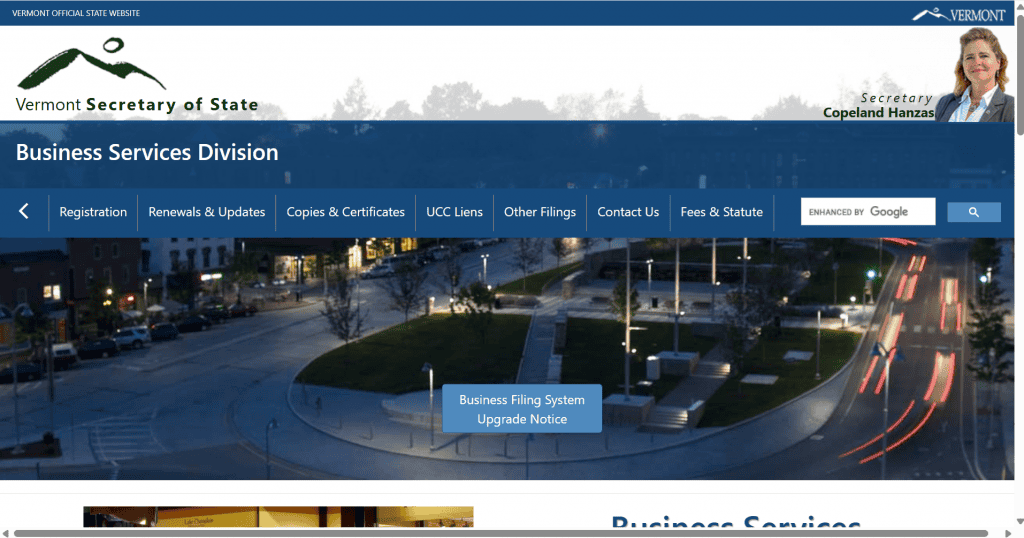
The official Vermont Business Entity Search tool is maintained by the Vermont Secretary of State’s Corporations Division and can be accessed through the Vermont Secretary of State website at Vermont Business Search.
Vermont Moved the Search, and Runs Seven of Them
Two things about Vermont catch people out. First, the old search address no longer works: the previous online/BusinessInquire path now bounces you to a login screen, and the public Business Search lives at bizfilings.vermont.gov/business/businesssearch. Any guide still pointing at the old URL will look like the search has been taken behind a login, which it has not.
Second, Vermont does not run one public search. It runs seven, and the Business Search is only the first of them.
| Public search | What it covers | When you would use it |
|---|---|---|
| Business Search | Registered entities, assumed names, reserved names | Name availability and company due diligence. This is the one you came for |
| Trademark Search | Vermont state trademark registrations | After the name clears. A state mark is separate from the entity register and from federal rights |
| UCC Search | Secured-lending filings against a business | Checking whether a company you are buying from or lending to has assets already pledged |
| Certificate Search | Certificates issued by the Division | Verifying a certificate someone has handed you is genuine |
| Telemarketer Search | Registered telemarketers | Checking a cold caller is registered, or confirming your own registration |
| Amusement Ride Operator Search | Registered ride operators and their inspection status | Genuinely niche, and it explains the Pending Safety Inspection status in the dropdown |
| Data Broker Search | Businesses registered as data brokers in Vermont | Vermont requires data brokers to register, which most states do not. Worth knowing if you handle personal data |
The One Thing Vermont Gets Right That Most States Do Not
| Match mode | What it returns | Vermont default |
|---|---|---|
| Starts With | Names beginning with your text | Not selected |
| Contains | Your text anywhere inside the name | Selected by default |
| Exact Match | Only a perfect string match | Not selected |
That default matters more than it sounds. In most states the first search a person runs is the least useful one, because Starts With is preselected and a conflict buried in the middle of a longer name never appears. Vermont starts you on the setting you actually want.
The search field takes either a business name or a record number, and the form adds a Record Type filter, a Record Status filter, an Initial Filing Date range and an Advanced Search panel. The Division is at 128 State Street, Montpelier, and answers the phone and the front desk from 7:45 a.m. to 4:30 p.m., Monday to Friday outside holidays, on (802) 828-2386.
Step-by-Step Guide to Conducting a Vermont Business Entity Search
1. Navigate to the Vermont Business Search Portal
First, visit the Vermont Secretary of State’s Business Entity Search page. The search tool is designed with a clean interface featuring multiple search options.
2. Choose Your Search Method
The Vermont Business Entity Search tool offers several search methods:
Search by Business Name
This is the most common search method when checking name availability or looking up a specific business.
- Click the “Business Name” radio button
- Select one of the following search criteria:
- Starts With: Returns entities whose names begin with your search term
- Contains: Returns entities whose names include your search term anywhere
- Exact Match: Returns only entities whose names precisely match your search term
- Pro Tip: Check the box for “Show me similar-sounding business names” to catch phonetically similar names that might not appear in a standard search. This is especially useful when checking name availability for a new business.
Search by Business ID or Filing Number
If you know the specific Business ID or Filing Number assigned by the Secretary of State:
- Click the appropriate radio button (“Business ID” or “Filing Number”)
- Enter the number exactly as formatted (typically a mix of letters and numbers)
- Click “Search”
Advanced Search Options
For more refined searches, use the Advanced Search feature to filter by:
- NAICS Code (industry classification)
- Physical address
- Filing type
- Business status
- Registered agent name
3. Interpret Your Vermont Business Search Results
After submitting your search, you’ll see a results table with the following columns:
- Business Name: Legal name of the entity
- Business ID: Unique identifier assigned by the state
- Status: Current legal status (Active, Terminated, Inactive, etc.)
- Entity Type: Business structure (LLC, Corporation, etc.)
- Domestic/Foreign: Whether the business is Vermont-based or registered from another state
- Formation Date: When the entity was officially formed
4. Review Detailed Business Information
To view comprehensive details about a specific business:
- Click on the business name in the results table
- You’ll be directed to the “Business Information” page showing:
- Entity’s official name
- Business ID
- Entity type
- Entity subtype (if applicable)
- Current status
- Formation date
- Principal office address
- Registered agent information
- Business purpose (if provided)
- Scroll down to see the business principals, including:
- Names of managers, members, directors, or officers
- Titles or positions held
- Business addresses
- At the bottom of the page, you’ll find tabs for:
- Filing History: All documents filed with the Secretary of State
- Name History: Previous names the business has operated under
- Shares (for corporations): Details about stock issuance
Understanding Vermont Business Entity Statuses
When reviewing search results, you’ll encounter various status designations. Here’s what they mean:
Active
The business is legally registered and in good standing with the state. All required filings and fees are current.
Terminated
The business has formally dissolved or withdrawn its registration. It no longer exists as a legal entity in Vermont.
Revoked
The state has administratively dissolved the business, typically due to failure to file annual reports or pay required fees.
Merged
The business has combined with another entity and now operates under a different structure or name.
Inactive
The business exists legally but may not be currently operating or may have fallen behind on filing requirements.
Pending
The business registration has been submitted but not yet fully processed by the Secretary of State.
Vermont Record Statuses, Grouped
Vermont’s Record Status dropdown runs to around forty labels, which is more than almost any other state offers. That looks daunting and is actually useful, because each label tells you exactly how a record ended and therefore whether it can come back.
| Group | Labels you will see | What it means for a name check |
|---|---|---|
| Live and clean | Active, Active – In Good Standing, Active – Registered | The name is taken |
| Live but flagged | Active – NOT In Good Standing, Active – Hold, Active – Expiration Pending, Active registered – Reregistration Pending | Still a live record. Not in good standing is not the same as not existing |
| Live, mid-restructure | Active – In Good Standing – Pending Conversion, Pending Domestication, Pending Merger, Pending Redomestication | The entity is changing shape, not disappearing. The name stays held |
| Held, no company behind it | Active – Reserved | Someone reserved the name. It blocks you |
| Winding down | Pending Cancellation, Pending Cessation, Pending Revocation, Pending Withdrawal | Not finished. Do not treat the name as free |
| Ended by choice | Inactive – Dissolved, Inactive – Withdrawn, Inactive – Cancelled, Inactive – Merged, Inactive – Converted, Inactive – Domesticated, Terminated | The record stays on file. Confirm with the Division before reusing the name |
| Ended by the state or a court | Inactive – Administratively Dissolved, Administratively Revoked, Administratively Terminated, Inactive – Judicially Terminated, Inactive-Revoked, Revoked, Inactive – Expired | Administrative endings are often reversible by reinstatement |
| Ended over money | Inactive – Non-Sufficient Funds | A filing that bounced. The record may be revived quickly |
The Nineteen Record Types Vermont Recognises
| If you are looking for | Choose this Record Type |
|---|---|
| A Vermont-formed LLC | Domestic Limited Liability Company |
| An out-of-state LLC operating in Vermont | Foreign Limited Liability Company |
| A Vermont corporation | Domestic Business Corporation, or Foreign Business Corporation |
| A nonprofit | Domestic or Foreign Nonprofit Corporation, or an Unincorporated Nonprofit Association |
| A partnership | Domestic or Foreign Partnership, or Limited Partnership |
| A co-op or member-owned business | Domestic Cooperative Association, or Mutual Benefit Enterprise, domestic or foreign |
| A trade name or DBA | Assumed Name, or Registered Name |
| A name someone is holding | Reserved Name |
| A municipal or government body | Public Entity |
Search First to Find Your Own Vermont Annual Report Deadline
Here is the strongest reason for a Vermont business owner to know this search, and the Secretary of State states it directly: to determine a business’s fiscal year end, search for the business online.
Vermont does not run a single statewide deadline. Your annual report date is calculated from the fiscal year end recorded on your own filing, so the search is not just a name check, it is how you find out when you owe a report.
| Your entity type | What you file | When |
|---|---|---|
| Profit corporation, or profit cooperative corporation | Annual report | Within the first two and a half months following the fiscal year end on record |
| LLC, PLC or L3C | Annual report | Within three months following the fiscal year end on record |
| Limited liability partnership, or mutual benefit enterprise | Annual report | Between 1 January and 1 April each calendar year after initial registration, regardless of fiscal year end |
| Nonprofit corporation, or nonprofit cooperative corporation | Biennial report | Every two years, beginning the first year following initial registration |
How Vermont Annual Report Filing Works
All filings must be completed online, through Vermont’s Online Business Service Center. Returning filers use their existing user ID and password, first-time filers create an account, and the report itself is reached by choosing File your Annual/Biennial Report from the main menu.
There is one accommodation worth knowing if your business does not pay by card. Vermont still requires the filing to be completed online, but you can pay by paper cheque by choosing “I Want to Print & Mail With Check” at the bottom of the eCheck payment screen.
Why This Explains the Statuses You Are Reading
Vermont’s status list is one of the longest of any state, and the reports above are behind a large slice of it. An entity showing Active but NOT In Good Standing has usually missed a report rather than done anything dramatic. Active – Expiration Pending and Active registered – Reregistration Pending are warnings on the same theme. The inactive labels come later.
For a name check this means the same thing it means everywhere: a lapsed Vermont entity still holds its name, and a report brings it back.
Vermont Certificates, Copies and Trade Name Registration
Certificates of Good Standing and Certified Copies
Vermont handles these through Copies & Certificates in the Business Services Division, and separately offers a public Certificate Search among its seven public lookups, which lets you check a certificate rather than order one.
Both sides are useful. If a counterparty gives you a Vermont certificate, run it through the Certificate Search. If somebody is asking you for one, the entity has to actually be current to get it, so fix the report first.
Registering a Vermont Trade Name
Vermont holds trade names in the same register as entities, which is why Assumed Name and Registered Name appear as Record Types on the search form. A trade name registration is what lets you operate under something other than your legal entity name.
The practical consequence for your search is the one worth repeating: run the phrase you want as a trade name as well as an entity name. A name can be completely clear as an LLC and already registered as somebody’s assumed name, and the search will only tell you if you look.
Searching for a Vermont LLC or Corporation
| What you are checking | How to set the form |
|---|---|
| A Vermont LLC | Contains, which is already selected, with Record Type set to Domestic Limited Liability Company |
| A Vermont corporation | The same, with Domestic Business Corporation |
| An out-of-state company operating in Vermont | The Foreign equivalent of either type |
| A trade name | Assumed Name or Registered Name |
| Your own fiscal year end and report deadline | Search your company by name and open the record |
If a search leaves you genuinely uncertain, the Business Services Division answers on (802) 828-2386 and at [email protected], from 7:45 a.m. to 4:30 p.m. Monday to Friday outside holidays, and takes walk-ins at 128 State Street, Montpelier during the same hours.
What to Do After Your Vermont Business Entity Search
Depending on your search goals, here are appropriate next steps:
Checking Name Availability for a New Business:
If your desired name is available (no exact or similar matches):
- Reserve the name to prevent others from using it while you prepare your business formation documents
- File a Name Reservation application through the Vermont Secretary of State’s Online Business Service Center
- Pay the $20 reservation fee
- Your name will be reserved for 120 days
- Reservations can be renewed twice, each for an additional 120 days ($20 fee each time)
- Register your business by filing the appropriate formation documents:
- For an LLC: File Vermont Articles of Organization ($125 filing fee)
- For a Corporation: File Vermont Articles of Incorporation ($125 filing fee)
- File online through the Vermont Secretary of State’s Online Business Service Center for fastest processing
- Secure your online presence by registering a domain name that matches or closely aligns with your business name.
Verifying an Existing Business:
- Check status: Confirm the business is active and in good standing
- Note registered agent information: Useful for legal service or official communications
- Review principals: Identify key individuals involved in the business
- Examine filing history: Verify compliance with state requirements
Vermont Business Name Requirements
When selecting a business name in Vermont, ensure it complies with these requirements:
For Limited Liability Companies (LLCs):
- Must include “Limited Liability Company,” “Limited Company,” or an abbreviation such as “LLC,” “L.L.C.,” “Ltd. Liability Co.,” “LC,” or “Ltd. Co.”
- For Professional LLCs: Must include “Professional” or “PLC”
- For Low-Profit LLCs: Must end with “L3C”
- For Blockchain-Based LLCs: Can use any standard LLC designator
For Corporations:
- Must include “Corporation,” “Company,” “Incorporated,” or abbreviations like “Corp.,” “Inc.,” or “Co.”
- For Professional Corporations: Must include “Professional Corporation” or “PC”
- For Benefit Corporations: Must include “Benefit Corporation” or “B Corp.”
General Requirements for All Entities:
- Must be distinguishable from other registered business names
- Cannot imply association with government agencies
- Cannot include prohibited words without proper licensing (e.g., “Bank,” “Insurance,” “Engineering”)
- Cannot include offensive language
Registering a DBA (Doing Business As) in Vermont
If you want to operate under a name different from your registered business name:
- Conduct a business entity search to ensure the DBA name is available
- File an Assumed Business Name Registration with the Vermont Secretary of State
- Pay the $50 filing fee
- Your DBA registration will be valid for 5 years, after which it must be renewed
Trademark Considerations After Your Business Name Search
While the Vermont business entity search confirms state-level name availability, it doesn’t guarantee trademark clearance. Consider these additional steps:
- Search Vermont Trademark Database: Check if your name is registered as a trademark in Vermont
- Federal Trademark Search: Search the USPTO database at the USPTO trademark database for federal trademark registrations
- Common Law Search: Conduct a general internet search to identify unregistered trademark usage
For a complete understanding of how to protect your business name, read our guide on how to trademark a business name.
Next Steps After Forming Your Vermont Business
After confirming your name availability and forming your business entity, you’ll need to:
- Obtain an EIN: Apply for a federal Employer Identification Number from the IRS
- Register for state taxes: Apply for a Vermont Business Tax Account through myVTax
- Open a business bank account: Separate personal and business finances with one of the best banks for small businesses
- Obtain necessary licenses and permits: Research industry-specific requirements using our business license guide
- Create an operating agreement: Document how your business will be managed (essential for LLCs) using our LLC operating agreement guide
Conclusion
The Vermont Secretary of State’s Business Entity Search tool is an essential resource for entrepreneurs, business owners, and anyone needing to verify a Vermont company’s legal status. By following this guide, you can effectively navigate the search process, understand the results, and take appropriate next steps for your business needs.
For more information on starting and managing a business in Vermont, visit see how the Vermont filing and registered agent work is handled or contact the Vermont Secretary of State’s Corporations Division.
Frequently Asked Questions About Vermont Business Entity Searches
How much does it cost to form an LLC in Vermont?
Filing Articles of Organization for a Vermont LLC costs $125. Additional costs may include the $20 name reservation fee (if applicable) and any professional service fees if you use a formation service or attorney.
How long does a name reservation last in Vermont?
Name reservations in Vermont last for 120 days and can be renewed twice. Each reservation or renewal costs $20.
What do I do if the business name I want is already taken?
If your desired name is taken, you have several options:
- Choose a different name
- Use a distinctive suffix or prefix
- Create a unique spelling variation
- Consider a completely different name
- Register a DBA later if you really want to use the original name for marketing
What information about a business is public record in Vermont?
Vermont business entity records include:
- Business name and ID number
- Entity type and status
- Formation date
- Principal office address
- Registered agent name and address
- Names and addresses of managers, members, or officers
- Filing history
How often do Vermont businesses need to file reports?
All Vermont businesses must file an Annual Report and pay a $35 filing fee. This report is due within 2.5 months after the end of the business’s fiscal year.
Can I search for a Vermont business by owner name?
Yes, the Advanced Search feature allows you to search by the names of principals associated with a business entity.
Related Blog Posts
- New Hampshire next door runs a phonetic name check. Here is how to run a New Hampshire business entity search.
- Selling into Massachusetts? Check whether the name is taken in Massachusetts before you print anything.
- Crossing into New York? The New York lookup works a little differently.