
Montana entrepreneurs and business owners need to verify business name availability before forming a new entity or registering a trade name. Whether you’re starting an LLC, corporation, or simply researching competitors, the Montana Secretary of State’s Business Entity Search tool is your essential first step. This comprehensive guide walks you through the entire process of conducting a Montana business entity search and helps you understand what to do with the results.
Quick Summary
Montana’s Secretary of State search doubles as the entry point for filing your annual report and ordering documents, which most states separate. Annual reports are due April 15, and the EZ Annual Report path lets you pay without logging in. Reservations cost $10.
What is the Montana Secretary of State Business Entity Search Tool?
The Montana Secretary of State (SOS) maintains the official database of all registered business entities in the state. The Montana Business Entity Search Portal (available at Montana Business Search) is a user-friendly online tool that allows you to search for:
- Business names and their availability
- Active and inactive business entities
- Registration information for LLCs, corporations, and other entity types
- Business status (Active/Good Standing, Dissolved, etc.)
- Registered agent information
- Principal office address
- Management details
This powerful tool is free to use and provides essential information to help you make informed business decisions.
Step-by-Step Guide to Using Montana’s Business Entity Search
Step 1: Access the Montana Business Entity Search Portal
- Visit the official Montana Secretary of State Business Search page at Montana Business Search
- You’ll see a simple search interface with a search box at the top of the page
Step 2: Enter Your Search Criteria
For basic name searches:
- Type the business name you’re searching for in the search box
- Click the magnifying glass icon to initiate your search
For more precise searches:
- Click the “Advanced” tab below the search box to expand additional search options
- Select one of the following search types:
- Starts with: Finds entities that begin with your search term
- Contains: Finds entities that include your search term anywhere in the name (recommended for thorough searches)
- Optional: Refine your search further with these additional filters:
- Entity Type: Filter by LLC, Corporation, etc.
- Status: Search only for active entities
- State: Select “Montana” for in-state entities
- County: Choose a specific county or leave as “all”
- Date range: Filter by formation date or last filing date
Pro Tip: When searching for name availability, always use the “Contains” option rather than “Starts with” to catch any potential conflicts that might not be obvious. For example, searching for “Mountain Brewing” with “Contains” will find “Blue Mountain Brewing LLC” even though it doesn’t start with your term.
Step 3: Review and Interpret Your Search Results
After running your search, you’ll see a list of matching entities with the following information:
- Business Name: The legal name of the entity
- Status: Current standing with the Secretary of State
- ID Number: The entity’s unique Montana business identifier
- Entity Type: Whether it’s an LLC, Corporation, etc.
- Principal Address: The main business location
- Registered Agent: Entity’s designated agent for service of process
Step 4: Examine Detailed Entity Information
To view detailed information about a specific entity:
- Click on the business name in the results list
- A slide-out panel will appear on the right with comprehensive details including:
- Formation date
- Last annual report filing date
- Principal office address
- Registered agent information
- Management details (members/managers for LLCs, officers/directors for corporations)
Step 5: Access Additional Filing Options
From the entity details panel, you can:
- Click “Filing Actions” to see available forms and filings for that entity
- Order certificates or request additional information
- For your own entity, you can file annual reports, make amendments, or update information
How to Narrow a Montana Business Search with Advanced Filters
Montana’s own instruction on the search page is blunt: results are limited, so use the Advanced search to narrow them. That single line is the difference between a useful result set and a truncated list that makes a taken name look available. Open Advanced before you type anything.
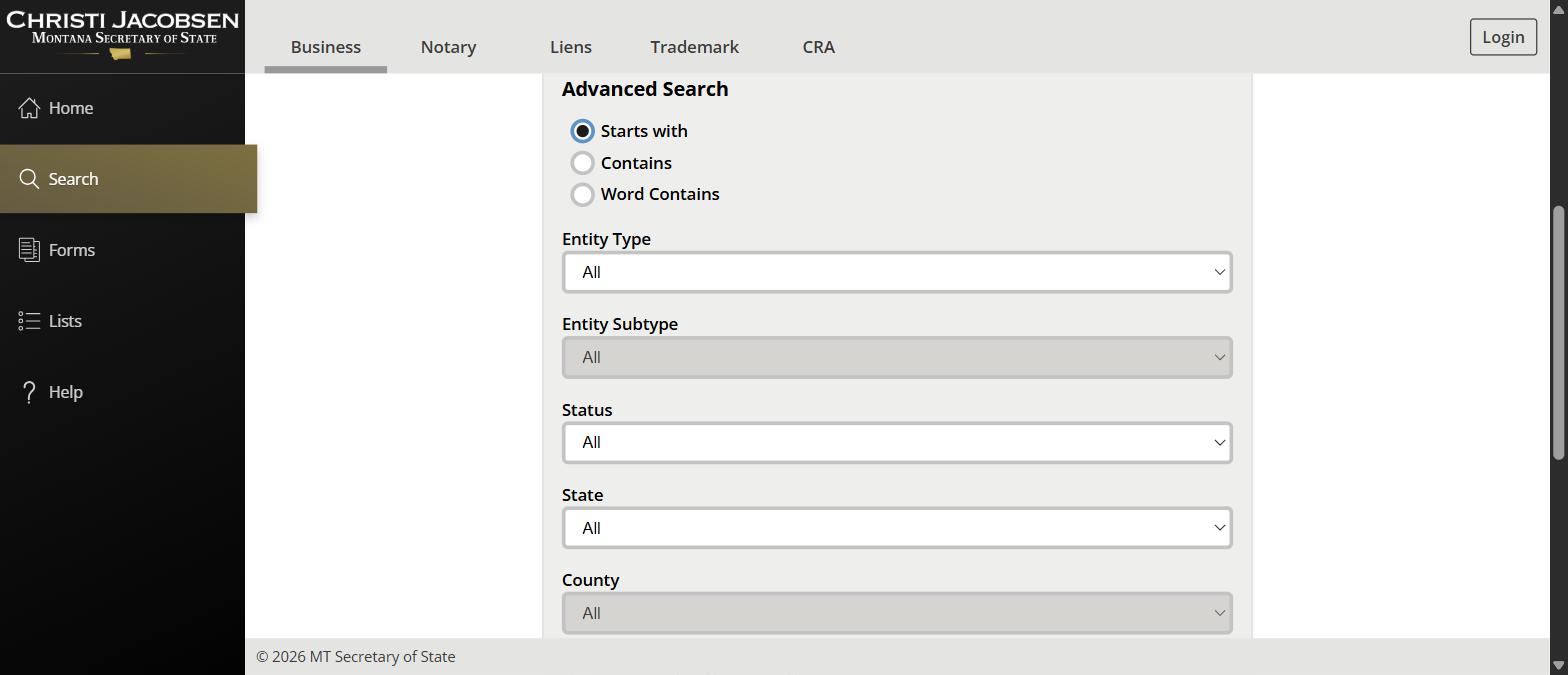
The Three Match Modes
| Match mode | What it returns | Use it when |
|---|---|---|
| Starts with | Records whose name begins with your text. This is the default | You know how the name begins. Weakest option for an availability check |
| Contains | Records holding your text anywhere in the name, including mid-word | Casting the widest net for near misses |
| Word Contains | Records where your text appears as a whole word inside the name | The sweet spot for a name check, since it surfaces conflicts without the noise of partial-word hits |
Every Advanced Filter and What It Is For
| Filter | What it does | Worth using when |
|---|---|---|
| Entity Type | Restricts to one registered form, from Domestic Limited Liability Company through to Water and/or Sewer District | You only care about LLCs or corporations and want the specialised registrations out of the way |
| Entity Subtype | Unlocks once a type is chosen and narrows further inside it | Professional and series variants matter to you |
| Status | Filters by All-Active, All-Inactive, or any one of the specific labels | Separating live records from dead ones, which is the core of a name check |
| State | Home state of the entity, so you can isolate foreign registrations | Checking whether an out-of-state company has already registered in Montana |
| County | Montana county on the record | Local due diligence rather than a name check |
| Search by Registered Agent PID | Pulls every entity tied to one registered agent’s identifier | Checking an agent’s book of business, or auditing your own portfolio |
| Registration Date, start and end | Limits to entities registered inside a date window | Seeing who filed recently in your space |
| Expiration Date, start and end | Limits by when the registration lapses | Spotting names about to fall away, though never plan on one becoming free |
Domestic and Foreign: Which Entity Type to Pick
Montana splits nearly every entity type into a domestic and a foreign version. Domestic means formed in Montana. Foreign means formed elsewhere and registered to operate in Montana. Both occupy a name, so a name check has to cover both.
| If you are looking for | Pick this Entity Type |
|---|---|
| A Montana-formed LLC | Domestic Limited Liability Company |
| An out-of-state LLC registered in Montana | Foreign Limited Liability Company |
| A Montana-formed corporation | Domestic Profit Corporation |
| A nonprofit | Domestic Non-Profit Corporation, or the Foreign equivalent |
| A partnership | Domestic Limited Partnership or Domestic Limited Liability Partnership, each with a Foreign counterpart |
| A trade name or DBA | Assumed Business Name |
| A held name with no company behind it | Reservation of Name |
You can also search by filing number rather than name. Montana filing numbers take the form of a letter followed by eight digits, and entering one returns the single exact record instead of a list.
Understanding Montana Business Entity Status Meanings
When conducting your search, you’ll encounter various status designations. Here’s what they mean:
Active Statuses:
- Active-Good Standing: The entity is properly registered and up-to-date on annual filings and fees. This is the ideal status for operating businesses.
- Active: The entity is registered but may have pending requirements or minor compliance issues.
Inactive Statuses:
- Administratively Dissolved: The entity failed to file annual reports or meet other requirements and was dissolved by the Secretary of State.
- Voluntarily Dissolved: The owners intentionally terminated the entity’s existence.
- Terminated: The entity’s registration has been officially ended.
- Expired: The entity’s term has ended or its registration has lapsed.
- Inactive: The entity is not in good standing and cannot conduct business.
Important Note: Montana corporations and LLCs can apply for reinstatement within 5 years of their dissolution date, so some “dissolved” entities may still have name protection. When in doubt, contact the Montana Secretary of State’s office at (406) 444-3665 or visit get the filing and registered agent handled for assistance.
Montana Status Labels, Grouped
Montana’s status list is one of the longest of any state register, and the Advanced Search groups it for you. Two umbrella options, All-Active and All-Inactive, do most of the work. The specific labels underneath tell you why an entity sits where it does.
| Group | Examples of the specific labels | What it means for a name check |
|---|---|---|
| All-Active | Active-Good Standing, Active-Pending Expiration, Active-Suspended, Active-Pending Reinstatement, Active-Pending Renewal, Active-Registration, Active-Statement of Intent, Active-Intending Dissolution, Active-Cessation | The name is in use. Suspended and intending dissolution still count as active records |
| All-Inactive | Inactive-Voluntary Dissolution, Inactive-Court Dissolution, Involuntary Dissolution, Inactive-Revoked, Inactive Expired, Inactive-Cancelled, Inactive-Merged, Inactive-Withdrawal, Inactive-Void, Inactive-Converted, Inactive-Pending Reinstatement | The entity has stopped, but the record remains. Reinstatement is possible, so do not assume the name is free |
| Name reservations | Active-Reserved Name, Deleted-Reserved Name, Expired Reserved Name, Cancelled Reserved Name | An active reservation blocks the name even though no company exists yet |
The reserved-name statuses are the ones people miss. A name can have no company behind it and still be unavailable because someone filed a reservation, and that record only shows up if you are not filtering to active entities alone.
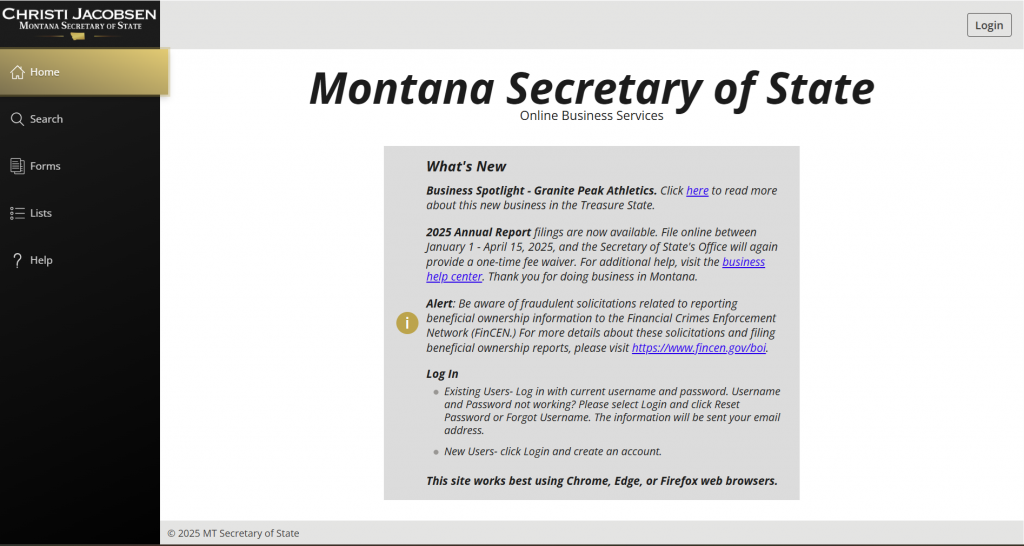
The Montana Business Search Is Also the Filing Front Door
Montana does something most states do not. The search is not just a lookup, it is the entry point for the two things owners actually come back for: filing the annual report, and requesting documents. The instructions sit on the search page itself, and they all begin the same way, by finding the entity and clicking its name.
Every route starts by clicking the entity name in the results to open the record.
- To see the documents a business has filed, open the record, then View Filings.
- To file your annual report, open the record, then use the File Annual Report button.
- To file an amendment or any other change, open the record, then Filing Actions, then choose the form.
Three tasks, one starting point. If you are hunting for a separate annual report portal, there is not one.
Montana Annual Reports Are Due 15 April
The Secretary of State puts the date on the business services page in plain terms: the annual report is due 15 April. It is the filing that keeps an entity in good standing, and missing it is what eventually moves a record into one of the inactive statuses you were reading in your search results.
Because you file it through the search, the practical version of “have I filed my annual report” is: search your own company, open the record, and see whether the button is still offering it to you.
Montana Certificates, Copies and Verification
| What you need | Where Montana puts it | Typical reason |
|---|---|---|
| A certificate, such as a certificate of good standing, or copies of filed documents | The Request Certificates or Copies form on the Secretary of State’s business site | A bank, a landlord, a lender or a counterparty has asked you to prove the entity is current |
| Confirmation that a certificate you have been given is genuine | The Secretary of State’s certificate verification tool | Somebody has handed you a certificate and you want to check it before you rely on it |
| A quick look at what a company has filed | The free search, then View Filings on the record | Due diligence where you do not need a certified document |
Searching for a Montana LLC or a Montana Corporation
A Montana LLC search and a Montana corporation search run through the same tool. The difference is the Entity Type filter, and getting it right is what turns a messy result set into a short one.
| What you are looking for | Entity Type to choose | What to remember |
|---|---|---|
| A Montana LLC | Domestic Limited Liability Company | Search the distinctive words without LLC attached, or the filter and the text will fight each other |
| An out-of-state LLC operating in Montana | Foreign Limited Liability Company | Both occupy the name, so a name check has to cover both |
| A Montana corporation | Domestic Profit Corporation | Nonprofits and religious corporations are separate types |
| A name with no company behind it | Reservation of Name | The type that blocks names invisibly if you filter to active entities only |
Articles of Organization in Montana
Articles of Organization are the formation document for a Montana LLC, and a corporation files Articles of Incorporation instead. Both are filed through the Secretary of State’s filing portal, and once accepted they appear on the entity record as part of the filing history, which is where you go to get a copy later rather than back to the form you originally submitted.
What To Do After Your Montana Business Entity Search
If the Name You Want is Available:
- Reserve the Name (Optional): You can reserve your desired business name for 120 days by filing a Name Reservation application and paying a $10 fee. This gives you time to prepare your formation documents.
- Form Your Business Entity: Depending on your chosen entity type, file the appropriate formation documents:
- Montana LLC: File Articles of Organization ($70 filing fee)
- Montana Corporation: File Articles of Incorporation ($70 for profit, $20 for nonprofit)
- Other Entity Types: Check the Montana Secretary of State’s website for specific requirements
- Register a DBA/Assumed Business Name (If Needed): If you want to operate under a name different from your official entity name, file a Registration of Assumed Business Name ($20 filing fee).
For assistance with any of these steps, consider using have the Montana registration handled for you.
If the Name You Want is Already Taken:
- Check Entity Status: If the entity with your desired name shows as “Dissolved,” it may be available, but verify with the Secretary of State’s office first.
- Create a Variation: Consider adding words, changing terms, or incorporating geographic identifiers to make your name unique.
- Choose a Different Name: Sometimes it’s best to start fresh with a completely different name that is available.
Montana Business Name Requirements and Restrictions
Your Montana business name must comply with specific rules:
Entity-Specific Requirements:
- LLCs: Must contain “Limited Liability Company,” “LLC,” “L.L.C.,” or acceptable variations (“Limited Company,” “Ltd. Liability Co.,” etc.)
- Corporations: Must contain “Corporation,” “Incorporated,” “Company,” “Limited,” or abbreviations (“Corp.,” “Inc.,” “Co.,” “Ltd.”)
- Nonprofits: For nonprofit corporations, the name must comply with corporation requirements
General Rules for All Entities:
- Distinguishability: Your name must be distinguishable from other registered entities
- Restricted Words: Terms like “Bank,” “Insurance,” “Trust,” or similar require additional approval and licenses
- Prohibited Terms: Words that imply government affiliation or mislead about the entity’s purpose are prohibited
Obtaining Certificates and Additional Information
The Montana Secretary of State offers several official documents that may be needed for financing, contracting, or other business purposes:
Certificate of Existence/Good Standing:
- Available for corporations and LLCs that are current on all filings
- Costs $5.00
- Can be ordered directly through the search portal by:
- Searching for your entity
- Clicking on the entity name
- Selecting “Request Information” from the panel on the right
- Choosing “Certificate of Existence” (for domestic entities) or “Certificate of Authorization” (for foreign entities)
Certificate of Fact:
- A more detailed document showing entity name, formation date, status, purpose, and management details
- Costs $15.00
- Ordered through the same process as above, selecting “Certificate of Fact”
Filing Annual Reports in Montana
All Montana LLCs and corporations must file annual reports to maintain active status:
- Due each year by April 15th
- Can be filed online at the Montana SOS filing portal
- Standard fees apply, but for 2025, Secretary of State Christi Jacobsen is providing a one-time fee waiver for all Montana businesses that file between January 1 and April 15, 2025
Pro Tip: Montana’s “EZ Annual Report” process allows businesses with no changes to simply search their business, click to enter an expedited portal, and pay without logging in.
Montana-Specific Business Entity Search Tips
- Be thorough with variations: Montana’s search system doesn’t automatically find plurals or possessives. Search multiple variations of your name.
- Ignore entity designators: When searching, leave out “LLC,” “Inc.,” etc., as the system will find entities regardless of these terms.
- Use partial words: Sometimes searching for key portions of a name yields better results than full phrases.
- Check for similarites: Montana requires names to be “distinguishable on the records,” meaning even similar names might be rejected. Pay attention to similar sounding or similarly spelled entities.
- Verify dissolved entities: Just because an entity shows as “dissolved” doesn’t automatically mean the name is available. Call to confirm.
Next Steps After Forming Your Montana Business
After confirming your business name and forming your entity, take these important next steps:
- Obtain an EIN: Apply for an Employer Identification Number from the IRS for tax purposes
- Open a business bank account: Separate your business and personal finances
- Register for state taxes: Contact the Montana Department of Revenue to register for applicable state taxes
- Check for required licenses: Research industry-specific licenses or permits needed for your business
- Create an operating agreement (for LLCs) or bylaws (for corporations): Document how your business will operate
For comprehensive business assistance, including virtual mailbox services and more, visit see what is covered for remote founders.
Conclusion
Conducting a thorough Montana business entity search is a crucial first step in your business formation journey. The Montana Secretary of State’s Business Entity Search tool provides a user-friendly way to verify name availability, research competitors, and access important business information.
By following this comprehensive guide, you’ll be well-equipped to navigate the search process and take the appropriate next steps based on your results. Remember that the Montana Secretary of State’s office is an excellent resource for specific questions about business entity searches and formation requirements.
Ready to start your business in Montana? Visit get the filing and registered agent handled for comprehensive business formation services and support.
This guide is provided for informational purposes only and does not constitute legal advice. For specific legal questions regarding your business, please consult with an attorney.
FAQs About Montana Business Entity Searches
What does “Active-Good Standing” status mean?
Active-Good Standing indicates that a business is properly registered with the Montana Secretary of State and is current on all required filings and fees. It means the entity is authorized to conduct business in Montana. Learn more about Montana business compliance requirements.
How long does a business name reservation last in Montana?
A Montana business name reservation lasts for 120 days and cannot be renewed. However, you can file additional reservations (at $10 each) if you need more time before forming your entity.
What happens if I don’t file my annual report in Montana?
If you fail to file your annual report, your entity will be administratively dissolved by the Secretary of State. You’ll then need to file for reinstatement, pay all past-due fees, and possibly obtain a certificate from the Montana Department of Revenue.
Can I check if my desired business name is available without contacting the Secretary of State?
Yes, you can use the Montana Business Entity Search tool to check name availability without contacting the office. However, for absolute certainty, you may call (406) 444-3665 to confirm your findings.
If a business is dissolved, can I use its name?
You may be able to use the name of a dissolved entity, but Montana corporations and LLCs can apply for reinstatement within 5 years of dissolution. It’s best to contact the Secretary of State’s office to confirm availability. For more insights, visit our Montana business registration guide.
Related Blog Posts
- Forming next door in Wyoming? Check whether the name is taken in Wyoming before you commit to branding.
- Looking west? Here is how to run an Idaho business entity search.
- Operating across the eastern line too? The North Dakota lookup works a little differently.
- Also looking at South Dakota? Here is how to run a South Dakota business entity search.