
Asynchronous work is a flexible approach that lets people work on their own schedules, focusing on results rather than fixed hours. Unlike traditional 9-to-5 models, this method prioritizes deep focus, minimizes interruptions, and allows global teams to collaborate effectively across time zones.
Key Takeaways:
- What it is: Employees work independently without needing to be online simultaneously.
- Why it works: It reduces distractions, improves productivity, and supports flexible schedules.
- Core principles: Autonomy, documentation, and prioritizing action over waiting.
- Benefits: Better focus, fewer interruptions, and seamless collaboration for distributed teams.
- Tools: Platforms like Asana, Slack, and Notion help manage tasks, communication, and documentation.
Quick Comparison: Synchronous vs. Asynchronous Workflows
| Feature | Synchronous Work | Asynchronous Work |
|---|---|---|
| Communication | Real-time (meetings, calls) | Flexible responses |
| Focus | Frequent interruptions | Deep, uninterrupted work |
| Inclusivity | Favors fast thinkers | Supports reflective thinkers |
| Documentation | Often temporary | Permanent, searchable logs |
Asynchronous work is reshaping productivity by giving employees control over their schedules while enabling global collaboration. For businesses, adopting this model can improve retention, reduce meeting overload, and create a more results-focused culture.
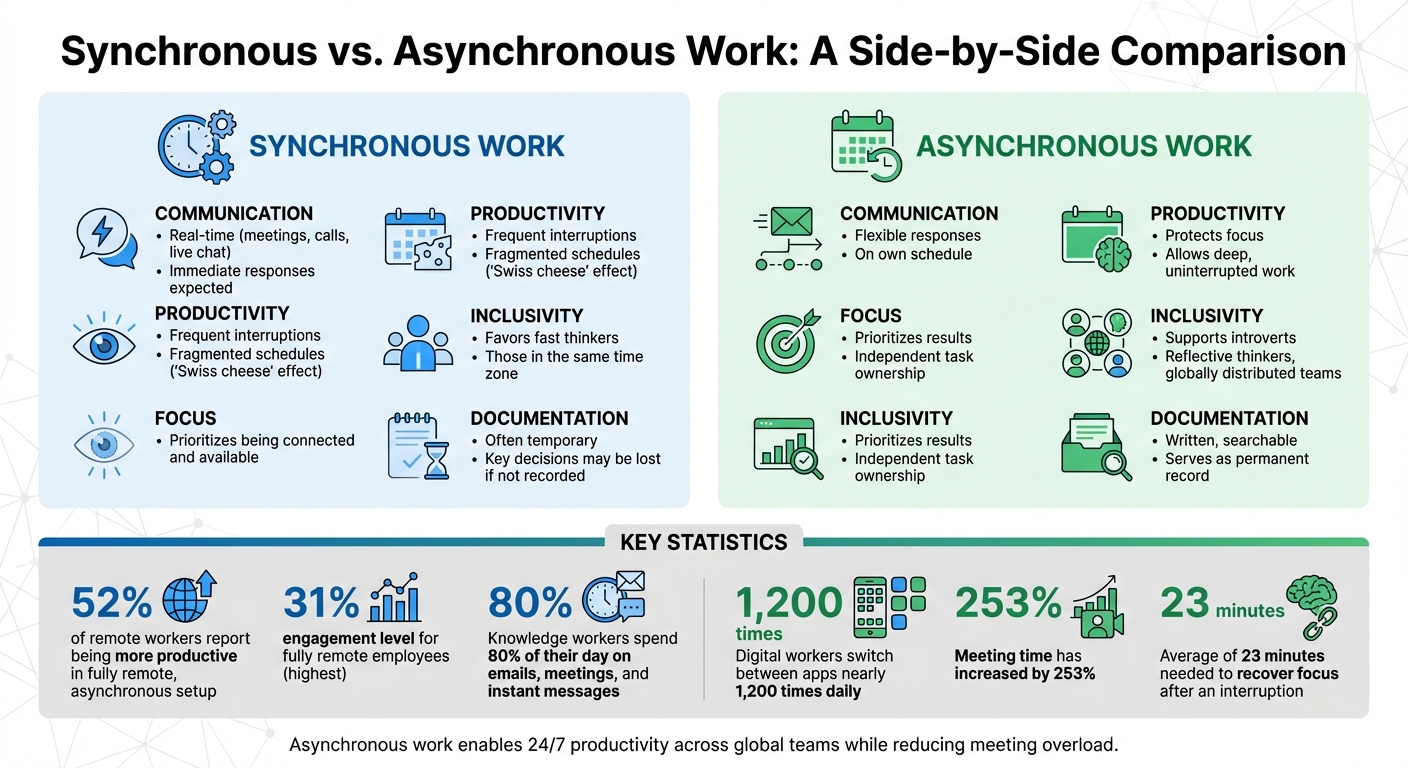
Synchronous vs Asynchronous Work: Key Differences in Communication, Productivity, and Focus
What Is Asynchronous Work?
Asynchronous work is a workflow approach where employees tackle tasks and communicate on their own schedules, without the need for immediate responses. Instead of requiring everyone to be online simultaneously, team members contribute during their most productive hours.
This model shifts the focus from time spent working to the actual results delivered. Performance is measured by the quality and completion of work, not by how quickly someone replies or how many hours they log.
McKenna Sweazey, an expert in remote and hybrid work, explains one of the main advantages:
"The top benefit is that async allows people to truly take advantage of remote work. If done well, communication can flow effectively throughout an organization regardless of time zones or working hours."
This highlights how asynchronous work can reduce digital distractions and create space for deep focus. On average, knowledge workers spend 80% of their day communicating through emails, meetings, and instant messages. Additionally, the typical digital worker switches between apps nearly 1,200 times daily, which disrupts the focus required for meaningful work. By adopting asynchronous workflows, teams can combat this constant fragmentation.
To make this model successful, three key principles come into play: autonomy, documentation, and prioritizing action over waiting.
Core Principles of Asynchronous Work
Three foundational principles ensure asynchronous work thrives, especially in distributed teams.
Autonomy is about trusting employees to manage their schedules and deliver results without constant oversight. Instead of tracking when someone logs in or replies, managers evaluate the actual outcomes. This trust-based approach resonates with employees – 92% say they value a supportive, trusting manager nearly as much as their salary.
Documentation fosters a "document-first" culture where decisions, processes, and updates are logged in shared tools like wikis or project boards. This ensures everyone stays informed, even if they work at different times.
"Writing is thinking. To write well is to think clearly. That’s why it’s so hard." – David McCullough, Author
By documenting ideas before discussions, teams create searchable references that outlast any single meeting or conversation.
Action over waiting promotes a "default to action" mindset, encouraging team members to move projects forward independently instead of waiting for real-time approvals or feedback. This approach – often called multiplexing – breaks work into smaller, independent tasks, allowing multiple team members to work on different parts of a project simultaneously without creating bottlenecks.
These principles form the foundation of a flexible, efficient work environment that prioritizes smarter workflows.
Synchronous vs. Asynchronous Workflows
Comparing synchronous and asynchronous workflows sheds light on their unique impacts on team dynamics and productivity.
| Feature | Synchronous Work | Asynchronous Work |
|---|---|---|
| Communication | Real-time; immediate responses expected (meetings, calls, live chat) | Responses come on a flexible schedule |
| Productivity | Frequent interruptions; fragmented schedules ("Swiss cheese" effect) | Protects focus and allows for deep, uninterrupted work |
| Inclusivity | Favors fast thinkers and those in the same time zone | Supports introverts, reflective thinkers, and globally distributed teams |
| Documentation | Often temporary; key decisions may be lost if not recorded | Written, searchable, and serves as a permanent record |
| Focus | Prioritizes being connected and available | Prioritizes results and independent task ownership |
Thomas Kunjappu, CEO and Cofounder of Cleary, emphasizes another benefit:
"Async better incorporates the work of more introverted people or people who prefer having time to process ideas before they contribute to an initiative."
The data backs this up. Fifty-two percent of remote workers report being more productive in a fully remote, asynchronous setup. Moreover, fully remote employees show the highest engagement levels at 31%, proving that when people work can be just as crucial as where they work.
Benefits of Asynchronous Work
Asynchronous work offers clear advantages for both employees and organizations. Moving away from rigid 9-to-5 schedules opens up opportunities for productivity that traditional workflows often fail to deliver.
Flexibility is now a top priority for workers. A staggering 94% of employees want control over when they work – outpacing the 80% who prioritize where they work. This preference isn’t just about convenience; it directly impacts performance. For instance, 43% of workers say flexibility is their biggest productivity driver. Add to that the fact that happy employees are 13% more productive than their less-satisfied counterparts, and the case for flexibility becomes undeniable.
Organizations also benefit significantly. Companies embracing asynchronous work models report better retention rates – Doist, for example, boasts a retention rate of over 90%, well above the tech industry average. Additionally, 60% of employers note an improvement in the quality of job applicants when they adopt async-friendly practices. With 40% of workers saying they’d look for a new job if their flexible arrangements were taken away, it’s clear that getting this right is critical.
The sections below dive deeper into how asynchronous work delivers these benefits.
More Flexibility and Personalization
Asynchronous work allows employees to align their schedules with their natural productivity peaks. This means early birds and night owls alike can work when they’re most effective, rather than conforming to a fixed eight-hour block.
Why does this matter? Recovering focus after an interruption takes an average of 23 minutes. Traditional schedules, filled with scattered meetings, often create fragmented "Swiss cheese" calendars. By contrast, asynchronous work preserves uninterrupted blocks of time, enabling employees to focus on deep, meaningful tasks instead of constantly reacting to pings and meetings.
This approach shifts the workday from being reactive to proactive. Employees can prioritize tasks based on their optimal working hours, leading to higher-quality output and less mental fatigue.
Better Focus and Fewer Interruptions
The modern workplace is drowning in interruptions. Meeting time has skyrocketed by 253%, and knowledge workers now spend 80% of their day on emails, meetings, and instant messages. This leaves little time for actual work.
Asynchronous workflows tackle this by eliminating the need for immediate responses. Edward Brown, a workplace expert, highlights the cost of constant interruptions:
"Interruptions diminish high-quality execution by breaking momentum, thus resulting in the need for distressful do-overs."
Video calls add to the problem. After just 30 minutes, brain fatigue starts to set in, making it harder to concentrate. Async work combats this by grouping communication into scheduled blocks, preserving focus time for activities like coding, writing, or strategic planning. This setup not only improves individual performance but also supports smoother collaboration across global teams.
Global Team Collaboration
Asynchronous work turns time zones into an advantage rather than a hurdle. Instead of restricting hiring to specific regions or forcing teams into inconvenient meeting schedules, companies can build global teams that operate around the clock.
This "follow-the-sun" model allows projects to advance continuously. For example, a team in Manila can wrap up their tasks just as their colleagues in New York start their day, speeding up delivery without requiring anyone to work overtime. Reflecting this trend, fully remote job postings in the U.S. rose from 10% in Q1 2023 to 15% by Q4 2024.
Clear documentation is key to making this work. Every decision, update, and discussion is recorded and accessible, ensuring all team members – regardless of location – have equal access to information. This transparency prevents remote workers from feeling sidelined and promotes a level playing field for everyone.
These advantages show how asynchronous work reshapes productivity and collaboration, breaking free from the limits of traditional working hours.
Tools for Asynchronous Teams
Using the right tools is essential for asynchronous work. Without them, remote teams can face delays, miscommunication, and endless back-and-forth exchanges. The best tools help keep everything organized, maintain context, and allow team members to work independently.
Searchability is key. In an asynchronous setup, team members often work on their own schedules. They need tools that let them quickly find information – whether it’s discussions, decisions, or files – without waiting for someone else to respond. A lack of organized documentation can lead to massive inefficiencies, costing companies billions each year.
Effective asynchronous workflows typically rely on three main types of tools: project management platforms, communication tools, and documentation systems. Each category plays a unique role, and together, they form a system that keeps work moving smoothly across time zones.
Project Management Platforms
Platforms like Asana, Trello, Jira, and Hubstaff Tasks act as the backbone of async teams. These tools help assign tasks, set deadlines, and track progress – all without the need for constant check-ins or status meetings. Everything – project details, files, and even task-specific communication – stays in one place, reducing confusion and improving visibility across teams.
One major advantage is the ability to comment directly on task cards. This keeps updates tied to specific tasks, eliminating the need to sift through endless chat threads or emails to understand a decision.
These tools also minimize the need for frequent status meetings. When everyone updates their tasks regularly, managers can review progress on their own time, allowing teams to focus on their work instead of constant reporting. This shift toward self-service visibility saves time and boosts productivity.
Communication and Documentation Tools
Threaded messaging apps like Slack, Microsoft Teams, and Google Chat help keep conversations organized by topic. This prevents important details from getting buried in real-time chatter, making it easier for team members to catch up – even if they’re not online at the same time.
Notification management is a game-changer. Tools with features like "Do Not Disturb" modes, custom status updates, and batch notification reviews allow team members to stay informed without constant interruptions. Explicit tags like "Action Required", "FYI", or "Urgent" can further streamline communication by helping recipients prioritize their responses.
For centralized knowledge, platforms like Notion, Google Workspace, and Confluence shine. These tools act as a single source of truth, housing everything from project briefs to decision logs and company policies. Features like version control and collaborative editing let teams work together without overwriting each other’s contributions. Additionally, support for rich media – like screen recordings or video messages – can add clarity that plain text often lacks.
While project management and communication tools are essential, a complete asynchronous workflow often requires more robust solutions to handle business operations.
BusinessAnywhere Solutions
For a fully integrated approach, BusinessAnywhere provides tools designed for asynchronous work. Its platform centralizes critical business functions, making it easier to maintain flexibility and productivity.
One standout feature is their virtual mailbox service, which digitizes physical mail. This eliminates the need for a physical office and ensures that documents can be accessed and forwarded at any time – perfect for teams spread across different time zones.
Their cloud phone system is another highlight. It lets you stay connected professionally without being tied to a desk. Calls can be routed to wherever you are, and voicemail transcriptions allow you to review messages on your own schedule, avoiding the hassle of phone tag.
For compliance and legal needs, BusinessAnywhere’s registered agent service manages essential documents like compliance notices and legal filings. This removes bottlenecks that might otherwise require synchronous coordination.
For entrepreneurs and remote workers managing U.S.-based businesses, BusinessAnywhere’s dashboard brings everything together. From business registration to compliance alerts, document management, and online notary services, the platform ensures that operations run smoothly without requiring everyone to be online at the same time. It’s a setup designed to keep businesses moving forward, no matter where the team is located.
sbb-itb-ba0a4be
How to Implement Asynchronous Practices
Switching to asynchronous work isn’t just about using new tools – it’s about rethinking how your team communicates, makes decisions, and collaborates. While it may seem daunting, the process can be straightforward. Start by analyzing your workflows. Identify tasks that truly require real-time collaboration, like brainstorming or crisis management, and separate them from tasks that can be done independently, such as coding, reporting, or design work. Real-time collaboration still has its place, but it should be used selectively for activities that benefit most from immediate interaction.
Centralize Critical Information
A key step in asynchronous work is creating a centralized hub – a "single source of truth" – where all project details, decisions, and workflows are documented. This reduces the reliance on waiting for someone to be online to answer questions. It’s worth noting that knowledge workers spend 40% of their day switching between communication tools and tasks, leaving them with just over an hour of uninterrupted productive time in an 8-hour day. Proper documentation helps cut through this inefficiency.
Leadership sets the tone for async practices. When managers send non-urgent messages late at night or expect instant Slack replies, employees often feel pressured to do the same, leading to burnout. Instead, assign a "Direct Responsible Individual" (DRI) for each project to ensure decisions can move forward without constant oversight. This approach emphasizes results over physical presence, empowering team members to work independently, even across different time zones.
Set Clear Communication Norms
Ambiguity can derail asynchronous workflows. Without clear expectations, teams may fall into "asynchronish" habits – using tools like Slack but still expecting quick responses, which defeats the purpose. To avoid this, establish response time guidelines for each communication channel. For instance, emails could have a 24-hour response window, while Slack messages during work hours might require a 2-4 hour reply time. This structure protects deep focus time while reducing the pressure for immediate replies.
Develop a "working agreement" that outlines which communication channels should be used for specific purposes. For example:
- Use project management tools for task updates.
- Threaded chats for quick questions.
- Shared documents for final decisions.
Also, standardize message formats. Start messages with a "TL;DR" summary or use subject line tags like [Action Required], [Decision Needed], or [FYI] to clarify urgency and expectations.
Create an escalation channel for emergencies. Designate a specific medium, such as a #urgent Slack channel or phone calls, for true crises. This way, employees can confidently disconnect without fearing they’ll miss something critical. Asana tackled similar challenges by introducing a "Meeting Manifesto" and "No Meeting Wednesday" in February 2026, clearly defining when meetings are necessary and when updates should be shared asynchronously.
Replace Meetings with Asynchronous Updates
Once communication norms are set, reduce interruptions further by cutting down on live meetings. Remote workers spend an average of 18 hours per week in meetings, and 71% of those meetings are deemed unproductive. A better alternative? Replace recurring status meetings with written or recorded updates. For example, instead of live stand-ups, use automated threads or video messages to share progress. This approach can slash meeting time by 60% to 80%, saving up to 31 hours per employee per month.
Doist, a fully remote company with over 100 employees, operates with a 24-hour response expectation. In October 2025, they replaced live stand-ups with automated threads in their tool, Twist. Team members reflect on their past week and plan ahead asynchronously, contributing to an impressive employee retention rate of over 90%. The key here is providing enough detail in updates so teammates can stay informed without needing follow-up conversations.
For decisions requiring input from multiple people, use shared documents to centralize discussions instead of scheduling meetings. This allows team members to review and contribute at their own pace, often leading to better outcomes than rushed live calls. If live meetings are unavoidable, record them and provide written summaries so team members in other time zones can catch up without attending in real-time.
Use Time-Zone Differences to Your Advantage
Rather than seeing time-zone differences as a challenge, treat them as an opportunity for continuous progress. By designing "workflow relays", teams can hand off tasks across time zones, creating a 24/7 work cycle. For example, a design team in Europe can pass deliverables to a development team in Asia, who then hands them off to a QA team in North America for review the next morning. This kind of relay can significantly accelerate project timelines.
"The full power of async-first operations is unlocked when teams are distributed across time zones. Instead of treating geography as friction, organizations can design workflow relays that turn time differences into a competitive advantage." – Creative Bits
Effective handoffs require clear end-of-day summaries. Use templates that include status updates, blockers, and linked references to ensure the next person in line can pick up seamlessly. This structured approach has been shown to reduce project cycle times by up to 20%.
Even with time-zone gaps, schedule 30-60 minutes of overlapping availability for critical discussions, such as architectural decisions or team bonding. Emma van Emmerik from Just Eat Takeaway successfully transitioned her Berlin and Amsterdam-based teams to async workflows in March 2026. She introduced "top of mind" documents to replace ad-hoc Slack messages and implemented "Focus Fridays" to give researchers uninterrupted time for deep work. For necessary live meetings, rotate the timing to share the inconvenience of odd hours fairly among team members.
Examples and Best Practices
Successful Asynchronous Teams
Real-world examples showcase how asynchronous workflows can transform team efficiency. Take Canva‘s finance team in 2021: by automating status updates with Slack’s Workflow Builder, they reduced their weekly synchronous stand-ups from 1.5 hours to just 5-minute asynchronous updates. This shift saved around 64 hours weekly, allowing the team to focus on more impactful tasks.
Another standout is GitLab, a fully distributed company spanning over 65 countries. GitLab operates with a "handbook-first" approach, meticulously documenting every decision and process. This method supports low-context communication, making it easier for employees across time zones to collaborate effectively. As GitLab co-founder Sid Sijbrandij explains:
"By taking smaller steps through iteration, we can ship faster. The only way this is possible is through asynchronous communication".
This approach allows GitLab to break projects into smaller tasks, enabling team members to make progress independently and hand off work without waiting for large-scale consensus.
In September 2021, Oyster experimented with "Async Weeks", canceling all internal work calls to encourage creative problem-solving without real-time syncs. They introduced "Async Champions" to guide teams through the transition. Rhys Black, Oyster’s Head of Workplace Design, highlighted the benefits:
"If you’re relying solely on synchronous ways of working, that limits the time zones we can cover and the countries from which we can hire talented individuals".
Similarly, in November 2020, Hugo implemented a "3Ds Rule" – reserving synchronous meetings exclusively for debate, discussion, and decision-making. By limiting internal meetings to just four hours per week, they preserved deep work time and reduced interruptions caused by frequent context-switching.
Best Practices for Teams
These examples underline the potential of asynchronous workflows, but success lies in thoughtful implementation. Here are some best practices to consider:
- Promote transparency: Open communication channels are key. At Zapier, open Slack channels allow new hires to review historical decisions independently, easing their onboarding process and reducing the need for constant guidance from existing team members.
- Clarify accountability: Assigning a Direct Responsible Individual (DRI) to each project ensures decisions move forward smoothly. Doist, a fully remote team, expects a 24-hour response time for internal communications. To balance async workflows with personal connections, they hold monthly one-on-ones and informal video calls, while relying on tools like Twist and GitHub for 70% of their core work. This approach has contributed to their impressive employee retention rate of over 90%.
- Foster team connections: Non-work channels like #book-club or #dad-jokes can help maintain a sense of community. For example, Envato uses Slack Huddles for "virtual office hours" and automates performance reviews with 15Five to reduce meeting overload.
- Set boundaries for mental well-being: Encourage employees to remove work apps from personal devices to avoid notification fatigue. Darren M., Head of Remote at GitLab, emphasizes the importance of this mindset:
"An asynchronous mindset enables everyone to take a step back and assume that whatever we’re doing is done with no one else online. It removes the burden of an endless string of messages you must respond to immediately".
Conclusion
Asynchronous work, when implemented thoughtfully, offers undeniable advantages. By safeguarding deep focus time, cutting back on unnecessary meetings, and encouraging global collaboration, async practices can lead to measurable improvements. Companies that succeed in this space document decisions meticulously, empower their teams to take initiative, and treat live meetings as rare exceptions. Jennifer Fong, Chief People Officer at Customer.io, captures it perfectly:
"The companies that master async and remote communication are the ones that will be able to move faster and more efficiently".
To begin your async journey, start small: review recurring meetings, set clear response time guidelines (like responding within 24 hours), centralize your documentation in a shared workspace, and swap out status meetings for recorded videos or written updates. Save real-time interactions for meaningful discussions and relationship-building moments.
Beyond team communication, operational efficiency is just as crucial. Tools that simplify administrative tasks can help remote businesses thrive. For example, BusinessAnywhere offers services like U.S. business registration, registered agent services, and virtual mailbox solutions, ensuring you can focus on fostering an async-first culture without getting bogged down by compliance challenges.
Ultimately, thriving async teams trust their people, prioritize outcomes over hours worked, and embrace the flexibility that asynchronous work provides. Whether you’re a solo entrepreneur or managing a team spread across time zones, the tools and strategies to succeed are already within reach. Are you ready to focus on results and transform the way your business operates?
FAQs
How do I know which work should be async vs. live?
Deciding whether to use asynchronous or live work depends largely on the urgency of the task and how much collaboration it requires. Asynchronous work is ideal for tasks like writing reports or sharing project updates, where having the freedom to work at your own pace is important. On the other hand, live work shines in situations like brainstorming sessions or making decisions, where real-time interaction can make all the difference. To strike the right balance, consider how quickly responses are needed and how much teamwork is involved.
What response-time rules keep async from turning into ‘always on’?
To prevent the pitfalls of an ‘always on’ culture in asynchronous work, it’s crucial to establish clear rules for response times. For example, you can set specific response windows, like 24 to 48 hours, to manage expectations and avoid unnecessary pressure.
Equally important is respecting individual schedules. Leaders play a key role here – they should lead by example, setting boundaries around their availability. This not only helps maintain a healthy work environment but also encourages team members to prioritize deep, focused work without constant interruptions.
By setting clear guidelines, you can strike the right balance between effective communication and the flexibility that asynchronous work offers, all while safeguarding uninterrupted productivity.
How do you prevent miscommunication when most updates are written?
Clear communication is the backbone of successful asynchronous work. To minimize misunderstandings, start by setting clear communication norms. This means agreeing on how and when updates are shared and ensuring everyone is on the same page.
Structured, detailed updates are key. Stick to consistent formats that include all the necessary context – this makes it easier for team members to stay informed without having to dig for details. Tools like project management platforms and documentation repositories are invaluable here, as they centralize information and make it accessible to everyone.
Encourage team members to provide thoughtful updates that are concise yet comprehensive. Establish clear expectations for response times so no one is left guessing when they’ll hear back. Using templates can also help maintain consistency across communications, making it easier to understand and follow.
Finally, take the time to regularly review important points to ensure everyone is aligned. This practice not only improves clarity but also builds trust and openness in written communication.