Small businesses are prime targets for data breaches and privacy violations. If you collect customer data – like emails or payment details – you’re responsible for protecting it under laws like GDPR (EU), CCPA (California), and others. Non-compliance can lead to fines as high as €20 million (GDPR) or $7,500 per violation (CCPA). Beyond fines, mishandling data can damage your reputation – 48% of Americans stop buying from companies over privacy concerns.
Here’s what you need to know:
- Who must comply: Laws depend on where your customers live, not where your business operates.
- Key regulations: GDPR governs EU data; CCPA applies to California residents. Other U.S. states are adopting similar laws.
- Steps to protect your business:
- Audit your data: Map out what personal data you collect, why, and where it’s stored.
- Update policies: Write a clear, accurate privacy policy.
- Secure data: Use tools like encryption, multi-factor authentication, and vendor agreements.
- Respond to requests: Handle data access or deletion requests promptly.
- Stay compliant: Conduct regular audits and train employees.
Understanding Data Privacy Regulations
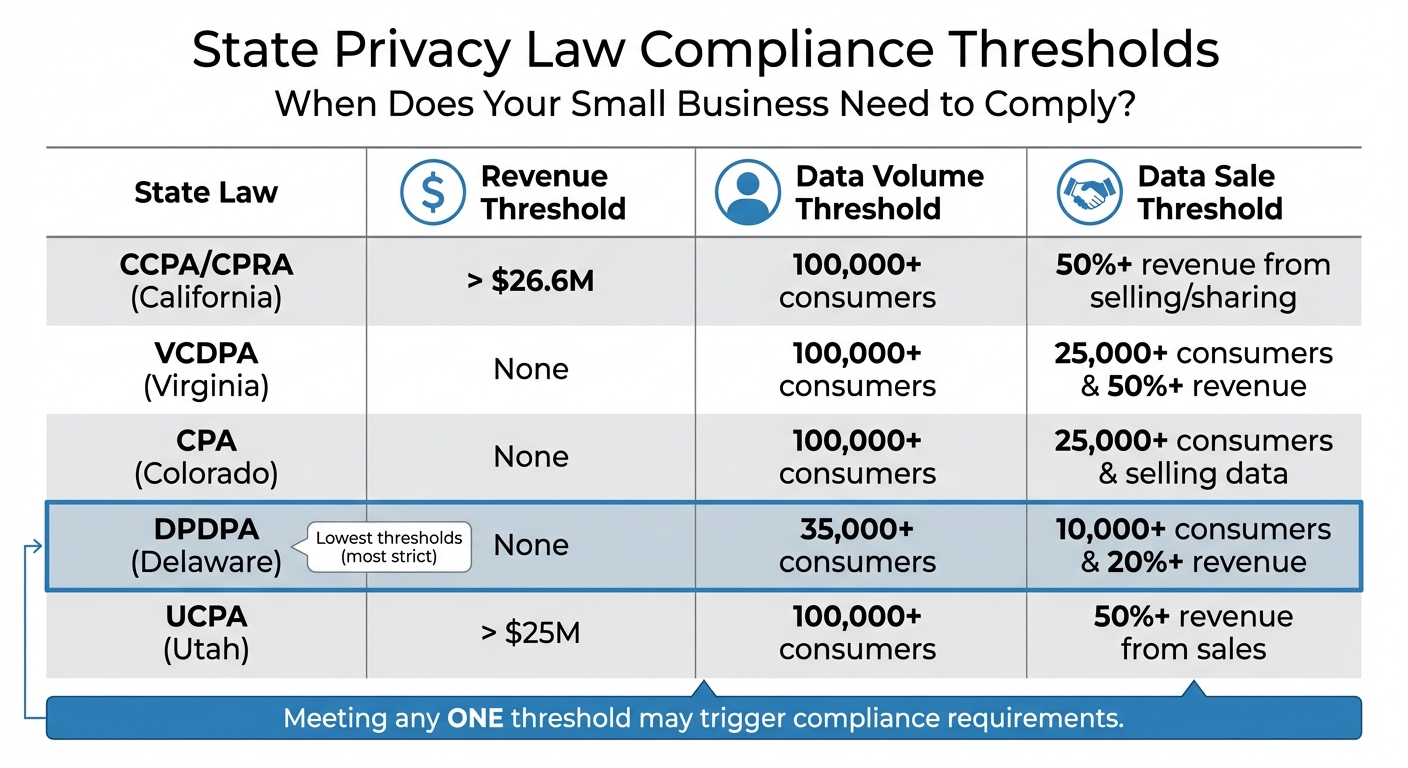
State Privacy Law Compliance Thresholds Comparison Chart
Privacy laws are tied to the location of your customers, not your business. If you’re selling to someone in California or the EU, their privacy laws apply to you – no matter where your company operates or its size.
Three major frameworks dominate the landscape: GDPR (for EU customers), CCPA (for California residents), and a growing list of state privacy laws. While each has unique requirements, they all aim to give individuals more control over their personal data. Let’s break down these frameworks to help you navigate the rules.
GDPR: Requirements for EU/EEA Customer Data
The General Data Protection Regulation (GDPR) applies to any business handling the personal data of EU or European Economic Area (EEA) residents. Even a single EU customer can trigger GDPR compliance obligations. Small businesses aren’t exempt – penalties can be steep for even minor breaches.
GDPR is built on seven principles: lawfulness, fairness, and transparency; purpose limitation; data minimization; accuracy; storage limitation; integrity and confidentiality; and accountability. This means you must collect data for a valid reason, use it only for its stated purpose, and handle it securely.
Under GDPR, EU residents have strong rights, including the ability to access their data, request its deletion (known as the "right to be forgotten"), correct errors, and transfer their data to another provider. Businesses must respond to these requests within 30 days. And if a data breach risks individuals’ privacy, authorities must be notified within 72 hours.
Small businesses with fewer than 250 employees can keep simplified Records of Processing Activities (ROPA). However, penalties for non-compliance remain severe. For example, in 2025, Tax Return Limited was fined €200,000 for sending unsolicited marketing texts, while DM Design Bedrooms faced a €160,000 fine for consent violations.
"GDPR compliance isn’t optional – it’s essential. But here’s the thing: you don’t need a law degree to get it right."
GDPR’s definition of "personal data" is broad, covering names, email addresses, IP addresses, cookie identifiers, and even pseudonymized data. If you’re using tools like Google Analytics or Facebook Pixel, make sure you have proper consent mechanisms in place.
Now let’s shift focus to U.S. regulations, starting with California’s CCPA.
CCPA: Privacy Rights for California Residents
The California Consumer Privacy Act (CCPA), updated by the California Privacy Rights Act (CPRA), applies to for-profit businesses meeting at least one of these thresholds: annual gross revenue over $26.6 million (adjusted for inflation in 2025), handling personal data of 100,000+ California residents or households, or earning 50% or more of annual revenue from selling or sharing personal data.
Even modest website traffic can add up. For instance, just 137 daily visitors from California could push a business over the threshold within two years, especially if IP addresses are collected. Additionally, as of January 1, 2023, exemptions for employee and B2B data have expired, broadening the scope of the law.
The CCPA gives California residents rights to know what data is collected, delete their data, correct inaccuracies, opt out of data sales or sharing, and limit the use of Sensitive Personal Information (SPI). SPI includes Social Security numbers, precise geolocation (within 1,850 feet), biometric data, and racial or ethnic origin.
Penalties for violations can reach $2,663 per unintentional violation and $7,988 for intentional violations or cases involving minors. Consumers can also sue for damages between $100 and $750 per incident in data breach cases.
For example, in 2025, clothing retailer Todd Snyder was fined nearly $350,000 by the California Privacy Protection Agency (CPPA) after technical issues prevented users from opting out of data sharing for 40 days.
Starting January 1, 2026, new rules will take effect, including requirements for Automated Decision-Making Technology (ADMT), risk assessments for high-risk data processing, and honoring browser-based Global Privacy Control (GPC) signals that automatically opt users out of data selling or sharing.
Other State Privacy Laws: Preparing for New Regulations
California isn’t alone. States like Virginia, Colorado, Connecticut, Utah, and Delaware have passed their own privacy laws. By the end of 2025, it’s estimated that 80% of U.S. states will have active privacy regulations.
While many state laws resemble CCPA, their thresholds differ. For instance:
- Virginia’s Consumer Data Protection Act (VCDPA) applies to businesses handling data from 100,000+ residents or 25,000+ residents if 50% or more of revenue comes from data sales.
- Colorado’s Privacy Act has similar triggers.
- Delaware’s Data Privacy and Protection Act (DPDPA) sets lower thresholds: 35,000+ consumers or just 10,000+ if 20% or more of revenue comes from data sales.
Small businesses operating in multiple states must track these variations to stay compliant. For example, in 2025, Connecticut fined TicketNetwork $85,000 for failing to comply with its privacy law.
| State Law | Revenue Threshold | Data Volume Threshold | Data Sale Threshold |
|---|---|---|---|
| CCPA/CPRA (CA) | > $26.6M | 100,000+ consumers | 50%+ revenue from selling/sharing |
| VCDPA (VA) | None | 100,000+ consumers | 25,000+ consumers & 50%+ revenue |
| CPA (CO) | None | 100,000+ consumers | 25,000+ consumers & selling data |
| DPDPA (DE) | None | 35,000+ consumers | 10,000+ consumers & 20%+ revenue |
| UCPA (UT) | > $25M | 100,000+ consumers | 50%+ revenue from sales |
To simplify compliance, design your program to meet the strictest standards, such as GDPR or CCPA. This approach often covers other regulations as well. Regularly monitor unique visitors or customers from specific states to identify when you’re nearing key thresholds.
Even if you don’t meet these thresholds, you may still need to comply if you provide services to larger companies subject to these laws.
Step 1: Conduct a Privacy Audit and Map Your Data
To protect customer data effectively, you first need to understand what you’re collecting and how it’s being used. A privacy audit helps you uncover where personal data enters your business, how it flows through your systems, and who has access to it. For small businesses, sharing data with multiple third parties can increase the risk of compliance issues. Establishing clear control over your data not only helps you avoid penalties but also strengthens customer trust.
Skipping this step can be expensive. For example, processing a Data Subject Access Request (DSAR) costs an average of $1,524. Fortunately, for small businesses, the audit process usually takes just one to two weeks.
How to Identify and Categorize Personal Data
Start by cataloging every point where your business collects data. This includes obvious sources like website forms, apps, email sign-ups, and payment processors, as well as less visible collection points, such as analytics tools, marketing pixels, and third-party cookies that operate in the background.
Once you’ve identified these collection points, create an inventory of the specific types of data you gather. Use a spreadsheet to organize information into categories like:
- Identity data: Names, emails, phone numbers
- Technical data: IP addresses, device IDs, cookie identifiers
- Financial data: Credit card details, billing addresses
- Usage data: Browsing history, click patterns
For businesses with fewer than 250 employees, a simplified Record of Processing Activities (ROPA) can meet GDPR Article 30 requirements.
Next, sort the data by its sensitivity. Information like Social Security numbers, precise geolocation (within 1,850 feet), biometrics, health records, and racial or ethnic origins requires stricter safeguards. For each data type, document why you’re collecting it, the legal basis (such as consent or legitimate interest), and how long you’ll keep it.
"A privacy policy isn’t just a legal formality… It’s a legally binding document that must accurately reflect your actual data practices."
- PrivacyForge.ai
It’s crucial to involve all departments in this process. Teams like marketing, sales, customer service, and IT often introduce tools – such as chatbots or marketing pixels – without realizing they add new data collection points. This matters because 71% of consumers say they would stop doing business with a company that mishandles their data.
Mapping Data Flows Across Systems and Vendors
After categorizing your data, map out how it moves through your systems. A data flow map shows the journey of information from collection points to internal storage (e.g., CRMs or databases) and external sharing (e.g., payment processors, email platforms, or cloud services).
To create your map, answer these key questions:
- What data is collected?
- Why is it collected?
- How is it processed?
- Who has access to it?
- When is it deleted?
For instance, when a customer makes a purchase, their credit card details might go from your website to a payment processor like Stripe, while their email address is sent to your CRM and email marketing platform.
Audit every third-party vendor and tool that interacts with your data, including Google Analytics, Facebook Pixel, and email service providers. Ensure you have signed Data Processing Agreements (DPAs) with each vendor. Automated scanning tools can help identify tracking technologies that might have been added without formal approval. While spreadsheets can work for small setups, they’re prone to human error and can quickly become outdated. Automation can cut compliance management time by 40–50% compared to manual tracking.
Set clear retention schedules for each type of data. For example, payment records might be kept for seven years for tax purposes, while browsing history could be deleted after 90 days. Document these timelines and use automation to ensure data is deleted once retention periods expire, aligning with data minimization principles.
Regulators take compliance seriously. Sephora, for instance, paid $1.2 million for failing to disclose data sales and not processing opt-out requests. Even small businesses face scrutiny – Tax Return Limited was fined €200,000 for sending unsolicited marketing texts.
A well-documented data map not only helps you respond to DSARs within the required timelines (30 days for GDPR and 45 days for CCPA) but also identifies potential security gaps. This step sets the stage for improving security and ensuring compliance as you refine your policies and protections.
Step 2: Create or Update Your Privacy Policy
After mapping out your data flows, the next step is to turn that information into a clear and accessible privacy policy. This document isn’t just a formality – it’s a legally binding statement of your commitment to protecting user data. Ignoring compliance can lead to steep penalties, such as fines of up to €20 million or 4% of global annual revenue under GDPR, and $2,500–$7,500 per violation under CCPA.
Data protection matters to consumers, too. A staggering 71% of people say they’d stop doing business with a company that mishandles their personal information. To meet legal standards and build trust, your privacy policy needs to be written in plain language, as required by GDPR Article 12. Avoid drowning readers in legal or technical jargon. Here’s what your policy should include:
Key Elements of a Privacy Policy
When drafting your privacy policy, make sure it covers these essential points:
- Business Identity and Contact Information: Include your full legal business name, a contact email, and details for your Data Protection Officer (if applicable).
- Categories of Data Collected: Clearly outline the types of data you collect, such as names, emails, IP addresses, payment details, or sensitive data like health information or biometrics.
- Purposes and Legal Bases: Explain why you collect each type of data and identify the legal basis for doing so. GDPR requires you to specify one of its six lawful bases for any data processing activity.
- Third-Party Disclosures: List all third parties that receive customer data, such as payment processors or analytics tools. Under CCPA, also disclose if you "sell" or "share" data for targeted advertising.
- Data Retention: State how long you retain each category of data or the criteria used to determine retention periods.
- Consumer Rights: Provide clear instructions on how users can access, delete, correct, or transfer their data, and how they can opt out of data sales or sharing.
- Security Measures: Outline the steps you take to protect user data, but avoid sharing details that could expose vulnerabilities.
- International Transfers: If relevant, disclose any international data transfers and the mechanisms in place to safeguard them, such as Standard Contractual Clauses.
- Consent and Opt-Out Links: Prominently display links like "Do Not Sell or Share My Personal Information" and "Limit the Use of My Sensitive Personal Information." Update your privacy policy at least annually and use a layered approach by summarizing key points at data collection points, linking to the full policy.
Streamlining with Privacy Policy Generators
Creating or updating a privacy policy from scratch can be a time-consuming and costly process. Privacy policy generators can simplify this task. These tools use structured questionnaires to capture your data practices and produce compliant policies tailored to multiple jurisdictions.
Before using a generator, ensure your data audit is thorough and up-to-date. This ensures the generated policy accurately reflects your data collection and usage. Look for tools that support regulations like GDPR and CCPA. Some popular options for small businesses include:
- Termly: Free for websites with under 10,000 monthly visitors; paid plans start at $10/month.
- Secure Privacy: Offers a free plan, with paid tiers ranging from $14 to $199/month.
- Cookiebot: Free for websites with fewer than 50 pages; paid plans start at €13 and go up to €80+/month.
Many of these platforms also provide features like automatic updates when regulations change, geolocation-aware consent tools, and mobile-responsive designs. Once your policy is ready, make it easily accessible by placing links in your website footer, checkout pages, account registration forms, and cookie consent banners. Ensure it’s also accessible to users with disabilities.
"A perfectly crafted initial policy that becomes outdated in six months creates more risk than a simpler policy that stays current." – PrivacyForge.ai
Keep an archive of previous policy versions to show compliance during audits. Always display the "Last Updated" date prominently so visitors know the policy’s most recent revision. By using a generator and staying on top of updates, you can maintain compliance without relying heavily on costly legal services.
Step 3: Implement Security Measures to Protect Data
Once you’ve established your privacy policy, the next step is to safeguard the data you’ve documented. Protecting this information isn’t just about compliance with GDPR and CCPA – it’s about maintaining customer trust. The stakes are high: 43% of cyberattacks target small businesses, yet only 14% have adequate defenses. And the fallout can be devastating – around 60% of small businesses shut down within six months of a major breach, with median ransom demands hitting $150,000 in 2025.
Thankfully, you don’t need a massive budget to implement effective security measures. GDPR and CCPA don’t prescribe specific tools, giving you the flexibility to choose cost-conscious solutions. The key is to adopt a layered approach addressing vulnerabilities that hackers commonly exploit.
Data Security Best Practices
Start with multi-factor authentication (MFA) – it’s one of the most effective ways to secure systems. Enable MFA on all platforms handling personal data, such as email, cloud storage, CRM systems, and banking tools. Avoid SMS-based codes and opt for authenticator apps instead.
Affordable security tools are widely available. For instance, Microsoft Defender for Business provides endpoint protection for about $3 per user per month, while Proofpoint Essentials offers email security for roughly $2.95 per user per month.
Another critical step is enforcing strong password management. Since 65% of people reuse passwords, consider investing in business-grade password managers like Bitwarden Teams (around $4 per user per month) or 1Password Business (about $7.99 per user per month). These tools eliminate weak passwords and prevent unsafe sharing practices.
Encryption is also a must. Use built-in tools like BitLocker for Windows or FileVault for Mac to enable full-disk encryption on company devices. For cloud storage or file transfers, ensure your vendors use industry-standard encryption protocols. To protect your data further, follow the 3-2-1 backup rule: keep three copies of your data, store them on two different types of media, and keep one copy offsite in the cloud. Test backups quarterly to ensure reliability.
Don’t overlook physical security. Implement a clean desk policy requiring employees to lock away documents containing personal data at the end of the day. Use cross-cut shredders for disposing of sensitive records and set up a separate guest Wi-Fi network to limit risks from intrusions. These physical safeguards are foundational for building secure partnerships.
Access Controls and Vendor Management
Technical defenses are only part of the equation – controlling access to data is equally important. Apply the principle of least privilege, ensuring employees access only the data necessary for their roles. Most SaaS platforms, like Microsoft 365, Google Workspace, and HubSpot, offer role-based access controls (RBAC) to restrict sensitive information to specific user roles. Always require unique logins for each user to simplify access tracking and revocation.
Establish a clear offboarding checklist to immediately revoke access when employees leave. Regularly audit who has access to sensitive systems, remove unnecessary permissions, and maintain logs to track data access. These practices not only improve security but also demonstrate accountability under GDPR and CCPA.
Vendor management is another critical area. Even when you outsource data processing, you’re legally responsible for its protection. In fact, 38% of organizations cite vendor management as their biggest privacy challenge. Before signing on with a vendor, verify their compliance with GDPR and CCPA by requesting security certifications like SOC 2 or ISO 27001. GDPR also mandates a Data Processing Agreement (DPA) with any third party handling personal data. These agreements should outline data usage, security responsibilities, subprocessor disclosures, and breach notification timelines. Operating without a DPA could expose you to significant liability during a breach.
Keep a vendor inventory that tracks all services handling personal data, the types of data processed, and the status of each DPA. If you work with fewer than 20 vendors, a simple spreadsheet will suffice; for larger operations, consider automated monitoring tools. Conduct annual reviews to check for changes in vendor terms, security certifications, or privacy policies. When ending a vendor relationship, follow your offboarding checklist to revoke access and confirm that data has been deleted. These steps can save you from costly legal fees, which can range from $50,000 to $200,000.
| Vendor Category | Common Examples to Audit |
|---|---|
| Email & Productivity | Google Workspace, Microsoft 365 |
| CRM & Sales | HubSpot, Salesforce, Pipedrive |
| Marketing & Analytics | Mailchimp, ConvertKit, Google Analytics |
| Finance & Payments | QuickBooks, Xero, Stripe, PayPal |
| E-commerce | Shopify, WooCommerce |
| HR & Payroll | Gusto, BambooHR |
| Customer Support | Zendesk, Freshdesk, Intercom |
sbb-itb-ba0a4be
Step 4: Respond to Consumer Requests and Data Breaches
Once your security measures are in place, it’s essential to be prepared for two critical situations: handling consumer data requests and responding to breaches. Mishandling these can lead to hefty penalties – up to $7,500 per intentional violation under CCPA or as much as €20 million under GDPR. Thankfully, most small businesses can manage these scenarios with straightforward processes, even without a dedicated legal team.
Handling Data Subject Access Requests (DSARs)
A Data Subject Access Request (DSAR) allows individuals to request access to, delete, or transfer their personal data. These requests don’t need formal legal phrasing to be valid. Under GDPR, you must respond within one month, with an option to extend by up to two additional months for complex cases. CCPA requires a response within 45 days, with a single 45-day extension allowed if you notify the requester within the original timeframe.
To comply, provide at least two submission methods, such as a web form and email. When a DSAR is received, acknowledge it within 10 business days if it falls under CCPA. Before acting on the request, verify the requester’s identity using methods appropriate to the sensitivity of the data, like email verification or a password-protected login. Maintaining a log of DSARs – recording the request date, type, verification method, and response – can help demonstrate compliance.
Processing DSARs manually can be costly, averaging $1,524 per request. Automating the intake process can streamline data collection and trigger internal workflows, saving time and resources.
From January 1, 2026, California residents will have access to a centralized "Delete Request and Opt-out Platform" (DROP) under the Delete Act, enabling them to submit deletion requests to all registered data brokers simultaneously.
Here’s a quick comparison of GDPR and CCPA response deadlines and extensions:
| Regulation | Response Deadline | Acknowledgment Window | Extension Allowed |
|---|---|---|---|
| GDPR | 1 Month | Not specified | +2 Months |
| CCPA/CPRA | 45 Days | 10 Business Days | +45 Days |
While DSARs are a key aspect of compliance, it’s equally important to have a robust plan for managing data breaches.
Creating a Data Breach Response Plan
When a data breach occurs, time is of the essence. GDPR requires notifying the relevant supervisory authority within 72 hours of becoming aware of a breach that could risk individuals’ data. Under CCPA, affected consumers must be informed within 30 to 60 days, depending on state-specific laws. Since human error accounts for 95% of breaches, a well-structured response plan can help contain the damage.
"The clock starts when you become aware of the breach, not when the breach occurred." – PrivacyForge.ai
Your response plan should address four stages: detection, containment, notification, and remediation. Start by training employees to report incidents immediately, whether it’s a lost device, suspicious activity, or unauthorized access. Within the first four hours of discovery, activate your incident response team to contain the breach. This might involve disabling compromised accounts, isolating affected systems, and preserving logs for investigation.
Next, assess the breach’s impact by determining what data was exposed, how many individuals were affected, and the potential consequences, such as identity theft or financial harm. Document your findings, including why authorities weren’t notified if the risk is deemed low.
For notifications, prepare templates in advance. A GDPR notification to authorities should include details like the nature of the breach, the approximate number of individuals affected, potential consequences, and steps taken to mitigate the issue. If the risk to individuals is deemed "high", notify them directly without delay. Under CCPA, ensure affected consumers are informed within the required 30- to 60-day window. Finally, address the root cause of the breach and update your security measures to prevent future incidents. Note that under GDPR, even a permanent loss of access to data – such as during a ransomware attack – is considered a reportable breach, even if no data was stolen.
With 71% of consumers saying they’d stop doing business with a company that mishandles their data, responding quickly and transparently isn’t just about compliance – it’s essential for maintaining trust.
Step 5: Maintain Continuous Compliance
Once you’ve established a solid foundation, keeping up with compliance is essential for safeguarding data over the long haul. Privacy regulations are constantly evolving, and as your business grows – whether through new tools, expanded markets, or additional vendors – your compliance needs will shift. For example, by 2026, 25 U.S. states are expected to have comprehensive privacy laws in effect. California’s updates to the CCPA for 2026 include new data categories like neural data and remove the 12-month lookback limit for data access requests. Without a system to monitor these developments, even the best initial compliance efforts can fall short.
Compliance Monitoring and Regular Audits
A compliance calendar is a simple yet effective tool to help you stay on top of your obligations. Breaking tasks into monthly, quarterly, and annual checkpoints ensures your privacy program remains up-to-date.
- Monthly tasks: Review user access levels and remove unnecessary permissions. Test cookie banners and opt-out workflows to confirm they’re functioning properly. For instance, in May 2025, retailer Todd Snyder faced a $345,000 fine due to a 40-day issue with their cookie preference center.
- Quarterly tasks: Conduct automated cookie audits to identify any hidden trackers. Reassess vendor relationships, review Data Processing Agreements (DPAs), test data backups, and evaluate DSAR metrics along with security incident logs.
- Annual tasks: Perform a Privacy Impact Assessment (PIA), conduct a compliance gap analysis, update employee privacy training, and refresh your master data inventory. Regulators in states like California, Colorado, and Connecticut are now conducting joint enforcement sweeps, focusing on compliance with Global Privacy Control (GPC) and cookie regulations. In September 2025, Tractor Supply was fined $1.35 million for failing to honor GPC signals and missing third-party contract updates.
Automation tools can save significant time, cutting compliance management efforts by 40% to 50%. These tools provide real-time checks and alerts, making it easier to stay ahead of changes. For objective assessments, consider bringing in independent third parties for external reviews. Be sure to audit your processes immediately after major regulatory changes or shifts in your data handling practices.
| Frequency | Audit Activity | Key Focus Area |
|---|---|---|
| Monthly | Access & Workflow Review | MFA, unique logins, and opt-out functionality |
| Quarterly | Vendor & Technical Audit | DPA compliance, cookie scanning, and backup tests |
| Annually | Comprehensive Assessment | Staff training, PIAs, and policy updates |
| Ad-hoc | Regulatory/System Change | Impact of new laws or software integrations |
By conducting regular audits and staying proactive with updates, you not only strengthen your compliance processes but also reinforce a culture of accountability among employees.
Employee Training on Data Privacy
Your employees are both your first line of defense and a potential vulnerability. With small businesses accounting for nearly half of all data breaches, ensuring your team is well-trained is crucial. This aligns with the "Accountability" principle outlined in GDPR and CCPA. Privacy training should be a part of onboarding and refreshed annually. In 2026, California regulations will require training programs to include modules on Automated Decision-Making Technology (ADMT) and AI, as businesses will need to explain these processes to consumers.
Keep training sessions practical and concise – 30 to 60 minutes is ideal for retention. Cover the basics, such as what constitutes personal data, how to handle DSARs, and the steps for reporting potential breaches. Using real-world examples makes the material more relatable and impactful. Document attendance for audit purposes, and ensure employees can easily access written privacy policies via a shared drive or company wiki.
Investing in privacy training is not just about avoiding fines – it’s about building trust. With 95% of organizations reporting returns on privacy investments that exceed their costs (averaging 1.6 times the investment), training your team is a smart move for both protecting your business and fostering customer loyalty.
Conclusion
Small businesses can navigate the complexities of data privacy compliance by following a straightforward plan: perform a privacy audit, update policies, implement robust security measures, manage consumer requests effectively, and ensure ongoing compliance. This isn’t just about avoiding legal trouble – it’s about strengthening customer trust and setting a solid foundation for growth.
The stakes are high. GDPR fines can reach up to €20 million or 4% of annual global turnover, while CCPA penalties can climb to $7,500 per intentional violation. On the other hand, 92% of consumers prefer companies that prioritize protecting their data. Regulators have made it clear: compliance with privacy laws isn’t optional. And here’s the upside – 95% of organizations report that privacy investments yield a return greater than their cost, with an average return of 1.6 times the initial investment.
Ignoring privacy concerns can be costly in more ways than one. Nearly half (48%) of Americans have stopped purchasing from companies due to data privacy issues. In today’s competitive environment, trust isn’t just a buzzword – it directly impacts customer loyalty and revenue. The Federal Trade Commission puts it succinctly:
"Given the cost of a security breach, losing your customers’ trust and perhaps even defending yourself against a lawsuit, protecting personal information is just plain good business."
By adopting strong privacy practices now, you’re not just meeting current regulations – you’re preparing for future changes, like California’s upcoming 2026 rules on automated decision-making. Prioritizing privacy today means you’re building a resilient business for tomorrow.
Focus on the basics, automate where possible, and make privacy an integral part of your operations. This approach not only strengthens customer trust but also supports long-term profitability.
FAQs
Do I need to follow GDPR or CCPA if my business is outside the EU or California?
If your business is located outside the EU or California, you generally aren’t required to comply with GDPR or CCPA – unless you deal with personal data from EU residents or California consumers. Whether you need to follow these regulations depends entirely on whether your business processes data from individuals in these areas.
What’s the fastest way to figure out what personal data my business collects and where it goes?
The fastest route is data mapping. This method provides a clear snapshot of all the personal data your business handles – what you collect, where it’s stored, how it’s used, and who it’s shared with. Start by listing data sources such as website forms, CRM platforms, and third-party tools. Not only does this help you stay compliant with regulations like GDPR and CCPA, but it also makes managing your data much more straightforward.
What should I do first if a customer asks me to delete their data or I discover a breach?
If a customer asks to have their data deleted, first confirm their identity to ensure the request is legitimate. Then, delete their personal data in accordance with laws such as GDPR or CCPA. In the event of a data breach, stick to your response plan. This typically includes notifying impacted customers and, if required, informing the appropriate authorities. Always make sure your actions align with the applicable data privacy regulations.