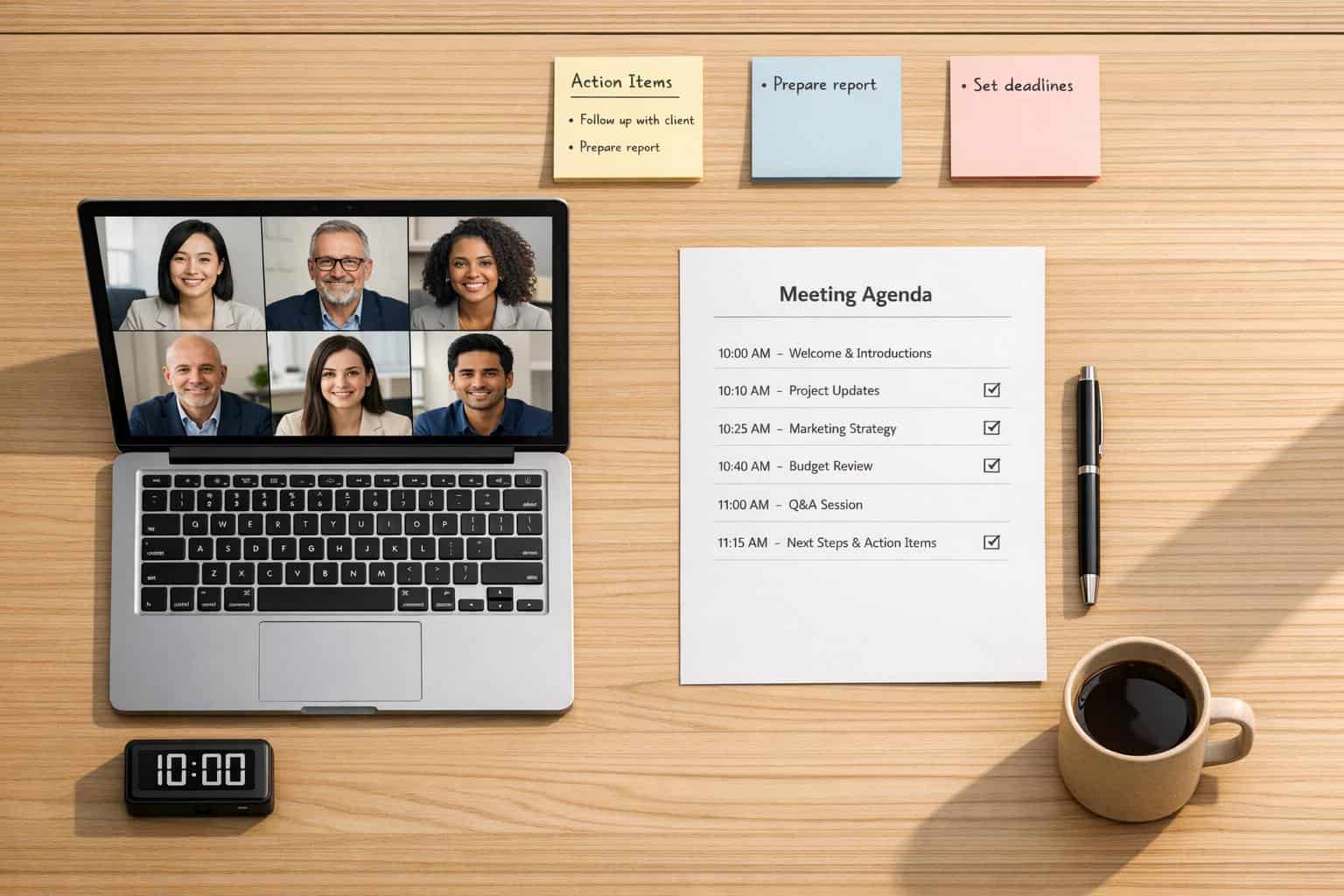
Virtual meetings can save time and money, but only if they’re managed well. Poor planning, tech issues, and disengaged participants often derail these sessions, wasting valuable hours. Here’s what you need to know to make your virtual meetings productive:
- Choose from the top video conferencing apps: Match features like HD video, recording, and integrations to your team’s needs. Prioritize security and reliability.
- Prepare clear agendas: Focus on 3–5 key items, assign time limits, and share the agenda in advance.
- Test your tech: Check audio, video, and internet connections before the meeting to avoid delays.
- Moderate effectively: Assign a moderator to keep discussions on track and ensure everyone contributes.
- Engage participants: Use tools like polls, breakout rooms, and chat features to encourage collaboration.
- Follow up: Send meeting notes within 24 hours, with clear action items, owners, and deadlines.
Quick Tip: Start and end meetings on time, and tackle the most important topics first when energy is highest. A little preparation goes a long way in turning virtual meetings into productive work sessions.
Select the Right Virtual Meeting Platform
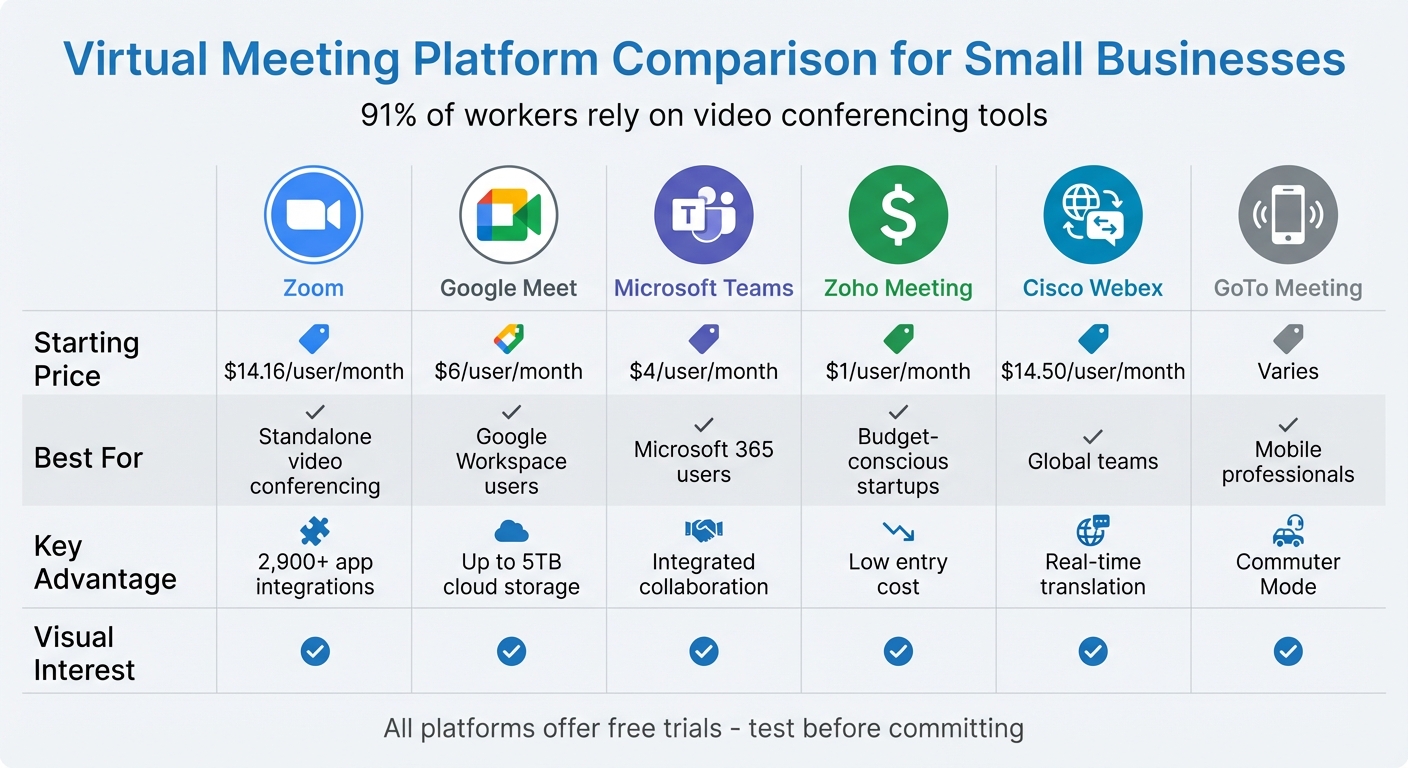
Choosing the right platform for virtual meetings can make or break your team’s communication flow. With 91% of workers relying on video conferencing tools at work, this decision isn’t just about technology – it directly impacts your team’s day-to-day productivity and overall success.
Match Features to Your Business Needs
Before settling on a platform, figure out which features matter most to your team. Essentials like HD video, clear audio, screen sharing, and recording are a must. Additional tools like digital whiteboards, breakout rooms, and real-time co-editing of documents can elevate collaboration.
Modern platforms also come with AI-powered features that simplify meeting management. These include automatic meeting summaries, live transcription, and action item tracking – cutting down the need for manual note-taking. Noise suppression is another handy feature, especially if your team works in busy or shared spaces.
Don’t overlook integration. If your team uses Google Workspace, Google Meet integrates seamlessly with Gmail and Google Calendar. Microsoft Teams is a natural fit for businesses using Microsoft 365, while Zoom offers a massive ecosystem with over 2,900 third-party integrations.
Focus on Security and Reliability
When it comes to virtual meetings, security is non-negotiable. Look for platforms that offer strong encryption, and for highly sensitive discussions, opt for end-to-end encryption. Features like waiting rooms, password-protected sessions, and unique meeting links provide extra layers of access control.
Host management tools are equally important. The ability to mute participants, manage screen sharing, and remove disruptive attendees ensures smooth meetings. For industries handling sensitive data, make sure the platform complies with regulations like HIPAA or GDPR.
Reliability is another key factor. Research from TestDevLab found that Zoom consistently delivers high-quality video and performs well even under network strain. Plus, Zoom’s 99.999% uptime SLA ensures minimal disruptions, keeping your meetings on schedule.
Once you’ve identified your feature and security priorities, start reviewing platforms that match these criteria.
Popular Virtual Meeting Platforms for Small Businesses
Here’s a breakdown of some leading platforms that cater to different business needs:
- Zoom: With over 300 million daily users, Zoom is a top choice for standalone video conferencing. Its free plan supports 40-minute meetings with up to 100 participants, while the Pro plan (starting at $14.99–per user/month) unlocks features like breakout rooms and cloud recording.
"Zoom is, I believe, the ideal tool to suit the culture that we are and that we strive to be at Capital One",
says Nikita Steals, Capital One’s VP of Tech Talent Acquisition. - Google Meet: Perfect for teams already using Gmail, Drive, and Calendar. It’s browser-based, so no downloads are needed, and it includes anti-hijacking controls. The Business Starter plan costs around $6 per user/month and offers up to 5TB of pooled cloud storage for recordings. The free version supports 60-minute meetings with up to 100 participants.
- Microsoft Teams: Designed for Microsoft 365 users, this platform combines video calls, file sharing, and team chat. Plans start at $4 per user/month, with seamless integration into Office apps like SharePoint and OneDrive. The free tier supports 60-minute meetings for up to 100 participants.
- Zoho Meeting: A budget-friendly option starting at just $1/month. It includes screen sharing and recording, making it ideal for startups on a tight budget.
- Cisco Webex: A great choice for global teams, thanks to its real-time translation support for over 100 languages. Plans start at approximately $12 per user/month.
- GoTo Meeting: Offers a "Commuter Mode", perfect for professionals who frequently join meetings while on the move.
| Platform | Starting Price | Best For | Key Advantage |
|---|---|---|---|
| Zoom | ~$14.99/user/month | Standalone video conferencing | 2,900+ app integrations |
| Google Meet | ~$6/user/month | Google Workspace users | Up to 5TB cloud storage |
| Microsoft Teams | ~$4/user/month | Microsoft 365 users | Integrated collaboration |
| Zoho Meeting | ~$1/user/month | Budget-conscious startups | Low entry cost |
| Cisco Webex | ~$12/user/month | Global teams | Real-time translation |
Try free trials to test features like audio quality, video clarity, and guest access. The right platform should feel intuitive for your team while meeting your security and feature requirements.
sbb-itb-ba0a4be
Create Clear Agendas and Invite the Right People
A strong agenda is the foundation of any effective virtual meeting. Without one, conversations tend to lose focus, time slips away, and participants leave unsure of what to do next. Did you know that 72% of meetings are deemed ineffective? Even worse, poorly planned meetings prevent 43% of people from completing their actual work. To avoid these pitfalls, you need a clear plan and a carefully selected group of attendees.
Build a Structured Meeting Agenda
Start by identifying the meeting’s purpose in a single, concise sentence. This ensures everyone knows what to expect before the meeting even begins. For instance, instead of a vague title like "Q3 Planning Meeting", try something more specific: "Identify the top three sales strategies to achieve the $500,000 Q3 revenue target."
Frame agenda items as questions to encourage problem-solving and keep discussions on track. For example, instead of listing "Marketing Budget", rephrase it as, "How should we allocate the remaining $15,000 in our marketing budget?" This approach keeps everyone engaged and focused. Assign a time limit of 10 to 15 minutes per topic to maintain momentum.
Tackle the most critical or challenging topics first. People tend to be most alert and productive in the first 10 to 15 minutes, so use that time wisely. Keep the agenda limited to three to five key items. If there’s more to cover, consider scheduling a follow-up meeting or sharing less urgent updates via email.
Distribute the agenda at least 24 hours in advance – or 48 to 72 hours for more complex discussions – so participants can prepare and contribute meaningfully. Once your agenda is set, focus on inviting the right people to the table.
Limit Attendees to Necessary Participants
A well-thought-out agenda is only half the battle; the other half is inviting the right people. Before sending out that invite, ask yourself: "Who is directly responsible for this outcome? Who will be affected by the decisions we make?". Only those individuals need to attend. Others can stay in the loop with a meeting summary or recording.
Here’s the reality: 43% of meetings could be canceled without any negative impact, and ineffective meetings cost the U.S. economy up to $283 billion annually. A big chunk of this waste comes from overpopulated meetings. By limiting attendance to essential participants, discussions stay sharp, everyone has a chance to contribute, and decisions get made faster.
For nonessential participants, mark their attendance as optional and send them a summary afterward. This approach respects their time while still keeping them informed. The result? Leaner, more productive meetings that drive real results.
Test Technology Before Meetings Start
Few things derail a meeting faster than spending the first 15 minutes troubleshooting someone’s video or scrambling to download software. These tech issues not only waste time but also disrupt focus, leaving attendees questioning the value of the meeting. The solution? Prepare ahead of time by testing your technology before the meeting begins. Start with your own setup to ensure everything runs smoothly.
Check Hardware and Software Functionality
A quick 5-minute test call with a teammate 15 to 30 minutes before your meeting can help identify and resolve potential issues. If no one is available, use built-in tools like Zoom’s "Test Speaker/Mic" or Teams’ "Make a test call" feature to confirm your audio and video settings.
Manually set your microphone and speaker within the app instead of relying on system defaults, which might select a poor-quality built-in mic. Use headphones to prevent echo and feedback, and position any external microphone 6 to 12 inches from your mouth for clear sound.
Your internet connection also plays a critical role. High-quality video calls typically need at least 1.5 Mbps for both upload and download speeds, while group calls may require up to 2.5 Mbps. If your connection is unstable, try moving closer to your router, switching to an Ethernet cable, or closing apps that consume significant bandwidth. Lastly, practice screen-sharing by selecting a specific application window instead of your entire desktop. This not only protects your privacy but also ensures a smoother experience.
"Taking a few moments to test your audio and screen-sharing isn’t a sign of technical weakness; it’s a mark of a true professional." – Silas, Founder, Flavor365
Offer Technical Help to Participants
Once you’re confident in your setup, help participants prepare as well. Send out login details, links, and basic instructions one to two weeks in advance, followed by a reminder 24 hours before the meeting. Always include a phone dial-in option for those who might struggle with unstable internet connections.
To keep the meeting on track, assign someone to handle technical issues during the session so you can focus on the agenda. Encourage participants to update their meeting software a day before high-stakes meetings to avoid last-minute updates. On macOS, remind them to check "Screen Recording" permissions in System Settings for apps like Zoom or Teams. A little preparation goes a long way in ensuring a smooth and productive meeting.
Assign a Moderator and Set Meeting Rules
Once your tech is in place and the agenda is set, the next step in running a business remotely is making sure the discussion stays on track. Even with the best tools and a clear plan, virtual meetings can quickly lose focus without someone to guide them. That’s where a moderator comes in. A good moderator keeps the meeting organized, ensures everyone gets a chance to contribute, and prevents the conversation from derailing.
What the Moderator Does
A moderator’s job is to manage the flow of the meeting, using the agenda as a guide. They kick things off by outlining the meeting’s purpose, steer conversations back on track when they drift, and summarize key points to keep everyone aligned. This role is more than just reading through agenda items – it’s about making sure every participant feels heard.
When disruptions happen, the moderator steps in. For instance, if someone dominates the discussion, they can summarize the person’s point and then redirect the conversation. In tense moments, they might ask, “What are your concerns?” to refocus the group on shared goals. Time management is also crucial. Assigning a timekeeper and setting limits for each agenda item can help keep things moving.
"If you have a good clear [agenda], you can use it as guideposts to bring the conversation back to the core topics." – Jason Evanish, CEO, Get Lighthouse, Inc.
To keep engagement high, techniques like Round Robin (where everyone gets a turn to speak) work well. Avoid long silences – limit them to no more than five minutes. On audio-only calls, ask participants to state their name before speaking to reduce confusion.
Establish Participant Guidelines
Clear rules make meetings run more smoothly and prevent unnecessary interruptions. Share these guidelines with the agenda at least 24 hours before the meeting, and take a moment to review them at the start. Here are some effective practices:
- Mute your microphone when you’re not speaking to cut down on background noise.
- For smaller groups (fewer than 10 people), keep your camera on to encourage active participation.
- Use features like "raise hand" or the chat box to signal when you’d like to speak.
- Log in 2–5 minutes early to test your setup and avoid delays.
- Stay focused – avoid multitasking during the meeting.
Increase Participation and Collaboration
Getting everyone engaged during virtual meetings is a common hurdle for entrepreneurs. Studies reveal that over 98% of knowledge workers multitask during these meetings, with nearly 40% even admitting to occasionally nodding off. To tackle this, it’s essential to make meetings interactive and foster an environment where everyone feels at ease contributing.
Use Interactive Features
The right tools can turn passive attendees into active participants. Digital whiteboards like Miro and FigJam are great for real-time brainstorming, whether it’s for mind mapping, project planning, or sketching ideas. These tools cater to the 65% of your team who are visual learners. Similarly, real-time polls can quickly gather feedback, gauge the room’s energy, and help prioritize agenda items or make decisions without lengthy back-and-forth discussions.
Breakout rooms are another effective feature, especially for larger teams. Splitting a group of 15 into smaller breakout sessions allows more focused discussions and gives quieter team members a chance to share their thoughts in a less intimidating setting. Research shows that teams can perform up to 20% better on tasks after a 45-minute collaborative exercise. Simple non-verbal tools like emoji reactions, "raise hand" buttons, and chat sidebars also provide ways for participants to contribute without interrupting the speaker.
"I like giving people a space that isn’t verbal to contribute. Maybe that’s a Slack chat or a document people can comment on ahead of time. This makes it a lot easier for folks who don’t like interrupting or don’t like speaking in public." – Juan Pablo Buriticá, SVP of Engineering at Ritchie Brothers
While tools are helpful, creating a space for open dialogue is equally important for meaningful collaboration.
Create Space for Open Discussion
Building psychological safety is crucial, and a simple way to start is by dedicating the first 5–10 minutes to an icebreaker, like "Two Truths and a Lie" or quick personal updates. These small activities help set a relaxed, collaborative tone early on.
"Proactive facilitation is critical in any virtual meeting because there’s a lot of stilted and stunted conversation… I advocate thoughtful prompting, meaning call on people by name to let them know, ‘OK, you have the floor’." – Karin M. Reed, author of Suddenly Virtual
Rather than asking open-ended questions to the whole group – which often leads to awkward silence – try calling on specific individuals by name. Rotating roles, such as assigning someone as a "Vibes Watcher" to keep track of who hasn’t spoken yet, can also ensure balanced participation. For those who prefer not to speak up, providing alternative ways to contribute – like shared documents for comments, anonymous Q&A tools, or chat threads – can make a big difference. These facilitation techniques, combined with a clear agenda, can transform meetings from unproductive to actionable. Considering that 72% of meetings are reported to be ineffective, even small adjustments can lead to better outcomes.
Manage Time to Keep Meetings on Schedule
Time mismanagement during meetings can drain productivity – 43% of workers report losing time to poorly organized meetings, while 38% struggle to stay focused on their projects because of them. When virtual meetings run over their scheduled time, the disruption often cascades through the day. These practical strategies can help ensure meetings stay on track, maintaining focus and respecting everyone’s time.
Begin and End at Scheduled Times
Starting and finishing meetings on time is a simple yet powerful way to show respect for participants’ schedules. At the start of the call, clearly state the planned end time as a "hard stop." For example: "We’ll wrap up by 3:00 PM sharp." This sets clear expectations, encourages efficiency, and ensures participants prioritize key points early on.
"Setting a hard stop time straight off encourages people to be more mindful of their shared time. It also gives the incentive to prioritize the points they want to discuss." – Entrepreneur
To stick to the timeline, designate someone as the timekeeper. This person can monitor the clock and gently remind the group if discussions are running long. Additionally, logging in early for audio and video checks can prevent delays before the meeting even starts.
Address Important Topics First
With punctuality in place, focusing on the most pressing issues at the start of the meeting ensures maximum productivity. Research shows that energy and attention are at their peak during the first 10 to 15 minutes of a meeting – after that, focus tends to decline. By tackling critical topics early, you make the best use of this high-energy window.
For example, begin with complex decisions or urgent matters while participants are fully engaged. Save routine updates or less critical items for later in the meeting or handle them asynchronously.
"Structure the agenda to prioritize the most pressing or challenging items first. After 10 to 15 minutes of focused activity, attention spans tend to wane, so it’s wise to address the more complex issues up front when energy is highest." – Jeong Lee, Atlassian
To keep the meeting moving, limit each agenda item to 10–15 minutes. This prevents minor topics from derailing progress. When planning longer sessions, consider shorter time blocks – like 30 minutes instead of an hour – to encourage quicker decision-making, following Parkinson’s Law: work expands to fill the time available. For meetings lasting over 45 minutes, include brief two-minute breaks so participants can stretch or check their devices, helping them stay focused throughout.
Solve Common Virtual Meeting Problems
Even the most carefully organized virtual meetings can hit snags like technical issues or disengaged participants. These challenges don’t have to derail your meeting, though. Research shows that 77% of workers lose meeting time due to tech problems, and 30% of meetings are delayed because of confusing or unreliable technology. The strategies below can help you tackle these disruptions and keep your meeting running smoothly.
Fix Technical Problems Quickly
When technical hiccups arise, addressing them immediately is key. Common issues like network connectivity problems – caused by insufficient bandwidth, high latency, or packet loss – can lead to frozen screens or dropped calls. If someone’s connection is weak, suggest they turn off their video to conserve bandwidth for audio and screen sharing.
Audio issues are another frequent problem. Echoes and feedback often occur when participants use speakers instead of headsets, while background noise can make it hard to follow the conversation. Ask participants who aren’t speaking to mute themselves, and ensure the correct microphone and speaker are selected in the platform’s settings. If the problem persists, leaving and rejoining the meeting can sometimes resolve it.
For video problems, unstable streams are often tied to high CPU usage or weak internet connections. Turning the camera off and back on may help re-establish the video feed. If a complete internet failure happens, switch to a mobile hotspot or use the platform’s "dial-in" phone audio option to stay connected.
Re-engage Distracted Participants
Once technical issues are sorted out, the next challenge is keeping everyone engaged. Virtual meetings make it easy for participants to lose focus, especially during long sessions. Unlike in-person meetings, where silence feels natural, extended quiet moments in virtual settings can stall momentum. To counter this, you need to create structured opportunities for participation.
"Never go longer than five to 10 minutes without giving the group another problem to solve." – Justin Hale and Joseph Grenny
Try using the Round Robin method by calling on participants by name. This approach keeps everyone involved and prevents passive behavior. For larger groups, consider using breakout rooms with 3-4 participants to ensure everyone has a chance to contribute. Live polling is another effective tool – it provides instant feedback and can spark meaningful discussions.
Encourage the use of the chat feature as a space for reactions and side comments, which can help quieter participants engage without interrupting the flow of conversation.
Complete Follow-Up Tasks After Meetings
To make sure your virtual meetings lead to real progress, effective follow-up is a must. Studies show that 71% of follow-up tasks from meetings are often left undone. This means that without proper follow-up, much of the time spent planning and making decisions ends up wasted. Participants tend to remember about 70% of meeting details within the first 24 hours, but this drops to under 20% after 48 hours. Acting quickly after a meeting isn’t just useful – it’s key to turning ideas into actions.
Send Meeting Notes and Task Assignments
Share a meeting summary within 24 hours to keep details fresh in everyone’s minds. Focus on the outcomes by outlining key decisions and listing specific action items, each with a clear owner and deadline.
Make your notes easy to read. Use bullet points to organize information, highlight important details (like names and due dates), and keep paragraphs short so assignments are easy to spot. Each task should have one owner and a firm deadline – vague "team tasks" or open-ended timelines usually lead to inaction.
| Action Item Component | Requirement | Example |
|---|---|---|
| The Task | Start with an action verb and be specific. | "Finalize Q4 budget proposal" |
| The Owner | Assign to one person only. | "Sarah Jenkins" |
| The Due Date | Provide a clear, specific deadline. | "Nov 1" |
Store your meeting notes in a central location, like a project management tool or shared drive, so they’re accessible without digging through emails. Include all related materials in one place to ensure team members have everything they need to complete their tasks.
For larger projects, follow a three-step approach: send the initial summary within 24 hours, check back in 3–5 days to address any obstacles, and send a reminder 1–2 days before the deadline.
This method not only helps clarify next steps but also sets the tone for better collaboration moving forward.
Collect Feedback for Improvement
Gathering feedback after meetings isn’t just a nice-to-have – it’s how you stop meetings from becoming the kind of unproductive sessions that cost U.S. businesses $283 billion annually. When participants know their opinions are valued, they’re more likely to engage and contribute in future meetings.
Keep your feedback requests simple and specific. Instead of asking vague questions like “How was the meeting?”, try more focused ones, such as “Was the agenda clear?” or “How could we improve the pacing?”. A quick rating scale or letter grade system works well for capturing responses without overburdening your team.
Send your feedback request at the same time as the meeting notes. Tools like Google Forms or Slack polls make it easy for participants to respond, increasing the likelihood of getting useful input. For those who need more time, offer asynchronous options like leaving comments on the meeting recording or submitting a short video response.
"By listening to what your participants have to say, you’ll be on track to hosting better Zoom meetings every time!" – Fireflies
Take the feedback seriously and act on it. If recurring issues come up – like unclear agendas, too many attendees, or meetings running over time – address them before the next session. This creates a cycle of improvement, turning meetings into productive sessions that drive meaningful progress.
Conclusion
This guide has explored the key elements needed to make virtual meetings productive and engaging. From preparation to follow-up, every step plays a role in ensuring success. Did you know unproductive meetings can eat up as much as 31 hours of a professional’s time each month? That’s why it’s crucial to break the cycle with clear objectives, structured agendas, and a quick tech check before starting.
But it’s not just about logging in and turning on your camera. Adopting a video-first approach and assigning a moderator to steer discussions can make a huge difference. To combat Zoom fatigue and keep participants engaged, break your content into short, 10- to 15-minute segments. Tools like polls and digital whiteboards can also bring your meetings to life.
Preparation remains the cornerstone of any successful virtual meeting. As Monica Linares from the State of the Executive Assistant Facebook group puts it:
"Planning is the secret to getting the most value from your virtual meetings." – Monica Linares
To keep the energy up, avoid long silences – pose a question or present a problem if there’s a lull that lasts more than five minutes. And before even scheduling a meeting, consider whether your goals could be met through a simple email or message. If so, skip the meeting altogether.
After the meeting, solidify the outcomes by promptly sharing meeting minutes, assigning clear action items, and confirming responsibilities. With thoughtful preparation, the right tools, and timely follow-up, virtual meetings can shift from being time-wasters to becoming powerful opportunities for collaboration and progress.
FAQs
How do I know if a meeting should be a message instead?
Sometimes, sending a message can get the job done without the need to gather everyone for a meeting. Here are a few situations where a message might work better:
- Quick updates or clarifications: If you just need to share or request information without a back-and-forth discussion.
- Routine topics: When the subject is straightforward and can be easily summarized in writing.
- No immediate feedback needed: If there’s no urgency to get responses in real time.
If the meeting isn’t going to provide value to all participants, it’s often smarter to stick with a message. It saves time and keeps things moving efficiently.
What’s the best way to get quiet attendees to speak up?
Encouraging quieter attendees to participate can make a big difference in group dynamics. One effective way is to politely invite their input during discussions. You can also assign a moderator to ensure everyone gets a chance to contribute or use visual cues, like hand-raising systems, to signal when someone wants to speak. These strategies help create an environment where everyone feels comfortable sharing and valued in the conversation.
How can I prevent action items from getting ignored after the call?
To make sure tasks aren’t forgotten after a virtual meeting, it’s essential to have a system in place for tracking and accountability. Use tools to document decisions, assign responsibilities, and outline next steps during the meeting itself. Afterward, regularly review and update the progress on these tasks. Project management tools can be particularly helpful to keep everyone on the same page, ensuring follow-through and reducing the chance of anything slipping through the cracks.