Hiring remote employees across state lines in the U.S. offers access to nationwide talent but comes with complex legal and tax requirements. Each state enforces its own rules on payroll taxes, workers’ compensation, and labor laws based on where employees physically work – not where your business is located. Non-compliance can lead to hefty fines, audits, and even legal penalties.
Key Takeaways:
- State Tax Compliance: Register for state income tax withholding and unemployment insurance in the employee’s state of residence.
- Labor Laws: Follow state-specific rules on minimum wage, paid leave, overtime, and expense reimbursements.
- Workers’ Compensation: Ensure your policy covers employees in their respective states.
- Employee Classification: Misclassifying employees as contractors can result in significant penalties.
- Tracking Locations: Monitor remote employees’ work locations to avoid unexpected tax obligations.
By prioritizing compliance, you can avoid costly mistakes while maintaining trust with your remote workforce. Tools like payroll software and professional employer organizations (PEOs) can simplify multi-state compliance and reduce administrative burdens.
State Tax Registration and Unemployment Insurance
When you hire a remote employee in a new state, it triggers the need for state tax and unemployment registrations. Even a single remote worker creates a legal obligation to register with that state’s tax authorities – there’s no minimum revenue or headcount requirement for this to apply. This typically means registering for state income tax withholding in most states and unemployment insurance in all 50 states.
State Income Tax Withholding Requirements
Currently, 41 states require employers to withhold state income tax from employee paychecks. However, nine states – Alaska, Florida, Nevada, New Hampshire, South Dakota, Tennessee, Texas, Washington, and Wyoming – do not have a personal income tax. Even in these states, you’ll still need to handle unemployment insurance responsibilities.
Before registering for state income tax withholding, you’ll need a federal Employer Identification Number (EIN) from the IRS. If your business isn’t incorporated in the state where your remote employee works, you’ll also need to register as a foreign entity with that state’s Secretary of State. This process can cost anywhere from $100 to $800. Once that’s done, you can apply for a State Income Tax (SIT) withholding account through the state’s Department of Revenue or Taxation. Online applications are relatively quick, taking about 15 to 30 minutes, but paper applications might take two to four weeks to process.
"Payroll tax obligations are almost always based on where the work is physically performed."
- Glencoyne Editorial Team
It’s also worth checking reciprocity agreements between states. These agreements might allow you to withhold taxes only for the employee’s resident state, simplifying compliance. Additionally, be aware of local tax requirements. Cities and counties in states like Ohio, Pennsylvania, and New York City often require separate local income tax registrations.
Once you’ve addressed state income tax withholding, you’ll need to focus on unemployment insurance registration.
How to Register for Unemployment Insurance
Unemployment insurance registration is required in all 50 states, even in those without state income tax. Registration is handled through the state’s designated agency, such as the Department of Labor or Department of Workforce Commission. Just like income tax, the requirement is based on where the employee physically works.
New employer State Unemployment Insurance (SUI) rates typically range from 2.7% to 4.1%, applied to a specific wage base, which can vary from $7,000 to $17,600 of wages. In some states – Alaska, New Jersey, and Pennsylvania – you’ll also need to withhold unemployment taxes from employee wages in addition to paying the employer’s portion. Certain states, like California, New York, and Washington, require separate registrations for additional programs such as Paid Family and Medical Leave (PFML) or Temporary Disability Insurance (TDI).
It’s important to start the registration process as soon as an offer letter is signed, as it can take weeks for state agencies to issue your SUI account number. Without this number, you cannot legally process payroll. Be prepared with essential documentation, including your EIN, entity type, NAICS code, owner Social Security Numbers, and bank routing numbers. During onboarding, confirm each employee’s primary work address and ensure they notify you of any relocations. A move to a new state requires closing old accounts and setting up new ones.
State Labor Laws and Wage Requirements
Once you’ve handled tax registration, the next step is understanding state-specific labor laws. These laws are crucial for protecting your remote team’s rights and shielding your business from potential penalties. They govern everything from wages to leave entitlements. One important rule to remember: employment laws are tied to the state where the employee physically works, not the employer’s location. Below, we’ll break down wage standards, leave policies, and overtime regulations.
Minimum Wage and Paid Leave by State
When it comes to remote employees, the highest applicable minimum wage – whether federal, state, or local – must be paid. While the federal minimum wage is $7.25 per hour, many states set higher rates. For example, Washington State leads with $16.66 per hour, and California follows closely at $16.00. Some cities, like Seattle, go even further, with a local minimum wage of $20.76 per hour. As of January 1, 2026, 19 states increased their minimum wages, making it essential to stay updated on these changes [21, 19].
Paid leave requirements can be equally complex. By 2026, 13 states and the District of Columbia have implemented Paid Family and Medical Leave (PFML) programs. Minnesota and Delaware will begin offering benefits in January 2026, with Maine joining on May 1, 2026. These programs involve payroll contributions, which vary by state. For instance, Washington’s PFML contribution rate rose by 23% in 2026 to 1.13%, with employees covering 71% of the cost and employers the remaining 29%. Beyond these programs, some states also mandate paid sick leave, with specific accrual rates tied to each pay period.
Overtime rules add another layer of variation. Federal law requires time-and-a-half pay for hours worked beyond 40 in a week. However, states like California and Nevada take it further, requiring overtime pay after eight hours in a single day. California even mandates double-time pay for work exceeding 12 hours in a day [6, 22]. To simplify compliance, some employers adopt California’s stricter overtime rules as their standard for all remote employees.
Expense reimbursement is another area to watch. States like California, Illinois, and Montana require employers to reimburse remote workers for necessary business expenses, such as internet, phone bills, and office supplies, under laws like California’s Labor Code 2802 [21, 23]. Additionally, 17 states and the District of Columbia now mandate salary ranges in job postings under pay transparency laws. In New York City, penalties for willful violations can reach as high as $250,000.
Employee vs. Independent Contractor Classification
Getting worker classification right is just as important as understanding wages and leave. Misclassifying employees as independent contractors can lead to hefty penalties and back taxes. Many states have stricter standards than federal law for determining worker status. States like California, Massachusetts, and New Jersey use the "ABC test", which assumes a worker is an employee unless the employer can prove three specific criteria: the worker operates independently, performs work outside the business’s core operations, and is established in their trade [19, 22]. This test sets a higher bar than the IRS "Common Law" test used in many other states.
"When an employee works remotely from California, California law governs their employment relationship regardless of where the employer is located."
- Remote Work Laws U.S. Guide
Misclassification can be costly. In 2025, Lyft settled a $19.4 million case in New Jersey over allegations of worker misclassification and labor law violations. In California, penalties range from $5,000 to $15,000 per misclassification incident, with fines increasing to $25,000 for repeated or intentional violations. Even if a remote worker has significant autonomy, that alone doesn’t qualify them as an independent contractor. A detailed legal review of state-specific standards is essential.
Payroll Taxes and Workers’ Compensation
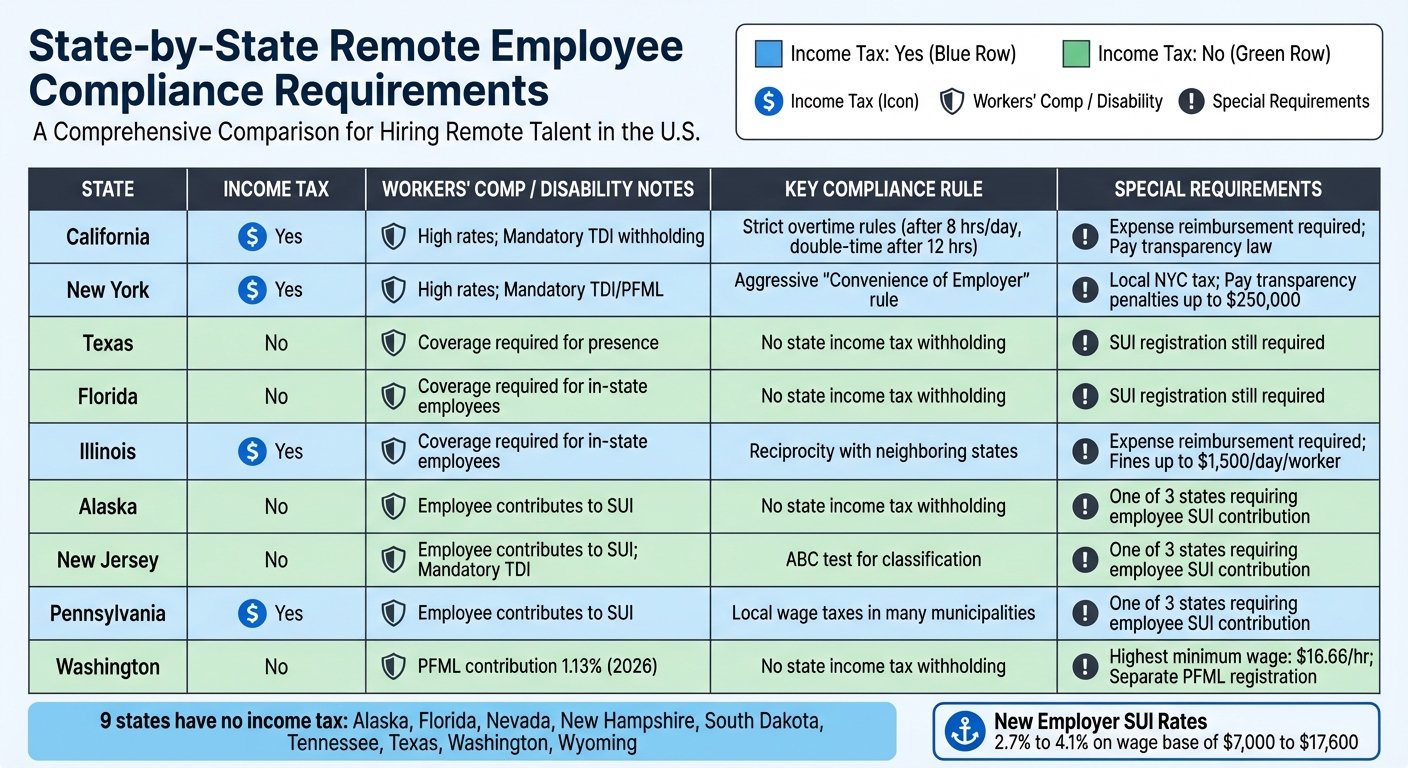
State-by-State Remote Employee Compliance Requirements Comparison Chart
Managing payroll taxes and workers’ compensation for remote employees can feel like navigating a maze. These responsibilities are tied directly to where your employees physically work, and every state has its own deadlines, tax rates, and insurance requirements. Missing a deadline or miscalculating taxes can result in costly penalties. Let’s break down the essentials of handling multi-state payroll and workers’ compensation.
How to Manage Multi-State Payroll Taxes
When you hire a remote employee in a new state, you establish what’s called a "nexus", which triggers tax obligations. This typically requires registering with that state’s Department of Revenue and Department of Labor within 20 to 30 days of running your first payroll. During this process, you’ll need to set up state income tax withholding and unemployment insurance.
Interestingly, nine states – Alaska, Florida, Nevada, New Hampshire, South Dakota, Tennessee, Texas, Washington, and Wyoming – do not impose state income tax. For employees in other states, reciprocity agreements can simplify matters. These agreements ensure that employees who live in one state but work in another only pay income tax to their state of residence, provided they submit a certificate of non-residency.
However, states like New York, Pennsylvania, and New Jersey enforce "convenience of the employer" rules. If a remote employee works from home for personal reasons rather than necessity, you may still need to withhold taxes for your headquarters’ state. Local taxes add another layer of complexity. Cities like New York City, Philadelphia, and over 600 municipalities in Ohio impose their own wage or resident taxes. Using geocoding tools within your payroll system can help pinpoint these local tax requirements.
"Multi-state payroll tax withholding done incorrectly can lead to penalties and interest for employers and create tax headaches for employees."
- Robert Willeford, Jr., Principal and State and Local Tax Practice Leader, Anders CPAs + Advisors
When it comes to State Unemployment Insurance (SUI), most states determine liability based on factors like where work is localized, the base of operations, and the employee’s residence. Only three states – Alaska, New Jersey, and Pennsylvania – require employees to contribute to unemployment taxes alongside employers. Additionally, five states (California, Hawaii, New Jersey, New York, and Rhode Island) require employers to withhold temporary disability insurance (TDI) from employee paychecks. If you have hybrid or traveling employees, keeping track of where they work is crucial, as some states require withholding after as few as 10 days of work within their borders.
Once you’ve tackled payroll taxes, the next step is ensuring your workers’ compensation coverage aligns with individual state requirements.
Workers’ Compensation Requirements by State
Hiring a remote employee in a new state typically creates a business presence that triggers the need for workers’ compensation coverage. Your existing policy won’t always extend to new states automatically. Before your employee starts, contact your insurance carrier to confirm coverage and understand any premium changes. Skipping this step can lead to compliance issues and legal risks.
Each state sets its own workers’ compensation rates and rules. Here’s a quick look at some key states:
| State | Income Tax | Workers’ Comp / Disability Notes | Key Compliance Rule |
|---|---|---|---|
| California | Yes | High rates; Mandatory TDI withholding | Strict overtime rules |
| New York | Yes | High rates; Mandatory TDI/PFML | Aggressive "Convenience of Employer" rule |
| Texas | No | Coverage required for presence | No state income tax withholding |
| Florida | No | Coverage required for in-state employees | No state income tax withholding |
| Illinois | Yes | Coverage required for in-state employees | Reciprocity with neighboring states |
It’s critical to register with the appropriate state agency as soon as you add remote employees. Some states require multiple forms and have longer processing times. Additionally, remote employees may need digital access to workers’ compensation notices. Leveraging payroll software or partnering with a Professional Employer Organization (PEO) can simplify multi-state compliance and help you stay on top of ever-changing regulations.
sbb-itb-ba0a4be
Documentation and Compliance Monitoring
Accurate documentation and consistent tracking are just as important as proper registrations and payroll management. These steps help shield your business from compliance risks. Without thorough records, you could face audits, fines, or even legal troubles. It’s essential to treat each remote employee’s location as its own compliance zone and tailor your documentation to fit.
How to Update Employment Contracts for Remote Workers
Standard employment contracts often fall short for remote workers spread across different states. To stay compliant, you’ll need to make some adjustments. For starters, designate the employee’s home office as their primary work location. This detail is crucial because it determines which state’s labor laws apply to the employment relationship.
You’ll also need to outline reimbursable expenses and set up an accountable plan. Some states require employers to cover specific business-related costs for remote workers, such as home internet, mobile phone usage, or office supplies. To ensure these reimbursements remain tax-free, make it a point to collect receipts and proper documentation.
Another key area to address is paid leave and PFML (Paid Family and Medical Leave) accruals. Many states, including Oregon, Colorado, and Massachusetts, now have programs for paid sick leave or PFML, and your contracts need to reflect these state-specific requirements.
Additionally, review restrictive clauses like non-compete or non-solicitation agreements to ensure they’re enforceable in the employee’s state. Termination and final pay provisions must also align with state laws – some states require immediate payment upon termination, while others allow payment on the next scheduled payday.
"Employment laws now follow your employees, not your headquarters."
- Eleanor Hecks, socPub
To keep things manageable, use state-specific addenda to update the core contract. These addenda can address variations like leave policies, meal breaks, jury duty, and voting time requirements, ensuring compliance while keeping your documentation streamlined.
Once contracts are updated, it’s equally important to monitor compliance on an ongoing basis.
Tools for Tracking Employee Locations and Compliance
Accurate contracts are just the beginning – tracking employee locations is critical for staying compliant across multiple states. If an employee moves without informing you, it could create tax nexus issues, new unemployment insurance obligations, or workers’ compensation requirements. To avoid surprises, establish a formal policy requiring employees to notify HR before relocating or working from a new state.
During onboarding, use a residency questionnaire to gather details about each employee’s tax home. This could include their primary residence, car registration, voter registration, and driver’s license information. Have employees confirm their primary work address in writing as part of their onboarding process.
For hybrid or mobile workers, maintain a log to track work locations by pay period. This can be as simple as a spreadsheet or as advanced as an automated system, helping ensure accurate tax withholding and supporting audits.
Payroll software with geocoding capabilities can also simplify compliance. For example, Gusto can calculate and file payroll taxes across all 50 states and handle new hire reporting, while Rippling automates state tax registrations and keeps employee data updated across payroll and benefits systems. For labor law postings, tools like Poster Compliance Center by eComply360 provide digital access to federal, state, and local labor law posters required for remote workers.
Finally, conduct regular audits of your payroll and benefits to ensure they meet the specific requirements of the states where your employees work. With the right tools and processes in place, managing compliance for a remote workforce becomes far less daunting.
Conclusion
Expanding your remote team across state lines opens the door to nationwide talent, but it also comes with responsibilities like tax withholding, unemployment insurance, workers’ compensation, and adherence to local labor laws. Failing to meet these obligations can lead to serious consequences, including multi-state audits, back-tax liabilities exceeding 40% of wages, and fines as high as $1,500 per day per worker in states such as Illinois.
To stay compliant, start by registering for state tax and unemployment accounts, appointing a registered agent (usually costing under $200 annually) to handle official correspondence, and updating employment contracts with state-specific provisions. It’s also crucial to monitor where your employees are working – just one unreported relocation can create unexpected tax complications.
This is where a simplified compliance process becomes vital. BusinessAnywhere offers a centralized platform that handles everything from foreign qualification and registered agent services to payroll tax registration and compliance alerts. With this tool, you can shift your focus to hiring top talent instead of wrestling with state-by-state administrative hurdles.
Proper compliance safeguards your company’s reputation, keeps your employees happy, and ensures they receive the benefits they’re entitled to. When managed effectively, compliance becomes your gateway to hiring the best people, no matter where they call home.
FAQs
Do I need to register in a state if I hire just one remote employee there?
Yes, in most states, businesses must register if they have even one remote employee. This is because having an employee working in a state is generally viewed as "doing business", which brings registration and compliance obligations. It’s important to check the specific regulations in each state to ensure your business meets all requirements.
What happens if a remote employee moves to another state without telling me?
If a remote employee moves to a new state without letting you know, it can create a host of legal, tax, and compliance headaches. For instance, you might need to register your business in the employee’s new state, follow that state’s employment laws, and adjust payroll taxes accordingly. These obligations often kick in as soon as the employee relocates, making clear and ongoing communication about moves a must to sidestep any surprise compliance problems.
How do I know whether a remote worker should be an employee or a contractor?
Classifying a remote worker as either an employee or a contractor hinges on several key factors, especially the level of control and the nature of the working relationship. Employees usually operate under the employer’s direction, adhering to specific instructions about how, when, and where their work is performed. On the other hand, contractors maintain more independence, deciding their own methods and schedules.
Getting this classification wrong can lead to serious penalties. To avoid issues, it’s essential to carefully review federal guidelines, IRS criteria, and applicable state laws. Pay close attention to aspects like behavioral control (who directs the work), financial control (how the worker is paid and reimbursed), and the overall nature of the relationship between the parties.