
Managing remote teams across time zones can be tough. Delayed responses, scheduling conflicts, and burnout are common issues. But with the right strategies, you can improve team efficiency and communication. Here’s a quick summary of the key tips:
- Use time zone tools like World Time Buddy to simplify scheduling and reduce errors.
- Set "Golden Hours" for overlapping work windows to enable real-time collaboration.
- Prioritize asynchronous communication to keep projects moving without waiting for live responses.
- Rotate meeting times to share the burden of inconvenient schedules fairly.
- Define clear communication protocols for response times and urgency levels.
- Respect work-life boundaries by avoiding the "always-on" culture.
- Visualize team time zones with shared calendars to eliminate confusion.
These steps can help your team work effectively, no matter where they are. By focusing on structured communication and respecting time differences, you can avoid delays, improve productivity, and support your team’s well-being.
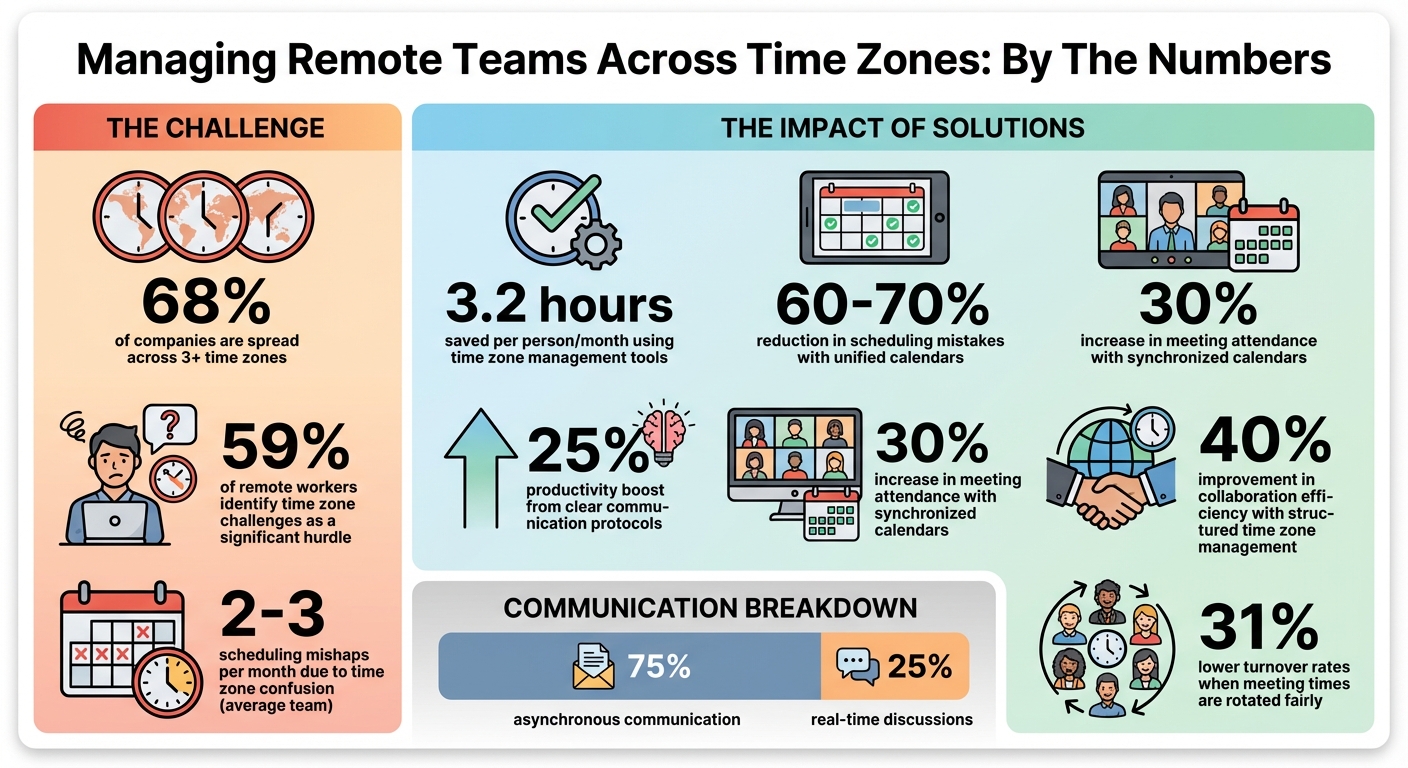
Remote Team Time Zone Management Statistics and Impact
1. Use Time Zone Management Tools Like World Time Buddy
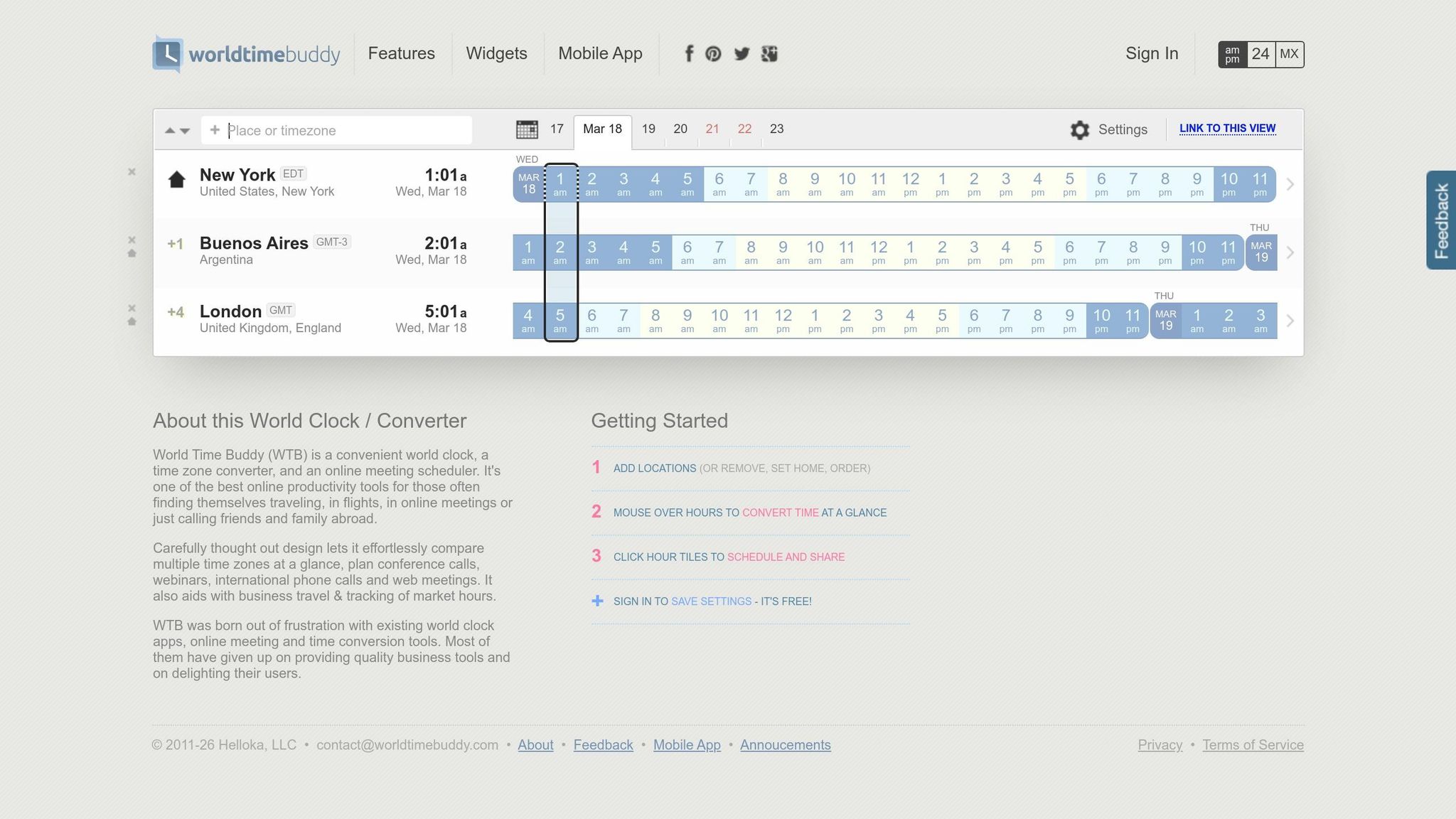
Tired of juggling time zones and doing mental math? Tools like World Time Buddy simplify scheduling by visually aligning multiple time zones side-by-side. They even highlight those precious "Golden Hours" – the 1-to-4-hour windows when most team members are awake and available.
This is especially important for distributed teams. With 68% of companies now spread across three or more time zones, it’s no surprise that the average team faces 2-3 scheduling mishaps per month due to time zone confusion. Automating this process can dramatically reduce these errors.
The benefits are clear. Teams utilizing time zone tools save an average of 3.2 hours per person each month – time that would otherwise be wasted on back-and-forth coordination. Plus, unified calendars with automatic time conversion can cut scheduling mistakes by 60-70%. Imagine no more "What time is that for you?" emails cluttering your inbox. Instead, you’ll have more energy to focus on what really matters: getting work done.
A few practical tips can also help. Use full city names instead of abbreviations (e.g., "3:00 PM Chicago Time" instead of "3:00 PM CST", which could mean Central Standard Time or China Standard Time). Adopting a 24-hour format, like 15:00 EST, can also eliminate AM/PM confusion. These small changes, paired with the right tools, turn time zone management into a non-issue.
Many of these tools offer free versions, while advanced features – like dashboards and daylight saving time alerts – are available in paid plans. The trick is to integrate your chosen tool into platforms your team already uses, such as Slack, Google Calendar, or Microsoft Teams. This way, time zone information is always accessible without extra effort.
2. Establish Golden Hours for Overlap Collaboration
Once you’ve streamlined scheduling with time zone tools, the next step is setting up golden hours – those crucial windows when everyone on your team, whether they’re in New York, London, or Mumbai, is available at the same time. These aren’t just convenient meeting times; they’re essential for real-time collaboration. Without them, even a simple question can go unanswered for hours, dragging what could’ve been a quick discussion into an endless email chain.
The trickiest part? The broader your team’s time zone spread, the harder it gets to find these overlap windows. When your team spans more than 10–12 hours of time zones, a single "perfect" golden hour might not exist. That’s where a Sacrifice Score Framework comes in handy. Here’s how it works: assign 1 point for meetings during ideal hours (10:00 AM–4:00 PM local time), 2–3 points for early mornings or late afternoons, and 9 points for sessions held at inconvenient hours, like between 11:00 PM and 7:00 AM. The goal is to choose the time slot with the lowest score for the entire team.
Take Groove as an example. Back in March 2017, this remote team – spread across nine time zones – set a fixed golden hour at 10:00 AM EST for their daily meetings. While some team members joined early or late, the consistency helped everyone stay aligned on progress and metrics. Another case: a software company with team members in San Francisco, New York, London, Bangalore, and Sydney. They settled on 9:00 AM EST for their standup. This meant 6:00 AM PST, 2:00 PM GMT, and 7:30 PM IST, while Sydney team members participated asynchronously to avoid middle-of-the-night calls.
"I’d never want one of my overseas team members to have to log on excessively late at night, or in the early hours of the morning, just because that’s a convenient time for my UK team." – Gareth Hoyle, Managing Director, Marketing Signals
Once you’ve nailed down your golden hours, guard them carefully. Use these windows for brainstorming, solving complex problems, and making critical decisions. Leave routine updates or status checks for tools like Slack. This approach doesn’t just improve productivity – by as much as 25% – but also lowers turnover rates by 31% when meeting times are rotated weekly or quarterly. Protecting these overlap periods ensures your team stays connected and efficient, no matter where they are.
3. Embrace Asynchronous Communication as Default
When working with global teams, relying solely on real-time conversations can be a major bottleneck. Imagine this: your developer in Singapore wraps up their day just as your project manager in London starts theirs, while your designer in New York is still sound asleep. If everyone waits for live responses, progress grinds to a halt – sometimes for 8 hours or more – while waiting for someone in another time zone to become available. Clearly, this isn’t sustainable for distributed teams.
Instead, make asynchronous communication the norm. Set clear response windows so everyone can work during their most productive hours, rather than forcing a rigid 9-to-5 schedule that doesn’t fit their local time. For instance, Zapier has a rule: if you’re 80% sure of a decision and the risks are reversible, move forward. Spencer McCullough, Customer Champion at Zapier, explains:
"Think of it as giving people the opportunity to opt out of too much information, instead of having to ask for access to more".
This method not only avoids scheduling conflicts but also ensures that every decision is documented. Conversations and choices are saved in tools like Slack, Notion, or project management platforms, making them easy to search and reference later. As RemotePass puts it:
"At RemotePass, we treat undocumented decisions as unfinished work".
To make this system work, establish clear expectations for response times across different channels. For example:
Daily stand-ups can be replaced with short recorded video updates that team members watch when they start their workday. When you ask a question, provide all the necessary context upfront – links, background details, and specific requests – to avoid unnecessary back-and-forth.
Interestingly, remote workers tend to be more productive than their office-based counterparts. With around 70% of businesses now operating primarily remotely, asynchronous communication is more than just a time-zone solution. It creates a workflow where progress never stops, helping to reduce burnout and keep projects moving around the clock.
4. Rotate Meeting Times Fairly Across Teams
Scheduling meetings at 10:00 AM EST might seem convenient, but it can create major challenges for remote team members in different time zones. Imagine a developer in Singapore joining at midnight or a designer in Sydney waking up at 2:00 AM. This kind of imbalance can lead to burnout and even higher turnover rates. To address this, rotating meeting times ensures no single group consistently bears the brunt of inconvenient scheduling.
Rotation is key. By alternating meeting times – say, 11:00 AM EST one week and 6:00 AM EST the next – you can distribute the inconvenience more evenly. While it’s impossible to find a perfect time for everyone, this approach ensures all team members share the load fairly.
To make this process more objective, you can use a scoring system to measure inconvenience. Build on the earlier "sacrifice score" method by assigning points based on time slots:
- 1 point for golden hours (10:00 AM–4:00 PM)
- 5 points for evening hours (7:00 PM–11:00 PM)
- 9 points for night hours (11:00 PM–7:00 AM)
Then, select meeting times with the lowest total score. This shifts discussions from subjective complaints to a more data-driven approach to fairness.
Beth Colman from RemotePass, a company managing teams across 27 countries, highlights the importance of this:
"If one region has to consistently accommodate everyone else, you’ll see it in turnover before you hear it in feedback."
To maintain transparency, publish the rotation schedule in a shared calendar and review it quarterly. Make it clear that recorded meetings and written updates are just as valuable as attending live sessions. This reinforces the idea that everyone’s time is equally important, regardless of location.
sbb-itb-ba0a4be
5. Set Clear Communication Protocols and Response Expectations
Imagine this: a team member sends a message at 9:00 AM EST, expecting a quick reply. But their colleague in Tokyo is already off-duty. The result? A delay of anywhere from 3 to 16 hours. To avoid these kinds of hiccups, you need clear communication protocols right from the start. A playbook can go a long way here, outlining response times for different communication channels. For example, urgent blockers might need a reply within 2–4 hours during local work hours, while general Slack messages and emails could have a response window of 24 hours or even 24–48 hours. This kind of structure not only keeps things running smoothly but also avoids creating an "always-on" culture, leaving room for focused work. Companies that follow these practices have reported up to a 25% boost in productivity.
But what counts as "urgent"? It’s essential to define this clearly. Reserve the term for issues that directly affect deadlines, client needs, or system functionality. As the Deel Team puts it:
"Include specific details in your documented guidelines, such as expected response times, preferred communication channels, and dependence on free collaboration tools".
When everyone knows the difference between urgent and routine, the right channels stay open for true emergencies.
GitLab, which operates across more than 65 countries as of February 2026, offers a great example. Their public handbook acts as a go-to resource, allowing team members to find answers at any time – no need to wait for someone in another time zone to wake up. Similarly, Arc’s development team introduced standardized emoji reactions in Slack in January 2025. Emojis like 👀 for "reviewing" and ✅ for "completed" let team members quickly check task statuses without interrupting anyone for updates.
Another helpful practice is setting up a handover process. End-of-day summaries can outline progress, challenges, and any pending questions for colleagues in the next time zone. This relay-style system keeps projects moving without requiring anyone to work outside their normal hours. Tools like the "schedule send" feature in email and Slack make it even easier to ensure messages arrive during the recipient’s local work hours, respecting their boundaries.
6. Respect Work-Life Boundaries and Off-Hours
Respecting work-life boundaries is a must for remote teams to thrive. For instance, a Slack message sent at 11:00 PM in San Francisco might reach someone in Sydney at 5:00 PM the next day. Without clear boundaries, remote teams can easily fall into the "always-on" trap, leaving no room for true downtime. The solution begins with visibility: team members should document their working hours in shared tools like Google Calendar or Outlook and update their Slack or Teams profiles with their typical availability. This simple step eliminates guesswork and reduces accidental interruptions.
But documentation alone won’t cut it – leaders need to set the tone. Managers who log off at consistent times and avoid sending non-urgent messages after hours model healthy work behaviors for their teams. Shifting the focus from hours worked to outcomes and deliverables also helps, often by using goal-tracking tools to maintain accountability. As Josh Cremer, a business owner managing global teams, explains:
"Managing a globally dispersed team requires flexibility and trust. Autonomy aligns team goals while respecting cultural differences."
Features like "schedule send" in communication tools can ensure messages drafted outside of work hours are delivered during recipients’ active times. Encouraging the use of "Do Not Disturb" modes on platforms like Slack also helps protect personal time and prevent burnout.
Regularly reviewing meeting schedules across time zones is another key step. If one region consistently shoulders the burden of inconvenient meeting times, team morale can drop, and turnover may quietly rise. When boundaries are respected, employees feel valued, leading to better morale and stronger retention.
7. Visualize Team Time Zones with Shared Calendars
Shared calendars take the guesswork out of scheduling by offering a clear, visual way to manage time zone differences. These tools are especially helpful for distributed teams, as they display events in local times for all participants. For example, platforms like Google Calendar and Outlook automatically adjust event times based on time zone data. So, if you schedule a meeting for 3:00 PM EST, it will show up as 8:00 PM GMT for a colleague in London. This feature can lead to a 30% boost in meeting attendance for teams using synchronized calendars with automatic time zone translation. Without such tools, distributed teams typically face 2–3 scheduling errors per month due to time zone confusion – a problem that significantly decreases with visual time zone displays.
To enable this functionality, follow these steps:
- Google Calendar: Go to Settings > Time Zone and activate "Display secondary time zone".
- Outlook: Navigate to File > Options > Calendar > Time zones to add additional time zones.
For better clarity, label time zones with specific city names like "London Time" or "Tokyo Time" rather than using abbreviations, which can sometimes cause misunderstandings.
"Time zone confusion is the hidden productivity killer for distributed teams." – CalendHub
This visual organization becomes even more critical during seasonal time changes. To avoid disruptions, review recurring meetings 2–3 weeks before daylight saving time transitions to ensure local times remain accurate. For regions with nonstandard offsets – like India (UTC+5:30) or Nepal (UTC+5:45) – automated calendar displays are indispensable. They eliminate the need for manual calculations, reducing errors and streamlining team schedules.
Conclusion
Managing remote teams across time zones doesn’t have to be complicated. The strategies outlined here – from leveraging time zone management tools to using shared calendars – lay the groundwork for effective collaboration. By setting golden hours for overlapping schedules, prioritizing asynchronous communication, and rotating meeting times fairly, you’re doing more than just solving logistical issues. You’re fostering an environment where every team member feels included and appreciated, no matter where they are.
Consider this: remote teams rely on asynchronous communication for 75% of their interactions, leaving just 25% for real-time discussions. Companies that adopt structured time zone management practices report a 40% improvement in collaboration efficiency. These numbers highlight how impactful these strategies can be.
"If it’s not documented, it didn’t happen. Relying on informal meeting recollections is risky when team members miss real-time discussions." – TimeZonder Blog
Documentation isn’t just a nice-to-have; it’s a necessity. Use precise timestamps for deadlines (e.g., "3:00 PM EST" instead of "end of day") and take advantage of scheduled send features to respect work-life boundaries. Treat undocumented decisions as incomplete to avoid delays and miscommunication. This approach not only prevents burnout and eases the constant pressure of being "always-on" but also supports a follow-the-sun workflow where work progresses seamlessly across time zones without overburdening anyone.
Given that 59% of remote workers identify time zone challenges as a significant hurdle, even implementing a few of these strategies can turn a disconnected team into a well-oiled, productive unit. By focusing on these methods, remote teams can enhance collaboration and achieve greater efficiency, regardless of the distance separating them.
FAQs
How do I pick “golden hours” if our time zones barely overlap?
To find those "golden hours" where time zones overlap just enough, look for a shared 1-4 hour window that aligns with most team members’ working schedules. Tools like World Time Buddy or Google Calendar can help you map out time zones and identify the best overlap. If the overlap is minimal, consider rotating meeting times to ensure fairness. For tasks that aren’t urgent, lean on asynchronous communication to keep things productive while respecting everyone’s schedules.
What should be synchronous vs. asynchronous for a global team?
Synchronous work thrives on real-time interactions – think live meetings or video calls. It’s perfect for situations where immediate feedback, brainstorming, or strengthening team connections are key. On the other hand, asynchronous work, like emails or recorded updates, offers flexibility, particularly for routine tasks or when working across different time zones.
Striking the right balance between the two is essential for smooth collaboration. Use synchronous methods for crucial discussions that demand instant input, while relying on asynchronous approaches to minimize scheduling headaches and accommodate varied schedules.
How can I stop time zone work from turning into an always-on culture?
To avoid creating an always-on work environment, it’s important to establish clear boundaries around working hours. This helps maintain a healthy balance between professional and personal life. Tools that map out time zones can be incredibly useful for scheduling meetings during overlapping hours, ensuring fairness for distributed teams.
Another key approach is to encourage asynchronous communication. By doing this, you reduce the pressure for instant replies and allow team members to work at their own pace. At the same time, prioritize building a workplace culture that values offline time and supports personal well-being. Regular check-ins can help maintain flexibility and provide an opportunity to address potential burnout before it becomes a bigger issue.