
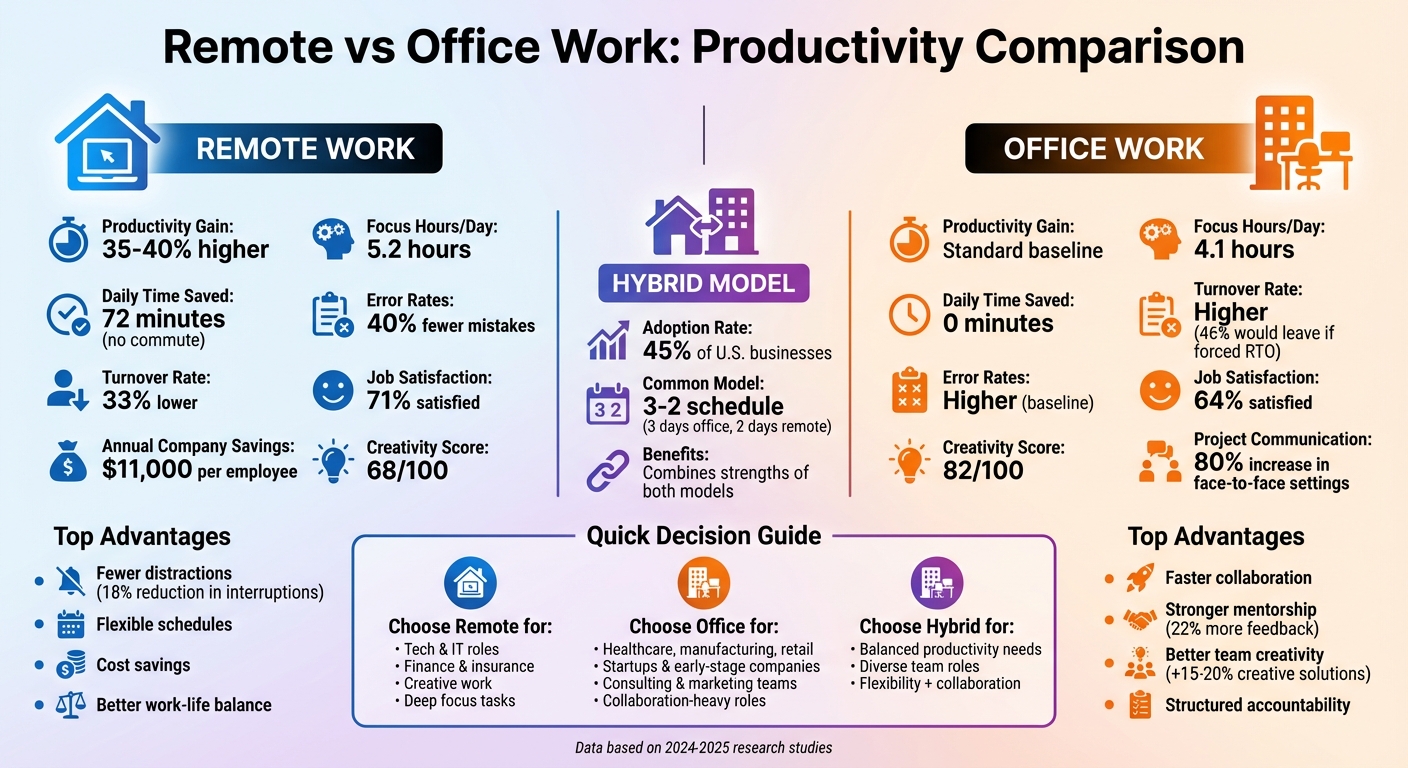
Remote work increases productivity by 35-40%, saves employees 72 minutes daily (no commute), and reduces turnover by 33%. However, office work fosters faster collaboration, stronger mentorship, and team creativity. Hybrid models, combining both, are now used by 45% of U.S. businesses, balancing individual focus with teamwork.
- Remote Work Advantages: Fewer distractions, flexible schedules, and cost savings ($11,000 per employee annually).
- Office Work Advantages: Better teamwork, quicker knowledge sharing, and structured environments that boost accountability.
- Hybrid Work: Offers flexibility while maintaining collaboration benefits.
| Metric | Remote Work | Office Work |
|---|---|---|
| Productivity Gain | 35-40% higher | Standard |
| Daily Time Saved | 72 minutes (no commute) | 0 minutes |
| Creativity Score | 68/100 | 82/100 |
| Turnover Rate | 33% lower | Higher |
The best model depends on your business needs. Remote work suits focused tasks, while office setups excel in collaboration. Hybrid models combine the strengths of both.
How Remote Work Improves Productivity
Remote work fosters conditions that naturally enhance productivity. In fact, 77% of remote workers report being more productive when working from home at least a few times per month. This improvement is largely driven by three key factors: fewer distractions, flexible schedules, and the elimination of commutes. Together, these elements create measurable gains in performance.
Fewer Distractions and Better Focus
Traditional office settings are often riddled with interruptions that break concentration. On average, office workers face about 3.40 interruptions per day, compared to 2.78 for remote employees – an 18% reduction. These interruptions can add up, with office workers losing as much as 6.52 hours per week trying to regain focus. It takes about 23 minutes to recover deep concentration after a single disruption.
Remote workers, on the other hand, can shape their environment to minimize distractions. They can create dedicated workspaces, mute unnecessary notifications, and block out time for focused tasks. As a result, remote employees spend about 273 minutes (4.55 hours) per day on focused work, compared to 223 minutes (3.72 hours) for their office-based counterparts. Over the course of a year, this adds up to an additional 62 hours of concentrated work time. This ability to maintain focus lays the groundwork for the added flexibility that remote work provides.
Time and Energy Saved from No Commute
Commuting is a notorious drain on both time and mental energy. Remote employees save an average of 72 minutes per day by skipping the commute. About 40% of this reclaimed time is reinvested into productive work.
Data from TMetric‘s 2025 dataset highlights these efficiencies. Remote workers log an average of 6 hours and 55 minutes per day, producing 5 hours and 12 minutes of productive work. In contrast, office workers log 7 hours and 44 minutes, but only produce 5 hours and 17 minutes of productive output. Essentially, remote workers achieve nearly the same level of productivity while working 49 fewer minutes. Moreover, for every 1 percentage-point increase in remote work participation, businesses see an approximate 0.08 percentage-point boost in overall productivity.
sbb-itb-ba0a4be
How Office Work Improves Productivity
While remote work can enhance individual focus, office environments bring something unique to the table: they amplify team collaboration, encourage faster knowledge sharing, and create a sense of accountability that can drive measurable improvements in productivity.
Quick Collaboration and Knowledge Sharing
Face-to-face communication fosters better problem-solving, with project communication increasing by 80% when teams work in person. On the flip side, remote teams experience communication lapses in 17% of assignments, which can hinder progress.
Collaboration in person has tangible benefits. Teams working together physically are 50% more effective at completing tasks compared to individuals working solo. Moreover, in-person teams are more likely to generate bold, creative ideas, whereas remote teams often focus on technical or data-driven solutions.
Proximity also encourages spontaneous exchanges of knowledge. For instance, employees working on the same floor are six times more likely to interact than those located on different floors. Interestingly, 90% of office interactions happen at individual desks, showcasing the value of well-structured workspaces. Studies even show that 911 call operators perform 10% better in high-stakes situations when they share the same room with colleagues, as opposed to being in separate spaces.
This natural collaboration often leads to stronger mentorship opportunities.
Better Leadership Access and Mentorship
Offices provide fertile ground for mentorship, often described as an "escalator for new talent". Junior employees benefit from proximity to experienced leaders, gaining insights and guidance that might not occur as organically in remote setups.
"Mentorship is an organic, dynamic and ongoing process that, at least in its most impactful form, can’t be overly structured." – Entrepreneur
For example, engineers working in close proximity to their teams receive 22% more feedback, which correlates with a 7% higher likelihood of earning long-term pay raises. Additionally, being near high-performing peers can increase an employee’s own productivity by 15%. It’s no surprise that 35% of hybrid employees cite the presence of managers or leadership in the office as a key reason for coming in.
Structured Environment and Accountability
The office environment naturally fosters accountability and focus – not through micromanagement, but by working alongside peers. This "motivation by association" helps employees stay on task while reducing the constant pressure to be online, a common issue in remote work settings.
Nearly half of employees report better mental health when they can separate their work and personal lives, a distinction that physical offices help establish. This separation also reduces "digital presenteeism", the need to always appear online, which is a growing contributor to burnout in remote work.
Offices also play a pivotal role in onboarding and skill development. New hires tend to reach peak productivity faster when they work in structured, in-person environments. In contrast, remote onboarding can delay this process by one to three months. Companies with in-office or hybrid models often see 42% higher productivity compared to the average U.S. workplace.
A June 2024 study published in Nature examined 1,612 graduate employees at Trip.com in Shanghai, China. Researchers Nicholas Bloom, Ruobing Han, and James Liang found that while overall productivity was stable between fully in-office and hybrid workers, structured office interactions were crucial for managers. These interactions helped maintain team accountability and social connections, leading to a 33% drop in resignation rates for hybrid workers. As a result, Trip.com expanded its hybrid policy company-wide.
These structured benefits lay the groundwork for further strategies aimed at boosting productivity, which will be explored later.
Remote vs Office Work: Side-by-Side Comparison
This section takes a closer look at how remote and office work stack up across key productivity measures.
Productivity Metrics Compared
The numbers paint a clear picture. Remote workers report 35-40% higher productivity gains compared to their office-based peers. While office employees average 7 hours and 44 minutes daily, only 68.3% of that time is spent on active work – about 2 hours and 27 minutes are lost to distractions or non-productive activities. On the other hand, remote employees work slightly shorter days, averaging 6 hours and 55 minutes, yet deliver nearly the same results.
Mistakes are another area where remote work shines, with 40% fewer errors compared to office settings. Additionally, remote workers enjoy 5.2 hours of focused work per day, outperforming the 4.1 hours seen in office environments. However, when it comes to creativity, office settings take the lead. They score 82 out of 100 for team-based innovation, compared to 68 for remote setups, and in-person brainstorming generates 15-20% more creative solutions.
Retention figures highlight another advantage for remote work. Companies offering remote or hybrid models experience a 33% lower quit rate, and 46% of employees working remotely say they’d consider leaving if forced back to the office full-time. This retention boost also translates into annual cost savings for companies.
| Metric | Remote Work | Office Work |
|---|---|---|
| Productivity Gain | 35-40% higher | Standard |
| Focus Hours/Day | 5.2 hours | 4.1 hours |
| Active Work Share | ~75% | ~68.3% |
| Error Rates | 40% fewer mistakes | Higher |
| Creativity Score | 68/100 | 82/100 |
| Turnover Rate | 33% lower (Hybrid/Remote) | Higher (46% would leave if RTO mandated) |
| Daily Time Saved | 72 minutes (no commute) | 0 minutes |
| Annual Company Savings | $11,000 per employee | Standard |
| Job Satisfaction | 71% satisfied | 64% satisfied |
While office work excels in areas like teamwork and spontaneous collaboration, remote work is better suited for focus and individual productivity. As TMetric research aptly summarizes:
"Office boosts coordination speed; remote boosts focus efficiency"
Ultimately, the best choice depends on what your organization prioritizes. Increasingly, hybrid models are gaining traction as they combine the strengths of both approaches. Up next, we’ll dive into which industries and roles thrive in each work model, as well as the tools that can elevate productivity further.
Which Industries and Roles Work Best in Each Model
The type of work someone does often determines whether they thrive in a remote or office-based environment. Some roles demand deep focus, while others rely heavily on collaboration, and this balance often dictates the best setting for productivity.
Industries and Roles That Work Well Remotely
Certain industries seem tailor-made for remote work. Tech and IT is a prime example. Roles like software development, cloud services, and system design lend themselves well to distributed teams. A Microsoft study involving 18,000 engineers found that remote-first routines boosted production-ready lines of code by 13% over a year and increased deep-focus sessions (lasting over two hours) by 17%.
Finance and Insurance is another sector that thrives in remote setups. By late 2022, 37.6% of workers in this industry were participating in remote work. Tasks such as data analysis, actuarial calculations, and fund management benefit from the uninterrupted focus that remote environments provide. Interestingly, remote work in this field has been linked to a 0.08–0.09% increase in Total Factor Productivity.
Professional, Scientific, and Technical Services also see high remote participation rates, with 41.4% of employees working remotely. Similarly, Creative Fields like writing, graphic design, and digital media production thrive in remote setups, where flexibility often enhances creativity and output.
Industries and Roles That Work Well in Offices
On the flip side, some industries are inherently tied to physical locations. Healthcare, Manufacturing, and Retail are clear examples. These sectors rely on on-site equipment or direct, face-to-face interactions, leading to some of the lowest remote participation rates: food services (4.8%), mining (7.2%), construction (7.8%), transportation (8.8%), and retail (9.4%).
Startups and Early-Stage Companies often benefit from the collaborative buzz of an office environment. For instance, Atlassian found that junior engineers participating in an 8-week, in-person pair-programming program reached skill mastery milestones 35% faster than those working virtually. This reduced ramp-up time from 40 days to just 26. In-person mentoring plays a big role in speeding up skill development.
Consulting and Marketing Teams also thrive in office settings. Brainstorming sessions held face-to-face tend to generate 15–20% more creative solutions. As Amazon CEO Andy Jassy pointed out:
"Significant advantages of being together"
For roles requiring intense collaboration, strategic planning, or quick decision-making, the energy and immediacy of an office environment often outweigh the benefits of working remotely. Ultimately, the choice of work model depends heavily on the specific needs of the role and the industry.
Tools to Boost Productivity in Remote and Office Settings
Effective software tools can make a huge difference in productivity, whether your team works remotely, in an office, or a mix of both. Small businesses don’t need an overwhelming number of apps. Instead, focusing on a few key tools for communication, project management, and document handling can yield noticeable improvements.
Tools for Remote Work Productivity
Remote teams often face challenges like staying connected across time zones. That’s where platforms like Slack shine. Acting as a central hub for communication, Slack’s AI search and summarization features reportedly save users 97 minutes per week. Its "huddles" feature allows for quick audio or video check-ins without the hassle of formal scheduling. Plus, it integrates with over 2,600 apps to streamline workflows.
For managing projects, Trello provides a visual, Kanban-style system that’s easy to use. Its simple "To Do, Doing, Done" columns replace clunky spreadsheets and physical whiteboards, making project tracking straightforward. For more complex workflows, Asana offers features like Gantt charts and automated task assignments, while Notion serves as a centralized knowledge base for protocols, workflows, and brand guidelines.
Kate Jenson, Head of Americas at Anthropic, sums up Slack’s impact:
"Slack has been essential to our growth, our speed, and our ability to stay aligned as we scale."
Another standout is Google Workspace, which combines business email (Gmail), cloud storage (Drive), and real-time co-editing in Docs and Sheets. With 99.9% email uptime and plans starting at $6 per user per month, it’s a reliable option for remote teams.
For businesses needing a professional U.S. presence without a physical office, BusinessAnywhere‘s virtual mailbox and document dashboard simplify mail management and digital archiving. It’s a practical solution for remote-first companies.
While these tools are tailored for remote teams, office-based setups require tools that enhance in-person collaboration.
Tools for Office Work Productivity
For teams working in an office, tools that streamline face-to-face collaboration and reduce administrative tasks are key. Zoom Workplace is a versatile option, combining video conferencing, team chat, and a business phone system into one platform. This consolidation reduces the need for multiple apps.
Dave Kester, Director of IT at GableGotwals, highlights the simplicity of Zoom Workplace:
"We used to do an hour’s worth of training for conferencing. Now, we probably spend ten minutes on it as part of the onboarding."
Another helpful tool is DeskTime, which offers automatic time tracking, shift scheduling, and absence calendars. With a 4.5/5 rating from over 2,000 reviews, it helps managers monitor workloads without micromanaging and identifies inefficiencies in workflows.
For hybrid teams, BusinessAnywhere’s cloud phone systems ensure seamless communication. Employees can handle business calls from anywhere, keeping voicemails and messages organized in one place. This setup maintains a professional image, whether team members are in the office or working remotely.
Shobi Zietlow, President and Owner of Referral Staffing Solutions, appreciates the efficiency of integrated tools:
"Being able to pay one invoice versus multiple invoices has saved me a huge amount of time. Training new hires on a single integrated tool accelerates onboarding."
With the right mix of tools, businesses can support their work model effectively and make transitions between remote and office setups much smoother.
How to Transition Between Remote and Office Work Models
Shifting between remote and office work setups isn’t just about logistics – it’s about redesigning workflows to maintain productivity and ensure team cohesion. A clear, structured approach can help you manage this transition without losing momentum or focus.
Evaluate Your Team and Business Needs
Start by assessing the nature of each role within your team. Jobs that involve mostly independent work – like software engineering, finance, or content creation – tend to be better suited for remote work. On the other hand, roles requiring physical presence, such as lab work or manufacturing, are naturally tied to on-site operations.
Gather feedback from your team about their preferences and examine six months of productivity data, including metrics like cycle times, shipped features, and customer satisfaction. This information helps establish a baseline for evaluating the success of any changes. Interestingly, research suggests employees value the flexibility of working from home 2–3 days a week at an equivalent of about 8% of their salary.
Lynda Gratton, a Professor of Management Practice at London Business School, offers a valuable perspective:
"The question we should ask isn’t so much ‘How can hybrid work deliver on job flexibility?’ but rather ‘How can the redesign of work increase productivity, with hybrid work as an enabler?’"
Test a Hybrid Work Setup
Before making a full-scale change, consider running a 90-day pilot program with a small team or department. A common approach is the 3-2 model – three days in the office and two days remote – which, as of 2026, is used by about 75% of companies with hybrid policies. Many organizations designate specific in-office days, like Tuesdays and Wednesdays, to encourage collaboration and mentoring.
During the pilot, set clear guidelines for core hours and response expectations. For instance, you might require availability between 10:00 AM and 3:00 PM, set specific response times, and designate collaboration days. These measures can help avoid confusion and resentment later. After the pilot, evaluate how the setup impacts productivity and refine as needed.
Track Productivity Metrics After the Change
Once the pilot phase is complete, focus on measuring outcomes to validate your transition. Instead of tracking hours worked, monitor specific metrics like shipped features, resolved tickets, cycle times, and customer satisfaction scores. Comparing these results to your baseline data will help you fine-tune the setup. Regular check-ins – perhaps every two weeks – with your team can help identify trends and address any issues promptly.
Pay special attention to focus time. Studies show that hybrid teams often achieve only 31% deep focus time compared to 45% for fully office-based teams. If focus time drops, consider protecting the first 2–3 hours of the workday from recurring meetings to give employees uninterrupted time to concentrate.
Be mindful of proximity bias in performance reviews. Ensure evaluations are based on deliverables rather than physical presence. If remote workers consistently receive lower ratings despite similar output, it could signal that your approach needs tweaking.
Finally, conduct quarterly retrospectives to review what’s working and what isn’t. If a metric proves unhelpful or easily manipulated, replace it with one that provides more meaningful insights. The ultimate goal is to create an environment that aligns with your business needs while keeping your team motivated and engaged.
Conclusion
There’s no universal formula for productivity – it depends on the industry, team dynamics, and the nature of the work itself. Remote work often thrives when it comes to tasks requiring deep focus and individual effort, while office environments tend to foster spontaneous collaboration, mentorship opportunities, and a sense of community.
Consider this: data reveals that 62% of remote workers complete tasks at higher rates, yet office teams often lead in creative collaboration.
By 2026, many companies have embraced hybrid work as a balanced solution, with 45% of U.S. businesses adopting this model. This approach allows organizations to tailor work environments to the tasks at hand – dedicating remote days for focused, individual work and reserving office time for brainstorming sessions and team-building activities.
Of course, implementing the right work model is just part of the equation. Success also hinges on having the proper infrastructure in place. Tools like those offered by BusinessAnywhere can simplify operations, whether your team works remotely, in the office, or through a hybrid setup. From business registration and compliance management to virtual mailbox and online notary services, centralized solutions ensure your business stays on track regardless of where your team operates.
The key is to focus on your core business needs, measure the metrics that truly matter, and provide your team with the flexibility and tools they need to succeed. Choose a work model that aligns with your goals and remain adaptable, continuously assessing and refining your approach as your business evolves.
FAQs
Which roles in my company should be remote vs in-office?
Roles that are ideal for remote work often involve tasks that can be done independently or rely heavily on digital communication. Examples include software developers, graphic designers, content writers, and digital marketers. These positions thrive on flexibility and the ability to concentrate without interruptions.
On the other hand, some roles are better suited for in-office settings. Jobs that require regular face-to-face interaction, hands-on work, or access to specialized equipment – like manufacturing staff, lab technicians, or receptionists – typically fall into this category. It’s essential to evaluate the nature of the job and the tools needed to ensure productivity is maintained.
How do I measure productivity without tracking hours?
To gauge productivity without relying on hours worked, shift your attention to task-based and outcome-focused metrics. Evaluate performance by looking at the quality, quantity, and timeliness of completed tasks. Factor in goal completion and progress on project milestones as well. You can also analyze location-based performance data to see how various work environments impact results. This approach emphasizes outcomes over the time invested.
What hybrid schedule works best for my team?
The ideal hybrid schedule strikes a balance between flexibility, productivity, and what employees prefer. A good starting point is to test different combinations of remote and in-office days to see what works best for your team. Studies indicate that spending around 60% of the workweek on-site – roughly three days in the office – while working remotely for two days can boost both productivity and satisfaction levels.
However, there’s no one-size-fits-all solution. Consider the specific responsibilities of your team and adjust the schedule based on their feedback and performance data. This approach ensures the arrangement supports both individual needs and overall business goals.