
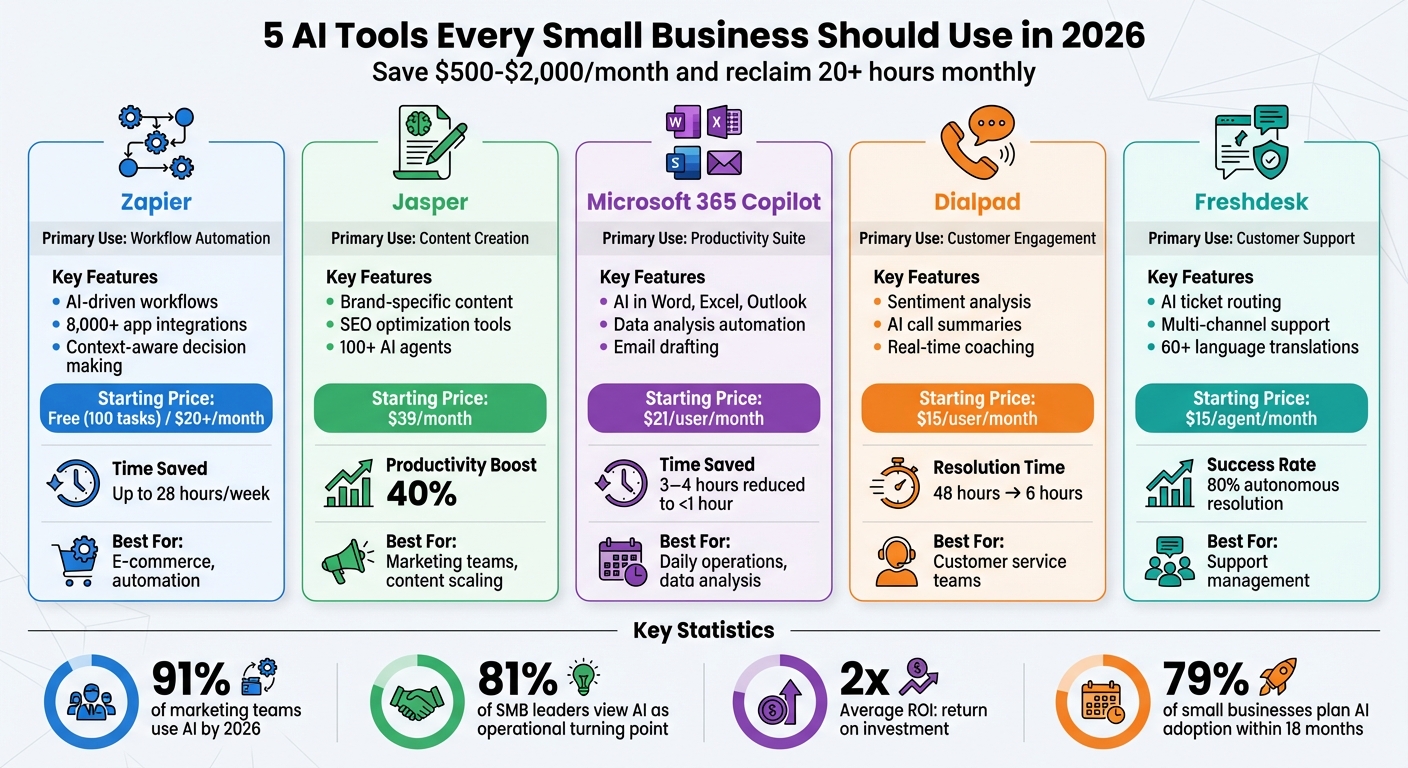
In 2026, small businesses are leveraging AI tools to save time, cut costs, and improve efficiency. These tools act as digital assistants, automating repetitive tasks and enabling small teams to operate like larger organizations. Here are five must-use AI tools for small businesses:
- Zapier: Automates workflows across 8,000+ apps with AI-driven decision-making. Saves time by connecting tools like Shopify and QuickBooks.
- Jasper: Handles content creation at scale, generating marketing assets, product descriptions, and more while maintaining brand consistency.
- Microsoft 365 Copilot: Integrates AI into Word, Excel, and Outlook for tasks like data analysis, email drafting, and financial reporting.
- Dialpad: Combines phone, messaging, and video with AI-powered customer support features like sentiment analysis and automated summaries.
- Freshdesk: Simplifies customer support with AI agents that resolve queries, route tickets, and provide real-time translations.
Key Benefits:
- Businesses save $500–$2,000/month and reclaim 20+ hours monthly.
- Teams achieve higher productivity and reduce errors with automated workflows.
- Affordable pricing plans make these tools accessible for small businesses.
Quick Comparison:
| Tool | Primary Use | Key Features | Starting Price |
|---|---|---|---|
| Zapier | Workflow Automation | AI-driven workflows, 8,000+ app integrations | Free (100 tasks) / $20+ per month |
| Jasper | Content Creation | Brand-specific content, SEO tools | $39/month |
| Microsoft 365 Copilot | Productivity | AI in Word, Excel, Outlook | $21/user/month |
| Dialpad | Customer Engagement | Sentiment analysis, AI summaries | $15/user/month |
| Freshdesk | Customer Support | AI ticket routing, multi-channel support | $15/agent/month |
These tools are transforming how small businesses operate by automating tasks, improving workflows, and enhancing customer interactions. Start with the one that aligns with your biggest challenges and scale from there.
5 Essential AI Tools for Small Businesses in 2026: Features and Pricing Comparison
1. Zapier for Workflow Automation
In 2026, Zapier stands out as an AI orchestration platform that links over 8,000 apps, including heavyweights like QuickBooks, Shopify, Stripe, and HubSpot. What truly sets it apart is Zapier Central, which introduces AI agents capable of evaluating context, making decisions, and branching workflows based on factors like customer value or message urgency. This shift from static rules to dynamic decision-making helps small businesses save time and reduce errors.
Automation Capabilities
Zapier’s tools in 2026 are designed to simplify life for small business owners. The AI Copilot feature allows users to create complex, multi-step workflows just by describing their needs in plain English – no coding required. These intelligent systems can predict tasks based on past behavior and even fix errors by auto-formatting data.
Take Sarah, for example, who owns an eco-friendly e-commerce store in San Diego. In early 2026, she set up four Zapier automations to connect Shopify with QuickBooks and create low-stock alerts. The results? She saved 28 hours per week, reduced order errors by 94%, and boosted revenue by 41% in Q1 alone. Similarly, James, a freelance consultant in Austin, built a 5-step Zap involving Typeform, Notion, and Calendly to streamline lead qualification. His efforts saved him 19 hours per week and helped him close three extra clients per month, adding an impressive $9,400 in monthly revenue.
Pricing and Scalability
Zapier offers plans that grow with your business. The free plan provides 100 tasks per month, perfect for testing simple workflows. For solopreneurs, the Professional plan starts at around $20/month, supporting multi-step Zaps and AI logic. Small teams often choose the Team plan, which ranges between $69–$103.50/month and includes over 2,000 tasks plus collaboration tools. Smart use of Filters and Paths can cut task usage by 40–60%, ensuring Zaps only trigger under specific conditions – like processing orders over $150.
"Automation isn’t about replacing the human; it’s about freeing the human to do the high-value strategy that a Zap can’t." – Muhammad Arsalan
Ease of Implementation
Zapier’s straightforward setup makes it easy to see results quickly. With a library of pre-built templates and a natural language builder, even non-technical team members can create enterprise-level automations. For instance, Priya’s marketing agency in New York used AI Actions and Paths to automate support ticket routing and sales reporting. This 4-person team managed to save 52 hours per week collectively, and their average client response time dropped from 14 hours to just 47 minutes.
Zapier continues to prove that automation is not just about efficiency – it’s about enabling teams to focus on what matters most.
2. Jasper for Content Creation
By 2026, 91% of marketing teams are expected to use AI, with Jasper standing out as a leading tool for business-focused content creation. Jasper is built with over 100 specialized AI agents that handle everything from research to content generation. Its Content Pipelines manage the entire content lifecycle, while the Optimization Agent ensures your content performs well across both traditional search engines and newer discovery platforms.
Automation Capabilities
Jasper IQ uses your stored brand guidelines and company knowledge to deliver outputs that stay true to your brand identity. It also features Knowledge Base Connectors, which sync with external sources like SharePoint, ensuring updates to documents like pricing or positioning are instantly reflected. The Jasper Grid, a spreadsheet-like interface, allows businesses to create high-quality content at scale.
Take Cushman & Wakefield, for example. In January 2026, they used Jasper to cut marketing task times by 50%, saving over 10,000 hours annually. Adidas, another major brand, generated 7,500 product descriptions in just 24 hours using Jasper’s bulk content tools.
"It’s not just about efficiency gains, it’s about augmenting human creativity, scaling expertise, and unlocking new ways to engage customers and drive business outcomes."
– Peter So, VP of Digital Innovation, Cushman & Wakefield
These tools make it easier than ever to integrate automation tools for remote businesses into daily operations.
Integration with Small Business Tools
Jasper’s automation capabilities extend to its integrations with popular business tools. It works with Google Docs, Google Sheets, and Microsoft Word through add-ins, while the Jasper Everywhere Chrome extension streamlines browser-based workflows. For team collaboration, Jasper integrates directly into Slack, bringing AI-powered assistance into everyday conversations.
For advanced automation, Jasper connects to over 5,000 apps via platforms like Zapier, Make, and Pabbly Connect. Its integration with Salesforce Marketing Cloud ensures automated content flows smoothly into marketing campaigns. Jasper’s Google Sheets add-on simplifies bulk tasks like creating product descriptions or social media posts. Additionally, its partnership with Surfer SEO provides keyword recommendations and optimization scores.
Pricing and Scalability
Jasper offers flexible pricing to suit businesses of all sizes:
- Creator Plan: $39/month (billed annually) for one user, unlimited words, one brand voice, and five knowledge assets.
- Pro Plan: $59/month (billed annually) or $69/month (monthly), supporting up to five team members, three brand voices, and 10 knowledge assets.
- Business Plan: Custom pricing for unlimited seats, enhanced API access, and advanced features like single sign-on.
With over 1.8 million active users generating more than 15 million words daily, Jasper is a proven tool for scaling content efforts. In 2026, small businesses using AI tools reported a 40% productivity boost, and 60% of marketers tracking AI ROI saw at least a 2× return on investment.
Ease of Implementation
Jasper is designed to be user-friendly, even for those without technical expertise. It includes over 50 specialized templates for tasks like ad copy and blog posts. For long-form content, the "Boss Mode" feature can handle articles exceeding 5,000 words. You can also upload 5–10 sample pieces to train Jasper on your brand’s tone, cutting down on editing time. The Campaign Builder transforms a single product description into a full suite of assets, including press releases, blog posts, and social media content.
With a 4.8-star rating from over 10,000 reviews, users appreciate Jasper’s ability to create content that matches their brand’s tone rather than sounding generic. A 7-day free trial for the Creator and Pro plans lets you explore its features before committing. Plus, support for over 30 languages makes it a great choice for businesses with global reach.
3. Microsoft 365 Copilot for Productivity

Microsoft 365 Copilot brings AI into popular Microsoft 365 apps like Word, Excel, and Outlook. According to a 2025 survey, 81% of small and medium-sized business leaders viewed that year as a turning point for rethinking operations with AI. Copilot is designed to streamline workflows and improve efficiency by using its Work IQ Intelligence Layer, which adapts to your business’s unique data, roles, and processes to predict needs and deliver relevant information automatically.
Automation Capabilities
Copilot takes care of repetitive tasks across the Microsoft 365 suite, eliminating the need to jump between apps. For instance, in Outlook, it condenses lengthy email threads and crafts professional responses. In Excel, it identifies trends – like AI feedback and purchase patterns – using simple, natural language commands instead of complex formulas. It also employs AI Agents to automate processes like onboarding, inventory tracking, and customer support.
The real-world impact is clear. In 2025, Ms. Yui Takeuchi from PKSHA Technology shared how Copilot reduced her time spent analyzing data and creating graphs in Excel from three to four hours down to under an hour. Similarly, Newman’s Own used Copilot in Word to draft campaign briefs in just 30 minutes, a task that previously took up to three hours.
"When I was analyzing the information, I would spend three or four hours looking at the data and making graphs. With Copilot, it takes less than an hour to do that same work."
– Ms. Yui Takeuchi, Customer Success, PKSHA Technology
For businesses looking to customize their tools, Copilot Studio allows the creation of custom AI agents without requiring coding skills. Additionally, the Agent Store offers pre-built assistants like Researcher or Analyst, ready to use. Security-conscious businesses can rest easy knowing Copilot operates on Microsoft’s trusted cloud and adheres to existing privacy and compliance protocols through Microsoft Purview. This focus on compliance and security is essential for businesses handling sensitive data.
These capabilities make Copilot a natural fit for simplifying and improving daily business tasks.
Integration with Small Business Tools
Copilot builds on its automation strengths by integrating seamlessly within the Microsoft 365 ecosystem. As of February 2026, it also connects with external platforms like Canva, HubSpot, Notion, Linear, Intercom, Google Contacts, and Google Calendar. Using federated connectors, it retrieves data in real time without indexing it. For branding consistency, SharePoint Organization Asset Libraries ensure teams have access to approved images and templates.
NextPath Career Partners has benefited from this cross-platform functionality. CEO James Hawley emphasized how Copilot consolidates information across Microsoft 365, enabling teams to stay within their existing systems instead of switching between platforms. For businesses using Dynamics 365 Business Central, Copilot simplifies financial analysis, highlights trends, and even drafts reports automatically.
"I love that it’s in our environment. It’s able to cross pollinate and gather information from all of the data we’ve got in Microsoft 365… it keeps our people working inside our systems."
– James Hawley, CEO and Founder, NextPath Career Partners
Pricing and Scalability
Microsoft 365 Copilot Business is priced at $21 per user per month, designed for organizations with fewer than 300 users. Through March 31, 2026, businesses can take advantage of a discounted rate of $18 per user per month when billed annually. Bundle options include Business Standard + Copilot for $22 per user per month and Business Premium + Copilot for $32 per user per month during this promotional period.
These pricing options align with small business budgets while delivering measurable benefits. Surveys show that faster time to market with Copilot has increased topline revenue by up to 6% for small and medium-sized businesses. Additionally, 59% of respondents reported operating cost reductions of 1% to 20%, and 51% saw supply chain cost savings of 1% to 10%.
Ease of Implementation
For those already using Microsoft 365, Copilot requires no extra setup. It works immediately within your existing apps, and its conversational interface allows you to complete complex tasks using natural language instead of formulas or code. Microsoft supports businesses with guided onboarding, learning resources, and adoption kits tailored specifically for small businesses.
Companies like Morula Health have used Copilot in Word to summarize scientific data tables, cutting content creation time from weeks to just days – all while maintaining accuracy. The Rider Firm also leveraged Copilot in Excel to consolidate product specifications, streamlining the process for website updates. With 79% of small businesses planning to adopt AI agents within the next 12 to 18 months, starting with familiar tools like Word and Outlook can save time and pave the way for more advanced uses.
sbb-itb-ba0a4be
4. Dialpad for Customer Engagement
Dialpad is designed to simplify operations and improve how businesses connect with their customers. This cloud-based platform combines phone calls, video meetings, and messaging into a single system. Its AI-powered tools take the lead on tasks like scheduling, order updates, and resolving customer issues – all without human intervention.
Automation Capabilities
Dialpad’s AI provides real-time support during customer interactions. The Live Coach feature offers instant suggestions and sentiment analysis, helping agents adapt their approach based on the customer’s mood. Another standout tool, AI CSAT, predicts customer satisfaction scores for every call, removing the need for post-call surveys. Additionally, AI Recap creates searchable transcripts and concise summaries with actionable insights. These tools have delivered measurable results: Camino Financial reduced customer inquiry resolution time from 48 hours to just 6, while WizeHire improved their callback times by 50%.
"In customer experience, this means AI systems that don’t just surface insights or respond to prompts, but proactively manage interactions end to end."
– Shane Freeburg, SVP of Global Support Services, Dialpad
With Dialpad, agents can manage twice as many calls, and businesses can set up conversational flows in minutes using drag-and-drop tools.
Integration with Small Business Tools
Dialpad seamlessly connects with tools like Salesforce, HubSpot, Zendesk, Google Workspace, Microsoft 365, Slack, and Zapier. These integrations automatically log interactions, ensuring agents have the context they need. It also supports automated user provisioning and single sign-on through Okta, Azure, OneLogin, and Google.
Lori Grisham, Director of Customer Happiness at The Hero Co., highlighted its simple setup process:
"Implementing Dialpad was really easy. It’s a plug-and-play system… Once we got our numbers ported over, it probably took a couple of days to set up our contact centers. We were all set up within a week and ready to go."
Number porting typically takes just one to three days.
For specialized needs, Dialpad’s open APIs allow businesses to build custom workflows, such as automated SMS notifications or content archiving. The platform ensures customers can move between voice, chat, and email without repeating themselves, maintaining a consistent experience across channels.
Pricing and Scalability
Dialpad offers two main pricing tiers for small businesses. Dialpad Connect, starting at $15 per user per month, includes unlimited calling, SMS/MMS, AI-driven transcriptions, and 24/7 web and chat support. For businesses with contact center needs, Dialpad Support is available at $80 per user per month and adds features like AI Live Coach and sentiment analysis.
The platform is flexible, allowing businesses to adjust user counts instantly – ideal for seasonal changes or rapid growth. By consolidating communications into one platform, a 100-person team could save about $36,000 annually compared to using multiple services. Dialpad also offers a 14-day free trial and guarantees 100% uptime on Pro and Enterprise plans.
Ease of Implementation
Dialpad’s ease of use is a major advantage for small businesses, even those without dedicated IT teams. It works across Windows, macOS, iOS, Android, and select desk phones from Poly and Yealink. The admin console is intuitive, making it simple to manage on both desktop and mobile.
Mike Monteiro, Communications System Manager at EF Education First, shared:
"We can set up a new call center in 10 minutes, from anywhere."
The platform requires minimal training, and its conversational interface and real-time sentiment alerts help managers step in when needed to prevent negative customer experiences. While the AI performs well in most cases, its accuracy can drop in noisy environments or when handling strong accents.
5. Freshdesk for Customer Support Management
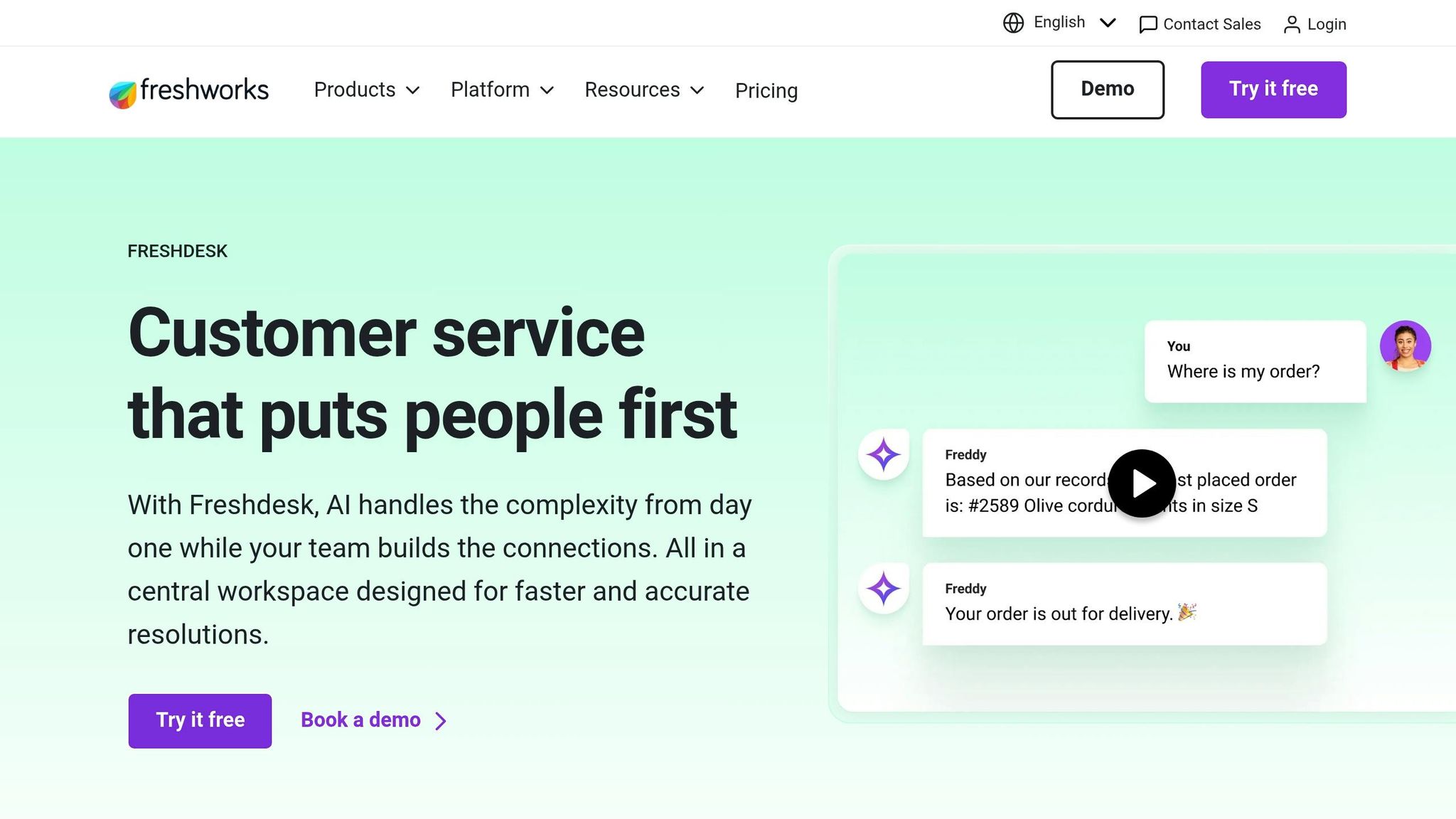
Freshdesk is a game-changer for handling customer support, offering AI-driven tools to tackle increasing ticket volumes with ease. By combining automated workflows and smart routing, it lets businesses manage inquiries across email, chat, phone, and social media – all from one centralized workspace. With over 74,000 businesses worldwide relying on this platform, it’s clear that Freshdesk helps teams of all sizes work more efficiently and effectively.
Automation Capabilities
At the heart of Freshdesk’s automation is Freddy AI Agent, which autonomously resolves routine customer queries with an impressive 80% success rate – and usually within 2 minutes. It can handle tasks like updating records, processing requests, and answering FAQs round the clock. For more complex issues, Freddy AI Copilot steps in, offering real-time summaries, live translations in over 60 languages, and suggested replies to save time. This combination can boost productivity by as much as 60%.
Freshdesk also excels at ticket routing, using factors like customer sentiment, agent expertise, and workload to prioritize and assign tickets intelligently. For example, UK-based retailer Hobbycraft introduced Freshdesk’s AI chatbots in 2025. These bots now handle up to 30% of customer queries independently. Simon Birch, Hobbycraft’s Head of Customer Experience, shared:
"AI chatbots now answer up to 30% of questions, helping to free up Hobbycraft’s agents so they can spend more time sharing their crafting knowledge".
The automation benefits don’t stop there. Agents save an average of 54 hours annually thanks to automated workflows, allowing them to focus on more meaningful customer interactions.
Integration with Small Business Tools
Freshdesk’s integration capabilities make it a natural fit for businesses of all sizes. It connects with over 1,000 marketplace apps like Shopify, Slack, Microsoft Teams, and Salesforce, and even extends to 8,000 additional tools for seamless data sharing and process automation. The Command Center consolidates all communication channels into one workspace, giving agents a complete view of customer interactions without needing to switch between platforms.
Pricing and Scalability
Freshdesk’s pricing is flexible enough to accommodate businesses at different stages of growth. The Growth Plan starts at $15 per agent per month (billed annually) and includes essential automation and multi-channel support. For $49 per agent per month, the Pro Plan adds more advanced routing and workflow features. AI capabilities are available as add-ons: Freddy AI Copilot costs $29 per agent per month, while Freddy AI Agent is priced at $49 per 100 sessions. There’s even a free plan for up to 2 agents, allowing small businesses to test the waters before committing to paid options.
Freshdesk also boasts a quick return on investment, with a reported payback period of under three months and a 75% reduction in ticket resolution time.
Ease of Implementation
One of Freshdesk’s standout features is its straightforward setup, designed to be up and running in minutes – even for teams without IT support. Luke Gaspar, a Field Engineer, praised its simplicity:
"Freshdesk’s workspace is user-friendly and has all the necessary features to manage and assign tickets effectively".
The platform also includes a Simulation Mode, which allows businesses to test AI workflows on past tickets to gauge potential ROI before going live. Additionally, with over 50 prebuilt workflows tailored to specific industries, small businesses can start automating their support processes right away without needing to create custom solutions from scratch.
Conclusion
In 2026, these five AI tools have transitioned from experimental novelties to critical tools for small businesses. As Stacklabx puts it:
"The most successful small businesses in 2026 are not the largest or the most funded – they are the most intelligently automated".
These platforms empower small teams to work with the efficiency of much larger organizations. Ken McMahon from Nextiva highlights this advantage:
"AI levels the playing field. It allows small and medium-sized enterprises (SMEs) to access the same fast customer service, instant data analysis, and creative opportunities as large corporations – at a significantly lower cost".
To get the most out of these tools, consider the 1-3-1 Rule: adopt one core AI platform (such as Microsoft 365 Copilot), three specialized agents (focused on marketing, operations, and support), and one written AI governance policy. Start by targeting your biggest time-consuming tasks, then gradually expand your AI toolkit. On average, AI tools save small business employees 5.6 hours per week, while managers reclaim 7.2 hours per week. However, pairing AI with strong business support remains equally important.
While AI takes care of your digital workflows with speed and precision, your business still needs a solid operational and legal foundation. BusinessAnywhere is designed to provide exactly that. Whether you’re launching a new venture or maintaining an existing one, BusinessAnywhere offers business registration services starting at $0 plus state fees, including a free year of registered agent service. For remote entrepreneurs and digital nomads, the virtual mailbox service provides unlimited mail scanning and global forwarding from just $20/month, giving you a professional U.S. address no matter where you are.
Take it a step further with BusinessAnywhere’s bookkeeping services to ensure your financial records stay accurate and tax-ready. Or explore the Digital Nomad Kit – a complete package that includes LLC formation, EIN application, compliance tools, and banking setup support. With AI tools streamlining your daily operations and BusinessAnywhere managing your administrative needs, you’ll have a comprehensive system to succeed in 2026’s competitive digital marketplace. Together, these tools help small businesses optimize workflows, improve customer engagement, and compete on equal footing with larger players.
FAQs
Which AI tool should I start with first?
Start with AI tools designed to handle repetitive tasks and improve efficiency. Take ChatGPT, for instance – a popular choice in 2026 for crafting content and managing customer support. These tools help save time and simplify workflows, making them a practical first step for small business owners looking to optimize their operations.
How do I measure ROI from AI tools in my business?
To figure out the ROI of AI tools, start by comparing their costs – like subscription fees or setup charges – against the savings or benefits they bring. For instance, if an AI tool costs $50 per month but helps you save $500 in operational expenses, the return is obvious. Focus on tracking key metrics such as time saved, cost reductions, productivity improvements, and revenue growth. Regularly checking these numbers will help you ensure the tools are aligning with your business objectives.
What data privacy steps should I take before enabling AI?
To keep AI use safe and compliant in your small business, start by taking stock of all the AI tools you’re using and documenting how they handle data. Incorporate privacy-by-design principles into your processes, run regular audits, and use strong encryption to safeguard sensitive information. Make sure to follow regulations by securing proper consent for any AI training data and setting up measures to prevent misuse. These actions can reduce risks while strengthening trust with both your customers and business partners.