
New Jersey does not keep business filings with a Secretary of State — they sit with the Division of Revenue and Enterprise Services, part of the Department of the Treasury, which runs the state’s business name and entity search. A record shows the entity ID, the formation date, the current status, the registered agent, and the annual reports filed. Two searches cover most needs: a name availability check before you form, and a status lookup to confirm a company is active and current on its annual report.
Quick Summary
New Jersey’s filings sit with the Division of Revenue and Enterprise Services under the Treasury, not a Secretary of State. Putting a percent sign in front of your term turns a starts-with search into a contains search. Reservations cost $50 for 120 days.
Are you planning to start a business in New Jersey or need to verify information about an existing company? The New Jersey business entity search is an essential tool that allows you to access crucial information about businesses registered in the state. This comprehensive guide will walk you through the entire process of conducting a business entity search in New Jersey, helping you navigate the state’s official business portal with ease.
What is the New Jersey Business Entity Search Tool?
The New Jersey Department of Treasury’s Division of Revenue and Enterprise Services (DORES) maintains an official online database that contains information on all registered businesses in the state. This powerful tool, officially called the “New Jersey Business Records Service,” allows users to:
- Check if a business name is available for registration
- Find information about existing companies
- Access business documents and certificates
- Verify a company’s registration status
- Identify registered agents and business addresses
The search portal is an invaluable resource whether you’re starting a new business, conducting due diligence, or researching potential business partners. If you’re considering using a virtual business address for your New Jersey company, you’ll still need to verify your business name availability through this portal first.
How to Access the Official New Jersey Business Entity Search Portal
The official New Jersey business entity search portal is operated by the New Jersey Division of Revenue and Enterprise Services. You can access it through these steps:
- Visit the official New Jersey business records website at New Jersey Business Records Service
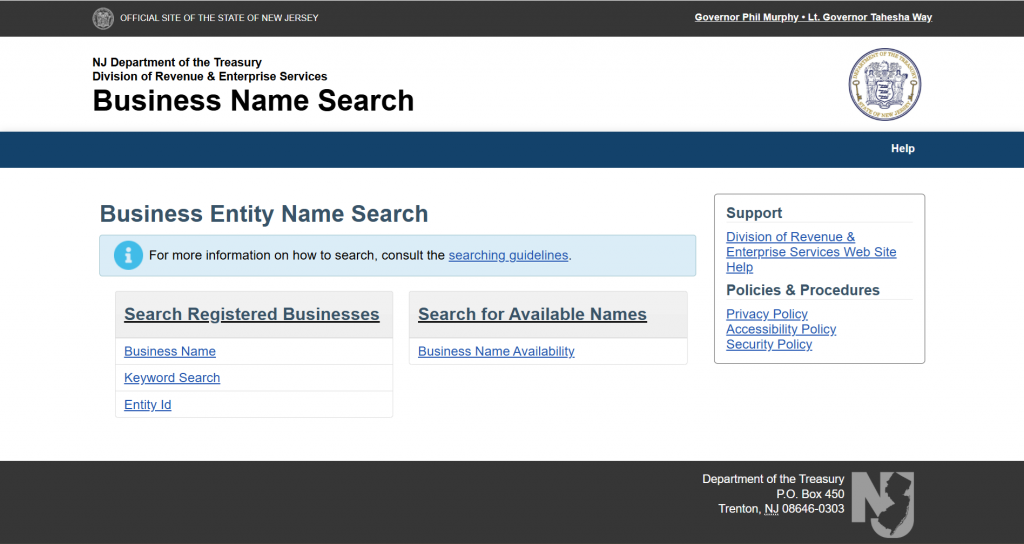
- Once on the site, you’ll see various search options to help you locate business information
The service is available 24/7, and the basic name search functionality is completely free to use.
Step-by-Step Guide to Searching for a Business Entity in New Jersey
The New Jersey business portal offers multiple ways to search for business entities. Here’s a detailed breakdown of each method:
1. Searching by Business Name
This is the most common search method and allows you to check if your desired business name is available or to find information about an existing business:
- Go to the Business Name Search page at New Jersey Business Name Search
- Under “Search Registered Businesses,” select the “Business Name” option
- Enter the business name (or part of it) you’re looking for in the “Search Criteria” field
- Pro tip: You can use the “%” symbol as a wildcard to replace unknown characters in the name
- Click the “Search” button
- Review the results that display in a table format
Example Search: If you’re searching for “Garden State Construction,” you would simply type that name in the search field. The results will show any businesses with names containing those words.
2. Searching by Entity ID
If you know the 10-digit ID number assigned to a business by the New Jersey Division of Revenue:
- Select the “Entity ID” search option
- Enter the complete ID number in the search field
- Click “Search”
- The system will return the exact matching entity if it exists
3. Business Name Availability Search
If you specifically want to check if a name is available for a new business:
- On the same search page, look for the “Business Name Availability” section
- Enter your proposed business name
- Click “Search”
- If the name is available, you’ll see a green “Available!” notice
- If the name is already taken or too similar to an existing business, you’ll see a list of conflicting names
The Percent Sign Trick That Makes the New Jersey Search Usable
Start with the thing that trips people up: New Jersey has no Secretary of State business search. Business records sit with the Department of the Treasury’s Division of Revenue and Enterprise Services, and if you are hunting for a New Jersey Secretary of State lookup you will not find one.
Once you are on the right page, the Business Name Search form is almost aggressively simple. One field, one button. And the instructions on it explain a behaviour that quietly ruins most searches.
Read the Three Lines Above the Box
| What the page says | What it actually means for you |
|---|---|
| Enter as much of the name as you are sure of | Partial names are expected. Do not type the whole legal name |
| A wild card is automatically inserted at the end of each search | Every search is a starts-with search whether you asked for one or not. A conflict in the middle of a longer name will not appear |
| Leave off endings like “Inc.” and “LLC.” unless you are sure of an exact match | Including the suffix narrows you to entities that spell it the same way you do, which is how a taken name looks free |
| Use “%” as a wildcard | This is the fix. Put a percent sign at the front and you turn a starts-with search into a contains search |
How to Use the Wildcard
| What you type | What you get back |
|---|---|
| Anchor | Names starting with Anchor, because the trailing wildcard is automatic |
| %Anchor | Names containing Anchor anywhere, including Blue Anchor Holdings |
| %Anchor%Marine | Names containing Anchor followed later by Marine, in that order |
| Anchor Marine LLC | Very little, because you have pinned the suffix as well as the words |
Which New Jersey Service to Use for What
The Business Records Service is a set of separate tools rather than one search, and only some of them are free. Knowing which is which saves you paying for an answer you could have had for nothing.
| Service | What it gives you | Reach for it when |
|---|---|---|
| Business Entity Name Search | Whether a name is on the register | Name availability. This is the free starting point |
| Business Entity Status Reports | A report on an entity’s current standing | Due diligence on a counterparty, where you need the detail rather than a yes or no |
| Business Entity Standing Certificates | An official certificate of standing | A bank, landlord or contract counterparty has asked for proof |
| Business Entity Documents | Copies of filed corporate and LLC documents | You need the actual formation or amendment paperwork |
| Business Entity Lists | Downloadable lists and abstracts of businesses on file | Market research or portfolio checks rather than a single lookup |
| Trade Name and Trade/Service Mark Status Report | Trade names and state marks, searched separately from entities | Checking a brand. A name can be clear as an entity and taken as a trade name |
| Certificate Validation | Confirms a certified document is genuine | Someone has handed you a certificate and you want to check it |
That separation is the second thing worth taking away. In several states one search covers entities, trade names and marks together. In New Jersey you have to run the entity search and the trade name and trade/service mark search as two jobs, and a phrase that clears the first can easily be sitting in the second.
Understanding the Search Results
When you conduct a business entity search in New Jersey, the results page displays a table with the following important information:
- Business Name: The official registered name of the entity
- Business ID: The 10-digit identifier assigned by the state
- Business Type: The legal structure (LLC, Corporation, etc.)
- Status: Whether the business is active, inactive, or in another status
- Formation Date: When the business was officially registered
Clicking on any business name in the results will provide additional details about the entity, including:
- Registered agent information
- Principal office address
- Filing history
- Business status details
New Jersey Business Entity Status Meanings
When reviewing search results, you’ll encounter various status labels. Here’s what they mean:
- Active: The business is in good standing with all required filings and payments up to date
- Inactive: The business has not maintained its filings and may be at risk of administrative dissolution
- Revoked: The business has had its charter revoked for non-compliance with state requirements
- Dissolved/Cancelled: The business has been officially closed either voluntarily or by administrative action
- Merged: The business has merged with another entity
- Converted: The business has changed its entity type
Understanding these status indicators is crucial when conducting due diligence on potential business partners or competitors.
New Jersey Status Labels and What They Mean for a Name
| Status | What it means | Is the name free to use? |
|---|---|---|
| Active | In good standing, filings and payments up to date | No |
| Inactive | Filings not maintained, and at risk of administrative dissolution | No. Still a live record, and it can be brought current |
| Revoked | Charter revoked for non-compliance | Not automatically. Revocations can be reversed |
| Dissolved / Cancelled | Officially closed, voluntarily or by the state | Not automatically. The record stays on file |
| Merged | Absorbed into another entity | Usually not. The name often stays associated with the surviving entity |
| Converted | Changed structure, for example from LLC to corporation | No. Same business, different form |
Unique Features of New Jersey’s Business Entity Search System
The New Jersey business search portal has several distinctive features that set it apart from other states:
Wildcard Searching
You can use the “%” symbol as a wildcard to replace unknown characters in a name. For example, searching for “Smith % Construction” would return results like “Smith & Sons Construction” or “Smith Brothers Construction.”
Case-Insensitive Searching
The search system ignores capitalization, making it more user-friendly. Whether you type “ACME CORPORATION,” “Acme Corporation,” or “acme corporation,” you’ll get the same results.
Downloading Business Lists
For a fee, you can generate and download lists of businesses that match specific criteria, which can be valuable for market research and competitive analysis.
Integrated Document Access
Unlike some states that separate their document repositories from their search functions, New Jersey’s system allows you to directly request official documents from the search results page.
Fees for New Jersey Business Entity Services
While basic name searches are free, many related services have associated fees:
- Business Status Report: $5 per report
- Certificate of Good Standing: $25 per certificate
- Certified Copies of Documents: $25 certification fee plus $10 per page
- Business Document Copies: $10 per page
- Name Reservation: $50 for a 120-day reservation
- Name Reservation Renewal: $50 for an additional 120 days
All fees can be paid online via credit card or electronic check, with credit card payments incurring a small service fee.
Business Name Reservation in New Jersey
If you’ve found an available business name but aren’t ready to form your entity immediately, New Jersey allows you to reserve the name for a limited time:
- Visit the online filing portal at the New Jersey business filings portal
- Select “File a Business Name Reservation”
- Choose Form UNRR-1 for a new reservation
- Complete the online form with your contact information and desired business name
- Pay the $50 reservation fee
This reservation holds your name for 120 days, preventing others from registering it. If you need more time, you can renew the reservation by filing Form UNRR-3 and paying another $50 fee before the initial reservation expires.
New Jersey Business Naming Requirements
Before searching for a business name, understand that New Jersey has specific naming rules:
For LLCs:
- Must include “Limited Liability Company,” “LLC,” or “L.L.C.”
- Cannot use corporation designators like “Inc.” or “Corp.”
- Cannot be identical or deceptively similar to another registered business
For Corporations:
- Must include “Corporation,” “Incorporated,” “Company,” “Inc.,” “Corp.,” or “Co.”
- Cannot be identical or deceptively similar to another registered business
Prohibited Terms:
- Terms implying government affiliation (FBI, Treasury, etc.)
- Professional service terms (Attorney, Engineer, etc.) unless properly licensed
- Financial institution terms (Bank, Trust, etc.) without proper authorization
- Offensive or discriminatory language
Sample Business Entity Search Walkthrough
Let’s walk through a sample search for a fictional business called “Garden State Builders LLC”:
- Access the New Jersey business name search portal
- Under “Search Registered Businesses,” select “Business Name”
- Enter “Garden State Builders” (no need to include “LLC” in the search)
- Click “Search”
Results page shows:
- Garden State Builders LLC (Active)
- Garden State Home Builders Inc. (Active)
- South Garden State Builders LLC (Inactive)
Clicking on “Garden State Builders LLC” reveals:
- Business ID: 0400123456
- Formation Date: January 15, 2020
- Registered Agent: John Smith
- Business Address: 123 Main Street, Trenton, NJ 08608
- Status: Active (Annual report filed March 2025)
This tells us the business is actively registered, has filed its required reports, and provides contact information if needed.
What to Do After Finding an Available Business Name
If your business entity search reveals that your desired name is available, here are your next steps:
1. Reserve the Name (Optional)
If you’re not ready to form your business immediately, reserve the name for $50 to hold it for 120 days.
2. Check Trademark Availability
Search the US Patent and Trademark Office database at the USPTO trademark database to ensure your name doesn’t infringe on registered trademarks.
3. Secure a Domain Name
Check if your business name is available as a domain using registrars like GoDaddy or Namecheap. A professional online presence is essential for most businesses today.
4. Form Your Business Entity
File the appropriate formation documents with the New Jersey Division of Revenue:
- For LLCs: Public Records Filing for New Business Entity ($125 filing fee)
- For Corporations: Certificate of Incorporation ($125 filing fee)
- For Nonprofit Corporations: Certificate of Incorporation ($75 filing fee)
Many entrepreneurs opt to use a virtual mailbox service when setting up their business to maintain privacy and manage mail efficiently.
5. Register for Taxes
Within 60 days of formation (or 15 days of beginning business), register with the Division of Taxation through the online Business Registration Application.
Conclusion
Conducting a business entity search in New Jersey is an essential step in starting a new business or researching existing companies. The state’s comprehensive online portal makes it easy to find the information you need, check name availability, and access official business documents.
By following the steps outlined in this guide, you can navigate the New Jersey business search system with confidence and ensure that your business starts on the right legal footing.
Remember that while the basic search functions are free, some services like document copies, certificates, and name reservations come with fees. Plan accordingly and include these costs in your business startup budget.
If you’re looking for flexibility in your New Jersey business operations, consider exploring options like a virtual office in Texas or other states that might offer advantages for your specific business needs.
For additional guidance, you can explore our other state business entity search guides in the resources section below.
Found the company and need proof it is active? Learn how to get a certificate of good standing in New Jersey.
FAQs About New Jersey Business Entity Searches
How long does a name reservation last in New Jersey?
A business name reservation in New Jersey lasts for 120 days and can be renewed for additional 120-day periods by filing a renewal form and paying another $50 fee.
What do different business status labels mean in New Jersey?
The most common status labels include Active (in good standing), Inactive (not in good standing), Revoked (charter revoked for non-compliance), and Dissolved/Cancelled (officially closed).
Can I check if my business name is available without reserving it?
Yes, the business name availability search is free and does not obligate you to reserve or register the name.
What information can I find through a New Jersey business entity search?
You can find the business name, ID number, entity type, status, formation date, registered agent information, and business address. This can be especially helpful when researching competitors or potential business partners.
How much does it cost to form an LLC in New Jersey?
The filing fee for forming an LLC in New Jersey is $125. This is a one-time fee paid to the Department of Treasury when submitting your Public Records Filing. If you’re operating from home, you might want to consider the pros and cons of using a home address for an LLC.
What should I do if my desired business name is taken?
If your desired name is already taken, you have several options:
- Choose a different name
- Use a distinctive DBA (doing business as) name
- Modify your original name to make it distinguishable
- Contact the existing business to see if they’re willing to sell or transfer the name
Can I search for a business by owner name in New Jersey?
Yes, you can search for businesses by principal name (officer/director, manager, etc.) through the New Jersey Business Records Service, though this search may require payment for detailed results.
Related Blog Posts
- Most New Jersey founders check New York too. Here is how to run a New York business entity search.
- Philadelphia side of the river? Check whether the name is taken in Pennsylvania.
- Incorporating in Delaware but operating in New Jersey? The Delaware lookup works a little differently.
- Connecticut clients too? Here is how to run a Connecticut business entity search.