
No-code tools let you create apps and websites without writing a single line of code. They use drag-and-drop interfaces, saving time and cutting costs for businesses. Here’s a quick overview of five popular no-code platforms:
- Bubble: Build complex apps with advanced integrations and workflows. Ideal for SaaS platforms and marketplaces.
- Softr: Turn Airtable or Google Sheets data into client portals or internal tools.
- Glide: Create apps from spreadsheets, perfect for mobile-friendly tools and dashboards.
- Adalo: Focused on native mobile apps for iOS and Android.
- Carrd: Best for single-page websites like landing pages and portfolios.
Quick Comparison
| Tool | Free Plan Features | Paid Plan Starting Price | Best For | Key Limitation |
|---|---|---|---|---|
| Bubble | No custom domain | $29/month | Complex apps & SaaS | Steep learning curve |
| Softr | 10 users | $49/month | Portals from Airtable/Sheets | User limits on higher plans |
| Glide | 10 users | $60/month | Mobile apps from spreadsheets | No native App Store publishing |
| Adalo | 200 records | $36/month | Native mobile apps | Performance with large datasets |
| Carrd | 3 sites on subdomain | $9/year | Single-page websites | Limited to single-page designs |
These tools are game-changers for entrepreneurs and small businesses. They help you launch faster, test ideas, and save on development costs. Let’s dive into the details of each platform.
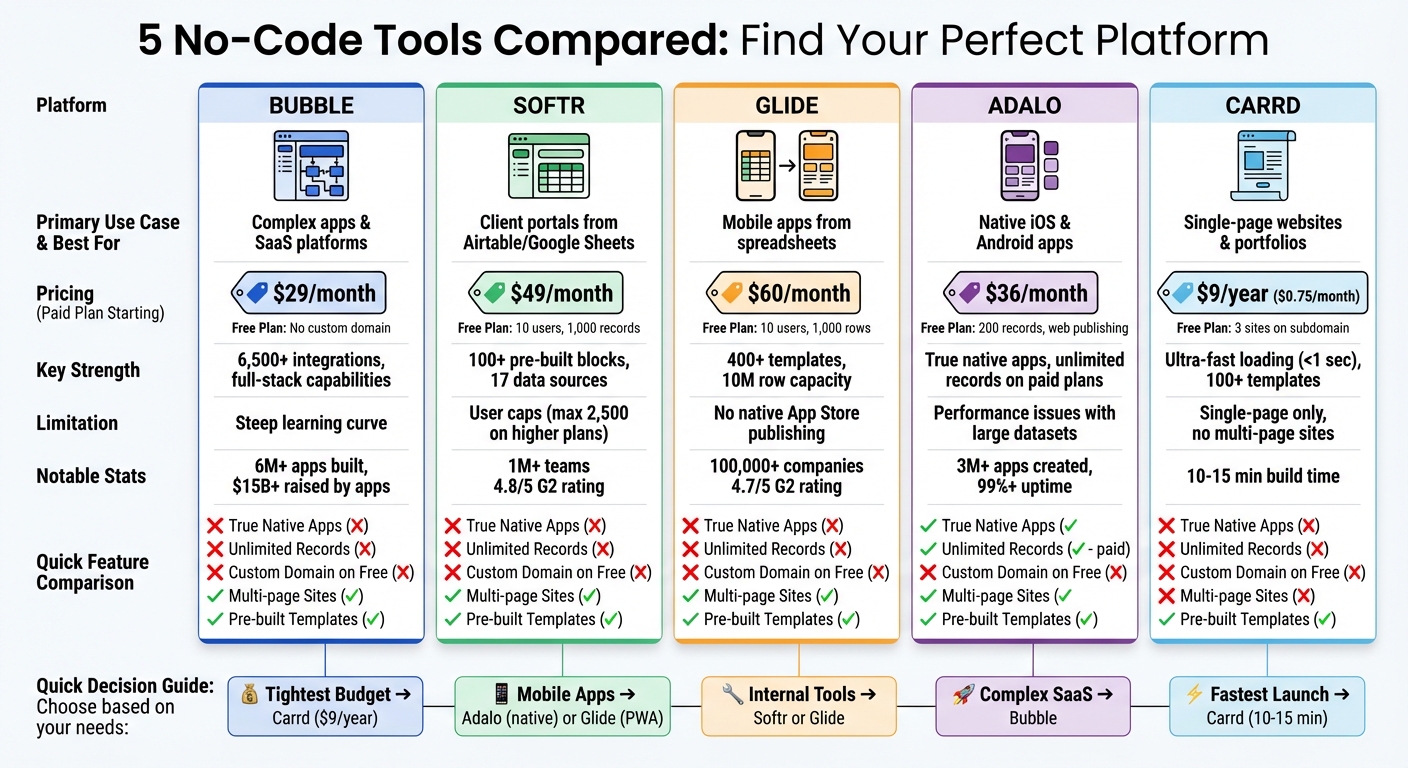
No-Code Platform Comparison: Features, Pricing, and Best Use Cases
1. Bubble
Bubble is a full-stack platform that handles design, database management, and more. With over 6 million apps built by a community of 5 million users, it’s become a go-to choice for entrepreneurs who want full control over their products. Apps created on Bubble have collectively raised more than $15 billion, showcasing strong investor confidence.
Drag-and-Drop Interface
Bubble’s visual editor makes app building accessible by allowing users to drag and drop elements like buttons, forms, and popups directly onto a canvas – completely bypassing the need for HTML or CSS. Its visual workflow editor simplifies automation, letting you set up actions like user registrations, payment processing, or sending automated emails by connecting visual blocks.
The platform also incorporates AI tools, including an AI Agent that can generate a functional app outline from a simple text description. Additionally, an AI-powered page creator helps users set up common layouts like dashboards or landing pages.
"I feel like Bubble allows me to do everything, but I’m not limited to anything." – Keren Franck, Product Manager, Unity
Real-world examples highlight Bubble’s potential. Flexiple co-founder Karthik Sridharan built a tech talent job board on Bubble that now generates over $3 million in annual revenue with just one developer. Similarly, Formula Bot reached 1 million users under the management of a single full-time founder, and Dr. Abrar Gundroo of Messly reported development speeds 12 to 20 times faster than traditional coding for a location-based marketplace for substitute physicians.
Integration Capabilities
Bubble’s plugin marketplace offers over 6,500 integrations. Its API Connector allows seamless connections to external services with public APIs. For example, you can integrate Stripe for payment processing, OpenAI for AI features, or Google Maps – all without needing to write code.
Recently, Bubble introduced a native mobile app builder in public beta. This feature allows users to publish apps directly to the Apple App Store and Google Play Store, expanding its reach into mobile development.
These integration options provide flexibility for businesses of all sizes.
Pricing Plans
| Plan | Monthly Price | Best For |
|---|---|---|
| Free | $0 | Learning and testing |
| Starter | $29 | Solo founders launching MVPs |
| Growth | $119 | Small teams scaling apps |
| Team | $349 | Startups with active users |
| Enterprise | Custom | High-traffic applications |
Bubble uses a pricing model based on "Workload Units" (WU), which scales according to your app’s compute needs. You can start with the Free plan to experiment and later upgrade to the Starter plan to launch your app on a custom domain.
Best Use Cases
Thanks to its user-friendly features and wide range of integrations, Bubble is ideal for various applications. It’s particularly effective for building SaaS platforms, multi-way marketplaces, custom CRMs, and internal management dashboards.
For example, small businesses often use Bubble to replace expensive per-seat software subscriptions with custom-built CRMs. The platform is also reliable, boasting 99.93% uptime over a 90-day period as of late 2024. It meets SOC 2 Type II compliance standards and includes security features like SSL encryption and role-based privacy rules.
TechRadar summed it up well, noting that Bubble "has enough dexterity to make itself suitable for everything from simple to rather sophisticated apps".
2. Softr
Softr transforms business data into functional apps. Trusted by over 1 million teams worldwide, it serves as a front-end layer that connects to data sources like Airtable, Google Sheets, Notion, or SQL databases. With Softr, you can effortlessly create client portals, CRMs, or internal tools.
Drag-and-Drop Interface
Softr offers more than 100 pre-built blocks – such as lists, charts, forms, tables, calendars, and kanban boards – that you can easily drag and drop onto your canvas. Its AI Co-builder simplifies the process by using plain language prompts to generate database structures, layouts, and business logic. Plus, it enables one-click PWA conversion for mobile-friendly apps.
"We’re not coders or developers, but Softr is so easy to use and learn – it lets us run with our ideas." – Ashley Kalinauskas, CEO, Torigen Pharmaceuticals
In 2025, Guillaume Duvernay from Plan A used Softr to create a sustainability training app that reached over 5,000 professionals in just a few days. Similarly, Natalie Neumann, COO of Designity, developed a custom project management system in weeks, eliminating the need for developers or UX designers.
Integration Capabilities
Softr shines when it comes to integrations. It supports two-way synchronization with over 17 data sources, including Airtable, Google Sheets, Notion, HubSpot, monday.com, and PostgreSQL. It also connects with more than 30 automation tools and Stripe for payment processing. You can embed external content like YouTube videos, Typeform surveys, Calendly links, and reporting dashboards directly into your app pages. For added flexibility, the Vibe Coding Block allows you to extend functionality using custom code while keeping live data connections intact.
"Softr builds apps 10x faster and more cost-effectively." – Erik Sandsmark, Co-Founder and Chief Design Officer
Pricing Plans
Softr offers pricing options tailored to different business needs:
| Plan | Monthly Price | Key Features |
|---|---|---|
| Free | $0 | Unlimited apps, up to 10 users, 1,000 records per app |
| Basic | $49 | Up to 20 users, custom domain, CSS/JS customization |
| Professional | $139 | Up to 100 users, advanced permissions, charts, PWA |
| Business | $269 | Up to 500 users, organizational SSO, AI features |
| Enterprise | Custom | Unlimited users, dedicated support, security audits |
For solo entrepreneurs working on simple projects, the Basic plan at $49/month (billed annually) is a practical choice. Meanwhile, the Professional plan at $139/month is ideal for small businesses building advanced portals or internal tools.
Best Use Cases
Softr is a great fit for businesses embracing no-code solutions to enhance efficiency. It’s particularly effective for creating client portals, internal tools, inventory management systems, employee intranets, and community directories. The platform’s granular permission system lets you control what different user groups can see or edit, making it perfect for sharing specific data with clients while safeguarding sensitive information. Softr has earned high praise, with a 4.8/5 rating on G2 from over 360 reviews and a 4.7/5 on Capterra.
3. Glide
After Bubble and Softr, Glide stands out as another impressive tool for creating apps using familiar spreadsheet-based workflows. Glide transforms your spreadsheets into fully functional mobile and web apps. Trusted by over 100,000 companies, it integrates seamlessly with Google Sheets, Microsoft Excel, Airtable, and SQL databases, turning raw data into polished applications. Once you design an interface, Glide ensures it works smoothly across phones, tablets, and desktops.
Drag-and-Drop Interface
Glide’s workspace is designed for simplicity, with three main tabs: Data, Layout, and Actions. These tabs make it easy to manage your app’s content, design its interface, and automate workflows. With access to over 400 customizable templates for common use cases like CRMs and inventory tracking, getting started is straightforward. The Glide Agent feature takes this a step further by allowing you to describe your app in plain language, automatically generating layouts and interfaces. Features like professional themes, interactive cards, progress bars, calendars, and checklists ensure your app looks polished and works consistently.
"Glide gives us the ability to build whatever we need – whether it’s a clickable prototype, a project workflow management tool, or a company-wide operational dashboard." – Marc Walford, Head of FinOps, ITV
In 2024, Innovative Logistics Group used Glide to create the AI-powered iDispatchHub, generating $1M in sales. Similarly, Manfield Paris developed an inventory management app that saved the equivalent of two full-time employees’ productivity [39, 44]. These examples highlight how Glide helps users quickly create and deploy effective solutions.
Integration Capabilities
Glide’s integration options are robust, syncing with popular tools like Google Sheets, Microsoft Excel, Airtable, and SQL databases. Any updates to your source data are instantly reflected in your app. For larger-scale needs, Glide Tables support up to 10 million rows of data [49, 50]. Beyond spreadsheets, Glide connects with over 100 business tools, including Slack, Salesforce, HubSpot, Notion, Stripe, and Gmail, often through automation platforms like Zapier or Make.
The platform also includes AI Columns, which can perform tasks like text analysis, sentiment extraction, and summarization. For added security, role-based permissions ensure your data is protected better than sharing raw spreadsheets.
"The software we built with Glide will save our business $1M this year alone – and by helping us proactively identify safety issues, could even save a life in the plant." – Evan Furniss, IT, Liberty Steel USA
In 2025, Lonestar implemented a Glide app for over 100 field technicians, achieving a remarkable 15× boost in efficiency.
Pricing Plans
Glide offers a range of pricing plans to suit different business needs:
| Plan | Monthly Price | Key Features |
|---|---|---|
| Free | $0 | 2 apps, 1,000 rows per app, basic AI features |
| Maker | $60 | 10 apps, 50,000 rows, custom domain, API access |
| Pro | $125 | Unlimited apps, 10 million rows, priority AI |
| Business | $199 | 30 users included, workflows, express support |
| Enterprise | Custom | SSO, data backups, support for 100+ data sources |
For small teams building multiple tools, the Business plan at $199/month (billed annually) is a solid option. Glide also offers a 14-day free trial to explore its advanced features.
Best Use Cases
Glide excels at creating internal tools like inventory management systems, field sales apps, customer portals, specialized CRMs, and real-time dashboards. It’s especially useful for businesses that rely on spreadsheets and need to turn that data into user-friendly, mobile-ready apps. With a 4.7/5 rating on G2 from over 790 reviews, users praise its speed and efficiency – enabling MVPs to be developed in hours or days. For instance, in 2024, yetipay used Glide to manage field reps, contracts, and commissions, driving a 750% increase in revenue.
4. Adalo
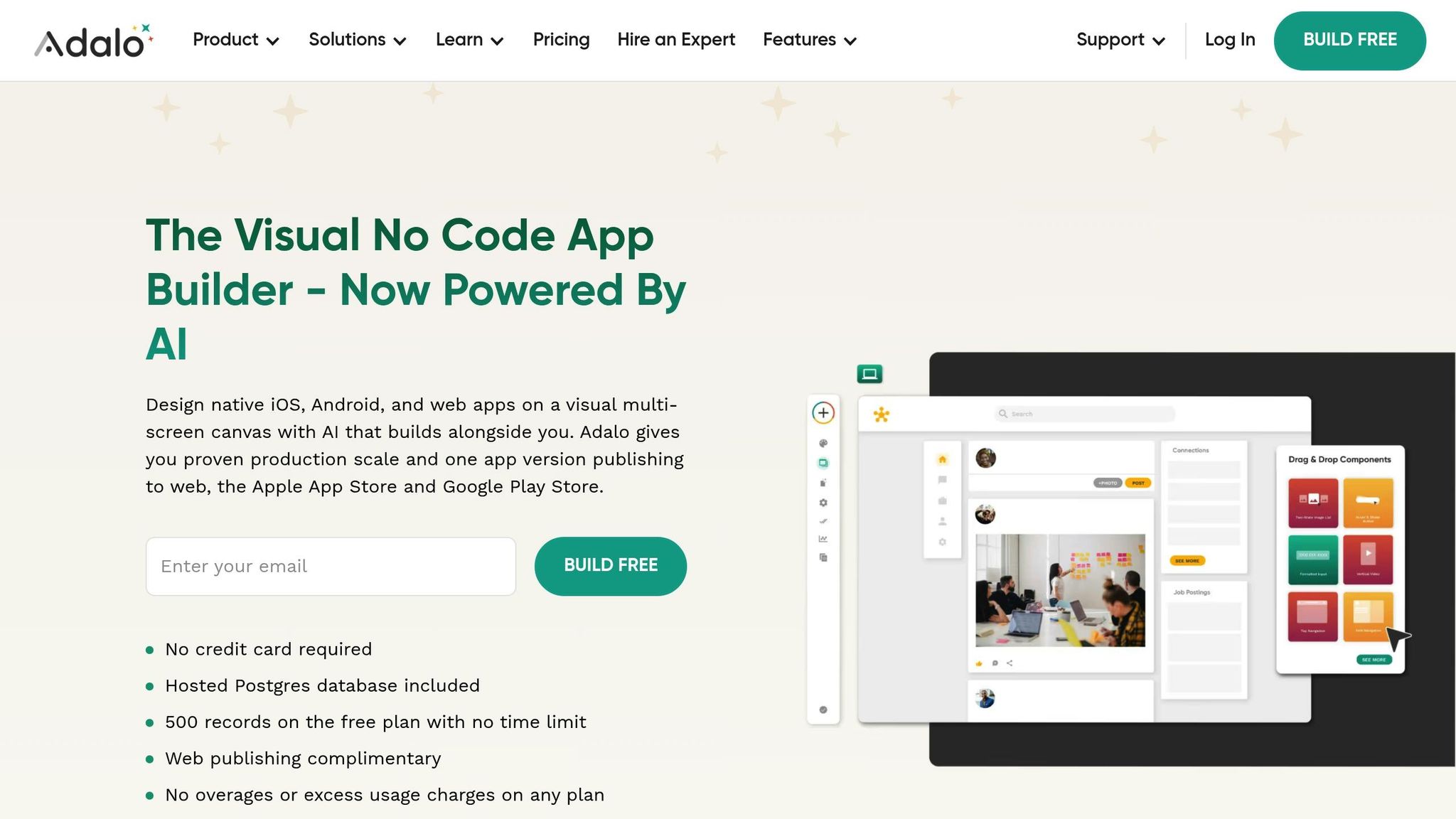
Adalo stands out by focusing on creating native mobile apps rather than web wrappers or progressive web apps. With Adalo, you build a single version of your app that can be published simultaneously to iOS, Android, and the web. To date, the platform has been used to create over 3 million apps, handling more than 20 million daily data requests. After a major infrastructure upgrade in late 2025, Adalo 3.0 now operates 3-4 times faster than earlier versions, making it a strong option for businesses that rely on mobile apps.
Drag-and-Drop Interface
Adalo’s drag-and-drop builder makes app creation accessible, even for those without coding experience. The visual canvas allows you to design app screens easily, using a component library that includes navigation bars, buttons, lists, forms, and basic elements like text and images. With Magic Start, you can generate an app’s basic structure from a simple text description, while Magic Add lets you expand features later using plain language prompts.
The Screen Size Switcher ensures your app looks great on mobile, tablet, and desktop devices. Meanwhile, the X-Ray Performance Tool helps optimize your app by analyzing its database and logic to identify potential bottlenecks. For additional functionality, the Component Marketplace offers both free and premium add-ons, such as Google Maps, Stripe payments, and QR scanners.
"The intuitive visual editor takes a complex subject, like coding, and creates a building environment in a common interface for today’s software tools. If you’ve used tools like Powerpoint or Canva, you’ll be able to navigate Adalo."
Integration Capabilities
Adalo’s integration options enhance your app’s functionality beyond its design tools. It connects to over 6,000 apps via Zapier and integrates directly with Xano, Airtable, and external REST APIs through External Collections. The SheetBridge feature allows you to use Google Sheets as a database without complicated API setups, which is especially helpful for teams already managing data in spreadsheets. For payment processing, Adalo supports Stripe and IAPHUB for in-app purchases. Unlike many spreadsheet-based tools, Adalo includes a built-in relational database with unlimited records on all paid plans.
"I would absolutely recommend building on Adalo – especially for small businesses. Price wise for example, you can’t beat it." – Alan Ogle, Business Owner
Pricing Plans
Adalo simplified its pricing in 2025 by removing "App Action" limits, offering unlimited usage on all paid plans.
- The Free plan provides unlimited screens and web publishing on an Adalo subdomain.
- The Starter plan, at $36/month (billed annually), includes custom domains and app store publishing.
- The Professional plan, priced at $52/month, supports two published apps, geolocation features, and priority support, making it a great fit for small businesses.
- The Business plan, at $200/month, accommodates up to 10 published apps and allows unlimited editors.
All paid plans come with unlimited database records and actions, avoiding the fluctuating costs associated with usage-based platforms.
Best Use Cases
Adalo’s native app-building approach makes it ideal for customer-facing apps like booking systems, loyalty programs, fitness class schedulers, and community platforms. For example, UAE Offroaders developed a comprehensive community app featuring trip management, event calendars, and member profiles – all within over 100 screens. Similarly, Washington University in St. Louis created Beyond Boundaries, an app that helps students discover events and connect with peers. In February 2026, Adalo was ranked first among visual builders for non-developers in the "State of App Building" report. With over 99% uptime, Adalo enables businesses to launch MVPs in as little as 2-6 weeks.
sbb-itb-ba0a4be
5. Carrd
Carrd is a go-to option for anyone looking to launch a sleek, single-page website in record time. Perfect for entrepreneurs and creatives, it allows users to create a professional online presence in just 10–15 minutes. Every Carrd site is mobile-ready, automatically adjusting to fit tablets and desktops seamlessly.
Drag-and-Drop Interface
The platform’s editor uses a block-based system that ensures layouts stay consistent and responsive. With a live preview canvas and a properties panel for quick adjustments, designing is intuitive and hassle-free. Carrd offers over 100 templates, including options with multi-section navigation, making it easy to build everything from portfolios and landing pages to personal profiles.
"Carrd is a website builder for people who don’t want to become website builders." – Templatery
Since Carrd sites are static and don’t rely on databases, they load incredibly fast – usually in under one second.
Integration Capabilities
Carrd may be simple, but it doesn’t skimp on functionality. It integrates with over 18 email marketing platforms like Mailchimp, Kit (formerly ConvertKit), and HubSpot. If you need to accept payments, it supports Stripe, PayPal, and Gumroad via "Buy" buttons, making it ideal for selling digital products or services. For tracking visitor behavior, Google Analytics integration is included. On the Pro Plus plan, you can access advanced form integrations with tools like Zapier or Airtable, and the "Embed" element lets you add third-party tools such as Calendly for scheduling or Crisp for live chat. These features elevate Carrd’s simplicity into a highly functional tool while staying true to its promise of quick and easy deployment.
Pricing Plans
Carrd’s pricing is hard to beat, starting at just $9 per year. The Free plan lets you create up to three sites on a .carrd.co subdomain with a 100-element limit, making it a great way to test ideas. The Pro Standard plan, priced at $19 per year, is ideal for small businesses, offering 10 sites, custom domains, SSL, contact forms, and payment widgets. For $49 per year, the Pro Plus plan supports up to 25 sites and adds features like password protection, advanced form integrations, and the ability to download your site’s source code.
"For 90% of solo founders, creators, and freelancers, Carrd is the best starting point. It removes the friction of building a website so you can focus on shipping your project." – Robby Frank, 1Capture
Carrd’s no-code approach empowers users to focus on their projects and business goals instead of getting bogged down in technical details.
Best Use Cases
Carrd shines when used for personal portfolios, "link-in-bio" pages for social media, product landing pages, or basic local business sites. It’s also a fantastic tool for validating startup ideas, allowing you to quickly create a professional landing page for collecting email signups. Designers, photographers, and writers will appreciate its clean, showcase-style templates. However, Carrd isn’t designed for multi-page content sites, blogs with extensive posts, or e-commerce setups that require inventory management.
Feature and Pricing Comparison
Finding the right no-code platform depends on what you’re building and your budget. Each tool has its own pricing model, so understanding how they charge is key. Bubble bases its pricing on processing power (Workload Units), Adalo uses "App Actions", Softr and Glide focus on user counts and data records, and Carrd keeps things straightforward with an annual flat fee. The trick is to align the pricing structure with your expected usage.
| Tool | Free Tier | Entry Paid Tier | Best For | Key Limitation |
|---|---|---|---|---|
| Bubble | No custom domain | $29/month | Complex apps & SaaS | Steep learning curve; potential cost spikes |
| Softr | 10 users | $49/month | Client portals using Airtable/Sheets | Caps at 2,500 users on higher-priced plans |
| Glide | 10 users | $19/month | Mobile-friendly PWAs from spreadsheets | No native App Store publishing |
| Adalo | 200 records | $36/month | Native iOS and Android apps | Performance issues with large datasets |
| Carrd | 3 sites on subdomain | $9/year ($0.75/month) | Single-page sites and portfolios | Limited to single-page sites |
For small businesses and entrepreneurs in the U.S. aiming to establish a digital presence quickly, this table provides a clear breakdown of pricing and limitations for each platform.
Bubble stands out for its ability to handle complex applications, but watch out for potential cost spikes – moderately active apps can exceed $1,000 per month in additional charges. While it’s powerful, the platform has a 1.7 out of 5 rating on Trustpilot, with users frequently citing billing surprises and mobile performance issues. On the other hand, Adalo earned the top spot among visual builders for non-developers in a February 2026 report. A notable success story is the mental health app Shmoody, which achieved $2 million in annual recurring revenue using Adalo.
If you’re working with a tight budget, Carrd offers incredible value at just $9 per year, making it perfect for simple landing pages or link-in-bio sites. For those who need quick and functional web interfaces without overhauling their data, Softr and Glide are excellent choices. Meanwhile, Adalo is your best bet for creating truly native apps for the Apple App Store or Google Play Store, as it compiles to native code rather than relying on web wrappers.
"The hardest part of building an app isn’t building it. It’s getting distribution to where your users actually are." – Nile Frater
Conclusion
No-code tools have opened the door for U.S. entrepreneurs to create digital products without the need for expensive developers or complex coding skills. Whether you’re building a mobile app, a client portal, or a landing page, platforms like Bubble, Softr, Glide, Adalo, and Carrd put the power of technology right at your fingertips. With the no-code market projected to hit $3.06 billion by 2025 and 43% of users reporting quicker product launches compared to traditional development, these tools have become a game-changer for small business owners aiming to thrive in today’s digital landscape.
But even the most innovative digital product needs a solid foundation. For U.S. entrepreneurs, this means pairing no-code solutions with a formal business structure. Using business formation services ensures your venture operates as a legal entity, whether that’s an LLC or a corporation. Additionally, a virtual mailbox offers a professional physical address for registration, digitizes your mail, and protects your personal address from being made public. Together, these services streamline your operations and set you up for long-term success.
Efficiency doesn’t stop at development. Starting lean with an MVP and basic subscription plans allows you to test your concept with real customers before investing in higher-tier options. Virtual mailbox services further simplify operations by digitizing mail and enabling remote check deposits. Adding registered agent services ensures compliance, giving you everything needed to manage your business professionally from anywhere. This approach saves time, safeguards your privacy, and prepares your venture for growth.
As your business scales, it’s crucial to choose platforms that can handle increasing data and user demands to avoid costly migrations later. By combining no-code tools with essential business services, you can focus on what truly matters: creating products your customers love and expanding your business.
FAQs
Which no-code tool should I pick for my specific project?
When it comes to picking the right no-code tool, it all boils down to your project’s specific needs, goals, and type. If you’re building customer engagement apps or internal tools, platforms like Adalo can help you get things up and running quickly. For more robust, scalable apps with a professional edge, Bubble offers plenty of flexibility.
If you’re looking to incorporate AI into your app, tools like Appy Pie and Softr are worth checking out. The key is to evaluate each platform based on its features, your budget, and the scope of your project. Don’t forget to take advantage of free trials or demos to see which tool aligns best with your vision.
Can I publish my no-code app to the Apple App Store or Google Play?
Yes, you can publish your no-code app on both the Apple App Store and Google Play. Platforms like Adalo simplify this process by offering support for publishing to both stores. Just make sure you carefully follow the submission guidelines for each platform to increase your chances of getting approved without any hiccups.
How can I avoid unexpected costs as my no-code app grows?
To keep costs under control as your no-code app expands, it’s important to get familiar with how platform pricing works. This includes understanding subscription fees, hosting costs, and any charges for add-ons. Start small by building a basic version of your app and add features gradually as your audience grows.
Using budgeting tools can also help you stay on top of expenses – set alerts to track spending and keep an eye on platform usage limits to avoid unexpected overage fees. By planning ahead, you can scale your app in a way that’s both manageable and cost-effective.