
Balancing work and travel as a digital nomad can be challenging, but it’s manageable with the right strategies. Here’s what you need to know:
- Prioritize Tasks: Use tools like the Eisenhower Matrix to separate urgent tasks from long-term goals.
- Structure Your Day: Time blocking helps you assign specific hours for focused work, shallow tasks, and personal time.
- Handle Distractions: Techniques like the Pomodoro Method improve focus, especially in noisy or unpredictable environments.
- Manage Time Zones: Tools like World Time Buddy and "Golden Hours" scheduling simplify coordination across regions.
- Simplify Admin Work: Virtual mailboxes, registered agent services, and online notary services streamline business operations while on the move.
These methods help you stay productive, avoid burnout, and make the most of your nomadic lifestyle.
Using the Eisenhower Matrix to Prioritize Tasks
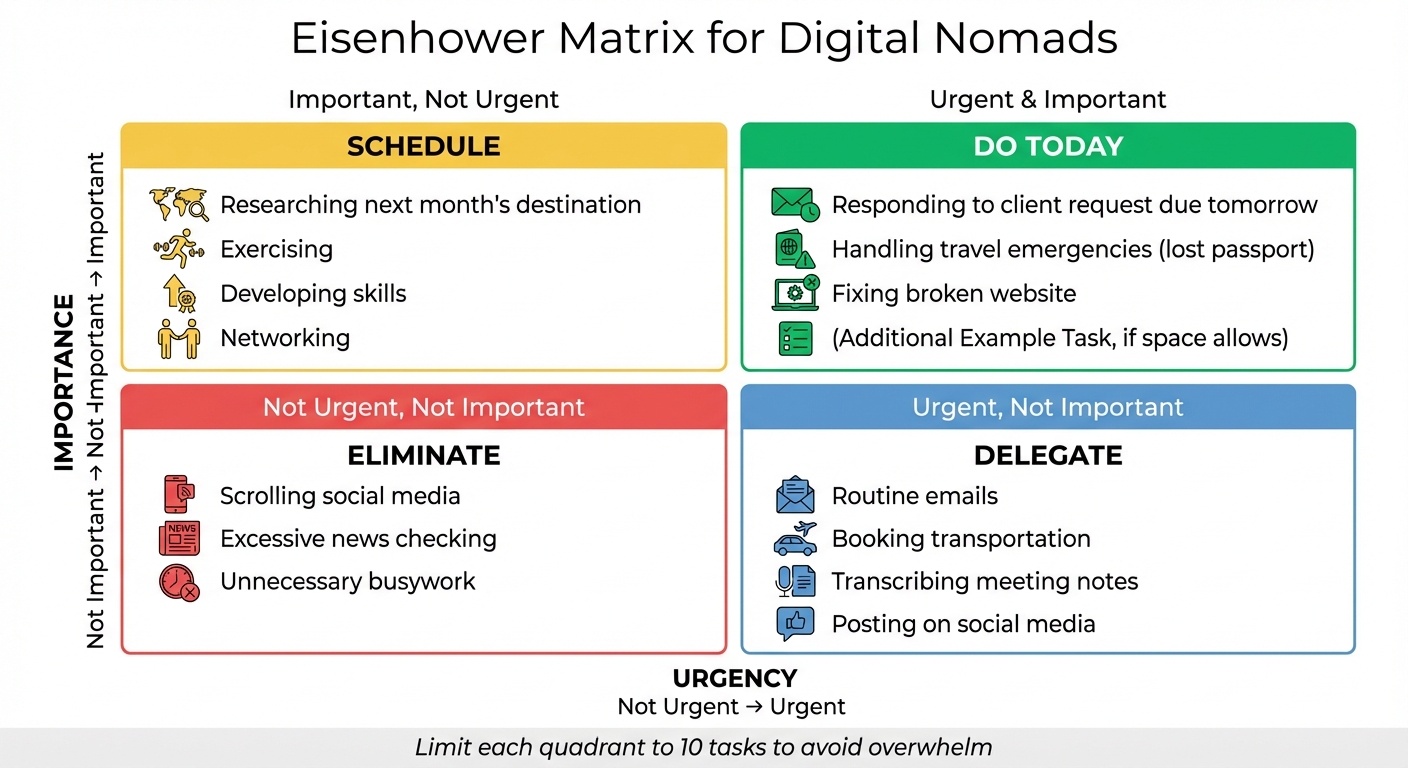
Managing a business across multiple locations can make it easy to mistake being busy for being productive. The Eisenhower Matrix helps cut through the noise by categorizing tasks based on urgency and importance. This method is especially useful when your work environment changes daily.
Named after President Dwight D. Eisenhower, who famously said, "I have two kinds of problems, the urgent and the important. The urgent are not important, and the important are never urgent", the matrix divides tasks into four quadrants:
- Quadrant 1 (Urgent & Important): Tasks that demand immediate attention, like client emergencies or fixing a website crash.
- Quadrant 2 (Important, Not Urgent): Strategic activities such as networking or skill-building that contribute to long-term goals.
- Quadrant 3 (Urgent, Not Important): Interruptions like scheduling social media posts or booking flights – pressing but not requiring your expertise.
- Quadrant 4 (Not Urgent, Not Important): Low-value distractions like excessive social media scrolling.
Studies show that managing time effectively can improve job performance and well-being while reducing stress. However, many people instinctively focus on urgent tasks, even when they’re not important – a tendency known as the "Mere Urgency Effect". For digital nomads, this might mean getting sidetracked by travel logistics instead of focusing on work that drives revenue.
Let’s break down how to use this tool in practical steps.
How to Apply the Eisenhower Matrix
Start with a brain dump: spend 15–20 minutes listing everything on your to-do list, from client projects to personal errands. Then, apply the "Month Test" to each task – will it still matter in a month or a year?.
Next, assign each task to one of the four quadrants. To keep it simple, use color-coding: green for Q1 (highest priority), yellow for Q2, blue for Q3, and red for Q4. Limit each quadrant to 10 tasks to avoid overwhelm. Using productivity and business tools like Trello, Asana, or Todoist can make this process smoother and easier to update as you move from one location to another.
The key to success lies in protecting Quadrant 2. For example, in January 2026, Maya, a marketing coordinator, used the matrix to manage a product launch. She categorized "Landing page copy" as Q1 (Do Today), "Competitor research" as Q2 (Schedule for Wednesday), and "Social graphics" as Q3 (Delegate to a junior team member). When an urgent metrics request arrived mid-morning, she adjusted by postponing a Q3 task to address the new Q1 priority. This approach allowed her to handle immediate crises without neglecting her strategic goals.
Task Prioritization Examples for Digital Nomads
Here’s how tasks might fall into each quadrant for someone working remotely:
| Quadrant | Action | Digital Nomad Task Examples |
|---|---|---|
| Q1: Urgent & Important | Do | Responding to a client request due tomorrow, handling travel emergencies (e.g., lost passport), fixing a broken website |
| Q2: Important, Not Urgent | Schedule | Researching next month’s destination, exercising, developing skills, networking |
| Q3: Urgent, Not Important | Delegate | Routine emails, booking transportation, transcribing meeting notes, posting on social media |
| Q4: Not Urgent, Not Important | Eliminate | Scrolling social media, excessive news checking, unnecessary busywork |
For solopreneurs without a team, delegation might mean automating or outsourcing. Tools like Zapier can handle repetitive workflows, while freelancers can take on tasks like data entry or graphic design. The goal is to reclaim time for Quadrant 2 tasks – the ones that prevent future crises and help your business grow. Utilizing a comprehensive digital nomad kit can further streamline these essential administrative and compliance requirements.
sbb-itb-ba0a4be
Time Blocking for Structured Workdays
Once you’ve prioritized your tasks, the next step is to structure your day in a way that minimizes interruptions. Think of it this way: a to-do list is just a wish list, but a calendar? That’s a commitment. Time blocking transforms your day from being reactive – constantly putting out fires – to proactive, where you decide ahead of time what truly deserves your focus. The idea is simple: assign each task a specific time slot on your calendar.
This approach is especially helpful if you’re constantly on the move, working from a new city every few weeks. When you’re navigating noisy hostels or cafés with spotty Wi-Fi, interruptions are inevitable. Time blocking creates what some call a "Calendar Fortress" – a protective structure that helps you stay focused despite the unpredictable nature of remote work.
The method works by grouping tasks into categories like Deep Work (high-focus tasks like coding or writing), Shallow Work (quick, low-effort duties), Batch Blocks (grouping similar tasks together), and Buffer Blocks (flexible time for surprises). Research even suggests that deep work during your peak energy hours can yield three to four times the output compared to fragmented, distracted efforts.
Selecting Tools for Time Blocking
Google Calendar is a popular choice for digital nomads. You can create a separate "Time Blocks" calendar to distinguish work sessions from meetings. Mark these blocks as "Free" so colleagues can check your availability without disrupting your structured plan. Use color coding to make your day visually clear: for instance, deep blue for focused work, red for meetings, green for personal time, and gray for buffer periods. Another tip? Adjust default meeting lengths to 25 or 45 minutes instead of the usual hour to allow transition time between tasks.
For project management, Trello pairs well with time blocking. Use it to organize tasks into visual boards, then assign specific cards to your calendar blocks. For example, if you’re working on a content project, you could schedule a two-hour deep work session on Tuesday morning to focus solely on writing. This approach ensures tasks don’t just sit on a board – they’re assigned actionable time slots.
Once your tools are set, the goal is to design your day around your energy levels and travel needs.
Structuring Your Day: Peak, Buffer, and Personal Time
Not all hours are created equal. Plan your most demanding tasks during your peak energy times – often between 8:00 AM and 11:00 AM for many people – and save routine or administrative work for slower periods, like after lunch. A helpful trick is the 25% Rule: estimate how long a task will take, then add 25% to account for hidden snags. Also, only schedule about 75% of your workday to leave room for unexpected issues, transitions, or technical hiccups.
The remaining 25% of your day becomes buffer time. These are 30-minute open slots mid-morning, late afternoon, or whenever you anticipate potential delays, overrun meetings, or last-minute client requests. On travel days, when flights or transit eat into your schedule, plan for shorter work hours and focus on easy tasks like sorting emails or tracking expenses.
| Block Type | Purpose | Recommended Timing |
|---|---|---|
| Deep Work | High-focus tasks like writing or coding | Peak energy hours (e.g., 8:00 AM–11:00 AM) |
| Shallow Work | Routine tasks like emails or admin work | Low-energy periods (e.g., 1:00 PM–3:00 PM) |
| Batch Block | Grouping similar tasks to minimize switching | 2–3 times daily for 30–45 minutes |
| Buffer Block | Handling surprises or delays | Mid-morning, post-lunch, and end-of-day |
| Personal/Travel | Sightseeing, transit, or exercise | Scheduled around work blocks for balance |
When you arrive in a new city, schedule a "Buffer Day" to settle in before diving into a packed workload. This flexible approach helps you stay productive while balancing running a business remotely with the joys of travel.
Managing Multiple Time Zones
Juggling time zones can feel like a logistical nightmare when you’re working from Bali while your client is in New York or coordinating a team spread across San Francisco, London, and Sydney. In fact, 83% of professionals report struggling with scheduling meetings across multiple time zones, often leading to delays and miscommunication. Research shows that even a small one-hour increase in time zone difference can reduce synchronous communication (like calls or instant messages) by 11%.
So, how do you keep things running smoothly? It starts with being upfront. Share your location and work hours in your email signature or during introductions. Then, establish "Golden Hours" – a consistent 2–3 hour window when you and your clients or team can overlap for real-time discussions. For example, if you’re in Bangkok (UTC+7) and your main client is in Chicago (UTC-6), your Golden Hours might be 8:00 PM–10:00 PM Bangkok time, which aligns with 7:00 AM–9:00 AM Chicago time.
Outside of these overlap hours, lean into asynchronous communication. Tools like Slack for threaded conversations or Loom for video walkthroughs let you share updates without requiring everyone to be online simultaneously. This approach reduces the stress of constant availability and keeps projects moving forward.
"To maintain productivity, I’ve found that it’s crucial to establish a work schedule that aligns with your peak productivity hours while accommodating the needs of your clients or team." – Rosanna Webb, content writer and social media manager
Using World Time Buddy for Scheduling
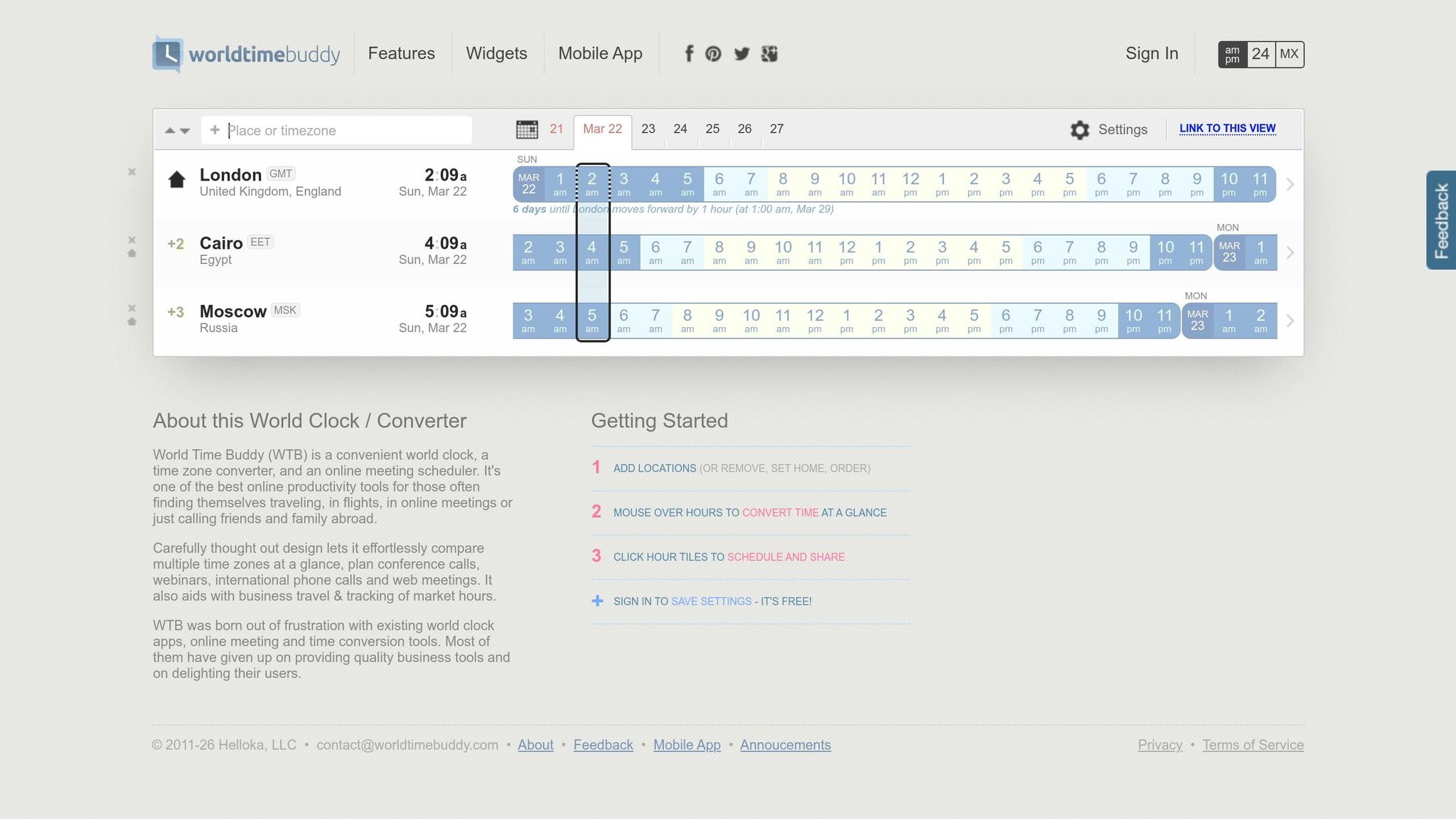
Time zones don’t have to be a headache if you use the right tools. World Time Buddy is a free online tool that makes scheduling across time zones a breeze. Instead of manually calculating time differences, simply add the cities where your team or clients are located. The tool provides a visual slider that shows overlapping work hours for all regions.
For instance, if you’re in Lisbon, working with a client in Los Angeles and a developer in Manila, World Time Buddy lines up all three time zones side-by-side. You can adjust the slider to find a time that works for everyone, avoiding those dreaded middle-of-the-night meetings.
"World Time Buddy transforms, otherwise tricky, tasks like time zone conversion and international meeting or conference call planning into an intuitive, super-quick and painless experience." – AllRemote
Pair this with Google Calendar’s secondary time zone feature. Enable this setting to display your local time alongside your client’s, helping you spot conflicts and avoid errors. For added clarity, include multiple time zones in your meeting titles, like "3:00 PM EST / 12:00 PM PST / 8:00 PM GMT: Project Kickoff".
Building a Time Zone-Friendly Work Schedule
Creating a time zone-friendly schedule requires planning. Start by identifying your core overlap hours – the 2–4 hour window when you and your team or clients are all available. Reserve this time for live calls, Slack check-ins, or urgent tasks. Outside of this window, switch to asynchronous work. Record video updates, leave detailed project notes, and schedule emails to arrive during your client’s working hours (Gmail makes this easy with its email scheduling feature).
To avoid confusion, stick to standardized time formats. Use 24-hour time and reference UTC as your baseline. For example, instead of saying "3 PM", write "15:00 EST" or "15:00 UTC-5." This eliminates AM/PM mix-ups and helps during Daylight Saving Time transitions, which vary between regions.
Another tip? Build in a 12–24-hour buffer for deadlines. This cushion accounts for unexpected delays caused by travel, connectivity issues, or time zone shifts when you’re on the move. And don’t forget to check global holidays using resources like Timeanddate.com to avoid scheduling meetings when your client’s office might be closed.
For long-term teams, consider rotating meeting times. Sharing the inconvenience of early mornings or late nights ensures no one person consistently bears the brunt of odd hours.
"Clear is kind. So we aim to be clear in our communication with each other across the team, and clear as a company what those expectations for communication best practices are so everyone can be aligned." – Hailley Griffis, Head of Communications at Buffer
The Pomodoro Technique for Focused Work Sessions
Staying focused in bustling cafés or noisy terminals can feel like a constant battle. Remote workers, on average, lose 2.5 hours each day to distractions. The Pomodoro Technique offers a straightforward solution: work in 25-minute intervals of deep focus (called "Pomodoros"), followed by 5-minute breaks. After completing four cycles, take a longer break lasting 15–30 minutes.
This method helps conserve mental energy. Studies show that remote workers who take structured breaks are 40% more productive than those who try to power through without pausing. For digital nomads navigating jet lag, unreliable internet, and the pull of new experiences, these scheduled intervals provide a clear boundary between work and leisure.
"Pomodoro saved my WFH career. I was working 12-hour days and burning out. Now I work 6 focused Pomodoro hours and actually ship MORE code." – Alex, Software Engineer
Another advantage of the technique is its ability to align tasks with your energy levels. Use your most alert hours for "Deep Work Pomodoros" to tackle demanding tasks like coding, writing, or strategic planning. Meanwhile, reserve slower periods for "Shallow Work Pomodoros" to handle simpler activities like answering emails or organizing files.
How to Use the Pomodoro Technique
Start by selecting a single task using the "Verb-Noun-Constraint" formula to clarify your goal. For instance, instead of "work on blog post", try "Draft [verb] the executive summary [noun] using only bullet points [constraint]". This approach keeps you focused and on track.
Set a 25-minute timer and dedicate yourself fully to the task. Close unnecessary browser tabs, mute your phone or leave it in another room, and set Slack or Teams to "Do Not Disturb". When the timer goes off, stop working immediately, even if you’re mid-sentence. Take a 5-minute active break: stretch, hydrate, go for a quick walk, or follow the 20-20-20 rule (look at something 20 feet away for 20 seconds). Avoid social media during breaks to prevent "attention residue", which can disrupt your next session.
After four Pomodoros, reward yourself with a longer 15–30 minute break. Use this time to eat, take a walk, or relax. Tracking your Pomodoro sessions can improve consistency by 50%, helping you better estimate project durations and identify your most productive hours.
Keep a "distraction capture sheet" handy. If a random thought like "Book that hostel in Lisbon" or "Did I reply to that email?" pops into your head mid-session, jot it down and refocus on your task.
You can adjust these steps to fit different work settings.
Adapting the Technique for Different Work Locations
Flexibility is essential for digital nomads. In cafés or co-working spaces, noise-canceling headphones can help block out background chatter. A visible timer can also signal to others that you’re in the zone.
During transit – whether you’re on a plane, train, or bus – use Pomodoro blocks for low-effort tasks like drafting emails, brainstorming, or organizing your to-do list. Prepare tasks ahead of time to make the most of offline moments, and save deep work for when you’re in a stable environment.
For meetings, try 25-minute "Meeting Pomodoros" instead of traditional hour-long sessions. This keeps discussions focused and minimizes unnecessary tangents. If you’re navigating time zone challenges, use overlapping hours for "Collaboration Pomodoros" – live calls or check-ins – and save solo time for deep work.
"Time zones used to kill me. Now I use overlap hours for ‘meeting Pomodoros’ and solo hours for deep work. Game changer." – David, Project Manager
On travel days, keep your workload light with just 1–2 Pomodoro blocks to account for transit and settling in. Tools like Freedom or Cold Turkey can block distracting websites during work sessions. If you’re traveling slowly, maintaining a consistent Pomodoro routine is easier without the constant disruption of changing workspaces.
Building Flexible Routines for Changing Locations
When you’re constantly on the move, keeping your productivity intact can feel like a challenge. But by combining effective time blocking with flexible routines, you can maintain structure while adapting to new environments.
The key is to create a routine that anchors you with essential habits, while also leaving room to adjust to local rhythms.
Identifying Core Productivity Habits
Start by pinpointing three to five habits that you can stick to no matter where you are. These "anchor rituals" provide a sense of stability in the midst of change. For example, you might:
- Begin each morning with a quick planning session to identify your top three priorities.
- Dedicate time to physical activity, like yoga or a 20-minute jog.
- End your day with a review of accomplishments and setting goals for the next day.
"A consistent routine helps carve out a mental space for productivity in the middle of a chaotic, ever-changing world." – Nomad Routines
Make these habits portable. If you can’t access a gym, focus on bodyweight exercises that you can do in your hotel room. Bring along tools like a portable French press or your favorite instant coffee to maintain your morning ritual. Even small actions, like changing out of pajamas into "work clothes", can help signal your brain that it’s time to work.
When you arrive at a new location, schedule a buffer day to get settled. Use this time to sort out logistics like finding reliable Wi-Fi, locating coworking spaces or quiet cafés, and getting groceries. Diving into a full workload immediately upon arrival can lead to unnecessary stress and missed deadlines.
Adjusting Routines to Local Customs and Schedules
Once your core habits are in place, adapt their timing to fit the local environment.
Research local customs, business hours, and meal times in advance. For instance, in places where businesses close for a midday siesta, you might use that time for personal activities or exercise, then return to work later in the day.
Match your work schedule to the local energy. In cities with lively evenings, consider working early mornings when things are quieter. On the other hand, in quieter locations with early sunsets, reserve evenings for deep focus work. This approach allows you to enjoy the local culture without compromising your productivity.
If you’re traveling across time zones, adjust your sleep schedule gradually – by 30 to 60 minutes each day – starting a few days before your trip. Once you arrive, expose yourself to sunlight as soon as possible to help reset your internal clock.
| Routine Component | Anchor Method | Flex Method |
|---|---|---|
| Work Hours | Set a fixed number of hours per day | Adjust start/end times to overlap with clients’ schedules |
| Physical Activity | Stick to a specific type of exercise | Time workouts to align with your body clock (e.g., morning light) |
| Workspace | Carry a portable ergonomic kit | Choose from coworking spaces, cafés, or local options |
| Communication | Use asynchronous tools like Slack | Adapt response times based on urgency and time zones |
Batch tasks based on your environment. For example, reserve quiet mornings in your accommodation for high-focus work, and use transit time – whether on a plane, train, or bus – for simpler tasks like organizing emails or brainstorming.
Using BusinessAnywhere Tools to Manage Your Business

Running a business while traveling means you can’t escape administrative tasks – they follow you wherever you go. However, tools like BusinessAnywhere can help by automating essential tasks, allowing you to focus on balancing your travel and business obligations. One major challenge for remote entrepreneurs is handling physical mail. Important documents like bank statements, IRS notices, replacement credit cards, and legal paperwork require a stable U.S. address. Missing these can lead to frozen accounts or legal headaches.
Managing Mail with a Virtual Mailbox
BusinessAnywhere offers a virtual mailbox service that provides a permanent, professional U.S. address in prime business areas. When mail arrives, it’s scanned and uploaded within 24 hours, letting you review it directly from your device. From there, you can decide whether to have items scanned further, forwarded internationally, stored, or shredded.
"Having a reliable way to receive physical mail is still crucial, even in our increasingly digital world." – Rick Mak, Global Entrepreneur and Business Strategist
The service includes unlimited page scans, so you won’t face extra charges for opening or reading your mail. Plans start at $20 per month for up to two recipients, and you can choose addresses in states like Wyoming, Delaware, Nevada, etc., which may offer favorable tax and regulatory benefits. Beyond managing mail, this service helps ensure your business remains legally compliant, an essential factor for any remote operation.
Staying Compliant with Registered Agent Services
If you run a U.S.-based LLC, you’re legally required to have a registered agent with a physical address in the state where your business is formed. This agent is responsible for receiving critical legal documents like lawsuits, subpoenas, and government correspondence. For digital nomads, fulfilling this requirement can be tricky when you’re constantly on the move.
BusinessAnywhere’s registered agent service simplifies this process for $147 per year, with the first year included if you register your business through them. The service ensures you never miss essential state filings or legal notices, helping you avoid penalties. It also manages annual reports and state fees while keeping your personal or travel address private.
"BusinessAnywhere offered registered agent service as an add-on, which meant we could receive legal documents and official notifications on their behalf. This made the entire process of business formation straightforward, even though they were physically in Thailand." – Rick Mak, Global Entrepreneur and Business Strategist
Notarizing Documents with Remote Online Notary Services
Some documents, like USPS Form 1583 (needed for authorizing mail receipt), real estate paperwork, or legal agreements, require notarization. For travelers, finding a notary in person can be a logistical nightmare. BusinessAnywhere solves this with its remote online notary service, letting you notarize documents online from anywhere in the world for $37 per notarization. The process is conducted via video call and is accepted in all U.S. states. It’s especially handy for setting up your virtual mailbox while abroad or handling urgent business needs. Most notarizations are completed in under 30 minutes.
With these tools, managing administrative tasks becomes much easier, ensuring that your business stays on track no matter where you are in the world.
Wrapping It All Up
Balancing freedom with professional goals is the key to thriving as a digital nomad. The strategies laid out here – like the Eisenhower Matrix, time blocking, and the Pomodoro Technique – provide a solid foundation for staying productive while navigating the challenges of a mobile lifestyle. These methods help shield your focus from constant interruptions, which research shows happen every 11 minutes on average, with over 23 minutes needed to refocus after each distraction.
Handling multiple time zones becomes less daunting when you establish core working hours and use visual scheduling tools. Pair that with flexible routines centered around your productivity habits, and you’ll find it easier to adjust to new environments without losing momentum.
Administrative hassles can also eat into your productivity. Tools like BusinessAnywhere’s virtual mailbox and registered agent services, and remote notary options simplify these tasks, allowing you to focus on growing your business instead of chasing paperwork around the globe.
Take action this week – pick one strategy from this guide and start there. You don’t have to revamp your entire workflow overnight. Even small, consistent changes can lead to noticeable results. In fact, companies that implement clear communication and asynchronous work guidelines have reported up to a 30% increase in productivity. A single, well-executed strategy can free up your time and energy, giving you more space to explore the world.
The digital nomad lifestyle is all about freedom, but that freedom thrives on structure and discipline. By putting these time management techniques into practice, you’ll not only build a business that can succeed from anywhere but also create more opportunities to enjoy the adventures that come with your journey.
FAQs
How do I pick my daily “golden hours” when clients are in multiple time zones?
To pinpoint your daily "golden hours" across different time zones, tools like world clocks or time zone converters are invaluable for spotting overlapping working hours. Scheduling platforms like Google Calendar can visually map these shared periods, making planning easier. Be sure to clearly communicate your availability, including your current time zone, to simplify coordination. Establish routines around these overlapping hours to boost productivity and ensure seamless collaboration with clients.
What’s a realistic time-blocking schedule on travel days with flights or long transit?
When you’re traveling, keeping your schedule on track can feel tricky. But with some planning and flexibility, you can make the most of your day without feeling overwhelmed. Here’s how:
- Plan Ahead: Block out time in your calendar for flights, transit, or any other travel-related activities. This helps you stay realistic about how much time you actually have for other tasks.
- Prioritize Light Tasks: Travel days aren’t ideal for heavy workloads. Use the time for lighter activities like checking emails, organizing your schedule, or brainstorming ideas. These tasks are easier to tackle when you’re on the go.
- Stay Organized: Tools like Google Calendar can be a lifesaver. They help you keep track of your itinerary and ensure you don’t miss important commitments.
Once you’ve arrived, don’t jump right into work. Give yourself a chance to rest and recover from the journey. By doing so, you’ll avoid burnout and be ready to tackle tasks with a clear mind.
How can I delegate or automate Quadrant 3 tasks as a solo digital nomad?
Managing Quadrant 3 tasks – those that are urgent but not important – can be a challenge, especially when you’re a solo digital nomad. The good news? AI tools can help streamline these time-consuming chores. For instance, automating repetitive workflows like invoicing and scheduling allows you to focus on what truly matters. These tools can handle multi-step processes and even make smaller decisions on your behalf, freeing up valuable time.
To stay organized, platforms like Trello or Google Calendar are game changers. They help you track tasks efficiently, ensuring that your attention remains on high-priority activities while managing the demands of working independently.