
Startups often delay investing in a CRM, thinking they’re “too small” to need one. But this mindset can lead to missed leads, disorganized customer data, and lost opportunities. A CRM centralizes customer details, automates follow-ups, and tracks interactions, making it a must-have tool as your startup grows.
Key Takeaways:
- If you’re managing over 50–100 customers or have more than five team members, it’s time to consider a CRM.
- Without a CRM, missed follow-ups, scattered data, and inefficiency are common problems.
- CRMs can deliver an average return of $8.71 for every $1 spent and help track key metrics like CAC and LTV.
When to Invest:
- Your team struggles with manual tracking or missed follow-ups.
- You’re managing 500+ leads or generating $10,000+ in monthly revenue.
- Your team is growing (10+ members) or working remotely.
Affordable CRM Options for Startups:
- HubSpot: Free tier; paid plans start at $15/month.
- Freshsales: Free for up to three users; paid plans from $9/month.
- Close CRM: $9/month with built-in calling.
- Copper: $12/month, ideal for Google Workspace users.
Start small with a simple, budget-friendly CRM that fits your workflow. Test free trials to ensure the system is easy to use and aligns with your team’s needs. Acting early can save time, avoid disorganization, and set you up for scalable growth.
Signs Your Startup Needs a CRM
It’s easy for founders to overlook the early indicators that a CRM system is becoming a necessity. At first, it might just be a missed callback or an email thread that gets buried. But over time, these small hiccups can snowball into bigger problems – lost productivity, frustrated customers, and missed revenue. If any of the following scenarios sound familiar, it’s probably time to move beyond memory and spreadsheets to streamline your processes.
Overwhelmed by Manual Customer Tracking
One of the clearest signs is the chaos of managing customer data across too many disconnected tools. If your team is juggling customer information through personal email accounts, sticky notes, or scattered notebooks, you’re missing a unified system to keep everyone on the same page. Hours might be wasted searching for contact details with "Control + F", while valuable customer insights stay locked in someone’s head. This creates bottlenecks when that person isn’t available. Worse, storing sensitive data in personal spreadsheets can pose serious security risks when employees leave. Beyond inefficiency, this kind of disorganization can harm your professional image and weaken your ability to close deals.
Struggling to Manage Growing Customer Data
The need for a CRM becomes even more apparent as your team grows past five members or your customer base exceeds 50–100 accounts. At this point, scattered information can slow everything down. Sales teams may struggle to find key details from previous conversations, while support teams might be unaware of ongoing issues. When team members rely on personal notes or patchwork solutions, processes become fragmented, and compiling data manually eats up valuable time. This lack of structure not only slows decision-making but also highlights the need for a centralized system to keep things running smoothly.
Missing Follow-Ups and Sales Opportunities
Without automated reminders, it’s easy for time-sensitive leads to fall through the cracks. This is especially true for founders juggling multiple responsibilities, where callbacks and follow-ups can be forgotten. Managing dozens of conversations manually is tough enough, and with sales cycles ranging anywhere from a few days to a year, it becomes nearly impossible to stay on top of everything. Consider this: businesses often interact with 5 to 10 prospects for every customer they eventually acquire. A CRM can act as your safety net, setting up reminders and ensuring no lead is left behind. Plus, it allows any team member to pick up right where the last conversation ended, keeping everything seamless.
sbb-itb-ba0a4be
Growth Milestones That Require a CRM
As your startup grows, certain milestones make it clear when a CRM becomes essential. These moments often highlight how manual systems fall short, pushing you to proactively address challenges instead of reacting to missed opportunities.
Reaching 10+ Team Members or Managing Remote Teams
When your team hits 10 or more members, managing customer relationships gets trickier. Here’s a telling statistic: 91% of companies with 10+ employees rely on an automated CRM system. Why? Because as teams grow, information silos tend to form. Sales might not know about customer service issues, and support teams might lack visibility into active deals. Depending on memory or scattered emails becomes a recipe for errors.
For remote or distributed teams, the stakes are even higher. With team members spread across time zones or locations, a CRM acts as a central hub. It ensures anyone can jump into a customer conversation without digging through endless messages. Plus, cloud-based CRMs allow access to customer data from any device, keeping everyone on the same page.
"The question isn’t ‘should we have a CRM?’ but rather ‘at what point does our current approach to managing customer relationships create risk?’" – Sam Poole, Associate Content Marketer, Nutshell
As your team grows, so do your leads and revenue – and that’s when precise data management becomes non-negotiable.
Managing 500+ Leads or Generating $10,000+ Monthly Revenue
A growing lead pipeline and rising revenue are clear signs that a CRM is no longer optional. While spreadsheets might suffice for 10 to 20 leads, they become unmanageable once you’re juggling 50 to 100 leads. When you hit 500+ leads, manual tracking becomes nearly impossible. Without automation, follow-ups can slip through the cracks, costing you valuable deals.
Hitting $10,000 in monthly revenue is another key milestone. At this stage, investors expect detailed metrics like Customer Acquisition Cost (CAC), Lifetime Value (LTV), and funnel conversion rates. A CRM provides the reporting tools to showcase these numbers effectively. Disorganization during long sales cycles (which often stretch 9 to 12 months) can also hurt your pricing power. If prospects sense chaos, they might push for discounts. On the flip side, companies using a CRM to automate sales tasks see 53% higher conversion rates. And improving customer retention by just 5% can increase profits by 25% to 95%.
Key Features to Look for in a Startup CRM
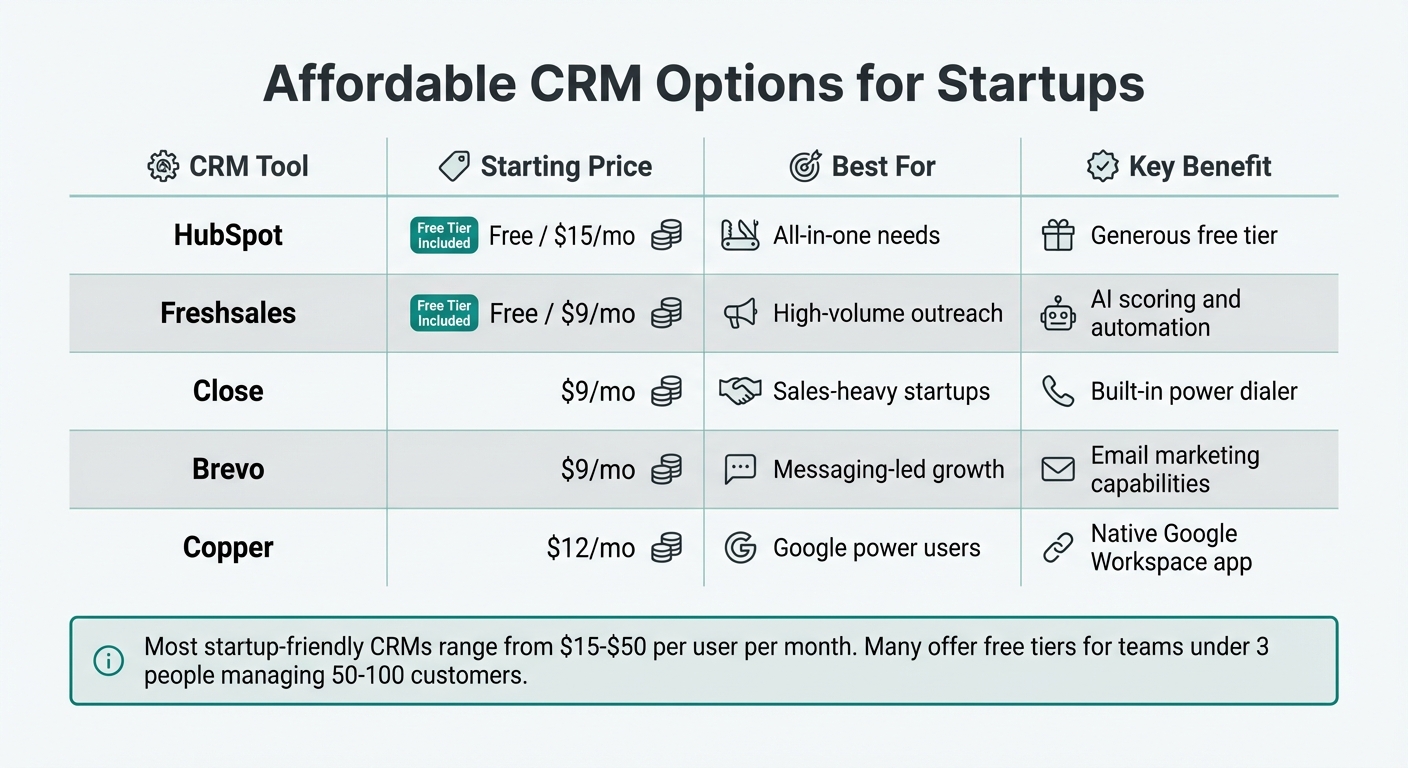
Affordable CRM Options for Startups: Features and Pricing Comparison
Must-Have Features for Startup Success
For startups navigating rapid growth, the right CRM can be the difference between staying organized or being overwhelmed. Prioritize tools that offer immediate value to lean teams, rather than getting bogged down with unnecessary advanced features.
A solid starting point is contact and lead management. Your CRM should centralize key interactions, making it easier to manage workflows. A visual sales pipeline – like a drag-and-drop Kanban board – can simplify tracking deals as they move from "Prospecting" to "Closed Won" with just a click.
"A CRM tool for startups will help you quickly gauge the health of your sales pipeline… helping all of your team members stay on the same page."
– Zahra Jivá, Sales Director, Pipedrive
Automation is another game-changer. Features like automated lead capture from web forms, email drip campaigns, and task reminders ensure no follow-up gets missed. Seamless integration with tools you already rely on – like Gmail, Outlook, Slack, Zoom, or QuickBooks – further enhances efficiency.
"Avoid the ‘Zapier Tax’ – look for native integrations to prevent monthly fees for third-party connectors and sync failures."
Mobile access is equally important. Whether your team is in the office or working remotely, they should be able to update deals and access customer data on the go. And let’s not forget analytics and reporting. Dashboards that track metrics like conversion rates, sales cycle length, and revenue forecasts provide the insights needed to make smarter decisions. In fact, organizations that leverage CRM effectively report a 17% increase in lead conversions and a 27% boost in customer retention.
Beginner-Friendly and Budget-Conscious Options
While robust features are essential, simplicity and affordability are what ensure your team actually uses the CRM. The best CRM for your startup isn’t the one packed with every feature under the sun – it’s the one your team can adopt with ease. Overcomplicated systems can slow growth by forcing teams to focus on managing the tool instead of customers.
"Complexity too early slows growth. Teams end up managing the system instead of customers."
– Mariam Hameedi, Blazeo
Choose a CRM that’s intuitive, quick to set up, and requires minimal training. A good test is the "30-Minute Rule": see if you can import 10 contacts and log a deal in under half an hour. If the interface feels clunky, it’s likely to hurt productivity. Look for clean dashboards, easy navigation, and straightforward onboarding to get your team up and running fast.
Budget is another major factor, especially for startups in their early stages. Fortunately, there are affordable options that don’t skimp on quality. Many CRMs offer plans under $25/month or even free tiers. For instance:
- HubSpot’s "free forever" plan includes unlimited contacts, with paid seats starting at $15/month.
- Freshsales offers a free plan for up to three users, with paid tiers ranging from $9–$11 per user per month.
- Close CRM’s "Solo" plan, at $9/month (billed annually), includes built-in calling features.
- Brevo starts at $9/month, catering to email-focused startups.
- Monday Sales CRM and Copper begin at $12 per seat per month, with Copper being ideal for Google Workspace users.
| CRM Tool | Starting Price | Best For | Key Benefit |
|---|---|---|---|
| HubSpot | Free / $15/mo | All-in-one needs | Generous free tier |
| Freshsales | Free / $9/mo | High-volume outreach | AI scoring and automation |
| Close | $9/mo | Sales-heavy startups | Built-in power dialer |
| Brevo | $9/mo | Messaging-led growth | Email marketing capabilities |
| Copper | $12/mo | Google power users | Native Google Workspace app |
These tools strike the right balance between functionality and affordability, making them ideal for startups. Next, we’ll explore how adopting a CRM early can further drive your startup’s growth.
Benefits of Early CRM Adoption
Getting a CRM system in place early can set the stage for steady growth, helping startups tackle current challenges while preparing for future success.
Improved Sales Efficiency and Customer Retention
One of the biggest advantages of adopting a CRM early is the ability to centralize customer data. Instead of wasting time searching through scattered sources, your team gets a single, reliable system. This ensures that no critical information is lost – even if someone is out of the office or leaves the company altogether.
The numbers speak for themselves: businesses see a return of $8.71 for every dollar spent on CRM software. Startups specifically report impressive results, including a 29% increase in sales, 41% higher revenue, and a 27% boost in customer retention.
Speed is another game-changer. Since 78% of customers go with the company that responds first, a CRM’s automation features – like lead capture and instant follow-up emails – give startups a competitive edge. Routine tasks, such as assigning leads or setting follow-up reminders, are handled automatically, allowing your team to focus on closing deals. This streamlined approach can lead to a 21% increase in agent productivity.
"A CRM gives you a superpower: an elephant’s memory for every customer." – Nutshell
Starting with a CRM early also helps establish good data habits. When you’re a solo founder or have a small team, it’s easier to implement clean and organized workflows. Waiting until the team grows to three or four people can make adoption harder, as disorganized processes become ingrained.
These operational improvements don’t just make life easier – they also set the stage for smarter, data-driven decisions.
Data-Driven Decision Making for Growth
Beyond improving efficiency, an early CRM adoption helps startups make smarter decisions based on actual data. A CRM organizes your information and highlights patterns that can guide your strategy. Instead of relying on guesswork, you’ll gain insights into customer behavior, sales trends, and team performance. Advanced CRMs even use historical data to predict which customers are likely to buy or churn, enabling proactive steps to maximize opportunities.
This level of visibility extends across your operations. You can track metrics like response times, conversion rates by sales rep, and revenue per customer segment. These insights help identify what’s working and where improvements are needed. Startups using CRMs equipped with generative AI tools are 83% more likely to exceed their sales goals.
CRMs also make marketing more efficient. By leveraging CRM data, you can focus on the right prospects with personalized messages, reducing marketing costs by an average of 32%. Instead of casting a wide net, you can segment customers based on their preferences and interaction history, delivering tailored communication that builds trust and drives conversions.
"CRM isn’t just about managing data – it’s about maximizing growth, aligning your team, and delivering an exceptional experience to every customer who walks through your digital door." – Patricia Jones, CRM Consultant, ConvergeHub
Starting early means you can build this data-driven foundation while keeping costs manageable – typically $15 to $50 per user per month for startup-friendly CRM plans. On the other hand, delaying CRM adoption can lead to costly headaches. Series B startups often spend $50,000 to over $250,000 on professional implementation and data migration. By that point, disorganization may have already cost you valuable opportunities and revenue.
How to Choose and Get Started with Your First CRM
Assessing Your Startup’s Needs and Budget
Before diving into CRM options, take a close look at how your team currently manages customer data. Is everything scattered across spreadsheets, emails, or even notebooks? Identify problem areas like missed follow-ups, lost contacts, or deals that never moved forward. These gaps will help you understand what you need most from a CRM.
Your sales approach also plays a big role in choosing the right platform. If your strategy revolves around inbound marketing, tools like HubSpot might be a great match. On the other hand, if you’re running outbound campaigns with cold calls and emails, platforms like Close or Pipedrive – designed for fast-paced sales – could be better options. Also, make sure the CRM integrates well with the tools your team already relies on.
When planning your budget, don’t just look at the monthly per-user fee. For instance, a CRM priced at $10 per user per month might seem affordable, but additional integrations costing $30, $50, and $25 can push the total to $115 per user monthly. Don’t forget to account for onboarding fees and the time your team will spend learning the system.
"If your founder can’t figure it out in 10 minutes, your sales team will not use it longer term." – The Pipeline Report
Most CRMs designed for startups range from $15 to $50 per user per month. If your team is small – say, fewer than three people – many platforms offer free plans that can handle your first 50–100 customers before requiring an upgrade.
Once you’ve outlined your needs and budget, use free trials to evaluate which CRM fits your workflow best.
Prioritizing Features and Testing Free Trials
Avoid falling for the CRM with the most features. A whopping 88% of sales professionals value accurate customer data over an overload of unnecessary tools. A simple system that your team consistently uses will outperform one loaded with hundreds of unused features.
Focus on core functionalities like contact management, a visual sales pipeline, and email integration. Once those are working well, you can add features like lead assignment automation, follow-up reminders, and detailed reporting. Check for native integrations with tools like LinkedIn, Slack, and your calendar to avoid relying on third-party connectors that might increase costs.
Make the most of free trials by importing a small batch of real contacts – 10 to 50 – and running them through a full deal cycle. Test the CRM’s interface with the least tech-savvy person on your team. If they struggle, it’s a sign the system might not work for everyone. If your team spends a lot of time on the road, ensure the mobile app is easy to use and fully functional.
Pay attention to how long it takes to perform basic tasks like adding a contact or moving a deal through the pipeline. If these actions feel cumbersome, that friction could discourage your team from using the CRM consistently.
Once you’ve chosen a CRM, follow a structured plan to integrate it smoothly into your workflow.
Quick-Start Checklist for Easy Integration
A well-planned implementation can help avoid the pitfalls that cause 75% of CRM projects to fail. Here’s a four-week roadmap to get started:
Week 1: Foundation Setup
- Clean up your customer data by removing duplicates and standardizing formats. Start with a small test batch to ensure everything maps correctly.
- Define 5–7 clear sales pipeline stages that reflect your actual process. Keep it simple at first to avoid over-complication.
Week 2: Process Integration
- Connect key tools like Gmail, Outlook, or Slack so emails and messages sync automatically.
- Assign a tech-savvy team member as the go-to person for CRM questions. Create simple guides with screenshots for common tasks.
Week 3: Team Adoption
- Encourage daily logins, with leadership setting the example to drive consistent use.
- Stick to core features initially and limit customization to avoid overwhelming your team.
Week 4: Measurement and Optimization
- Track key metrics like daily login rates, data completeness, and lead follow-up times.
- Set up weekly reviews to keep data organized and address any issues as they arise.
- Keep in mind that 83% of senior executives have to actively encourage CRM use among their teams, so consistent reinforcement is key.
The goal isn’t to create a perfect system right away – it’s to build one that your team will actually use. Start with the basics, and expand its capabilities as your startup grows.
Conclusion
Your startup shouldn’t be asking if it needs a CRM – it should be asking when to implement one. Once your team surpasses five people or you’re juggling more than 50–100 customer accounts, relying on informal tools like spreadsheets can quickly turn into a headache. Missed follow-ups, scattered customer data, and an inability to track your sales pipeline effectively are clear signs that it’s time to make a change. This is the moment to take a hard look at your current processes.
"The worst time to set up a CRM is when things are already breaking." – Patricia Jones, CRM Consultant, ConvergeHub
Here’s a compelling stat: over 90% of companies with larger teams – and 94% in tech – use CRMs, which deliver an average return of $8.71 for every $1 spent. The key isn’t to find a flawless system from the start; it’s to ensure your team uses it consistently. A simple CRM that your team adopts daily will outperform a complex, feature-packed tool that no one touches.
Start by identifying where your customer management is falling short. Are deals slipping through the cracks? Is onboarding dragging on too long? Let those pain points steer your decision. Focus on essential features like contact management and pipeline tracking. Take advantage of free trials to test your top options with real data, and make sure your team has a say in the selection process.
As mentioned earlier, a CRM evolves from a basic contact database into a powerful tool for forecasting revenue, retaining customers, and driving growth through data. Companies that grow successfully prioritize strong customer management practices early – long before disorganization forces their hand. Now’s the time to assess your needs, get your team involved, and choose a system that fits your current stage but allows room to expand. By acting early and scaling thoughtfully, your CRM can become the foundation of sustainable growth.
FAQs
Can a CRM work alongside spreadsheets at first?
Yes, a CRM can work alongside spreadsheets initially, serving as a stepping stone before fully moving to a dedicated system. This lets you ease into using CRM features while continuing to rely on spreadsheets for certain tasks during the early stages of growth.
How do I migrate messy contacts into a CRM safely?
To move disorganized contacts into a CRM without headaches, begin by auditing and cleaning your data. This means getting rid of duplicates, fixing errors, and ensuring everything is accurate. Next, map your current fields to the new CRM to prevent mismatches during the transfer.
Before diving in, run a small test migration to spot any potential issues. Also, make sure to back up your data – just in case something goes wrong. Then, proceed to migrate your contacts in organized batches rather than all at once.
Once the migration is complete, take time to validate the imported data, ensuring everything is where it should be. You might also need to rebuild workflows or processes in the new system. Finally, keep an eye on the CRM to ensure everything runs smoothly after the migration.
What should I track first in my CRM dashboard?
Tracking customer interactions and follow-ups is essential to staying organized, especially as your business expands. By keeping tabs on key areas like prospects, communication, and follow-up actions, you can maintain a clear picture of your sales pipeline. It’s also important to pay attention to metrics such as deal status, recent interactions, and customer touchpoints. These insights help you manage relationships effectively and ensure your startup is set up for growth.