![Best E-Commerce Platforms for New Businesses [2026 Guide]](https://businessanywhere.io/wp-content/uploads/2026/03/image_4708f214840d7672bba690bd26e9bee1.jpg)
- Shopify: Easy to set up, great for scaling, with plans starting at $29/month. Watch out for transaction fees if you don’t use Shopify Payments.
- WooCommerce: Free to start but requires hosting and technical skills. Ideal for WordPress users who want full control.
- BigCommerce: No transaction fees, supports complex catalogs, but automatic plan upgrades based on sales can be frustrating.
- Squarespace: Perfect for design-focused brands with smaller catalogs. Limited scalability and fewer integrations compared to others.
Quick Comparison
| Platform | Starting Cost | Transaction Fees | Best For | Scalability |
|---|---|---|---|---|
| Shopify | $29/month | 0.5%-2% (unless using Shopify Payments) | New businesses, fast setup | High |
| WooCommerce | Free (plus hosting, ~$200/year) | None | Tech-savvy users, full customization | Depends on hosting |
| BigCommerce | $29.95/month | None | Large catalogs, B2B | High |
| Squarespace | $23/month | 0%-2% | Design-focused brands | Low to Medium |
Each platform has strengths and trade-offs. Choose based on your budget, technical skills, and growth plans.
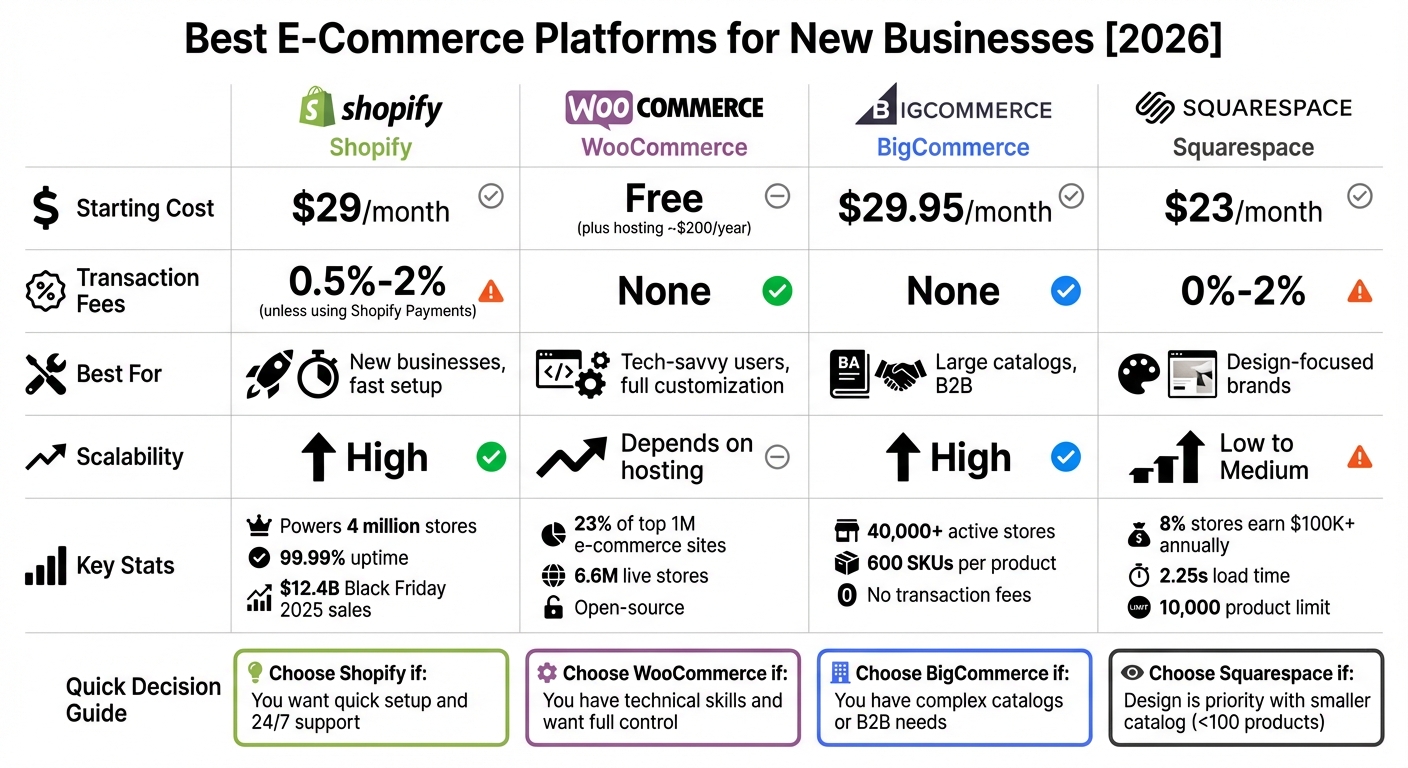
E-Commerce Platform Comparison 2026: Shopify vs WooCommerce vs BigCommerce vs Squarespace
1. Shopify

Shopify powers over 4 million online stores globally as of 2026, cementing its role as a leader in e-commerce. Built to cater to businesses at every stage of growth, it boasts 99.99% uptime and unlimited bandwidth across all plans, ensuring smooth operations even during high-traffic events.
Pricing
Shopify uses a tiered pricing model where higher-tier plans come with lower transaction fees. Most new businesses start with the Basic plan, priced at $29/month (billed annually) or $39/month if paid monthly. This plan provides about 90% of the essential features needed to run a professional online store. For those focused on selling through social media or requiring simple checkout links, the Starter plan at $5/month offers a streamlined option.
If you opt for Shopify Payments, you can avoid the extra 0.5–2% fees charged by third-party payment processors. For example, if you’re processing $100 in sales, the savings from using Shopify Payments can add up quickly. The break-even point for upgrading from the Basic to Grow plan typically hits around $33,000 in monthly card volume.
"Think of plan upgrades as financial levers, not just feature access."
– Brenda Barron, Writer and Editor, Bootstrapping Ecommerce
One thing to watch out for is app bloat. Adding too many third-party apps can drive up your monthly costs. Instead, consider investing $130–$350 upfront in a premium theme with built-in features. This approach could save you over $1,200 annually in app subscription fees.
These pricing options make Shopify appealing for businesses aiming to scale, supported by its reliable infrastructure.
Scalability
Shopify’s infrastructure is built to handle high transaction volumes. During Black Friday 2025, the platform processed around $12.4 billion in global sales, showcasing its capability. Clear upgrade paths support businesses at every growth stage:
- Basic plan: Ideal for solo entrepreneurs
- Grow plan: Suited for small teams processing $30,000+ monthly
- Advanced plan: Designed for brands hitting $150,000+ monthly
- Plus plan: Tailored for enterprise-level operations, starting at $2,300/month.
Take Character.com as an example. This kids’ apparel business switched from Adobe Commerce to Shopify and saw a 40% boost in conversions while managing thousands of products more efficiently. With unlimited product listings and bandwidth across all plans, Shopify ensures businesses won’t face limitations as they expand.
The platform’s mobile-first design and accelerated checkout with Shop Pay cater to the growing mobile shopping trend. Shopify is also preparing for the rise of AI-driven commerce, with 15–20% of purchases expected to be made through AI shopping agents by late 2026.
Customizability
Shopify offers over 8,000 apps in its marketplace, allowing businesses to add features like loyalty programs and advanced product filtering. Its built-in theme editor makes it easy to tweak layouts, colors, and fonts without coding, while developers can use Shopify’s GraphQL API to create fully custom storefronts for headless commerce.
Although checkout customization is limited on lower-tier plans, most new businesses find that Shopify’s customization options meet about 90% of their needs without requiring technical expertise.
Integration Capabilities
Shopify supports multi-channel selling by connecting seamlessly with platforms like Facebook, Instagram, TikTok, Amazon, eBay, Pinterest, and YouTube. Beyond Shopify Payments, it integrates with over 100 payment gateways and offers one-click setups for print-on-demand services like Printful, Printify, and Gelato.
The platform also includes built-in tools for email marketing, SEO, and automated social media syncing – features that previously required paid apps. For brands focused on sustainability, the Shopify Planet integration calculates and supports carbon-neutral shipping. To keep costs manageable, start with essential integrations and add more as your business grows.
2. WooCommerce
WooCommerce stands out as a self-hosted e-commerce solution, making it a great choice for those comfortable managing technical aspects. It powers about 23% of the top 1 million e-commerce sites globally and supports over 6.6 million live stores as of 2026. As a free, open-source WordPress plugin, it eliminates monthly software fees. However, "free" doesn’t mean without expenses – you’ll still need to invest in hosting, a domain name, and an SSL certificate. This setup appeals to businesses looking for cost control and full customization freedom.
Here’s a closer look at WooCommerce’s pricing, scalability, customization, and integration options to help you decide if it fits your needs.
Pricing
While the core WooCommerce plugin is free, running a fully functional store typically costs between $1,250 and $4,000 in the first year. This estimate includes hosting, premium themes, and essential plugins. Below is a breakdown of common costs:
| Cost Component | Annual Cost |
|---|---|
| Managed Hosting | $200–$600 |
| Domain Name | ~$15 |
| Premium Theme | $50–$200 (one-time) |
| Payment Processing | 2.9% + $0.30 per transaction |
| Essential Extensions | $400–$1,200 |
One key advantage? WooCommerce doesn’t charge platform transaction fees. For instance, if you process $100,000 annually using a gateway like Stripe, you’ll only pay Stripe’s fees of 2.9% + $0.30 per transaction.
"WooCommerce is cheaper at scale if you’re comfortable managing hosting and updates, but the total cost of ownership (including developer time) is usually higher than advertised."
– Max Beech, Founder, Athenic
Developer maintenance can add another $500–$2,400 annually for tasks like security updates and plugin management, which hosted platforms handle automatically. These added responsibilities can influence your scalability and overall costs.
Scalability
WooCommerce’s ability to scale depends heavily on your hosting and technical optimizations, such as server tuning, caching (e.g., Redis), and using a CDN. For businesses without tech teams, managed WordPress hosting is a must. Providers like WP Engine or Kinsta start at $20–$25 per month, while enterprise-level hosting for high-traffic stores can range from $500 to $2,000 monthly.
A creative example of WooCommerce’s scalability is DVO Suspension, a mountain bike component brand. In January 2026, they used WooCommerce to build a custom product configurator, allowing customers to choose frames, wheels, and handlebars with real-time pricing updates.
Customizability
WooCommerce shines in its customization capabilities, offering complete access to its PHP and MySQL code. With over 59,000 WordPress plugins and thousands of WooCommerce-specific extensions, you can enhance your store with features like subscriptions ($279/year), memberships ($199/year), and advanced shipping (starting at $100/year). Its WordPress foundation also gives you detailed control over SEO elements like URL structures and canonical tags.
"WooCommerce is the undisputed champion for on-page SEO and content flexibility."
– Chloe Phung, Shopsidek
However, there’s a catch: too many plugins can slow your site, hurting both conversions and search rankings – two critical factors for online success.
Integration Capabilities
WooCommerce supports a vast range of integrations, connecting with CRM tools (e.g., Salesforce, HubSpot, Zoho), ERP systems (like SAP, NetSuite), and payment gateways (such as WooPayments, Stripe, and PayPal). The 2026 release of REST API v3 and GraphQL support has made it easier to create headless commerce setups and link third-party systems.
For omnichannel selling, WooCommerce allows you to sync products, inventory, and orders across platforms like TikTok, Instagram, Facebook, and marketplaces like Amazon and Walmart. Tools like TaxJar or Avalara automate tax compliance, saving you time on administrative tasks.
"By adding Afterpay to our other payment options, we’re able to provide a more customized shopping experience, give our customers additional convenience and control, and reach a younger demographic."
– John Strain, Chief Digital and Technology Officer, Gap, Inc.
When choosing plugins, prioritize those with at least 10,000 active installations and a 4.5-star rating or higher to ensure reliability and security.
3. BigCommerce
BigCommerce operates as an "Open SaaS" platform, blending the ease of a hosted solution with the flexibility of open APIs for advanced customization. With over 40,000 active online stores and a history of serving 130,000+ merchants across 150+ countries, it’s a well-established player in the e-commerce space. One of its standout features is the inclusion of more built-in tools compared to many competitors, potentially saving users between $5,800 and $30,000+ annually by reducing the need for paid third-party apps.
The platform eliminates transaction fees on all plans, meaning merchants only pay standard gateway fees. For example, if you process $100,000 annually through Stripe, you’ll only pay Stripe’s fees – BigCommerce doesn’t take an extra cut. Additionally, it supports up to 600 SKUs or variants per product, making it a strong choice for businesses with complex inventories.
With transparent pricing, scalability, flexible customization, and seamless integrations, BigCommerce is designed to meet the needs of modern e-commerce businesses.
Pricing
BigCommerce offers four main pricing tiers, with automatic upgrades based on your annual sales:
| Plan | Monthly Price | Annual Sales Limit | Key Features |
|---|---|---|---|
| Standard | $29.95 | Up to $50,000 | Professional reporting, gift cards, real-time shipping quotes |
| Plus | $79.95 | Up to $180,000 | Customer groups, stored credit cards, abandoned cart saver |
| Pro | $299.95 | Up to $400,000 | Product filtering, Google customer reviews, custom SSL |
| Enterprise | Custom | Unlimited | 99.99% uptime SLA, priority support, unlimited API calls |
"BigCommerce provides transparent pricing without the hidden transaction fees that can quietly balloon your overall costs on other platforms." – Haylee Clark, BigCommerce
The sales-based pricing structure automatically upgrades your plan when your revenue exceeds the set threshold. While this can be frustrating for high-volume, low-margin businesses, the absence of transaction fees often offsets the higher plan costs.
Scalability
BigCommerce is built to support businesses at every stage, from startups to large enterprises, thanks to its extensive native features. It accommodates complex catalogs, offering up to 250 product options and 600 SKUs per product. For businesses managing multiple operations, its multi-storefront capabilities allow you to oversee 3 to 8 distinct storefronts from a single account – ideal for international expansion or separating B2B and B2C operations.
In 2024, MKM Building Supplies leveraged BigCommerce’s headless technology to enhance their digital experience.
"Using headless technology meant we could make rapid improvements and change directions quickly, adding new features or categories without being limited by the technology." – Andy Pickup, Digital Director, MKM Building Supplies
Scalability varies by plan. Enterprise users benefit from a 99.99% uptime SLA and unlimited API calls, while lower-tier users face some restrictions. With over 90% of its functionality accessible via APIs, BigCommerce is an excellent choice for businesses planning custom integrations or adopting modern commerce architectures.
Customizability
BigCommerce offers robust customization tools to fit a variety of business needs. Its Catalyst visual editor and API access enable merchants to tailor their stores extensively. For example, users can control SEO elements like URL structures and permalinks directly – features that often require plugins on other platforms. Checkout flows, product pages, and customer account experiences can also be adjusted without needing coding expertise.
For businesses requiring deeper customization, developers can use the platform’s APIs to create tailored storefronts. TradeTools, for instance, transitioned their backend to BigCommerce while keeping their existing frontend intact.
"We were able to transition the backend to BigCommerce with minimal disruption and no customer confusion, keeping the frontend exactly as it was." – Mark Vourlides, Marketing and Ecommerce Manager, TradeTools
While the learning curve is steeper compared to simpler platforms like Wix or Squarespace, the tradeoff is greater flexibility and fewer limitations as your business scales. BigCommerce also includes "BigAI" tools powered by Google AI, which automate tasks like generating product descriptions and recommendations.
Integration Capabilities
BigCommerce integrates with over 65 payment gateways, including Stripe, PayPal, and Square, without additional transaction fees. Its app marketplace provides hundreds of tools for marketing, SEO, shipping, and more. Native omnichannel integrations allow you to sync inventory across platforms like Amazon, eBay, Walmart, TikTok, Instagram, and Facebook – all from a single dashboard.
In January 2026, Canpump enhanced its payment options using BigCommerce’s Stripe integration, resulting in faster transactions. Similarly, Carewell co-founder Bianca Padilla reported a 200% increase in conversion rates after implementing stored payment and quick checkout features.
"By combining Stripe’s AI-powered payments and fraud prevention with BigCommerce’s open platform, we’re helping merchants build a commerce foundation that’s ready for what’s next." – Travis Hess, CEO, Commerce
For enterprise systems, BigCommerce connects seamlessly with tools like NetSuite, SAP, Microsoft Dynamics (ERP), and Salesforce or HubSpot (CRM). Its composable architecture is particularly appealing to enterprise-level businesses, with 80% of them either considering or adopting composable website structures.
sbb-itb-ba0a4be
4. Squarespace

Squarespace takes a design-focused approach to e-commerce, making it a popular choice for creatives and first-time sellers. Known for its sleek design templates and all-in-one functionality, the platform offers tools like the grid-based "Fluid Engine" editor and "Blueprint AI", which walks users through a five-step process to create a personalized site structure. While Squarespace caters well to small businesses and individuals, only about 8% of its stores generate over $100,000 annually, compared to Shopify’s 21%.
"Squarespace has always offered some of the best website templates on the market, making it a firm favorite amongst creatives such as artists and photographers." – Owain Williams, Website Builder Editor
In terms of performance, Squarespace sites load in about 2.25 seconds, slower than Shopify’s 0.9 seconds.
Pricing
Squarespace offers four e-commerce plans, starting with the Core plan at $23/month, which is ideal for startups. Transaction fees vary depending on the plan:
- Basic plan: 2% transaction fee on sales.
- Core, Plus, and Advanced plans: No transaction fees.
For digital products, additional fees apply: 7% for Basic, 5% for Core, 1% for Plus, and none for Advanced.
| Plan | Annual Price (Monthly) | Transaction Fee | Best For |
|---|---|---|---|
| Basic | $16/month | 2% | Portfolios, blogs, and hobbyists |
| Core | $23/month | 0% | Small businesses and startups |
| Plus | $39/month | 0% | Growing stores needing lower fees |
| Advanced | $99/month | 0% | High-volume sellers and brands |
"The Core plan ($23 per month) is the best value for money and unlocks the widest range of features, including advanced analytics, integrations, and sales tools." – Annie Angus, Writer, Website Builder Expert
Choosing annual billing can save up to 36% compared to monthly payments, and it includes a free custom domain for the first year. Additionally, eligible founders can take advantage of a 50% discount on their first annual plan.
Scalability
Squarespace is best suited for businesses with smaller product catalogs and simpler operations. It supports up to 10,000 products with 250 variants per product. While this is sufficient for many startups, it can become limiting as businesses grow. The platform lacks built-in integrations for marketplaces like Amazon and eBay, requiring third-party extensions.
"Squarespace is great for first-time sellers, indie brands, and those testing product-market fit… It’s not built to scale like Shopify or BigCommerce." – Rajendra Bhochalya, Software Developer
Squarespace shines for service-oriented businesses, offering tools like Acuity Scheduling, custom invoicing, and client document management. Recent updates, such as a 20x improvement in site search speed and bulk actions for managing up to 1,000 contacts, enhance user experience. Features like Squarespace Capital for financing and "Instant Payouts" for cash flow management further support small businesses. However, many businesses outgrow Squarespace once they exceed 500 products or need advanced features like multi-location tracking. For companies earning less than $5,000 monthly, Squarespace can be 20–50% cheaper than Shopify, thanks to its built-in tools for email, analytics, and SEO.
Customizability
Squarespace prioritizes design simplicity and aesthetic appeal over technical flexibility. Its Fluid Engine editor allows users to visually customize layouts without coding, while the Blueprint AI tool helps generate site structures and content. For those on the Core plan and above, CSS and JavaScript customizations are available. Squarespace also provides an AI-powered SEO tool to identify and resolve visibility issues quickly. However, its menu structure can feel cumbersome, and its support for multi-currency and multilingual selling is limited. Unlike open-source platforms, Squarespace doesn’t allow deep backend modifications, making it ideal for users focused on ease of use and design rather than technical depth.
Integration Capabilities
Squarespace relies on about 31 official extensions and emphasizes native tools over a large app ecosystem. Its payment system, Squarespace Payments (powered by Stripe), supports options like Apple Pay, Klarna, and Afterpay. The mobile app’s "Tap to Pay" feature enables contactless payments without additional hardware, though it’s only available in the U.S.. Social commerce integrations with TikTok, Instagram Shops, Facebook Shops, and Pinterest help businesses tap into platforms that collectively generated almost $700 billion in revenue in 2024. Marketing tools like Email Campaigns, Bio Sites, and the Unfold app ensure brand consistency.
For logistics, Squarespace partners with carriers like FedEx, UPS, and USPS, and integrates with third-party services like ShipStation, ShipBob, and Spocket for dropshipping. Businesses needing advanced plugins should consider the Commerce Advanced plan, which includes access to Commerce APIs. Tools like Acuity Scheduling streamline appointment management with features like automated reminders and secure payments.
Advantages and Disadvantages
Every e-commerce platform has its own strengths and challenges, making the choice largely dependent on your business needs.
Shopify stands out for its simplicity, allowing users to set up a store in under four hours. It also offers 24/7 customer support and a "Shop Pay" feature that can increase mobile conversions by up to 91%. However, if you’re not using Shopify Payments, transaction fees range from 0.5% to 2%, which could add up – potentially $1,000 extra per month for a business processing $50,000 in sales.
WooCommerce, as an open-source WordPress plugin, gives you complete ownership and unlimited customization without monthly platform fees. That said, the total first-year cost – covering hosting, security, and essential plugins – typically falls between $1,000 and $3,200. While it can be more cost-effective for larger operations, managing hosting and updates requires some technical know-how, and the actual cost of ownership is often higher than it initially appears.
BigCommerce is ideal for businesses with complex product catalogs or B2B operations, offering support for over 600 product variants and charging no transaction fees. Its extensive built-in features reduce reliance on third-party apps. However, it comes with a less intuitive user interface and automatic plan upgrades once annual sales exceed $50,000 for its Standard plan.
On the other hand, Squarespace is all about aesthetics. With award-winning templates, it’s perfect for creative brands or businesses with a smaller product catalog. The trade-off is limited scalability and fewer integration options, which may not suit businesses with larger inventories.
| Platform | Strength | Limitation | Best For |
|---|---|---|---|
| Shopify | Quick setup and robust app ecosystem | Transaction fees without Shopify Payments | New direct-to-consumer brands |
| WooCommerce | Full customization and no platform fees | Requires technical expertise for upkeep | WordPress users seeking total control |
| BigCommerce | Advanced features with no transaction fees | Clunky interface and sales-based pricing tiers | High-volume or B2B operations |
| Squarespace | Stunning design and simplicity | Limited scalability and integrations | Design-driven brands with curated products |
Each platform offers a unique mix of features, making the decision largely about aligning those features with your business goals and priorities.
Conclusion
Match your technical skills, budget, and growth plans with the strengths of each platform discussed above. This guide breaks down their features, helping you find the best fit for your specific needs.
For beginners, Shopify stands out with its user-friendly setup, 24/7 support, and an attractive $1-for-three-months promotion. As Max Beech, Founder of Athenic, explains:
"Shopify is the best ecommerce platform for most businesses starting out – it’s the easiest to set up, has the best app ecosystem, and the costs are predictable".
Shopify also offers quick scalability, making it ideal for those just getting started.
If you’re working with a $0 budget, Square Online is a solid choice. Its free plan allows you to sync physical and online sales seamlessly.
For creative professionals or design-driven brands, Squarespace is a great option, thanks to its award-winning templates. However, it’s better suited for smaller catalogs (under 100 products). Squarespace thrives in visually stunning, design-oriented commerce.
Looking for full customization without recurring fees? WooCommerce offers unparalleled control. That said, be prepared to invest 10–20 hours in setup and ongoing management. It’s a perfect fit for tech-savvy users who want complete ownership.
For businesses scaling rapidly or managing complex catalogs, BigCommerce is a smart pick. With no transaction fees and support for up to 600 product variants, it minimizes reliance on third-party apps. BigCommerce is built to handle enterprise-level demands with ease.
Use these insights to create an online store that aligns with your goals and sets you up for success in 2026.
FAQs
Which platform is best if I want to switch later?
Shopify is a go-to option for businesses anticipating a platform switch down the line. Its straightforward setup, vast app marketplace, and clear pricing structure make future migrations easier, reducing potential downtime and headaches.
WooCommerce can handle larger businesses but often demands more technical expertise to manage effectively. On the other hand, BigCommerce provides robust built-in tools for high-volume stores, though it doesn’t quite match Shopify’s ease of use when it comes to smooth migrations.
What costs should I budget for beyond the monthly plan price?
When planning your e-commerce budget, it’s important to account for more than just the monthly plan price. Transaction fees, premium apps or plugins, and any necessary customization or development costs can quickly add up. If hosting isn’t included in your plan, you’ll need to factor in that expense too.
On top of that, ongoing costs like marketing, SEO, and advertising are crucial to keep your store growing and competitive. These investments ensure your e-commerce business runs smoothly and has the ability to scale effectively as you move into 2026.
How do I choose based on my product count and variants?
For extensive catalogs with 100,000+ SKUs, tiered pricing, or intricate shipping needs, BigCommerce and Adobe Commerce are solid choices – they’re designed to handle that level of complexity effectively. If you’re working with a moderate number of products, Shopify stands out for its ease of use and ability to grow with your business. On the other hand, WooCommerce can be a good option if you’re comfortable managing your own hosting, though keep in mind it might lead to higher costs over time. Your decision should align with the size of your catalog, the complexity of your operations, and your technical expertise.