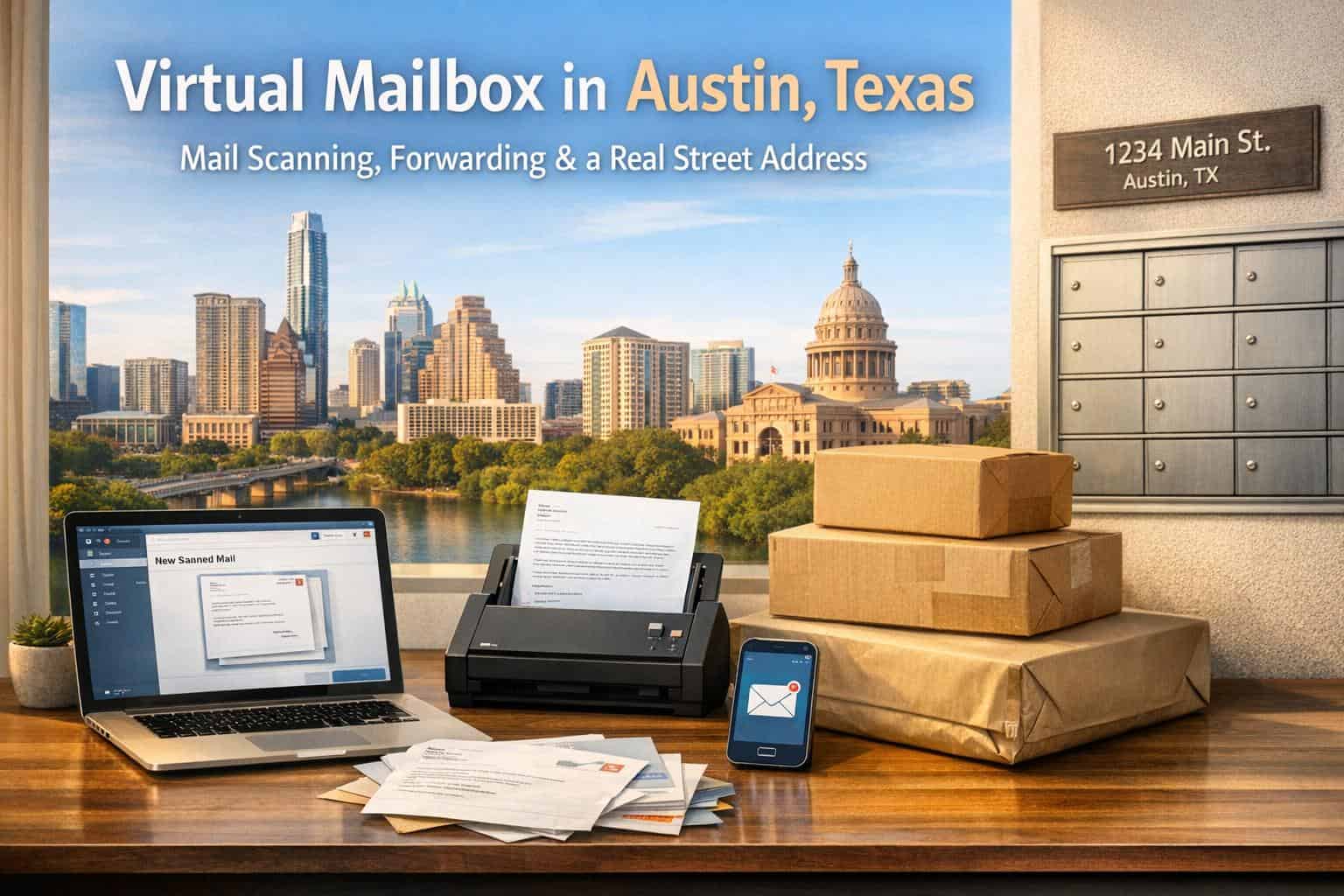
A virtual mailbox in Austin is a modern solution for managing physical mail remotely. It provides a real street address for receiving mail, which is scanned and uploaded to a secure online platform. You can view, manage, forward, or shred mail from anywhere. Unlike a PO Box, it’s suitable for business registration, bank accounts, and official filings, meeting Texas requirements for a physical address. Services often include mail forwarding, check deposits, and secure storage, making it ideal for remote workers, digital nomads, and small business owners.
Key Benefits:
- Real Street Address: Suitable for business filings and professional use.
- Mail Scanning: Access scanned mail online 24/7.
- Mail Forwarding: Ship items anywhere, with discounted rates.
- Privacy Protection: Keep your home address off public records.
- Business Compliance: Meets Texas regulations for LLCs and corporations.
This service is especially helpful for those working remotely or running businesses from home, offering convenience, security, and professionalism without the cost of renting office space.
What is a Virtual Mailbox and How Does It Work
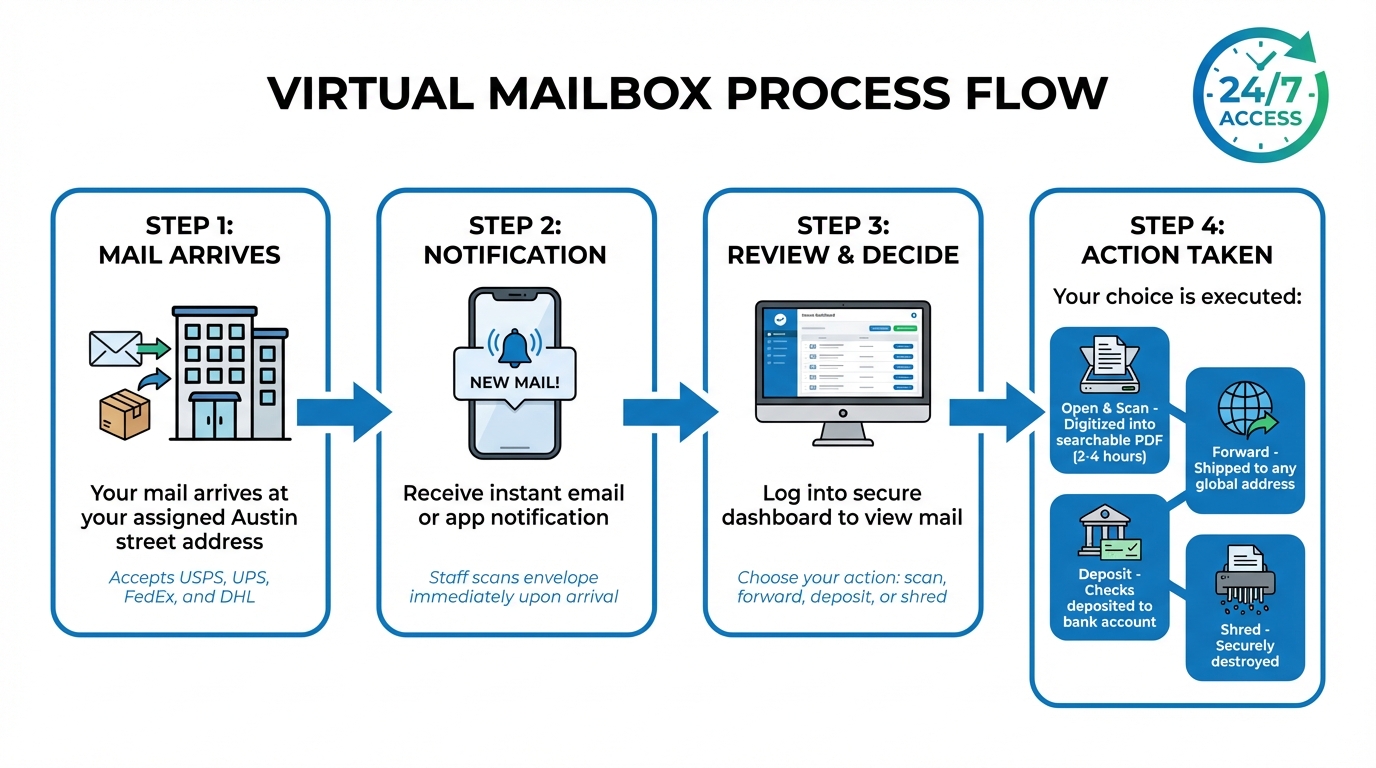
How Virtual Mailbox Services Work: 4-Step Process
A virtual mailbox gives you a real street address where your physical mail is received, sorted, and digitized for online access. Think of it as a remote mailroom that handles your mail securely while you manage everything from your computer or smartphone.
Here’s how it works: When mail arrives at your assigned address, staff scan the envelope or package and immediately notify you via email or app. From there, you can log in to a secure dashboard to decide what to do next – open and scan the contents into a searchable PDF, forward the item to another address, deposit checks, or securely shred unwanted mail. Unlike a PO Box, virtual mailboxes accept deliveries from all major carriers, including UPS, FedEx, DHL, and USPS.
With high-resolution scans and advanced data tools, you can manage your mail remotely 24/7, no matter where you are in the world. For businesses, especially those registering with the Texas Secretary of State, having a real street address is not just helpful – it’s required. We’ll dive deeper into why this matters in the sections below.
Mail Scanning: Turning Physical Mail into Digital Files
Mail scanning transforms your incoming paper mail into digital documents you can access instantly. When a letter or package arrives, the service scans the envelope so you can see who sent it and decide whether to open it. If you choose "Open and Scan", the contents are digitized into a searchable PDF.
This feature is a game-changer for remote workers and frequent travelers who can’t check a mailbox daily. Instead of missing important documents or letting mail pile up, you receive instant notifications and can act right away.
Barry McCardel, CEO of Hex Technologies, put it simply: "The last thing you want to worry about as a founder is physical mail and package logistics. Stable takes that completely off your plate…"
The scanned documents are stored in a searchable archive, allowing you to download, email, or print them whenever needed. Many providers also offer SOC 2 or HIPAA-compliant security for sensitive mail. When evaluating providers, use a secure virtual mailbox checklist to ensure your data remains protected. Depending on your service level, scans can be completed in as little as 2 to 4 hours, which is especially useful for tasks like depositing checks.
Trisha Robertson, Controller at Havenwood Academy, shared her experience: "We have loved utilizing electronic check deposits… Their interface makes the deposits so simple and it’s easy to track what has been deposited."
For those working remotely or constantly on the move, this system ensures you stay on top of your mail without being tied to a physical location. And when you need the actual item, mail forwarding takes care of that.
Mail Forwarding: Sending Mail Wherever You Are
Mail forwarding allows you to receive physical mail or packages at any location worldwide. Whether it’s an important legal document or a package that can’t be digitized, you can request forwarding through your dashboard, and the service ships it to your chosen address.
This feature is particularly useful for digital nomads and expats who need a consistent address while moving between cities or countries. Many providers offer discounted shipping rates – sometimes up to 80% off – for international forwarding thanks to bulk carrier agreements. Some even offer bulk forwarding, combining multiple items into one shipment to save on postage.
Forwarding typically involves a base fee plus postage costs. Providers often include free storage for a limited time before applying daily fees, giving you flexibility to manage your mail without feeling rushed. This ensures you never lose access to critical documents, no matter where you are. And for business owners, maintaining a stable Austin address enhances your professional image.
Real Street Address: Adding Professional Credibility
A real street address gives your business a level of legitimacy that a PO Box simply can’t provide. For example, when registering an LLC in Texas, opening a business bank account, or filing IRS documents, many institutions require a physical street address. The Texas Secretary of State even rejects filings that use PO Boxes.
This is especially important for entrepreneurs working from home who don’t want to use their residential address for business purposes.
Matt H., a business owner, shared: "As my main office is at home, the service provides me with a separate discrete mailing address that protects my home privacy, while giving me a ‘physical’ address for my mail."
Listing a professional Austin street address on your website, business cards, and official documents signals stability and professionalism. It shows that your business is anchored in a thriving city without the overhead costs of renting office space. Plus, a real street address solves practical issues – unlike PO Boxes, it can accept deliveries from USPS, UPS, FedEx, and DHL.
For small business owners and entrepreneurs, this combination of privacy, professionalism, and convenience makes a virtual mailbox an invaluable tool for streamlining operations.
| Feature | Virtual Mailbox | Traditional PO Box |
|---|---|---|
| Address Type | Real street address | PO Box |
| Carrier Compatibility | Accepts USPS, UPS, FedEx, DHL | Typically USPS only |
| Remote Access | Digital scans viewable online | Requires physical visit |
| Business Registration | Accepted for LLC/Corp filings | Not accepted by state regulations |
| Check Deposits | Available via online request | Not available |
| Privacy | Shields your home address | May not fully protect your privacy |
sbb-itb-ba0a4be
Benefits of Virtual Mailboxes for Austin Residents and Businesses
Virtual mailboxes offer Austin residents and businesses a secure and professional way to manage mail, building on efficient mail scanning and forwarding features.
Privacy Protection and Security
One of the biggest perks of a virtual mailbox is keeping your home address private. When you register an LLC with the Texas Secretary of State or list your business address online, your information becomes public. A virtual mailbox ensures your residential address stays confidential, shielding it from customers, vendors, and solicitors.
Virtual mailboxes also help prevent porch piracy by securing your deliveries at staffed facilities with restricted access. Your mail and packages are kept safe, and you’ll get instant notifications whenever something arrives.
For businesses handling sensitive documents, the security features go even further. Mail is scanned and uploaded to encrypted platforms with 256-bit AES encryption and two-factor authentication. Some providers even offer HIPAA-compliant services, including locked facilities, digital audit trails, and secure shredding. Impressively, some providers report a 99.99% accuracy rate while processing over 3 million pieces of mail annually.
These robust security measures not only protect your mail but also enhance your business’s image, projecting professionalism and trustworthiness.
Professional Presence in Austin
Using an Austin street address for your business adds credibility. Unlike a PO Box, virtual mailbox, or registered agent address – which the Texas Secretary of State won’t accept for business filings – a real street address works for LLC registration, business bank accounts, and IRS documentation. This is especially valuable for home-based entrepreneurs or remote business owners wanting to establish a presence in one of the country’s most business-friendly cities.
Joe H., a web design business owner, remarked: "I purchased a mailbox to establish a business address for my home-based web design company. It was fast and simple… I now have an excellent-looking address!"
Austin’s reputation as a hub for innovation and entrepreneurship makes it a prime location for business registration. With major events like SXSW and Austin Startup Week, plus Texas’s tax advantages – no state income tax or corporate income tax – listing an Austin address on your business materials signals you’re part of this thriving ecosystem. Best of all, you can do this without the expense of renting an office.
Flexibility for Remote Workers and Digital Nomads
Virtual mailboxes are perfect for those who value location independence. Whether you’re traveling around Texas or halfway across the globe, you can manage your mail 24/7 from any device.
Dean Woods, a verified customer, shared: "These guys help me keep track of my mail no matter where my job sends me. It’s awesome to get an email letting you know what you get."
For digital nomads, having a stable Austin address simplifies global communication. Many providers offer consolidated shipping, combining multiple packages into one shipment to cut international forwarding costs – some users report saving up to 80% on shipping rates. Features like mobile check deposit also let you handle finances remotely, allowing you to deposit payments straight into your bank account, no matter where you are.
Business Anywhere Virtual Mailbox Service
Business Anywhere takes your mail management to the next level with straightforward pricing and integrated tools for entrepreneurs. Offering a virtual mailbox with a real Austin street address, it provides a flat-rate pricing model that includes unlimited scans and global mail forwarding. Perfect for those who value simplicity and transparency.
Plans and Pricing Options
Business Anywhere offers three pricing tiers, designed to cater to varying needs based on the number of mail recipients. These plans are billed annually and include the following:
| Plan | Monthly Cost | Recipients | Key Inclusions |
|---|---|---|---|
| Basic | $20 | Up to 2 | Unlimited mail/packages, unlimited scans, global forwarding |
| Premium | $30 | Up to 5 | Unlimited mail/packages, unlimited scans, global forwarding |
| Advanced | $65 | Up to 20 | Unlimited mail/packages, unlimited scans, global forwarding |
"Our simple pricing means just that, simple. Other virtual mailbox providers may have complex pricing that leaves you in the dark on what you are going to be charged, but we found it is much simpler for managing our business and much better for you to have a very clear and simple pricing structure."
The Basic plan is ideal for small-scale operations, such as home-based businesses or partnerships, covering up to two recipients. For growing teams or businesses managing multiple entities, the Premium and Advanced plans provide options for up to 5 or 20 recipients, respectively, ensuring scalability without hidden fees.
Key Features: Unlimited Scanning and Global Forwarding
Business Anywhere stands out with its unlimited scanning feature, eliminating the hassle of per-page fees or monthly limits. Every piece of mail is scanned and uploaded to your secure digital dashboard – accessible 24/7 via iOS, Android, or desktop – within three business days.
The service is compatible with all major carriers, including USPS, UPS, DHL, and FedEx, so you’re not restricted by delivery preferences. Need physical mail or packages? The global forwarding feature allows you to ship items anywhere in the world. Plus, you can consolidate multiple packages into a single shipment through the dashboard, reducing international shipping costs significantly.
To save you even more time, the platform automatically filters out junk mail, ensuring your digital mailbox stays clutter-free. This means you can focus on important correspondence without wading through unnecessary flyers or promotional materials.
Integration with Business Services
Beyond mail management, Business Anywhere integrates seamlessly with tools essential for business formation and compliance. The Austin address can be used immediately for tasks like LLC filings, IRS documentation, and opening bank accounts.
"Texas is booming with a strong economy, so take advantage of it. Even if you don’t live in the state, you can still form an LLC there… To make it happen, you’ll need a virtual address in Austin."
Additional features include registered agent services – provided free for the first year when you register your business – online notary services at $37 per notarization, and compliance tools that notify you of annual reports and filing deadlines. With everything accessible from a single dashboard, Business Anywhere eliminates the need to juggle multiple platforms or service providers.
How to Set Up and Manage a Virtual Mailbox in Austin
Step-by-Step Setup Process
Setting up a virtual mailbox in Austin is pretty straightforward and can be done in about 15 minutes. Start by picking a Business Anywhere plan that fits your needs. All plans come with perks like unlimited mail scanning and global forwarding.
The next step is completing USPS Form 1583, a legal requirement for any Commercial Mail Receiving Agency to handle your mail. This form needs to be notarized, but you can take care of it online using Business Anywhere’s remote notary service for $37 per notarization. To complete this, you’ll need two forms of ID: one with a photo, like a U.S. driver’s license or passport, and another document to confirm your address, such as a utility bill, lease, or voter registration card. Once everything is verified, your Austin address will be ready to use immediately for filings and applications.
A typical virtual mailbox address might look like this:
[Your Name/Business Name]
2028 East Ben White Boulevard, Suite 240 – [Mailbox Number]
Austin, TX 78741
You can use this address right away for things like LLC filings, IRS paperwork, or opening a bank account. To ensure your mail gets sent to your new address, file a Change of Address with USPS and notify critical senders – like banks, government agencies, or vendors – of the update.
Daily Mail Management Tips
Once your virtual mailbox is set up, staying on top of your mail becomes a breeze. You’ll get instant notifications when new mail arrives, and the dashboard lets you decide what to do next – request scans, forward items, deposit checks, or shred documents.
To keep everything tidy, organize your mail with tags and categories like "Invoices", "Legal", or "Action Required." The system also helps by filtering out junk mail, so you won’t have to deal with spam or promotional flyers clogging up your dashboard. For urgent items, like IRS notices or bank statements, you can set up auto-scan rules to ensure mail from specific senders is digitized right away.
Be mindful of storage limits to avoid extra fees. Most services include 30 days of free storage for envelopes and 14 days for packages. After that, storage fees kick in – typically $0.05 per day for envelopes and $0.50 per pound per day for packages. If you need mail forwarded, use the consolidation feature to bundle multiple items into one shipment, which can save you money on domestic and international shipping costs.
For checks, skip the hassle of forwarding altogether. With just one click, you can deposit checks directly into your bank account through the dashboard, cutting out shipping delays and reducing the risk of lost mail. If you’re managing mail for a team, you can invite team members to the platform. This way, everyone can access, assign, and handle important mail without needing to share login credentials.
Austin-Specific Considerations for Virtual Mailboxes
Compliance with Texas Business Regulations
In Texas, businesses are required to use a real street address for official filings. If you’re forming an LLC or corporation, using a PO Box will result in your application being rejected.
Additionally, Texas law requires every business entity to have a registered agent with a physical office address in the state. This agent is responsible for receiving legal documents and official correspondence. Some virtual mailbox providers, like Business Anywhere, include a registered agent service free for the first year of business registration, with an annual fee of $147 after that. However, not all virtual mailbox plans come with this service, so it’s important to confirm if it’s included when you’re selecting a provider.
Another requirement to keep in mind is completing USPS Form 1583 before using a virtual mailbox. This federal form ensures compliance with legal standards and is a critical step in setting up a virtual mailbox that aligns with both state regulations and practical delivery needs.
Local Address Options and Carrier Compatibility
Beyond compliance, the type of address you choose matters. While traditional PO Boxes only work with USPS, a real street address in Austin allows deliveries from all major carriers, including USPS, FedEx, UPS, and DHL. This flexibility is particularly important for businesses that need to receive packages from private carriers or meet vendor delivery requirements.
"The Texas Secretary of State will reject your filing if you use a PO box as your business address on your formation documents." – PostScan Mail
Austin virtual mailbox locations are staffed during standard business hours, so someone is available to sign for packages, including restricted deliveries. This minimizes the risk of missed deliveries and ensures your shipments are received promptly. Some providers even offer local pickup options for added convenience.
When selecting an Austin address for your virtual mailbox, it’s worth considering well-known business areas. Streets like East Ben White Boulevard, Brodie Lane, or North Highway 183 not only provide a professional presence but also meet federal requirements for physical addresses, such as those needed to open a business bank account.
Conclusion
A virtual mailbox brings together all the perks of modern mail management into one streamlined service. For residents and businesses in Austin, it transforms how mail is handled – eliminating the need for physical trips while offering a real street address that accepts deliveries from major carriers. Plus, with a digital dashboard, you can manage your mail anytime, anywhere.
For those forming a Texas LLC, having a real street address isn’t just convenient – it’s legally required and adds credibility to your business. Remote workers and digital nomads also benefit from the flexibility of managing mail while maintaining a professional presence in Austin.
Beyond convenience, virtual mailboxes help keep your home address private and off public records. Features like automated check deposits, junk mail filtering, and worldwide forwarding take the hassle out of mail management, letting you focus on what matters most.
Business Anywhere wraps all these benefits into a budget-friendly package, starting at just $20 per month. This includes unlimited mail scanning, no hidden fees, and access to Austin’s business-friendly environment – complete with Texas’s no personal income tax advantage. Whether you’re starting a business, running one remotely, or simply prioritizing your privacy, a virtual mailbox offers the tools you need without the costs of a physical office.
For any business aiming to boost efficiency and maintain credibility, choosing a virtual mailbox is a smart, forward-thinking move.
FAQs
How does a virtual mailbox help keep my personal and business information private?
A virtual mailbox gives you an added layer of privacy by offering a real street address that keeps your personal or home address separate from business or public communications. This setup helps protect your home address, reducing risks like identity theft, uninvited guests, or breaches of your privacy.
On top of that, virtual mailboxes provide secure mail handling and digital management features. You can access scanned images of your mail online and decide whether to have it opened, forwarded, or shredded. This reduces the need for physical contact with sensitive documents and ensures that only you can access your information. It’s a simple way to maintain a professional address while keeping your personal details protected.
Can I use a virtual mailbox to register an LLC in Texas?
Yes, you can use a virtual mailbox to register an LLC in Texas. Most virtual mailbox providers offer real street addresses, which meet the requirements for LLC registration. Since PO boxes aren’t allowed for this purpose, a virtual mailbox with a valid street address becomes a practical alternative.
This is particularly useful for remote business owners. It not only helps you stay compliant with legal regulations but also adds convenience and flexibility when it comes to handling your mail.
What are the costs and features of virtual mailbox plans in Austin, Texas?
Virtual mailbox services in Austin, Texas, cater to a variety of needs, with basic plans starting at $15 to $25 per month. These entry-level options typically include essentials like a real street address, mail scanning, and online mail management – perfect for remote workers, digital nomads, or small business owners looking for a streamlined solution.
For those needing more advanced features, higher-tier plans are available. These often include perks like mail forwarding, package handling, check deposit services, and storage options. Premium plans can cost $50 or more per month, depending on the range of services offered. With options designed for both personal and business use, these plans provide a balance of convenience and flexibility to meet diverse requirements.
Related Blog Posts
- Virtual Address vs Registered Agent in Texas
- Virtual Mailbox in Gilbert, Arizona: Mail Scanning, Forwarding and a Real Street Address
- Virtual Mailbox in Denver, Colorado: Mail Scanning, Forwarding and a Real Street Address
- Virtual Mailbox in Rockville, Maryland: Mail Scanning, Forwarding and a Real Street Address