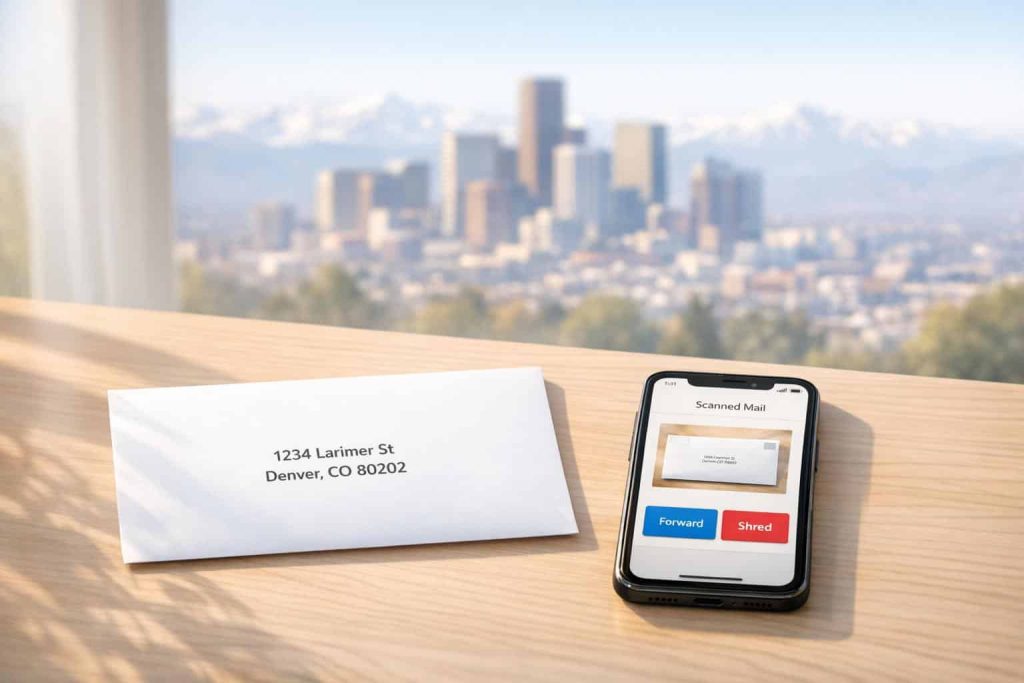
Managing mail has never been easier. Virtual mailbox services in Denver offer a secure, online way to handle your physical mail. Here’s what you get:
- A real Denver street address (not a P.O. Box) suitable for business registrations, IRS forms, and bank accounts.
- Mail scanning and notifications: View scanned envelopes and request content scans directly from your dashboard.
- Mail forwarding: Ship physical mail or packages anywhere in the world, with options for consolidation to save on costs.
- Secure storage and shredding: Store your mail digitally or physically, and shred unwanted items with a single click.
Perfect for small business owners, remote workers, and privacy-conscious individuals, this service allows you to access and manage your mail from anywhere. Whether you’re registering an LLC with a virtual address, traveling, or just want to protect your home address, a virtual mailbox simplifies the process while maintaining a professional image.
Plans start as low as $20/month, making it an affordable alternative to traditional office spaces.
How Virtual Mailboxes Work
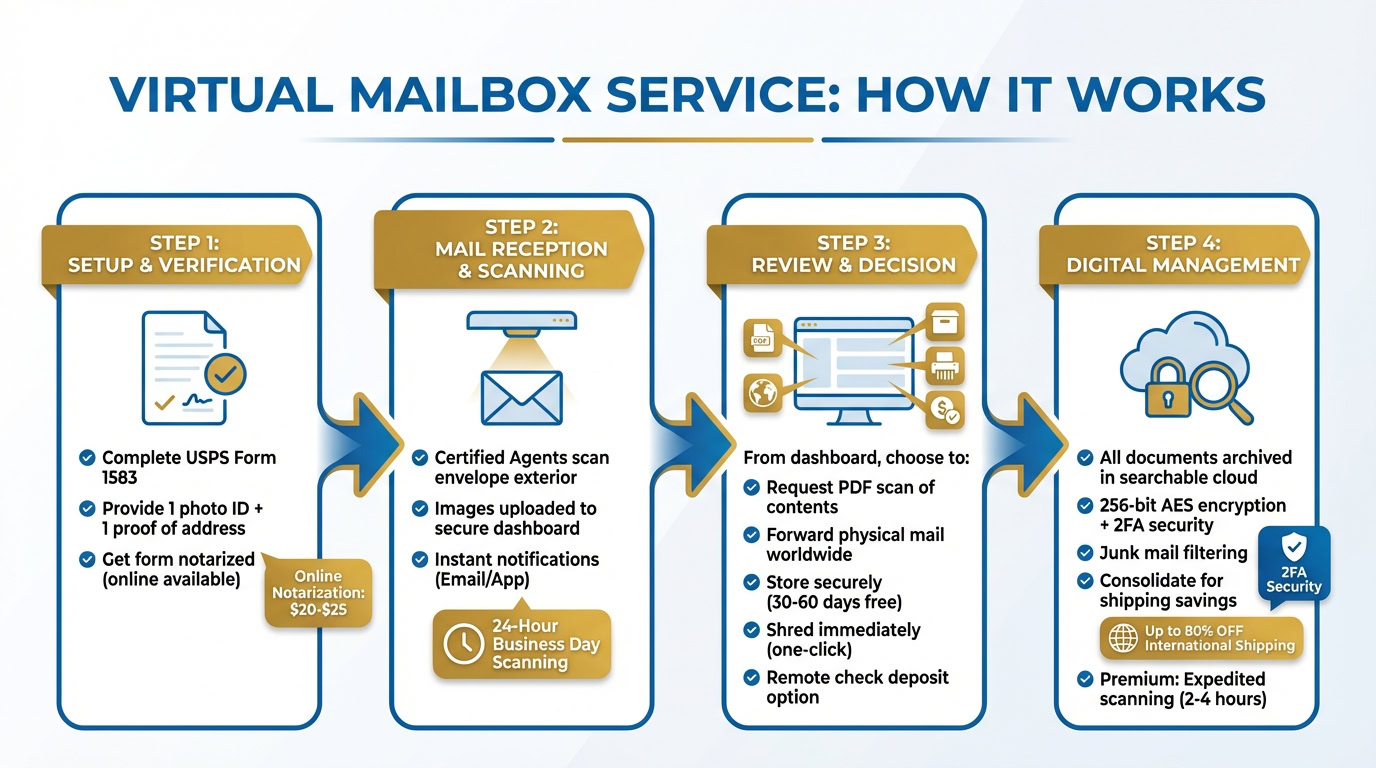
Setting up a virtual mailbox is straightforward. Start by completing USPS Form 1583, which requires one photo ID and one proof of address. The form must be notarized, but many Denver-based providers now offer online notarization services for around $20–$25 through video calls. Once that’s done, you’re ready to experience efficient mail handling and digital organization.
Mail Handling and Notifications
After activating your account, Certified Mail Receiving Agents will scan the exterior of each piece of mail you receive. These images are uploaded to your secure dashboard, typically within 24 business hours. You’ll also get instant notifications via email or a mobile app, so you’re always in the loop when new mail arrives.
From your dashboard, you can take action on each item. Options include requesting a high-resolution PDF scan of the contents, forwarding the physical mail to any address worldwide, storing it securely, or shredding it immediately. Some services even offer remote check deposit options – either by scanning the check for mobile deposit or mailing it directly to your bank.
This system not only keeps you updated but also simplifies the way you manage your mail.
Digital Mail Management
Once your identity is verified and the notarization is complete, all your mail is managed through a secure cloud-based system. Scanned documents are archived and searchable, making it easy to keep everything organized. Features like junk mail filtering and a one-click shred option further simplify the process.
If you need physical mail forwarded, consolidating multiple items into a single shipment can help save on costs. Many providers offer discounted international shipping – sometimes up to 80% off – thanks to the high volume of mail they handle. For those who need faster service, premium plans often include expedited scanning, with some providers completing scans in as little as 2 to 4 hours.
Why a Real Street Address Matters
One of the biggest advantages of a virtual mailbox is that it provides a real Denver street address, unlike a P.O. Box. This distinction is essential for businesses. A street address satisfies legal requirements for banks, the IRS, and state agencies. Plus, it can receive deliveries from all major carriers – USPS, FedEx, UPS, DHL, and even Amazon – while P.O. Boxes are limited to USPS deliveries.
For entrepreneurs and small business owners, having a Denver street address adds a layer of professionalism. You can use it on business cards, websites, and marketing materials, giving your company a credible local presence without the cost of renting a physical office space. This flexibility makes it an ideal solution for modern businesses.
sbb-itb-ba0a4be
Virtual Mailbox Features in Denver
Virtual mailbox services in Denver offer a modern solution for managing mail, catering to remote workers, entrepreneurs, and anyone needing flexible access to their correspondence. These services provide secure digital access, worldwide delivery options, and enhanced privacy – all accessible from your smartphone or computer.
Mail Scanning and Online Access
When mail is delivered to a Denver facility, you’ll get an instant notification via email or a mobile app. High-resolution scans of envelopes and package labels are uploaded to your secure dashboard. If you need to see the contents, you can request an "Open & Scan" service, which provides a PDF of the internal documents – perfect for reviewing important mail without waiting for physical delivery.
Security is a top priority. Providers use 256-bit AES encryption and two-factor authentication (2FA) to protect your scanned files. Some advanced platforms even include features like AI-generated summaries of mail contents and automated routing to specific team members, simplifying the process for businesses handling large volumes of correspondence.
To manage costs effectively, it’s smart to review envelope images first and only request scans for critical documents. Many plans include page limits (typically 5 to 15 pages), so being selective helps you stay within your allowance. Don’t forget to enable 2FA in your settings for an extra layer of security.
Mail Forwarding and Global Delivery
Digital access is just one part of the equation – flexible forwarding options ensure you can receive physical documents wherever you are. Once notified of new mail at your Denver address, you can log in and request forwarding to your current location, whether that’s across town or halfway around the world.
Using a real Denver street address enhances your professional image, and with bulk shipping discounts – sometimes up to 80% off retail rates – you can save significantly on international deliveries.
Another handy feature is consolidation. If you’re traveling or living abroad, you can let multiple items accumulate and then have them repackaged into a single shipment. This approach reduces shipping costs and simplifies logistics. As Phil Marsh, a satisfied customer, shared:
"I used to buy stuff and then ask they repack everything to save weight and volume for forward shipping. I now trust these guys. I just tick the box to repack and they do an excellent job."
Premium plans often include automated forwarding rules, making sure time-sensitive items like checks or legal documents reach you promptly without requiring manual requests.
Storage and Shredding Options
Managing physical mail is easier with storage and shredding services. Most providers in Denver offer 30 days of free physical storage, with premium plans extending this to 60 days. Digital storage is typically unlimited, as scanned PDFs are archived in a secure cloud dashboard for easy access and retrieval.
For unwanted mail, secure shredding is just a click away. Many services even pre-sort and shred junk mail for free, keeping both your digital and physical inboxes tidy. One Denver provider, for example, recycles over 228 tons of paper annually, blending privacy protection with eco-friendly practices.
Nanette, a customer of US Global Mail, praised these features:
"I love the scan feature which allows me to be able to view mail online without the expense of having it delivered."
To avoid unexpected fees, keep an eye on your storage limits. If you receive a lot of physical mail, make sure to forward or shred items before the free storage period ends to avoid additional charges.
Who Should Use Virtual Mailbox Services in Denver
Denver’s virtual mailbox services offer a range of benefits tailored to different types of users. Whether you’re running a business from home, traveling frequently, or looking to keep your personal address private, these services make managing mail easier, safer, and more convenient.
Small Business Owners and Entrepreneurs
For entrepreneurs and small business owners in Denver, a virtual mailbox provides a professional street address instead of a P.O. Box. This real street address not only meets legal requirements for business registration but also enhances your company’s credibility. Customers are more likely to trust businesses with a local presence.
If you run your business from home, a virtual mailbox helps protect your privacy by keeping your residential address off public records, business cards, and websites. As Matt H., a small business owner, shared:
"As my main office is at home, the service provides me with a separate discrete mailing address that protects my home privacy, while giving me a ‘physical’ address for my mail."
In addition to privacy, these services simplify operations with features like mail scanning for instant digital access, automated check deposits, and package handling from all carriers. This reduces the chances of missed deliveries or porch theft. With business plans typically costing $50–$150 per month, using a virtual mailbox is far more affordable than leasing office space in Denver.
Before registering your business, check with the Colorado Secretary of State to ensure your virtual address complies with current requirements for a registered office. You’ll also need to complete and notarize USPS Form 1583 to authorize the provider to handle your mail.
Remote Workers, Digital Nomads, and Travelers
For remote workers, digital nomads, and frequent travelers, managing mail from anywhere is a game-changer. Virtual mailbox services offer real-time mobile notifications, allowing you to stay updated no matter where you are. A Denver street address can also be used for official purposes like opening bank accounts, obtaining a driver’s license, or handling IRS documents.
Travelers benefit from global mail forwarding, with the option to bundle and forward mail or packages to any address, domestically or internationally. You can even set up a delivery schedule – weekly, bi-weekly, or monthly. Many providers offer discounted shipping rates for international forwarding, thanks to high-volume contracts with carriers.
Rodney Lax, a satisfied customer, said:
"I can review, scan, discard, download, save or forward from the other side of the world, and it is super-fast and affordable."
Dean Woods added:
"These guys help me keep track of my mail no matter where my job sends me. It’s awesome to get an email letting you know what you get."
To get started, complete USPS Form 1583 and provide two forms of ID. If you’re starting a business while traveling, ensure your Denver address is a real street address that can be used for LLC or corporate registration. Automated "Mail Rules" can also be set up to scan or forward documents from specific senders, saving you time.
Privacy-Conscious Individuals
For those who value privacy, a virtual mailbox is an excellent way to keep personal information secure. Using your home address on state forms makes it part of the public record, but a virtual mailbox provides a professional street address that keeps your residential details private and off databases like the Colorado Secretary of State’s business registry.
A virtual address also reduces the risk of unwanted visitors, service of process agents, or scammers showing up at your home. As Denver Virtual Office explains:
"Using both Virtual Office and Registered Agent Service maximizes your privacy and minimizes the chances of disgruntled customers or scammers finding your home address."
Your mail is received at secure facilities with 24/7 surveillance, alarm systems, and trained staff. Additional features like junk mail filtering, secure shredding, and encrypted digital scans ensure your information stays safe. For added privacy, avoid serving as your own registered agent, as listing your home address could still make it publicly accessible. Instead, choose a service that provides a real street address with a unique suite number, as many banks and the IRS won’t accept standard P.O. Boxes for business purposes.
How to Choose a Virtual Mailbox Service in Denver
Selecting the right virtual mailbox service in Denver means balancing features and pricing to fit your specific needs. Whether you’re running a startup, managing a remote team, or simply aiming to protect your privacy, knowing what to look for can save you time, money, and headaches.
Comparing Features and Pricing
Start by identifying the features that matter most to you. For instance, if you’re registering a business or opening a bank account, you’ll need a real street address with a unique suite number – most institutions won’t accept a P.O. Box.
Mail volume is another key consideration. Some services offer unlimited scanning for a flat fee, while others may charge extra if you exceed a set limit. If you expect to receive a lot of mail, opt for a plan that can handle your volume without surprise fees.
Keep an eye on forwarding costs, too. Many providers charge a handling fee – typically between $9 and $15 per request – on top of postage. To save money, consider consolidating multiple items into a single shipment whenever possible.
Security should also be a priority. Providers that own their facilities and use in-house staff tend to offer better privacy and quality control. Look for services with 24/7 surveillance, strong alarm systems, and encrypted digital scans to protect sensitive information.
When reviewing plans, think about how much mail you expect to receive. Providers often offer tiered options, ranging from basic plans for personal use to enterprise packages capable of managing thousands of pieces of mail. Paying annually can often reduce your costs, with some providers offering the equivalent of one or two free months compared to monthly billing.
If you need extras, consider additional services like registered agent support, which helps keep your home address off public records when forming a Colorado LLC or corporation. Registered agent fees typically range from $25 to $147 per year. If you’re in a regulated industry, check whether the provider offers a HIPAA Business Associate Agreement. Other useful features might include virtual phone lines with Denver area codes, meeting space access, or integrations with tools you already use.
Rich Bowen, Chief Operating Officer at Darwin Homes, highlighted how a reliable mailbox service can transform operations:
"Stable has reduced the time spent coordinating the mail by 90%. It’s mind-boggling. They’ve helped us operate with greater accuracy as well."
Once you’ve matched your needs to a service and budget, the next step is ensuring everything is set up properly and complies with legal requirements.
Service Setup and Compliance
After choosing a service, follow these steps to get started. First, pick a Denver street address from the available locations. It’s a good idea to use Google Street View to confirm that the address looks professional.
Next, select a plan based on your expected mail volume. Starting with a lower-tier plan and upgrading later can be a smart move if you’re unsure of your needs.
You’ll also need to fill out and notarize Form 1583, which requires two forms of identification. Many providers now offer online notary services, making this step quick and easy.
Once your Form 1583 is processed, file a Change of Address with USPS to redirect your mail to your new Denver address. After your account is activated, you’ll receive notifications when new mail arrives – often with digital scans available within hours.
The signup process is straightforward and can take as little as two minutes, though USPS processing might delay full activation. Many services include 30 days of free physical mail storage, but after that, small daily fees (around $0.05 per item) may apply. To avoid unnecessary charges, review and manage your mail regularly.
Setting up a virtual mailbox with a professional Denver address not only simplifies mail handling but also adds a polished touch to your business operations.
Conclusion
A Denver virtual mailbox offers a smart way to manage your mail while boosting privacy and professionalism. With features like unlimited scanning, global forwarding, and a real street address accepted by banks and government agencies, it’s a practical solution for remote workers, digital nomads, and small business owners alike. Whether you’re registering an LLC, opening business accounts, or receiving packages from any carrier, this service simplifies your operations.
Denver’s vibrant business scene makes it an excellent choice for establishing a professional address. A virtual mailbox not only protects your home address from public records but also streamlines mail handling with digital scans and enhances credibility with clients. It’s a time-saving tool designed to make life easier for entrepreneurs.
BusinessAnywhere takes these benefits a step further by combining them into a user-friendly, all-in-one platform. You can start your business for $0 plus state fees, enjoy a free first-year registered agent service, and add a virtual mailbox with unlimited scanning and global forwarding – all managed through a single online dashboard. Plans begin at just $20 per month for two recipients, with options to grow alongside your business businessanywhere.io. For digital nomads and remote entrepreneurs, the Digital Nomad Kit provides everything needed to launch and maintain a U.S. business, including LLC registration, EIN filing, compliance support, and banking setup assistance businessanywhere.io.
FAQs
What’s the difference between a virtual mailbox and a P.O. Box?
A virtual mailbox gives you a real street address, making it possible to receive mail and packages from all carriers, such as USPS, FedEx, UPS, and Amazon. On the other hand, a traditional P.O. Box is restricted to USPS mail and is tied to a physical box located at the post office.
What sets a virtual mailbox apart is its convenience. Your mail is scanned and uploaded to a secure online portal, allowing you to view, forward, or even shred items remotely – anywhere you have internet access. A P.O. Box doesn’t offer these features, requiring you to make trips to the post office to collect your mail in person.
Another advantage of a virtual mailbox is its versatility. Since it provides a standard street address, it’s suitable for business registrations, licensing, and maintaining a professional image. Many virtual mailbox services also offer extras like mail forwarding, package handling, and even check deposit services – options you won’t find with a P.O. Box.
How can I set up a virtual mailbox in Denver, Colorado?
Setting up a virtual mailbox in Denver is a straightforward process. Begin by selecting a trusted provider that offers virtual mailbox services in the area. Choose a plan that aligns with your personal or business requirements. After signing up, you’ll need to create an account, input your details, and complete identity verification to officially link the address to you.
Once your account is active, you can submit a USPS Change-of-Address form to reroute your mail or inform senders about your new Denver address. As mail starts arriving, you’ll be able to manage everything online through a secure dashboard. This includes requesting scans of your mail, forwarding items, shredding unwanted documents, or even depositing checks. It’s a practical solution for managing mail while maintaining a professional appearance with a Denver street address.
Can I use a virtual mailbox address to register my business?
Yes, you can absolutely use a virtual mailbox address for registering your business, as long as the service provides a legitimate commercial address. Many virtual mailbox providers offer addresses that meet state-specific requirements, making them suitable for inclusion in your Articles of Organization or incorporation paperwork.
This option is particularly useful for remote workers, digital nomads, or small business owners who want to maintain a professional image without renting a physical office. Just double-check that the provider’s address aligns with your state’s business registration rules.