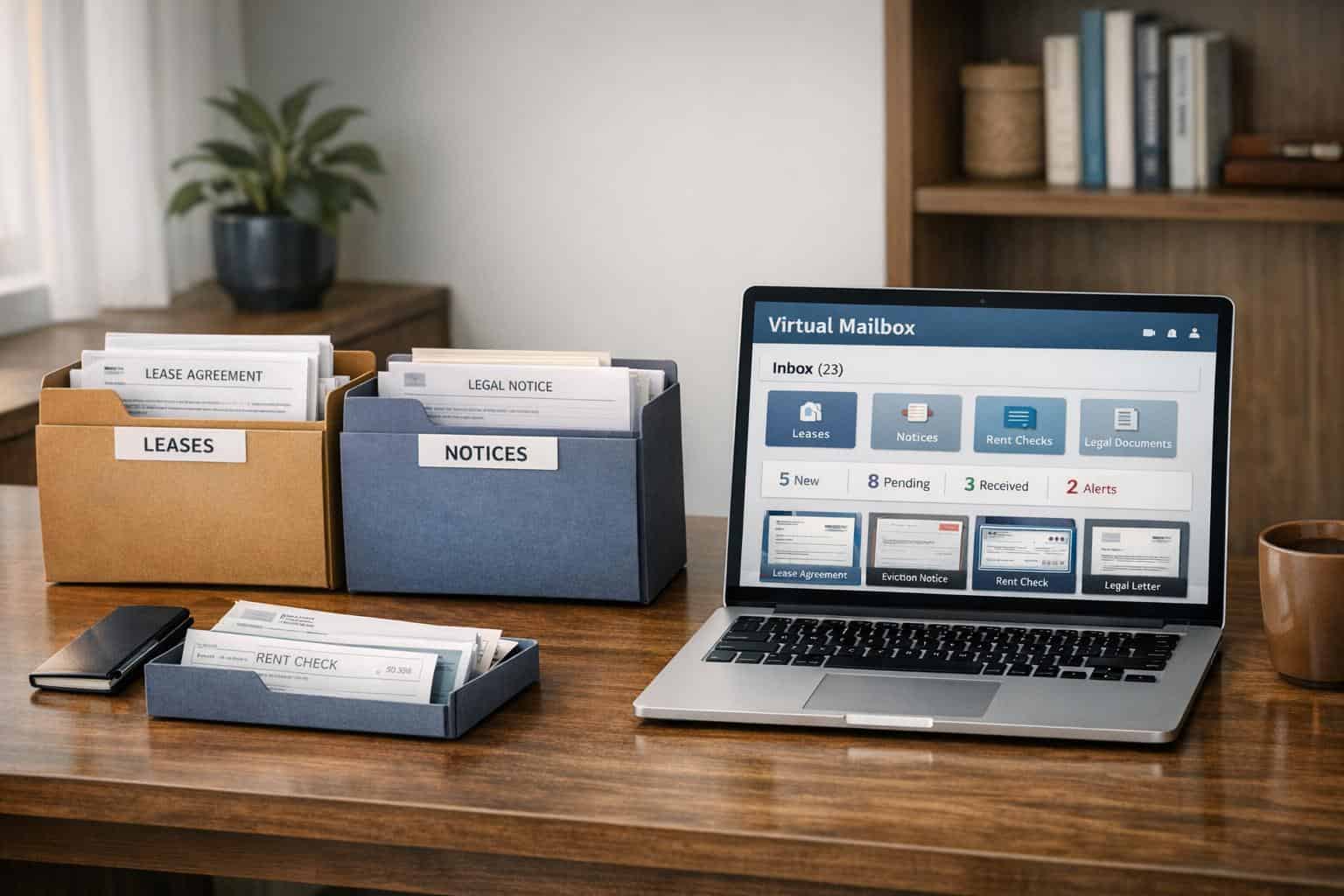
Managing mail across multiple rental properties can be overwhelming. Rent checks, legal notices, and lease agreements pile up, creating risks like missed deadlines, fraud, or compliance issues. Virtual mailboxes solve this by digitizing and organizing mail, allowing landlords to access everything from a single dashboard. Here’s what you need to know:
- Centralized Access: View scanned documents (e.g., rent checks, notices) online within hours.
- Searchable PDFs: Quickly locate tenant names, property addresses, or specific documents with OCR technology.
- Improved Security: Protect sensitive mail from theft and fraud.
- Time and Cost Savings: Reduce administrative work by up to 90% and cut costs by 50%.
- Remote Features: Deposit checks, forward critical mail, or discard unwanted items – all online.
With features like unlimited storage, team access, and automated workflows, virtual mailboxes simplify property management and improve efficiency for landlords, no matter where they’re located.
How Virtual Mailboxes Centralize Property Mail
How Virtual Mailboxes Work
Virtual mailboxes turn your physical mail into digital files you can access anytime, anywhere. When your mail arrives at a real U.S. street address provided by the service, staff at a secure facility scan the envelopes and contents (as per your request). These scans are then uploaded as high-resolution, searchable PDFs to a cloud-based platform for you to review. Whether you’re on your phone, laptop, or tablet, you can usually view your mail within just a few hours.
Unlike traditional P.O. boxes that require you to visit in person during limited hours, virtual mailboxes offer 24/7 access. Even if you’re managing mail for over 100 entities, LLCs, or properties, everything can be handled from a single login. The system automatically organizes your mail by recipient, property, or document type, making it simple to deposit checks, forward important documents, or discard unwanted mail with just a few clicks. This streamlined digital approach is a game-changer for managing property-related correspondence.
Types of Documents Virtual Mailboxes Handle
As a landlord, you’re likely juggling a variety of documents across multiple properties. Virtual mailboxes centralize key items like rent checks, lease agreements, tenant notices (such as late payment warnings or eviction notices), legal correspondence, vendor invoices, HOA letters, tax forms, property bills, maintenance requests, and inspection reports. If you manage properties under different LLCs or ownership entities, the system lets you filter and sort mail by property, owner, or recipient – all from one dashboard.
Many services also use Optical Character Recognition (OCR), which makes PDFs searchable. This means you can quickly locate a tenant’s name or a specific address without digging through piles of paperwork. By centralizing these documents, you not only simplify your workflow but also boost security and ensure compliance with housing and tax regulations.
Benefits of Centralized Mail for Multi-Property Landlords
Bringing all your mail into one digital system can dramatically cut down on administrative work. Landlords report up to a 90% reduction in time spent handling mail, a 50% drop in costs, and even a fourfold return on investment (ROI) within the first year. Beyond just saving time and money, centralized mail creates a permanent, time-stamped digital archive of every document. This can be invaluable during disputes or audits, ensuring you meet record-keeping requirements for housing authorities and tax purposes.
Security is another critical advantage. With mail theft increasing by 600% between 2021 and 2024, keeping sensitive documents like rent checks out of residential mailboxes significantly reduces the risk of fraud. By digitizing and securing your mail, you’re not just managing it better – you’re protecting your business.
sbb-itb-ba0a4be
Features to Look for in a Virtual Mailbox Service
Virtual mailbox services come with a variety of features, and if you’re managing multiple properties, it’s critical to choose one that can handle a high volume of documents, keep your team organized, and safeguard sensitive information. The right service can save you hours of sorting through paperwork by putting everything you need just a few clicks away. Below are some standout features that set the best virtual mailbox platforms apart.
Unlimited Mail Scanning and Storage
With unlimited scanning and storage, you won’t have to worry about hitting capacity limits or paying extra fees as your portfolio grows. Every document – leases, notices, invoices – is scanned into a searchable PDF format. Thanks to OCR (Optical Character Recognition), you can quickly find what you need by searching for a tenant’s name or a property address. Say goodbye to digging through piles of paper or overflowing filing cabinets.
This feature becomes especially handy during tax season or legal disputes. For example, you can easily pull up invoices from a particular vendor or retrieve all notices sent to a specific tenant. Plus, unlimited storage gives you a permanent, time-stamped digital archive that meets record-keeping requirements, which is a lifesaver during audits.
Team Access and Role-Based Permissions
Managing a team? Multi-user access with role-based permissions ensures everyone has the tools they need – without overstepping boundaries. Invite team members to your digital dashboard and customize their access. For instance, a maintenance coordinator might only see repair-related invoices, while your accountant handles rent checks and tax documents. This setup protects sensitive information while keeping workflows efficient.
Features like automated routing and audit logs add an extra layer of security and accountability. Everything integrates into a centralized system, making mail management smoother and more secure.
Check Deposit and Mail Forwarding Options
Remote check deposit is a game-changer for rent collection. When a rent check lands in your virtual mailbox, the service can automatically detect it, endorse it electronically, and deposit it straight into your business bank account. This speeds up cash flow and minimizes the risk of check fraud, which nearly doubled between 2021 and 2023. Keep in mind, deposits might come with a one- to five-day hold.
For documents that need to be physically delivered – like original contracts or legal paperwork – mail forwarding for virtual addresses is another essential feature. You can request delivery to any address directly from your dashboard. Additionally, you can choose to have unimportant mail shredded or discarded, keeping your digital files clean and organized.
How to Set Up and Use a Virtual Mailbox
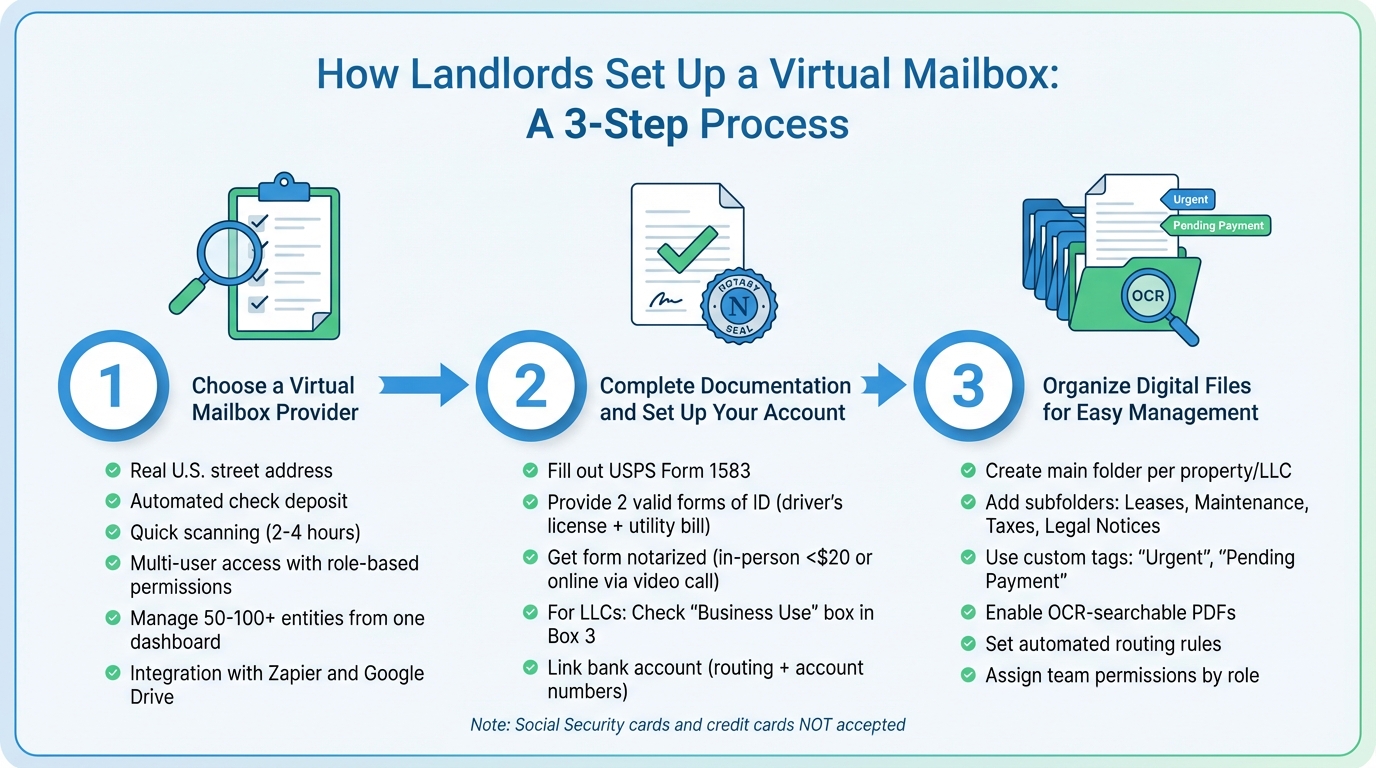
Setting up a virtual mailbox can simplify property management and make handling mail more efficient. Here’s a straightforward, three-step guide to get you started.
Step 1: Choose a Virtual Mailbox Provider
Start by selecting a provider that meets your needs. Look for one offering a real U.S. street address, automated check deposit, quick scanning (within 2–4 hours), and integrations with tools like Zapier and Google Drive. Multi-user access with role-based permissions is another must-have, especially for managing tenant notices and legal correspondence without juggling multiple accounts.
If you oversee multiple LLCs, opt for a service that lets you manage 50 to 100+ entities from one dashboard. A physical street address is particularly helpful, allowing you to accept packages from carriers like UPS, FedEx, and DHL. You can also use this address for official business registrations.
Step 2: Complete Documentation and Set Up Your Account
To get started, fill out USPS Form 1583 and provide two valid forms of ID, such as a driver’s license and a utility bill. You’ll also need to get the form notarized – either in person or through a Remote Online Notarization service. If the mailbox is for an LLC, check the "Business Use" box in Box 3, then submit the completed form along with copies of your IDs. Some providers may allow you to submit a selfie holding your ID and the signed form as an alternative.
For notarization, you can visit a bank or courthouse for less than $20, or complete the process online via a video call. Keep in mind that Social Security cards and credit cards are not accepted as valid IDs.
Once your account is approved, link your bank account by entering your routing and account numbers. This enables automated check deposits, so rent payments can be electronically processed without the hassle of visiting a bank.
Step 3: Organize Digital Files for Easy Management
Set up a digital filing system to keep everything organized. Create a main folder for each property or LLC, with subfolders for Leases, Maintenance, Taxes, and Legal Notices. Use custom tags like "Urgent" or "Pending Payment" to prioritize tasks. For added convenience, take advantage of OCR-enabled PDFs to make documents searchable by tenant name or property address.
Streamline your workflow further by setting up automated rules to sort mail by sender or property. If you’re working with a team, invite members to your dashboard and assign specific permissions. For example, your accountant can access tax documents and rent checks, while your maintenance coordinator handles repair invoices. This approach not only keeps things efficient but also ensures sensitive information stays secure.
Managing Leases, Notices, and Legal Correspondence
Efficient document management goes hand in hand with going paperless through streamlined mail scanning and centralized storage. When it comes to compliance and quick access, a virtual mailbox proves its worth through organized, digital solutions.
Organizing Folders by Property or Document Type
Start by setting up a main folder for each property or LLC you manage. From there, create subfolders for categories like Leases, Legal Notices, Maintenance, and Inspections. If you’re juggling multiple entities, organizing by EIN or entity name can help keep things clear and separate. To make your filing system even smarter, use automated routing rules and custom tags. Labels such as Urgent, Pending Signature, or Tax-Related can highlight items that require immediate action. These strategies make it easier to stay on top of your mail and integrate perfectly with your broader mail management system.
Leveraging Searchable PDFs and OCR Technology
Virtual mailboxes use Optical Character Recognition (OCR) technology to convert physical mail into high-resolution, text-searchable PDFs. This means you can quickly locate tenant names, property addresses, or even specific clauses in a lease – no manual digging required. Full-text search features are especially handy during audits or legal disputes, saving time and reducing stress. Plus, integrating these files with cloud storage solutions ensures easy access and permanent records, boosting your ability to stay compliant and well-organized.
Staying on Top of Record Retention Requirements
Virtual mailboxes also simplify record retention by offering secure, long-term cloud storage. All incoming mail is stored in a centralized digital archive, complete with automatic time and date stamps, and can be accessed 24/7 from any device. Many services even provide unlimited or indefinite storage for critical documents like tax records, lease agreements, and legal notices. With mail theft rising by 600% over the last three years, storing sensitive documents digitally in a secure, access-controlled environment is far safer than leaving them in a traditional mailbox. Features like 256-bit SSL encryption and background-checked technicians ensure your records stay protected and ready for audits.
Conclusion
Managing multiple rental properties often feels like a constant balancing act, especially when it comes to handling essential documents every month. Virtual mailboxes simplify this process by consolidating all your important mail into a single, easily accessible digital dashboard, available 24/7.
But the benefits go far beyond convenience. Features like automated check deposits and searchable PDFs powered by OCR technology save time and eliminate the hassle of bank trips or digging through piles of paperwork. With check fraud nearly doubling between 2021 and 2023, virtual mailboxes also add a layer of security by storing sensitive documents in an encrypted, theft-resistant digital environment.
Remote access is another game-changer. Wherever you are, your critical documents are just a click away, enabling quick responses to pressing matters. Plus, virtual mailboxes help you stay on top of record retention rules by automatically creating permanent, time-stamped digital archives. Need to collaborate? Team access features allow you to assign permissions to staff like maintenance coordinators or leasing agents, making teamwork seamless without sacrificing security. And by keeping your private address confidential, virtual mailboxes offer an extra layer of protection during disputes.
In short, virtual mailboxes make property management smoother, safer, and more efficient. If you’re ready to save time and reduce stress, consider BusinessAnywhere‘s virtual mailbox services, which include unlimited scanning, automated routing, and secure storage. Let technology handle the paperwork so you can focus on what really matters – growing your portfolio.
FAQs
How can a virtual mailbox improve security for landlords managing multiple properties?
A virtual mailbox adds a layer of security by converting physical mail into a protected digital format. Here’s how it works: when mail arrives at a secure facility, it’s scanned and uploaded to an encrypted online platform. This process safeguards sensitive documents – like leases, tenant notices, and legal correspondence – from theft or tampering that can occur with traditional mailboxes. Plus, landlords can keep their personal address private, reducing the risks of identity theft or targeted mail fraud.
With digitized mail, landlords gain more control. They can set role-based permissions to manage access, securely shred confidential documents, and maintain a searchable archive for compliance and record-keeping. By blending secure facilities, encryption, and access controls, virtual mailboxes provide a safe and efficient way to handle critical mail, ensuring peace of mind for both landlords and tenants.
What kinds of documents can landlords manage with a virtual mailbox?
A virtual mailbox gives landlords a convenient way to handle all the essential paperwork for their rental properties in one secure, online hub. Key documents like lease agreements, renewal contracts, tenant notices (such as 30-day notices or repair requests), and legal correspondence are easily managed and accessible.
Beyond that, virtual mailboxes can digitize and organize items like rent payment checks, utility bills, insurance policies, HOA fees, tax documents, and vendor invoices. They’re also handy for keeping track of maintenance requests and other service-related communications. By centralizing everything online, landlords can quickly search, share, and securely store critical files, making it easier to stay on top of their responsibilities and save time.
How can virtual mailboxes help landlords stay compliant and manage records efficiently?
Virtual mailboxes make it easier to manage compliance and keep records by turning all incoming mail into time-stamped, searchable PDFs stored securely in the cloud. This gives landlords a well-organized, audit-ready archive of critical documents like leases, tenant notices, and legal correspondence. Need to review something or respond to a legal matter? You can find what you need quickly and efficiently.
Many of these services also offer automatic retention controls, letting you schedule secure shredding for outdated documents while keeping important records, such as legal letters and leases, accessible indefinitely. With tools like multi-user access and permission settings, you can ensure only authorized individuals handle sensitive documents, creating a clear audit trail and minimizing compliance risks.
By digitizing and centralizing all property-related mail, landlords can cut down on paperwork, simplify their processes, and stay on top of record-keeping requirements with ease.