
Are you planning to start a business in New Hampshire or need to research an existing company? The New Hampshire Secretary of State’s “NH QuickStart” Business Entity Search portal is your gateway to accessing vital information about registered businesses in the Granite State. This comprehensive guide walks you through exactly how to use this essential tool, with state-specific details you won’t find elsewhere.
Quick Summary
South Dakota’s Secretary of State search needs no account and matches partial names automatically, so no wildcards are required. A $25 reservation holds 120 days, cannot be renewed, and blocks you from reserving the same name again for 60 days.
What is the New Hampshire Business Entity Search?
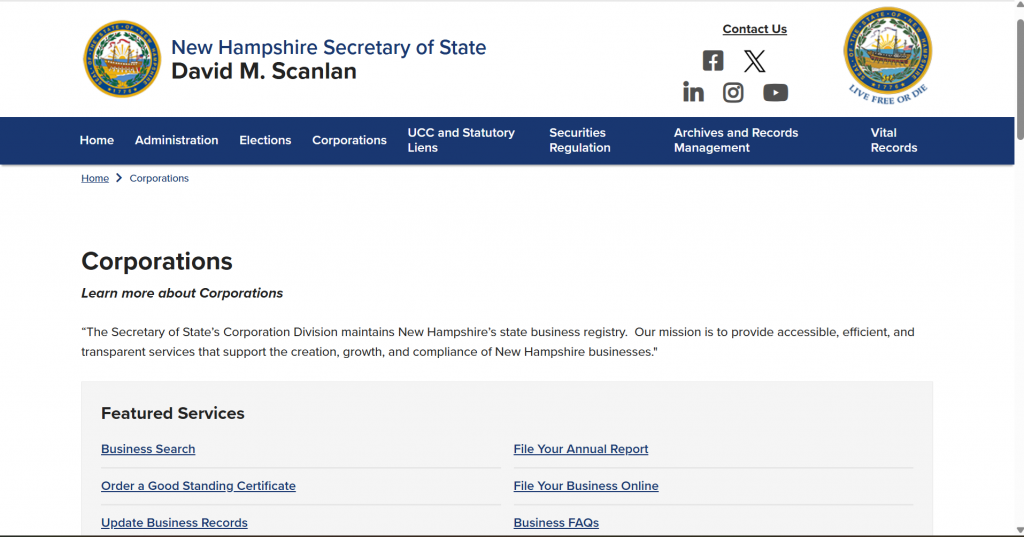
The New Hampshire Secretary of State’s Corporation Division maintains the state’s official business registry through the NH QuickStart portal. As stated by the Secretary of State’s office, their mission is to “provide accessible, efficient, and transparent services that support the creation, growth, and compliance of New Hampshire businesses.”
This online database allows you to:
- Verify if your desired business name is available
- Research competitors or potential partners
- Find registered agent information
- Check a company’s legal status and standing
- Access public business documents
- Verify trademark registrations
Accessing the NH QuickStart Business Entity Search Tool
Direct Link: NH QuickStart Business Entity Search
The NH QuickStart portal is the official business search platform maintained by the New Hampshire Secretary of State. Unlike some states that charge for business searches, New Hampshire provides this service completely free of charge.
Quick Tip: As of May 2025, the Customer Service Lobby of the Corporations Division has been temporarily relocated to 28 School Street (across from Municipal Parking Garage) in Concord due to ongoing construction. If you need in-person assistance, the lobby is open Monday through Friday from 8:30 am to 4:00 pm.
Step-by-Step Guide to Searching New Hampshire Business Entities
Method 1: Searching by Business Name (Most Common)
- Access the Search Portal: Navigate to the NH QuickStart Business Entity Search page.
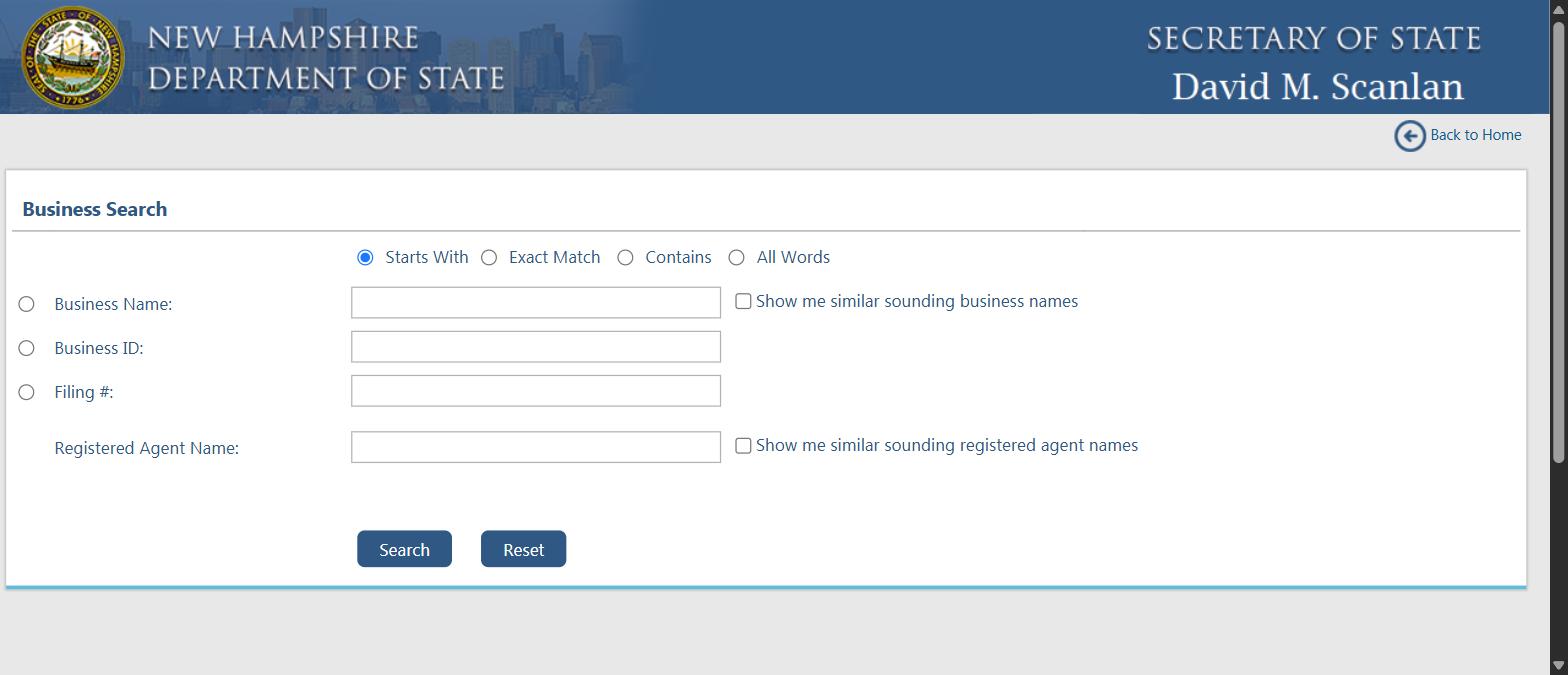
- Select Search Type: On the left side of the page, you’ll see radio buttons. Select the first option to search by business name.
- Set Search Parameters: You’ll notice additional radio buttons at the top of the page that let you refine your search:
- Starts With: Finds businesses whose names begin with your search term
- Exact Match: Finds businesses with names identical to your search term
- Contains: Finds businesses with names containing your search term anywhere
- All Words: Finds businesses whose names contain all the words in your search term
- Show Me Similar Sounding Business Names: An optional checkbox that includes phonetically similar names
- Enter Search Term: Type your search term in the box.
- NH-Specific Tip: The search is NOT case-sensitive, but it IS affected by punctuation and special characters. Don’t include entity designators like “LLC” or “Inc.” in your search.
- Complete CAPTCHA: Enter the security verification text.
- View Results: Click “Search” to see a list of matching businesses. The results table includes:
- Business Name
- Business ID
- Home State
- Previous Name (if applicable)
- Business Type
- Principal Office Address
- Registered Agent Name
- Status
- View Business Details: Click on any business name (shown in blue text) to access its complete public information.
Method 2: Searching by Business ID
If you know the unique Business ID number assigned by the state:
- Select the “Business ID” radio button on the left side of the search page.
- Enter the Business ID number.
- Complete the CAPTCHA verification.
- Click “Search” to go directly to that business’s information page.
Method 3: Searching by Filing Number
To find a business based on a specific document filing number:
- Select the “Filing Number” radio button.
- Enter the filing number of the document.
- Complete the CAPTCHA verification.
- Click “Search” to find the associated business record.
Method 4: Searching by Registered Agent
This unique New Hampshire search method lets you find all businesses represented by a particular registered agent:
- Select the “Registered Agent Name” radio button.
- Enter the registered agent’s name.
- Complete the CAPTCHA verification.
- Click “Search” to see a list of agents matching your search term.
- Click on the specific agent’s name to view all businesses they represent.
The QuickStart Feature That Makes New Hampshire Unusual
Most state registers make you guess at near misses. New Hampshire does not. Sitting next to the Business Name field on QuickStart is a checkbox that reads “Show me similar sounding business names”, and there is a matching one for registered agent names. It runs a phonetic match rather than a text match, which is the closest thing any state gives you to an automated conflict check.
That matters because New Hampshire, like every state, rejects names that are too similar to an existing one. A text search cannot see that similarity. A phonetic search can.
The Four Match Modes
| Match mode | What it returns | Use it when |
|---|---|---|
| Starts With | Names beginning with your text. Selected by default | You know the opening words |
| Exact Match | Only a perfect string match | Confirming one business you can name precisely. Never for availability |
| Contains | Your text anywhere in the name | Casting the widest net |
| All Words | Records containing all your words in any order | Availability checks, since word order will not hide a conflict |
What Each Search Field Is Actually For
| Field | What it finds | Reach for it when |
|---|---|---|
| Business Name | Entities by name, with the four match modes applied | Name availability, or looking up a company you know |
| Show me similar sounding business names | Phonetically close names, not just textually close ones | Always, on an availability check. This is the box people skip |
| Business ID | The single record with that New Hampshire business identifier | You have the ID from an earlier filing or a certificate |
| Filing # | One specific filing rather than the entity | You are chasing a document, not a company |
| Registered Agent Name | Entities served by a named agent | Checking an agent’s book, or auditing your own entities |
| Show me similar sounding registered agent names | Phonetic match on the agent name | You are unsure of the spelling of a person or firm |
A Practical Search Order for New Hampshire
| Pass | Settings | What you are looking for |
|---|---|---|
| 1 | All Words, full name minus the suffix | A direct conflict, in any word order |
| 2 | All Words plus similar sounding business names | Phonetic near misses a text search cannot see |
| 3 | Contains, the distinctive word only | Your keyword buried inside longer names |
| 4 | Repeat pass 1 for the trade name you intend to use | A registered DBA that blocks your branding |
The New Hampshire Department of State sits at 107 North Main Street, Room 204, Concord, and that is the office to ask if a search leaves you genuinely uncertain about whether two names are distinguishable. A rejected filing costs the fee and the wait.
Understanding the Business Information Page
When you click on a business name in the search results, you’ll see the detailed Business Information page, which contains several important sections:
1. Business Information Section
- Business Name
- Business ID (unique identifier assigned by NH)
- Business Type (LLC, Corporation, etc.)
- Business Status (Active, Dissolved, etc.)
- Principal Office Address
- Principal Mailing Address (if different)
- Formation/Registration Date
- Business Email (if provided)
2. Registered Agent Information
- Agent Name
- Office Address
- Mailing Address (if different)
3. Filing History
A chronological list of all documents filed with the state, including:
- Formation documents
- Annual reports
- Amendments
- Any status changes
4. Trade Name Information
If the business operates under any trade names (DBAs), they will be listed here.
5. Trademark Information
Any trademarks registered by the business in New Hampshire.
NH-Specific Feature: The New Hampshire Secretary of State now issues computer-generated black-and-white seals on all certificates, rather than raised gold seals. The new certificates contain both a business ID number and a certificate number, which can be verified for authenticity on the QuickStart portal.
Business Entity Status in New Hampshire
When reviewing a business record, pay attention to the status field, which indicates the company’s standing with the state:
- Active/Good Standing: The business is current on all filings and fees
- Dissolved: The business has formally closed, either voluntarily or by state action
- Delinquent: The business has missed required filings or payments
- Not In Good Standing: There are compliance issues that need resolution
- Inactive: The business is no longer operating but hasn’t formally dissolved
New Hampshire Status Labels and What They Mean for a Name
| Status on the record | What it tells you about the business | Is the name free to use? |
|---|---|---|
| Active / Good Standing | Registered, filings current, authorised to operate | No |
| Delinquent | Registered but has missed a required filing | No. Still a live record |
| Not In Good Standing | Registered with outstanding compliance problems | No. The record can be brought back into good standing |
| Dissolved | Formally wound up | Not automatically. Ask the Corporation Division before you rely on it |
| Inactive | No longer operating in New Hampshire | Not automatically. The record stays on file |
Obtaining Business Documents and Certificates
After conducting your search, you may need official documents. Only the New Hampshire Secretary of State can issue official certificates and document copies.
Types of Available Documents
- Plain Copies: Unofficial copies of business filings
- Certified Copies: Official copies with state certification
- Certificate of Good Standing: Confirms a business is in compliance with state requirements
- Certificate of Existence: Verifies a business exists in the state records
How to Request Documents
Online Method:
- Login to your NH QuickStart account (or create one)
- Select the appropriate document request option
- Pay the required fee online
- Receive electronic delivery for some documents
Mail Method: Send a written request to: Corporation Division NH Dept. of State 107 N Main St, Rm 204 Concord, NH 03301-4989
In-Person Method: Visit the temporary Customer Service Lobby location at: 28 School Street Concord, NH 03301
Document Fees (as of May 2025)
- Plain Copy: $5 per document
- Certified Copy: $15 per document
- Certificate of Good Standing: $10
- Certificate of Existence: $10
- Expedited Service: Additional $25
Processing Times: Standard processing for online filings is currently 15-18 business days (as of May 2025). Expedited service is available for an additional fee.
Checking Name Availability for a New Business
Before forming a business in New Hampshire, you should verify that your desired name is available. Follow these steps:
- Use the NH QuickStart Business Entity Search as described above
- Select “All Words” as your search parameter
- Enter your desired business name WITHOUT any entity designator (LLC, Inc., etc.)
- Review the results carefully
New Hampshire Name Requirements and Restrictions
According to Section 304-C:32 of the New Hampshire LLC Act, your business name must:
- Be distinguishable from other registered or reserved business names
- Include an appropriate designator:
- For LLCs: “Limited Liability Company,” “LLC,” or “L.L.C.”
- For Corporations: “Corporation,” “Incorporated,” “Inc.,” “Limited,” or “Company”
- Not imply a purpose other than what is permitted by law
- Not contain restricted words like “Bank,” “Engineer,” or “Insurance” without proper authorization
- Not include “Farmers’ Market” unless meeting specific legal definitions
- Not be the same as a government agency or political party
Name Reservation
If you find an available name but aren’t ready to register your business, you can reserve it for 120 days by:
- Filing an Application for Reservation of Name through NH QuickStart
- Paying the $15 reservation fee
- Receiving confirmation of your reservation
NH QuickStart: the Four Things on the Front Page
Most people arrive here searching for an NH business search, an NH SOS business search or simply NH QuickStart, and land on a page with four tiles across the top. Those four tiles are the whole system, and two of them are genuinely one-click services that other states charge you a phone call and a wait for.
The Secretary of State’s own line for the portal is that NH QuickStart is your first stop for doing business in New Hampshire, and the four tiles bear that out.
| Tile | What it does | Account needed |
|---|---|---|
| Business Record Search | The lookup covered in this guide, including the similar-sounding name match | No |
| One Click Certificate of Good Standing | Produces a certificate of good standing for a New Hampshire entity | Expect to sign in to obtain the document |
| One Click Annual Report Filing | Files the annual report without navigating a filing wizard | Yes |
| Verify Certificate | Confirms a certificate you have been handed is genuine | No |
NH Annual Report Filing
New Hampshire puts annual report filing on the front page of QuickStart as a one-click action, which tells you something about how often it gets used. If you have been looking for a separate NH annual report portal, there is not one, and there does not need to be.
The practical sequence is the same one you use for a search. Find the entity, open it, and file. Because the annual report is what keeps a record current, it is also the filing behind most of the statuses you were reading earlier in this guide: a Delinquent or Not In Good Standing label is usually a missed report rather than anything more dramatic.
NH Certificates of Good Standing, in One Click
This is worth knowing before you promise a bank or a landlord a document by Friday. New Hampshire offers a certificate of good standing as a one-click service from the QuickStart home page, and it offers a separate Verify Certificate tool for checking one somebody has given you.
Both directions matter. If you are being asked to prove your entity is current, the certificate is quick. If you are the one being handed a certificate, verify it rather than trusting the PDF, because only an entity that is genuinely in good standing can produce a real one.
Searching for an NH LLC or a New Hampshire Corporation
An NH LLC search and a New Hampshire corporation search both run through the same Business Record Search. QuickStart also handles the formation side: the portal invites you to file your business name, or form a new Limited Liability Company or Corporation, from the same place.
| What you are doing | Where in QuickStart | Practical note |
|---|---|---|
| Checking whether an LLC name is free | Business Record Search, All Words, with the similar-sounding box ticked | Leave the LLC suffix out of the search term |
| Checking a corporation | The same search | The entity type shows on the record rather than as a filter |
| Registering a trade name | File your business name | A trade name can block your branding even when the entity name is clear |
| Forming the entity | Form a new LLC or Corporation | Needs an account |
Two Current Notes Worth Checking Before You File
QuickStart publishes its own processing times, and as of 27 August 2026 the portal states that processing for business filings may run up to five business days. If you are working to a deadline, that is the number to plan around rather than assuming same-day acceptance.
Separately, New Hampshire has launched the NH Business Gateway, which the Secretary of State describes as bringing more than a hundred business-related tools and resources from across state agencies and community partners into one place. It does not replace QuickStart for searching or filing, but it is the better starting point if your question is broader than the register.
What to Do After Your Business Entity Search
If Starting a New Business:
- Reserve or Register Your Name: If available, either reserve the name or proceed with registration
- Choose Your Business Structure: Determine whether an LLC, corporation, or other entity type is right for you
- Register with the Secretary of State:
- LLCs: File a Certificate of Formation ($100 fee)
- Corporations: File Articles of Incorporation ($100 fee)
- Other entities: File appropriate formation documents
- Obtain an EIN: Apply for an Employer Identification Number from the IRS
- Register for State Taxes: Register with the NH Department of Revenue Administration if required
- Obtain Necessary Licenses: Check the NH Online Licensing page for industry-specific requirements
If Researching an Existing Business:
- Verify Status: Confirm the business is in good standing
- Request Documents: Obtain certified copies if needed for legal or business purposes
- Contact Information: Use the registered agent information for official communications
- Check Annual Reports: Review filing history to assess compliance history
Next Steps After Checking Name Availability
Once you’ve completed your New Hampshire business entity search and confirmed your desired name is available, your next steps depend on your business goals:
New Hampshire LLC Formation
- File a Certificate of Formation through NH QuickStart
- Designate a registered agent with a physical NH address
- Create an operating agreement (not filed with the state but important)
- Apply for an EIN with the IRS
- Check our Business Registration page for more information
New Hampshire Corporation Formation
- File Articles of Incorporation through NH QuickStart
- Designate a registered agent with a physical NH address
- Create corporate bylaws
- Issue stock certificates to shareholders
- Hold initial corporate meetings
- Visit our Registered Agent Services page for additional guidance
Registering a Trade Name (DBA)
- Conduct a business entity search to ensure the trade name is available
- Complete the Application for Registration of Trade Name
- Submit the application online through NH QuickStart or by mail
- Pay the $50 registration fee
- Learn more on our Business Registration page
Conclusion
The New Hampshire Business Entity Search through the NH QuickStart portal is an invaluable tool for entrepreneurs, researchers, and anyone needing information about companies registered in the Granite State. By following this comprehensive guide, you can efficiently navigate the search process, understand the results, and take appropriate next steps whether you’re starting a new venture or conducting due diligence on an existing business.
Remember that while business entity searches are free, certain official documents and certificates require fees. Always verify critical information through official channels, and consider consulting with a business attorney or formation service for complex situations.
For more guidance on business formation and compliance in New Hampshire, explore our other resources at see how the filing and registered agent work is handled.
Found the company and need proof it is active? Learn how to get a certificate of good standing in New Hampshire.
Frequently Asked Questions About NH Business Entity Searches
What does “Active” status mean in New Hampshire?
Active status indicates that a business entity is current with its state filing requirements and authorized to conduct business in New Hampshire. This means the company has filed all required annual reports and paid any necessary fees.
How long does a business name reservation last in New Hampshire?
A business name reservation in New Hampshire lasts for 120 days from the date of filing. The reservation fee is $15, payable to the Secretary of State. This gives you exclusive rights to the name while you prepare your formation documents.
Can I search for a DBA (trade name) in New Hampshire?
Yes, trade names (DBAs) are searchable through the NH QuickStart portal. When viewing a business record, check the “Trade Name Information” section to see if they have registered any alternative names. You can also search specifically for trade names.
What are the filing fees for business entities in New Hampshire?
Formation filing fees in New Hampshire are typically $100 for most entity types, including LLCs and corporations. Annual report filing fees are also $100 ($102 if filing online due to a $2 service fee). Name reservations cost $15, and trade name registrations are $50.
What if my desired business name is taken in New Hampshire?
If your preferred name is already in use, you have several options:
- Choose a different name that’s distinguishable from existing entities
- Modify your name to make it distinguishable (adding words, changing spelling)
- Consider using a trade name (DBA) for your public-facing identity
- Contact the existing business to inquire about purchasing the name (if they’re inactive)
Can I check NH business entity records outside of business hours?
Yes, the NH QuickStart online portal is available 24/7 for searching business records. However, document requests and other services requiring staff assistance are only processed during regular business hours.
Related Blog Posts
- Trading in Vermont too? Check whether the name is taken in Vermont before you print anything.
- Maine is next on the list for a lot of New England founders. Here is how to run a Maine business entity search.
- Heading for Boston? The Massachusetts lookup works a little differently.
- Rhode Island in the mix? Here is how to run a Rhode Island business entity search.