
A 2023 analysis shows that Virginia’s economy is strong, with its objectives met while spending less. Not to mention, the labor force is at its highest in history, and the participation rate is at the highest level since 2012.
Quick Summary
Virginia has no Secretary of State business search: filings sit with the State Corporation Commission, searchable free through its Clerk’s Information System. Virginia compares a stripped-down core name rather than your full name, ignoring suffixes. A name reservation costs $10 and holds 120 days.
This should make the state a strong contender if you want to become a business owner. With so many people willing to work, Virginia is a safe bet if you’re just starting out.
To begin with, you should perform a Virginia business entity search. This will tell you if your desired business name is free, so here are the vital steps to follow.
Use the Virginia State Corporation Commission Website
If you’ve done a business entity search before, then you might be expecting a Virginia Secretary of State business entity search. However, it’s different for this state.
Instead, you’ll be using the State Corporation Commission website for a Virginia business search. On the Clerk’s Information System page is the business entity search function.
Here, you can search by “starts with,” “exact match,” or “contains. You can then fill out the entity name or entity ID.
You can also search by principal name (individual or entity). Fill out the first and last name in this case.
Another search option is by registered agent name (individual or entity as well). The information you’ll need is their first and last name, as well as the filing number.
Additional advanced search options include:
- Entity type
- Document type
- Jurisdiction type
- Entity status
- Name type
- Industry code
- Date of formation (and end)
You can also check off boxes for “principal office address” and “registered office address.”
When you hit “search,” hopefully, you shouldn’t get any results. If you do, then your business name is too close or identical to existing ones.
If you’re curious, you can click on the businesses to find out more about them. Details on the page include the status of the entity, principal office address, registered agent, and filing history.
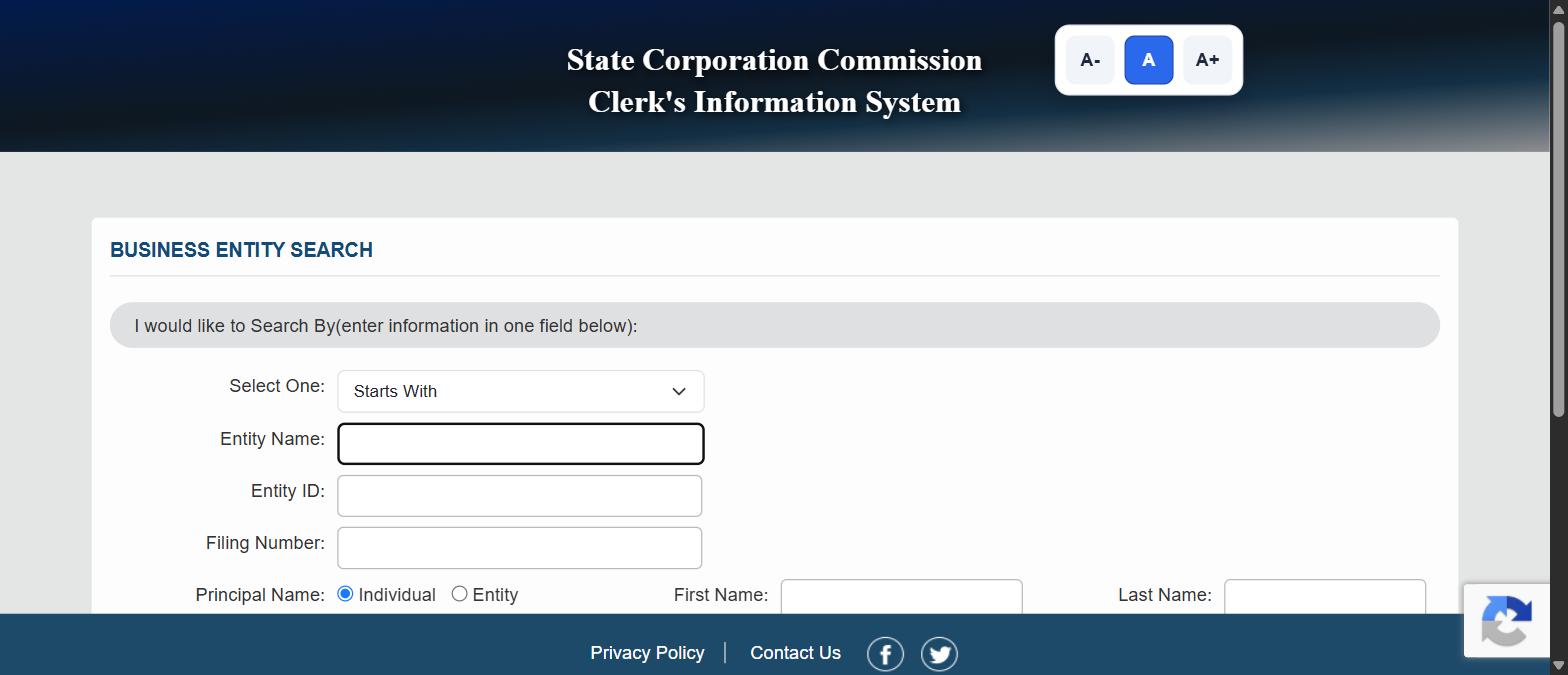
The Three Match Modes on the CIS Search
The dropdown offers three match modes, and the one that loads by default is the one least suited to an availability check.
- Starts With returns only entity names that begin with your text. It loads by default, and it is the weakest setting for an availability check, because anything that buries your words mid-name stays hidden.
- Exact Match returns a perfect string match on the whole name and nothing else. Use it when you are confirming one company you can already name precisely, and accept that it will hide every near miss.
- Contains returns your text anywhere inside the name. It is the only one of the three that surfaces conflicts buried mid-name, which is what makes it the setting to use.
Contains is the setting to use. Starts With is the setting most people leave on by accident.
Every Field You Can Search By, and What Each One Answers
The instruction at the top of the form is easy to skim past: enter information in one field below. CIS searches one field at a time, so combining a name and an agent in a single pass will not work the way you expect.
| Field | What it finds | Reach for it when |
|---|---|---|
| Entity Name | Businesses by name, with the match mode applied | Name availability, or looking up a company you know by name |
| Entity ID | The single record with that SCC identifier | You have the ID from a certificate or an earlier filing |
| Filing Number | One specific filing rather than the entity itself | You are chasing a document, not a company |
| Principal Name, Individual or Entity | Businesses tied to a named officer, director or member, by first and last name | Due diligence on a person, or finding every entity you are named on |
| Registered Agent Name, Individual or Entity | Every business served by one agent | Checking an agent’s book of business, or auditing a portfolio |
| Designee Name | Records tied to a named designee, by first and last name | Tracing who a filing was submitted through |
What Advanced Search Options Adds
Advanced Search Options unfolds a row of filters, and each one answers a different question.
- Entity type narrows to a single registered form, from LLC through to nonprofit corporation. Use it when you only care about one structure and want the rest out of the way.
- Entity status narrows by whether the record is live, terminated, cancelled or otherwise ended, which separates names genuinely in use from records that merely exist.
- Jurisdiction type narrows by whether the entity was formed in Virginia or elsewhere, for checking whether an out-of-state company has registered in the Commonwealth.
- Name type narrows by legal name, former name, fictitious name and similar. A name can be free as a legal name and taken as a fictitious one.
- Document type narrows by the kind of filing on the record, for when you want records that include a specific document.
- Industry code narrows by the sector recorded against the entity, which suits competitive research rather than a name check.
- Date of formation, start and end narrows to entities formed inside a window, for seeing who has filed recently in your space.
- Principal office address and registered office address are tick boxes that bring the addresses into your results, for local due diligence or confirming a company is really where it claims.
Name type is the quiet one. Fictitious name records block branding just as effectively as a legal name.
What the Virginia SCC Search Gives You Without a Login
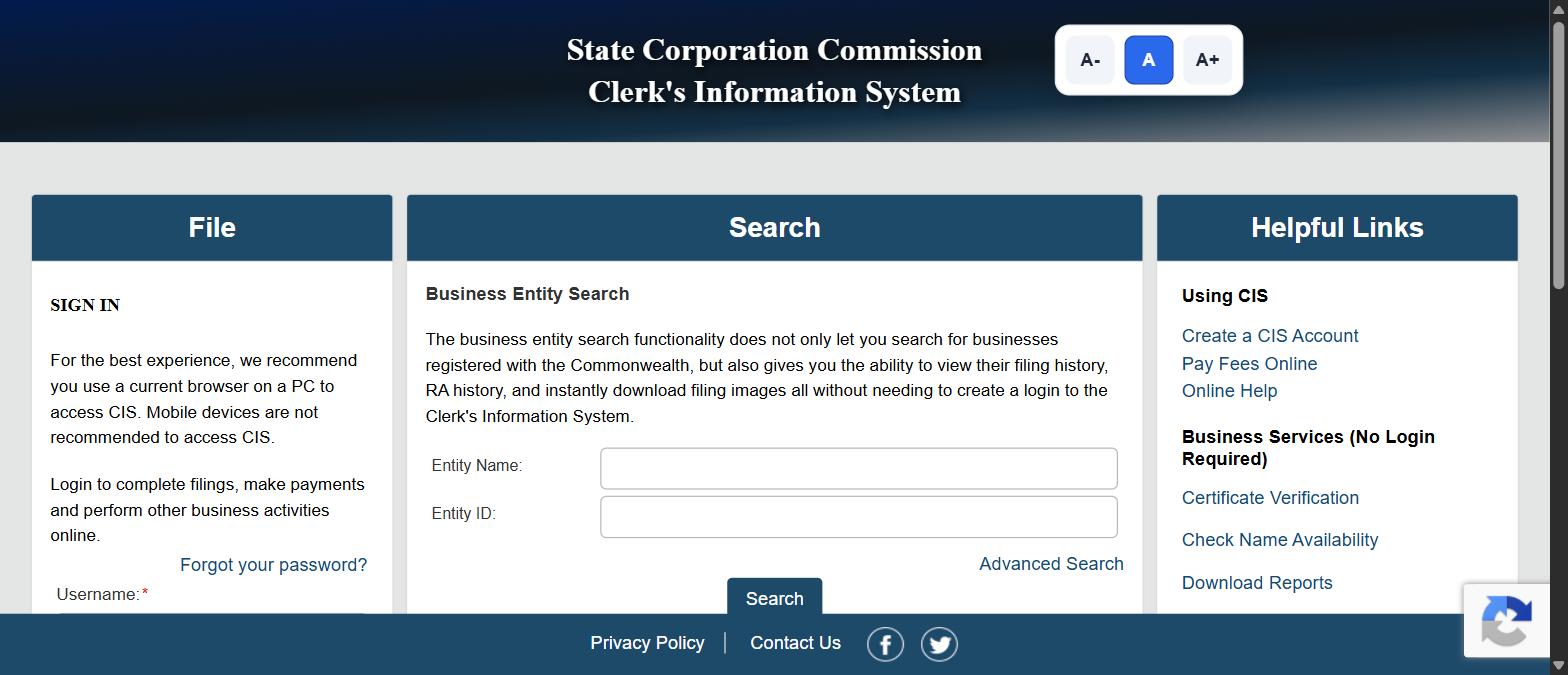
This is the part Virginia does better than most states and almost nobody writes about. The Commission’s own description of the entity search says it does not only let you search for registered businesses, it also gives you the ability to view their filing history, view registered agent history, and instantly download filing images, all without needing to create a login.
Filing images without an account is genuinely unusual. In a lot of states that is a paid request with a wait. In Virginia you click and the document downloads.
Four services sit under Business Services on the CIS home page, and none of them need an account.
- Business Entity Search returns names, statuses, filing history, registered agent history, and downloadable filing images. That is full due diligence on a Virginia company for free, in one sitting.
- Check Name Availability is a dedicated name-availability tool, separate from the entity search, purpose-built for the question most searchers actually have.
- Certificate Verification confirms that a certificate issued by the Commission is genuine, which is useful when a counterparty hands you a certificate of good standing.
- Download Reports does bulk data pulls from the register, for market research, lead lists, or checking a whole portfolio at once.
Use Check Name Availability as a Second Opinion, Not a First One
Check Name Availability is the fastest route to an answer, and it is the tool most Virginia guides never mention. Use it after your entity search rather than instead of it. The entity search shows you the near misses and lets you judge them. The availability tool gives you a verdict without showing its work, and a verdict on its own is hard to act on when the answer is no.
One Practical Warning About CIS
The Clerk’s Information System asks you to accept a cookie notice before it will load, and the sign-in panel carries the Commission’s own advice: use a current browser on a PC, because mobile devices are not recommended for CIS. If the search behaves oddly on a phone, that is why, and it is the Commission saying so rather than a quirk of your setup.
Reading Your Results: Available, Taken, or Too Close to Call
The article above says that ideally your search returns nothing. In practice it usually returns something, and the useful skill is telling the difference between a result that blocks you and one that does not.
| What comes back | What it means | What to do next |
|---|---|---|
| Nothing, across several variants on Contains | Likely clear at the Commonwealth level | Confirm with Check Name Availability, run a trademark search, then file |
| An identical or near-identical name, live status | Not available | Change the distinctive word, not the suffix |
| A close name in a terminated or cancelled status | Uncertain. The record still sits on the register | Do not plan around it clearing. Ask the Commission or pick another name |
| A match under a fictitious or former name type | The phrase is in use even though no entity carries it as its legal name | Review before you commit to branding |
| Your name is clear but close to a known brand | Virginia clearance is not trademark clearance | Search the USPTO before you launch |
| Several results that only differ by punctuation | Punctuation is rarely what makes a name distinguishable | Treat them as conflicts and search the letters alone |
A Four-Pass Search That Takes Two Minutes
Four passes, two minutes, and you will have seen what a single search hides.
- Contains, the full name with the suffix stripped. This is the pass that catches direct conflicts anywhere in a name.
- Contains, the distinctive word only. This catches your keyword buried inside longer names.
- Contains, with the obvious variants: and for the ampersand, singular for plural. This catches conflicts hiding behind a spelling choice.
- Advanced Search, with Name type opened up. This catches the fictitious and former names that block branding.
Searching once, on Starts With, with the full legal name and suffix, is how a taken name looks available.
If the Name Is Already Taken in Virginia
Change the distinguishing word rather than the suffix or the punctuation. Swapping LLC for Inc, or adding a comma, will not usually satisfy a distinguishability standard, and a rejected filing costs both the fee and the wait.
If the legal name is gone but you want the brand, a fictitious name registration lets you trade under something different from your registered entity name. That is a separate filing, and as the Name type filter shows, fictitious names are searchable, so someone else may already hold the one you want.
Where the conflict is close rather than identical, it is worth asking the Commission before you file. That is a free question, and it is cheaper than a rejection.
Try a Search Engine
You can do a VI business entity search easily by using your favorite search engine. Put in your desired business name with “Virginia,” and possibly a city name too if you want.
While looking at the search results, you can also check social media accounts and domain names. If you’re set on this business name, consider creating accounts and buying URLs to reserve them.
Utilize Our Business Name Search Function
Are you ready to start a business if your desired name is available? Then kill two birds with one stone by using our business name search function.
On our business registration page, there’s an easy-to-use search bar where you can type in the company name. Below, we list our offerings line by line with their associated costs. We believe in full transparency, and this allows you to know exactly what you’re paying for and what you’re getting.
To search, select “LLC” or “corporation,” and then “Check availability.” We’ll let you know if another organization has taken your name. However, if it’s free, you can fill out your details to proceed. We’ll get back to you shortly to discuss how to cater to your needs.
Do a Virginia Business Entity Search
You should do a Virginia business entity search if you’d like to start a company in this state. It’s quick and simple to do, and you have several options.
So cover your bases and carry out a state of Virginia business entity search. Get peace of mind knowing the name you’ve chosen is yours to use.
Sign up with Business Anywhere now to take advantage of our fantastic prices. Our experts will help you every step of the way.
What the Virginia SCC Is, and Why There Is No Virginia Secretary of State Business Search
If you have searched for a Virginia Secretary of State business search, a Virginia SOS business search, or a Virginia Secretary of State corporation search and come up short, this is why. Virginia does not register companies through a Secretary of State. It registers them through the State Corporation Commission, almost always written as the Virginia SCC, and the public records live in the Clerk’s Information System, written as CIS.
The two names trip people up because they are used interchangeably in conversation and mean different things. The SCC is the agency. CIS is the system the SCC runs, and in the Commission’s own terms of use, the Clerk’s Information System is the property of the State Corporation Commission of the Commonwealth of Virginia.
What a Virginia SCC Lookup Can and Cannot Do
A Virginia SCC entity search is a read-only tool. The filing side of CIS needs an account, and the Commission lists what that account is for.
| What you want to do | Do you need a CIS account? | Notes |
|---|---|---|
| Run a Virginia business entity search or business lookup | No | Names, statuses, filing history, registered agent history and downloadable filing images, all without a login |
| Check name availability | No | Separate tool under Business Services |
| Verify a certificate someone has given you | No | Certificate Verification confirms a certified document is genuine |
| Download reports, data files or images in bulk | No | Download Reports and Download Data and Images sit alongside the search |
| Look up a nonresident property owner | No | A separate search most people never notice |
| File or submit business entity documents | Yes | For new and existing businesses |
| Pay business entity annual registration fees | Yes | The Commission notes there is no processing fee for paying online |
| Reinstate a business entity | Yes | Handled inside CIS rather than on paper |
| File UCC and federal lien documents | Yes | CIS carries a separate UCC search as well |
| Serve process on the Clerk as statutory agent | Yes | Listed among the authorised uses of CIS |
So a Virginia SCC search, a VA business entity search and a Virginia business lookup all describe the same free tool. Only the filing, paying and reinstating side sits behind a login.
Running a Virginia LLC Search or a Virginia Corporation Search Specifically
A Virginia LLC search and a Virginia corporation search are the same search with a different filter. There is no separate LLC lookup and no separate corporation lookup. You run the entity search, then narrow by entity type under Advanced Search Options.
What genuinely differs is the name itself, because Virginia requires different words in the name depending on what you are forming. Knowing the required words tells you what to type, and what to ignore when you are judging whether two names clash.
| Entity type | The name must include | Or the abbreviation |
|---|---|---|
| Stock corporation | company, corporation, incorporated, or limited | Co., Corp., Inc. or Ltd. |
| Limited liability company | limited company, or limited liability company | LC, L.C., LLC or L.L.C. |
| Limited partnership | limited partnership | LP or L.P. |
| Professional corporation and professional LLC | Additional options apply to professional entities | Check the instructions on the Commission’s forms |
| Registered limited liability partnership | Additional requirements apply to general and limited partnerships registering as an LLP | Check the instructions on the Commission’s forms |
Which Characters Virginia Will Accept in a Name
A business entity name must be written in English letters available on a standard QWERTY keyboard, and it may include symbols from that keyboard with a short list of exceptions. The excluded characters are the curly braces, the square brackets, the double quote, the angle brackets, the caret and the backslash.
If CIS refuses your name and you cannot see why, an excluded character is worth ruling out before you assume the name is taken.
The Core Name Test: How Virginia Decides Whether a Name Is Distinguishable
This is the part that decides whether a Virginia business name search actually tells you anything, and almost no guide explains it. Virginia does not compare your full name against the register. It reduces both names to a core name and compares those.
A proposed name must be distinguishable upon the records of the Commission from any name that has been designated, registered or reserved, and from the names of all active business entities, with general partnerships excluded from that comparison.
To get to the core name, the Clerk’s Office throws away three things:
- The words and abbreviations that are required to be in the name, such as company, corporation, Inc. and LLC
- Certain nondescript articles, conjunctions and prepositions, such as the, and, or, of and for
- Certain marks and symbols
What is left is the core name, and yours has to differ from every core name already on file.
| Two names | Their core names | Distinguishable? |
|---|---|---|
| ABC, Inc. and ABCs Inc. | ABC and ABCS | Yes. The single letter s is enough |
| ABC of Virginia, Inc. and ABC Virginia Company | ABCVIRGINIA and ABCVIRGINIA | No. Identical once “of”, “Inc.” and “Company” are stripped out |
The practical lesson for your search is to do the stripping yourself before you type. Take out the suffix, take out the little joining words, mash what is left together, and search that. If you search “ABC of Virginia, Inc.” you will miss “ABC Virginia Company” entirely, and Virginia will not.
What Happens If Your Name Is Not Distinguishable
It depends how you file. A paper document establishing a name that is not distinguishable will be rejected and returned so you can choose a new name. CIS behaves differently, and that difference is the argument for filing online: the system checks as you go rather than posting your rejection back to you.
How to Reserve a Business Name in Virginia, and What a Filing Protects
Once a name clears, you have two ways to hold on to it. Reserve it, or file for the entity itself.
To reserve a Virginia business entity name you file an application with the Commission through CIS. The reservation gives you exclusive use of the name for 120 days, and the Commission states a filing fee of $10 for it. Treat that figure as the amount to confirm rather than a promise, since fees are revised, and check the current amount on the Commission’s forms and fees page before you pay.
A reservation and a formation filing are not the same protection. The reservation holds the name for you and then expires. Forming the entity puts the name on the Commission’s records permanently, for as long as the entity stays on file. Both are filed through CIS, both need a CIS account, and the formation fee varies by entity type rather than sitting at a flat rate, so confirm it before you file.
Reserve when you are not ready to file but you do not want to lose the name. File when you are ready. A reserved name becomes permanently yours only once the business entity is actually formed under it.
What Name Protection in Virginia Actually Means
People assume that registering a business name in Virginia gives them ownership of it. It does not, and the Commission is precise about this. Once your name is entered on the Commission’s records in the Clerk’s Office, it is protected to the extent that the Commission is prohibited from filing a document for another entity under a name that is not distinguishable from yours.
Read that carefully. It is a filing block, not a trademark. It stops the Clerk accepting a clashing name. It does not stop anyone using your name on a shopfront, a website or a product, and it gives you nothing outside Virginia. Federal trademark rights are a separate search at the USPTO and a separate application.
After the Search: Articles of Organization, Annual Registration and Certificates
The search is the first of four things you will do inside CIS, and the other three are worth knowing about before you start rather than after.
| Step | What it is | Where |
|---|---|---|
| Articles of Organization | The formation document for a Virginia LLC. A stock corporation files Articles of Incorporation instead | Filed in CIS, or on paper using the Commission’s forms |
| Registered agent and office address | Virginia requires one on the record, and it is its own FAQ category at the Commission for a reason | Part of the formation filing, changeable later in CIS |
| Annual registration fee | Paid every year to keep the entity in good standing on the Commission’s records | Paid online in CIS. The Commission notes there is no processing fee for online payment |
| Reinstatement | Bringing back an entity that has fallen off the register | Filed in CIS. This is why a terminated name is not automatically free |
Certificates, and How to Check One Is Real
If a Virginia company hands you a certificate and you want to know it is genuine, CIS has a dedicated Certificate Verification tool and it needs no account. Enter the details from the document and the system confirms whether the Commission issued it.
That works in both directions. If you are the one being asked to produce a certificate for a bank, a landlord or a counterparty, check the Commission’s forms and fees page for the exact certificate that applies to your entity type rather than assuming Virginia calls it what your last state called it. The naming differs between states more than people expect.
Fictitious Names, Which Virginia Does Not Call a DBA
The last thing worth knowing before you commit to branding. Virginia handles trading names through a Certificate of Assumed or Fictitious Name, with separate forms depending on whether the business is conducted by an individual or by an entity, and a further form to release one already on file.
Fictitious names sit on the Commission’s records alongside entity names, which means a phrase can be free as an entity name and already taken as a fictitious one. If you are choosing a trading name rather than a legal name, that is the search that matters.
Found the company and need proof it is active? Learn how to get a certificate of good standing in Virginia.
Frequently Asked Questions About Virginia Business Entity Searches
Does Virginia have a Secretary of State business search?
No, and this is the single most common wrong turn. Virginia registers businesses through the State Corporation Commission, not a Secretary of State, and the public search lives in the Commission’s Clerk’s Information System at cis.scc.virginia.gov. If a guide sends you to a Virginia Secretary of State business search, it is describing a system that does not exist for this purpose.
Why does my search return nothing when I know the company exists?
Almost always the match mode. The form loads on Starts With, so a search for the distinctive middle word of a company name returns nothing. Switch to Contains. The second most common cause is entering information in more than one field, since CIS asks you to search on one field at a time.
Can I search Virginia businesses by owner or by registered agent?
Yes. Principal Name finds businesses tied to a named officer, director or member, and Registered Agent Name finds every business served by one agent. Both have an Individual and an Entity toggle, and choosing the wrong one is why these searches often come back empty. A registered agent that is a company will not appear under an individual search.
Does a terminated or cancelled entity free up its name?
Not automatically. The record remains on the register, and the Commission decides whether a new name is distinguishable from what is already on file. Treat a non-active record as a conflict until the Commission tells you otherwise, and never build a launch plan around a name you expect to become free.
How do I run a Virginia SCC entity search?
Go to cis.scc.virginia.gov, accept the cookie notice, and use the Business Entity Search panel on the home page or open the full form at the Advanced Search link. A Virginia SCC entity search, a Virginia SCC lookup and a Virginia business entity search are all the same tool. Set the match mode to Contains and enter one field at a time.
How do I search for an LLC in Virginia?
Use the same entity search and narrow by entity type under Advanced Search Options. There is no separate Virginia LLC search. If you are checking whether an LLC name is free, strip the LLC or L.L.C. off the end before you search, because Virginia disregards those words when it decides whether two names clash.
How do I check business name availability in Virginia?
Two steps, in this order. Run the entity search on Contains so you can see the near misses and judge them yourself, then use the Check Name Availability tool under Business Services for the Commission’s own read on the name that survived. Neither needs an account.
How much does it cost to reserve a business name in Virginia?
The Commission states a $10 filing fee for a name reservation, which holds the name for 120 days. Confirm the current amount on the Commission’s forms and fees page before you pay, since fees change.
Related Blog Posts
- Working either side of the border? Here is how to run a West Virginia business entity search, which uses a different system entirely.
- Expanding south? Check whether the name is taken in North Carolina before you print anything.
- Maryland and DC customers in the mix? The Maryland lookup works a little differently.
- Expanding into Tennessee? Here is how to run a Tennessee business entity search.