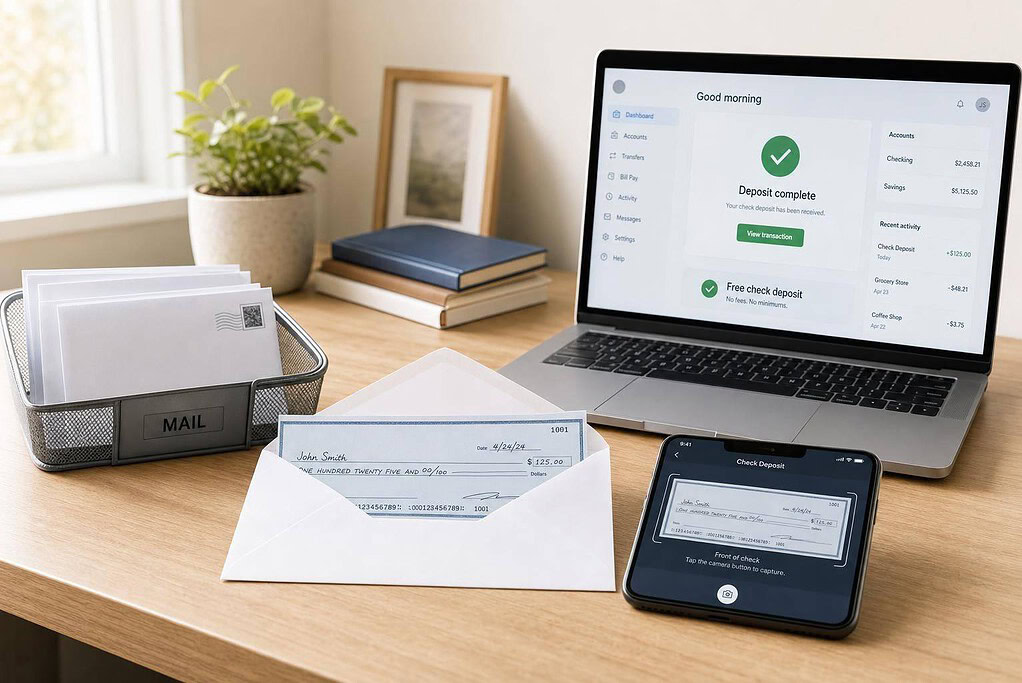
Most “free check deposit” offers are not bank deposits at all. In most cases, you get a scanned image of the check, then you deposit it through your bank’s mobile app.
If I were picking from this list, I’d split the options like this:
- Best for included check scans: BusinessAnywhere
- Best for built-in check handling: VirtualPostMail
- Best if you want checks mailed to your bank: US Global Mail
- Best for location count: iPostal1 and Anytime Mailbox
- Not a fit for free check deposit: Earth Class Mail, PostScan Mail, and likely Postal until terms are clear
A few facts matter more than the sales page:
- Scan turnaround can be within 1 business day or up to 2 business days
- Physical check storage ranges from 30 to 180 days
- Some services include scanning in plans from about $20/month to $85/month
- Some services charge extra, and some do not offer check deposit at all
You may also want to review common virtual mailbox questions to understand how these services handle privacy and logistics. Before I sign up, I’d check three things first:
- Whether the provider scans checks or mails them to a bank
- Whether my bank accepts that deposit method
- What I’ll pay for forwarding, storage, and setup fees
Quick Comparison
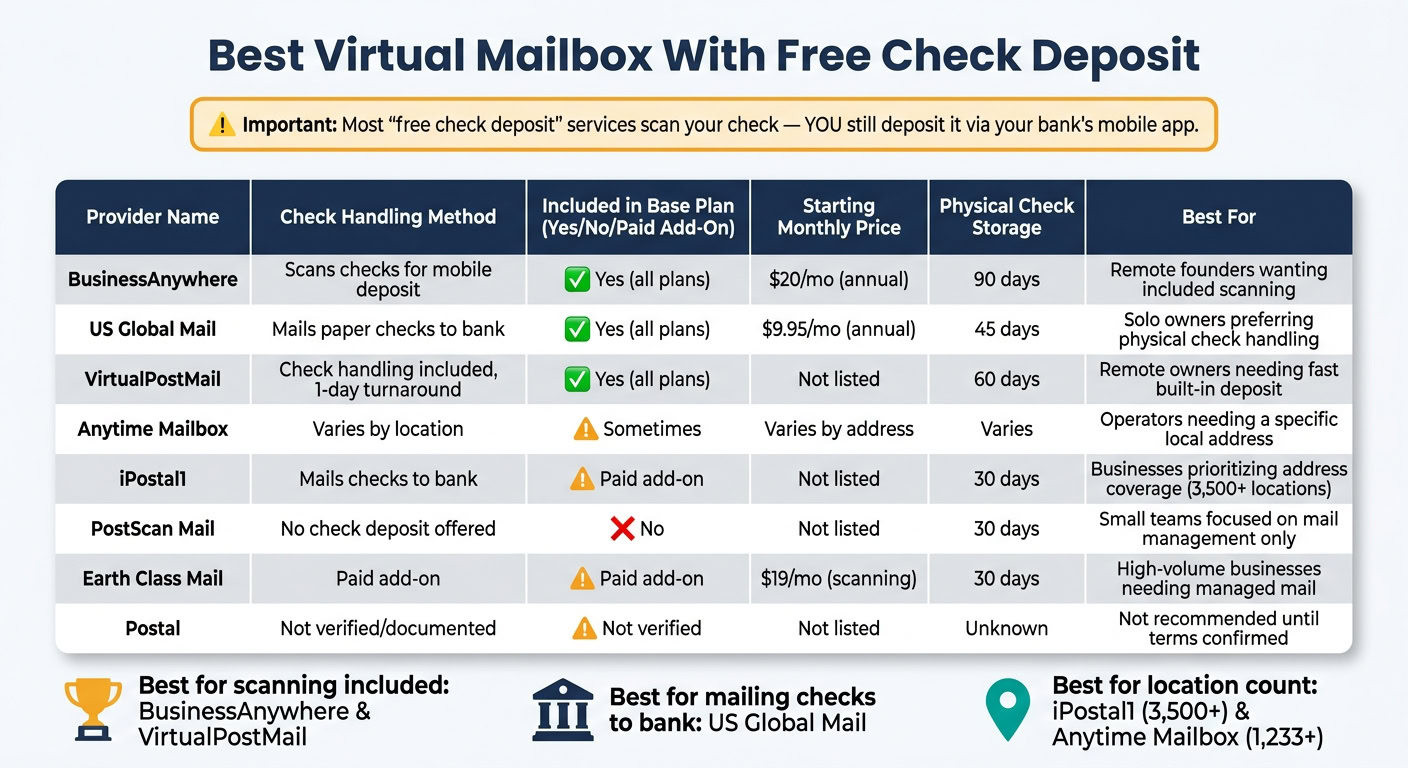
Best Virtual Mailbox With Free Check Deposit: Side-by-Side Comparison
| Provider | Check handling | Included in base plan? | Main catch |
|---|---|---|---|
| BusinessAnywhere | Scans checks for mobile deposit | Yes | You deposit through your bank app |
| US Global Mail | Mails paper checks to supported banks | Yes | Works with a limited bank list |
| Postal | Not clearly listed | Not verified | Public terms are thin |
| Earth Class Mail | Paid add-on | No | Higher cost for check handling |
| VirtualPostMail | Check handling included | Yes | Fewer address locations |
| Anytime Mailbox | Varies by address | Sometimes | You must verify each location |
| PostScan Mail | No check deposit | No | Checks must be forwarded |
| iPostal1 | Mails checks to bank | No | Paid add-on only |
Bottom line: if you want the lowest-friction option, learn how a virtual mailbox works and look first at BusinessAnywhere or VirtualPostMail. If you want the provider to send the paper check to your bank, US Global Mail is the clearer pick.
1. BusinessAnywhere
BusinessAnywhere keeps check handling simple. Check scans are included in every plan, and you make the actual deposit through your bank.
Check Deposit Cost
BusinessAnywhere includes check scanning across all plans. Current pricing is Basic at $25/month or $20/month when billed annually, Premium at $40/month or $30/month when billed annually, and Advanced at $85/month or $65/month when billed annually. Monthly billing also comes with a $25 sign-up fee, while annual billing does not.
One thing to note: BusinessAnywhere scans checks, but it does not deposit them for you. You’ll need to use your bank’s mobile app to complete the deposit.
Deposit Limits
BusinessAnywhere does not limit the number of checks it scans. If there’s any cap, it comes from your bank’s mobile deposit policy instead. Once a check arrives at the facility, the scanned image is usually available in your dashboard within 2 business days.
Address and Business Use
The address can be used for banks, clients, and LLC formation. But it can’t be used as a registered agent address. If you need that, you’ll have to get a registered agent service on its own. You also need to submit USPS Form 1583 before BusinessAnywhere can receive your mail. That makes the service useful for remote business mail handling, not just check scanning.
Mail Handling
Checks are scanned automatically when they arrive. Physical checks are then stored for 90 days at no extra charge. After that, they’re shredded unless you ask for forwarding. Forwarding costs $2.00 per package, plus postage. BusinessAnywhere also filters out junk mail.
2. US Global Mail
US Global Mail takes a different route. Instead of using scan-and-deposit, it mails the paper check to your bank for deposit.
Check Deposit Cost
Check deposit by mail is included on all plans. The Individual plan starts at $9.95/month when billed annually or $14.99/month when billed monthly. The Business plan starts at $29.95/month.
US Global Mail sends paper checks to supported banks such as Wells Fargo, Bank of America, Citibank, Chase, and HSBC.
Deposit Limits
Since US Global Mail mails the check instead of scanning it, your bank’s rules carry more weight here than the mailbox service’s rules. The Individual plan allows one recipient. After that, deposit limits depend on your bank, not US Global Mail.
Address and Business Use
US Global Mail gives you a real street address that can be used for LLC registration, opening business bank accounts, and receiving packages from USPS, FedEx, UPS, and DHL. That makes it a good fit for solo owners and small businesses that need a U.S. mailing address.
Before mail forwarding can begin, you need to complete USPS Form 1583 and identity verification.
Mail Handling
For remote owners, the main draw is simple: checks can be handled without extra deposit steps on your side. Incoming mail gets an automatic exterior scan when it arrives. If you want to see what’s inside, you can request Open and Scan.
Digital storage lasts up to 180 days, and physical mail storage is free for 45 days. Shipping discounts can reach up to 80%.
3. Postal
Postal is hard to rank for free check deposit because its public terms are thin.
Check Deposit Cost
Postal does not publicly document free check deposit terms, per-check fees, or monthly limits. Free check deposit is not verified in its plans. So, don’t treat it as a confirmed free-check option until those terms are verified.
That lack of detail makes Postal a poor pick for readers who need a clearly documented check-deposit process.
Address and Business Use
Use Postal only after confirming that its address works for registering your LLC, banking, and mail-receipt needs.
Mail Handling
Postal’s check and forwarding workflow is not clearly documented, so it’s not a strong fit for readers who need predictable check processing.
4. Earth Class Mail
Earth Class Mail does not include free check deposit in its base plans. If you need check deposit, it’s a paid add-on, and the company does not list a public flat per-check fee. So this is a paid route for people who want managed mail handling, not free check deposit.
Check Deposit Cost
Earth Class Mail’s base virtual address plans start at $39/month, while its mail scanning plans start at $19/month. Check deposit costs sit on top of those monthly fees, which makes this service a weaker match for readers who want free check handling.
Deposit Limits
Earth Class Mail does not publish deposit limits, bank requirements, or processing times. If you plan to use it for regular deposits, check those details first.
Address and Business Use
For business use, users must submit formation documents, EIN confirmation, ID, and a notarized USPS Form 1583.
Mail Handling
Where Earth Class Mail stands out is mail management. Mail is scanned into searchable PDFs at a centralized facility. Physical mail storage is free for 30 days, and packages come with 10 days of free storage. The service also connects with QuickBooks Online, Xero, Bill.com, Google Drive, and Dropbox.
Its main draw is full-service mail handling, not no-cost check deposit.
5. VirtualPostMail
VirtualPostMail, or VPM, makes the most sense for people who want check handling built into the base mailbox plan. That’s the main draw here. Every plan includes check deposit at no added charge. If that matters to you, the next thing to look at is speed.
Check Deposit Cost
Check deposits usually process within 1 business day.
Deposit Limits
Public sources don’t list a per-check cap or a monthly limit.
Address and Business Use
VPM provides a commercial street address that can be used for LLC registration and business banking. It has locations in California, Nevada, and Delaware. All plans also include registered agent service.
There is one setup step to know about: VPM requires USPS Form 1583 before it can receive mail on your behalf.
Mail Handling
Mail scanning requests are usually completed within 6 business hours, and scanned files are delivered as searchable OCR PDFs. Physical mail storage is free for 60 days, while digital storage is unlimited.
On the security side, the platform is SOC 2 Type II certified and HIPAA compliant.
The tradeoff is pretty simple:
- Fewer locations
- No dedicated mobile app
sbb-itb-ba0a4be
6. Anytime Mailbox
Anytime Mailbox has more than 1,233 locations in the U.S. and abroad. But when it comes to check deposit, the platform name doesn’t tell the whole story. The exact address is what matters.
Check Deposit Cost
Check deposit isn’t part of every location or every plan. Support and pricing change based on the address you pick, and some locations don’t offer check deposit at all. If you need this feature, check first before you sign up.
Deposit Limits
Deposit terms also change by location and plan, so you’ll want to confirm the rules for the address you choose.
Address and Business Use
Since support varies by location, the next thing to check is whether the address fits your business needs. Anytime Mailbox offers street addresses that can be used for LLC registration and business banking. USPS Form 1583 is required.
Mail Handling
When mail comes in, it shows up in your dashboard. From there, you can request Open and Scan to see what’s inside. If your location supports it, you can also request check deposit through the platform.
The service also has iOS and Android apps, which makes it easier to manage mail while you’re away from your desk.
Pricing depends on the address, and some locations – such as one Denver, CO address – don’t support check deposit. With this provider, the address matters more than the brand. So before you choose a location, confirm that check deposit is available.
7. PostScan Mail
PostScan Mail gives you access to 800+ U.S. street addresses for business mail and managing multiple LLCs. That’s a solid fit if your main goal is receiving and managing mail online.
There’s one clear catch: it does not offer check deposit. So if checks show up, you’ll need to have them forwarded and deposit them yourself. In plain English, it works well for mail handling, but not for anyone who wants checks processed on their behalf.
Check Deposit Cost
PostScan Mail does not offer check deposit on any plan, so checks must be forwarded and deposited manually. Since there’s no check deposit service, there are also no deposit limits to compare.
Address and Business Use
Its street addresses are real U.S. addresses, and plans support 2 to 6 users with separate logins. For small teams, that’s the main edge here. Each person can have their own access instead of sharing one account, which makes day-to-day mail management a lot less messy.
Mail Handling
PostScan Mail includes inbound scanning, mail consolidation, junk-mail recycling, web and mobile access, mail storage free for 30 days, package storage for 7 days, and forwarding at $2.00 for the first item plus $0.50 for each additional item.
If location coverage is a big deal for you, this provider has plenty of reach. The next option is worth a closer look if that’s high on your list.
8. iPostal1
iPostal1 stands out here for one main reason: scale. It offers more than 3,500 real street addresses.
Check Deposit Cost
Check deposit is a paid add-on, so it’s not part of the standard plan. iPostal1 will mail paper checks to your bank, but only if your bank accepts deposits that way.
Deposit Limits
iPostal1 does not list deposit limits. In practice, your bank’s rules decide what happens.
Address and Business Use
iPostal1 offers street addresses that can work for LLC registration, business banking, and package receipt. You’ll need to complete USPS Form 1583.
Mail Handling
This is where the tradeoff shows up. Check deposit is not part of the base price. Envelope scans are free, content scans cost extra, and physical storage is free for 30 days. You manage mail through the iOS and Android apps.
So, iPostal1 looks stronger on address coverage than on free check handling.
How These Providers Compare on the Features That Matter
Across these services, the biggest differences come down to check scanning, deposit method, and bank compatibility. But one detail tends to shape the total cost more than anything else: whether check scanning is included in the plan or billed on its own.
Check Deposit Cost
Here, check deposit means scanning a check so you can submit it through your bank’s mobile deposit app. That scan has to be clear enough for the bank to accept it.
That’s why pricing can get tricky. Some providers include scanning in the monthly fee. Others charge per check or treat it as a paid add-on. On paper, two plans may look close in price. In practice, the one with bundled scanning may cost less if you’re depositing checks on a regular basis.
Deposit Limits
Your bank sets the deposit limit, not the mailbox provider.
So once you know your bank’s rules, the next step is simple: make sure the mailbox address works for your business setup.
Address and Business Use
Address quality and banking fit matter more than the number of locations a provider offers. A huge address network doesn’t help much if the address you choose doesn’t meet your bank’s rules or can’t support your LLC registration.
That shifts the focus away from raw location count and toward what day-to-day use looks like. In plain terms, mail workflow and deposit handling matter more than address volume.
Mail Handling
Physical check handling matters too. After a provider scans a check, what happens next? That’s where the process can either stay fully remote or start getting messy.
Look at:
- How long the provider stores checks
- Whether they can forward them
- What extra fees may apply
Those details can make a big difference, so it’s smart to confirm them before you sign up for a plan.
Next, compare the practical pros and cons behind each provider’s workflow.
Pros and Cons of Each Provider
The main tradeoffs here are pretty simple: scan cost, deposit speed, and whether the deposit process works with your bank.
| Provider | Pros | Cons | Best Use Case |
|---|---|---|---|
| BusinessAnywhere | Unlimited scans on all plans; no hidden scan or storage fees; integrated LLC formation services, registered agent, and notary services; annual Basic at $20/month | $25 sign-up fee on monthly plans; deposits go through your bank’s mobile app | Remote founders who want included scanning and predictable monthly costs |
| US Global Mail | Mails paper checks directly to supported banks; no extra deposit steps on your side; up to 80% shipping discounts | Limited to a small set of supported banks; slower than mobile deposit; Individual plan allows one recipient | Solo owners who prefer physical check handling over mobile deposit |
| Postal | – | Check deposit terms are not publicly documented; cannot be verified as a free-check option | Not recommended until deposit terms are confirmed |
| Earth Class Mail | Higher-touch mail handling with searchable PDF scans; integrates with QuickBooks, Xero, and Google Drive | Check deposit is a paid add-on, not included; higher base cost; strict eligibility requirements | Larger businesses with high-volume scanning needs, not free check handling |
| VirtualPostMail | Check deposit included on all plans; 1-business-day deposit turnaround; registered agent service included; SOC 2 Type II and HIPAA compliant | Fewer locations than most competitors; no dedicated mobile app | Remote owners who want fast, built-in check deposit and compliance-grade security |
| Anytime Mailbox | Broad address coverage across 1,233+ U.S. locations; iOS and Android apps | Check deposit availability varies by location; service quality is not consistent across addresses | Remote operators who need a specific local address and confirm check deposit is available there |
| PostScan Mail | 800+ U.S. street addresses; supports 2–6 users with separate logins; strong mail management workflow | No check deposit on any plan; checks must be forwarded and deposited manually | Small teams focused on mail management, not check processing |
| iPostal1 | 3,500+ real street addresses; iOS and Android apps; free envelope scans | Check deposit is a paid add-on; content scans cost extra | Businesses that prioritize address coverage over free check handling |
BusinessAnywhere makes sense for remote founders who want scanning included, steady pricing, and extra business tools in one place. The catch is that deposits still happen through your bank’s mobile app.
Earth Class Mail is a better fit for higher-volume operations that want more managed mail handling and don’t mind paying more for check deposit. Anytime Mailbox is often the pick when getting a certain local address matters most, but check deposit support can vary by location, so it’s smart to confirm that before you sign up.
Nonprofits receive a high volume of donation checks. See our pick of the best virtual mailbox for nonprofits and associations.
Conclusion
The right pick comes down to how you want to deal with mailed checks, how much mail you get, and whether you also need help with business registration. BusinessAnywhere keeps check handling simple for remote owners, and its all-in-one setup makes it the best match for remote business use.
That said, the best option can change based on your location, mail volume, or day-to-day process. Providers with a strong local presence can make sense when a specific street address matters most, though check deposit access may differ. Full-service mail companies tend to fit businesses with heavier mail flow and a need for hands-on mail handling. Options that pair a mailbox with registered agent service can also make sense if you want both under one roof.
Before you sign up, double-check that your bank accepts uploaded check images, confirm your bank’s daily mobile deposit limit, and look over current pricing and plan terms. The right mailbox should fit your bank, your mail volume, and the way your business is set up.
FAQs
What does free check deposit really include?
It usually comes with high-resolution digital scans of the front and back of each check. You can download those images from your secure online dashboard, then use your bank’s mobile deposit feature to deposit the funds from just about anywhere.
Some providers charge a per-check fee, while others include this only with certain plans. Most do not endorse or deposit checks for you.
Will my bank accept a scanned check image?
It depends on your bank’s mobile deposit rules. Most major banks do support mobile deposits, but it’s smart to check the details first.
Look at your bank’s requirements for:
- image quality
- accepted file formats
- deposit limits
- processing times
Before you pick a service, make sure your bank accepts digital images from your virtual mailbox provider. Also confirm that it allows mobile deposits from your current location.
What happens to the paper check after scanning?
After a check arrives at your virtual mailbox, the envelope and its contents are opened and scanned in high resolution. Those images are then uploaded to your secure online dashboard, where you can view them or download them for your bank’s mobile deposit app.
The original paper check is kept for up to 90 days. During that window, you can ask to have it forwarded to another address or kept in secure storage.