If I had to cut this down to one answer, it’s simple: pick based on mail volume, address choice, forwarding costs, and whether you need the mailbox to help with LLC and USPS compliance.
Here’s the short version:
- BusinessAnywhere fits people who want mailbox service plus LLC and compliance help in one account.
- Traveling Mailbox works well if your scan needs change month to month because unused scans carry over.
- Anytime Mailbox is a low-cost pick with 1,800+ U.S. locations and 2,000+ worldwide.
- US Global Mail is better if you ship packages often and want up to 80% off shipping.
- iPostal1 gives you the biggest network here, with 2,750+ locations.
- PostScan Mail is a good match if you want cloud storage links and access to U.S. plus overseas locations.
A few numbers stand out fast: prices start as low as $5.99/month, some services need USPS Form 1583 with notarization, and scan rules differ a lot. One service gives unlimited envelope scans, another gives unlimited scanning, and others put limits on pieces or pages. That’s why the cheapest option is not always the best fit.
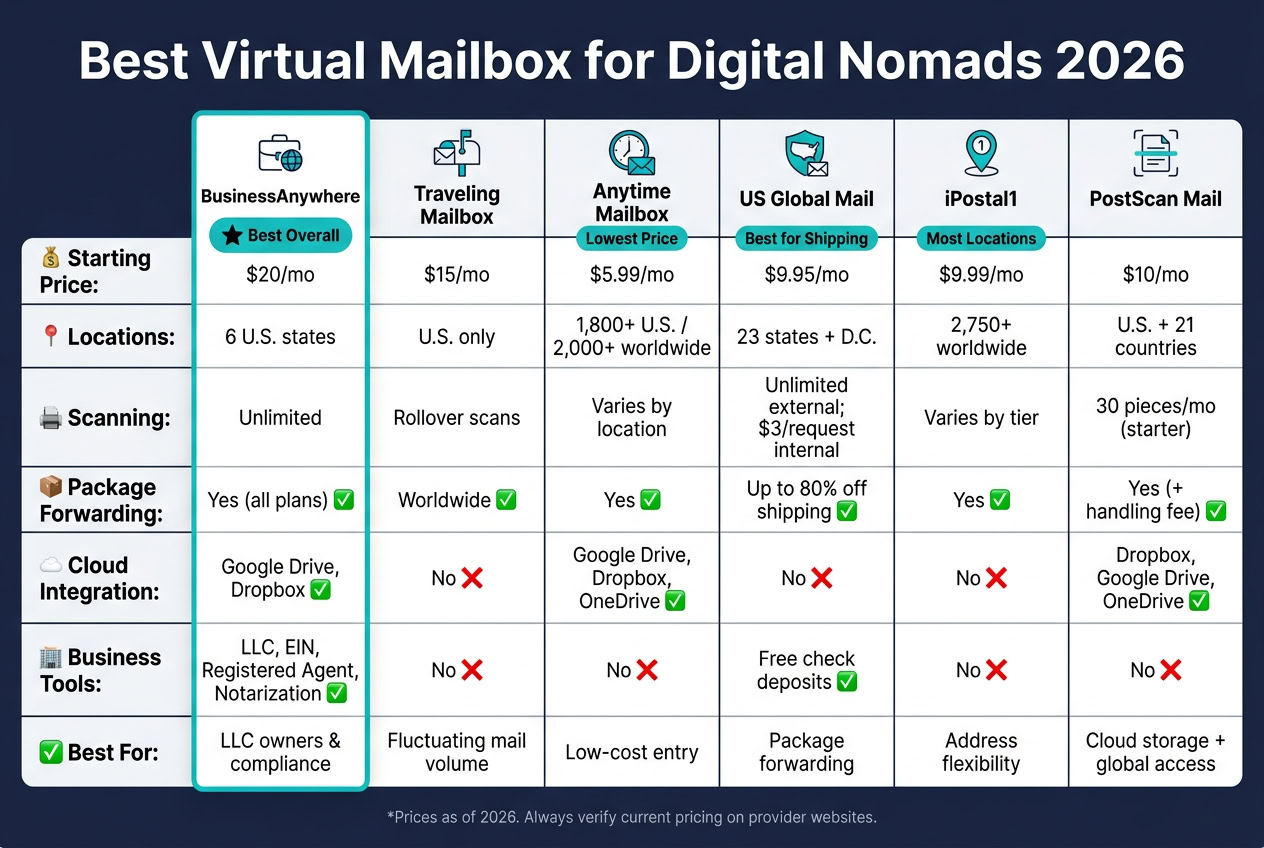
Quick Comparison
| Provider | Best Fit | Starting Price | Main Point | Watch Out For |
|---|---|---|---|---|
| BusinessAnywhere | LLC owners and business use | $20/month billed annually | Unlimited scanning and business tools in one dashboard | Only 6 U.S. states |
| Traveling Mailbox | Uneven mail volume | $15/month | Unused scans roll over | No overseas address options |
| Anytime Mailbox | Low-cost entry and address choice | $5.99/month | Large location network | Service can differ by site |
| US Global Mail | Package forwarding | $9.95/month | Up to 80% off shipping and free check deposits (a key benefit of virtual mailboxes) | Inside scans cost extra |
| iPostal1 | Address flexibility | $9.99/month | 2,750+ locations | Features and price depend on tier |
| PostScan Mail | Cloud storage and mixed U.S./global access | $10/month | Dropbox, Google Drive, and OneDrive links | Fees can climb after plan limits |
My takeaway: if you want an all-in-one setup, I’d look at BusinessAnywhere first. If you just need a low-price address, I’d check Anytime Mailbox. If shipping is the main issue, US Global Mail makes more sense. And if your top goal is picking from the most locations, iPostal1 is hard to ignore.
The rest of the article breaks down those trade-offs in plain English.
1. BusinessAnywhere
BusinessAnywhere is aimed at digital nomads and remote founders who need a real U.S. street address for mail, compliance, and remote access.
For many nomads, that’s the big selling point: a mailing address that can also work for business formation and compliance.
Address and Compliance
BusinessAnywhere operates as a CMRA, which means users need to complete USPS Form 1583. The platform takes care of notarization online.
Registered agent service is separate from the mailbox address. That service handles legal notices and service of process.
One catch: BusinessAnywhere only offers addresses in six U.S. states right now. So if your business needs a certain state, your options may be tight.
Scanning and Forwarding
Mail is usually scanned and uploaded to your dashboard within 24 to 48 hours after it arrives. Plans come with unlimited scanning and storage, with no added charges for mail, scans, or storage. You can view, forward, or shred mail from any device.
International forwarding is available on every plan. You pay the actual shipping cost plus a small handling fee. The service also accepts packages from major carriers and Amazon.
Pricing and Fees
For digital nomads, one of the first things to check is whether the flat fee covers both personal and business recipients. BusinessAnywhere uses flat-rate pricing based on the number of recipients, not the amount of mail you get.
| Plan | Monthly Billing | Annual Billing | Recipients |
|---|---|---|---|
| Basic | $25/mo + $25 sign-up fee | $20/mo, no sign-up fee | Up to 2 |
| Premium | $40/mo + $25 sign-up fee | $30/mo, no sign-up fee | Up to 5 |
| Advanced | $85/mo + $25 sign-up fee | $65/mo, no sign-up fee | Up to 20 |
A personal name and a business name count as two separate recipients.
Business Integration
Mail handling is only one part of the pitch. The other part is having key business tasks in one dashboard.
BusinessAnywhere combines forming a US LLC, registered agent services, EIN applications, S-Corp tax filings, and online notarization in the same place. It also connects with Google Drive and Dropbox for document storage.
The main downsides are pretty clear: six-state coverage, no phone support, and no free trial.
2. Traveling Mailbox
Traveling Mailbox gives remote workers a U.S. street address, mobile mail management, and flexible forwarding. Its biggest draw is simple: unused scans roll over, so you don’t lose them if one month is quiet and the next is packed.
Address and Compliance
Traveling Mailbox runs as a CMRA, which means users need to complete a notarized USPS Form 1583 before the service can receive mail. It offers U.S. physical addresses only, with no international address options. If you want a higher-tier address, that costs an extra $4.95 per month.
Scanning and Forwarding
The standout feature here is scan rollover. Unused monthly scans carry into the next month. That’s a big plus for digital nomads and remote workers whose mail volume can swing from light to heavy.
You can also forward mail and packages to any location worldwide. And if you’re on the move, the mobile app makes it easy to request scans, forwarding, or shredding from anywhere.
Pricing and Fees
Traveling Mailbox uses tiered pricing based on mail volume, with plans ranging from $15 to $55 per month. If you pay annually, you get two months free. There’s no free trial.
Its main edge is flexibility when your mail needs change from month to month.
3. Anytime Mailbox
Anytime Mailbox stands out for one big reason: its huge address network. It offers more than 1,800 locations across the United States and over 2,000 worldwide. For digital nomads, that means a lot more choice when picking an address.
You’re not limited to one type of location either. Addresses can be based at UPS and FedEx stores, local mail centers, and coworking spaces like WeWork. So if you need an address in a certain city or state for business reasons, there’s a good chance you can find one.
Address and Compliance
All addresses are real street addresses, not PO Boxes. That can make things easier when dealing with banks, vendors, and business partners.
Anytime Mailbox works as a CMRA, which means you’ll need to fill out and notarize USPS Form 1583 before it can accept mail on your behalf. One thing to watch: locations are run independently, so security, service quality, and mail handling can differ from site to site. It’s smart to look at the storefront and even the nearby tenants before you choose an address.
Scanning and Forwarding
After your mail arrives, you can manage it through the portal or mobile app. Services include scans, forwarding, shredding, and disposal.
For nomads who move between countries, the broad location network and international package forwarding are the main draw. Scanned documents can also sync with Google Drive, Dropbox, or OneDrive, which makes storage a lot less messy.
Pricing and Fees
Pricing depends on the location, since each site sets its own rates. Entry-level plans can start at $5.99 per month. At other locations, basic plans may start at $9.99 per month and often include up to 30 pieces of incoming mail.
That setup works well if you don’t get much mail or if you want an address in a very specific place.
Business Integration
For document storage, Anytime Mailbox connects with major cloud platforms, so you can keep scanned mail organized without downloading files by hand. Before you sign up, check whether the exact location you want offers registered agent support.
4. US Global Mail
US Global Mail is a good fit for nomads who still deal with physical packages and paper checks, not just PDFs in an inbox.
Address and Compliance
As a CMRA, US Global Mail requires you to complete and notarize USPS Form 1583 before it can receive and open your mail. It offers physical addresses in 23 states and Washington, D.C..
Scanning and Forwarding
US Global Mail includes unlimited free external envelope scans. If you want the contents scanned, that costs $3.00 per request plus $0.50 per page. It also offers up to 80% off shipping for bundled mail and packages.
One thing to watch: digital storage lasts 180 days. So if a file matters, download it sooner rather than later.
That setup makes the service stronger for people who still need help with physical mail, not only digital scans.
Pricing and Fees
| Feature | Details |
|---|---|
| Monthly Plans | $9.95–$29.95 |
| Address Locations | 23 states + Washington, D.C. |
| External Scans | Unlimited / Free |
| Internal Scan Cost | $3.00 per request + $0.50/page |
| Check Deposits | Free on all plans |
| Shipping Discount | Up to 80% off |
| Digital Storage | 180 days |
Business Integration
Free check deposits come with every plan. The tradeoff is simple: scan fees can add up, and the 180-day storage window is fairly short.
If having more address options matters more than free check deposits, the next section looks at a different tradeoff.
sbb-itb-ba0a4be
5. iPostal1
iPostal1 stands out for one big reason: its address network. It offers more than 2,750 locations across the U.S. and abroad. That kind of range matters when you need a steady mailing address for banking, business filings, or frequent cross-border travel. Using a service like this also provides significant privacy and anonymity for those on the move. If location choice is your top concern, iPostal1 makes a strong case.
Address and Compliance
The service uses real street addresses that can support business mail, package receipt, and compliance filings, depending on the rules at the location you pick. It also follows CMRA requirements for mail authorization.
Locations fall into four tiers: Standard, Select, Premium, and Prestige. Your tier affects both price and features, so it’s worth checking the details for the exact location before you sign up. For travelers, the draw isn’t just the address itself. It’s the fact that you can keep mail moving without being locked to one city.
Scanning and Forwarding
You manage mail through the app or web portal. Before you forward anything, you can see live carrier shipping quotes. That gives you more control over cost.
The tradeoff is pretty simple: address quality and options can vary a lot by location. So while the network is broad, the day-to-day experience may not feel the same everywhere.
Pricing and Fees
| Feature | iPostal1 Details |
|---|---|
| Starting Price | $9.99/month |
| Total Locations | 2,750+ (U.S. and International) |
| Location Tiers | Standard, Select, Premium, Prestige |
| Refund Window | 30-day refund window for unused accounts with no received mail |
The refund policy is fairly narrow. You get 30 days, but only if the account is unused and no mail has been received. That’s an important detail to check before you commit, especially if you’re still comparing mailbox services.
6. PostScan Mail
PostScan Mail is a solid pick for nomads who want more coverage and steadier mail handling, especially since virtual mailboxes enhance privacy and professionalism for travelers. It uses a hub-based setup and offers hundreds of address locations across the U.S. and in 21 other countries. That mix of U.S. and global locations can make a big difference if you move around a lot and still want one steady mailing base.
Address and Compliance
PostScan Mail runs 13 company-owned hubs along with a larger network of contracted third-party locations. The company-owned hubs tend to offer steadier handling than the contracted sites.
Like other mail services, PostScan Mail requires a notarized USPS Form 1583 before it can legally receive and open your mail.
Scanning and Forwarding
When mail comes in, you get a notification and can choose what happens next. You can have it scanned, forwarded, shredded, or stored. Packages are photographed and added to your account, and the service connects with Dropbox, Google Drive, and OneDrive. If you like to keep life digital, those cloud connections matter almost as much as the address itself.
Forwarding comes with a handling fee on top of shipping costs.
Pricing and Fees
| Feature | PostScan Mail Details |
|---|---|
| Starting Price | $10/month |
| Mail Limit (Starter) | 30 pieces/month |
| Primary Hubs | 13 company-owned locations |
| International Presence | 21 countries |
| Cloud Integrations | Dropbox, Google Drive, OneDrive |
The $10 base plan works best for light to moderate mail volume, not heavy physical mail use. Once you go past the plan limit, overage and storage fees kick in.
Pros and Cons by Use Case
No virtual mailbox works for every nomad. The right pick depends on three simple things: how much mail you get, how often you change locations, and whether you need a business address that meets compliance rules.
The table below trims it down to what matters most for each use case.
| Provider | Best For | Key Differentiator | Key Limitation |
|---|---|---|---|
| BusinessAnywhere | Heavy business mail and compliance needs | Bundles LLC formation, registered agent, and virtual mailbox in one place | Available in only 6 U.S. states |
| Traveling Mailbox | Fluctuating mail volume | Unused scans roll over month to month | No international addresses |
| Anytime Mailbox | Freelancers with light mail volume | Low starting price with broad location network | Quality varies by independently operated location |
| US Global Mail | International package forwarding | Up to 80% off shipping; free check deposits | Internal scans billed per request and per page |
| iPostal1 | Broad address coverage | 2,750+ locations across the U.S. and internationally | Pricing and features tied to location tier |
| PostScan Mail | Users who want company-owned hubs and cloud storage integrations | 13 company-owned primary hubs with Dropbox, Google Drive, and OneDrive sync | Most locations are third-party, not primary hubs |
BusinessAnywhere makes the most sense if you want one steady U.S. street address for both mail and business paperwork. Instead of piecing things together across different services, you can handle LLC registration, registered agent service, and EIN filing in one place. That setup is a good match for people dealing with heavier business mail or anyone who doesn’t want to juggle multiple vendors.
Final Verdict
The right virtual mailbox depends on the job you need it to do. Looking at the factors above – compliance, forwarding, address coverage, and scan speed – these picks stand out for the most common use cases:
| Scenario | Top Pick | Why |
|---|---|---|
| Best Overall | BusinessAnywhere | Flat-rate $20/mo when billed annually, unlimited scanning, and integrated LLC formation and compliance tools |
| Best for Low-Cost Entry | Anytime Mailbox | Lowest entry price at $5.99/mo with 1,800+ locations |
| Best for Frequent Forwarding | US Global Mail | Up to 80% off shipping costs through package bundling |
| Best for Address-Only Needs | iPostal1 | 2,750+ locations worldwide for maximum address flexibility |
BusinessAnywhere makes the most sense for LLC owners who want steady pricing and built-in compliance support.
If your main goal is just getting an address in a certain city, iPostal1 gives you the most location options. If you expect to ship packages often, US Global Mail is the better match. If price is your main concern, Anytime Mailbox starts at $5.99/month.
One cost to keep on your radar: BusinessAnywhere’s registered agent renewal is $147/year starting in year two, so factor that into your yearly cost.
FAQs
Do I need USPS Form 1583?
Yes. USPS Form 1583 is legally required if you want to use a virtual mailbox.
Why? Virtual mailbox providers work as Commercial Mail Receiving Agencies (CMRAs). That means they must have this form on file before they can receive, scan, or forward your mail.
You’ll also need two forms of ID:
- one primary photo ID
- one secondary document that shows your home address
The form must be notarized. And if more than one person or business owner will receive mail, each one must submit a separate notarized form.
Can I use a virtual mailbox for my LLC?
Yes. A virtual mailbox can give your LLC a professional business address for day-to-day mail, like vendor invoices, bank statements, and client messages.
But it does not replace a registered agent.
Your LLC still needs a registered agent to accept legal notices and service of process. A virtual mailbox is for regular business mail, not legal documents.
What fees matter beyond the monthly price?
Look past the monthly subscription if you want the full cost.
A lot of services tack on extra fees for things like setup, mail forwarding, package consolidation, and overages when you pass your scan limit.
You may also pay more for a premium address location. Check those charges up front so you know what the total price looks like.