
If I had to sum it up fast: iPostal1 is the better pick for consistency, address choice, and international forwarding, while Anytime Mailbox is the cheaper way to get started.
If you’re comparing these two in 2026, here’s what I’d focus on right away:
- Starting price: Anytime Mailbox starts at $4.99/month; iPostal1 starts at $9.99/month
- Address count: iPostal1 has 2,750+ locations; Anytime Mailbox has 1,800+
- Pricing style: iPostal1 is more standardized; Anytime Mailbox varies more by location
- Business use: both can work as a mailing address for an LLC, but neither is a registered agent
- Forwarding: both offer it, but iPostal1 gives clearer live shipping rates
- Setup: both need a notarized USPS Form 1583 and IDs before mail service starts
So the choice is pretty simple:
- Pick iPostal1 if you want more predictable service, a stronger address list, or mail forwarding outside the U.S.
- Pick Anytime Mailbox if you want the lowest monthly entry cost and don’t mind checking each location’s rules
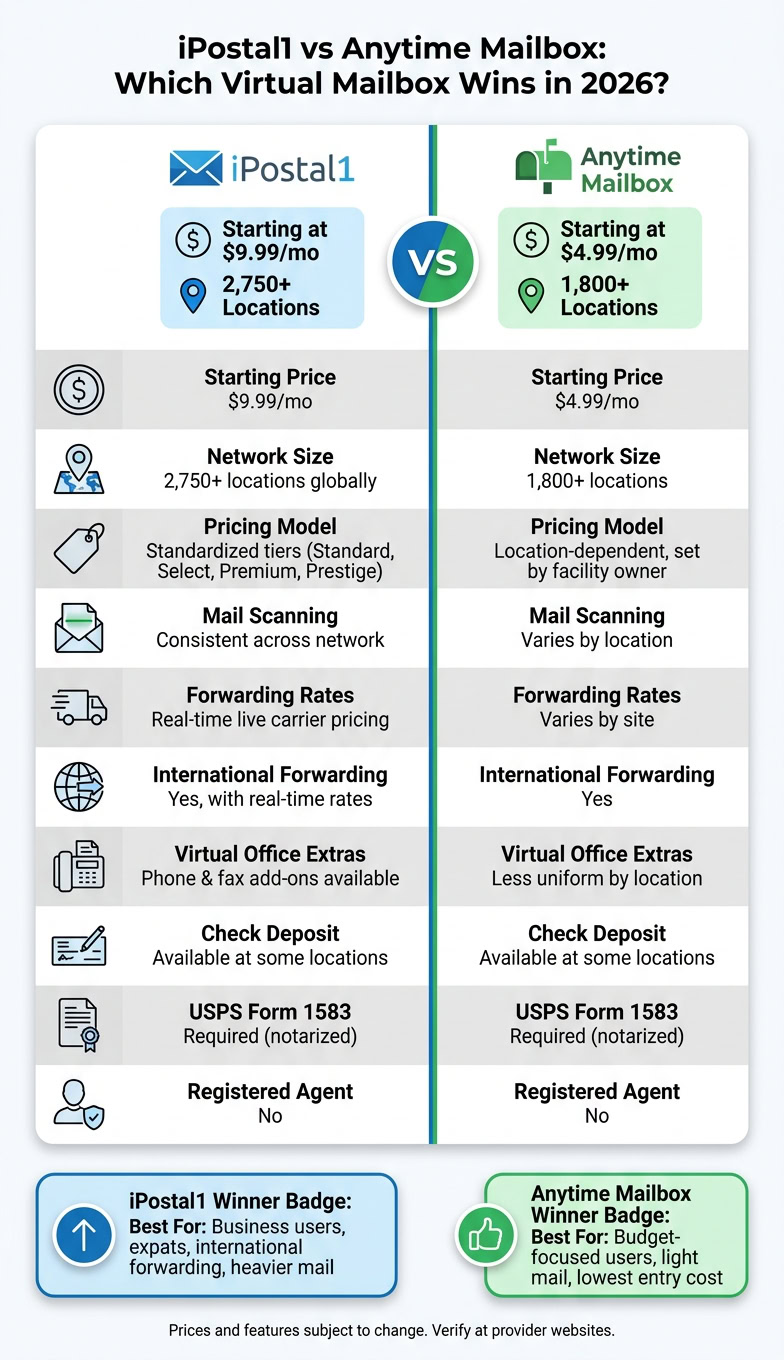
iPostal1 vs Anytime Mailbox: Side-by-Side Comparison 2026
Quick Comparison
| Criteria | iPostal1 | Anytime Mailbox |
|---|---|---|
| Starting price | $9.99/mo | $4.99/mo |
| Network size | 2,750+ locations | 1,800+ locations |
| Service model | More standardized tiers | More location-based variation |
| Scan limits | Often tied to plan tier | Set by each location |
| Forwarding rates | Live carrier pricing | Varies by site |
| Check deposit | Available at some locations | Available at some locations |
| Virtual office extras | Phone and fax add-ons | Less uniform by location |
| Best for | Business users, expats, heavier mail | Budget-focused users, light mail |
My short take: if you care more about price, Anytime Mailbox has the edge. If you care more about control, address options, and fewer surprises from one location to the next, iPostal1 comes out ahead.
That’s the full decision in plain English, and it matches the rest of the article.
iPostal1 vs Anytime Mailbox: Core Features Side by Side
iPostal1 is the more standardized option. Anytime Mailbox changes from one location to another because each mail center sets its own terms. That has a direct effect on pricing, scan limits, package fees, and which add-ons you can get.
The difference becomes clearer when you look at network size, plan setup, and day-to-day mail handling.
Address Networks, Plan Structure, and Mail Handling Basics
iPostal1 has 2,750+ locations globally, grouped into four tiers: Standard, Select, Premium, and Prestige. Anytime Mailbox has 1,800+ locations, but pricing and service terms are set by each facility operator.
So, two addresses in the same city can come with different scan limits, package fees, and storage rules. That’s a big deal if you want the same experience across more than one location.
| Feature | iPostal1 | Anytime Mailbox |
|---|---|---|
| Address Network Style | Centralized, standardized tiers | Network of independently owned mail centers |
| Network Size | 2,750+ locations globally | 1,800+ locations |
| Pricing Style | Standardized tiers based on location classification | Location-dependent, set by facility owner |
| Mail Scanning | Generally consistent across the network | Varies by location |
| Package Handling | More standardized | Varies; some locations charge higher per-package fees |
The main split is consistency. iPostal1 keeps more of the experience the same across its network, while Anytime Mailbox depends more on the local operator.
Those setup choices shape the kinds of users each service tends to fit.
Which Business Use Cases Each Service Targets
iPostal1 leans toward businesses that want predictable operations. Its phone and fax add-ons also make it a better fit for teams looking for more of an office-style setup.
Anytime Mailbox leans toward lower starting cost. Some locations begin at $4.99/month, while iPostal1 starts at $9.99/month. But there’s a catch: terms can change by location. Check deposit, local pickup, and storage limits are not the same everywhere.
Next, pricing, apps, forwarding, and compliance show how these setup differences play out in daily use.
Head-to-Head: Pricing, Apps, Forwarding, and Compliance
Pricing, Included Scans, and Cost Predictability
The starting prices are far apart. Anytime Mailbox lists plans from $4.99/month, while iPostal1 starts at $9.99/month.
That said, the listed price doesn’t tell the whole story. On both platforms, pricing changes by address, so your monthly cost depends on the location you pick. iPostal1 groups its addresses into four tiers – Standard, Select, Premium, and Prestige – while Anytime Mailbox sets pricing by each site.
| Provider | Starting Price | Mail Handling Limits | Forwarding Fees |
|---|---|---|---|
| iPostal1 | $9.99/mo | Varies by location tier | Real-time carrier rates |
| Anytime Mailbox | $4.99/mo | Varies by location | Varies by site |
Before you sign up, look closely at the plan for your exact address. Scan limits and forwarding charges can shift your monthly total more than the base fee suggests.
The main gap here isn’t just the advertised price. It’s how much that specific address can change what you pay each month.
Apps, Mail Forwarding, Check Deposit, and Day-to-Day Use
Once pricing is out of the way, day-to-day use becomes the big thing. Both services have mobile apps and mail forwarding, but iPostal1 tends to be more uniform from one location to another. It also shows live carrier rates, which makes forwarding costs easier to estimate if you ship mail often. Check deposit is available on both, but it depends on the location.
| Provider | Mobile App | Envelope Scans | Content Scans | Check Deposit | International Forwarding | Best Fit for Daily Management |
|---|---|---|---|---|---|---|
| iPostal1 | Yes | Tiered by plan | Tiered by plan | Location-dependent | Yes, with real-time rates | Business owners needing office extras |
| Anytime Mailbox | Yes | Location-dependent | Location-dependent | Location-dependent | Yes | Budget-focused remote users |
iPostal1 also has a Virtual Office upgrade that adds a business phone number and fax line. If you’re a solo founder or running a small team, that can make the setup feel more complete without adding a physical office.
LLC Formation, Privacy, and Compliance Fit
For LLC owners, the big issue is simple: will the address work for filings, banking, and keeping your home address private? Both services offer real street addresses that can support business registration and bank account opening. Both are Commercial Mail Receiving Agencies, or CMRAs, and both require a notarized USPS Form 1583 plus two forms of ID before they can receive or open your mail.
A virtual mailbox handles mail. It does not act as a registered agent.
That notarization step is often where setup slows down, so it helps to have your ID and entity details ready ahead of time.
| Provider | Real Street Address | LLC-Friendly Use | Privacy Value | Registered Agent |
|---|---|---|---|---|
| iPostal1 | Yes | Yes – as a business address | Protects your home address | No |
| Anytime Mailbox | Yes | Yes – as a business address | Protects your home address | No |
One more thing to watch: Google limits verification for CMRA-linked addresses, which can matter if you want a public-facing business profile.
With pricing, daily use, and compliance in view, the next move is figuring out which service lines up better with your setup.
sbb-itb-ba0a4be
Which Service Wins for Each Use Case in 2026
Here’s how those trade-offs look in practice.
Best for Digital Nomads, Expats, and Frequent Travelers
iPostal1 wins here. It’s the stronger fit for international forwarding because you get more location choices and clearer control over shipping rates. That makes a difference when you’re sending packages overseas and want to compare carrier prices before you ship.
Complete Form 1583 notarization before you travel so you don’t get stuck dealing with delays.
For business owners, though, the focus shifts. At that point, travel ease matters less than how strong and credible your address looks.
Best for U.S. LLC Owners, Startups, and Real Estate Investors
iPostal1 edges ahead for business owners who want a Prestige address in a higher-profile location. That can matter during banking KYC reviews, state filings, and when you want to keep your home address private – cases where address quality carries more weight.
Its Virtual Office option also adds phone and fax service, which gives you a more complete business setup. One thing to keep straight: a mailbox handles general mail, while a registered agent handles legal notices.
If price is the biggest factor, the pick changes.
Best for Budget Shoppers vs. Heavier Business Mail
Anytime Mailbox wins on starting price. For heavier mail volume, iPostal1 is the better choice because its standardized setup makes costs easier to predict as volume grows.
| User Type | Recommended Service | Key Reason |
|---|---|---|
| Minimal mail, lowest cost | Anytime Mailbox | Starts at $4.99/mo |
| International forwarding needs | iPostal1 | Real-time shipping rates, more location choices |
| Prestige business address | iPostal1 | Premium "Prestige" locations in major hubs |
| Heavier business mail | iPostal1 | More standardized structure keeps total costs predictable |
Put simply, Anytime Mailbox wins on entry price. iPostal1 wins when address quality, location variety, or international forwarding matter more.
The conclusion pulls these use-case calls into a final recommendation.
Conclusion: Final Verdict and Next Steps
Final verdict: iPostal1 is the stronger choice for address quality and network depth, while Anytime Mailbox starts at a lower price point.
Choose iPostal1 if you want stronger address options. Choose Anytime Mailbox if your main goal is the lowest entry cost.
FAQs
Which service is better for an LLC?
For an LLC, the better pick comes down to what matters most: an all-in-one platform or mail handling first.
BusinessAnywhere makes more sense if you want to set up your LLC, get registered agent service, and manage a virtual mailbox from one dashboard. It keeps those core business tasks in one place, which can save time and cut down on back-and-forth.
iPostal1 is the stronger fit if your LLC is already set up and your main goal is flexible mail management. If mail is the big thing you care about, that focus can be a better match.
Can I use either address for Google Business Profile?
Maybe. It depends on Google’s policies.
Google usually wants a physical location where you meet customers face-to-face. A virtual mailbox often doesn’t meet that bar.
Why? These addresses are often labeled as CMRAs. And Google may filter them out.
Before you use a virtual address, check Google’s current guidelines for:
- service-area businesses
- storefront businesses
That distinction can make or break whether the address is accepted.
What extra fees should I check before signing up?
Look past the base monthly rate. The sticker price can look fine at first, then the extra fees start piling up.
Check for charges tied to:
- mail scanning after page limits
- mail storage after the free window ends
- going over your monthly mail volume
- check deposits
- add-ons like live call answering
It also helps to confirm a few easy-to-miss costs. Some providers charge more for premium locations. Some monthly plans come with a sign-up fee. And in some cases, you may need to pay to notarize USPS Form 1583.