If iPostal1 doesn’t fit, I’d narrow it down like this: Anytime Mailbox for the lowest starting price, BusinessAnywhere for an all-in-one business setup, Traveling Mailbox for people on the move, US Global Mail for heavy forwarding, VirtualPostMail for a long-term business address, PostScan Mail for basic mail handling, and Stable for a more compliance-focused setup.
At a glance, the article compares 7 services across 4 points: starting price, mail handling, address coverage, and business support. It also flags one thing many people miss: every provider needs USPS Form 1583 before you can activate your mailbox, and some services give you more help with that step than others.
Here’s the short version:
- Lowest starting price: Anytime Mailbox at $5.99/month
- Largest network in this list: Anytime Mailbox with 1,800+ locations
- All-in-one business setup: BusinessAnywhere
- Best for uneven mail volume: Traveling Mailbox with rollover scans
- Best for forwarding-heavy use: US Global Mail, with shipping savings of up to 80%
- Best for stable business records: VirtualPostMail
- Best for how a virtual mailbox works: PostScan Mail
- Best for a structured business-address setup: Stable
Quick Comparison
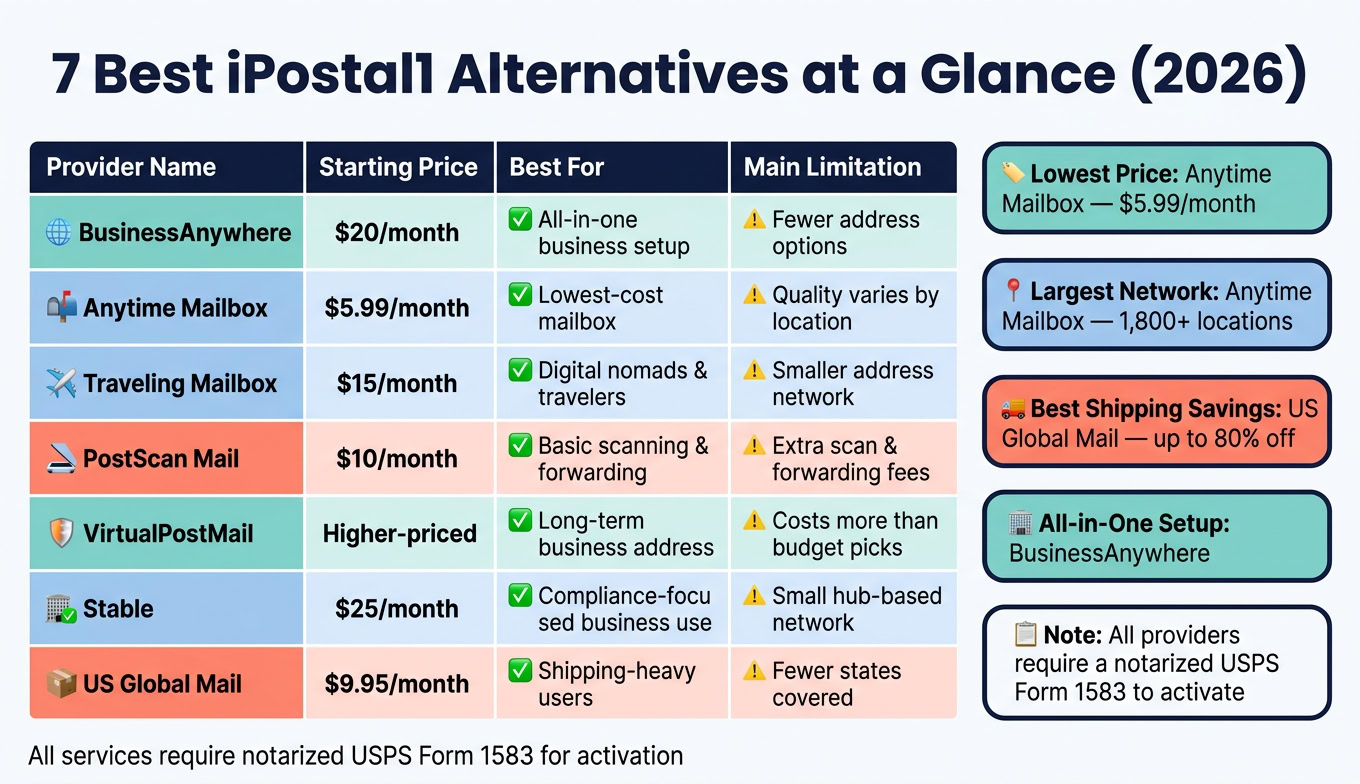
| Service | Starting Price | Best For | Main Limitation |
|---|---|---|---|
| BusinessAnywhere | $20/month | Mailbox + formation + registered agent + notary | Fewer address options |
| Anytime Mailbox | $5.99/month | Low-cost mailbox service | Quality can vary by location |
| Traveling Mailbox | $15/month | Digital nomads and travelers | Smaller address network |
| PostScan Mail | $10/month | Basic scanning and forwarding | Extra scan and forwarding fees |
| VirtualPostMail | Higher-priced | Long-term business address use | Costs more than budget picks |
| Stable | $25/month | Compliance-focused business use | Small hub-based network |
| US Global Mail | $9.95/month | Shipping-heavy users | Fewer states than big mailbox networks |
Bottom line: I’d pick based on your main job to be done. If you only need mail scanning, go low-cost. If you need LLC support or registered agent service too, pick a provider that handles more than just mail.
sbb-itb-ba0a4be
1. BusinessAnywhere
BusinessAnywhere is a good fit for remote founders and international owners who want their mailbox and business paperwork in one place. Instead of juggling a few tools, you get mailbox service, business formation, registered agent service, and notarization in a single dashboard.
Pricing
Virtual mailbox plans start at $20/month when billed annually. Higher-tier plans cost $30/month and $65/month. If you bundle registered agent service with formation, the first year is free.
Mail Handling
BusinessAnywhere scans your mail and uploads it to your dashboard, usually within two business days. After that, you can review and manage everything from one account, no matter where you are.
Address Coverage
BusinessAnywhere offers addresses in sixteen U.S. states. Its lineup leans most heavily toward Wyoming, New Mexico, and Arizona.
Compliance Support
BusinessAnywhere also includes online notarization for USPS Form 1583 for $37. On top of that, it offers registered agent service and add-ons for annual report filings and S-Corp elections. If you’re a non-U.S. founder and need federal tax filings, you may still need a separate tax professional or a tax filing add-on.
This service makes the most sense if you care more about bundled business support than having the largest address network. If you want a mailbox-only choice with more address options, the next service goes in that direction.
2. Anytime Mailbox
If you want a mailbox-only option instead of bundled business support, Anytime Mailbox is the cleanest fit.
Anytime Mailbox is a standalone virtual mailbox service for digital nomads, remote workers, and small businesses that need a U.S. street address.
Pricing
Plans start at $5.99/month, and most locations fall in the $10 to $30/month range, depending on the address and how much mail you get.
Mail Handling
You get a real U.S. street address for mail and packages, along with online scanning, forwarding, storage, and shredding.
Address Coverage
Anytime Mailbox offers 1,800+ U.S. locations, which gives you a lot of choice, even though iPostal1 has more.
Compliance Support
As a commercial mail receiving agency, Anytime Mailbox requires USPS Form 1583 before your mailbox can go live. The form must be completed and notarized. International users also go through identity verification.
Some addresses can work for business registration in certain states, but the rules depend on the state. So while Anytime Mailbox can help with basic address needs, it makes more sense for simple mail handling than for an all-in-one business setup.
3. Traveling Mailbox
Traveling Mailbox is a good fit for digital nomads and frequent travelers who want solid mail management without a bunch of extra business add-ons. It makes the most sense when handling mail is the main priority, not bundled company support.
Pricing
Plans cost $15 to $55 per month. Premium addresses add $4.95 per month, and annual billing gives you 2 free months.
Mail Handling
You get a real U.S. street address, plus mail and package forwarding to any location worldwide. The mobile app lets you scan, forward, and track mail without much hassle.
One feature that stands out: unused monthly mail scans roll over to the next month. That can save money if your mail volume goes up and down.
Address Coverage
Traveling Mailbox offers U.S. addresses only. Its location coverage is smaller than some top networks, so it works best for people who already know which city or state they want.
If you need the address for business use, check the exact location before you sign up.
Compliance Support
Traveling Mailbox requires USPS Form 1583 to activate your mailbox. Its real street addresses can work for LLC registration and official documents required by many banks and agencies.
4. PostScan Mail
PostScan Mail is a solid pick for digital nomads, remote workers, and vanlifers who want simple digital mail control. The big draw here is its no-fuss setup: a virtual mailbox with the main tools most people need, without trying to bundle in a bunch of business extras.
Pricing
Plans run $10 to $30 per month. That entry price is almost the same as iPostal1’s $9.99 starting tier. But there’s a catch: scan overages and forwarding fees can push your bill up fast.
If you go past your monthly scan limit, you’ll pay about $0.20 per extra scan. Forwarding costs also sit on top of the base plan. So while the sticker price looks low, the total can climb if you get a lot of mail or need items shipped often. That makes PostScan Mail a better match for people who want a simple mailbox service, not bundled business help.
Mail Handling
PostScan Mail handles the core tasks: scanning, forwarding, shredding, and storage. That covers the basics well, though the extra scan and forwarding charges are worth watching.
You sign in to a digital dashboard, look at scans of incoming envelopes, and decide what to do with each piece of mail. You can forward it, store it, or shred it. The setup is made for remote use, so you don’t need to be anywhere near a physical mailbox to keep up with what’s coming in.
Address Coverage
PostScan Mail gives you real street addresses at retail storefronts and commercial mail-receiving agencies – not PO Boxes. That matters if you want an address that looks and works more like a standard mailing address. Its street-address network is broader than what you get with many lower-cost plans.
Compliance Support
PostScan Mail requires USPS Form 1583 for activation. It does not come with formation help or registered agent service.
If you want more built-in business support, the next option starts to lean that way.
5. VirtualPostMail
VirtualPostMail, or VPM, is a good match for business owners who want a stable, long-term virtual address. Unlike many mailbox services, VPM owns or directly runs its locations. That helps keep addresses steady over time.
So if your main goal is a durable business address, VPM makes more sense than a low-cost mailbox plan.
Pricing
VPM costs more than budget mailbox services. It also charges extra for things like check deposits, added recipients, and mail forwarding.
That makes it a better fit for businesses that care more about permanence and compliance than the lowest monthly price.
Mail Handling
VPM includes standard mail features through an online dashboard:
- Open and scan
- Mail forwarding
- Shredding
- Storage
Address Coverage
VPM offers physical street addresses that can work for LLC registration and business banking in many cases. Because it owns or directly runs these locations, the addresses tend to be more stable.
This is where VPM stands out most. It’s a strong pick for established LLCs and founders who need a mailing address they can keep for the long haul.
Compliance Support
VPM requires USPS Form 1583 before you can activate a mailbox. If you want a lower-cost service with simpler mail handling, the next option is likely a better match.
6. Stable
Stable is a good pick if you want a more structured business address and mailroom setup. It’s built for remote-first businesses that need a professional business address without paying for a physical office. Plans start at $25/month. Unlike services that rely on third-party storefronts, Stable uses directly controlled hubs.
Mail Handling
Stable covers the main mailroom tasks: scanning, forwarding, storage, and shredding. You manage everything through an online dashboard.
Address Coverage
Stable offers a smaller set of hub-based U.S. addresses instead of a large national network. That means it tends to work best when you already know which location makes sense for your business.
Compliance Support
Like all CMRAs, Stable requires a notarized USPS Form 1583 before it can receive your mail.
If you want more address options instead of a hub-based setup, the next virtual mailbox service is a better fit.
7. US Global Mail
US Global Mail is a good fit for small businesses, expats, and frequent travelers who need mail and package forwarding without paying more than they have to. One of its biggest selling points is bundled forwarding, which can cut shipping costs by up to 80%.
Plans run from $9.95 to $29.95 per month. If you want to see what’s inside an envelope, that costs $3.00 per request plus $0.50 per page. On the other hand, scans of the outside of envelopes are free and unlimited. So if shipping costs are your main concern, this setup can make a lot of sense.
Mail Handling
US Global Mail includes forwarding, storage, shredding, and check deposits. Check deposits come with every plan at no extra charge. That’s a nice plus if you receive payments by mail.
There is one limit worth noting: digital mail storage lasts 180 days. If there’s anything you want to keep, download it before that window closes.
Address Coverage
US Global Mail offers addresses in 23 U.S. states plus Washington, D.C. That’s a much smaller footprint than some mailbox services, so it works best if one of those locations already matches what you need.
Compliance Support
US Global Mail gives you a professional mailing address and handles day-to-day business mail well. But it does not include business formation or registered agent services.
That matters most if you want a mailbox-first service. If you need help setting up a company or staying on top of state filing rules, you’d likely need a separate provider.
Which Service Fits Your Situation
There’s no one-size-fits-all pick here. The right service depends on what you need most: LLC setup, heavy shipping, working on the move, keeping costs low, or keeping your name off public records. Based on the criteria above, here’s the fastest way to match a service to your main goal.
| Use Case | Best Choice | Why It Fits | Trade-Offs |
|---|---|---|---|
| LLC Formation | BusinessAnywhere | Bundles LLC formation, registered agent, virtual mailbox, and online notary in one dashboard | Mailbox locations limited to select states like Wyoming, New Mexico, and Arizona |
| Shipping-Heavy Business | US Global Mail | Free check deposits and up to 80% off shipping costs | Addresses available in only 23 states |
| Digital Nomad | Traveling Mailbox | Rollover scans make it a good fit for uneven mail volume | U.S. addresses only |
| Budget Priority | Anytime Mailbox | Starts at $5.99/month with 1,800+ U.S. locations | Pricing and features vary by location |
| Public-Record Privacy | VirtualPostMail | Directly operated locations provide stable, long-term addresses for business records | No bundled formation or registered agent service |
If you’re torn between two picks, go with the one that’s easier to set up and has the lower total cost. That usually saves headaches later.
One more thing: every virtual mailbox requires a notarized USPS Form 1583 before activation.
Pros and Cons of Each Provider
Here’s a fast side-by-side view of the main tradeoffs. If you’re trying to pick a provider without digging through every feature page, this makes the differences easier to spot.
| Provider | Biggest Advantage | Biggest Drawback | Best For | When to Skip It |
|---|---|---|---|---|
| BusinessAnywhere | All-in-one business support | Smaller footprint than large third-party networks | Remote founders who want to manage a U.S. business entirely online | If you need a specific local address or broad location choice |
| Anytime Mailbox | Lowest entry price and broad location choice | Service quality varies by location | Budget-conscious users who need a local address in a specific city | If consistent service quality matters more than location choice |
| Traveling Mailbox | Rollover scans for fluctuating mail volume | Not ideal for heavy package forwarding | Digital nomads with fluctuating mail volume | If package forwarding is your main priority |
| PostScan Mail | Straightforward virtual mailbox basics | Basic mailbox tools only | Users who only need basic mail handling | If you want a more feature-rich, all-in-one platform |
| VirtualPostMail | Self-operated locations for consistent handling | More limited address network than large third-party networks | Businesses that want a stable address for records and everyday mail | If breadth of locations matters more than consistency |
| Stable | Compliance-focused support for new U.S. entities | Narrower feature set than a full-service business platform | International founders setting up a U.S. entity for the first time | If you do not need compliance-focused setup support |
| US Global Mail | Strong shipping savings for forwarded mail | Better suited to shipping-heavy users than to a simple address-only setup | E-commerce sellers and businesses that move packages frequently | If shipping and forwarding volume is low |
A simple way to think about it: some providers win when you compare the best virtual mailbox services based on price and address choice, while others lean into consistency, compliance help, or shipping support. That’s why the “best” option depends less on branding and more on how you’ll use the mailbox day to day.
If your setup is light and you just need mail scanned, PostScan Mail may be enough. If you expect lots of forwarding, US Global Mail stands out. And if you want one place to handle more of your U.S. business admin, BusinessAnywhere and Stable make more sense for that kind of use case.
Conclusion
BusinessAnywhere stands out as the best all-in-one pick for founders who want business formation, registered agent service, a virtual mailbox, and online notarization in one place. It also includes in-platform USPS Form 1583 notarization for $37.
The simplest way to choose is to match the service to your main use case. Anytime Mailbox is the lowest-cost option if you only need a virtual mailbox. Stable is a better fit for people who want a business address with a stronger focus on compliance and more structured mail handling.
Focus on four things when comparing options: price, mail volume, address availability, and compliance support. The right replacement is the one that fixes your biggest pain point first.
FAQs
How do I choose the right virtual mailbox?
Start by getting clear on what you need the address to do. That matters because LLC compliance, banking, and day-to-day mail don’t always call for the same setup.
A virtual mailbox gives you a physical street address where mail and packages can be received, scanned, and managed online. But here’s the key point: it does not replace a registered agent.
Before you pick a provider, look at the rules that can trip people up later. Check bank requirements, scan limits, mail forwarding fees, and whether the company supports online notarization for USPS Form 1583. After that, compare plans based on how much mail you expect to get, not just the lowest monthly price.
What is USPS Form 1583 and why do I need it?
USPS Form 1583 is the form that lets a commercial mail receiving agency or virtual mailbox provider accept and handle your mail. USPS requires it for security and compliance.
To activate your virtual mailbox, you need to submit the form, provide two forms of ID, and get it notarized. Many providers now let you do the notarization online through a video call.
Can I use a virtual mailbox for my LLC?
Yes – if the provider is a USPS-registered CMRA and you complete USPS Form 1583 with the proper ID and notarization, that address can legally receive and forward mail for your LLC.
That said, a virtual mailbox is only for mail handling. It does not replace your Registered Agent, a physical in-state service address, or your home or official residency address.