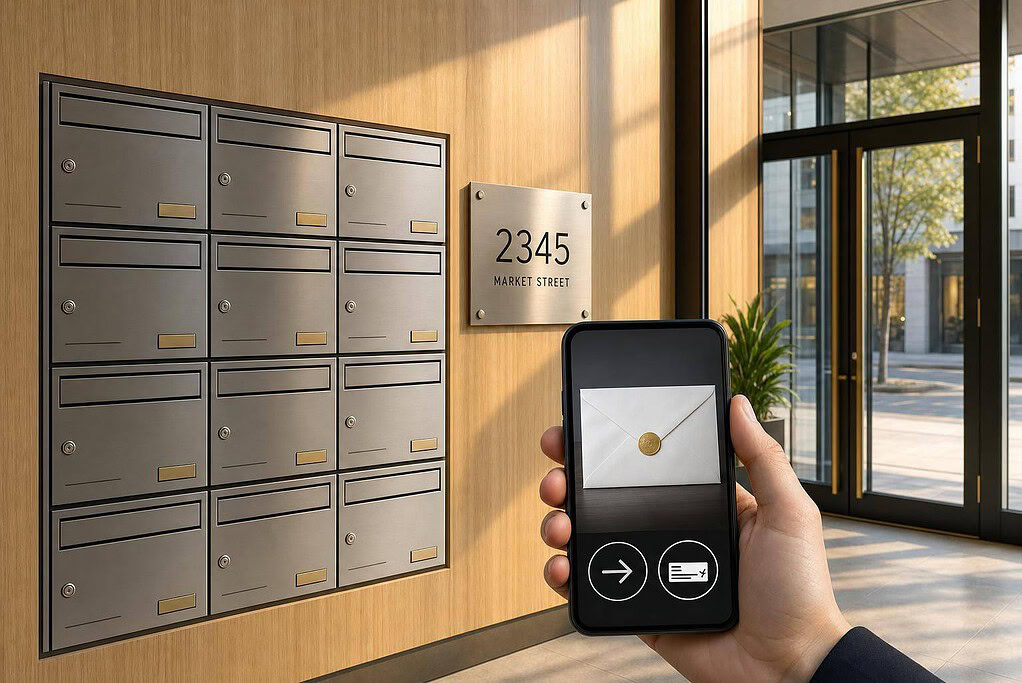
If you want to keep your home address off public records, a virtual mailbox can do that – but it does not replace a registered agent.
I’d sum it up like this: a virtual mailbox gives you a street address for business mail, digital scans in about 24–48 hours, and tools like forwarding, shredding, storage, and sometimes check deposit. But if you run an LLC or corporation, you still need a registered agent address for legal and state notices.
Here’s the short version:
- Use it for: contracts, invoices, tax mail, bank mail, insurance papers, vendor bills, and paper checks
- Don’t use it as: your registered agent for service of process unless the provider also offers that service
- Setup step: you need USPS Form 1583, completed and notarized, before mail can be accepted
- Best fit for: consultants and coaches who work from home, travel, or want one business address across client forms, banking, and filings
- Watch for costs: monthly plan fees, forwarding charges, page scan fees, and check deposit limits
A few details matter more than most people think. Some providers hold physical mail for 30 to 60 days before shredding, and many banks or payment platforms want a commercial street address instead of a P.O. Box. That’s why I’d check the address type, scan timing, security settings, forwarding fees, and user access before signing up.
If you want one clear takeaway, it’s this: a virtual mailbox helps with privacy and mail access, while a registered agent handles legal compliance.
What a virtual mailbox is and how it works for consultants and coaches
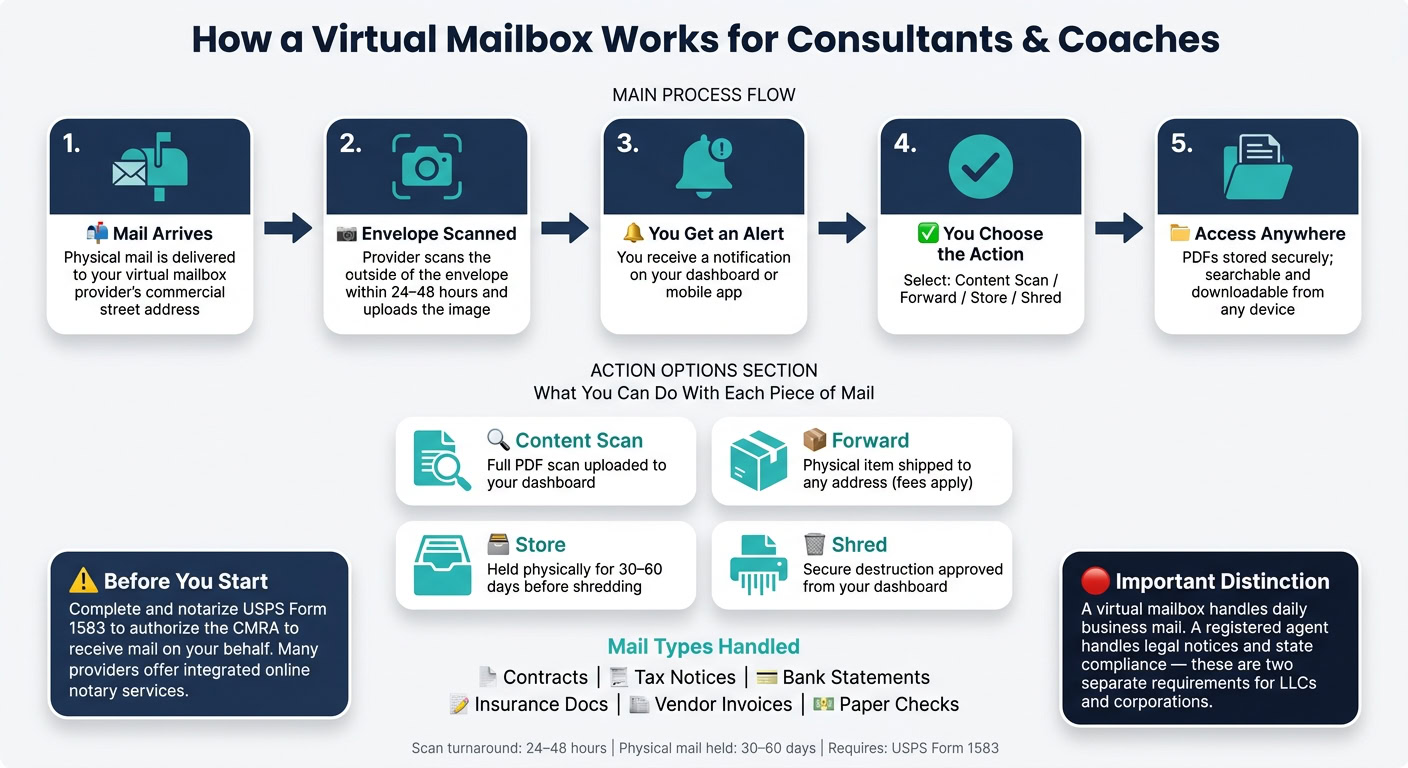
For consultants and coaches, a virtual mailbox gives your business mail a professional street address even if you work from home, travel often, or run your business from different places. The provider receives your mail, scans it, and uploads it to a secure dashboard or mobile app.
To get started, you need to complete and notarize USPS Form 1583 so the CMRA can accept mail on your behalf. After that, the process becomes pretty simple.
How mail moves from delivery to your screen
When a piece of mail arrives, the provider scans the outside of the envelope, posts it to your dashboard, and sends you an alert. From there, you can choose what happens next: request a content scan, forward the item, store it in secure document storage, or have it shredded. You can do all of that from anywhere, including while traveling. Most providers finish scans within 24 to 48 hours after receipt.
That setup covers the day-to-day business mail most consultants and coaches depend on.
Types of business mail a virtual mailbox can handle
Consultants and coaches often receive:
- Contracts and engagement letters
- IRS and state tax notices
- Bank statements
- Insurance documents
- Compliance reminders
- Vendor invoices
- Paper checks
Many providers also screen out junk mail before it shows up in your dashboard.
That kind of convenience helps a lot, but it doesn’t replace legal mail duties.
Why a registered agent address is not the same thing
A registered agent is a legal requirement for LLCs and corporations. That address is used for legal notices and state notices, and the location must be staffed during business hours.
"A Registered Agent is a legal requirement for LLCs and corporations, separate from your mailing address." – Rick Mak, Business Strategist
A virtual mailbox is for daily business mail. A registered agent is for legal notices and state compliance.
sbb-itb-ba0a4be
Key features for a client-facing consulting or coaching practice
A virtual mailbox brings mail handling, storage, and access into one portal. For a consulting or coaching practice, that matters for privacy, client records, and the small admin tasks that can eat up your day.
Address, scanning, storage, and forwarding
The first thing most people notice is the commercial street address. You can use it on contracts, intake forms, invoices, websites, and business registrations. It also helps with banks and payment processors like Stripe, which often reject PO boxes during account setup.
When mail comes in, the provider scans the envelope and uploads the image to your dashboard. From there, you can ask for a full content scan, which gives you a PDF stored in your account. Those PDFs are searchable and downloadable. So if you need to find a signed coaching agreement or an IRS notice, you can pull it up fast instead of digging through a stack of paper.
Some items still need to stay in their original form. Think certified documents or signed agreements with ink on the page. In those cases, you can request forwarding to any address, though shipping and handling costs are added on top of your plan fee.
Check deposit, shredding, and team access
If your practice still gets paid by paper check, deposit speed matters just as much as mail scanning. A virtual mailbox can help here too. The check arrives, staff scan the image so you can confirm the payer and amount, and then the deposit is processed directly into your bank account. That means no trip to the branch and less friction when you’re on the road. Per-check fees apply, and daily or monthly deposit limits vary by plan, so check those details before you sign up.
Secure shredding is another feature worth paying attention to. Once scanned mail is no longer needed, you can approve destruction from your dashboard. That keeps client data out of household recycling, which is a simple but big deal. Many services hold physical mail for 30 to 60 days before shredding it if you don’t request forwarding.
If you work with an assistant or an operations lead, permissions matter. Multi-user access lets team members log in with set roles. Some services stick to basic viewer and admin access, while others offer folder-level controls. It’s worth checking this upfront before you give anyone access to client mail.
Put together, these tools help you keep a polished business address and stay on top of your mail from anywhere.
How consultants and coaches use a virtual mailbox day to day
A virtual mailbox helps solo consultants, executive coaches, and online service providers handle client work, stay on top of compliance, and keep their home address private. In day-to-day work, that usually means one place for business mail and one address you can keep using even when your work happens from different locations.
Client onboarding, contracts, and payments
When a new client mails a signed engagement letter or a retainer check, it goes to your virtual mailbox address instead of your home. You can review contracts and invoices from any device without putting your home address out there.
If a check comes in, you can deposit it or forward the original if you need the paper copy in hand. Either way, your home address stays off public records and marketing materials. Your business mail also stays organized in one place, which makes it easier to track client paperwork, tax documents, and state mail without digging through a mixed pile of personal and business items.
Compliance, tax mail, and business registration
IRS notices, state annual report reminders, and bank correspondence all go to one address. You can use that address on state filings, bank paperwork, and vendor forms.
A virtual mailbox does not replace a registered agent. A registered agent handles legal service and official notices. Some providers offer both services under one account, which can keep business correspondence in one place.
When a time-sensitive notice arrives, you get an alert and can open the scanned document right away, whether you’re at your desk or on the road. That matters most if you work from more than one location or spend part of the year traveling.
Remote work, travel, and keeping your home address private
If you work from multiple places, a virtual mailbox gives you a stable U.S. business address you can keep on your website, contracts, and email footer while you travel. That helps you keep your home address off public records and marketing materials while still looking polished to clients.
Mail shows up in your dashboard, and physical items that need forwarding can be shipped to wherever you are. For many consultants and coaches, that’s the big draw: one address, one inbox, and access from anywhere.
Benefits, limitations, and how to pick the right setup
Once you know what a virtual mailbox does, the next step is picking the setup that fits your practice. That mostly comes down to your mail volume, privacy needs, and how clients deal with your business around contracts, checks, compliance mail, and forwarding.
Here are the main trade-offs.
| Aspect | Limitation or Risk | Mitigation |
|---|---|---|
| Address credibility | Some banks may flag commercial street addresses during account opening. | Confirm the provider uses a real commercial street address, not a P.O. Box. |
| Privacy setup | USPS Form 1583 must be completed and notarized before mail can be received. | Choose a service with an integrated online notary to speed setup. |
| Accessibility | Scanned mail is not available instantly. | Enable notifications so you can act on scans quickly. |
| Security | Client correspondence is handled by third-party staff. | Look for encrypted dashboards, two-factor authentication, and regular security audits. |
| Cost | Forwarding and extra scan fees can add up. | Choose a flat-rate plan with unlimited scanning to keep costs predictable. |
What to check before you sign up
Use those trade-offs to narrow your list before you sign up. A mailbox plan can look cheap at first glance, then get expensive once scan fees, page fees, and forwarding charges kick in.
- Address type and location: Confirm it’s a real commercial street address, not a P.O. Box, and that it’s tied to a professional office building or commercial plaza.
- Check deposit: Verify whether the provider supports direct bank deposit, not just forwarding.
- Scan speed: Look for a 24–48 hour scan-and-upload turnaround.
- Forwarding costs: Ask about handling fees on top of actual shipping charges, especially for international forwarding.
- Security controls: Encrypted storage, secure shredding, and two-factor authentication matter for client-facing practices.
- Recipients: Confirm how many team members are included on the plan.
- Total monthly cost: Add the base fee plus any per-scan, per-page, or forwarding charges.
How to set up your mailbox and update your business records
After activation, update your records in this order: IRS, bank, state, client, and invoicing systems. First, complete and notarize USPS Form 1583 to authorize mail receipt. Many providers offer online notary services, which can make setup less of a hassle.
Then test your scans and alerts so you know mail is flowing the way it should. After that, update your IRS, bank, state, client, and invoicing records.
Conclusion
A virtual mailbox is a practical tool for consultants and coaches who want a professional U.S. business address and personal privacy without paying for a physical office.
FAQs
Can I use a virtual mailbox for my LLC address?
Yes – if the service gives you a real commercial street address, not a P.O. Box.
That address can usually be used for:
- business registration
- bank accounts
- tax mail
- other official compliance mail
There’s one key step: you must complete USPS Form 1583 to let the provider handle mail on your behalf.
A virtual mailbox can also work as your public business address. But it does not take the place of a registered agent.
Will banks accept a virtual mailbox address?
Yes, banks will often accept a virtual mailbox address if it’s a real commercial street address and not a P.O. Box.
That can be a smart way to keep your home address private while still handling business mail.
That said, bank rules differ. Some banks may still ask for a separate physical address for internal records.
How fast can I view my mail online?
Most virtual mailbox services scan and upload your mail to a secure online dashboard within 24 to 48 hours after it arrives. With BusinessAnywhere, documents are usually processed and ready to view within two business days.
You’ll also get real-time alerts when your mail arrives and again when it’s ready to open. That way, you don’t have to keep checking the dashboard all day.
Related Blog Posts
- How Virtual Mailboxes Enhance Privacy for Remote Professionals
- The Role of Virtual Mailboxes in Streamlining Small Business Operations
- Virtual Mailbox in Albuquerque, New Mexico: Mail Scanning, Forwarding and a Real Street Address
- Virtual Mailbox in Washington, DC: Mail Scanning, Forwarding and a Real Street Address