
If I only need mail handling, I’d pick a virtual mailbox. If I need a place to meet clients or use office space now and then, I’d pick a virtual office.
That’s the short answer. A virtual mailbox is usually the lower-cost option at about $10 to $30 per month, while virtual office plans often start near $49 per month and can go past $300 per month. Both can give me a U.S. street address, but only one adds in-person office use. And neither one replaces a registered agent for legal notices.
Here’s what matters most:
- Virtual mailbox: mail scanning, forwarding, shredding, and home address privacy
- Virtual office: mail handling plus meeting rooms, reception, and part-time workspace
- Registered agent: a separate service for lawsuits, subpoenas, and state notice delivery
- Banking and seller checks: some addresses may be flagged, so I’d check with my bank or platform first
- Best fit: mailbox for remote or online work; office for client meetings and local image
Quick Comparison
| What I’m comparing | Virtual Mailbox | Virtual Office |
|---|---|---|
| Main use | Mail handling | Mail + office presence |
| Starting price | $10 to $30/month | $49+/month |
| Mail scanning | Yes | Sometimes |
| Mail forwarding | Yes | Yes |
| Meeting rooms | No | Yes |
| Reception for visitors | No | Yes |
| Workspace access | No | Sometimes |
| Home address privacy | Yes | Yes |
| Can replace a registered agent? | No | No |
My rule of thumb: if no client will ever visit me, I’d stay with a virtual mailbox. If I need to host meetings, greet visitors, or work from a business location once in a while, I’d pay more for a virtual office.
Let’s break down which one fits the way I work.
What Each Service Actually Includes
Virtual Mailbox: Mail Scanning, Forwarding, and Address Privacy
A virtual mailbox gives your business a commercial street address, not a P.O. box, where your mail and packages are sent. In most cases, the service includes mail scanning, forwarding, shredding, and digital storage. Some providers also offer check deposit. What it does not include is physical office use.
For a home-based LLC owner or an e-commerce seller, that can be a big win. It keeps your home address off invoices, business filings, and vendor records without forcing you to pay for office features you’ll never touch. If your main goal is privacy and better control over mail, a virtual mailbox usually fits the job.
This option makes sense when you need:
- A business mailing address
- Mail management from anywhere
- More privacy for your personal address
If you don’t need to meet clients in person, this is often enough. If you do need a place to sit down with people, the next option gives you more than just an address.
The real gap here isn’t just how the address is used. It comes down to whether your business needs only a mailbox or access to a desk, office, or meeting room.
Virtual Office: Business Address Plus Physical Space Access
A virtual office includes mail handling plus some level of physical office access. That usually means a business address at a staffed office building, along with the option to book meeting rooms, use a day office, or drop into coworking space when needed.
Many plans also come with a business phone number, live call answering, and receptionist support for visitors. Those extras matter when your business needs to look and feel client-facing, not just online. If you meet clients once or twice a month, for example, booking a conference room as needed can make more sense than paying for a full-time lease.
There’s one catch people often miss: access to the space is usually limited. You may get set hours or a certain number of room credits each month or year. So while a virtual office gives you more flexibility, it does not replace a private office you can use every day.
Even if the plan includes office access, you still need a separate registered agent for legal notices.
How These Differ from a Registered Agent Address
Mail handling and legal notice handling are not the same thing.
A mailing address is where your day-to-day business mail goes. A main business address is the address listed on business filings, tax forms, and bank applications. A registered agent address is different – it is the official address set to receive formal legal notices, including lawsuits and subpoenas, for your LLC or corporation.
"A virtual office does not fulfill the legal requirement for a registered agent. State laws are clear that businesses must designate a registered agent when forming an LLC or corporation." – Rick Mak, Global Entrepreneur and Business Strategist
A virtual mailbox or virtual office can work as your mailing address and, in many cases, your main business address. But they do not automatically count as your registered agent address unless the provider clearly offers registered agent service that meets state rules and your state allows it.
It helps to think of these as three separate jobs: mailing address, main business address, and registered agent.
A business can use one address for mail, another to present a more polished public image, and a separate provider for legal notices.
Virtual Mailbox vs Virtual Office: Cost, Features, and Compliance Side by Side
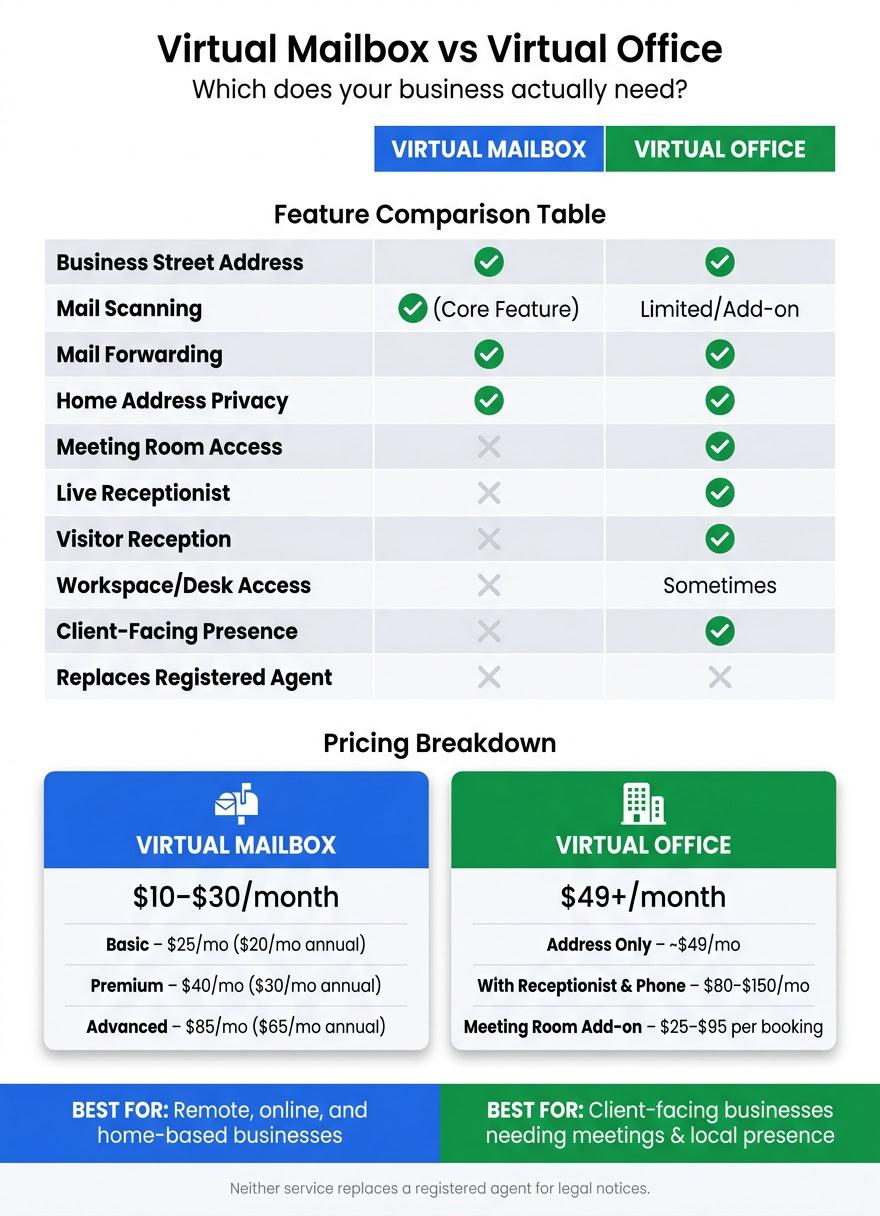
Virtual Mailbox vs Virtual Office: Features & Pricing Compared
Feature Comparison: Mail Management vs Office Presence
The simplest way to compare these two options is by their main job: mail handling versus office presence.
| Feature | Virtual Mailbox | Virtual Office |
|---|---|---|
| Best For | Remote businesses | Client-facing businesses |
| Mail Scanning | Core feature | Usually basic or an add-on |
| Mail Forwarding | Yes | Yes |
| Visitor Reception | No | Yes – live receptionist |
| Meeting Room Access | No | Yes – on-demand or included hours |
| Workspace Access | No | Lounge or desk access |
| Client-Facing Presence | No | Yes |
A virtual mailbox is built for businesses that need a place to receive, scan, and forward mail. That’s the main draw.
A virtual office does more. It gives you a business address, but it can also include a live receptionist, meeting room access, and sometimes lounge or desk space. If clients may visit, or if you want a more polished front-facing setup, that extra layer starts to matter.
Put simply: if you never meet clients, the mailbox side of the table matters most. If you do, the office side becomes much more useful. That gap shapes both cost and day-to-day value.
Pricing Breakdown for U.S. Small Businesses
Mailbox pricing usually starts lower and climbs based on features. Example tiers include Basic at $25/month (or $20/month billed annually), Premium at $40/month (or $30/month billed annually), and Advanced at $85/month (or $65/month billed annually), with signup fees applying on monthly plans.
Virtual office plans start higher. A basic address-only package often begins at about $49/month. Plans with live receptionist services and local phone support can run $80 to $150/month. If you need a meeting room, that may add $25 to $95 per booking, depending on the city and provider.
So the trade-off is pretty clear. If you only need mail handling, a virtual mailbox is usually the lower-cost fit. If your business depends on local presence or in-person meetings, paying more for a virtual office often makes sense.
Still, price isn’t always the deciding factor. In many cases, banking rules and identity checks end up being the bigger issue.
Compliance, Banking, and Address Credibility
This is where things can get tricky.
Many mailbox providers – and some virtual office providers – operate as Commercial Mail Receiving Agencies, or CMRAs. Some banks and fintech platforms flag CMRA addresses during KYB review. A staffed office address may look more established during review, but that doesn’t guarantee approval. The final call still depends on the bank or platform.
That’s why it’s smart to check with your bank, payment provider, or business platform before picking an address and hoping it works.
"Banks and vendors often reject registered agent addresses as your main business address. A virtual office or virtual mailbox is better suited for client communications and banking applications." – BusinessAnywhere
This issue also shows up in seller verification. Platforms like Amazon and Etsy review business addresses for e-commerce sellers, and a commercial office address may carry more weight than a mailbox-only setup. For local service businesses, a virtual office address can also help build trust with nearby clients.
Once compliance is sorted out, the next step is simple: pick the setup that fits the way you actually work.
sbb-itb-ba0a4be
Which Option Fits Your Business Model
Choose a Virtual Mailbox If You Run a Remote or Online Business
If your business runs online, a virtual mailbox will usually cover what you need. Freelancers, solo LLC owners, e-commerce sellers, digital nomads, and real estate investors all deal with the same basic issue: they don’t need a physical office, but they do need steady mail handling.
A virtual mailbox gives you a real U.S. street address. It also lets you receive, scan, store, and forward mail without putting your home address out in public. For e-commerce sellers, that can help with returns and disputes. For digital nomads, it keeps notices and banking mail in one dashboard.
For most remote business owners, a virtual mailbox is the lowest-cost way to handle mail and protect privacy. If mail handling and privacy are all you need, this is the default pick.
If clients never visit, you can stop here. If they do, the office option is the next step.
Choose a Virtual Office If You Need Meetings, Visitors, or a Local Office Image
When mail handling alone isn’t enough, office access becomes the deciding factor. A virtual office is the step up when your address also needs to support meetings and visitors.
If you’re a consultant closing high-ticket contracts, a marketing agency pitching local brands, or a financial advisor meeting clients face-to-face, a virtual office is often the better fit. It gives you access to bookable conference rooms, a staffed reception area to greet visitors, and sometimes a live phone answering service under your business name.
Those features matter when clients expect an in-person presence. The same goes for small teams that need shared space now and then for planning sessions or workshops.
When Using Both Services Makes Sense
Some businesses start with one service and add the other as they grow. A common path is to start with a virtual mailbox, then add a virtual office once meetings become regular or clients start asking to visit.
A growing consultancy, for instance, might begin with a virtual mailbox to handle compliance mail and protect privacy, then layer in virtual office access once client workshops become a monthly part of its sales process.
Upgrade when client meetings become regular.
How to Decide and Get Set Up
A Simple Decision Checklist
If the line between the two still feels blurry, use these questions to match the service to the way your business actually runs.
| Question | If Yes, Choose |
|---|---|
| Do you need mail scanned and managed online? | Virtual Mailbox |
| Will clients visit you or expect a physical office presence? | Virtual Office |
| Do you need to keep your home address private? | Either (Mailbox is leaner; Office adds credibility) |
| Do you have a designated registered agent for state filings and legal notices? | Registered agent, separate from either service |
| Do you need mail handling only, or office access too? | Mailbox (lean) or Office (fuller presence) |
Key Takeaways
Once you’ve matched your needs to the right service, this is the shortest path to a choice.
Choose a virtual mailbox if your business runs remotely and mail handling is all you need. Choose a virtual office if in-person presence – client meetings, visitors, or a local phone system – adds clear, recurring value to the way you operate.
Pick the option that fits how you work, not just how you want to appear.
FAQs
Can I switch from a virtual mailbox to a virtual office later?
Yes. You can usually upgrade to a virtual office as your business needs change.
Many providers offer flexible plans, so you can add features like meeting room access, receptionist services, and a more complete office presence while keeping your business identity and day-to-day operations consistent.
Will a virtual address work for my LLC and bank account?
A virtual address can help with your LLC setup and business bank account, but it does not take the place of a registered agent. Every LLC needs a registered agent with a physical, in-state address where legal documents can be delivered.
You can often use a virtual address for LLC filings and IRS EIN applications. But when it comes to banking, things can get stricter. Some banks want a commercial street address and may reject registered agent addresses.
Do I still need a registered agent if I use one of these?
Yes. A virtual mailbox or virtual office is mainly for mail handling and giving your business a professional address. A registered agent, on the other hand, is a separate legal requirement for LLCs and corporations.
States require you to name a registered agent with a physical street address in your formation state. That person or service must be available during standard business hours to accept service of process and other legal documents.
Some companies bundle these services together, which can make things easier. But they are not automatically the same thing.