If I split time between two homes, one mailing address can cut down missed mail, late notices, and twice-a-year address changes. How a virtual mailbox works is simple: it gives me one U.S. street address, shows new mail online in 24 to 48 hours, and lets me choose what to forward, store, shred, or deposit.
Here’s the short version:
-
I use one address for banks, the IRS, insurance, utilities, and HOA mail
-
I can view envelope scans online and request scans of the contents
-
I can send paper mail or packages to whichever home I’m in
-
I don’t have to rely on a 30-day USPS hold
-
Some plans also support check deposit and package forwarding
That matters because mail problems for snowbirds are usually simple but costly: a tax form arrives late, an insurance notice sits unopened, or a debit card goes to the wrong house. A virtual mailbox helps me keep one mail setup all year instead of changing records every season.
One service in the article, BusinessAnywhere, says it posts scanned mail within 2 business days and offers plans from $20/month when billed yearly, with recipient limits based on household size.
|
What I need |
How a virtual mailbox helps |
|---|---|
|
One steady mailing address |
Uses one U.S. street address year-round |
|
Access while in either home |
Mail appears in an online dashboard |
|
Control over each item |
I choose forwarding, storage, or shredding |
|
Help with checks and packages |
Some plans handle deposits and parcel forwarding |
|
Less back-and-forth updates |
I keep the same address on file |
Bottom line: if I live in two places, a virtual mailbox gives me one place for mail, one login, and fewer chances to miss time-sensitive documents.
How a virtual mailbox gives snowbirds one permanent address
Once you’ve picked one address, the next step is simple: decide what should be sent there.
A virtual mailbox gives you a real U.S. street address, not a P.O. Box or registered agent address, through a virtual mailbox provider. When mail arrives, it’s scanned and uploaded to a secure online dashboard. From that dashboard, you can review each item and choose whether to forward it or have it shredded.
That means banks, the IRS, insurers, and HOAs can all use the same address. Instead of updating your mailing details every season, you keep everything tied to one place.
What mail goes to the virtual address
The virtual address works well for the mail snowbirds need to keep within reach all year – especially the kind that still matters when you’re away from either home.
This often includes:
-
Bank statements
-
Tax forms
-
Insurance notices
-
HOA mail
-
Legal notices
-
Utility bills
-
Subscriptions
-
Business correspondence
When a stable address matters most
This setup helps most with the mail you can’t afford to miss. A steady address matters most for banking, taxes, insurance, and legal notices, where a missed letter can turn into a problem fast.
It also helps keep time-sensitive mail from piling up, unopened, at either home. As soon as new mail is scanned, it shows up in your dashboard, so you can deal with tax forms, insurance notices, or legal correspondence from either location.
How mail handling works when you move between homes
Once your mail goes to one permanent address, the next step is simple: decide what happens to each piece.
When mail reaches your virtual address, the service logs it and sends you a notice in your dashboard or app. You can check the envelope scan, sender, and return address before doing anything else.
If you need to see what’s inside, you can ask for a content scan. BusinessAnywhere uploads scanned mail within 2 business days of receipt [2]. That means you can read what matters, then forward only the items you need and deal with the rest online.
Scanning, forwarding, and storage
After you review the digital scan, you can choose what to do with the physical mail:
-
Forward it to your current address
-
Store it securely
-
Have it shredded
That way, your seasonal home doesn’t end up stacked with paper you didn’t even need.
Package receipt and original document forwarding
The same setup works for packages and original documents. If a parcel shows up – like a replacement debit card, an original document, or other original documents – you get an alert and can tell the service where to send it.
As you move between homes, just update your forwarding address in the dashboard so items go to the right place.
Check depositing and digital document access
Mail isn’t the only thing that needs to follow you. Paper checks can be a hassle too. A refund check or rent payment that arrives while you’re away can sit there for weeks.
Some virtual mailbox plans include check deposit support, which lets the service deposit the check into your bank account for you. On top of that, scanned documents stay searchable and downloadable in your dashboard.
Why a virtual mailbox beats manual mail holds and forwarding
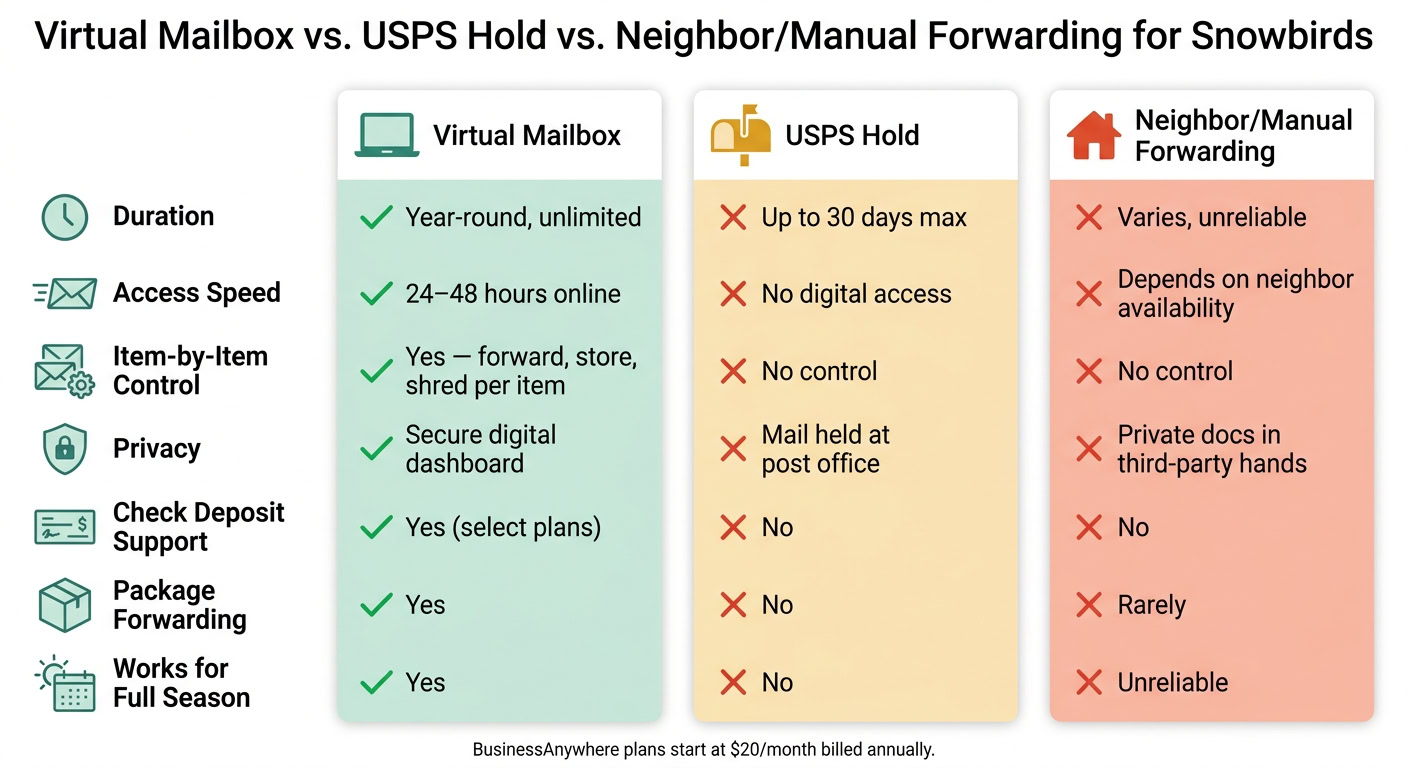
Virtual Mailbox vs. USPS Hold vs. Mail Forwarding for Snowbirds
Most snowbirds begin with one of two quick fixes: a USPS mail hold or asking a neighbor to grab the mail. That can work for a short trip. But over a full season of living between two homes, those fixes tend to fall apart.
USPS mail holds are short-term and are usually capped at 30 days [2]. Mail forwarding sends everything to one address, which means you can’t sort urgent items from the stuff that can wait. And when a neighbor is handling your mail, private documents are sitting in someone else’s hands.
Once all of your mail is tied to one address, the bigger issue becomes pretty clear: temporary holds and patchwork forwarding don’t match a seasonal routine very well. A virtual mailbox gives snowbirds one steady address, fast digital access, and item-by-item control over forwarding, storage, and shredding. So instead of waiting, guessing, or asking for help, you decide what happens to each piece of mail.
That matters even more for snowbirds who move on a set seasonal schedule and need access to mail without delays.
Who benefits most from this setup
This setup works especially well for a few common snowbird groups.
-
Retirees and RVers who split time between places get one stable U.S. address for vital documents [3].
-
Business owners and entrepreneurs who manage rental properties or LLCs can keep a professional, consistent mailing address all year [3].
-
Snowbirds with rental income can use check deposit features to keep cash flow moving while they’re away [1].
It also helps keep your home address off public-facing mail records and marketing lists, which can cut down on junk mail and lower privacy risk [3].
Using BusinessAnywhere as a snowbird mail solution
For snowbirds who want one address and one dashboard, BusinessAnywhere puts mail in one place all year. You get one permanent U.S. address and one dashboard to manage everything. Mail is scanned and posted to your dashboard within 24–48 hours [2]. Once it’s there, you can access it from anywhere. That means you can read, download, or forward items to either home right from the dashboard [3].
Every plan comes with unlimited mail scanning, junk mail filtering, and package forwarding. If you need the original paper document or a package in hand, you can request mail forwarding from the dashboard to whichever address you’re using that season.
Choosing a plan based on your household and mail volume
Choose the plan based on how many people get mail at that address. BusinessAnywhere offers three plans by household size [3].
|
Plan |
Monthly billing |
Annual billing |
Recipients |
|---|---|---|---|
|
Basic |
$25/mo + $25 sign-up fee |
$20/mo, no sign-up fee |
Up to 2 |
|
Premium |
$40/mo + $25 sign-up fee |
$30/mo, no sign-up fee |
Up to 5 |
|
Advanced |
$85/mo + $25 sign-up fee |
$65/mo, no sign-up fee |
Up to 20 |
Basic works well for a couple. Premium makes sense for a larger household or for people handling both personal and business mail. Advanced is a better fit for heavier mail volume.
BusinessAnywhere also offers online notarization for USPS Form 1583 [3].
Conclusion: One address, fewer missed documents, more control
The main upside is control. With one permanent address, online access, and forwarding only when you need it, seasonal mail stays organized and easier to handle.
FAQs
Can I use a virtual mailbox for IRS and bank mail?
Yes, in most cases. The IRS usually accepts a stable, consistent virtual mailbox address for tax filings and EIN applications.
Bank mail is a bit less straightforward. Policies vary from one institution to another. Some banks accept CMRA-registered virtual addresses for correspondence. Others may ask for a physical home or business address, or they may reject CMRA addresses during account setup.
Before you move forward, check your bank’s policy. Also make sure your provider gives you a real street address, not a P.O. Box.
How do I forward mail to whichever home I’m in?
A virtual mailbox lets you handle your mail from anywhere with a secure online dashboard. When something arrives, the outside of the envelope gets scanned and uploaded, so you can see it on your screen instead of waiting to check a physical mailbox.
From there, you decide what happens next. You can forward mail to your current home, keep it in storage, or have it shredded. If you move between homes, you can set up automatic forwarding or request it only when you need it.
What happens to packages and paper checks?
Virtual mailbox services let you handle physical mail even when you’re not there in person.
When a package shows up, you’ll usually get an alert in your online dashboard. From there, you can decide what happens next: store it for later, pick it up yourself, or have it forwarded to where you are now. Some services also offer package consolidation, which means they combine multiple shipments into one box before sending them out.
Paper checks can work the same way. Some providers can receive checks at your virtual address and deposit them straight into your bank account, which can help you avoid extra processing delays.