- Why Encryption Matters: Encryption ensures your data remains secure even if access controls fail. It protects data at rest, in transit, and in use, complying with standards like HIPAA, GDPR, and PCI DSS.
- Key Standards: Use AES-256 for stored data and TLS 1.2+ for data transfers. These are industry standards for robust security.
- Encryption Methods:
- Server-Side Encryption (SSE): Managed by cloud providers, with options for customer-managed keys for added control.
- Client-Side Encryption (CSE): Encrypts data locally before uploading, offering maximum security but requiring careful key management.
- Full-Volume Encryption: Secures entire storage volumes, ideal for virtual machines and physical drives.
- Key Management: Use Cloud Key Management Services (KMS) like AWS KMS or Azure Key Vault for centralized control, automated rotation, and secure storage of encryption keys.
- Compliance: Meet regulatory requirements by encrypting data, managing keys securely, and conducting regular audits. Standards like HIPAA, PCI DSS, and FedRAMP mandate encryption and data protection practices.
- Monitoring: Continuously monitor for threats, enforce encryption policies, and test backup restorations regularly to ensure data integrity.
Quick Tip: Always separate encryption keys from the data they protect and automate key rotation to reduce risks.
Encryption isn’t just about compliance – it’s about ensuring your business’s data remains safe, no matter what.
Encrypting Data at Rest in Cloud Backups
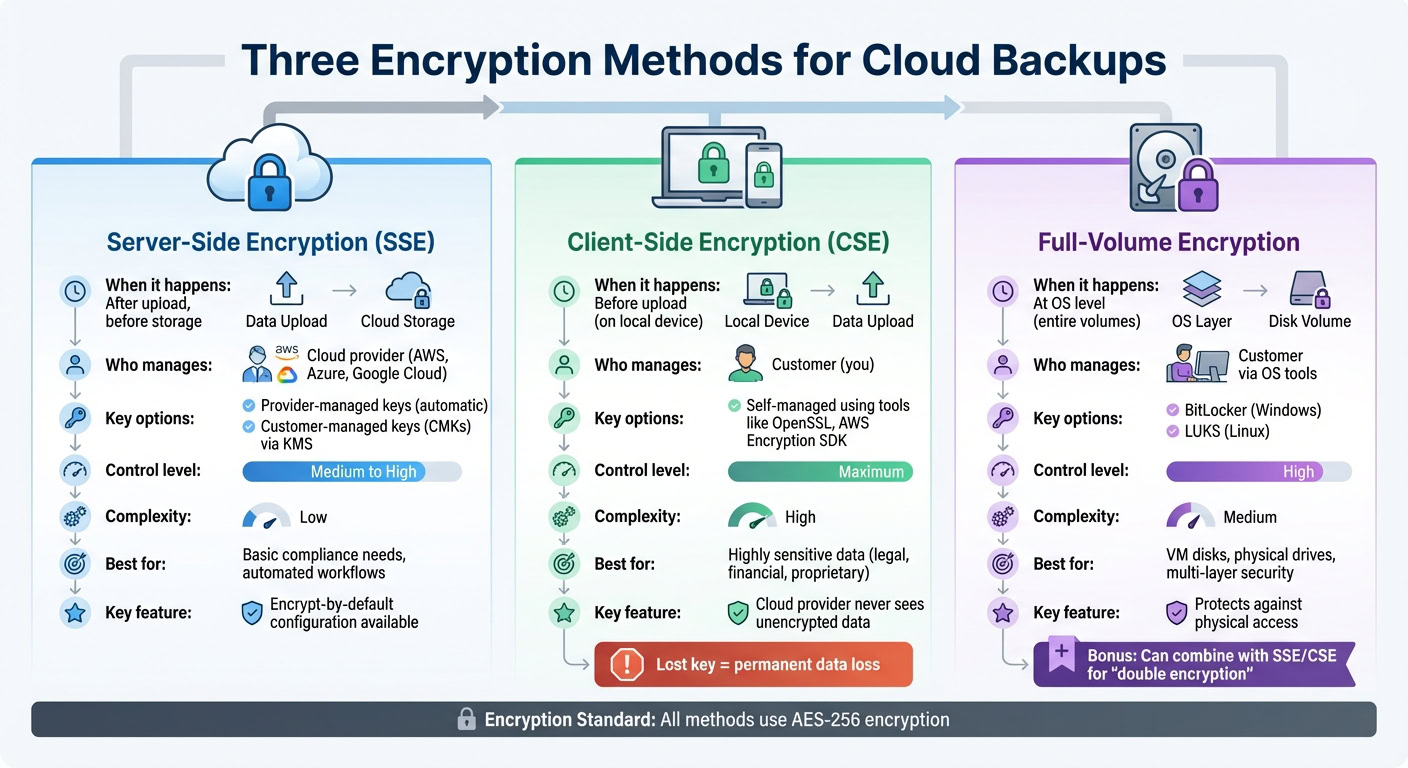
When it comes to securing cloud backups, encryption is a must. Whether you choose server-side, client-side, or full-volume encryption, each method brings its own mix of convenience and control to keep your stored data safe until you need it.
Server-Side Encryption
Server-side encryption (SSE) kicks in automatically once your data reaches the cloud provider but before it’s saved to disk. Major platforms like AWS, Azure, and Google Cloud offer built-in SSE options, allowing you to choose between provider-managed keys or customer-managed keys (CMKs) for added flexibility.
Provider-managed keys handle encryption seamlessly and meet basic compliance needs. On the other hand, CMKs give you greater control, letting you manage key rotation and access policies through tools like AWS KMS or Azure Key Vault. This makes CMKs a strong choice for sensitive business data, as you can decide who can decrypt your backups and when keys should be updated.
"Private data should be encrypted by default when at rest. Encryption helps maintain confidentiality of the data and provides an additional layer of protection against intentional or inadvertent data disclosure or exfiltration." – AWS Well-Architected Framework
AWS Backup even supports independent encryption, which allows your backups to use a different KMS key than the original data source. To ensure all new storage buckets and disk volumes are secure, configure your cloud environment to "encrypt-by-default".
Client-Side Encryption
Client-side encryption (CSE) puts the encryption responsibility entirely in your hands. Your data is encrypted locally – on your device or network – before it ever reaches the cloud. This means the cloud provider only stores encrypted data and never has access to the unencrypted version.
Tools like OpenSSL and AWS Encryption SDK support local AES-256-CBC encryption. Some services even ensure that no unencrypted data leaves your system during the transfer process.
This method offers maximum security but comes with a catch: you’re fully responsible for managing the encryption process and key lifecycle. Lose your encryption key, and your data becomes permanently inaccessible. For businesses handling highly sensitive information – like legal contracts, financial records, or proprietary code – this added control can outweigh the complexity.
Full-Volume Encryption
Full-volume encryption focuses on securing entire storage volumes or virtual disks rather than individual files. This method operates at the operating system level, making it ideal for virtual machine (VM) disks and physical drives. Common tools include BitLocker for Windows and LUKS for Linux.
For example, Azure Disk Encryption uses BitLocker to encrypt Windows VM disks and LUKS for Linux VMs. This approach protects against unauthorized physical access, ensuring that even if someone gains access to the underlying storage, they can’t read the data without the decryption key. Full-volume encryption pairs well with server-side or client-side encryption, creating multiple layers of protection – a strategy often referred to as double encryption.
For organizations with stringent security needs, combining platform-provided encryption with your own data-level encryption using separate keys creates a robust defense. Together, these methods provide a solid foundation for protecting data at rest, setting the stage for securing data in transit.
Securing Data in Transit
Protecting data in transit is just as critical as safeguarding data at rest. If transit encryption isn’t properly implemented, backup files can become exposed to risks like interception, man-in-the-middle attacks, and unauthorized access during their transfer. To mitigate these threats, it’s essential to adopt robust encryption protocols for securing data in transit.
Encryption Protocols for Data in Transit
For starters, TLS 1.3 is the gold standard for web and API transfers, with TLS 1.2 being the absolute minimum requirement. In fact, as of February 2024, AWS will no longer support TLS versions older than 1.2 for its API endpoints. This change underscores the industry’s move away from outdated and vulnerable protocols like SSL 3.0 and RC4 ciphers.
"Encryption helps maintain data confidentiality even when the data transits untrusted networks." – AWS Documentation
For web-based backup transfers, always enforce HTTPS, which combines HTTP with TLS encryption. Modern cloud platforms enhance this security by using HTTP Strict Transport Security (HSTS) to prevent any fallback to unencrypted HTTP. When transferring files, opt for SFTP, which secures the process with an SSH-encrypted channel.
If you’re connecting on-premises servers to cloud backup vaults, IPsec VPNs offer robust tunnel-based encryption for both point-to-point and network-to-network connections. For high-speed, dedicated connections like AWS Direct Connect or Azure ExpressRoute, MACsec encrypts data at the physical layer. For environments requiring high security, Mutual TLS (mTLS) ensures two-way authentication by requiring both client and server certificates. This setup is particularly effective for automated machine-to-machine backup processes.
| Protocol | Best Use Case | Security Level |
|---|---|---|
| TLS 1.3 | Standard web/API backup transfers | Highest (Current Standard) |
| IPsec VPN | Connecting on-premises servers to cloud vaults | High (Tunnel-based) |
| MACsec | High-speed, dedicated hardware connections | High (Layer 2) |
| SFTP/SSH | Secure file-based transfers from local devices | High (Standard for files) |
Setting Up Secure Connections
Once you’ve implemented strong encryption, focus on securing the connections to complete your data protection strategy. Enforce modern encryption protocols across your backup systems. For example, configure cloud-native policies like Amazon S3 bucket rules to block any upload requests that don’t use HTTPS. Similarly, restrict your firewall to accept only HTTPS traffic (port 443) while blocking HTTP (port 80).
Proper certificate management is equally important. Tools like AWS Certificate Manager (ACM) or Azure Key Vault can automate the provisioning and renewal of TLS certificates, ensuring there are no disruptions caused by expired credentials. You can also verify your TLS configurations using OpenSSL commands. To generate a private key, use:
openssl genrsa -out backup.key 2048 Check its integrity with:
openssl rsa -in backup.key -check -noout To confirm a certificate matches its private key, compare their modulus outputs:
openssl x509 -noout -modulus -in cert.cer openssl rsa -noout -modulus -in backup.key For SFTP clients handling backup transfers, ensure they use SSH-2 and strong encryption algorithms like AES-GCM, avoiding outdated ciphers. When setting up VPN-based backups, confirm that your IPsec configuration employs robust cipher suites, such as AES-128, AES-192, or AES-256. For highly sensitive data, consider adding an extra layer of security through double encryption, routing VPN traffic through two separate encrypted tunnels.
Enable Perfect Forward Secrecy (PFS) in your TLS configurations to safeguard past session data, even if a server’s private key is compromised in the future. If you’re using load balancers for backup traffic, ensure your HTTPS listeners are configured with security policies that support the strongest cipher suites compatible with your clients.
Azure Backup takes the extra step of encrypting all data in transit over HTTPS and ensuring it stays within the Azure backbone network. However, you should still verify that your backup workflows adhere to these high standards throughout the entire transfer process.
Key Management Best Practices
Encryption is only as strong as the management of its keys. Even the most advanced encryption algorithms can fail if keys are mishandled, improperly stored, or not rotated regularly. In fact, effective key management is the backbone of any encryption strategy, ensuring data remains protected even if other security measures are compromised.
Using Cloud Key Management Services
Cloud Key Management Services (KMS) offer centralized and automated control over encryption keys. For instance, AWS KMS relies on FIPS 140-3 Level 3 validated hardware security modules (HSMs), while Google Cloud KMS provides various protection levels, including software and hardware-based keys, to suit different security needs and budgets.
One of the standout benefits of cloud KMS platforms is envelope encryption. This method uses a Data Encryption Key (DEK) to encrypt your backup data, which is then encrypted (or "wrapped") by a Key Encryption Key (KEK) managed within the KMS. This layered protection ensures backup data is never directly exposed to the master key. For added security, Google Cloud’s internal Keystore refreshes master keys every 24 hours and re-encrypts customer keys monthly.
When configuring your KMS, consider using automated provisioning tools like Cloud KMS Autokey to maintain consistent adherence to industry standards. Opt for provider-generated key material instead of importing your own (BYOK) to reduce operational risks and prevent raw key material exposure. For backup encryption, stick to AES-256 in Galois Counter Mode (GCM), the widely accepted standard. Also, ensure that keys and backup data reside in the same geographical region to meet data residency rules and maintain availability.
To enhance security, implement separation of duties by assigning distinct roles for key administrators (who create and rotate keys) and key users (service agents that handle encryption and decryption). As AWS Prescriptive Guidance advises:
"Maintain separate identities for those who administer keys and those who use them".
Carefully assign roles to restrict key usage to only those accounts that need encryption or decryption capabilities. Additionally, apply project liens to prevent accidental deletion of projects containing encryption keys, which could lead to irretrievable data loss. Once keys are centrally managed, regular rotation and thorough auditing become critical for maintaining long-term security.
Key Rotation and Audit Practices
Rotating keys regularly minimizes the risk of data exposure if a key is compromised. It also ensures compliance with regulations like PCI DSS or FedRAMP, which require periodic updates. Both AWS KMS and Google Cloud Autokey typically default to an automated rotation cycle of 365 days, while Google Cloud’s internal Keystore enforces a maximum ciphertext age of 90 days for master keys.
Automating the rotation process helps eliminate manual errors. For example, Google Cloud KMS routinely performs integrity checks, scanning key material and metadata every hour to verify HMACs and ensure data remains decryptable. Set up alerts for critical actions, such as "Schedule Key Deletion" or "Disable Key", to quickly identify and address potential security incidents before they escalate.
Centralize administrative activity logs to monitor key creation, updates, and usage patterns for potential threats. These logs are invaluable during compliance audits or security investigations. Many cloud KMS platforms also offer a "soft delete" or "scheduled for destruction" period, typically defaulting to 30 days for recovery. AWS KMS, for instance, enforces a minimum 7-day waiting period for key destruction events. To further strengthen security, combine key rotation with physical separation of keys and data.
Separating Encryption Keys and Data
Keeping encryption keys separate from encrypted data is a fundamental practice for securing backups. Use a dedicated cloud project or account for key management, apart from the projects where encrypted backups are stored.
To safeguard key material, store it in Hardware Security Modules (HSMs), which ensure the material never leaves the hardware in plaintext form. AWS KMS, for example, uses FIPS 140-3 Level 3 validated HSMs, offering hardware-based isolation for sensitive keys. Additionally, use separate encryption keys for backup vaults and original source data. This strategy ensures that even if your production environment is compromised, your backup encryption remains secure.
Limit key usage to specific cloud services by applying condition keys like kms:ViaService to prevent unauthorized access. Grant encrypt permissions only to services that perform backups, and restrict decrypt permissions to recovery roles or automated restoration systems. When designing your key strategy, balance granularity: while "high granularity" (one key per resource) offers better isolation, it increases cost and complexity. Conversely, "low granularity" (one key per project) is easier to manage but poses greater risks if a single key is compromised. A practical approach is to assign one unique key per service, project, and location, effectively minimizing the impact of a single compromised key.
sbb-itb-ba0a4be
Compliance and Monitoring for Encrypted Backups
Meeting Regulatory Standards
Encryption plays a vital role in meeting legal and regulatory requirements for data protection, but compliance goes beyond just encrypting your backups. Many industries are bound by specific rules to ensure the security and recoverability of sensitive information.
For example, healthcare organizations dealing with patient data must comply with HIPAA, which requires contingency plans like data backup and recovery. Even if you store only encrypted data with a cloud provider, a Business Associate Agreement (BAA) is mandatory. The U.S. Department of Health and Human Services makes it clear:
"Lacking an encryption key does not exempt a CSP from business associate status and obligations under the HIPAA Rules."
Meanwhile, financial organizations must meet SOX (Sarbanes-Oxley Act) requirements, which specify that financial records need to be recoverable for seven years. Companies handling credit card transactions must adhere to PCI DSS standards, ensuring the secure backup and encryption of cardholder data. Federal agencies and their contractors must follow FedRAMP guidelines, which include compliance with NIST SP 800-53 controls and the use of FIPS 140-2 (or higher) validated encryption. Additionally, for Federal Tax Information (FTI), IRS Publication 1075 requires that all backups remain within U.S. legal jurisdictions, with encryption keys under the customer’s exclusive control using FIPS 140-compliant hardware.
Here’s a quick summary of key regulations:
| Standard | Primary Focus | Key Encryption/Backup Requirement |
|---|---|---|
| HIPAA | Healthcare (ePHI) | BAA required; encryption for "Safe Harbor" from breach notification. |
| SOX | Financial Records | 7-year data retention and guaranteed recoverability. |
| PCI DSS | Payment Data | Secure backup and encryption of cardholder data. |
| FedRAMP | Federal Cloud Security | NIST SP 800-53 controls; mandatory for federal agencies. |
| IRS Pub 1075 | Tax Information (FTI) | FIPS 140 validated encryption; data must reside onshore (U.S.). |
To maintain compliance, ensure your encryption mechanisms are FIPS 140 validated, use multi-factor authentication at Authenticator Assurance Level (AAL) 2 for remote access to backup systems, and conduct annual risk assessments of your cloud environment’s security controls.
These measures highlight the importance of continuous monitoring to detect and address threats as they arise.
Continuous Monitoring and Threat Detection
While encryption secures your data, continuous monitoring ensures it remains safe. Ransomware accounts for nearly 44% of all data breaches, with the global average cost of a breach projected to hit $4.44 million by 2025. Real-time monitoring of backup systems is essential for spotting potential problems early. Tools with anomaly detection can flag unusual activity, like a sudden 10x increase in backup size or files being encrypted during a backup process – both signs of a ransomware attack.
Access logging tools, such as AWS CloudTrail, provide insights into authentication events and resource access, helping security teams identify unauthorized attempts to alter backup data. Regular integrity verification using checksums or hashes ensures backup data hasn’t been tampered with. Advanced Cloud Backup Posture Management (CBPM) platforms enable real-time discovery of new resources, ensuring they’re automatically included in backup schedules and meet encryption requirements. Daniel Goldenstein Bar from Eon emphasizes:
"The core of Cloud Backup Posture Management (CBPM) is knowing what’s protected, proving it, and proactively fixing what’s not."
To enhance security, set up automated alerts for high-risk activities and enforce least-privilege access controls for encryption key management. This separation of duties ensures that personnel managing encryption keys cannot misuse them for unauthorized operations. For additional protection, implement phishing-resistant MFA with hardware-based authentication like FIDO/WebAuthn for accounts accessing backup environments.
These monitoring practices are crucial for maintaining compliance and ensuring your encryption strategy is always audit-ready.
Maintaining Audit-Ready Encryption Practices
To meet audit requirements, your encryption practices must be well-documented and consistently applied. Start by centralizing administrative activity logs so auditors can review key creation, modification, and access events. Use immutability features like AWS Backup Vault Lock or Amazon S3 Object Lock to prevent any changes or deletions to backup data during its retention period.
Testing backup restorations regularly is another critical step. As DataBank advises:
"A backup is only useful if it can be restored. Schedule regular recovery drills."
Perform both partial and full restores to confirm data integrity and recovery readiness. Enable Soft Delete and Purge Protection on key vaults to prevent accidental or malicious deletion of keys, which could make backups irretrievable and non-compliant. For sensitive recovery operations, require multi-party approval to avoid unauthorized or malicious restoration attempts. Additionally, classify your data – labeling it as highly confidential or public – to determine the appropriate encryption strength and retention policies required by regulations like GDPR or HIPAA.
Using Encryption with BusinessAnywhere Services

Securing the BusinessAnywhere Document Management Dashboard
BusinessAnywhere takes document security seriously by encrypting sensitive files both at rest and during transmission. The document management dashboard employs AES-256 encryption for storing files in cloud databases and backups. This encryption standard, with its 256-bit key length, is considered virtually impossible to crack with today’s computing capabilities.
To protect data while it’s being accessed or transferred, TLS protocols are used. This ensures that sensitive documents – such as EIN applications, S-Corp tax filings, and compliance records – remain secure during transit.
For added protection, enabling multi-factor authentication (MFA) is highly recommended. MFA blocks over 99% of automated attacks, ensuring that only authorized users can access the dashboard.
Other BusinessAnywhere services also rely on strong encryption measures to safeguard critical data.
Encryption for Virtual Mailbox and Compliance Services
The virtual mailbox service offered by BusinessAnywhere handles digitized versions of physical mail, which often includes sensitive items like bank statements, IRS notices, legal documents, and client contracts. Once these documents are digitized, they are encrypted using the same AES-256 standard as the document management dashboard.
For compliance-related tasks – such as BOIR filings or annual reports – encryption during transmission plays a key role. Sensitive ownership details and financial information are safeguarded with SSL/TLS protocols, which secure the connection between your browser and the service. This ensures that form data is encrypted before it is sent.
Under a shared responsibility model, BusinessAnywhere secures the underlying infrastructure, while users are responsible for managing access controls and configurations. It’s crucial to regularly review account permissions, especially after team changes, since most cloud data breaches result from user misconfigurations rather than flaws in the platform itself.
Conclusion
Key Takeaways
Encrypting cloud backups is a must for safeguarding sensitive business data. As one expert puts it, "Encryption is a fundamental cybersecurity tool for protecting sensitive data in the digital age". To achieve this, you need to secure your data in all three states: at rest (when stored on disks), in transit (as it moves across networks), and in use (while being processed in memory).
Using industry-standard encryption protocols is non-negotiable. Just as vital is managing encryption keys independently. This separation ensures that even if someone accesses your backups, they won’t be able to interpret the encrypted data without the keys.
Don’t overlook key rotation and immutability. Automating key rotation minimizes the risk if a key is compromised. Additionally, activate features like AWS Backup Vault Lock or Azure’s soft delete and purge protection to shield your backups from ransomware attacks. While encryption protects confidentiality, regular restore tests are essential to verify the integrity of your backups. These steps lay the groundwork for a more secure data protection strategy.
Next Steps for Securing Your Business Data
Now’s the time to evaluate your backup security practices. Double-check that all backups are encrypted both in transit and at rest. Are your encryption keys for backup archives separate from those used for production data? If not, it’s time to establish encryption across every backup environment.
Implement continuous monitoring and auditing to enforce encryption policies. Leverage native cloud tools to identify unencrypted resources and maintain audit-ready systems. For particularly sensitive data, consider using customer-managed keys to maintain full control over key lifecycles. At the end of the day, protecting your business starts with protecting its data.
FAQs
What’s the difference between server-side and client-side encryption for cloud backups?
When it comes to keeping your data safe in the cloud, there are two main encryption approaches: server-side encryption and client-side encryption. Each has its own strengths and considerations.
Server-side encryption kicks in after your data is uploaded to the cloud. The cloud provider takes care of encrypting it directly on their servers, ensuring that your information is secure while stored. This approach is straightforward because the provider manages the encryption keys and processes for you. However, it does mean you’re placing trust in their security practices.
Client-side encryption, by contrast, happens before your data ever leaves your device. You encrypt your files locally, so they remain protected both during transit and while stored in the cloud. This method gives you greater control over your data’s security, but it also means you’re responsible for managing the encryption keys and processes – a task that can be more complex and requires careful handling.
For those seeking the highest level of security, a combination of both methods is often recommended. Encrypt your data on your side before uploading it to the cloud, and ensure the cloud provider applies their own encryption as well. This layered approach adds an extra safeguard to your sensitive information.
What steps should I take to ensure my cloud backups comply with regulations like HIPAA and PCI DSS?
When encrypting cloud backups to meet regulations like HIPAA and PCI DSS, it’s essential to secure your data both in transit and at rest. For data transfers, rely on strong encryption protocols like TLS/SSL. For stored data, use robust algorithms such as AES-256, which are widely recognized for their reliability. Encrypting protected health information (PHI) is especially critical under HIPAA to ensure it remains inaccessible to unauthorized parties.
For PCI DSS compliance, maintain consistent encryption standards across all backups. This includes using secure encryption key management practices and enforcing access controls with proper authentication methods. Regularly test the integrity of your backups and implement key rotation to keep your security measures up to date. Many cloud providers offer built-in tools, such as key management systems and automated encryption features, which can simplify compliance efforts.
To enhance your security posture, establish detailed encryption policies, conduct regular audits, and continuously monitor your backup processes. These steps not only keep you compliant but also ensure your data stays protected against threats.
Why is managing encryption keys important, and how can cloud-based key management services help?
Managing encryption keys is a crucial part of safeguarding encrypted data. The effectiveness of encryption hinges on keeping these keys secure. If keys are mishandled or exposed, even the most advanced encryption methods won’t stop unauthorized access. Proper key management not only protects sensitive information but also helps businesses stay compliant with regulations like HIPAA and GDPR.
Cloud-based key management services (KMS) make this process easier by providing secure solutions to generate, store, and manage encryption keys. These services automate key rotation, enforce strict access controls, and offer auditing features to track usage – significantly lowering the risk of key exposure. By adopting a cloud KMS, companies can strengthen their security, simplify workflows, and ensure the safety of sensitive data stored in the cloud.