
When hiring employees, registering for state payroll taxes is mandatory in every state where they work. This ensures compliance with state income tax withholding and unemployment insurance contributions. Missing this step can lead to penalties, delayed payroll processing, and loss of tax credits. Here’s what you need to know:
- Who Must Register? Any business paying wages, even for one part-time employee in a state, must register for payroll taxes.
- Key Registrations:
- State Income Tax (SIT) withholding (required in 41 states).
- State Unemployment Insurance (SUI) in all 50 states.
- Additional programs like Disability Insurance in some states.
- Steps to Register:
- Obtain a Federal Employer Identification Number (EIN).
- Register with state tax agencies for SIT and SUI accounts.
- Meet state-specific deadlines (e.g., 15 days in CA, 10 days in TX).
- Ongoing Compliance: File quarterly SUI reports, report new hires within deadlines, and update payroll systems for accurate tax withholding.
Start the process at least 2–4 weeks before your first payroll date to avoid delays. Tools like BusinessAnywhere can simplify EIN acquisition, state registration, and compliance tracking.
Preparing for Payroll Tax Registration
Essential Business Information to Gather
Before setting up any state tax account, make sure you’ve gathered all your key business documents. State agencies typically ask for the same core details, and missing even one can delay your application.
Here’s a breakdown of what you’ll need:
| Information Category | Specific Data Points Required |
|---|---|
| Business Identity | Legal name, DBA (if applicable), EIN, entity type, state of incorporation |
| Contact Details | Physical business address (no PO Boxes), mailing address, registered agent info |
| Personnel Data | Owner/officer names, titles, SSNs, and home addresses |
| Operational Data | NAICS code, business start date, first hire date |
| Payroll Projections | Estimated first pay date, number of employees, expected quarterly wages |
| Financial Data | Bank routing number, bank account number |
Most states won’t accept a PO Box as your business address. Use your registered physical address instead. Also, keep your IRS CP 575 notice (the EIN confirmation letter) handy. Some states may ask for this to verify your business identity during the process.
Once this foundational information is ready, you’ll need to gather more specific details about your employees and payroll to complete your registration.
Employee and Payroll Details Required
After handling your business documentation, state agencies will ask for detailed employee and payroll information. Be prepared to provide the total number of employees, their physical work locations, and their hire dates.
You’ll also need to estimate quarterly wages, your first payroll date, and pay frequency. These details are crucial because they determine your filing deadlines and deposit schedules. Mistakes here can lead to costly problems – for example, incorrect NAICS codes contribute to about 40% of small businesses facing IRS payroll penalties, which average $845 per year.
"Payroll processing cannot begin until registration completes, leaving new hires waiting and HR teams caught between systems." – Skyvern
How State-Specific Requirements Differ
State tax registration requirements can vary a lot. For example, California requires businesses to register for State Disability Insurance (SDI) and Employment Training Tax (ETT), in addition to the standard SIT and SUI accounts. In New York, businesses must also handle Paid Family Leave (PFL) and, for those in the New York City metro area, a Metropolitan Commuter Transportation Mobility Tax (MCTMT). States like Washington and Massachusetts have their own Paid Family and Medical Leave programs that require separate registrations.
Most states will ask for a NAICS code, which can even impact your unemployment insurance rate. For instance, Georgia includes this code on its registration form. If you’re registering in a new state, also check for reciprocity agreements. As of 2024, 30 states and the District of Columbia participate in these agreements. This means employees who live in one state but work in another pay income tax to their home state, as long as they file an exemption certificate with you. If a reciprocity agreement applies, you won’t need a withholding account in the work state.
"The liable state for unemployment purposes is typically determined by where the employee’s work is localized." – Aspen HR
If your business is incorporated in one state but hiring in another, make sure you’ve completed foreign qualification with the Secretary of State in that hiring state before applying for tax accounts. Many agencies will check your standing before approving your registration. Foreign qualification fees can range from $100 to $800, depending on the state. It’s essential to review each state’s guidelines carefully to ensure you’re following the correct steps.
Steps to Register for State Payroll Taxes
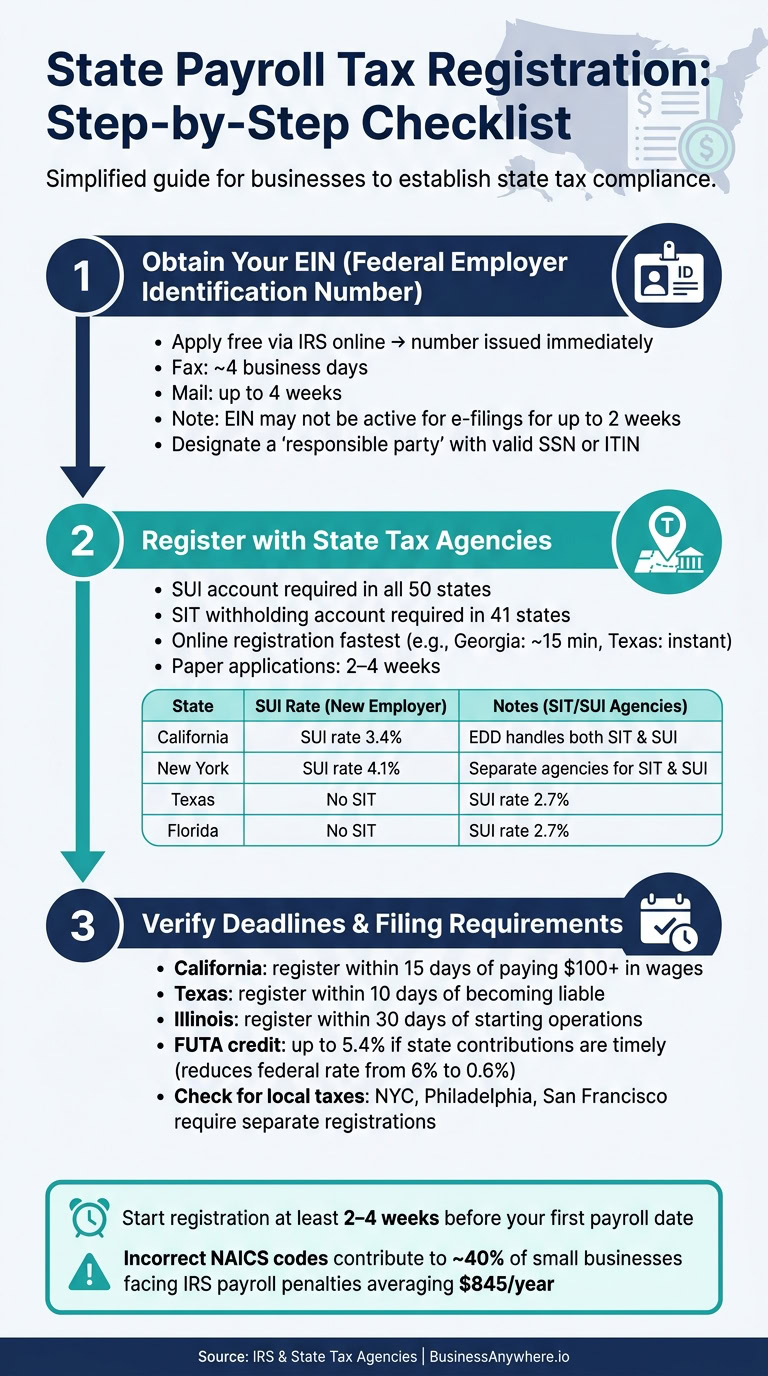
Step 1: Obtain a Federal Employer Identification Number (EIN)
Your Federal Employer Identification Number (EIN) is a critical first step in the payroll tax registration process. Without it, you can’t open a state tax account. Luckily, applying through the IRS is free.
The fastest way to get an EIN is through the IRS’s online application, which provides the number immediately. If you opt for fax, expect about a four-business-day turnaround, while mail-in requests can take up to four weeks. However, even with an online application, the EIN may not be ready for electronic filings or the IRS TIN Matching Program for up to two weeks. Plan your first payroll to allow for this waiting period.
When applying, you must designate a "responsible party" – this has to be an individual with a valid SSN or ITIN, not another business entity. Also, ensure your legal business entity is fully established with the state before applying to avoid delays or needing to request a new EIN.
Once you’ve secured your EIN, you can move on to state tax agency registration.
Step 2: Register with State Tax Agencies
Every state requires employers to set up a State Unemployment Insurance (SUI) account. Additionally, 41 states mandate a separate State Income Tax (SIT) withholding account. Even in states without a wage-based personal income tax – like Alaska, Texas, and Florida – SUI registration is still required.
"Every state where you have employees requires you to set up tax accounts before you can legally run payroll. Miss this step, and you’re looking at penalties, back taxes, and a lot of awkward calls to government agencies." – Nicole Sievers, Warp
Online registration is quicker than using paper forms. For instance, Georgia’s online portal can issue a business tax account number in about 15 minutes, while Texas provides account numbers instantly through its Workforce Commission portal. Paper applications, on the other hand, can take 2–4 weeks to process.
Here’s a quick look at registration details for some key states:
| State | Withholding (SIT) Agency | Unemployment (SUI) Agency | New Employer SUI Rate |
|---|---|---|---|
| California | Employment Development Dept (EDD) | Employment Development Dept (EDD) | 3.4% |
| New York | Dept of Taxation and Finance | Dept of Labor | 4.1% |
| Texas | N/A (no state income tax) | Texas Workforce Commission | 2.7% |
| Florida | N/A (no state income tax) | Dept of Revenue | 2.7% |
| Illinois | Dept of Revenue | Dept of Employment Security | Varies |
Once your state tax and SUI account numbers are approved, update your payroll system to ensure compliance.
Step 3: Verify State-Specific Deadlines and Filing Requirements
After setting up your state accounts, it’s essential to confirm the deadlines and filing requirements, as these vary by state. For example, California requires registration within 15 days of paying over $100 in wages during a calendar quarter. In Texas, the deadline is 10 days after becoming liable, while Illinois gives employers 30 days from starting business operations.
New employer SUI rates generally range between 2.7% and 4.1%, depending on the state, and are applied to a wage base of $7,000 to $17,600 per employee. Making timely state contributions allows you to claim a Federal Unemployment Tax Act (FUTA) credit of up to 5.4%, reducing the effective federal unemployment rate from 6% to just 0.6% on the first $7,000 of each employee’s wages.
Don’t forget to check for local payroll taxes, as some cities – like New York City, Philadelphia, and San Francisco – require separate registrations beyond state-level accounts. Start the registration process well ahead of your first payroll date to avoid delays.
Post-Registration Compliance Requirements
Once your state tax accounts are active, the real work begins: keeping everything in compliance. Registration happens once, but staying compliant is an ongoing job – and penalties can add up quickly. Let’s break down the most important steps to stay on track after registration.
Setting Up Payroll Withholding and Reporting
When withholding taxes, the key is to base it on where the employee works – not where they live. For remote workers, this becomes especially important. Even one employee relocating to a new state can create state tax nexus and kick off full payroll tax obligations, regardless of how much they earn.
"One employee in a new state triggers full tax obligations. Unlike sales tax… employment tax nexus has a zero-dollar threshold." – Nicole Sievers, Warp
To stay accurate, update your payroll software with the correct state account numbers and tax tables. This ensures proper withholding and reporting. Don’t forget to check any reciprocity agreements between states, which could allow you to withhold taxes for an employee’s home state instead of their work location. However, some states, like New York and Pennsylvania, have "convenience-of-employer" rules. These rules mean they may still claim withholding rights even if an employee works remotely from another state. Make sure your payroll system reflects these specific rules.
Once your withholdings are set up correctly, your next focus should be unemployment insurance filings.
Unemployment Insurance Tax Filings
State Unemployment Insurance (SUI) taxes are generally reported every quarter. During each quarter, you’ll need to report the total wages paid and pay contributions based on your assigned employer rate. If you’re a new employer, your rate will often be fixed for the first one to three years before switching to an experience-based rate. Wage bases for SUI taxes vary widely by state. For example, some states follow the federal minimum of $7,000, while others, like Washington, go up to $78,200. In 2026, new employer rates will range from 1.0% in South Carolina to 3.4% in New York.
Keeping up with these quarterly payments is critical to maintaining your FUTA (Federal Unemployment Tax Act) credit. This credit reduces your federal unemployment tax rate from 6.0% to 0.6%.
The final step in your compliance cycle is reporting new hires.
New Hire Reporting Requirements
Every employer must report all new or rehired employees to their state’s Directory of New Hires. The federal deadline for this is 20 calendar days from the employee’s first day, but many states have stricter timelines. For instance:
| State | Reporting Deadline |
|---|---|
| Alabama | 7 days |
| Georgia | 10 days |
| Massachusetts | 14 days |
| Iowa | 15 days |
| Federal Deadline | 20 days |
When reporting a new hire, you’ll need to provide the employee’s name, address, Social Security number (SSN), date of hire, and your employer identification details. Missing this step can lead to penalties: $25 per employee, or $500 per employee if there’s evidence of intentional avoidance. If your business operates in multiple states, you can simplify this process by designating one state for new hire reporting. To do this, you’ll need to register and report electronically.
sbb-itb-ba0a4be
How BusinessAnywhere Can Help with Payroll Tax Setup

BusinessAnywhere simplifies the process of managing payroll tax setup by combining EIN acquisition, state payroll tax registration, and deadline tracking into one easy-to-use platform. This all-in-one solution works seamlessly with the step-by-step registration process outlined earlier.
EIN Applications and State Registration Support
Before diving into state payroll tax registration, securing an EIN is essential. BusinessAnywhere makes this process straightforward with an EIN application service priced at a flat $97. Once you have your EIN, the platform helps you handle state-specific registrations for SIT withholding and SUI/SUTA taxes in the states where your employees are based.
Tools for Staying Compliant After Registration
Getting registered is just the first step. BusinessAnywhere provides tools to help you maintain compliance long after setup. These include automated alerts for quarterly SUI filings and new hire reporting deadlines, ensuring you stay on top of your obligations. The platform also securely stores all your tax registration documents for easy access. With 24% of new job postings being hybrid and 12% fully remote as of Q2 2025, these reminders are crucial for keeping up with changing state requirements.
A Single Platform for All Business Needs
BusinessAnywhere doesn’t stop at payroll tax setup – it’s designed to simplify business administration as a whole. The platform offers a range of services, including:
- Registered agent services for $147/year
- Virtual mailbox options starting at $20/month to handle official mail and tax notices
- Support for annual reports, bookkeeping, accounting, and even bank account setup
Everything is managed through a single, remote-access online dashboard, making it easier than ever to keep your business organized and compliant.
Conclusion
Following the registration steps outlined earlier, it’s clear that state payroll tax registration is a critical task that shouldn’t be ignored. Overlooking it can lead to costly penalties. To stay compliant, make sure to secure your EIN, register for state income tax (SIT) withholding in the 41 states that require it, and sign up for state unemployment insurance (SUI) wherever your employees are located. Even if you have just one remote worker, that creates a nexus requiring registration, no matter where your business is based.
Start the registration process at least 2–4 weeks before running your first payroll to avoid potential IRS deposit penalties. Missing registration deadlines can result in significant fines, so timing is everything.
Compliance doesn’t stop at registration. You’ll need to stay on top of ongoing requirements like new hire reporting deadlines, quarterly SUI filings, and any additional local tax rules in cities such as New York City or Philadelphia, which may have their own registration processes.
Tools like BusinessAnywhere make this process much more manageable. Their platform consolidates everything – EIN applications, state registration assistance, compliance reminders, and document storage – into one convenient dashboard. This way, you can avoid the hassle of navigating multiple state agency portals and keep your payroll tax obligations organized and stress-free.
FAQs
Do I need to register if I hire just one remote employee in another state?
Yes, hiring just one remote employee in a different state typically means you’ll need to register for payroll taxes in that state. This involves responsibilities like withholding income taxes and providing unemployment insurance. Even one employee can establish what’s called a payroll nexus. Be sure to review the specific tax and registration requirements for the state where your employee is located.
Which state do I withhold taxes for if an employee lives in one state and works in another?
When it comes to withholding income tax, the general rule is to withhold taxes in the state where the employee physically performs their job. However, there are a few exceptions to this rule:
- Reciprocal agreements: If two states have a reciprocal agreement, you withhold taxes for the employee’s home state instead of the state where they work, provided the employee submits a non-residence certificate.
- Convenience-of-the-employer rule: In some states, taxes must be withheld for the employer’s state, even if the employee works remotely in another state.
- Multiple states: For employees working in more than one state, you may need to allocate tax withholding based on the time they spend working in each state.
What should I do if my payroll tax account numbers aren’t approved before my first payroll?
If your payroll tax account numbers haven’t been approved yet, it’s best to hold off on running payroll until they’re fully established. This helps ensure compliance and avoids potential penalties. If there’s a delay in approval, you might want to consider postponing payroll until the account numbers become active. However, if payroll has already been processed, reach out to your state tax agencies right away. They can provide guidance on how to address any compliance issues that may arise.