Utah ranks first in the nation for economy and fiscal stability, making it an attractive destination for entrepreneurs and business owners. Whether you’re planning to start a new LLC, checking the availability of a business name, or researching competitors, knowing how to effectively use the Utah Business Entity Search tool is essential.
Quick Summary
Utah’s register is held by the Division of Corporations and Commercial Code, not a Secretary of State, and Utah has split it into three separate tools: entity records, name availability and certificate authentication. None needs a login. A $22 reservation holds 120 days.
This comprehensive guide will walk you through the entire process of performing a business entity search in Utah, covering everything from navigating the state’s official portal to understanding search results and taking the necessary next steps.
What is the Utah Business Entity Search?
The Utah Business Entity Search is an online database maintained by the Utah Division of Corporations and Commercial Code. This official tool allows you to:
- Verify if your desired business name is available for registration
- Research existing businesses in Utah
- Access public information about registered entities
- Check the status of business entities
- Find information about registered agents
The search portal provides valuable information that can help you make informed decisions before registering your business in Utah.
Accessing the Utah Business Entity Search Portal
The Utah Division of Corporations and Commercial Code provides an official online search portal that’s straightforward to use. Here’s how to access it:
- Visit the official Utah Business Search portal
- You’ll be directed to the Business Entity Search page
- No login or registration is required to perform a basic search
The portal is accessible 24/7, though it occasionally undergoes maintenance, typically during evening hours.
Step-by-Step Guide to Using the Utah Business Entity Search
Step 1: Navigate to the Search Function
When you arrive at the Utah Business Entity Search portal, you’ll see a clean, straightforward interface with several search options:
- Business Name Search: The most common search method
- Entity Number Search: For looking up a business by its state-assigned number
- Executive Name Search: To find businesses associated with a specific individual (requires a $3 fee)
Step 2: Enter Your Search Query
For a basic business name search:
- Click on the “Business Name” field
- Enter the name or part of the name you want to search
- You don’t need to include designators like “LLC” or “Inc.” for the most comprehensive results
- Click the “Search” button
Pro Tip: For the most effective search, enter only the key part of the business name. For example, if searching for “Mountain Valley Solutions LLC,” try searching just “Mountain Valley” to catch variations.
Step 3: Review Search Results
The search results page displays a table with the following information:
- Business Name
- Entity Number
- Status (Active, Expired, Delinquent, etc.)
- Type (LLC, Corporation, DBA, etc.)
- City
- State
- Registration Date
Results are displayed alphabetically, with up to 100 results per page.
Step 4: View Detailed Business Information
To see more information about a specific business:
- Click on the business name or the “Details” link to the right of the entry
- The system will display a detailed information page with:
- Principal address
- Registered agent information
- Filing history
- Management structure (for some entity types)
- Registration date
- Business purpose (if provided)
Advanced Search Tips for the Utah Business Entity Search
To get the most out of the Utah Business Search system, keep these tips in mind:
- Omit Special Characters: The search doesn’t handle special characters or punctuation well. Remove apostrophes, hyphens, and other punctuation for better results.
- Case Insensitivity: The search is not case-sensitive, so “MOUNTAIN,” “Mountain,” and “mountain” will return the same results.
- Use Partial Names: For broader results, search for just the first word or two of a multi-word business name.
- Be Specific for Narrow Results: Add more words to narrow down results when searching common names.
- Check Name Variations: Business names might be registered with slight variations, so try different versions.
- Use the “Search Hints” Tab: The portal offers a “Search Hints” tab with helpful tips directly from the Utah Division of Corporations.
Utah Has Moved the Search, and Split It Into Three Tools
The address most guides still use, secure.utah.gov/bes, now redirects. Utah’s Division of Corporations and Commercial Code has moved everything onto a new Business Registration System at businessregistration.utah.gov, and the public search sits inside it rather than on its own domain. If a bookmark or an old article sends you to the previous URL you will end up at a login page and assume the search has gone behind an account. It has not.
What has changed is that the one search is now three separate no-login tools, each answering a different question.
| Tool | What it answers | Reach for it when |
|---|---|---|
| Search Business Entity Records | What is on the register, including name reservations and foreign name registrations | General lookups, due diligence, and seeing the near misses for yourself |
| Name Availability | Whether a specific name can be used | After the entity search, to get the Division’s own read on the name that survived |
| Authenticate Certificate | Whether a certificate is genuine | A counterparty has handed you a certificate and you want it verified |
What the Utah Business Search Actually Covers
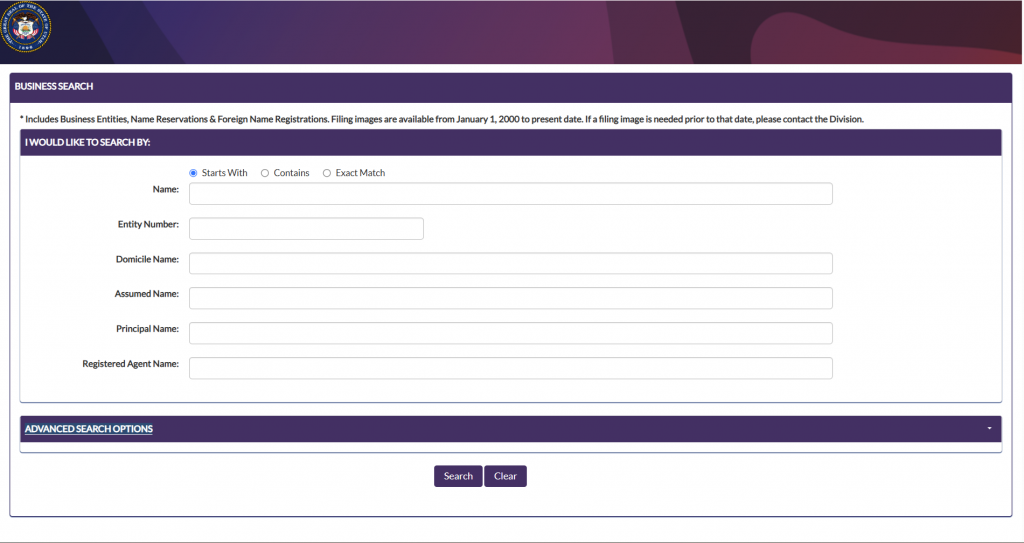
One line above the form does a lot of work: the search includes business entities, name reservations and foreign name registrations. That means a name can be blocked by something that is not a trading company at all, either because someone has reserved it or because an out-of-state business has registered the name for use in Utah.
The Three Match Modes and Six Search Fields
| Match mode | What it returns | Use it when |
|---|---|---|
| Starts With | Names beginning with your text. This is the default | You know the opening words. Weakest for availability |
| Contains | Your text anywhere inside the name | Every availability check. Switch to this first |
| Exact Match | Only a perfect string match | Confirming one company you can name precisely |
| Field | What it finds | Worth using when |
|---|---|---|
| Name | Entities, reservations and foreign name registrations by name | The main availability check |
| Entity Number | The single record with that number | You have a certificate or an earlier filing in hand |
| Domicile Name | The name a foreign entity uses in its home state | An out-of-state company trades in Utah under a different name from its own |
| Assumed Name | DBA registrations | Checking branding rather than legal names. This is the field people skip |
| Principal Name | Entities tied to a named officer, member or manager | Due diligence on a person, or finding your own entities |
| Registered Agent Name | Every entity served by one agent | Checking an agent’s book, or auditing a portfolio |
Two Practical Notes From the Division
The Business Registration System carries its own advice worth passing on. It recommends a Chrome-based browser and suggests clearing your cache if you hit problems, which is a strong hint that the new system is fussier than the old one. And on the filing side it states that all fees are non-refundable, that most filings are processed and approved instantly, and that anything else should be allowed two to four business days from receipt.
The non-refundable line matters more than it looks. If you file on a name that turns out to conflict, you do not get the money back, which is the whole argument for spending five minutes on Contains searches and the Name Availability tool first.
Understanding Business Status Labels in Utah
When viewing search results, you’ll notice various status labels. Here’s what they mean:
- Active: The business is current with all filings and in good standing
- Delinquent: The business has failed to file annual reports or pay required fees
- Expired: The business registration has lapsed but is within the reinstatement period (2 years in Utah)
- Dissolved: The business has been formally closed or has been administratively dissolved
- Withdrawn: A foreign entity that has formally withdrawn from doing business in Utah
- Revoked: The business’s authority to operate has been revoked by the state
Understanding these status indicators helps you interpret whether a business is currently operating legally in Utah.
Utah Status Labels at a Glance
| Status | What it means | Is the name free to use? |
|---|---|---|
| Active | Current and in good standing with the Division | No |
| Delinquent | Registered but has missed a required filing | No. Still a live record, and it can be brought current |
| Expired | The registration has lapsed | Not automatically. Treat it as taken until the Division says otherwise |
| Dissolved | Formally wound up | Not automatically. The record stays on file |
| Withdrawn | A foreign entity has ended its Utah registration | Possibly, but the domicile name may still be registered. Check the Domicile Name field |
| Revoked | Authority removed by the Division | Not automatically. Revocations can be reversed by reinstatement |
Using the Utah Trademark Search Tool
In addition to the Business Entity Search, Utah offers a separate Trademark Manager tool that’s important to use when conducting a comprehensive name search:
- Visit the Utah Trademark Manager
- Enter keywords related to your desired business name
- Choose status (active or expired) from the dropdown menu
- Review results to ensure no state-level trademark conflicts
This extra step ensures your chosen name doesn’t conflict with registered trademarks in Utah, even if it’s not registered as a business name. For more information on business formation, check out our guide on Amazon FBA and LLC Formation.
Name Reservation in Utah: Securing Your Business Name
If you’ve found an available name but aren’t ready to form your business yet, Utah allows you to reserve it:
- File an “Application for Reservation of Business Name” with the Utah Division of Corporations
- Pay the $22 filing fee
- Your name will be reserved for 120 days
- You can renew the reservation once for an additional 120 days (with another $22 fee)
This gives you time to prepare your business formation documents while ensuring no one else claims your name. For more information, see our guide on LLC Business Registration.
Utah Business Name Requirements and Restrictions
When choosing a business name in Utah, make sure it meets these requirements:
For LLCs:
- Must contain the words “Limited Liability Company,” “Limited Company,” “L.L.C.,” “LLC,” “L.C.,” or “LC”
- Cannot include words that would confuse it with a government agency (like “FBI” or “Treasury”)
- Cannot include words requiring special licensing without proper documentation (e.g., “Bank,” “Attorney,” “University”)
For Corporations:
- Must contain “Corporation,” “Incorporated,” “Company,” “Corp.,” “Inc.,” or “Co.”
- Same restrictions on government and professional terms apply
Name Distinguishability:
A name is considered distinguishable in Utah if:
- One of the key words is unique
- The spelling of one of the key words is different
- The words have different contextual meanings
Next Steps After Your Utah Business Entity Search
Once you’ve confirmed your business name is available through the Utah Business Entity Search, here are the next steps to establish your business:
1. Form Your Business Entity
For an LLC, you’ll need to:
- File a Certificate of Organization with the Utah Division of Corporations
- Pay the $59 filing fee
- Designate a registered agent with a physical address in Utah
- Include basic company information
For a corporation:
- File Articles of Incorporation
- Pay the filing fee ($70 for profit corporations, $30 for nonprofits)
- Designate a registered agent
- Provide information about shares and directors
Need help with the formation process? Check out our guides:
2. Obtain Necessary Business Licenses
Utah businesses typically require:
- City business license from your local municipality
- County business license (if operating in unincorporated areas)
- Professional or industry-specific licenses (if applicable)
3. Register for State Taxes
Register your business with the Utah State Tax Commission using their Taxpayer Access Point (TAP) at Utah Taxpayer Access Point to:
- Obtain a Sales Tax ID (if selling taxable goods or services)
- Register for employer taxes (if hiring employees)
- Set up withholding accounts
4. Secure a Federal Tax ID (EIN)
Apply for a Federal Employer Identification Number (EIN) through the IRS website at no cost.
Peculiarities of the Utah Business Entity Search System
The Utah Business Entity Search system has some unique features worth noting:
- No Login Required: Unlike some states, Utah allows searches without creating an account.
- Real-Time Updates: The database updates in real-time as new businesses are registered or statuses change.
- Downloadable Records: You can download business documents like Articles of Organization or Certificates of Existence (fees apply).
- Executive Name Search Fee: Utah charges a small $3 fee for searching by executive name, which is uncommon among state business portals.
- Two-Year Reinstatement Window: Business names remain reserved during the two-year reinstatement period after dissolution.
Simulated Business Name Search Example
Let’s walk through a simulated search for “Mountain Valley Enterprises” to illustrate how the process works:
- Enter “Mountain Valley” in the business name field
- Click “Search”
- Results show:
- Mountain Valley Construction LLC (Active)
- Mountain Valley Enterprises, Inc. (Expired)
- Mountain Valley Holdings LLC (Active)
- Mountain Valley Properties LLC (Delinquent)
- Click on “Mountain Valley Enterprises, Inc.” to view details:
- Status: Expired (12/15/2023)
- Entity Number: 12345678
- Registered Agent: John Smith
- Principal Address: 123 Main St, Salt Lake City, UT 84101
- Registration Date: 06/03/2015
This example shows that while “Mountain Valley Enterprises, Inc.” exists, its status is expired. However, since it’s within the two-year reinstatement period, this name would still be considered unavailable.
Conclusion: Mastering the Utah Business Entity Search
The Utah Business Entity Search is an invaluable tool for entrepreneurs and business owners. By following this comprehensive guide, you can effectively search for business entities, verify name availability, and take the necessary steps to establish your business in Utah’s thriving economy.
Remember that a thorough search is essential before registering your business name, as it helps avoid legal complications and potential trademark disputes. The Utah Division of Corporations and Commercial Code has streamlined the process, making it accessible and user-friendly.
Ready to start your Utah business journey? Explore our Business Registration Services or Sign up with Business Anywhere for comprehensive formation services that handle the paperwork and compliance requirements for you.
For more business insights and resources, check out our guides on How to Start an LLC in Texas and How to Start an LLC in Colorado.
This guide is provided for informational purposes only and does not constitute legal advice. Business registration requirements may change over time, so always verify current procedures with the Utah Division of Corporations and Commercial Code.
Frequently Asked Questions About Utah Business Entity Searches
How long does a name reservation last in Utah?
A business name reservation in Utah lasts for 120 days. You can renew it once for an additional 120 days by filing another application and paying the $22 fee again.
What does it cost to search for a business entity in Utah?
Basic business name searches and entity number searches are free. Searching by executive name requires a $3 processing fee.
What’s the difference between a business entity search and a trademark search?
A business entity search checks if a name is registered as a business in Utah, while a trademark search checks if a name or logo is protected as intellectual property. Both searches are important before starting a business.
Can I register a business with a name similar to an existing one?
No. Utah requires business names to be distinguishable from existing registered entities. The Division of Corporations makes the final determination on whether a name is sufficiently different.
How can I get a Certificate of Existence for my Utah business?
You can order a Certificate of Existence through the Utah Business Entity Search portal by searching for your business, clicking on the details page, and selecting the “Purchase Certificate of Existence” option. The fee is $12.
What if the business name I want is taken but the business is dissolved?
If a business is dissolved and outside the two-year reinstatement period, you may be able to use the name. However, if it’s within the reinstatement period, the name is still considered unavailable.
Related Blog Posts
- Comparing Utah with its low-tax neighbour? Here is how to run a Nevada business entity search.
- Idaho in the mix? Check whether the name is taken in Idaho before you commit.
- Also looking at Arizona? The Arizona lookup works a little differently.