Canceling a virtual mailbox does not mean your mail stops the same day. In most cases, billing stops first, access ends later, and any mail left behind is forwarded, returned, shredded, or thrown out based on the provider’s rules.
Here’s the short version:
- Your account often stays active until your paid term ends
- You may lose dashboard access and scans after closure
- Forwarding usually must be set up before the mailbox closes
- Unclaimed mail and packages are often removed after a short window
- If your old address is still on file, you can miss tax, bank, or legal mail
That’s the part many people miss.
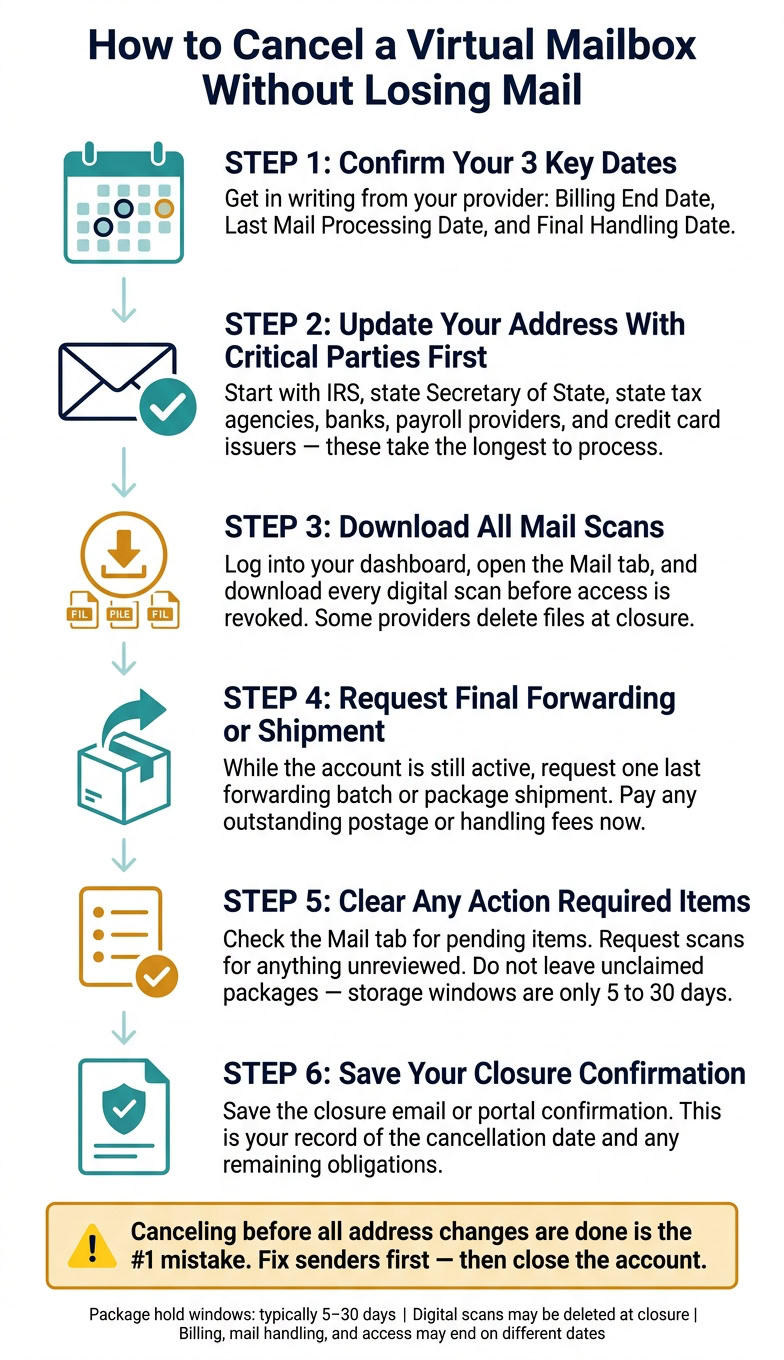
I’d treat cancellation like a deadline, not a button click. Before I close the account, I’d update every sender, download every scan, and confirm these three dates in writing:
- Billing end date
- Last mail-processing date
- Final handling date
A few days can make the difference between getting a letter and losing it for good. Package hold windows are often just 5 to 30 days, and some providers delete digital files at closure. That means waiting can cost you mail, time, and money.
If I were closing a mailbox tied to a business, I’d start with the IRS, state agencies, banks, payroll services, and card issuers first. Then I’d request a final forwarding batch and save the closure email for my records.
That’s the safe way to shut it down without leaving mail behind.
What happens to your mail and packages after cancellation
If you still expect notices or shipments, the next step is simple: know what happens to the items that are already headed to your mailbox. After cancellation, leftover mail follows the provider’s cutoff policy. What happens next depends on your forwarding instructions, the storage window, and the type of item. For business owners, that cutoff date isn’t just about billing. It’s a compliance deadline.
Forwarding, return to sender, shredding, and disposal
Forwarding only works if you set it up before the account closes and pay any required postage or handling fee.
Return to sender is common when no forwarding instruction exists. If there’s no forwarding order on file, the provider may send the item back to the sender or refuse new package deliveries after closure.
Secure shredding applies to letters and documents. If items are marked for destruction, or the holding period runs out, the provider may securely destroy them.
After the cutoff date, unclaimed mail is usually shredded or discarded.
Storage grace periods and cutoff dates
Timing matters. The provider’s cutoff date decides whether items are forwarded, held, or destroyed. Grace periods vary a lot. Some last only a few days, while others stretch for several months. Some providers also delete digital scans at cancellation, so download any files you need before your final day.
Before you cancel, confirm these three dates:
- Last day the provider accepts new mail
- Last day you can request forwarding or scans
- Final account-closure date
Post-cancellation mail outcomes: comparison table
The table below shows the usual outcome when no action is taken.
| Outcome | What it means | When it applies | Who pays | Risk if you do nothing |
|---|---|---|---|---|
| Forwarding | Sent to a new address you provide | Before closure, with forwarding set up in advance | Customer, for postage and handling | Mail may be returned or disposed of instead |
| Return to sender | Sent back to the original sender | When no forwarding instruction is on file | Usually no cost to the customer | Important documents may never reach you |
| Secure shredding | Documents destroyed at the facility | Items designated for destruction or past the retention window | Often included or charged per item | Irreversible loss of physical records |
| Temporary storage | Mail held for a set period | During a short grace period after cancellation | Included in the plan or billed as extra | Items may be shredded or discarded after the deadline |
| Package disposal | Unclaimed packages discarded or returned | After the storage window expires, often within 5 to 30 days | Usually no refund to the customer | Lost shipments may not be recoverable |
What to do before you cancel your virtual mailbox
Use the time left on your active plan to handle the loose ends. Update your address, download your scans, and set up any last forwarding requests. That short window matters because once the account closes, your options shrink fast.
Update your address with every party that needs it
Start with the groups that usually take the longest to process address changes: the IRS, your state’s Secretary of State office, and state tax agencies. Then move to banks, payroll providers, and credit card issuers.
Those are the mail streams you do NOT want falling through the cracks. A missed tax notice is bad enough. A missed bank letter or payroll document can turn into a mess.
Request final scans, forwarding, or shipment of remaining items
Log into your dashboard and open the Mail tab. Check for any envelopes or packages that still haven’t been scanned. Request scans for anything you haven’t reviewed, then download every file before closure.
For physical mail, request one last forwarding batch or package shipment while the account is still active. If you still owe postage or handling fees, pay them now so nothing gets held up.
State dissolution does not cancel the mailbox; cancel it manually or billing continues.
Before vs. after cancellation: what you can still do
| Action | Before Closure (Active Period) | After Account Closure |
|---|---|---|
| Update IRS, SOS, and state tax agencies | Complete before cancellation so notices reach you | Mail typically returned or destroyed |
| Download mail scans | Full access via dashboard | Access revoked; data may be deleted |
| Request forwarding or final shipment | Available for all remaining physical items | Unavailable; items may be shredded or refused |
| Update banks and payroll providers | Prevents missed correspondence | Higher risk of returned mail or missed payments |
| Pay forwarding or storage fees | Settles the account cleanly | No new charges; no partial refunds for unused time |
Those deadlines decide when the account fully closes.
sbb-itb-ba0a4be
How final account closure works
Once you request final scans or forwarding, the next part is simple in theory but easy to mess up in practice: knowing when the account actually closes. Virtual mailbox cancellation often happens in phases, so billing, mail handling, and account access may stop on different dates.
Billing end date, processing end date, and final handling
The billing end date is when recurring charges stop. The last mail processing date is the final day the provider will accept, scan, and handle incoming mail. Some providers stop everything on the same day. Others keep mail handling active until the end of your prepaid term or for a short grace period.
That distinction matters. It’s not just about whether mail can still be forwarded. It’s about which cutoff applies to which part of the service. Once the final active window ends, any mail or packages still on file move into final handling. Based on the provider’s policy and your instructions, that may mean forwarding to a new address, return to sender, secure shredding, or disposal.
USPS rules can require mail receiving providers to keep handling USPS mail for a period after closure. Packages from private carriers may follow a different process, so it’s smart to confirm how your provider handles UPS or FedEx deliveries after cancellation.
Some providers also leave dashboard access open during a grace period and charge per-item forwarding fees.
What to confirm with your provider before you close the account
Use this table to check what happens if you miss a cutoff date.
| What to Confirm | Why It Matters |
|---|---|
| Cancellation effective date | Shows when the account is officially treated as cancelled |
| Billing end date | Tells you when recurring charges stop |
| Last mail processing date | Shows the final day the provider will accept, scan, or process incoming mail |
| Storage grace period length | Explains how long existing mail stays available before final handling |
| Default mail outcome | Confirms whether remaining mail will be forwarded, shredded, returned, or discarded |
| Post-closure dashboard access | Lets you know whether you can still download scans after closure |
| Written closure confirmation | Gives you a record of the closure date and any remaining obligations |
Before you close the account, check the Mail tab for any Action Required items. Download any scans you may need before access ends. Then save the closure confirmation from the portal or email. Those dates decide whether you still have time to do anything.
Conclusion: How to close your mailbox without losing important mail
Once the final cutoff date passes, what happens next depends on your provider’s policy for leftover mail. After cancellation, any mail that’s still there is handled under that final policy. That can be fine – but ONLY if you take care of things before the cutoff.
The biggest risk is simple: canceling before all of your address changes are finished. If any bank, insurer, employer, subscription, or government office is still mailing the old address, fix that first. Then, before the account shuts down, log in to the dashboard one last time. Clear anything still pending, and save or download anything you may need later.
Focus on the three dates that matter most:
- Billing end date
- Mail-processing end date
- Final handling date
That’s what clean closure looks like in practice: change your addresses early, then empty out every last item before the cutoff.
FAQs
Can I still get mail after I cancel?
Yes – in most cases, for a limited time.
Your account will usually stay active until the end of your current paid billing period. That means you can still access your dashboard and manage your mail during that time.
After the service officially ends, providers registered as CMRAs may still need to remail or forward received items for up to six months under USPS rules.
That said, it’s smart to keep your account active until people and companies sending you mail have your new address.
What happens to packages left in my mailbox?
When you cancel your virtual mailbox, your account usually stays active until the end of your paid billing period. That gives you a bit of breathing room to deal with any mail or packages still in the account.
Before the service ends, ask for final mail forwarding or document scanning. In most cases, providers must remail or forward incoming items for up to six months after cancellation.
To avoid headaches, empty your mailbox and update your address with senders before your access runs out.
Which address changes should I make first?
Start with official government and financial records. First, file your IRS change of address. Then update your LLC’s principal office or registered agent records with your state. After that, update your business bank accounts.
Next, notify other agencies that matter to your business, like state tax departments and professional licensing boards. Once those are done, let your clients, vendors, and partners know about the change.