If you move often or live overseas, a virtual mailbox can help you keep one steady U.S. mailing address and manage mail online. I see the main value here as simple: you can view incoming mail, request scans, forward items, and store records without relying on an old address, base housing, or family members.
For military families, that matters because about one in three service members makes a PCS move each year, and USPS address changes can take weeks. In that gap, people can miss IRS letters, DMV renewals, bank cards, insurance notices, court mail, business filings, and property tax bills. A virtual mailbox helps close that gap by giving you a street address and a dashboard you can check from anywhere.
Here’s the article in plain terms:
- What it solves: missed mail during PCS moves, deployments, and overseas assignments
- How it works: mail arrives, the envelope is scanned, and you choose to open, forward, store, or shred it
- Why it helps: faster visibility into time-sensitive mail and less risk from mail sitting at old or shared addresses
- Who it helps most: active-duty families, deployed service members, spouses, overseas households, business owners, and rental property owners
- What to look for: USPS Form 1583 support, a real street address, scan limits, package handling, forwarding fees, security controls, and shared access
A few points stand out:
- Most providers scan incoming mail in 24 to 48 hours
- Military consumers reported more than 184,000 fraud and identity theft incidents in 2024
- Losses tied to those reports were close to $490 million
So if I had to sum it up in one line, it would be this: a virtual mailbox gives you one place to handle legal, financial, government, and business mail no matter where orders send you.
Mail Problems Military and Overseas Households Face Every Day
Personal and Government Mail That Cannot Wait
Some mail comes with a clock attached. Miss it, and the result can be late fees, penalties, or legal headaches.
For military families, the biggest trouble spots are IRS and state tax notices, DMV registration renewals, insurance cancellation warnings, court documents, and VA or Social Security correspondence.
Here’s what that looks like in daily life: a spouse finds out a driver’s license has been suspended because the DMV renewal notice went to an old address. Or a deployed service member misses the response window on an IRS notice because the letter was sent to an apartment they moved out of months ago. That can lead to penalties and interest fast.
There’s another layer here. Many SCRA protections depend on timely written notice. So when mail shows up late, the delay can shut off the very relief those protections are meant to provide. And when that same mailbox also receives business filings or property notices, the stakes get even higher.
Business and Property Mail During Deployments
The problem gets worse for service members who own a business or manage property.
State compliance letters, annual report reminders, and tax bills don’t stop during a deployment. If you miss a state annual report deadline, an LLC can be administratively dissolved. Then you’re stuck dealing with reinstatement fees and extra paperwork.
Landlords run into the same kind of trouble. Property tax bills, HOA notices, lease renewal letters, and code enforcement correspondence still arrive by mail, and each one may call for a decision. During a PCS, that mail may keep landing at the old address while maintenance requests, notices, and fines start stacking up.
Privacy, Security, and Family Coordination Challenges
There’s also the security side, and it’s hard to ignore. The FTC reports that active duty service members are 76% more likely than other adults to report that an identity thief misused an existing bank or credit card account. In 2024 alone, military consumers reported more than 184,000 incidents of fraud and identity theft, with nearly $490 million in losses.
That makes unsecured mail at a vacant home, old apartment, or even a relative’s house more than an annoyance. It can be an open door for theft.
Handing mail duties to family members can help in a pinch, but it also creates problems:
- Important letters can be missed or sorted wrong
- Private records may be seen by people who shouldn’t see them
- Time-sensitive documents can sit for days before anyone acts
Remote access changes that. It keeps sensitive documents out of kitchen piles and inside one controlled system. For spouses handling household finances across time zones, uneven mail access makes budgeting, benefits management, and legal compliance much harder. When TRICARE updates, VA letters, or school enrollment forms arrive late – or don’t arrive at all – the effect on health care access and daily family life can be immediate.
A virtual mailbox helps cut that risk by keeping mail visible, sortable, and secure from anywhere.
sbb-itb-ba0a4be
How a Virtual Mailbox Handles These Problems
A virtual mailbox turns mail into a simple remote system instead of a constant hassle.
Mail Scanning, Forwarding, and Online Access
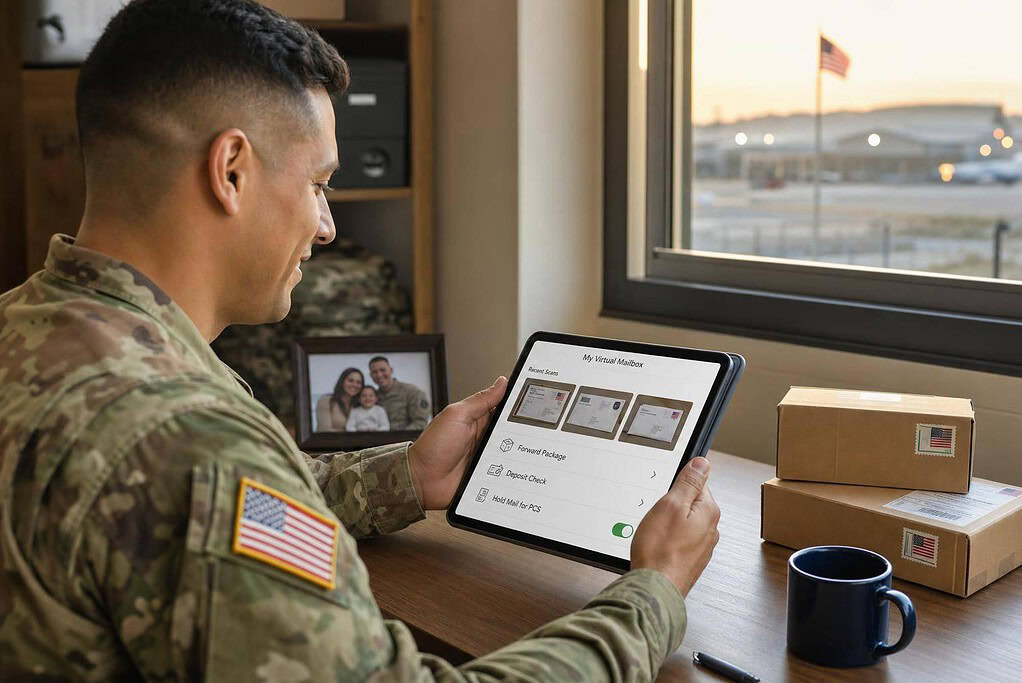
Your mail goes to your assigned U.S. address, gets logged, and shows up in your dashboard within 24–48 hours. You’ll get a notice by email or app, then you can sign in from anywhere and choose what to do with each item: scan the contents, forward the original, or shred it.
In practice, that means you only forward the mail that actually needs to move. Think a notarized document, a debit card, or a driver’s license. For routine mail, scans usually do the job just fine. Forwarding can go to a U.S. address, a family member’s home, or an APO/FPO/DPO address, as long as the contents meet USPS and military postal rules.
The same setup can also help with packages, checks, and papers you need to keep in order.
Package Handling, Check Deposit, and Recordkeeping
Packages are logged in your dashboard too, and some services let you store them, combine them, or forward them. Eligible checks can be deposited into your U.S. bank account, which helps a lot when you’re overseas or dealing with thin banking access.
For records, scanned mail stays in a digital archive. You can search by sender or date, tag items, and download PDFs whenever you need them. That archive can save a lot of time at tax time, especially if you’ve moved across more than one state or country during the year.
Privacy Protection for Households and Business Owners
For military families, privacy matters just as much as speed.
A virtual mailbox helps keep your home address off public records and cuts down exposure for military households and business owners. If you use that address on state LLC filings, DMV registrations, or business websites, your home address – and your base housing address – stays out of public databases.
When comparing provider security, look for features like:
- controlled access
- background-checked staff
- surveillance
- chain-of-custody logs
- encryption
- MFA
- role-based access
Role-based access is especially helpful. It lets a spouse or business partner view and manage mail without giving them full account credentials.
Military Use Cases and How to Choose the Right Service
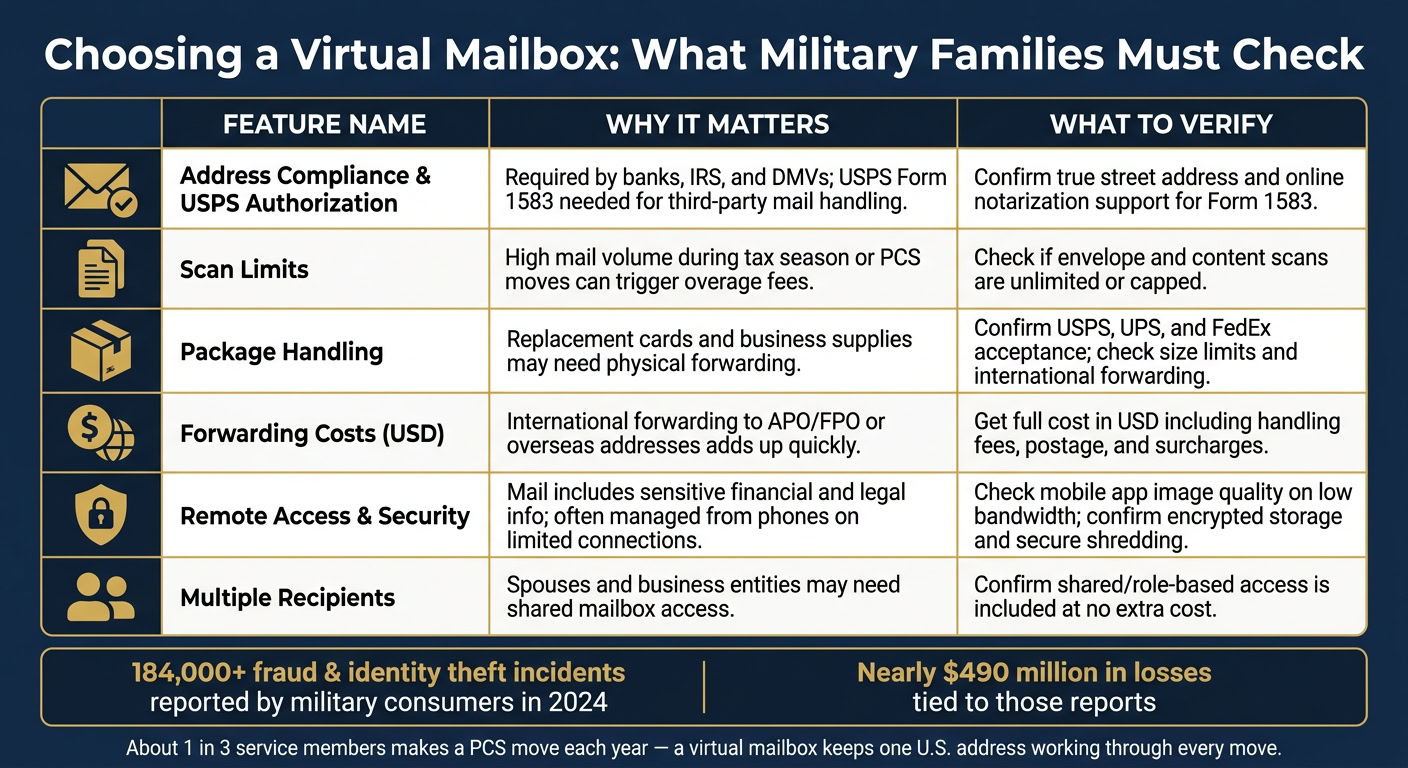
Use Cases: Legal Mail, Banking, DMV Notices, and Tax Letters
Once your mail is digitized, the next step is simple: putting that access to work in day-to-day life.
Say a family is stationed in Germany. A bank fraud alert shows up in their dashboard the same day it arrives. They request a scan, call the bank, and freeze the card within 24 hours. If a DMV renewal notice comes in, they scan it, check the due date, and renew online. If an IRS balance-due letter arrives, they send the scan to their tax preparer and mail back a certified response. That helps them stay on top of time-sensitive deadlines.
Use Cases: LLC Mail, Registered Agent Coordination, and Rental Property Admin
The same setup can handle both family mail and business, property, and tax tasks.
For a deployed service member with a U.S. LLC, the registered agent takes care of official notices while the mailbox handles routine business mail. Incoming checks can be scanned or deposited. Vendor contracts can be reviewed online. Client letters can be forwarded only when the original document is needed. The same setup can also support business formation, registered agent mail, and tax filings from abroad. That keeps filings, checks, and official notices moving during PCS travel.
Rental property owners can use the same approach. Tenants send rent checks and maintenance requests to the virtual mailbox address. The owner reviews scanned letters from anywhere, forwards urgent items to a local property manager, and pays property tax bills and insurance notices on time. That helps avoid delays with rent, repairs, and tax payments.
What to Check Before Signing Up
Picking the right service comes down to three things: compliance, access, and control. A steady U.S. address only helps under military conditions if the provider checks the boxes below.
| Feature | Why it matters | What to verify |
|---|---|---|
| Address Compliance & USPS Authorization | Needed for banks, the IRS, and DMVs. USPS Form 1583 is required for a third party to handle your mail. | Confirm it is a true street address and that the provider offers online notarization for Form 1583. |
| Scan Limits | Heavy mail volume during tax season or a PCS move can lead to overage fees. | Check whether envelope and content scans are unlimited or capped. |
| Package Handling | Replacement cards and business supplies sometimes need physical forwarding. | Confirm acceptance from USPS, UPS, and FedEx, and check size limits and international mail forwarding options. |
| Forwarding Costs (USD) | International forwarding to APO/FPO or overseas addresses can add up fast. | Get the full cost in U.S. dollars, including handling fees, postage, and surcharges. |
| Remote Access & Security | Service members often manage mail from phones on limited connections, and mail can include sensitive financial and legal information. | Review the mobile app for clear images and strong performance on low-bandwidth connections; confirm encrypted storage and secure shredding. |
| Multiple Recipients | Spouses and business entities may need access to the same mailbox. | Confirm whether shared access is included at no extra cost. |
A few checks can save a lot of hassle later:
- Match scan limits to your monthly mail volume.
- Compare forwarding limits and package rules before you sign up.
- Make sure the service fits both personal and business needs if you’ll use one mailbox for both.
The right setup keeps one U.S. address working through every move, deployment, and overseas assignment.
Conclusion: Keep a Stable U.S. Address No Matter Where You Are
Active-duty families move every 2–3 years on average, and about one-third of service members make a PCS move each year. With that kind of pace, it’s easy for IRS notices, bank mail, DMV reminders, and legal or business paperwork to slip through the cracks. That’s where a virtual mailbox comes in.
A virtual mailbox gives military families and overseas service members one stable U.S. mailing address. Legal, tax, banking, vehicle, and LLC mail can all go to the same place. Users can then scan, forward mail, and store records from one dashboard instead of juggling mail across multiple stops.
It’s not just about ease of use. It also helps protect sensitive information. Sending mail through a managed facility can lower exposure, and encrypted storage plus secure destruction add another layer of protection after review.
The last piece is picking a service that fits life on the move. Look for support for scanning, forwarding, package handling, privacy, and steady online access. When those parts are in place, one address can keep working through every move, deployment, and overseas assignment.
FAQs
Can I use a virtual mailbox for IRS and DMV mail?
Yes – you can use a virtual mailbox for IRS mail, including tax filings, EIN applications, and general tax documents, as long as you keep the address stable and use it the same way across your records.
The DMV is different. You can’t use a virtual mailbox as your home address for a driver’s license or voter registration. Those agencies want a residential or physical address.
One more thing matters here: your provider should be a USPS-registered CMRA and must have completed Form 1583.
Will a virtual mailbox work during deployment or overseas duty?
Yes. A virtual mailbox can work during deployment or overseas duty because it gives you a steady U.S. mailing address and lets you handle physical mail from anywhere through scanning and, when offered, forwarding. Many services also send prompt notifications, so you know when something arrives.
Just make sure the provider is a USPS-registered CMRA and that you complete a current USPS Form 1583. It does not replace a registered agent or a physical address for service of process.
What do I need to set up a virtual mailbox?
To set up a virtual mailbox, pick a USPS-registered CMRA and fill out USPS Form 1583. That form gives the provider permission to receive mail on your behalf.
You’ll also need two forms of ID:
- A primary photo ID
- A secondary document that shows your address
The form must be notarized, and many providers now offer remote online notarization.