If you need to see and manage mail online, pick a virtual mailbox. If you only need mail sent to a new place for a short time, pick mail forwarding.
I’d break it down like this:
- Virtual mailbox = a street address + online access + mail scans + package handling
- Mail forwarding = mail redirection from one address to another
- Best for business, travel, and remote work = virtual mailbox
- Best for a move or short stay elsewhere = mail forwarding
- Typical virtual mailbox pricing in this article = $20 to $85 per month, with lower annual rates
- Mail scan notice time = often 24 to 48 hours
- Required for virtual mailbox setup = USPS Form 1583
That’s the whole decision in plain English: one gives you control, the other just reroutes mail.
Quick Comparison
| Criteria | Virtual Mailbox | Mail Forwarding Service |
|---|---|---|
| Main use | Mail management online | Short-term mail redirection |
| Address | New CMRA street address | Uses your current address and forwards from it |
| Mail scans | Yes | No |
| Dashboard access | Yes | No |
| Packages | Usually yes | Often limited |
| Business use | Yes, often used for LLCs and remote work | Usually no |
| Privacy | Keeps your home address off some records | Limited privacy gain |
| Time frame | Long-term | Short-term |
| Cost style | Monthly or annual plan | Flat fee or per-forward fee |
If I were choosing, I’d use virtual mailbox for an LLC, remote job, travel, or frequent package delivery. I’d use mail forwarding only for a move, a snowbird setup, or a short address change. You can also forward USPS mail to a virtual mailbox to maintain a permanent digital record.
sbb-itb-ba0a4be
How each service works
The main difference comes down to control.
A virtual mailbox lets you handle mail before it goes anywhere else. Mail forwarding, on the other hand, just sends it to a new address after it arrives.
What a virtual mailbox is
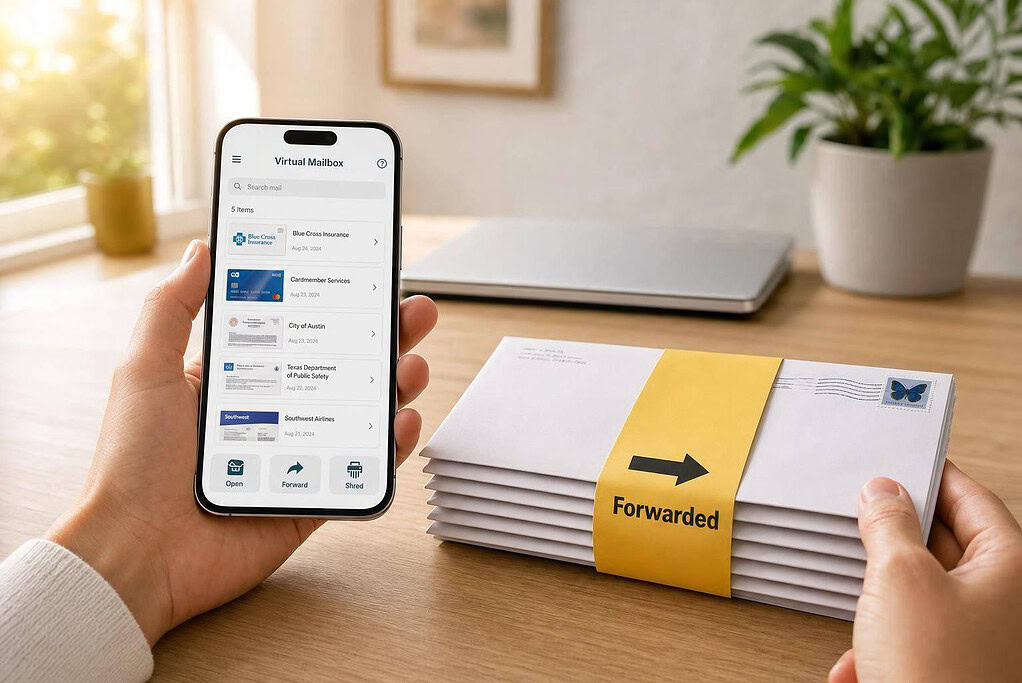
A virtual mailbox gives you a CMRA street address where your mail is received, scanned, and managed online. Once mail shows up, the facility scans the incoming item and sends you a notice by email or app within 24–48 hours. From there, you log into your online dashboard and choose what happens next.
You can:
- open it
- scan it
- forward it
- shred it
- hold it
The whole setup works from any device, which makes it handy if you’re traveling, running a business from home, or just don’t want to deal with paper mail the old-school way.
Virtual mailboxes also accept deliveries from major carriers. Before a CMRA can open mail on your behalf, you must complete and notarize USPS Form 1583.
What a mail forwarding service is
Mail forwarding is much simpler. It redirects physical mail from one address to another, either through USPS or a private service.
That means no dashboard, no scans, and no way to preview what came in. Your mail just gets rerouted. If you’re moving for a short time, that may be enough. But if you want day-to-day mail handling, it can feel pretty bare-bones.
Where BusinessAnywhere fits
BusinessAnywhere brings a virtual mailbox together with LLC formation, registered agent service, remote online notarization, and compliance tools in one dashboard.
Plans start at $20/month, billed annually, and include unlimited mail scanning and package forwarding.
Now that the mechanics are clear, the next section compares them side by side.
Virtual mailbox vs. mail forwarding: a direct comparison
Here’s the simplest way to look at it: a virtual mailbox gives you control after mail arrives, while mail forwarding just sends everything from one address to another.
If you’re sorting through options, this side-by-side view makes the choice easier based on your mail volume, privacy needs, and how often you move.
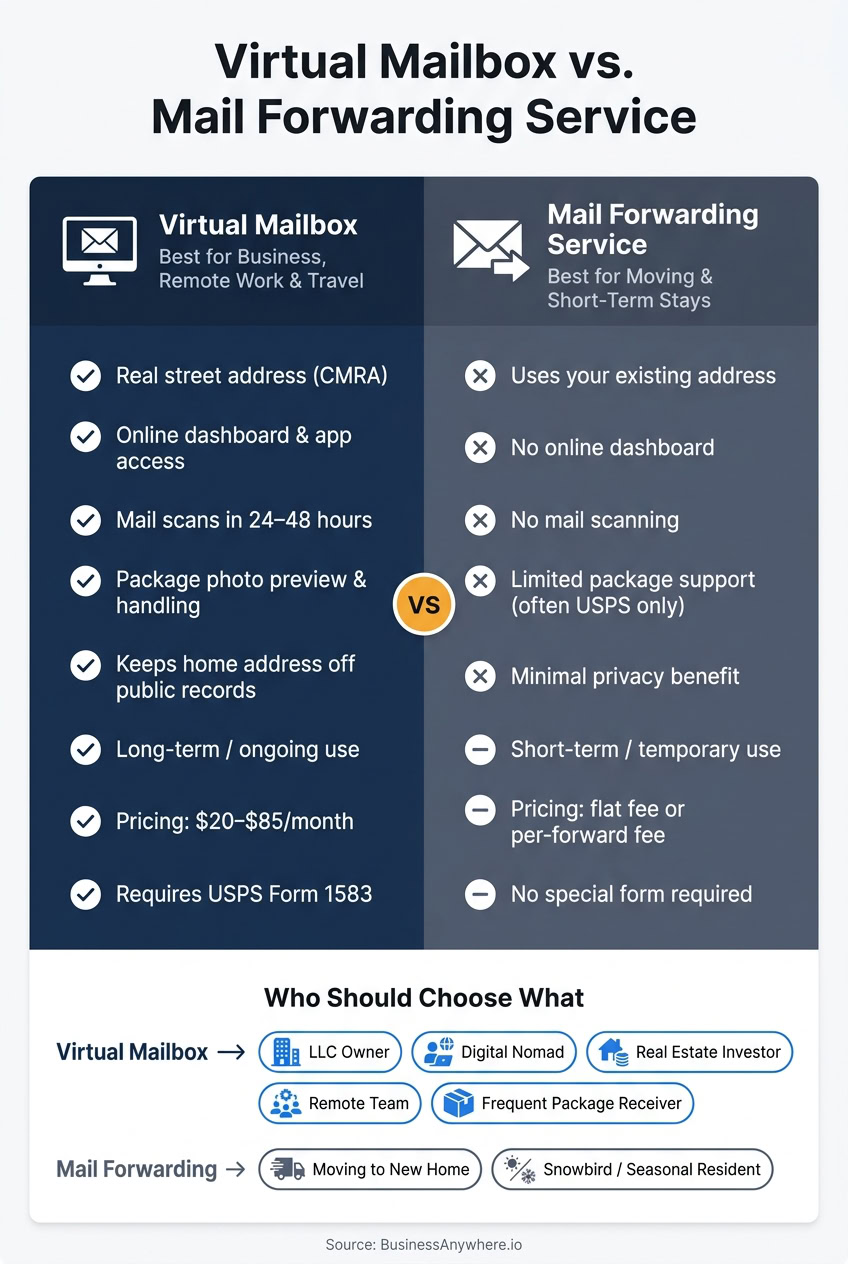
| Feature | Virtual Mailbox | Mail Forwarding Service |
|---|---|---|
| Purpose | Ongoing digital mail management | Temporary physical redirection of mail |
| Address Type | Permanent street address at a Commercial Mail Receiving Agency (CMRA) | Redirect from an existing address |
| Duration | Long-term / ongoing | Short-term / temporary |
| Digital Access | Full online dashboard/app access | None |
| Scanning | Envelope scans and PDF content scans | Not available |
| Package Support | Accepts major carriers | Limited, often USPS-only for standard forwarding |
| Pricing Model | Monthly or annual subscription | Per-forward fees or a flat fee |
| Best Use Case | LLCs, remote workers, digital nomads | Individuals between permanent residences |
Digital access, scanning, and mail control
With a virtual mailbox, you can review each piece of mail, ask for scans, and decide where it should go before anything gets shipped. That means you can forward the items you want, discard the ones you don’t, and avoid paying to send junk across the country.
Mail forwarding works in a much simpler way. It reroutes everything to the destination address. There’s no dashboard, no preview, and no way to filter mail before it moves.
That difference matters even more when you’re using the address for work.
Privacy, compliance, and business address use
A virtual mailbox helps keep your home address off public records and gives LLCs, remote workers, and digital nomads a stable U.S. mailing address. For LLC owners and remote professionals, that can be a big deal if they want a business address without putting their home address out in the open.
Mail forwarding doesn’t give you a new business address. It only redirects mail from one location to another, so the privacy upside is much smaller.
That added control usually means a higher monthly bill.
Pricing in U.S. dollars: what each service costs
BusinessAnywhere’s virtual mailbox plans are priced as follows:
- Basic: $25/month, or $20/month billed annually
- Premium: $40/month, or $30/month billed annually
- Advanced: $85/month, or $65/month billed annually
Monthly billing includes a $25 sign-up fee, while annual billing waives that fee. All plans include unlimited mail and package handling, unlimited scans, no junk mail, worldwide forwarding, and no hidden fees.
Which option fits your situation
Pricing and features only matter when they line up with how you actually get mail. The easiest way to choose is to match the service to your day-to-day setup.
| User Scenario | Recommended Service | Key Reason |
|---|---|---|
| LLC Owner / Home-based Business | Virtual Mailbox | Keeps your home address off public records and gives you a professional street address for business use. |
| Digital Nomad / Full-time Traveler | Virtual Mailbox | Gives you 24/7 digital access to scanned mail from anywhere. |
| Moving to a New Home | Mail Forwarding | A temporary solution for redirecting personal mail to a new residence. |
| Real Estate Investor | Virtual Mailbox | Centralizes notices for multiple properties or entities. |
| Seasonal Resident (Snowbird) | Mail Forwarding | Simple physical redirection for a set period. |
| Remote Team / Distributed Company | Virtual Mailbox | Creates a centralized digital hub for distributed staff. |
| Frequent Package Receiver | Virtual Mailbox | Shows package photos online so you can decide what to do next. |
Choose a virtual mailbox for ongoing business and remote living
A virtual mailbox makes more sense when mail is part of your business or part of life on the move. If you run an LLC, it gives you a public-facing business address instead of putting your home address on record. If you work remotely or travel full time, it gives you one stable inbox no matter where you are.
It also works well for real estate investors and distributed teams. Legal notices, account letters, and other time-sensitive documents stay in one place instead of getting scattered across homes, apartments, or temporary locations. For a remote team, that shared dashboard can feel like a single mailroom everyone can check without passing papers around.
If your mail ties into business operations, compliance, or remote work, a virtual mailbox is usually the better fit.
Choose mail forwarding for temporary address changes
Mail forwarding is best for a short-term address change. That’s it. If you’re moving to a new house, living in another state for part of the year, or traveling for a few months, it does the basic job: your physical mail gets redirected to where you are.
That makes it a good pick when you don’t need online mail scans, package controls, or a fixed address for business use. It’s simpler and lighter for a short stay.
Once you need more than redirection, though, the limits show up fast. If you want to review documents online, manage incoming packages, or keep one steady business address, standard forwarding stops being enough.
How package handling affects your choice
Packages can be the tie-breaker. Letters are one thing. Boxes are another story.
With a virtual mailbox, you can view package photos online and decide what to do next. You might forward the package, store it, or pick it up in person. That gives you more control, which matters when you’re dealing with business items or anything time-sensitive.
Mail forwarding doesn’t give you that step. It sends items from one address to another without a preview, so you’re waiting longer and making decisions later. In plain English, it moves first and asks questions never.
If you get packages often, or if you need to respond fast, a virtual mailbox gives you control that basic forwarding just doesn’t offer.
For one specific use case, see our guide to choosing a virtual mailbox for students studying abroad.
Conclusion: Choosing the right mail solution
The choice mostly comes down to time frame: do you need steady mail control, or do you just need your mail sent somewhere else for a while? In plain English, duration and control are the two things that matter most.
Choose a virtual mailbox if you need mail management for a business, remote work, or full-time travel. It makes the most sense when you want steady mail control, more privacy, and the ability to check and handle mail from anywhere.
Choose mail forwarding if you’re moving or dealing with a short-term relocation and only need your mail routed to a new address. It’s a better fit for short-term address changes and nothing more.
If you want an all-in-one business setup, BusinessAnywhere combines a virtual mailbox with core business tools starting at $20/month billed annually. That puts your mail, compliance, and business management in one place.
FAQs
Can I use a virtual mailbox for my LLC?
Yes. A virtual mailbox can work for an LLC for common tasks like state filings and IRS EIN applications. It also gives you a professional street address, which is often more useful than a PO Box.
That said, it can’t serve as your Registered Agent. To use one, the provider needs to be a USPS-registered CMRA, and you have to complete a notarized USPS Form 1583.
How long does virtual mailbox setup take?
Setting up a virtual mailbox is usually fast and fully remote. Once you pick a plan and a location, you’ll need to fill out and notarize USPS Form 1583 and submit two forms of ID.
Remote online notarization often takes less than five minutes, so this part is pretty painless. After you send in your documents, there’s a short approval period before your mail forwarding service is fully active.
Does mail forwarding work for packages too?
Yes. Both mail forwarding services and virtual mailboxes can handle packages.
A virtual mailbox usually gives you a physical street address that can accept deliveries from major carriers, not just USPS. When a package arrives, the provider notifies you and can forward it to your current location.
That said, there are usually limits around package size, weight, and storage time. So before you sign up, check the provider’s policy to see what they allow.