If you need one simple rule, start with Tuesday through Thursday, then post in the morning, around lunch, or early evening. Across the article, the same pattern shows up on most platforms: 7:00–10:00 AM, 11:00 AM–1:00 PM, and 7:00–10:00 PM. Sprout Social’s 2026 data also points to 11:00 AM–6:00 PM local time as the strongest overall block.
Here’s the short version I’d use:
- Instagram: midweek, lunch hours, then evening for Reels
- LinkedIn: Tue–Thu during work hours, mostly morning to lunch
- Facebook: midweek, late morning and early evening
- X: Tue–Thu mornings, with extra posts around news and live moments
- TikTok: morning and evening, especially Tue–Fri
- YouTube: publish before people start watching, often afternoon for evening viewing
- Pinterest: later in the day and on weekends, with seasonal posts published early
The big point: there is no one posting time that fits every account. Your top window still depends on your audience’s time zone, platform, format, and goals. Short-form posts often do well earlier in the day. Longer videos and deeper content often land later.
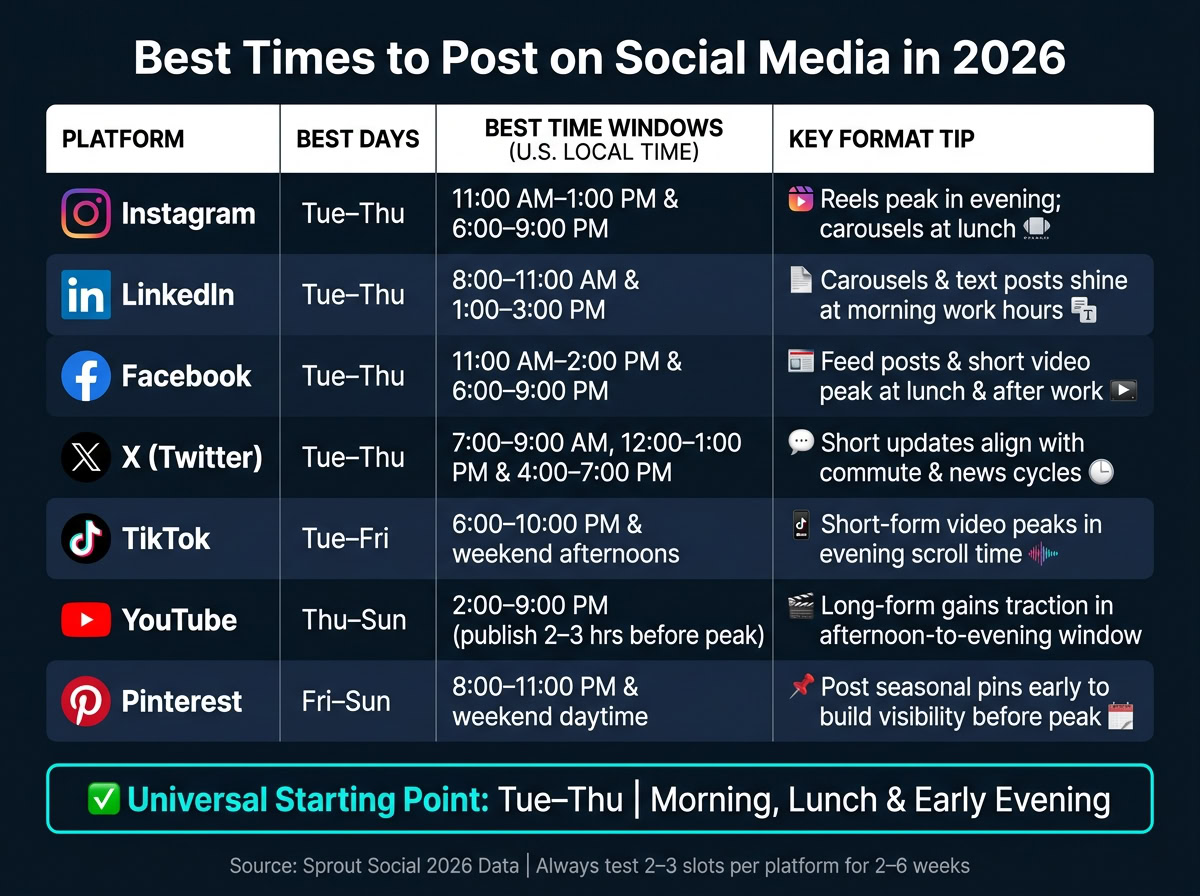
Quick Comparison
| Platform | Best starting days | Best starting times |
|---|---|---|
| Tue–Thu | 11:00 AM–1:00 PM, 6:00–9:00 PM | |
| Tue–Thu | 8:00–11:00 AM, 1:00–3:00 PM | |
| Tue–Thu | 11:00 AM–2:00 PM, 6:00–9:00 PM | |
| X | Tue–Thu | 7:00–9:00 AM, 12:00–1:00 PM, 4:00–7:00 PM |
| TikTok | Tue–Fri | 6:00–10:00 PM, plus some morning tests |
| YouTube | Thu–Sun | 2:00–9:00 PM, posted 2–3 hours before peak viewing |
| Fri–Sun | 8:00–11:00 PM, plus weekend daytime |
If I were turning this into a posting plan, I’d use these windows as a starting draft, then test 2–3 time slots per platform for 2–6 weeks and keep the ones that win on reach, engagement rate, clicks, and watch time.
1. Instagram
Best days: Tuesday through Thursday tend to be the strongest days. Sunday is usually the weakest day for launches and time-sensitive offers.
Peak Time Windows
The best posting windows are 10:00 a.m.–2:00 p.m. and 5:00 p.m.–8:00 p.m. local time. The top time slots bunch up around Thursday morning, Wednesday at noon and in the evening, plus an 8:00 p.m. spike on most days.
For brands that post across the U.S., a smart overlap is 12:00 p.m. ET / 9:00 a.m. PT for midday content and 6:00 p.m. ET / 3:00 p.m. PT for a second post later in the day.
Content Timing Patterns
Not all Instagram formats behave the same way. That’s the part a lot of teams miss.
Carousels and static feed photos usually do best around midday, roughly 11:00 a.m.–2:00 p.m. from Tuesday through Thursday. Reels tend to get stronger engagement in the evening, around 6:00 p.m.–9:00 p.m. in the middle of the week. Stories perform best in three bursts: morning, lunch, and evening.
There’s also a split between account types. Business accounts tend to perform better during the 9:00–11:00 a.m. weekday window, while consumer brands often see better results in the evening.
Testing Tools
Start with Instagram Insights. Check when your followers are most active by day and hour, then compare that with your top posts ranked by engagement rate. This gives you a simple starting point based on what your audience already does.
From there, Meta Business Suite helps you schedule Instagram and Facebook posts in one place. It also surfaces suggested time windows based on your past data. Buffer adds timing suggestions for each account and lets you run A/B tests by posting similar content in different slots.
Give the test enough time to breathe. After 4–6 weeks, keep the one or two windows that beat the others on reach and saves.
Instagram leans toward midweek consumer attention. LinkedIn is a different beast. It shifts earlier in the day and lines up more with work habits. The same test-and-adjust process still works, but the best hours and audience patterns won’t look the same.
2. LinkedIn
LinkedIn tends to work best during the workweek. Tuesday, Wednesday, and Thursday are the top days, with Monday as a decent backup. Weekends usually lag behind. That lines up with how people use the platform: less late-night scrolling, more quick check-ins between meetings, at lunch, or near the end of the day.
Peak Time Windows
So if you’re picking test windows, start with midday and late afternoon. A good first pass is 10:00 a.m.–2:00 p.m. and 3:00 p.m.–8:00 p.m. local time. If your posts target decision-makers, 10:00–11:00 a.m. on Tuesday and Thursday is the strongest place to start.
Late afternoon can also work well. In particular, 4:00 p.m. on Wednesday and about 3:00–4:00 p.m. on Friday tend to do well.
A simple testing plan is to begin with 11:00 a.m.–1:00 p.m., then compare it with 3:00 p.m.–5:00 p.m. over 4–8 weeks. That gives you enough data to see which window gets better results.
Content Timing Patterns
On LinkedIn, timing isn’t the whole game. Format plays a big role too.
Carousels – multi-slide documents – tend to get the most engagement, especially when posted in the 9:00–11:00 a.m. window. That timing fits the start of the workday, before calendars fill up with calls and meetings.
Video posts tend to do best a bit earlier, around 8:00–9:00 a.m.. That early slot helps catch people before their day gets pulled in five directions.
Text-only posts have the most flexibility, but they still tend to do better on weekday mornings and around lunch hours.
Posting frequency matters too:
- B2B company pages usually do best with 2–3 posts per week, mostly from Tuesday through Thursday. Posting every day can lift impressions, but average engagement per post often drops.
- Personal brands and consultants can usually keep up 3–5 posts per week, with no more than one feed post per day so posts don’t compete with each other for attention.
Testing Tools
LinkedIn’s native Post Analytics gives you post-level data like impressions, reactions, clicks, and comments. Use it to compare how posts perform at 10:00 a.m. versus 3:00–4:00 p.m. over a 4–8 week stretch. Then stick with the stronger window and post on a steady schedule.
Facebook follows a similar weekday-first pattern, but its audience is broader and its best posting windows tend to land a bit later in the day.
3. Facebook
Facebook tends to work best when your posts line up with local business hours and the moments when people are ready to take action. That matters even more for local businesses. Compared with Instagram and LinkedIn, Facebook often reacts more to local intent and activity during the workday.
Peak Time Windows
Start with Tuesday through Thursday. Then test posts in late morning and early evening based on your audience’s local time.
Don’t guess here. Use Facebook Insights to see when your audience is most active, then line up your feed posts, promotions, and ads with those higher-intent windows. If people in your area tend to browse during lunch or after work, that’s usually where you want to show up.
Content Timing Patterns
Use Facebook Events for launches, sales, and local promotions. For paid campaigns, use dayparting so your ads run only during the time windows that bring your best conversions.
Reach can also improve when you take part in local community groups and share testimonials. On Facebook, that kind of local presence can go a long way.
Testing Tools
Track reach, clicks, shares, comments, and conversions in Facebook Insights and Meta Business Suite. Then keep the time slots that perform best.
A simple weekly review is usually enough. Look for the posting windows that keep producing results, and adjust your schedule around them.
Next, X moves faster and rewards more immediate posting.
4. X
X moves fast. Posts that feel current and get early engagement tend to do best, which is why timing matters so much. Instead of leaning on broad averages, post when your followers are actually online.
Peak Time Windows
For most U.S.-based accounts, Tuesday through Thursday are the strongest days to post, and 8:00–11:00 a.m. local time is the sweet spot. If you’re posting once per day, a smart starting point is 9:00 a.m. on Tuesday or Wednesday.
Some niches run on a very different clock. Tech and gaming audiences can spike at 6:00 a.m. Monday, 3:00–6:00 a.m. Tuesday, or around midnight Sunday. Sounds odd at first, but it fits how those audiences scroll: early, late, and often outside the usual workday rhythm.
Content Timing Patterns
Different post types tend to work at different times of day.
- Business and education posts: 7:00–9:00 a.m.
- News and trend posts: 12:00–2:00 p.m.
- Entertainment and community posts: 6:00–9:00 p.m.
- Tech or gaming content: 10:00 p.m.–1:00 a.m.
For U.S. B2B brands, a simple posting rhythm often works well: one anchor thread at 9:00 a.m., one lighter post around 12:30 p.m., then replies and quote posts spread across the day. The key is spacing. Don’t dump everything into one short window. When you stagger posts, you give yourself more chances to reach smaller audience pockets that check X at different times.
Testing Tools
Use X analytics to compare impressions, engagement, and clicks by timestamp. Tools like Buffer and Hootsuite can also help surface your best-performing windows. Give each time slot one to two weeks before you judge it, and focus on engagement rate as your main KPI.
Next: TikTok’s feed works differently, so its best windows shift later and vary by format.
5. TikTok
TikTok moves at a slower pace than X. It tends to reward watch behavior more than instant reactions. For most U.S. accounts, a good place to start is Tuesday through Friday, with two main windows: 7:00–9:00 a.m. and 7:00–9:00 p.m. local time. Those time slots line up with morning commutes and evening wind-down sessions, when people are more likely to watch a full video and engage.
Content Timing Patterns
For sales-focused posts like product demos, tutorials, and customer testimonials, publish during 7:00–9:00 a.m.. That helps you catch strong conversion periods before the day gets crowded.
For engagement-focused posts like behind-the-scenes clips and day-in-the-life videos, 7:00–9:00 p.m. often leads to more comments, shares, and saves.
Testing Tools
Use TikTok’s native analytics, Buffer, or Hootsuite to compare engagement rate by time slot. Test one time block at a time for at least two weeks. Then stick with the window that gives you the best results.
Start by tracking engagement rate. After that, check GA4 conversion data to see which posting times bring in traffic and sales.
YouTube shifts away from quick engagement and toward longer viewing sessions, so the timing changes there too.
sbb-itb-ba0a4be
6. YouTube
YouTube tends to reward videos that are published before people start watching, not videos rushed out at one “perfect” minute. So the smarter move is to schedule uploads ahead of your audience’s usual viewing window. That way, your video is already live when people begin browsing.
For brands, that usually means getting each video up before the workday starts, before lunch, or before evening viewing picks up. Publishing time isn’t just about instant engagement. It’s about showing up early.
Best Days and Peak Time Windows
A good place to start is weekday midday and late afternoon. Tuesday through Thursday are solid starting points. From there, test each window and compare which one brings in the strongest first-24-hour views and watch time.
Once you spot a strong pattern, use analytics to compare first-day performance across upload times instead of guessing.
Content Timing Patterns
Apply the same timing test across demos, tutorials, testimonials, and day-in-the-life videos. Then stick with the slot that drives the strongest watch time.
Testing Tools
A few tools can help you sort this out without flying blind:
- VidIQ helps with keyword and competitor research.
- Google Analytics and Google Search Console can show website traffic and search visibility tied to your videos.
- YouTube Analytics lets you track views, watch time, clicks, and comments so you can see whether a timing change is helping.
Pinterest follows a different pattern because search and evergreen discovery matter more than live viewing windows.
7. Pinterest
Pinterest plays by a different set of rules. It leans more on search behavior and evergreen discovery than on same-day engagement. In plain English: Pinterest tends to reward search-driven discovery, not short-lived spikes. That’s why seasonal and buying-focused content should go live early, so it has time to pick up momentum before demand hits its high point.
Best Days and Peak Time Windows
Start by testing day-and-time blocks that line up with your audience’s highest-converting hours. Then stick with the time slots that drive the most saves and clicks.
Content Timing Patterns
Post seasonal and holiday pins early, especially product pins, Idea Pins, and how-to content. That gives them time to build visibility before the key date arrives.
Testing Tools
Use Pinterest Analytics to monitor saves, outbound clicks, and impressions by pin type. To track traffic and conversion data, connect Google Analytics 4 (GA4) and add UTM parameters to every link.
For A/B tests, run each test for 1–2 weeks. Change only the posting time, and wait until each variation has at least 100 conversions before you pick a winner.
Next, compare these platforms side by side to choose the best posting pattern for your team.
How the 7 Platforms Compare Side by Side
Each platform has its own high point. The table below puts the main differences in one spot, so you can map out a weekly posting schedule without bouncing across seven separate guides.
| Platform | Best Posting Days | Primary Time Windows (U.S. local time) | Format-Specific Behavior | Top Tool to Confirm Timing |
|---|---|---|---|---|
| Tue–Thu, especially Wed/Thu | 11:00 AM–1:00 PM and 6:00–9:00 PM | Reels perform best during evening scroll time; carousels work well at lunch; Stories fit early morning and late afternoon | Instagram Insights | |
| Tue–Thu, especially Wed | 8:00–11:00 AM and 1:00–3:00 PM | Text posts and document carousels do well at morning work hours; native video can work near lunch | LinkedIn Analytics | |
| Tue–Thu, especially Thu; weekend afternoons can also work | 11:00 AM–2:00 PM and 6:00–9:00 PM | Feed posts and short native video benefit from lunch and after-work windows; live video fits early evening | Meta Business Suite | |
| X | Mon–Fri, with Tue–Thu as the core window | 7:00–9:00 AM, 12:00–1:00 PM, and 4:00–7:00 PM | Short updates and threads align with commute and news cycles; live commentary follows event timing | X Analytics |
| TikTok | Tue–Fri; weekends can also work for entertainment niches | 6:00–10:00 PM; weekend afternoons | Short-form vertical video peaks in the evening; posting by 5:00–7:00 PM lets content gain traction before prime time | TikTok Analytics |
| YouTube | Thu–Sun | 2:00–9:00 PM (publish 2–3 hours before peak viewing) | Long-form videos and premieres gain traction in the afternoon-to-evening window; Shorts can be posted earlier and more frequently | YouTube Studio Analytics |
| Fri–Sun, especially evenings and Sunday night | 8:00–11:00 PM; weekend daytime for planning content | Idea Pins and standard pins align with planning cycles – recipes, home projects, weddings – so post ahead of seasonal peaks | Pinterest Analytics |
Use this table as your default schedule, then narrow it based on who you’re trying to reach.
Tue–Thu is the safest starting point. If you need one simple baseline, that’s it. Pinterest and YouTube are the main exceptions because people tend to browse those platforms later in the day and often with a planning mindset.
That said, your business model changes the picture.
- For U.S. B2B brands, put most of your energy into LinkedIn on Tue–Thu mornings. Then use X during commute hours and late afternoon, when people are checking updates between meetings or on the way out of the workday.
- For consumer-facing brands, lean into evening-first visual platforms, especially Instagram, TikTok, and Pinterest. Midweek through the weekend usually gives you the best shot.
- For local businesses, post in your local time zone and match the rhythm of the area. Facebook and Instagram often work well around 10:00–11:00 AM before lunch and 4:00–5:00 PM before dinner.
- For multi-time-zone brands, split your posts by region or schedule around your largest audience cluster.
Think of these windows as the starting map. Your audience location and your own analytics will tell you where to tighten the schedule.
Pros and Cons by Platform
The timing guide covered when to post. This table shifts the focus to something just as useful: which platforms reward careful scheduling, and which ones push you toward live, in-the-moment work.
| Platform | Engagement Stability | Evergreen Scheduling | Live-Coverage Need | Analytics Ease | Remote Team Fit |
|---|---|---|---|---|---|
| Moderate; steady midday and evening windows, but Reels trends can throw off patterns | Good for carousels and educational posts; trend-based Reels need faster reaction | Moderate; a fixed schedule works, but trending audio calls for quick action | Strong | Good; batch-schedule evergreen content, keep open slots for trends | |
| High; weekday mornings stay strong, while weekends drop off fast | Excellent; thought leadership and case studies do well on a fixed Tue/Thu morning schedule | Low; industry commentary may call for occasional real-time changes | Moderate; post-level data is clear, but hour-by-hour detail is less granular | Excellent; standardize around business hours for your main audience’s time zone | |
| Moderate; algorithm personalization makes timing less predictable than it used to be | Good; recurring series and group content perform well when scheduled ahead | Moderate; live video and announcements do better with real-time presence | Strong; Meta Business Suite combines scheduling and analytics in one place | Good | |
| X | Low; content peaks fast | Limited; evergreen threads can be scheduled, but real-time conversations drive most reach | High; trending topics and news cycles need fast response | Moderate; post-level data is detailed, but "best time" guidance takes manual pattern analysis | Challenging; remote teams need rotating coverage or pre-approved content templates for fast publishing |
| TikTok | Mixed; some accounts show clear best-time patterns, but virality can push content up at random over days or weeks | Moderate; tutorials and demos can be batched, but trending sounds need open slots | High; trending audio and challenges need fast production and publishing | Moderate; follower activity charts help, but data can arrive late | Moderate; needs flexible workflows alongside scheduled evergreen content |
| YouTube | Strong; subscriber behavior is consistent | Excellent; evergreen how-tos and tutorials bring search traffic for months or years after publishing | Low; mostly matters for live streams and premieres | Excellent; clear visual timing guidance for channels with enough data | Excellent; batch-produce and schedule releases; evergreen discovery reduces timing pressure |
| High for evergreen content; seasonal peaks matter more than hour-by-hour timing | Excellent; pins can be scheduled weeks or months ahead | Very low; minimal real-time need | Moderate; strong for seasonal and thematic trends, weaker for hour-level scheduling | Excellent; remote teams can batch-schedule months of content in advance |
Here’s the plain-English version: LinkedIn, YouTube, and Pinterest reward disciplined scheduling the most. They’re built for teams that like a calendar, a workflow, and a plan.
X and TikTok work the other way. They lean hard on speed, trend awareness, and quick reactions. If your team moves too slowly there, reach can disappear before you even hit publish.
A simple way to handle this split:
- Put fixed posting schedules on LinkedIn, YouTube, and Pinterest
- Keep live monitoring and faster approvals for X and TikTok
That setup gives your team structure where structure pays off, and breathing room where speed matters more.
Conclusion
Across all seven platforms, one thing keeps showing up: there isn’t a single best posting time for everyone. Still, the same broad pattern appears on most networks. Midweek, midday, and early evening are the best places to start.
That gives you a practical base for your posting calendar. Consumer-facing platforms tend to do better during off-work hours. LinkedIn leans toward business hours. X lines up more closely with the workday. If your team posts across more than one time zone, set the schedule by local time before you fine-tune anything. In plain English: anchor your plan to your audience’s main time zone.
Then test that pattern with a short trial. Pick two or three benchmark time slots per platform and run them for 2–4 weeks. As you do, track:
- Reach
- Engagement rate
- Clicks
- Watch time
When you find the slots that perform best, add them to a recurring calendar in Meta Business Suite or whatever scheduler you use. After that, check analytics every month or quarter. Build your posting plan around the top two or three time slots per platform, and keep testing as audience habits shift.
FAQs
How do I find my best posting times?
Use each platform’s built-in analytics to see when your audience is most active and engaged. Tools like Meta Business Suite make it easier to spot those patterns.
You can also test different posting windows with Buffer or Hootsuite, then fine-tune your schedule based on what gets the most reach and engagement.
Should I post in my time zone or my audience’s?
Prioritize your audience’s time zone. Post when the people you want to reach are actually awake and active. That simple shift can help more people see your content and interact with it.
If you manage a global audience or several regions, scheduling tools make this much easier. They let you see time differences at a glance and spot the best posting windows without guesswork. On your side, you can still keep your process organized with async workflows and time blocking.
How long should I test posting times?
The search results don’t give an exact testing period. So instead of testing forever, use a structured test phase.
A good starting point is two to four weeks. That usually gives you enough data to spot engagement patterns without dragging the process out. After that, use native analytics to compare date ranges and make changes based on how your audience actually behaves.