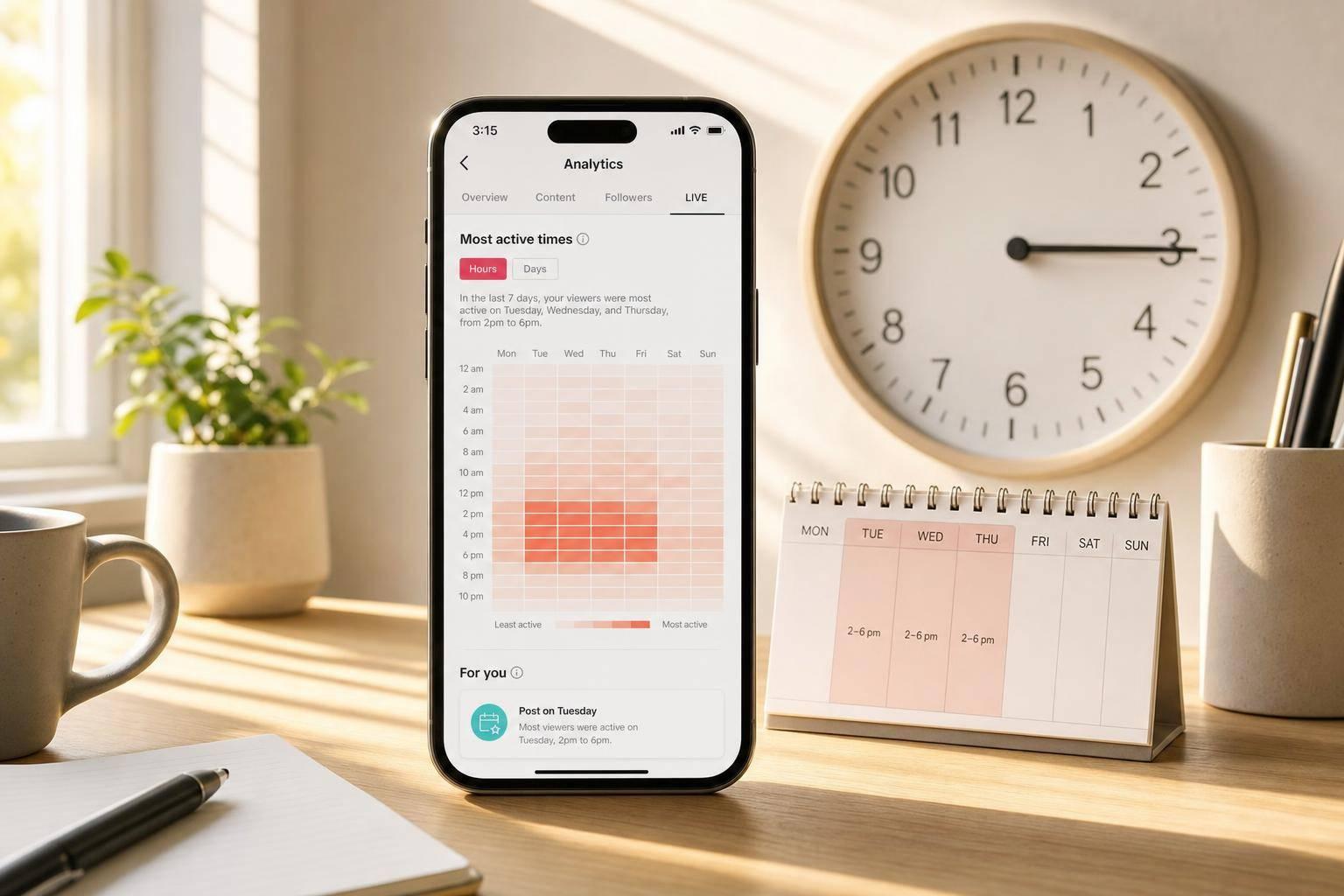
If I had to keep it simple, I’d start with Tuesday to Thursday, 2:00 p.m. to 6:00 p.m. local time. That’s the safest first test window for most U.S. small businesses in 2026.
TikTok has about 170 million U.S. users, and early engagement in the first 30 to 60 minutes can shape how far a post goes. That means timing can affect reach even when the video itself stays the same. Across large 2025–2026 studies, three posting blocks show up the most: 6:00–10:00 a.m., 12:00–4:00 p.m., and 7:00–11:00 p.m.
If I were using this guide, here’s what I’d take from it right away:
- Best starting days: Tuesday, Wednesday, and Thursday
- Best starting window: 2:00 p.m.–6:00 p.m.
- Best weekend test: Sunday morning
- Rule for time zones: post in your audience’s local time, not your business’s time
- Best method: use these time windows first, then check TikTok Analytics and test for 2–4 weeks
- Posting pace: most small businesses can stick with 3–5 posts per week
This article also breaks timing down by business type, because a café, a local shop, and an online store should not all post on the same schedule.
- Restaurants: before meal decisions, like 7:00–9:00 a.m., 11:00 a.m.–1:00 p.m., and 4:30–6:30 p.m.
- Local shops and salons: around 11:00 a.m.–1:00 p.m. and 4:00–6:00 p.m.
- Ecommerce: later in the day, often 7:00–10:00 p.m.
- Service and B2B accounts: weekday work hours, often 8:00 a.m.–4:00 p.m.
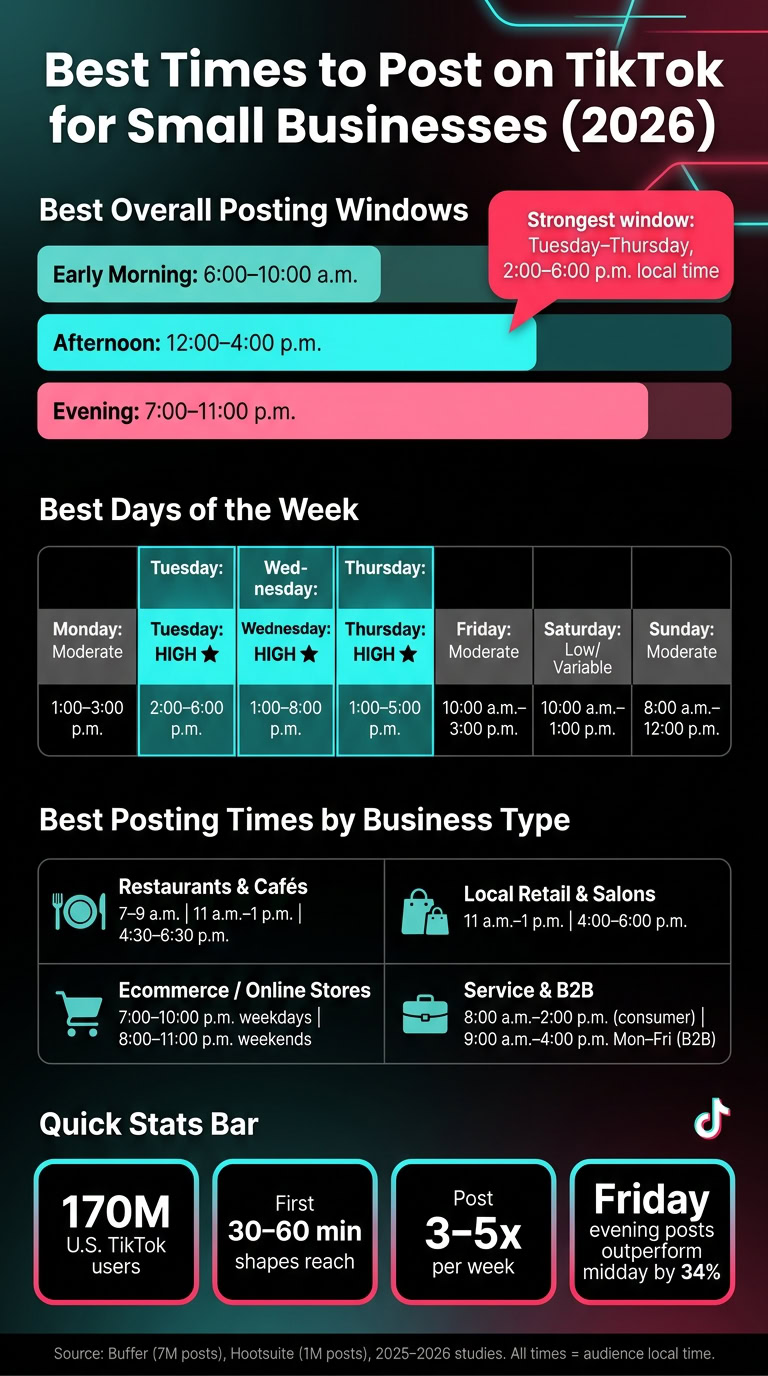
Quick Comparison
| Focus area | Best starting point |
|---|---|
| Best overall days | Tuesday–Thursday |
| Best overall hours | 2:00 p.m.–6:00 p.m. |
| Best morning test | 8:00–9:00 a.m. |
| Best weekend test | Sunday, 8:00 a.m.–12:00 p.m. |
| Best for ecommerce | 7:00–10:00 p.m. weekdays |
| Best for restaurants | Before breakfast, lunch, and dinner |
| Best for local services | Weekday mornings to early afternoon |
| Best testing period | 2–4 weeks |
| Best posting cadence | 3–5 posts per week |
The short version: I’d use midweek afternoons as the baseline, match posting time to audience location, and let TikTok Analytics decide the final schedule.
Best times to post on TikTok by day of the week
Studies from 2025–2026 point to repeating TikTok posting patterns, not one magic hour that works for everyone. Buffer looked at 7 million TikTok posts for its 2026 report, and Hootsuite reviewed 1 million social posts for its 2025 study. Across both, the same three time bands show up again and again: early morning (6:00–10:00 a.m.), afternoon (12:00–4:00 p.m.), and evening (7:00–11:00 p.m.). All times should match your audience’s local time.
Use the windows below as your starting point. Then tighten them based on time zone and how your audience actually behaves.
Posting windows for Monday through Sunday
If you only have room for one post a day, put your first bets on Tuesday through Thursday. That’s the safest place to start. The table below lays out the main and backup windows for each day.
| Day | Primary Window | Secondary Window | Content That Fits |
|---|---|---|---|
| Monday | 1:00–3:00 p.m. | 5:00–7:00 p.m. | Tips, explainers, motivation |
| Tuesday | 2:00–6:00 p.m. | 8:00–9:00 a.m. | How-to, BTS, demos |
| Wednesday | 1:00–8:00 p.m. | 8:00–9:00 a.m. | Educational series, challenges |
| Thursday | 1:00–5:00 p.m. | 6:00–9:00 a.m. | Drops, events, promos |
| Friday | 10:00 a.m.–3:00 p.m. | 3:00–6:00 p.m. | Weekend prep, offers, demos |
| Saturday | 10:00 a.m.–1:00 p.m. | 7:00–8:00 p.m. | Lifestyle, customer features, BTS |
| Sunday | 8:00 a.m.–12:00 p.m. | 1:00–2:00 p.m. | Planning, brand story, weekly teaser |
Across studies, Tuesday through Thursday keep coming out ahead, with 2:00–6:00 p.m. local time standing out as the strongest range. Weekends are much less steady. Some reports like Saturday morning, while others push weekends down the list. If your schedule is tight, midweek afternoons are the smart first move.
How to adjust posting times for Eastern, Central, Mountain, and Pacific audiences
Once you know the best clock hours, line them up with where your audience lives. This matters a lot for small businesses that serve one region or post from a different state than their customers.
All times should follow your audience’s local time. So if most of your buyers are on the East Coast, use Eastern Time even if your business is based in California.
Here’s a simple example: a post set for 3:00 p.m. Eastern Time hits people at 2:00 p.m. Central, 1:00 p.m. Mountain, and 12:00 p.m. Pacific. If your audience is split pretty evenly across the four main U.S. time zones, overlap slots such as 2:00–3:00 p.m. or 8:00–9:00 p.m. can serve as shared posting windows.
Evening posts need a bit more care. An 8:00 p.m. ET post reaches people at 7:00 p.m. CT, 6:00 p.m. MT, and 5:00 p.m. PT, which can feel a little early for West Coast viewers. If your data shows a solid Pacific Time audience, it may make sense to add a second post at 8:00 p.m. PT (11:00 p.m. ET). That can catch late-night East Coast scrollers and prime-time West Coast viewers at the same time.
If most of your followers are packed into one region, schedule for that time zone.
Daily TikTok posting windows by study pattern: comparison table
This table shows where the major studies line up and where they drift apart. The Notes column is the part to watch, since it tells you which days have the strongest support across multiple studies.
| Day | Primary Window | Secondary Window | Notes |
|---|---|---|---|
| Monday | 1:00–3:00 p.m. | 5:00–7:00 p.m. | Moderate agreement; Buffer centers Monday around 1:00 p.m., Sprout Social clusters it in the 3:00–5:00 p.m. range. Some studies also favor late-night posts. |
| Tuesday | 2:00–6:00 p.m. | 8:00–9:00 a.m. | High agreement; afternoon windows recur across Sprout Social, Hootsuite, and SocialPilot. |
| Wednesday | 1:00–8:00 p.m. | 8:00–9:00 a.m. | High agreement; Sprout Social supports the broad afternoon block, Buffer shows a late-night spike around 10:00 p.m. |
| Thursday | 1:00–5:00 p.m. | 6:00–9:00 a.m. | High agreement; Hootsuite emphasizes 7:00–9:00 a.m., Sprout Social emphasizes 1:00–5:00 p.m. |
| Friday | 10:00 a.m.–3:00 p.m. | 3:00–6:00 p.m. | Moderate agreement; late morning to early afternoon is the safest band. |
| Saturday | 10:00 a.m.–1:00 p.m. | 7:00–8:00 p.m. | Low agreement; Hootsuite supports a wide 10:00 a.m.–7:00 p.m. span, Sprout Social advises avoiding weekends. |
| Sunday | 8:00 a.m.–12:00 p.m. | 1:00–2:00 p.m. | Moderate agreement; morning windows recur across Buffer and Hootsuite, Sprout Social treats weekends more cautiously. |
The biggest pattern is pretty plain: Tuesday through Thursday afternoons are where the most studies line up. Saturday and Sunday come with more uncertainty, so it’s best to treat them like test slots until your own TikTok Analytics show whether your audience is active on weekends.
How posting times change by business type and audience behavior
Day-of-week windows are a good starting point. This section tightens them based on how people move through the day. Errands, meals, browsing, and work breaks all shape when someone is most likely to stop and pay attention.
Use that lens to narrow posting windows by business model.
Best posting windows for local shops, restaurants, online stores, and service businesses
Local retail shops and salons tend to do best from 11:00 a.m.–1:00 p.m. and 4:00–6:00 p.m.. Those windows line up with lunch-hour errands and the after-work trip home. Posts just before weekend late mornings, around 9:30–11:30 a.m., can also land well when people are scrolling and figuring out their plans.
Restaurants and cafés should post before people decide what to eat. The strongest windows are 7:00–9:00 a.m. for breakfast, 11:00 a.m.–1:00 p.m. before lunch, and 4:30–6:30 p.m. when dinner choices start to happen. Specials, limited-time offers, and customer reactions work well here because they meet people right in that meal-decision moment.
Ecommerce and online stores usually see better results during evening browsing windows: 7:00–10:00 p.m. on weekdays and 8:00–11:00 p.m. on weekends. One dataset found that Friday evening posts outperformed midday posts by 34%.
Service and B2B accounts, such as home services, wellness, real estate, consulting, and accounting, tend to do better during weekday business hours. A good target is 8:00 a.m.–2:00 p.m. for consumer services and 9:00 a.m.–4:00 p.m. Monday–Friday for B2B. These windows match workday breaks and the times when people are in research mode.
How remote and digital-first businesses should handle multi-time-zone audiences
If your brand serves more than one U.S. time zone, this becomes a scheduling issue, not just a timing theory. Start with TikTok Analytics to see where your followers are, then convert those target windows into your own posting schedule.
Instead of trying to hit every single time zone, use two anchor windows. Posting at 12:00 p.m. and 8:00 p.m. Eastern gives you one daytime post and one evening post. That setup can reach both East Coast and West Coast audiences without doubling your workload. For many national brands, it’s a simple way to get broad reach with a small number of posts.
Business type, best windows, and customer routine: comparison table
The table below pulls those patterns into one quick reference.
| Business Type | Best Posting Windows (U.S. local time) | Primary Audience Region | Customer Routine |
|---|---|---|---|
| Local retail / boutique | 11:00 a.m.–1:00 p.m. weekdays; 9:30–11:30 a.m. weekends | Local city or metro area | Lunch errands; weekend planning |
| Restaurant / café | 7:00–9:00 a.m.; 11:00 a.m.–1:00 p.m.; 4:30–6:30 p.m. weekdays | Local city or metro area | Meal-decision windows; commute scrolling |
| Online store / ecommerce | 7:00–10:00 p.m. weekdays; 8:00–11:00 p.m. weekends | Nationwide | Evening browsing; late-night shopping |
| Service business / B2B | 8:00 a.m.–2:00 p.m. for consumer services; 9:00 a.m.–4:00 p.m. Monday–Friday for B2B | Local or multi-region U.S. | Workday breaks; research mode |
| Creator-led brand | 7:00–11:00 p.m. weekdays; weekend late mornings | Nationwide or niche-specific | Evening entertainment; weekend leisure |
sbb-itb-ba0a4be
How to find your best posting times using TikTok Analytics and scheduling tools
Use the day and business-type windows above as your starting point. Then check them against TikTok Analytics and test how your audience acts. That’s the part that matters most. General timing advice can point you in the right direction, but your account data tells you where the better posting slots are.
Use TikTok Analytics to track follower activity and top-performing posts
Open TikTok Analytics in TikTok Studio or Business Suite. On mobile, go to Profile → Menu → Creator tools or Business Suite → Analytics. On desktop, go to tiktok.com → Business Suite → Analytics. Your account needs to be set to Business or Creator mode, since both are free and needed for full analytics access.
Inside the Followers tab, look at the hours and days when your audience was online during the past seven days. Pay attention to the top 3–5 hours that show up again and again across multiple days. Then go to the Content tab and check your top 5–10 videos by views or watch time. Compare each video’s publish day and time with those audience activity peaks. When those match up, you’ve got your first working theory for your best posting times.
For timing, watch first-hour views, watch time, completion rate, shares, saves, and profile visits. A good rule is to post 15–60 minutes before your peak follower activity.
Build a simple 2-to-4-week testing schedule
Once you know when your audience is active, test those windows in a steady way. Try 3–5 weekly windows across late morning, afternoon, and evening. Keep your content format and topics as steady as you can for 2–4 weeks so timing stays the main thing you’re testing.
Track each post in a simple spreadsheet with:
- Publish time
- Topic
- First-hour views
- 24-hour views
- Completion rate
- Shares
- Saves
- Profile visits
After 2–4 weeks, compare the average results for each time slot and keep the top 2–3 windows. Then test those best slots again in 30-minute increments. Check results at 1 hour, 24 hours, and 7 days so you can tell the difference between timing effects and content effects.
TikTok scheduling tools for small businesses: comparison table
Scheduling tools help you keep the test clean and consistent. Batch your content once or twice a week, then schedule it ahead of time.
| Tool | Strength | Best fit |
|---|---|---|
| TikTok’s built-in tools (TikTok Studio / Business Suite) | Most granular audience activity data and content performance insights | Businesses that want to test posting times using TikTok’s own analytics |
| Buffer | Clean scheduling workflow and solid post-level analytics | Small teams that want easy planning and basic reporting |
| Hootsuite | Advanced reporting, social listening, and multi-platform management | Businesses that need deeper reporting and multi-platform coordination |
| Later | Visual content planning, scheduling, and post analytics | Product-focused brands and online stores |
TikTok’s built-in tools still give you the most granular audience activity data, especially in the audience activity graph. Third-party tools help when you’re managing more than one platform or working with a team.
Build a weekly TikTok posting schedule you can actually maintain
After timing, cadence is the next piece: build a schedule you can stick with. Once you know your best posting windows, turn them into a weekly rhythm that fits your team and your workload. Most small businesses can handle 3–5 posts per week. A smart place to start is 3 posts, then add more only if your quality stays steady.
Sample weekly posting plan for a small business account
Use this 4-post template as a starting point.
| Day | Time (local) | Content focus | Goal |
|---|---|---|---|
| Monday | 3:00 p.m. | Educational / how-to | Build authority early in the week |
| Wednesday | 4:30 p.m. | Offer or new arrival | Capture mid-week browsing intent |
| Friday | 2:30 p.m. | Customer story / social proof | Drive weekend purchase decisions |
| Sunday | 10:00 a.m. | Behind-the-scenes | Brand-building slot |
This setup groups posts around strong weekday afternoon windows and uses Sunday morning for brand-building.
Around U.S. holidays or local events, keep your posting volume the same but adjust the theme and timing. For example, you might shift a Wednesday offer to feature a seasonal promotion, or post 24–72 hours before a local street fair or game day. Then do a quick monthly check in TikTok Analytics to see whether any time slots need to move based on actual follower activity.
Set aside one post per week as a test slot. Try a different posting time, a new format like a stitch or duet, or a new content angle you haven’t used yet. Keep the rest of your posts in proven windows so the test doesn’t throw off your baseline data.
Key takeaways for improving reach without wasting time
A steady posting schedule starts with testing, then turns into habit. Use scheduling tools to batch content once or twice a week so your cadence holds up even when things get busy.
A simple routine usually works best:
- Batch and schedule your posts once or twice a week
- Check watch time, saves, and profile visits once a week
- Test one slot each week
- Keep the windows that win on a regular basis
That way, you’re not posting at random or burning time on guesswork.
FAQs
How long should I test a TikTok posting schedule before changing it?
Test your TikTok posting times for 2 to 4 weeks before you switch things up. That window usually gives you enough data to see patterns in engagement, especially because TikTok puts a lot of weight on watch behavior.
Use TikTok Analytics and tools like Buffer or Hootsuite to compare results across different time blocks. Then stick with the posting window that performs best.
One thing matters here: test one time block at a time. If you change everything at once, it’s hard to tell what actually made the difference.
Should I post in my time zone or my audience’s time zone?
Prioritize your audience’s time zone. Post when your target customers are awake and active so your content gets in front of the right people and has a better shot at meaningful interaction.
If you’re trying to reach a global audience or people across several regions, use scheduling tools to spot peak posting windows in each location and keep your content calendar organized without a lot of guesswork.
What matters more on TikTok: posting time or video quality?
Video quality matters more, but timing still helps. On TikTok, genuine, engaging videos often beat polished production. That’s why small businesses should put their energy into making content that feels real and worth watching.
Posting when your audience is most active can help you get more reach and engagement. But it works best when paired with strong content. Use TikTok Analytics to test different posting times and fine-tune your schedule.