
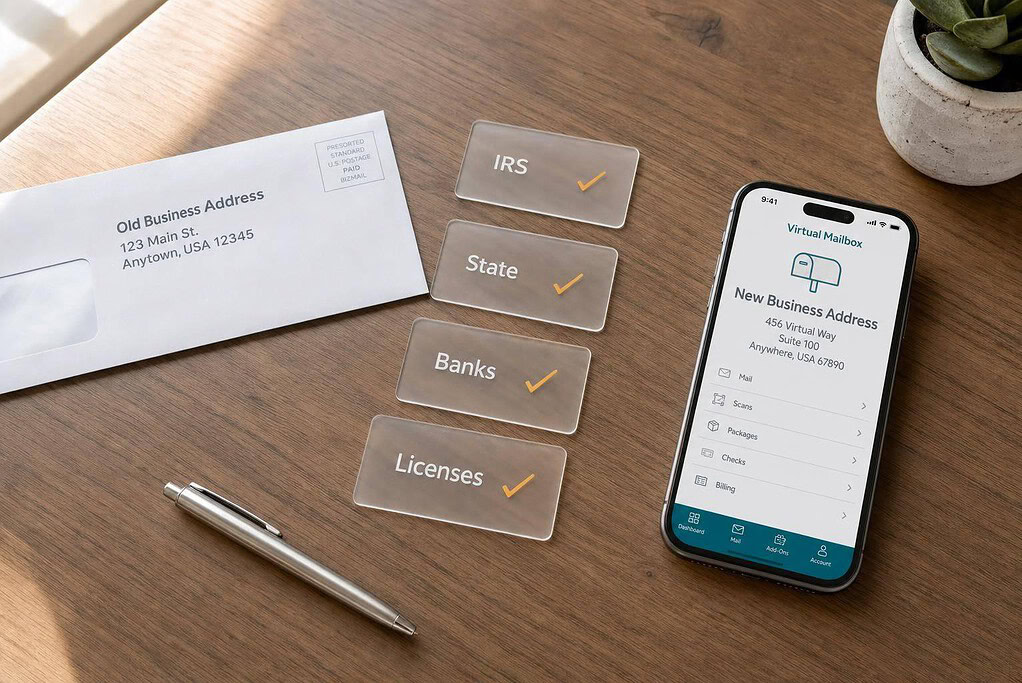
Changing your business address to a virtual mailbox is not one update. It’s a chain of updates. I need to make sure the mailbox is a USPS-approved CMRA, complete PS Form 1583, keep my old address active for a while, and then change records in the right order: IRS, state, banks and licenses, then public listings.
Here’s the short version:
- I can use a virtual mailbox for mailing address changes
- I usually cannot use it for a registered agent address
- I may not be able to use it as my physical business location or licensed premises
- My IRS, bank, and state records will not update by themselves
- I should use the exact PMB address format my provider gives me
- I should track every update until it shows as confirmed
- USPS says a Change of Address request often starts within 7–10 postal business days
- IRS Form 8822-B can take 4–6 weeks to process
A few mistakes cause most problems:
- using Suite instead of PMB
- closing the old address too soon
- assuming one state filing updates every record
- using the mailbox address where a physical address is still required
If I want the switch to go smoothly, I need one address worksheet, one document folder, and one follow-up list. That’s the whole job in plain terms.
| What I’m changing | Can I use a virtual mailbox? | What to check |
|---|---|---|
| Mailing address | Yes | Use the exact provider format |
| Principal business address | Maybe | State and bank rules |
| Registered agent address | No, in most cases | Separate state rule |
| Licensed premises | Usually no | Agency or permit rule |
Bottom line: I’m not just changing where mail goes. I’m changing each record that is allowed to use that address, one by one.
How to Choose a Virtual Mailbox That Is Compliant for Business Use
Start with compliance, not convenience. If you plan to use a virtual mailbox for business mail, make sure it’s a USPS-authorized CMRA. That means the provider is approved by USPS to receive mail for you. If it isn’t CMRA-compliant, agencies and banks may reject the address. After you confirm the mailbox meets that standard, check whether each agency and account will accept the address format you’ll be using.
Every person or business getting mail at that address must complete USPS PS Form 1583, Application for Delivery of Mail Through Agent. This form gives the provider permission to receive mail on your behalf. You’ll need your legal name, a current residential or physical address, and two forms of ID – one with a photo and one that shows your current address. Form 1583 must match your ID exactly, including spelling, middle names or initials, and address format. Some providers let you complete this online. Others require notarization. Ask before you sign up. Once the mailbox is approved, move to record updates in the right order.
Check Address Eligibility Before You Switch
Before you subscribe, confirm that each institution accepts a CMRA address for the exact record you want to change. USPS requires CMRA addresses to follow a private mailbox format. In most cases, that means the street address followed by a private mailbox identifier such as PMB and your assigned number. Use the format the provider gives you, word for word. Don’t change PMB to Suite. That misstates the address type and can lead to rejected records. From there, collect the exact address format and a full list of recipients before you submit any updates.
How to Compare Plans Before You Subscribe
Pick a plan based on the details that affect day-to-day use:
- recipient count
- scan volume
- mail forwarding fees
- storage limits
Count every recipient tied to the mailbox now, plus any you expect to add soon. Then choose a plan that covers that total. Also check current pricing and plan terms at checkout, since providers can change them.
sbb-itb-ba0a4be
How to Prepare Before Filing Any Address Updates
Once your mailbox is approved, get your records in order before you file any change. The easiest way to do that is to make one master address-change worksheet with your legal name, entity type, EIN, old address, new virtual mailbox address, effective date, provider name, provider street address, PMB number, and support contact. It should also show exactly which address is changing.
Build a Master Address Worksheet and Document Packet
A lot of businesses trip up here. They enter the new address one way in one portal, then a slightly different version somewhere else. That tiny mismatch can lead to verification problems and records that don’t line up. To avoid that mess, copy the address exactly as it appears in your mailbox agreement and use that same version everywhere.
Your worksheet is the control center for every filing. Then, before you submit anything, pull together one document packet with:
- Signed mailbox agreement, service activation notice, and any address-verification letter
- Completed USPS PS Form 1583 or your provider’s electronic submission record
- EIN confirmation letter
- Articles of incorporation or organization
- Current business license and state registration records
- Government-issued ID used during mailbox onboarding
It also helps to save PDFs or screenshots of every portal confirmation, approval notice, and message with banks or licensing agencies in one dated folder. Put copies of both the old and new address records there too.
Set one clear effective date as well. Use the day the mailbox is fully active and allowed to receive mail. Don’t use your subscription date if the USPS authorization step still isn’t done.
Keep the Old Address Active During the Transition
Keep the old address active while you switch things over. Set up mail forwarding where it’s available, keep access to the location or leave it with a trusted recipient, and continue checking that address for tax notices, bank letters, renewals, invoices, payments, and legal mail. In plain English: don’t shut the old door before the new one is working.
Keep watching the old address long enough to cover at least one full billing, tax, renewal, or payment cycle tied to your business.
During that period, track every piece of mail that still lands at the old address and update each sender one by one. USPS mail forwarding can help for a short stretch, but it won’t change your IRS record, state filings, bank accounts, or licenses. Those still need direct updates from you. Keep the old address active until the new mailbox is receiving mail and your main senders have been updated. Once the old address is still being monitored, you can move through IRS, state, bank, and license records in order.
How to Update Government, Financial, and Operating Records in the Right Order
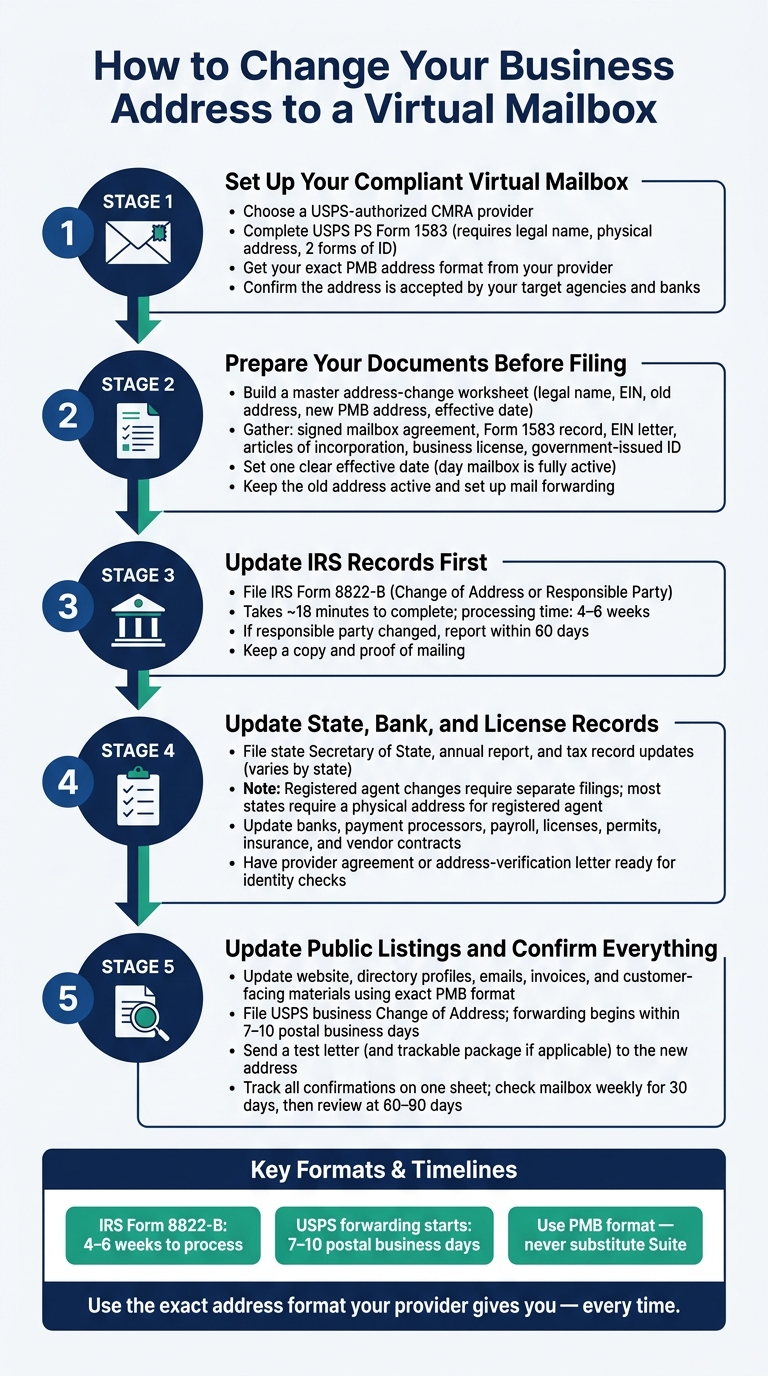
How to Change Your Business Address to a Virtual Mailbox: Step-by-Step
Once your old address is still being monitored and your document packet is ready, handle updates in this sequence: IRS first, state filings second, financial and regulatory accounts third, and public materials last.
Update IRS and State Business Records
Start with the IRS. If your business has an EIN, you’ll usually use IRS Form 8822-B, Change of Address or Responsible Party, to report a new business mailing address or business location. The form asks for your legal business name, EIN, old address, new address, and the kind of address being changed. An authorized person needs to sign it and mail it to the IRS address listed in the current instructions.
Keep a copy of the completed form, along with proof that you mailed it. The IRS says the form takes about 18 minutes to complete, and the address change can take 4–6 weeks to process. If your responsible party changed too, the IRS says that update must be reported within 60 days.
After that, move to your state filings. Update each state’s Secretary of State, annual report, tax, and foreign qualification records using that state’s process. This part can vary a lot. Some states let you file an address change online. Others want an amended annual report or a separate amendment form. And if you’re registered in more than one state, each state needs its own filing.
One more thing: registered agent and registered office changes usually need separate filings. Florida, for example, requires a physical street address for the registered agent and won’t accept a P.O. Box for that purpose. So don’t assume one form fixes everything. Check your state’s rules first.
Once the state filings are in, turn to the accounts tied to payments, renewals, and legal notices.
Update Banks, Licenses, and Internal Business Accounts
After your federal and state records are filed, update your banks, payment processors, payroll, tax accounts, licenses, permits, insurance, bookkeeping systems, vendor files, contracts, and invoices.
Some of these groups will want more than just the new address. Banks and payment processors may ask for a government-issued ID, formation records and qualification filings, EIN confirmation, or proof of a physical operating location, especially for identity checks. Licensing agencies may also require a physical premises for inspection and may accept a virtual mailbox only as a mailing address, not as proof of where the business operates.
It helps to have your provider agreement or address-verification letter ready before you start calling or submitting requests. For contracts, follow the notice steps written into the agreement. In many cases, that means a formal written notice or an amendment, not just a quick email.
Replace the Address on Public and Customer-Facing Materials
Once the official records are done, update the places customers can see. That includes your website, directory profiles, emails, invoices, packaging, and customer documents.
Use the exact address format your mailbox provider gives you every time: street address, mailbox number, city, state, and ZIP Code. This sounds small, but it matters. If the format changes from one place to another, your website, directory listings, and map listings can end up showing mixed records. That can trigger conflicting-record flags in search platforms and compliance systems.
Also, update the structured address fields in directory profiles, not just the visible text on your site. If customers use the address for returns, label it clearly as a mailing address or an authorized return location.
Once these records are changed, confirm each update and test the new mailbox.
How to Manage the Transition and Confirm Every Update Is Done
Track Confirmations and Test the New Mailbox
Once the filings are in, the job shifts from sending updates to making sure each one actually went through. An address change isn’t done just because you submitted it. It counts when it’s confirmed.
Use one tracking sheet for everything. Include the agency or company name, account type, submission date, confirmation number, current status, and follow-up date. Keep receipts, approvals, and screenshots in one dated folder so you can find them fast if something goes sideways.
After that system is in place, test the new mailbox the same way your business will use it in public. Send a letter addressed exactly to the new business address, including the required PMB or mailbox number. If your service includes package handling, send a small trackable package too.
That test tells you a lot in one shot:
- The address format works
- Mail gets delivered
- Notifications come through
- Scans show up
- Forwarding or pickup works as expected
If the test fails, fix the address format before you change public listings. That step can save you from a messy cleanup later.
Use USPS forwarding as a backup while you confirm that each sender has the new address on file. File a business Change of Address request so mail sent to the old address still has a path to you. USPS generally starts delivering to the new address within 7–10 postal business days after the start date. Add the confirmation code to your tracking sheet. Think of forwarding as a short-term safety net, not something to lean on forever.
For the first 30 days, check the virtual mailbox dashboard at least once a week and log each item that arrives. Then, after 60 to 90 days, review statements, renewals, and public listings. Recurring filings and renewals make good checkpoints. If the old address still shows up anywhere, that record slipped through and needs to be fixed right away.
Conclusion: Complete the Switch Without Missing Legal or Mail Obligations
The switch is only done when government records, bank and credit accounts, and public listings all show the same new mailbox address. Miss one piece, and legal notices can land in the wrong place. That can lead to compliance problems or mail issues at the worst time.
The order matters here. Start by making sure the mailbox meets the rules and that USPS Form 1583 is fully processed. Then lock in the exact address format your provider requires. Next, file IRS Form 8822-B and update state records. After that, notify banks, licensing agencies, and insurers. Change public-facing listings last. Before you stop using the old address, run the test letter and package.
For related setup details, see our guides on LLC formation, registered agent requirements, virtual mailbox setup, and foreign qualification.
Keep the tracking sheet active and keep watching the old address until every line shows a confirmed update in effect. That’s when the switch is done.
FAQs
Can I use a virtual mailbox as my business address everywhere?
No. A virtual mailbox can work for general business mail, banking, and branding, but it doesn’t cover everything.
For example, you can’t use it as your registered agent address. Some banks and state agencies may also ask for a separate physical or home address to verify your identity. And you can’t use a virtual mailbox for a driver’s license or voter registration.
What happens if I close my old business address too soon?
Closing your old business address too early can interrupt mail delivery and leave you missing mail that matters. That includes tax forms, government notices, bank verification letters, and legal documents.
And that’s not a small headache. Missed mail can turn into compliance problems, fines, or even administrative dissolution.
The safer move is simple: keep the old address active until every record has been updated and your new service is receiving mail without issues.
How long does it take to complete a business address change?
The timeline mostly comes down to which agencies and institutions you need to notify.
First, give yourself enough time to set up your virtual mailbox. Most providers won’t start service until USPS Form 1583 is approved.
Once your new address is active, file IRS Form 8822-B within 60 days. Some states move faster and may require you to update your address within 30 days.