
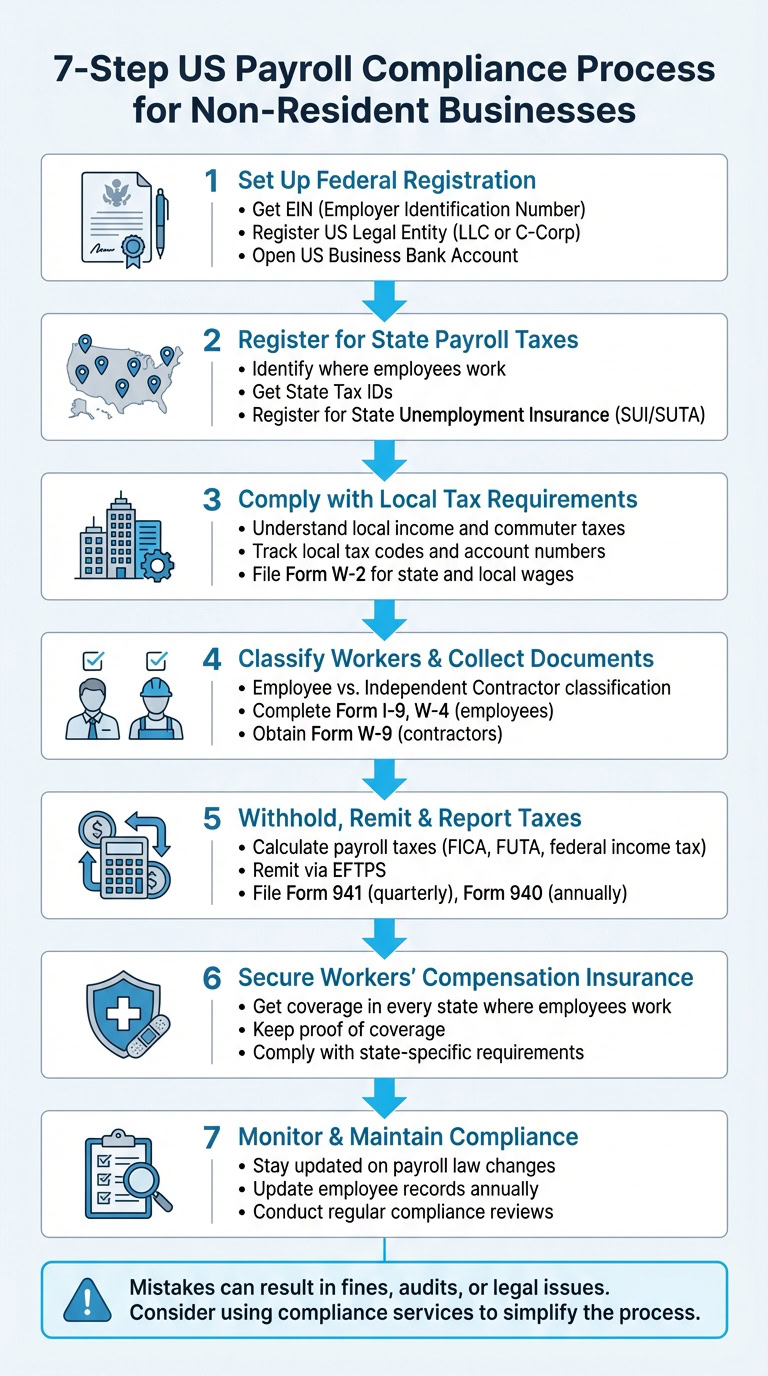
Managing payroll as a non-resident business in the US involves navigating federal, state, and local tax rules. Here’s what you need to know:
- Obtain an EIN: Essential for hiring and payroll processing. Apply via phone, fax, or mail if outside the US.
- Register Your Business: Form a legal entity like an LLC or C-Corp and comply with state requirements.
- State Payroll Taxes: Register in every state where employees work. Rules vary by state.
- Classify Workers Correctly: Misclassification can lead to penalties. Follow IRS guidelines for employees vs. contractors.
- Handle Payroll Taxes: Accurately calculate, withhold, and remit federal, state, and local taxes. Meet all filing deadlines.
- Workers’ Compensation Insurance: Required in most states. Coverage depends on employee locations.
- Maintain Compliance: Regularly update records, monitor law changes, and conduct compliance reviews.
Mistakes in these areas can result in fines, audits, or legal issues. Services like BusinessAnywhere can assist with EIN applications, state registrations, and compliance tracking to simplify the process.
Step 1: Set Up Federal Registration and Legal Requirements
To establish your business in the U.S., you’ll need to tackle a few key steps: securing an EIN, forming a legal entity, and opening a U.S. business bank account. Let’s start with getting your EIN.
Get an Employer Identification Number (EIN)
An EIN is a nine-digit number issued by the IRS that allows you to hire employees and process payroll. The good news? The IRS provides EINs for free. Be cautious of third-party websites that charge fees for this service.
For non-resident business owners, the online EIN application tool isn’t an option if your principal place of business is outside the U.S.. Instead, you’ll need to apply using one of the following methods:
| Application Method | Processing Time | Contact Info |
|---|---|---|
| Phone | Immediate | 267-941-1099 (Mon–Fri, 6 a.m.–11 p.m. ET) |
| Fax | 4 business days | 304-707-9471 (international) |
| 4 weeks | Submit Form SS-4 to the IRS |
The quickest way is to call the IRS international line at 267-941-1099. Have your completed Form SS-4 ready, as the agent will process it during the call. Note that the IRS issues only one EIN per responsible party per day.
The "responsible party" is the individual who owns or controls the business. This person must have a valid Taxpayer Identification Number, such as an SSN or ITIN. To avoid delays, make sure to form your legal entity with the state before applying for an EIN. While you can use your EIN immediately to set up a bank account, wait about two weeks before making electronic tax payments or e-filing returns.
"If you are forming a legal entity (LLC, partnership, corporation or tax exempt organization), form your entity through your state before you apply for an EIN." – Internal Revenue Service
If you want to skip the paperwork, BusinessAnywhere can handle your EIN application for $97, simplifying the process.
Register a US Legal Entity
Most non-resident business owners opt for an LLC for liability protection or a C-Corporation, as S-Corporations are generally limited to U.S. citizens and permanent residents.
To register, you’ll need to file either Articles of Organization (for LLCs) or Articles of Incorporation (for Corporations) with the Secretary of State in your chosen state. A physical U.S. address is also required for registration and official correspondence. Many non-residents use virtual mailbox services to meet this requirement.
Additionally, many new entities must report Beneficial Ownership Information (BOI) to the Financial Crimes Enforcement Network (FinCEN). This federal requirement applies to most LLCs and corporations.
BusinessAnywhere offers $0 business formation (you only pay state fees) and includes a free first year of registered agent service. They also handle BOIR filing for $37, ensuring you meet FinCEN compliance requirements.
Open a US Business Bank Account
Opening a U.S. business bank account is essential for handling payroll and federal tax payments. You’ll need your EIN to get started. Most U.S. banks require you to open the account in person. However, if traveling to the U.S. isn’t an option, some online banking services offer remote account setup.
BusinessAnywhere provides bank account setup assistance to help non-resident business owners navigate this process without needing to visit the U.S. Once your account is open, you can integrate it with payroll software to simplify tax withholdings and other financial tasks.
sbb-itb-ba0a4be
Step 2: Register for State Payroll Taxes
After completing your federal registration, the next step is handling state payroll taxes. This ensures you’re meeting state-specific requirements wherever your employees are located. It’s essential to register in every state where your employees work – not just where your business is based.
Identify Where Employees Work
Your responsibilities for state payroll taxes are determined by where your employees physically work. For example, if you have a remote employee in California and another in Florida, you’ll need to register in both states. State-specific rules often kick in once certain thresholds are met. In California, for instance, you must register within 15 days of paying more than $100 in wages during a calendar quarter.
Some states also have unique remote work tax nexus rules. New Jersey, for example, requires tax withholding for remote employees working in the state for personal convenience, even if your business operates elsewhere. For employees working across multiple states, unemployment tax obligations are typically determined by this hierarchy: 1) where the work is localized, 2) the employee’s main base of operations, 3) the state where the business directs and controls the work, and 4) the employee’s residence.
Get State Tax IDs and Unemployment Insurance
To comply with state payroll tax requirements, you’ll need to register for a state income tax withholding account and a State Unemployment Insurance (SUI or SUTA) account. However, in seven states with no income tax, you’ll only need to register for unemployment insurance.
Before starting the registration process, gather essential details like your EIN, the Social Security numbers of corporate officers, and your Secretary of State registration number. Many states require your business to be officially registered before applying for payroll tax accounts.
Most states now offer online portals to simplify the registration process. For example:
- California uses e‑Services for Business.
- Illinois provides MyTax Illinois.
- Connecticut offers myconneCT.
Some states even have "One Stop" portals where you can register for both income tax withholding and unemployment insurance at the same time.
| State | Income Tax Withholding | Unemployment Insurance | Notable Requirements |
|---|---|---|---|
| California | Required (EDD) | Required (EDD) | Also requires SDI and ETT contributions |
| Florida | Not Required | Required (Dept. of Revenue) | No state income tax; unemployment tax applies to the first $7,000 of wages |
| Connecticut | Required (Dept. of Revenue) | Required (Dept. of Labor) | Includes 0.5% Paid Family and Medical Leave withholding |
| New Jersey | Required (Division of Taxation) | Required (Dept. of Labor) | Teleworker "convenience" rules apply |
Each state has its own tax rates and wage bases. For example, new employers in California face a 3.4% unemployment insurance rate for their first two to three years. In Alaska, the 2025 wage base for Employment Security Tax is $51,700. Understanding state-specific rules is crucial to staying compliant.
If managing registrations across multiple states feels daunting, consider using services like BusinessAnywhere’s compliance support to help you meet deadlines and navigate requirements effortlessly.
Step 3: Comply with Local Tax Requirements
When managing payroll, it’s crucial to address local tax requirements. Many U.S. cities and counties impose local income or commuter taxes based on where employees physically work, adding an extra layer of complexity to your compliance efforts.
Understand Local Income and Commuter Taxes
Local income taxes can vary widely depending on the jurisdiction. Some cities require taxes from anyone working within their boundaries, even if they live elsewhere. For example, 400,000 New Jersey residents and 47,000 Connecticut residents who commute into New York City are subject to local tax filing requirements.
Additionally, eight states – Alabama, Connecticut, Delaware, Nebraska, New Jersey, New York, Oregon, and Pennsylvania – enforce "convenience of the employer" rules. These rules may require you to withhold taxes for the state where your office is located, even if an employee works remotely for personal reasons.
Certain states also have "safe harbor" thresholds that dictate when tax withholding begins. For instance:
- New York: Withholding starts after an employee works in the state for more than 14 days.
- Illinois and West Virginia: The threshold is 30 days.
Here’s a quick comparison of filing and withholding thresholds in some states:
| State | Filing Threshold | Withholding Threshold |
|---|---|---|
| New York | 1 day | More than 14 days |
| Illinois | More than 30 days | More than 30 days |
| Georgia | $5,000 or 5% of wages | Over 23 days or > $5,000 |
| Arizona | 1 day | 60 days |
| West Virginia | More than 30 days | More than 30 days |
Once you understand these rules, the next step is to ensure your records are well-organized to track all local tax codes and account numbers accurately.
Keep Track of Local Tax Codes and Account Numbers
After grasping local tax rules, focus on maintaining detailed and organized records. Just like federal and state tax obligations, staying precise with local tax compliance helps prevent penalties. For example, you’ll typically need to file Form W-2 to report state and local wages and taxes withheld. Keep in mind that federal tax treaties usually don’t exempt you from state and local reporting requirements.
Record all employment tax details, including amounts withheld for local jurisdictions, to ensure accurate year-end reporting. Notably, starting in 2026, the wage reporting threshold on Form W-2 (for cases where no federal income, Social Security, or Medicare tax was withheld) will increase from $600 to $2,000.
To streamline tax management, use tools like the IRS Business Tax Account portal. This platform offers electronic access to tax return transcripts for Forms 940, 941, 943, 944, and 945 for tax years 2023 and beyond. Additionally, verify employee names and Social Security numbers through the Social Security Administration’s verification services before filing state and local reports.
Stay informed about changes in local tax laws by subscribing to the IRS E-News for Payroll Professionals, which provides timely updates on payroll legislation. You can also check IRS.gov/DisasterTaxRelief for information on localized tax relief or deadline extensions that may apply to regions where your employees work.
With 75% of employed adults in remote-capable jobs working from home at least part of the time as of late 2024, staying ahead of local tax requirements is more critical than ever. If managing multiple tax jurisdictions feels overwhelming, consider using services like BusinessAnywhere’s compliance support to track requirements and maintain accurate records across all employee locations.
Step 4: Classify Workers and Collect Employee Documents
Getting worker classification right is crucial. The IRS uses common law tests to determine whether someone is an employee or an independent contractor, primarily based on the level of control exercised. This classification impacts your tax responsibilities, reporting duties, and potential liabilities.
Employee vs. Independent Contractor Classification
The IRS evaluates three key factors: behavioral control, financial control, and the overall relationship between the parties. These rules apply to all workers, whether they work remotely or in an office. Simply working from home doesn’t automatically make someone an independent contractor. Misclassifying workers can lead to unpaid employment taxes and even require filing Form 8919.
| Category | For Employees | For Contractors |
|---|---|---|
| Behavioral Control | Receives detailed instructions on when, where, and how to work; formal training provided | Decides how to achieve results independently |
| Financial Control | Employer reimburses expenses; provides tools and equipment; pays regular wages or salary | Covers own expenses; invests in personal equipment |
| Relationship | Includes benefits like insurance, retirement plans, and paid time off; expectation of ongoing work | Typically project-based with no long-term commitment |
Documenting the factors you considered during classification can help establish a reasonable basis if the IRS audits your business. If you’ve misclassified workers in the past, you might qualify for the Voluntary Classification Settlement Program (VCSP). This program allows eligible businesses to reclassify workers for future periods while receiving partial relief from federal employment taxes.
Once workers are classified, the next step is collecting the necessary documentation.
Complete Required Employee Forms
For employees, you’ll need to gather critical federal forms before issuing their first paycheck. Form I-9 (Employment Eligibility Verification) is mandatory for all hires – citizens and noncitizens alike – to confirm identity and work authorization. Keep in mind, an ITIN cannot be used in place of a Social Security number (SSN) for employment purposes.
You’ll also need Form W-4 (Employee’s Withholding Certificate) to determine how much federal income tax to withhold from wages. If an employee doesn’t provide a completed W-4, you’ll need to withhold taxes at the highest default rate, treating them as single. Employees claiming "exempt" status must submit a new W-4 by February 15 each year to maintain their exemption.
For independent contractors, you must obtain Form W-9, which provides their Taxpayer Identification Number (TIN). Keep this form on file for at least four years. If a contractor fails to provide a valid TIN, you’re required to apply a 24% backup withholding on payments. Payments to nonresident alien contractors are typically subject to a 30% withholding rate unless a tax treaty specifies a lower rate. Starting January 1, 2026, the reporting threshold for nonemployee compensation on Form 1099-NEC will increase to $2,000.
Lastly, verify all employee Social Security numbers using the Social Security Administration’s verification services before submitting reports. If you’re managing workers in multiple locations or handling complex classification issues, compliance tools like BusinessAnywhere can help you stay organized and avoid costly errors.
Step 5: Withhold, Remit, and Report Payroll Taxes
Once you’ve classified your workers and gathered the necessary documentation, it’s time to tackle payroll taxes. This step is often a stumbling block for non-resident business owners, but breaking it into clear, manageable tasks can make compliance much easier.
Calculate and Withhold Payroll Taxes
Start by withholding the right amount of taxes from each paycheck. Federal income tax is calculated based on the employee’s Form W-4 and the IRS guidelines in Publication 15-T. You can use either the Percentage Method or Wage Bracket Method. For nonresident alien employees, follow the instructions in Notice 1392: check "Single" and write "Nonresident Alien" or "NRA" below Step 4(c) on their W-4.
FICA taxes cover Social Security and Medicare contributions. For 2026, you’ll withhold 6.2% for Social Security (up to $184,500 in wages) and 1.45% for Medicare (with no wage limit). As the employer, you’re also required to match these amounts. If an employee earns more than $200,000, you must withhold an Additional Medicare Tax of 0.9%, though employers don’t match this tax.
For bonuses or supplemental wages, withhold at a flat rate of 22%. If the total exceeds $1 million in a calendar year, the withholding rate jumps to 37%. FUTA (Federal Unemployment Tax), on the other hand, is entirely the employer’s responsibility. It’s calculated at a standard rate of 6.0% on the first $7,000 of each employee’s wages and is never deducted from employee paychecks.
Here’s a quick breakdown of the key payroll taxes:
| Tax Type | Employee Rate | Employer Rate | Wage Base Limit |
|---|---|---|---|
| Social Security | 6.2% | 6.2% | $184,500 |
| Medicare | 1.45% | 1.45% | None |
| Additional Medicare | 0.9% | N/A | Over $200,000 |
| FUTA | N/A | 6.0% | First $7,000 |
Once you’ve calculated and withheld the proper amounts, the next step is remitting and reporting these taxes.
Remit Taxes and File Returns
After withholding taxes, it’s crucial to remit them on time and file the necessary returns accurately. Federal tax deposits must be made electronically through the Electronic Federal Tax Payment System (EFTPS) or Direct Pay. Your deposit schedule – monthly or semi-weekly – is determined at the start of the calendar year based on your previous tax liability. If you owe $100,000 or more in taxes on any single day, you must deposit the amount by the next business day.
For quarterly reporting, file Form 941 (Employer’s Quarterly Federal Tax Return) by the last day of the month after the quarter ends: April 30, July 31, October 31, and January 31. For FUTA tax, file Form 940 annually by January 31, with quarterly deposits required only if the tax due exceeds $500. By January 31, you’ll also need to provide employees with Form W-2 and file copies with the Social Security Administration. If you’re filing 10 or more information returns (like W-2s or 1099s), electronic filing is mandatory.
For nonresident alien employees claiming tax treaty exemptions using Form 8233, report their treaty-exempt wages on Form 1042 and Form 1042-S, both typically due by March 15. Managing multiple tax jurisdictions and deadlines can be overwhelming, but tools like BusinessAnywhere can centralize compliance tracking and help ensure you meet all filing requirements on time.
Step 6: Secure Workers’ Compensation Insurance
After handling payroll tax remittance, the next essential step in compliance is obtaining workers’ compensation insurance. This insurance is legally required in almost every state as soon as you hire your first employee. It safeguards both your employees and your business from the financial risks associated with workplace injuries or illnesses. Make sure to get the right coverage based on where your employees are located.
Get Workers’ Compensation Insurance
The coverage you need depends on the states where your employees work. Since each state has its own regulations, you’ll need to secure insurance in every state where you have employees. Keep in mind that coverage in one state doesn’t automatically apply to another unless specifically included. It’s crucial to confirm coverage across all employee locations and notify your insurer if those locations change.
In North Dakota, Ohio, Washington, and Wyoming, private insurance isn’t allowed. Employers in these states must purchase coverage directly through state-run funds. Additionally, you should consider "stop-gap" coverage because state funds generally don’t include employer’s liability insurance. In other states, you have more options, including commercial insurance carriers, competitive state funds, or self-insurance if your business meets the qualifications.
Failing to secure the required coverage can lead to steep penalties. For example, in California, fines can reach up to $100,000. In New York, penalties are $2,000 for every 10 days without coverage, and in Pennsylvania, intentional violations are treated as a third-degree felony, carrying a $15,000 fine and up to seven years in prison. If you’re a subcontractor, be aware that in states like Florida, the primary contractor is responsible for ensuring you have coverage. If you don’t, they could be held liable for your employees. Once you’ve secured coverage, always maintain proof to comply with audits and inspections.
Keep Proof of Coverage
After obtaining insurance, make sure to keep a Certificate of Insurance readily available. This document may be required by main contractors if you’re working as a subcontractor or by state authorities during audits and inspections.
For businesses working as U.S. government contractors or subcontractors on overseas public works, additional coverage under the Defense Base Act (DBA) is required. This federal mandate applies regardless of your employees’ nationality, and over 700 insurance carriers and self-insured employers are authorized by the OWCP to provide this coverage. Managing compliance across multiple locations can get complicated, but tools like BusinessAnywhere can simplify the process by helping you track deadlines, organize documents, and meet state and federal requirements all in one place.
Step 7: Monitor and Maintain Compliance
Once you’ve established a solid compliance framework, the next step is to ensure you’re consistently monitoring it. Payroll compliance isn’t a one-and-done task – laws change, employee details shift, and staying on top of these updates is critical. Regular monitoring helps you avoid penalties and ensures your payroll operations run smoothly.
Stay Updated on Payroll Law Changes
Every January, make it a habit to check the "What’s New" section in IRS Publication 15 (Circular E). This section highlights updates like changes to tax rates, wage bases, and reporting thresholds. For example, in 2026, the Social Security wage base will be $184,500, and some reporting thresholds for forms have increased. To stay in the loop, subscribe to the IRS "E-News for Payroll Professionals" and review the "Future Developments" section on IRS.gov/Pub15. You can also use the IRS Tax Calendar to track important filing and deposit deadlines. Don’t forget to review your tax liability from the lookback period to determine whether you need to follow a monthly or semi-weekly deposit schedule.
Accurate employee data is just as important as keeping up with tax laws.
Update Employee Records and Withholding Information
Employee details can change frequently, so keeping records up to date is a must. Remember, a Form W-4 stays valid until a new one is submitted. Any changes should be implemented by the first payroll period ending 30 days after you receive the updated form. Employees claiming an exemption from federal income tax withholding need to submit a new Form W-4 by February 15 each year. Before filing W-2s, verify all employee information for accuracy, and encourage employees to use the IRS Tax Withholding Estimator if they need to make adjustments. If you spot errors on previously filed returns, correct them promptly by submitting adjusted forms (like Form 941-X). Don’t forget to maintain employment tax records as required.
Conduct Regular Compliance Reviews
Routine compliance checks are essential to ensure your payroll processes remain on track. Reconcile Form W-2/W-3 totals with your quarterly or annual tax returns to catch any discrepancies. Periodically review worker classifications to confirm employees and independent contractors are properly designated. If you find any misclassifications, consider using the Voluntary Classification Settlement Program (VCSP) to address them with partial relief. Update your payroll systems annually to reflect new tax rates and wage base limits, and make sure your business address and "responsible party" information are current with the IRS by submitting Form 8822-B. If you file 10 or more information returns (like W-2s or 1099s), ensure you file electronically and use the Electronic Federal Tax Payment System (EFTPS) for all federal tax deposits.
For added convenience, tools like BusinessAnywhere can simplify compliance by helping you track deadlines, manage employee documents, and centralize payroll records in one dashboard.
Conclusion
Handling payroll as a non-resident business owner demands careful attention to federal, state, and local regulations. Every step, from securing an EIN to maintaining compliance, plays a role in protecting your business. Properly classifying workers, withholding the right taxes, and obtaining workers’ compensation insurance are all critical to avoiding penalties and keeping operations running smoothly.
As Forvis Mazars explains: "Navigating myriad payroll laws and requirements can be challenging, and it is critical to stay compliant and avoid costly fines and penalties." The consequences of non-compliance can be steep. For instance, in New York, failure-to-file penalties can climb to 5% per month on unpaid taxes, capping at 25%. With the rise of remote work, ensuring streamlined compliance has become even more important.
To simplify this process, integrated tools like BusinessAnywhere‘s dashboard can be a game-changer. These platforms automate tax calculations, track employee data, and manage filing deadlines, taking the guesswork out of compliance. For non-residents, they also provide the added benefit of offering a physical U.S. address for official correspondence and tax documentation. By automating these tasks, you reduce risks and ensure your payroll processes remain reliable and efficient.
FAQs
How can a non-resident business obtain a U.S. EIN?
To get a U.S. Employer Identification Number (EIN) as a non-resident business, here’s what you need to do:
- Figure out if you need an EIN: You’ll need one if your business plans to file U.S. taxes, open a U.S. bank account, or hire employees.
- Gather the required information: Have details ready, including your business’s legal name, its physical address outside the U.S., the type of entity (like LLC or corporation), and why you’re applying (e.g., "banking purposes"). You’ll also need information about the responsible party, such as their name, title, and taxpayer ID (SSN, ITIN, or foreign TIN). If you don’t have a U.S. taxpayer ID, you can explain your foreign status instead.
- Fill out Form SS-4: Complete the form with all the necessary details. If you’re submitting a paper form and the responsible party doesn’t have a TIN, write "N/A" in that section.
- Send in the form: You can fax or mail the completed Form SS-4 to the IRS using the contact details in the form’s instructions. Another option is to apply by phone by calling the IRS at +1-267-941-1099. If you apply by phone, you’ll get your EIN immediately after verification.
Once your application is approved, you’ll receive your EIN. This number is crucial for filing taxes, managing payroll, and opening U.S. bank accounts. Keep your EIN notice in a safe place, and notify the IRS if there are any changes to your business details to stay compliant.
How can non-resident businesses stay compliant with payroll taxes across multiple U.S. states?
To stay compliant with payroll taxes across various states, the first step is figuring out where your business has a tax nexus. This means determining where your employees are working – whether they’re in-office, remote, or a mix of both – and understanding any state-specific registration requirements. Once you’ve pinpointed these locations, you’ll need to register with the tax agencies in each state to set up accounts for State Unemployment Insurance (SUI), income tax withholding, and workers’ compensation, as applicable.
After registration, update your payroll system to reflect each state’s specific tax rates, brackets, and deductions. Filing deadlines can differ significantly between states – some require monthly filings, while others might only need quarterly or annual submissions – so it’s crucial to keep track of these schedules. Additionally, monitor for any changes in tax rates or laws to ensure your payroll calculations stay accurate. Keep thorough records of your registrations, filings, and payments for at least three years to avoid compliance issues down the road.
If managing all these requirements feels overwhelming, platforms like BusinessAnywhere can make life easier. They centralize registrations, tax filings, and updates in one easy-to-use dashboard, helping you stay organized, avoid penalties, and simplify your multi-state payroll processes.
What’s the difference between an employee and an independent contractor?
The main distinction between the two roles revolves around control and responsibilities. An employee works under the direct supervision of an employer, who dictates how, when, and where tasks should be done. Employers are also responsible for withholding federal income tax, Social Security, and Medicare taxes, paying unemployment taxes, and often offering benefits such as health insurance or retirement plans.
In contrast, an independent contractor runs their own business and has complete autonomy over how they carry out their tasks. They manage their own taxes, including self-employment taxes, and typically don’t receive benefits or workplace protections.
Misclassifying a worker can have serious consequences, including penalties, back taxes, and liabilities for unprovided benefits. To avoid these issues, businesses should thoroughly assess the working relationship by considering factors like the level of control, financial independence, and the type of work being performed.