If I want to keep my home address off public records, a virtual mailbox is one of the simplest ways to do it. It gives me a real U.S. street address, online mail access, and one place to handle licensing, tax, payer, and banking mail.
Here’s the short version:
- I can use it to separate personal and practice mail
- I can view envelope scans in about 24 to 48 hours
- I can forward, scan, or shred mail without going to an office
- I need to check whether my licensing board, IRS, business filings, and payers allow a CMRA address for each use
- If mail may include PHI, I should treat privacy as the first issue and get a BAA before any PHI is scanned
- To start, I must complete USPS Form 1583 and provide two IDs
A few details matter more than most:
- A virtual mailbox is not a PO Box
- Many services can receive USPS, UPS, FedEx, and DHL
- For therapy practices, the main use case is often privacy + remote mail handling
- For group practices, separate logins and role-based access matter more than extra add-ons
I’d focus on five things before signing up:
- Privacy for my home address
- Mail scanning for payer and tax letters
- PHI handling rules and BAA availability
- Address acceptance by boards, banks, and insurers
- User access if staff need to review mail
A small plan often works for a solo therapist. In the article, BusinessAnywhere lists:
- Basic: $25/month, or $20/month billed annually, up to 2 recipients
- Premium: $40/month, or $30/month billed annually, up to 5 recipients
- Advanced: $85/month, or $65/month billed annually, up to 20 recipients
If I pay month to month, there is also a $25 setup fee.
| What I need to check | Why it matters |
|---|---|
| CMRA vs. PO Box | Banks and agencies may reject a PO Box |
| BAA availability | Needed before PHI is opened or scanned |
| Access controls | Staff should have separate logins |
| Audit logs | Helps track who viewed mail and when |
| Forwarding and check handling | Useful for paper checks and legal documents |
My takeaway: if I run a solo, telehealth, or group practice, a virtual mailbox can work well for mail privacy, digital access, and one public mailing address. But I would verify HIPAA handling and address rules before I switch anything over.
That’s the core of the article in plain English.
How a Virtual Mailbox Helps Therapists and Private Practices
Keep Your Home Address Off Public Records
In many U.S. states, your business address becomes part of the public record. If you’re a therapist working from home, that can put your residential address in state databases, professional directories, and licensing board listings where anyone can find it. A virtual mailbox gives you a real street address to use as your public mailing address instead of your home address.
That also helps you keep a consistent professional identity across licensing forms, tax records, and client-facing documents.
State licensing boards may treat mailing addresses and practice locations differently, so it’s smart to use your virtual mailbox for mail only and check your board’s rules. That privacy perk also makes day-to-day mail handling a lot simpler.
Digitize Insurance, Billing, and Legal Mail
Insurance and billing mail doesn’t wait around. Miss a payer recoupment notice or a credentialing renewal notice, and you could end up with delayed payments, reimbursement problems, or missed follow-up deadlines. A virtual mailbox puts this mail in one digital dashboard, so you can review it from anywhere without stopping by an office.
For a solo therapist, that might mean seeing an Explanation of Benefits (EOB), claim update, bank statement, or tax letter as soon as it lands. For a group practice dealing with multiple payers, it means one place to track incoming billing mail instead of sorting paper across different offices.
Mail that often works best with scanning includes:
- EOBs and claim update letters from payers
- Credentialing and renewal notices
- IRS and state tax correspondence
- Bank statements and vendor invoices
This setup is especially helpful when your team works from home, across offices, or on the road.
Support Remote and Hybrid Practice Models
For distributed practices, one mailbox can keep business mail organized no matter where people are working. Remote and hybrid teams need one central place for incoming mail, and a virtual mailbox gives them that. Mail goes to one address whether the therapist is at home, in the office, or somewhere in between that day.
For group practices, the dashboard can also allow separate access for staff. An office manager can review payer letters and tax notices, while a billing specialist focuses on EOBs and payment mail.
A new practice can also use the address for registration and business banking before leasing office space.
Privacy, HIPAA-Aware Handling, and Address Rules
If your virtual mailbox will receive payer, billing, or legal mail, privacy rules come first.
When Mailed Documents May Involve PHI
Not every piece of mail sent to your practice address counts as protected health information (PHI). Plain business mail does not. But EOBs, superbills, provider correspondence, and billing notices tied to a patient can qualify as PHI under HIPAA.
The safe approach is simple: assume sensitive mail can show up at any time, and build your mail process around that from day one.
What to Check Before Using a Mailbox for Sensitive Mail
Before you send insurance or billing mail through any virtual mailbox, confirm these four items with the provider:
- Encryption: Scanned mail is encrypted at rest and in transit.
- Access controls: Each user has a separate login with role-based permissions.
- Audit logs: The system tracks who accessed each item and when.
- Retention and deletion: You can review image storage time and request deletion.
Once mail may contain PHI, access controls matter just as much as speed. Get a BAA signed before any PHI is opened or scanned.
Under HIPAA, any vendor that receives, maintains, or transmits PHI for you is a Business Associate. Ask the provider directly if they offer a BAA for healthcare customers. If the answer is no, use that service only for non-PHI business mail.
U.S. Mailing Address Requirements to Confirm
Address rules depend on the record type. Check with each agency or payer before you update anything.
| Record Type | What to Confirm |
|---|---|
| State licensing board | Accepts a CMRA for mail vs. practice location |
| Business entity filing | Allows a CMRA for principal office or registered agent |
| IRS correspondence | Accepts the address on IRS forms |
| Insurance credentialing | Allows different billing and service addresses |
Before the mailbox can receive mail, complete USPS Form 1583. This form lets the CMRA receive mail for you and requires two IDs, such as a driver’s license and passport.
After you verify these rules, you can add the mailbox to your licensing, tax, and payer records.
sbb-itb-ba0a4be
Features to Look for in a Virtual Mailbox Service
Pick features that fit the way your practice handles mail, payments, and staff access. Then zero in on the tools that make day-to-day mail work faster and more secure.
Focus on scan quality, searchable storage, mail forwarding, check handling, and role-based access.
Mail Scanning, Storage, and Forwarding
On-demand mail scanning is a must for therapists. If renewal paperwork or audit mail shows up, you need to see it right away.
Searchable storage matters just as much. With OCR-powered PDFs, you can pull up documents by payer, date, or topic instead of digging through files by hand.
And some items still need to stay physical. Signed consent forms, renewed licenses, and paper checks are good examples. That’s where mail forwarding comes in. Check for domestic and international forwarding, along with routing rules for urgent mail versus routine mail.
Check Deposit Options and Multi-User Access
If your practice gets payments by mail, check handling needs a close look. At the very least, you want clear check images so your biller can confirm payer details and amounts before the paper check lands in hand. Some services also send checks to a billing office or lockbox on a fixed schedule, which helps keep cash flow moving without extra trips.
For group practices, multi-user access with role-based permissions is a must. Different people need different levels of visibility:
- A billing coordinator may need insurance checks and EOBs
- A practice owner may need legal and licensing mail
- Individual clinicians may only need their own credentialing correspondence
Make sure the service supports separate logins and permissions for each user, not one shared login for everyone.
BusinessAnywhere Plans for Different Practice Sizes
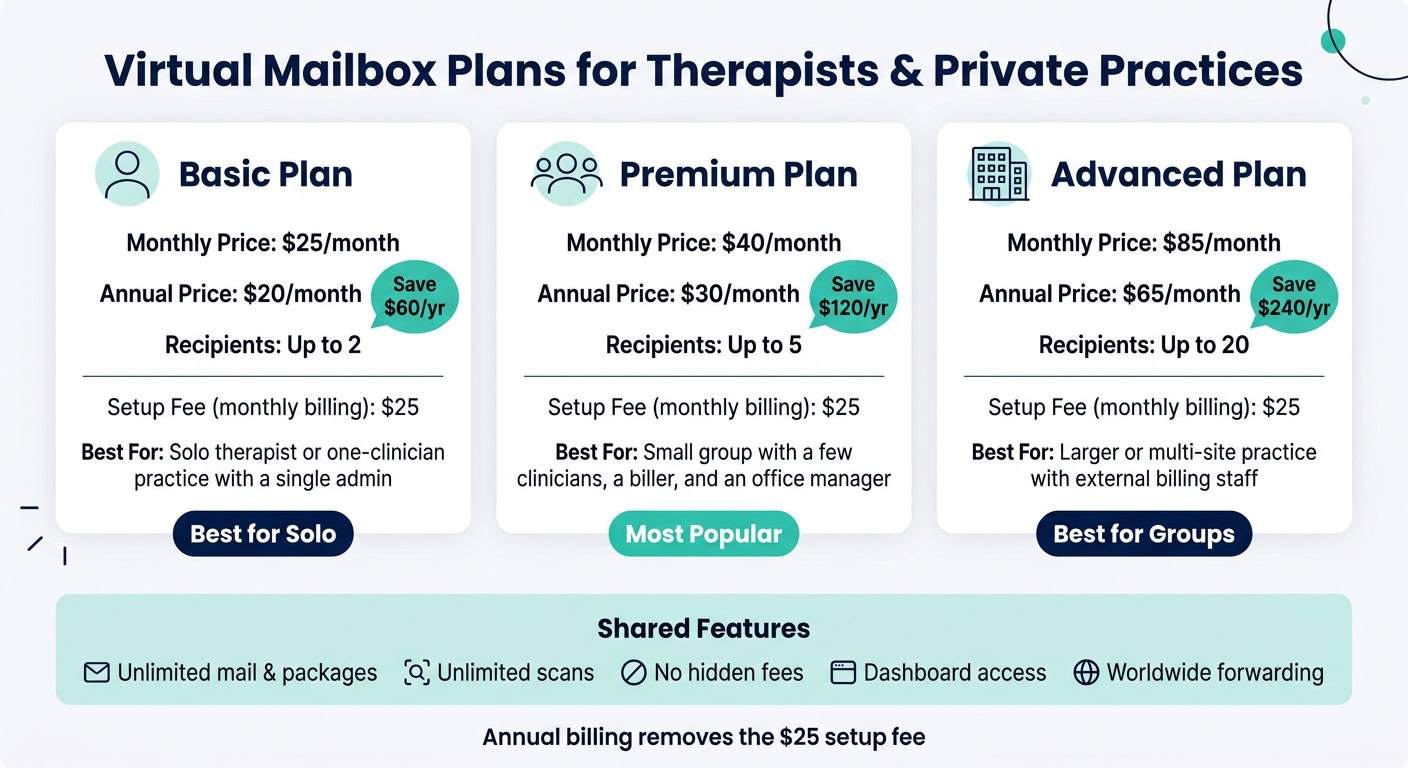
BusinessAnywhere offers three plans based on recipient count. Every plan includes unlimited mail and packages, unlimited scans, no hidden fees, dashboard access, and worldwide forwarding.
The best fit comes down to two things: how many people need access and how much mail your practice gets.
| Plan | Monthly Price | Annual Price | Recipients | Best Fit |
|---|---|---|---|---|
| Basic | $25/month | $20/month | Up to 2 | Solo therapist or one-clinician practice with a single admin |
| Premium | $40/month | $30/month | Up to 5 | Small group with a few clinicians, a biller, and an office manager |
| Advanced | $85/month | $65/month | Up to 20 | Larger or multi-site practice with external billing staff |
If you pay monthly, there’s a $25 sign-up fee. Annual billing removes that fee and lowers the monthly rate. If your team needs more recipients than the Advanced plan includes, extra users are billed separately. Pick the tier that lines up with the number of people who need access.
Once you’ve picked a plan, the next step is updating your practice records.
How to Set Up a Virtual Mailbox for Your Practice
Choose the Right Plan and Complete Setup
After you’ve picked the mailbox features your practice needs, look at your actual mail volume and choose the smallest plan that covers it. Keep the recipient count in mind too. Each recipient counts on its own, so include both your personal name and your legal practice name in that total.
To activate the address, you need to complete and notarize USPS Form 1583. BusinessAnywhere offers an integrated online notary service, which lets you handle this step remotely. For most solo practices, basic scanning is enough. Group practices often need multi-user access. If your office gets more mail, routing and check handling may make life much easier. And if your practice receives checks, make sure secure deposit or forwarding is in place before activation.
Update Licensing, Tax, and Business Records
Once the mailbox is active, update your address everywhere it matters: the IRS, state agencies, licensing boards, banks, payers, and any client-facing materials. That includes your website, email footer, and other public business details. Commercial emails also need to include a valid physical mailing address.
Conclusion: The Simplest Way to Separate Personal and Practice Mail
Start with the smallest plan that fits your mail, complete Form 1583, and then update your records.
FAQs
Can I use a virtual mailbox for my therapy license?
Yes – often for licensing applications, business registration, and general correspondence.
It gives you a professional physical address, but it cannot be used as your registered agent address.
To stay compliant, the provider must be a USPS-registered CMRA, and you must complete USPS Form 1583.
Because rules vary by state and profession, check the requirements for your specific therapy license before you set it up.
Will a virtual mailbox work for HIPAA-sensitive mail?
Yes, if you choose a provider that offers mail handling in line with HIPAA standards.
Before you sign up, check for a few key things:
- secure storage
- secure document transmission
- controlled access to physical files
That extra compliance support may cost about $25 per month.
Which plan fits a solo or group practice?
The right plan comes down to one thing: how many mail recipients your practice needs.
With annual billing, BusinessAnywhere offers:
- Basic: up to 2 recipients for $20/month
- Premium: up to 5 recipients for $30/month
- Advanced: up to 20 recipients for $65/month
Every plan includes unlimited mail scanning and forwarding.
One detail matters here: to stay compliant, each mail recipient must be listed on their own USPS Form 1583.