
Yes – you can market a service business with $0. The short version: make your offer clear, show up on free channels people already use, ask for reviews and referrals after each job, and track which actions lead to calls and customers.
Here’s what I’d focus on first:
- Say exactly what you do, who you help, and where
- Keep your business info the same everywhere
- Set up Google Business Profile, LinkedIn, and local Facebook groups
- Ask for reviews, referrals, and short testimonials
- Turn common client questions into posts, replies, and emails
- Track inquiries, booked calls, proposals, and new clients
A few numbers show why this works:
- 80% of U.S. consumers search online for local businesses every week
- 56% check whether business details are correct across listings
- 92% trust recommendations from friends and family
- 70% trust online reviews
The main idea is simple: free marketing trades money for time. So I’d keep the process tight, repeat the same weekly actions, and judge success by qualified inquiries and new customers – not likes or follower counts.
If I had to sum up the article in one line, it would be this: clear offer + free visibility + proof + follow-up = more leads without ad spend.
Build a Clear Offer and Basic Marketing Foundation First
Free marketing doesn’t work well if someone lands on your profile and still has to guess what you do, who you help, or how to contact you.
Before you post, network, or ask for referrals, get the basics in place. BrightLocal‘s 2025 consumer research found that 56% of consumers often or always verify that business information is correct and consistent across online mentions. So if your details don’t match from one profile to the next, you can lose trust before the first conversation even starts.
Write a One-Sentence Description of What You Do and Who You Help
Use this formula: "I help [who] [solve what] with [service] in [location or service area]."
That small shift can make a big difference. "Web designer" is just a title. But "I build mobile-friendly websites for local contractors in Denver who need more quote requests" tells a prospect right away if you’re the right fit.
If you work with people from anywhere, say that plainly. For example: "serving clients throughout the United States by video call."
Then make sure every profile and message ends with one clear next step. Keep it simple:
- "Email [email protected] for a free 15-minute intro call"
- "Call (512) 555-0147 for an estimate"
A single, easy action gives people a clear path forward. And when that part is clear, every free marketing channel gets easier to turn into inquiries.
Keep Your Contact Details Consistent Across Every Profile
Create one reference doc with your exact business details:
- Business name
- Phone
- Website
- Hours
- Service area
- Short description
Then copy from that doc every time you update or set up a profile. Don’t rewrite it from memory. Use the same phone format, the same spelling, and the same service-area wording everywhere – Google Business Profile verification, LinkedIn, Facebook, your email signature, invoices, and proposals.
Once this base is set, your free channels can all point leads to one clear place.
sbb-itb-ba0a4be
Get Found for Free Where Clients Are Already Looking
With your offer and contact details in place, the next step is simple: show up where people already search. For many service businesses, three free channels can bring in leads: Google Business Profile, LinkedIn, and local Facebook Groups.
Set Up and Optimize Your Google Business Profile for Local Leads
Google Business Profile is free, and it can help your business appear in Google Search and Maps.
If you run a service-area business – like plumbing, cleaning, consulting, or mobile auto repair – you don’t need a storefront. You can hide your street address and show only the cities or ZIP codes you serve. Google lets you add up to 20 service areas, so a Denver-based mobile dog groomer could list Denver, Aurora, and Lakewood if those are places they can actually cover.
Before you can fully manage the profile, Google has to verify the business. Verification may happen by phone, text, email, live video, or mail, and it can take up to 5 business days.
After that, fill out every field that fits your business. Pick the most specific primary category you can. Add plain-English service details like "move-out cleaning" or "drywall repair." Make sure your hours, phone number, website, and photos stay up to date. Photos of finished jobs and your team can help people feel more comfortable reaching out.
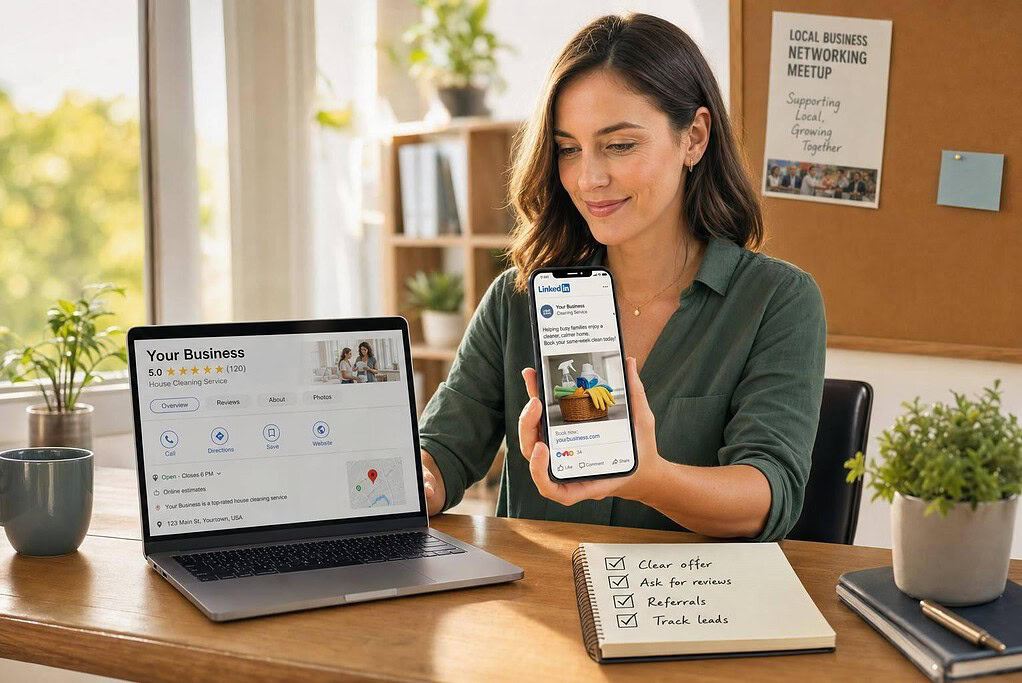
Reviews matter a lot here. They’re one of the strongest trust signals on your profile. After each job, send your direct Google review link and ask for an honest review. Don’t offer rewards or discounts for reviews, and reply to every review in a professional way.
Use LinkedIn and Facebook Groups to Reach the Right People
Your LinkedIn profile should sound more like a service page than a resume. Instead of a vague title like "Founder," use a headline that tells people what you do and who you help. For example: "Bookkeeper helping Austin contractors clean up monthly books and cash flow."
In your About section, explain:
- who you help
- what problem you solve
- where you work
- how people can contact you
Then add proof. That might be years of experience, industries served, certifications, or anonymized results. Freelancers and small business owners can also set up free LinkedIn Service Pages to show their services.
For content, keep it simple. Share short posts that answer questions clients ask all the time. A checklist works. So does a common mistake to avoid, or a short before-and-after example. End with a low-pressure call to action like "Message me if you want the checklist." And before sending direct messages, spend some time leaving useful comments on posts from prospects and referral partners. It warms things up and makes outreach feel less out of the blue.
On Facebook, join local groups where your clients already hang out. Read the group rules first. Some groups welcome business posts; others don’t. Mention your business only when the rules allow it. Focus on being helpful: answer questions, share advice, and skip the copy-paste promo message across a bunch of groups.
As these channels start bringing in attention, use each job as a chance to create one more asset – a referral, a testimonial, or a short piece of content.
Get Leads Through Referrals, Testimonials, and Helpful Content
Once your profiles are live, use each finished job to bring in more work. A single project can lead to a referral, a testimonial, and content you can reuse later.
That matters because referrals and reviews carry a lot of weight. According to Nielsen, 92% of consumers trust recommendations from friends and family, and 70% trust online reviews. For a service business with no budget, that kind of trust is gold.
Ask for Referrals and Testimonials at the Right Moment
Timing makes a big difference. Ask right after a clear win: when a project wraps up, a client sends happy feedback, books again, or gets a measurable result. In that moment, the experience is still fresh, and people are more likely to say yes.
Be specific when you ask for referrals. Don’t just say, “Send people my way.” Tell them who you help right now, then ask if they know one person or business that needs that same kind of help. That small shift makes the request easier to act on.
For testimonials, skip broad asks like “Would you write something nice?” They usually lead to bland praise that doesn’t help much. Instead, send these three prompts:
- What problem were you solving?
- What did we do?
- What changed?
That gives you feedback people can actually use. Good testimonials don’t just praise the service. They show the result.
Before you publish anything, get written permission. Use this template: "May I use your comments on my website, Google Business Profile, and social media? I can use your full name, first name only, or keep you anonymous." Keep that approval in your email thread.
Each completed job should produce one proof point and one reusable answer.
Turn Common Client Questions Into Short, Reusable Content
Client questions are a great source for content because they come straight from real buying concerns. If someone asks it on a sales call or during onboarding, there’s a good chance the next prospect is wondering the same thing.
A few common examples:
- "How much does this cost?"
- "How long does it take?"
- "Can I do this myself?"
- "What should I prepare before hiring you?"
- "How do I choose the right provider?"
One answer can go a long way. You can turn it into a LinkedIn post, a Facebook-group reply, a Canva checklist, and a short email. Same idea, different format.
Google Business Profile also gives you a place to reuse timely answers. It supports Update, Offer, and Event post types, so your content can show up on Search and Maps. For email, Mailchimp‘s free plan covers up to 250 contacts and 500 sends per month.
Keep the next step simple. End each piece with one action: message you, call you, or request a quote. Put the answer where prospects already spend time, then point them toward the next move.
Track What Works and Build a Simple Weekly Marketing Routine
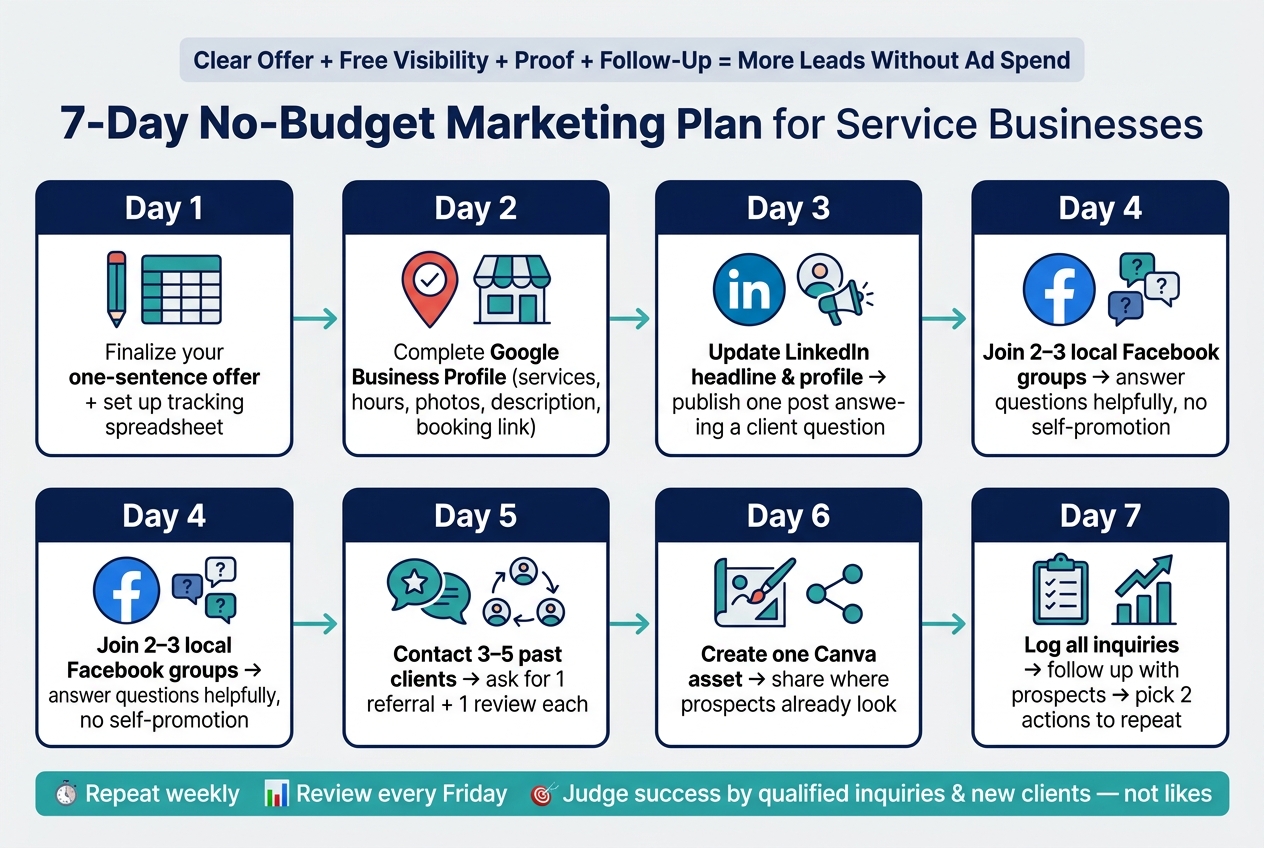
7-Day No-Budget Marketing Plan for Service Businesses
No-budget marketing may not cost cash, but it does cost time. So use that time on actions that lead to inquiries, consultations, referrals, and clients. Once your profiles are live and your outreach is in motion, stop focusing only on posting. Start measuring what brings in leads. That’s how you figure out which free actions are worth doing again.
Track Inquiries, Calls, Reviews, and Conversions in a Spreadsheet
Track every lead source in one place so you can see where your limited time is paying off. Create one spreadsheet row for each prospect and use these core fields: Date | Prospect Name | Source Channel | Service Requested | Follow-Up Date | Status | Outcome | Revenue. Put any extra details in Notes.
Use the same source labels every time: Google Business Profile, LinkedIn, Facebook group, referral, email, networking community, website, or repeat client. When someone reaches out, ask, "How did you hear about us?" Analytics tools only show part of the story. Your spreadsheet fills in the gaps.
Review your inquiry-to-client rate each week. Divide new clients by qualified inquiries, then multiply by 100. For example, 3 clients from 12 qualified inquiries gives you a 25% conversion rate. You can break this down by channel later, but wait until you have enough data. One or two leads isn’t enough to judge a channel.
Google Business Profile can also show useful interaction data, but treat those numbers as lead signals, not confirmed sales. Google counts a "call" as a tap on the call button, not a completed conversation, and website clicks are just clicks to your site – not proof of a sale or booked job. Check those numbers against your phone log and spreadsheet. If profile views go up but inquiries don’t, look again at your offer, service description, reviews, or call to action.
Follow a 7-Day No-Budget Marketing Plan to Get Started
Use your first week to build one routine you can repeat. Don’t try to test every channel at once. Small actions done again and again beat random bursts of promotion.
- Day 1: Finalize your one-sentence offer. Set up the tracking spreadsheet.
- Day 2: Complete your Google Business Profile – services, hours, photos, description, and a direct way to book or inquire. Record your starting performance figures.
- Day 3: Update your LinkedIn headline and profile so they show who you help and what result you deliver. Publish one short post that answers a common client question.
- Day 4: Find two or three local or industry Facebook groups that fit your work. Read the rules, then answer questions in a helpful way without promoting yourself.
- Day 5: Contact three to five past clients or contacts and ask for one referral plus one review.
- Day 6: Create one Canva asset and share it where prospects already look.
- Day 7: Log every inquiry from the week, follow up with active prospects, and pick two activities to repeat next week.
Set aside 20–30 minutes every Friday to review inquiries, consultations, clients, referrals, reviews, and revenue. Then repeat one activity that’s working and test one new one. Keep your offer and tracking method the same for at least a few weeks. If you change too much too soon, you won’t know what actually moved the needle.
FAQs
How long does free marketing take to work?
Free marketing is a long-term play. Don’t expect results in the same week. Early organic leads often start to show up around weeks 8 to 10, and many efforts follow a 30- to 90-day sales cycle.
That said, some channels move faster than others.
- Email marketing may start showing results in 1 to 2 months
- Social media often takes 3 to 4 months
- SEO and content marketing usually take 6 to 12 months
It helps to think of it like planting seeds. Some sprout sooner, while others take more time before you see anything above the surface.
What should I do first if I have no online presence?
First, make sure your business is set up as a legal entity and has an EIN. Then build a professional website that shows what you do and why people should trust you.
At the same time, set up and verify your Google Business Profile. You don’t need to be on every platform right away. It’s usually smarter to focus on one or two channels where your target audience already spends time.
How can I tell which free marketing channel brings real clients?
Track results instead of bouncing from one tactic to the next. Pick one or two channels where your audience already spends time, then stay with them for two to four months so you can gather enough data to judge what’s working.
Pay attention to what each channel brings in, like inquiries, consultation requests, or referrals. It also helps to ask new clients how they heard about you, then check Google Analytics or customer surveys to confirm which sources are bringing in actual clients.