Most new business owners don’t need more posts. They need a simple plan. If I were starting today, I’d set 1–2 goals for the next 90 days, pick one main platform plus one support channel, post 3–5 times a week on the main channel, and track only 3–5 numbers each week.
Here’s the short version:
- Start with goals: one awareness goal and one action goal
- Pick your buyer first: who they are, what problem they want fixed, and why they’d buy now
- Choose fewer platforms: not every business should start on Facebook or Instagram, even though 84% of U.S. small and midsize businesses use Facebook and 67% use Instagram
- Set up profiles before posting: bio, link, contact info, hours, and service area
- Use a simple content mix: tips, behind-the-scenes, customer proof, and offers
- Watch action metrics: clicks, calls, DMs, forms, and bookings matter more than follower count
If the business is local, I’d put extra focus on Google Business Profile. Complete GBP listings are 2.7x more likely to be seen as reputable, and about 5% of profile views lead to a direct action like a call, click, or directions request.
A simple starting point looks like this:
| Area | What I’d do first |
|---|---|
| Goals | Set 1 visibility goal and 1 conversion goal |
| Audience | Define the first buyer in plain terms |
| Platforms | Pick 1 main channel and 1 support channel |
| Content | Use 3–4 repeat post types each month |
| Posting pace | 3–5 posts weekly on the main platform |
| Tracking | Review reach, saves, clicks, calls, and DMs weekly |
That’s the whole idea: start small, stay consistent for 90 days, and keep the channels that lead to action.
Set 1–2 Clear Goals and Define Your Audience
Start with a 90-day goal, a first-buyer profile, and a one-sentence message. Those three pieces shape what you post and where you post it.
Choose Starter Goals for the First 90 Days
Pick one visibility goal and one action goal for your first 90 days. Here’s what that can look like for different business types:
| Business Type | Awareness Goal | Conversion Goal |
|---|---|---|
| Local plumber | Google Business Profile views | Phone calls and quote requests |
| Freelancer or consultant | LinkedIn profile views | Consultation requests |
| New online store | Instagram reach | Product page clicks and first purchases |
| B2B startup | LinkedIn engagement | Demo inquiries |
Track only 3–5 metrics per week. That keeps things simple and stops you from drowning in numbers.
And don’t treat follower count as your main metric. A big audience can look nice, but it doesn’t always lead to action. If engagement is one of your goals, watch metrics like:
- Comments
- Saves
- Shares
- Replies
- DMs
Once your goal is set, the next step is making your profile easy to understand at a glance.
Write a One-Sentence Brand Message
Your brand message should be easy to spot on your profile. It needs to answer three things right away: who you help, what you offer, and where you serve them.
A simple formula that works is: "I/We help [specific audience] [achieve result] with [product or service] in [location or market]."
For example: "We help busy homeowners in Dallas keep their yards clean year-round with reliable weekly lawn care."
Use the same name, phone number, website, hours, and location across every profile. If your details change from one platform to another, people can get confused fast.
Identify the Customers Most Likely to Buy First
Your first customer profile doesn’t need to be perfect. It just needs to be specific enough to guide your content.
Start with four filters:
- B2B or B2C – Are you selling to other businesses or directly to consumers?
- Local or nationwide – Does your customer need to be near you, or can you serve anyone in the U.S.?
- Main problem – What frustration or need makes them look for a fix right now?
- Reason to buy now – What pushes them to act today instead of next month?
A bookkeeping service targeting small business owners stressed about tax season needs a very different content plan than a skincare brand targeting women ages 25–40 who want sensitive-skin routines. That changes the platform, the posts, and even the captions.
Define your first customer profile before you move on. That buyer profile will point you to the best platform to start with.
Pick 1–2 Social Platforms That Match Your Business
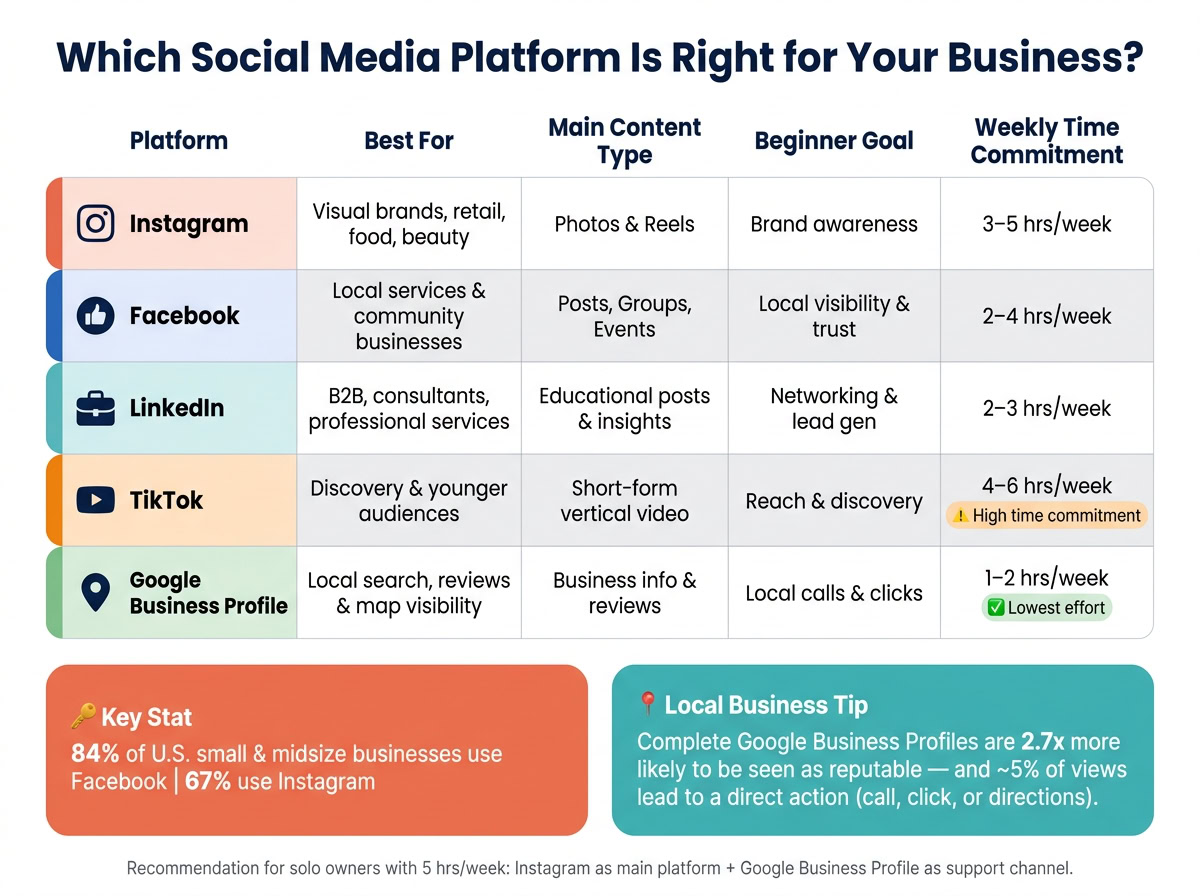
Use your first-buyer profile to choose one main platform and one support platform. For now, skip the rest.
How Instagram, Facebook, LinkedIn, TikTok, and Google Business Profile Differ
Each platform does a different job. Pick the right mix, and your early work stays focused instead of turning into a mess.
Instagram works best for visual storytelling. If you can show your product, service, or process through photos and short videos, it’s a strong fit. Think restaurants, boutiques, fitness studios, beauty services, and businesses with strong before-and-after visuals, like home organizers or landscapers. Reels, Stories, location tags, and city- or niche-specific hashtags can help local people find you.
Facebook reaches a broad age range, including older adults, and it’s especially useful for local community building. It supports events, longer posts, and direct messaging from the same Facebook Page. That makes it a good fit for businesses that depend on repeat customers and word-of-mouth referrals.
LinkedIn fits B2B and professional services best. It leans toward educational posts, industry insight, and case studies more than lifestyle content. For example, a U.S. marketing consultant could post once a week about one practical tactic, share short client win snippets, and leave thoughtful comments on posts from local business owners and industry leaders. LinkedIn is less about daily entertainment and more about trust with decision-makers.
TikTok runs on algorithm-based discovery, so even a brand-new account can get traction if the content connects. Polished production matters less here than showing up in a natural way. You can repurpose Instagram Reels or film during your normal workday to keep things simple. But there’s a catch: TikTok usually calls for 3–5 short videos per week, so only choose it if you can keep up with that pace.
Google Business Profile helps people find you in local search and take action. Businesses with complete profiles are 2.7x more likely to be considered reputable, and about 5% of profile views lead to a direct action like a call, website click, or direction request. If your business depends on local foot traffic or service calls, GBP should sit near the top of your list.
How to Pick the Right Channel Mix Based on Audience and Time
Choose the channel that fits both your buyer and the time you can actually give it each week. Your main platform should line up with where your core customers already spend time. Your second platform should be one where you can repost or lightly adjust content without doubling your workload. If local search or walk-in traffic matters, add Google Business Profile.
| Platform | Best For | Main Content Type | Beginner Goal | Weekly Time Commitment |
|---|---|---|---|---|
| Visual brands, retail, food, beauty | Photos and Reels | Brand awareness | 3–5 hours | |
| Local services and community businesses | Posts, Groups, events | Local visibility and trust | 2–4 hours | |
| B2B, consultants, professional services | Educational posts and insights | Networking and lead gen | 2–3 hours | |
| TikTok | Discovery and younger audiences | Short-form vertical video | Reach and discovery | 4–6 hours |
| Google Business Profile | Local search, reviews, and map visibility | Business info and reviews | Local calls and clicks | 1–2 hours |
A solo owner with only 5 hours per week, for example, is usually better off making Instagram the main platform and keeping GBP up to date than trying to force TikTok into the schedule too soon. Once you’ve picked your channels, the next step is to finish your profiles and put together a simple monthly content plan.
sbb-itb-ba0a4be
Set Up Your Profiles and Build a Basic Content Plan
Complete Your Profile Setup Before You Post Anything
Before you publish even one post, fill out every key part of your profile. People make snap judgments online. If your page looks half-done, many of them will leave just as fast.
At a minimum, each profile should have:
- A business handle that closely matches your business name
- A clear logo or professional headshot
- A short bio that says who you help and what you do
- A website or booking link
- Contact details
If you run a local business, add your hours and service area too.
Google Business Profile (GBP) needs extra attention. Claim your listing, choose the most accurate primary category, upload high-quality photos of your location or work, and make sure your business details match your website exactly. Hours and service areas matter here as well.
Plan 3–4 Content Types You Can Repeat Each Month
Once your profiles are done, don’t reinvent the wheel every time you need to post. Build a simple content mix you can repeat each month.
A good starting point is four content pillars:
- Educational tips
- Behind-the-scenes updates
- Customer proof
- Offers or promotions
Each one lines up with a different part of the buyer journey. Tips help people find you. Proof helps them trust you. Offers help them take action.
A practical starter schedule is 3–5 posts per week on your main platform and 1–3 posts per week on your secondary platform. On that second platform, you can reuse your best posts with small edits instead of making everything from scratch.
For example, a Denver lawn care company might post a lawn tip, a before-and-after photo, a customer review, and a seasonal deal. That gives you a solid mix without running yourself into the ground.
Use Canva, Buffer, and Meta Business Suite to Stay Consistent
These tools help you make, schedule, and manage the content pillars above without turning the process into a daily scramble.
Canva helps you set up a simple brand kit with two or three colors, one headline font, one body font, and your logo. From there, you can build reusable templates for each content pillar. That means each new post takes less time.
Buffer helps you schedule and organize posts across more than one channel, so you can batch your work instead of logging in every day to post manually.
Meta Business Suite is free and manages Facebook and Instagram together. You can handle posting, scheduling, inbox messages, and basic performance data in one place.
| Tool | Primary Use | Best For | Beginner-Friendly Strength |
|---|---|---|---|
| Canva | Graphic design | Branded graphics and reusable templates | Drag-and-drop interface; no design experience needed |
| Buffer | Content scheduling | Planning and automating cross-platform posts | Simple queue management for multiple accounts |
| Meta Business Suite | Facebook and Instagram management | Solo founders managing Meta platforms | Integrated inbox, cross-posting, and unified analytics |
A simple way to start: build your templates in Canva, use Meta Business Suite if Facebook and Instagram are your main platforms, and bring in Buffer when you need to manage a second channel outside Meta. Once that setup is in place, your weekly metrics will make it pretty clear what deserves more attention and what should go.
Track Results, Avoid Common Mistakes, and Keep Improving
Weekly Metrics That Show Real Progress
Once your content is live, let the numbers guide what you do next. After the first few weeks, set aside 30–45 minutes each week to review a short list of metrics. The ones that matter most are reach, engagement (likes, comments, shares, and saves), direct messages, website clicks, calls, and lead form submissions. Those numbers tell you two things: whether people are seeing your content and whether they’re taking action.
A simple way to read the data:
- Reach = awareness
- Saves and profile visits = interest
- Clicks, calls, and form submissions = action
Here’s what that looks like in practice. If a local salon’s Instagram posts reach 2,000 people per week but bring in zero DMs or website clicks, the content is getting seen, but it isn’t turning attention into inquiries. That’s a clear sign to adjust the offer, topic, or call to action.
Each month, look at your top 3–5 posts based on engagement and clicks. Then do more of what worked: the same format, the same kind of topic, or the same CTA if it pulled people in.
If you run a local business, review Google Business Profile on its own. Watch for calls, clicks, directions, bookings, and messages coming from Search and Maps.
Beginner Mistakes That Waste Time or Budget
If performance looks weak, start with the basics before you change everything.
| Mistake | Why It Hurts | What To Do Instead |
|---|---|---|
| Posting on too many platforms | Spreads limited time and energy too thin, so results stay inconsistent everywhere. | Focus on 1–2 channels where your customers are most active. |
| Stopping after a few weeks | Social media needs consistency, and long gaps can make a business look inactive. | Commit to a simple schedule you can maintain for at least 90 days. |
| Posting only promotions | Feels pushy and doesn’t build the trust or engagement people need before they buy. | Mix tips, behind-the-scenes content, testimonials, and occasional offers. |
| Ignoring comments or reviews | Signals poor service and misses chances to build trust. | Reply to comments, DMs, and reviews within 24–48 hours. |
| Mismatch in phone number, URL, hours, or address | Confuses customers and can lead to missed calls or visits. | Audit your contact details across every platform and correct any discrepancies. |
The big idea is simple: make small weekly changes based on what the numbers say, not based on whatever trend is making the rounds.
Conclusion: Start Small, Stay Consistent, and Measure What Matters
Effective social media marketing for a new business doesn’t need to be complicated. It’s a repeatable system: set 1–2 clear goals, define your audience, choose 1–2 main channels based on where your customers spend time, build a content plan around 3–4 repeatable content types, and use tools like Canva, Buffer, and Meta Business Suite to stay on track.
Posting with consistency on a small number of channels will beat scattered activity across many. Measure the goals you set, keep the channels that drive action, and cut the ones that don’t.
FAQs
How long should I test a platform before switching?
Use a 90-day calendar to launch, test, and review the platform. That gives you enough time to spot patterns without dragging things out.
Track performance against your KPIs from day one. If a channel keeps missing its goals after a few tests, move your time and budget to a channel that’s pulling its weight.
But don’t switch too fast. First, try to improve what you already have by changing the offer, tightening the targeting, or reworking the creative. Sometimes a small tweak can change the whole picture.
Keep a close eye on your analytics, and stay flexible as the data comes in. The goal isn’t to stick to the plan no matter what. It’s to learn, adjust, and put more effort into what works.
What if I have no photos, reviews, or content yet?
Start with content that doesn’t depend on case studies or customer proof.
Focus on the basics first:
- Educational posts
- FAQs
- Clear pricing
- Your method
- Common customer questions
This kind of content helps people understand what you do and how you work. It’s simple, useful, and a good place to begin when you don’t have much social proof yet.
If you don’t have case studies, use industry benchmarks to shape your plan for now. At the same time, work toward putting together a simple case study as soon as you can. It doesn’t need to be fancy. Even one clear example can go a long way.
Set your brand message first so people hear the same story wherever they find you. Then show up consistently on 1–2 main channels instead of trying to be everywhere at once. Keep your goals grounded: build awareness, get engagement, and bring in your first leads.
Should I use paid ads right away or start with organic first?
For new businesses, it’s usually smart to start with organic channels like social media, email marketing, or content marketing. They cost less, and they give you time to sharpen your brand message and learn what your audience actually cares about before you put money into ads.
That early stage matters. If you jump into paid ads too soon, you can end up paying to promote a message that isn’t dialed in yet. Organic channels help you test your positioning, see what gets attention, and figure out what clicks with people.
Paid ads make more sense when you’re ready to scale, need fast testing, or already have solid tracking in place and a clear offer. In other words, ads work best when you know what you’re selling, who it’s for, and how you’ll measure results.
If your budget is tight, keep it simple: focus on one high-ROI organic channel first.