If your family moves, travels, splits time between homes, or helps a parent with mail, one shared virtual mailbox can keep everything under one address. Instead of changing your mailing address over and over, I can use one U.S. street address, view mail online, forward what matters, shred junk, and let other approved adults access the same account.
Here’s the short version:
-
One address for the whole household
-
Shared dashboard access for approved family members
-
Scan, forward, store, shred, and sometimes deposit checks
-
Each adult must complete USPS Form 1583
-
Works well for RV families, snowbirds, co-parents, and caregiving setups
A few details matter most. A virtual mailbox is not a PO box. It gives me a street address, which is often easier to use with banks and other mailers. Many services also offer mail scans within 2 business days and let me add multiple recipients under one account. Pricing in the article starts at $20/month.
If I want one place to handle family mail without asking a relative or checking a box in person, this setup is often the simplest option.
Quick comparison
|
Option |
Address stays the same if I move? |
Online mail access |
Package handling |
Good for shared family use |
|---|---|---|---|---|
|
Home address |
No |
No |
Yes |
Limited |
|
USPS PO box |
No |
No |
Limited |
Limited |
|
Relative’s address |
Maybe |
No |
Yes |
Often messy |
|
Virtual mailbox |
Yes |
Yes |
Yes |
Yes |
That’s the core idea: one address, shared access, fewer mail problems for the household.
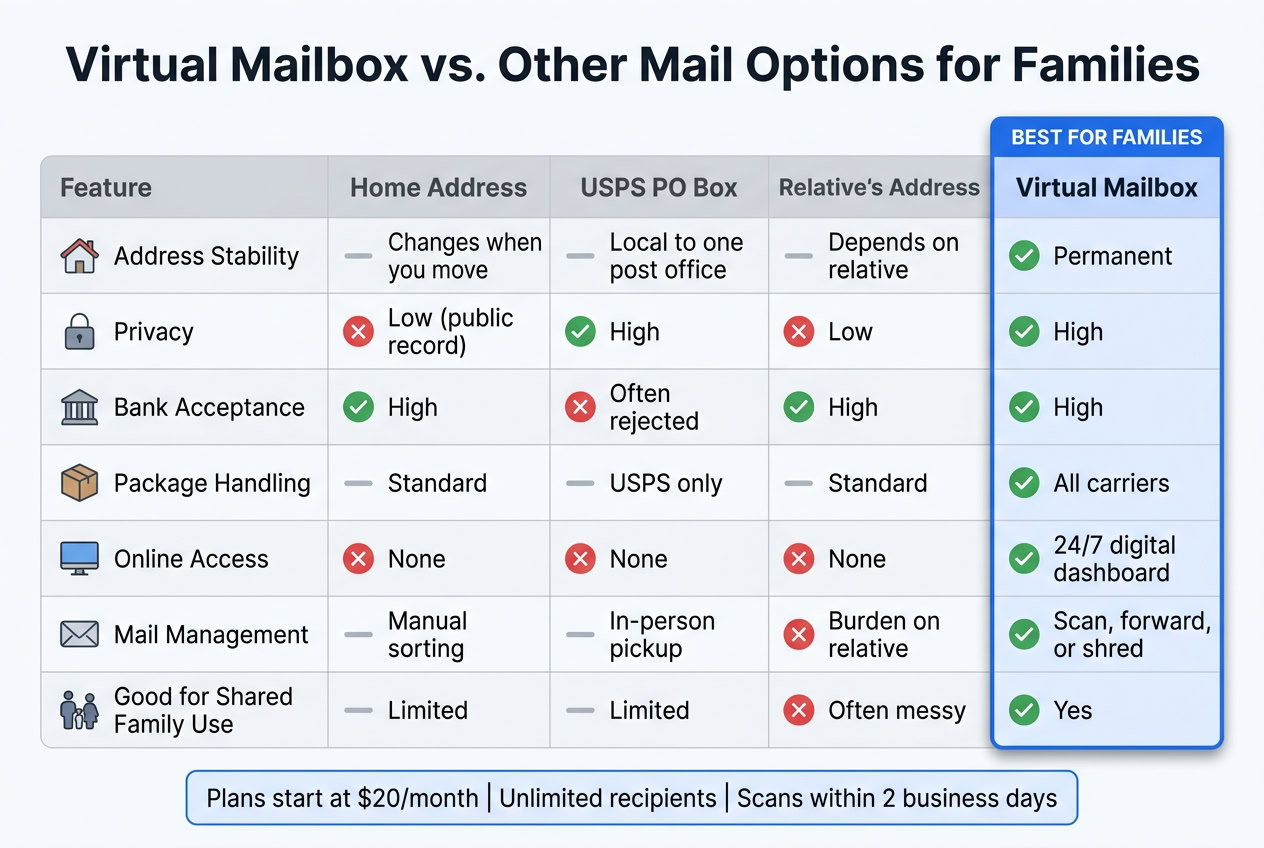
Virtual Mailbox vs. Other Mail Options for Families
What a family virtual mailbox is and how it works in the U.S.
A family virtual mailbox gives you a real U.S. street address at a CMRA, not a PO box. Mail and packages are sent there, then the staff logs and scans each item. For families, the big draw is simple: everyone can use the same address from one dashboard, even if they live in different cities or states.
There’s one key setup step. Each adult who wants mail sent to that address has to be listed on USPS Form 1583 and complete identity verification and notarization. Many providers now include online notarization through a video call with a licensed notary, so family members can finish the process from wherever they are.[4]
Why families choose a virtual mailbox over a home address, PO box, or relative’s address
A home address works fine until life changes. Then the same hassle starts all over again: updating banks, schools, insurance carriers, and subscriptions. And yes, something usually slips through the cracks. A virtual mailbox avoids that mess because the address stays the same even when the family moves.
A USPS PO box fixes the address-change issue, but it comes with tradeoffs. Banks may reject a PO box as a primary address. PO boxes also take USPS mail only, not packages from all carriers. On top of that, someone still has to make a trip to the post office.
A relative’s address may seem like an easy fallback, but it can get messy fast. That person ends up sorting, storing, and forwarding mail that doesn’t belong to them. Privacy takes a hit too, for both sides.
|
Feature |
Home Address |
USPS PO Box |
Relative’s Address |
Virtual Mailbox |
|---|---|---|---|---|
|
Address Stability |
Changes when you move |
Local to one post office |
Depends on relative |
Permanent |
|
Privacy |
Low (public record) |
High |
Low |
High |
|
Bank Acceptance |
High |
Often rejected |
High |
High |
|
Package Handling |
Standard |
USPS only |
Standard |
All carriers |
|
Online Access |
None |
None |
None |
24/7 digital dashboard |
|
Mail Management |
Manual sorting |
In-person pickup |
Burden on relative |
Scan, forward, or shred |
For many households, that steady street address is the part that matters most. It works better across banks, schools, and official records.
What mail actions a household can do online
Once an item is logged, the household usually has four main choices:
-
Request a full scan, which turns the mail into a searchable PDF in the dashboard
-
Forward the physical item to any address
-
Keep it in secure storage at the facility
-
Shred it on request
That searchable PDF feature is especially handy for records like tax forms, insurance letters, and other family paperwork. You don’t have to dig through a drawer or a file box later.
In day-to-day use, this can save a lot of friction. A family might scan a bill, store the PDF in its document archive, and shred the paper copy. Medical paperwork can be forwarded to a family member in another state. If a check shows up, some providers also offer check deposit service that sends it to your bank.[2]
Those actions matter most when the account also includes shared access, alerts, and recipient management.
The features families need for shared household mail management
Once the address is set, the next step is deciding who can view, sort, and forward household mail.
Multiple recipients, shared access, and mail notifications
Most families need support for more than one recipient name. Shared access also makes it easier for each person to deal with the mail that belongs to them. BusinessAnywhere does this with unlimited recipients under a single flat-rate account [1], which means adding another name doesn’t lead to extra per-person charges.
The dashboard also includes multi-user access with role-based permissions [1]. So each family member can handle their own mail without stepping on someone else’s work. When mail arrives, real-time notifications alert everyone right away [1][3]. Package alerts also help a family member decide what should be forwarded next.
Once access and alerts are in place, the day-to-day experience comes down to forwarding and storage.
Forwarding, package handling, check deposit, and document storage
Families can forward mail and packages to any address from the same dashboard [1][3]. If a household moves around a lot, combining several items into one shipment can cut shipping costs. In plain English: one shipment can cover everyone’s mail at the same time.
Check deposit can also make life easier for families. If a check shows up while you’re away, you don’t have to wait until you get home. BusinessAnywhere’s unlimited mail scanning means documents are usually uploaded to a secure digital dashboard within 2 business days [1][3], so families can get to stored records fast.
How to pick the right plan for your household size and mail volume
The right plan depends on two main things: how many people use the address and how often mail needs to be forwarded.
|
Plan |
Monthly Price |
Best For |
|---|---|---|
|
Basic |
Starts at $20/mo [1] |
Small households, low mail volume, occasional forwarding |
|
Premium |
Priced above Basic [1] |
Families with moderate mail, a home-based business, or regular forwarding |
|
Advanced |
Priced above Premium [1] |
High-volume households, frequent package handling, multi-location families |
All three tiers include unlimited recipients and unlimited mail scanning [1]. Junk mail is also filtered out automatically [1][3]. If your household gets large or frequent packages, check the storage time limits and any size restrictions before you sign up.
These plan differences matter most when one household is spread across more than one home, state, or travel schedule.
How one mailbox address works across different family situations
When a family lives across more than one place, mail can get messy fast. A single mailbox address helps keep everything in one dashboard, so the household can scan, forward, or store mail when needed. The basic idea stays the same in every setup: one address, shared access, less mail to manage. What changes is the workflow.
Digital nomad families and full-time RV households
For families living on the road, a fixed U.S. street address gives official mail one steady home base. When mail comes in, the family checks the scan first and forwards only time-sensitive items, like a replacement card or a signed document.
This setup also helps with packages. Instead of shipping items one by one, families can combine them into a single shipment to cut mailing costs. They can also time forwarding to land a few days after they expect to reach the next stop, which helps avoid missed deliveries. In practice, this works best when forwarding rules are set before the next move.
Split-residence, snowbird, and co-parenting households
Snowbird households can skip the headache of changing addresses again and again by keeping one mailing address all year. Mail keeps going to the same place, and the family decides where to send it based on where they’re staying at that point.
Co-parenting households need a bit more coordination. Multi-user access with custom permissions lets both parents check mail from the same dashboard while keeping access organized and secure. A scan-first approach also helps here. The family can review mail online, then forward only the pieces that matter, which cuts cost and reduces clutter.
Adult children or relatives helping manage a parent’s mail
Sometimes the person who needs to check the mail doesn’t live in the same city. In that case, an adult child can be added as a user on a parent’s account and given access to review and act on incoming mail.
This works especially well when scan-first rules are used for financial and medical mail. If an urgent notice shows up, it’s scanned and visible in the dashboard right away instead of sitting in transit during physical forwarding. The adult child can review it, decide what needs attention, and send the original later if a signature is required.
|
Household Scenario |
Recipient Count |
Forwarding Frequency |
Scan Rules |
Storage Needs |
|---|---|---|---|---|
|
Digital Nomad / RV |
1–4+ |
On-demand / Along route |
Scan all; discard junk |
Mostly digital, little physical storage |
|
Snowbird / Split-residence |
2 |
Seasonal or monthly |
Scan-first; forward originals |
Medium physical (seasonal) |
|
Co-parenting |
2+ |
As needed per parent |
Scan all; shared digital access |
High digital record-keeping |
|
Caregiving (Adult Child) |
2+ |
To caregiver’s address |
Scan financial/medical first |
Permanent digital archive |
For caregiving households, the dashboard also creates a dated record of bills, insurance notices, and tax documents. That record shapes how recipients are added, what each person can access, and how forwarding rules should be set.
How to set up a shared family virtual mailbox
Choose your address, set up recipients, and define your household workflow
Once you know what your household needs, it’s time to set things up.
The process is pretty much the same whether your family travels often, lives between two homes, or helps manage a parent’s mail from afar.
Start with a real U.S. street address. That gives your family one steady place for mail. From there, add every household member who needs access. Then choose a plan that fits your family size and the amount of mail you expect to receive. It also helps to name one dashboard owner and decide who can approve forwarding or shredding.
Complete Form 1583, update senders, and set mail rules
Once you’ve picked the address, the next step makes it official.
Every adult recipient on the account must complete USPS Form 1583. That form requires two valid IDs and must be notarized. If you want to handle everything from home, pick a provider that includes online notarization.
After Form 1583 is filed, update your mailing address with all major senders in one sweep. That usually includes:
-
Banks
-
Credit card companies
-
Insurance providers
-
Schools
-
Subscription services
-
Government agencies that send important mail
Then set your mail rules inside the dashboard. A simple starting point works well for most families: scan financial and legal mail, discard confirmed junk, hold packages for consolidation, and mark urgent items first.
Conclusion: What to look for in a virtual mailbox that works for a whole household
After setup, the best system is the one that fits how your family actually gets and handles mail. Choose the plan that lines up with your household’s mail volume, forwarding needs, and storage habits.
FAQs
Can my kids use the same mailbox address?
Yes. Your children can receive mail at your virtual mailbox address, but you need to follow USPS rules.
Each adult recipient must complete a separate USPS Form 1583.
For minors, parents can list them on their own application. You’ll also need to provide two forms of ID for each person listed on the account.
How do we share access without sharing everything?
Use multi-user access to share a virtual mailbox without giving up control. You can set clear permissions, so each family member only sees the mail meant for them.
You can also sort mail into folders or categories for each person or entity. That keeps everything in one place without turning it into a mess. On top of that, automated notifications help everyone stay up to date.
What happens to mail if we move again?
Your virtual mailbox doesn’t change when you move. That means you won’t need to update your mailing address every time you land in a new place.
Instead of sending mail to your home, it goes to a secure facility where it’s handled digitally. From there, you can log in to your online dashboard, check what’s arrived, and manage your mail from pretty much anywhere.
If you need a physical piece sent to your new address, you can request forwarding for specific items.