If I had to narrow it down fast: BusinessAnywhere is the best fit for simple flat pricing, US Global Mail is the better pick for check deposits, and iPostal1 or Anytime Mailbox make more sense if you want an actual NYC address.
A virtual mailbox gives you a street address, mail scanning, forwarding, and online access. But the right pick comes down to a few plain questions:
- Do I need a New York City address or just a New York address?
- Do I want flat monthly pricing or a lower entry price with add-on fees?
- Will I need package forwarding or check deposit?
- Can I use it for mail and banking without using it as a registered agent?
One point matters right away: a virtual mailbox is not a New York registered agent. So if you run an LLC, you may need two separate services.
I looked at six main options in this piece:
- BusinessAnywhere
- Anytime Mailbox
- iPostal1
- Traveling Mailbox
- US Global Mail
- NYC virtual office and coworking mailbox providers
What stood out most was the spread in pricing and limits. Plans run from $5.99/month at the low end to $50+ per month for many NYC locations, while virtual office plans often start around $50/month and can go to $200/month. Some providers include unlimited mail scanning, while others cap you at 30, 40, or 60 items per month before extra fees start.
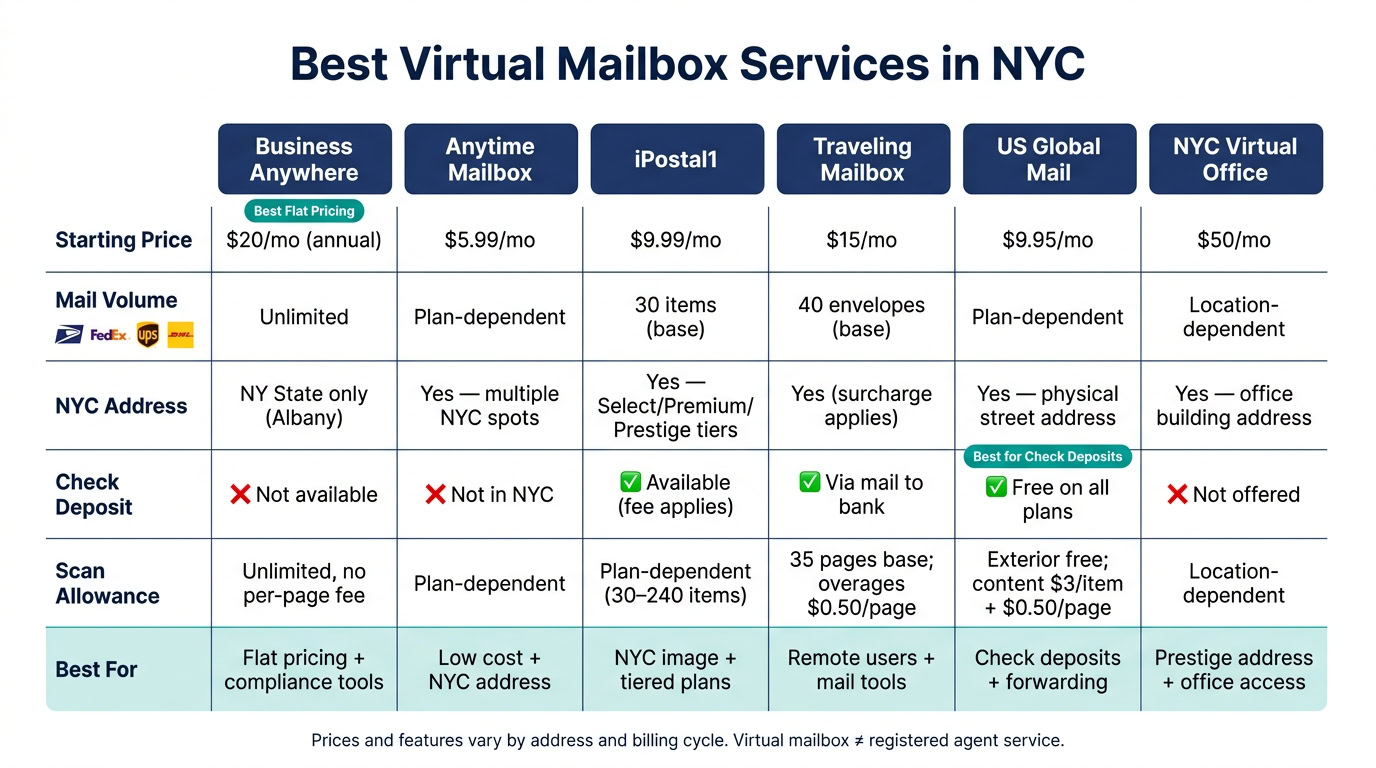
Best Virtual Mailbox Services in NYC: Side-by-Side Comparison
Quick Comparison
| Provider | Best fit | Starting price | Main thing to know |
|---|---|---|---|
| BusinessAnywhere | Flat pricing and unlimited intake | $20/month billed annually | New York State address, not NYC; no check deposit |
| Anytime Mailbox | Low starting price and many NYC spots | $5.99/month | Quality and fees change by location |
| iPostal1 | NYC image plus tiered plans | $9.99/month | Good address options, but item caps matter |
| Traveling Mailbox | Remote users who want mail tools | $15/month | NYC surcharge and overage fees can add up |
| US Global Mail | Check deposit and forwarding | $9.95/month | Content scans cost extra |
| NYC Virtual Office Providers | Public-facing office address | $50/month | Higher cost, fewer mailbox-style tools |
My short take is simple: pick the address first, then the fee structure. If you expect steady mail every month, unlimited plans can save money. If you only get a little mail, a capped plan may cost less. And if you need an NYC look for clients, a local Manhattan, Brooklyn, or other city address may matter more than scan limits.
Below, I break down which option fits privacy, banking, package handling, and LLC use without repeating every detail line by line. This includes registering an LLC with a virtual address while maintaining compliance.
1. BusinessAnywhere
New York State Address Quality
BusinessAnywhere gives you a New York street address at 1971 Western Ave, STE 1100, Albany, NY 12203. You can use it as a business mailing address for banking, billing, clients, and vendors.
Pricing and Scan Limits
BusinessAnywhere keeps pricing simple. It uses flat-rate plans, with no per-page scan fees and no cap on incoming mail.
| Plan | Monthly Billing | Annual Billing | Recipients |
|---|---|---|---|
| Basic | $25/month | $20/month | Up to 2 |
| Premium | $40/month | $30/month | Up to 5 |
| Advanced | $85/month | $65/month | Up to 20 |
If you choose annual billing, the $25 sign-up fee is waived. You can also add more recipients for $5/month on annual plans or $7.50/month on monthly plans.
For people who want steady, easy-to-predict costs, this is the part that stands out most.
Mail and Package Handling
BusinessAnywhere scans and uploads mail to your dashboard within two business days. It also filters junk mail by default, unless you ask to receive everything.
Mail and package forwarding is available worldwide for a flat $2.00 handling fee per shipment, plus shipping costs. Physical mail is stored for 90 days, while digital scans stay in your dashboard with no time limit.
That setup works well if you want your mail handled without a lot of back-and-forth admin work.
Business Compliance Fit
There is one limit to keep in mind: the Albany address can’t be used as a registered agent address. So if you need official service of process, you’ll need a separate registered agent in New York.
To activate the mailbox, you need USPS Form 1583. BusinessAnywhere also offers online notary service for $37 per document.
So the main thing to check is simple: does this split setup fit how you handle both filings and day-to-day mail?
2. Anytime Mailbox
NYC Address Quality
Anytime Mailbox offers several real street addresses in New York City. That can work well for privacy and day-to-day business use. But there’s a catch: service can vary from one location to another.
Why? Each NYC address is run by a local operator. So the experience depends a lot on who’s behind that location. One address may be smooth and reliable, while another may feel less consistent.
For NYC users, that puts the focus on three things: the address itself, the price, and how mail is handled. If you plan to use it for business, those details need to line up.
Pricing and Scan Limits
Pricing starts at $5.99 per month and can go up to $50 per month at some higher-end NYC locations, depending on the address. Most plans include unlimited digital storage. Physical storage for letters and packages is often free for 10 to 30 days, after which daily fees usually kick in.
That means the low starting price can look good at first glance, but the full cost depends on the location you choose and how long you leave mail or packages there.
Mail and Package Handling
Anytime Mailbox accepts mail and packages from USPS, FedEx, UPS, and DHL. It also offers scanning, open-and-scan, and forwarding within the U.S. or abroad.
One thing NYC users should pay close attention to: check deposit is not available in New York City. If your business depends on remote check handling, that’s a pretty big detail.
Business Compliance Fit
Anytime Mailbox requires a notarized USPS Form 1583 before it can receive and process your mail. That’s standard for this type of service, but it still adds one more setup step.
Its NYC addresses are not registered agent addresses unless a given location clearly says it offers that service. So if you need help with official state filings or service of process, you’ll still need a separate registered agent.
Those location-by-location differences matter most when you compare providers, especially on pricing, mail handling, and compliance support.
3. iPostal1
iPostal1 is a strong pick if you want a NYC address with different image levels and pricing tied to how much mail you expect to get.
NYC Address Quality
iPostal1 gives you a real NYC street address. You can use it for business mail and to look more polished with clients.
Its NYC addresses fall into three tiers: Select, Premium, and Prestige. Prestige spots are in higher-end business districts, so they give off a more polished business image. The tradeoff is pretty simple: the better the address looks, the more you may pay, so it helps to weigh image against your monthly mail volume.
Pricing and Mail Limits
Plans start at $9.99/month for 30 mail items and go up to $39.99/month for 240 items. NYC addresses, especially Premium and Prestige ones, often cost more than those base rates.
| Plan | Base Monthly Price | Mail Items Included |
|---|---|---|
| Green | $9.99+ | 30 |
| Blue | $14.99+ | 60 |
| Silver | $24.99+ | 120 |
| Gold | $39.99+ | 240 |
Pricing for specific NYC addresses may be higher than the base rates.
This setup matters most if you’re trying to line up address quality with the amount of mail you expect each month.
If you go over your monthly item limit, overage fees kick in. So, iPostal1 tends to work better for steady, predictable mail volume than for businesses with a big flow of incoming mail.
Mail and Package Handling
iPostal1 accepts deliveries from USPS, UPS, FedEx, and DHL. Every plan includes exterior scanning and automatic email alerts at no extra charge. Packages under 1,728 cubic inches come with 30 days of free storage.
Some add-ons cost extra, including content scanning, check deposits, insurance, and shredding. In-person pickup is also offered at some locations by appointment.
Business Compliance Fit
For LLC owners, the main issue is whether a virtual address vs. registered agent works better for filing and banking.
iPostal1 requires a notarized USPS Form 1583 before it can receive and process mail for you. Its NYC addresses are Commercial Mail Receiving Agencies (CMRAs), and they meet common LLC formation and bank correspondence needs.
4. Traveling Mailbox
Traveling Mailbox has been around since 2011, which puts it among the longer-running names in this category. It leans heavily into mail management, so it tends to fit remote founders and frequent travelers well. For most people, the main choice is pretty simple: pick the plan that fits how much mail you get each month.
NYC Address Quality
Traveling Mailbox offers a real street address in New York City. That said, an NYC address comes with a location surcharge added to the base plan.
After that, the bigger issue is whether the plan limits line up with your monthly mail volume.
Pricing and Scan Limits
Three plans cover most use cases: Basic at $15/month, Extended at $25/month, and Small Business at $55/month.
| Plan | Monthly Price | Mail Items | Page Scans | Scan Rollover |
|---|---|---|---|---|
| Basic | $15 | 40 | 35 | No |
| Extended | $25 | 100 | 80 | Yes |
| Small Business | $55 | 200 | 180 | Yes |
If you go over the limit, the fees are $0.25 for each extra mail item and $0.50 for each extra scanned page. The Extended and Small Business plans let unused scans roll into the next month, which can help if your mail flow goes up and down. You can also tag items as junk mail so they don’t count toward your scan cap.
Mail and Package Handling
Traveling Mailbox accepts packages from USPS, FedEx, UPS, and DHL. Through the web portal or mobile app, you can ask for scans, forwarding, or shredding.
A few details stand out:
- All plans include unlimited cloud storage for digital scans and free shredding.
- Forwarding costs $2 per shipment plus postage.
- Mail storage is free for 30 days, then $1 per envelope per month.
Scanned PDFs can sync on their own to Google Drive or Dropbox. If you get checks by mail, they can be mailed to your bank for deposit.
Business Compliance Fit
Mail handling is only one side of the decision. The other side is whether the setup works for your business paperwork.
Traveling Mailbox requires a notarized USPS Form 1583. You should also confirm bank acceptance before opening an account. And like other virtual mailbox services, it does not replace a registered agent or one of the best LLC formation services.
sbb-itb-ba0a4be
5. US Global Mail
US Global Mail leans more toward business users, especially if you expect a lot of mail or need forwarding outside the United States. It tends to fit companies that want steady mail handling at scale, and it often shows up on shortlists for non-resident LLC owners who need dependable U.S. mail forwarding while living abroad.
NYC Address Quality
US Global Mail gives you a physical street address in New York, not a P.O. Box. That matters more than it may seem. A street address is often easier to use for banking, LLC filings, and vendor verification.
Pricing and Scan Limits
Pricing starts at $9.95/month for the Individual plan and $29.95/month for the Business plan. External envelope scans are free and unlimited. If you want the contents scanned, the fee is $3.00 per item plus $0.50 per page. Digital storage lasts 180 days. Check deposits are included on all plans at no extra charge.
| Feature | Cost |
|---|---|
| Individual Plan | $9.95/month |
| Business Plan | $29.95/month |
| External Scans | Free, unlimited |
| Internal Content Scans | $3.00/item + $0.50/page |
| Check Deposit | Free |
| Digital Storage | 180 days |
For people with heavier mail volume, forwarding and storage often matter more than the monthly starting price. That makes this setup a better match for users who want predictable mail handling and simple check processing.
Mail and Package Handling
US Global Mail accepts mail and packages from USPS, UPS, FedEx, and DHL. It also offers mail consolidation, which can help cut forwarding costs for international shipments. If you’re getting several packages or pieces of mail at once, that can make a big difference.
Business Compliance Fit
To activate the service, US Global Mail requires identity verification and a notarized USPS Form 1583. The address can work well for business correspondence and banking, but it does not come with registered agent or company formation services. So if you’re setting up a New York LLC, you’ll need a separate registered agent. You can compare the top platforms for easy LLC formation to find a service that includes registered agent support.
On the security side, the platform includes encryption and two-factor authentication.
6. NYC Virtual Office and Coworking Mailbox Providers
If you want a more polished public-facing address than a mail center gives you, NYC virtual office and coworking providers are the next group worth comparing. Instead of a mail-center address, you get an office-building mailing address. That can make your business look more established from the outside.
Address Quality
An office-building address can carry more credibility than a standard CMRA address.
Pricing
Pricing usually falls between $50 and $200 per month. Forwarding and storage rules depend on the location, so the fine print matters.
Mail and Package Handling
Most providers accept parcels. Forwarding and storage fees can change based on the plan, which is where costs can creep up if you get a lot of mail.
Business Compliance Fit
A virtual office address works well for mail and banking, but it does not work as a registered agent address. Use the virtual office address for banking and client mail, and keep a separate registered agent for legal notices.
The main tradeoff is pretty simple: you get stronger image and possible office access, but you may give up some mailbox-focused features and the lower cost that comes with them.
Feature Comparison: Side by Side
After looking at each provider on its own, the table below makes the biggest differences easy to spot.
| Feature | BusinessAnywhere | Anytime Mailbox | iPostal1 | Traveling Mailbox | US Global Mail | NYC Virtual Office Providers |
|---|---|---|---|---|---|---|
| Starting Price (monthly) | $20/mo (annual) | From $5.99/mo | From $9.99/mo | From $15/mo | From $9.95/mo | From $50/mo |
| Mail Volume | Unlimited | Plan-dependent | 30 items (base) | 40 envelopes (base) | Plan-dependent | Location-dependent |
| Scan Allowance | Unlimited | Plan-dependent | Plan-dependent | 35 pages (base) | Plan-dependent | Location-dependent |
| Package Handling | Accepts major carriers | Accepts major carriers | Accepts major carriers; 30-day free storage | Accepts major carriers; no in-person pickup | Built for heavier mail volume | Location-dependent pickup |
| Check Deposits | Not available | Select locations only | Available for a fee | Check deposit by mail | Free on all plans | Not offered |
| Typical Processing Time | Within 2 business days | Location-dependent | Within a few hours | Same-day available | Plan-dependent | Location-dependent |
Prices and features vary by address and billing cycle.
For NYC founders, LLC owners, and remote operators, the main decision points usually come down to address quality, privacy, check handling, package support, and compliance fit. Put more simply: does the address work for banking, protect your privacy, and handle your mail the way you need?
BusinessAnywhere stands out because it combines a real street address with mail handling and compliance support. If check deposits sit high on your list, US Global Mail and iPostal1 are often the better fit. If you want in-person access and a more prominent business address, NYC virtual office providers make more sense.
Next, the pros and cons break these options down by provider type.
Pros and Cons by Provider Type
No single provider type fits every situation. The right pick comes down to one thing: what you need the address to do.
Some founders want an NYC address that looks strong in front of clients. Others want to keep a home address off public records. And some need a setup that can handle steady mail without turning into a headache. These provider types help NYC founders weigh image, mail volume, and compliance support so they can match the service to the main goal: image, privacy, volume, or compliance.
| Provider Type | Best For | Pros | Cons |
|---|---|---|---|
| Real Street Address | Founders needing NYC credibility | Prestige address; accepts all major carriers (FedEx, UPS, DHL); strong client-facing image | CMRA status can create friction during bank review |
| All-in-One Mail Platform | Remote LLC owners and digital nomads wanting compliance support and flexible mail handling | Bundles registered agent, unlimited mail scanning, and compliance tools in one dashboard; worldwide forwarding; USPS Form 1583 handled digitally | Fewer location choices than mailbox networks with more location options |
| Privacy-Focused Mailbox | Home-based businesses keeping addresses off public records | Keeps residential address out of state formation documents and public databases; secure scanning; shredding available | More features than basic privacy needs require |
The tradeoff is pretty simple: a better image often comes with a higher cost or less flexibility. With that in mind, the next section helps you match the right service to your situation.
Which Service Should You Choose?
Once you compare address quality, pricing, and mail handling, the choice mostly comes down to how you plan to use it.
If you need a specific New York City street address for client materials or local credibility, a local NYC provider is the practical pick. If local credibility matters most, put the address first. If cost matters most, focus on the plan.
If price is your main concern, go with the lowest-cost plan that still covers your expected scan volume.
If you’re a founder who wants mail and compliance in one dashboard, BusinessAnywhere is built for that setup.
One more thing before you decide: match the mailbox to your compliance needs. A virtual mailbox can receive mail, but it can’t serve as a registered agent address. A lot of businesses need both, so it helps to keep your mailing address separate from your registered agent service.
FAQs
Can I use a virtual mailbox to open a business bank account?
Yes. Banks often accept a virtual mailbox if it gives you a real street address. That matters for KYC and AML checks, because banks need a verified physical address. In that sense, a virtual mailbox is often more useful than a P.O. Box, which many banks won’t accept.
You might still need extra paperwork, such as a proof of address letter from your provider. It’s smart to check with your bank first, since some banks have their own rules for Commercial Mail Receiving Agencies.
Do I need both a virtual mailbox and a registered agent?
Yes. They do different jobs.
A registered agent is required for every New York business. Their job is to receive legal papers and official state mail during normal business hours.
A virtual mailbox is optional. It helps you handle regular business mail with scanning and forwarding.
You may want both if you’d like to keep your home address off public records and make mail handling easier.
What hidden fees should I watch for with a virtual mailbox?
Keep an eye out for extra charges that can push up your monthly cost, such as:
- extra mail item fees
- handling fees
- check deposit charges
- surcharges for premium addresses
- per-page scanning or mail storage fees
Read the fine print, confirm what’s included in the advertised monthly rate, and lean toward providers with clear pricing.