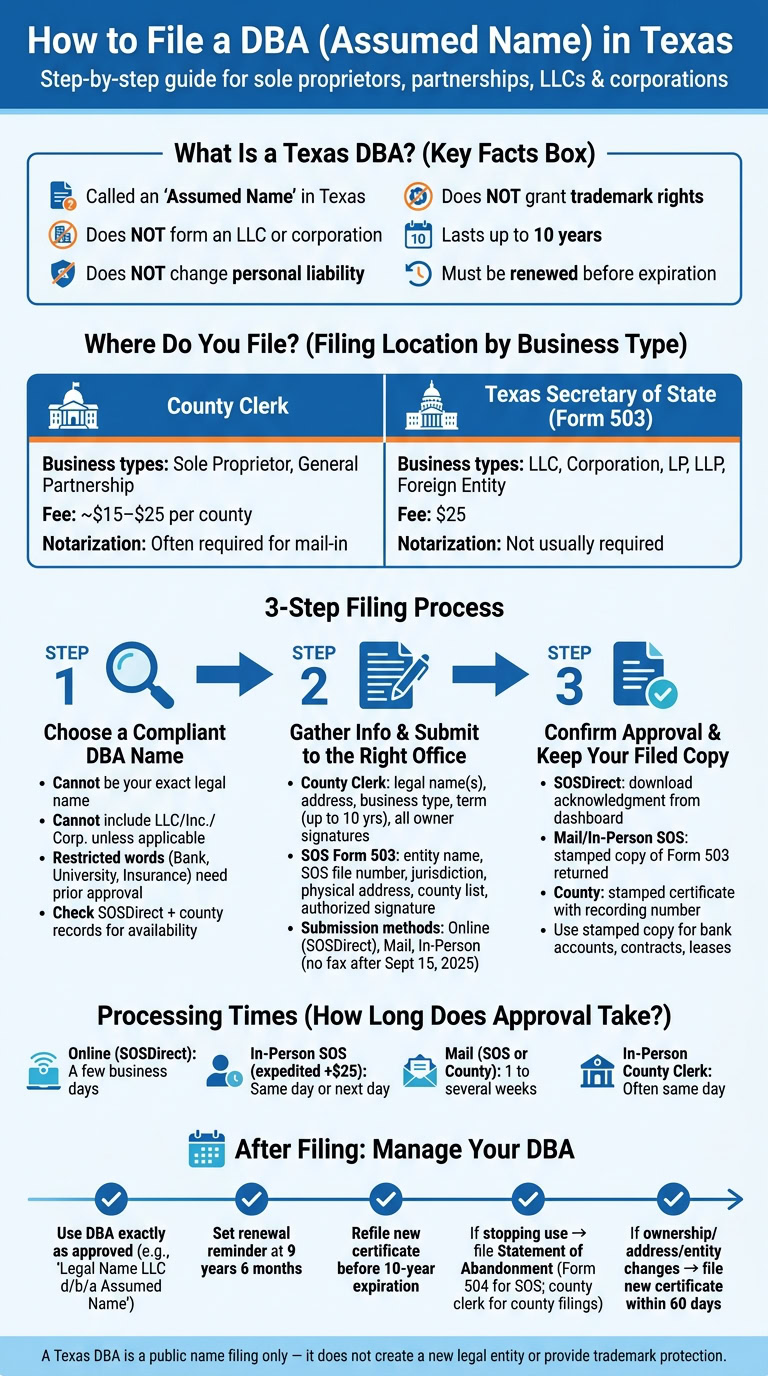
If you want to use a business name in Texas that is not your legal name, you usually need an assumed name filing. In plain English: sole proprietors and general partnerships file with the county clerk, while LLCs, corporations, LPs, LLPs, and foreign entities usually file Form 503 with the Texas Secretary of State. Most filings last up to 10 years, and state filing fees are $25.
Here’s the short version:
- A Texas DBA is called an assumed name
- It does not form an LLC or corporation
- It does not change liability
- It does not give trademark rights
- You must file in the right office based on business type
- County filings often cost about $15 to $25 per county
- State entity filings cost $25
- You may need to renew before the 10-year term ends
A few points matter most before filing:
- Pick a name that does not mislead the public
- Do not add “LLC,” “Inc.,” or “Corp.” unless your business is that entity type
- Check SOSDirect and, if needed, county records before you file
- Make sure your legal name, file number, address, counties, and term all match the form
- Keep your stamped copy, because banks and landlords may ask for it
| Business type | Where I file | Typical fee |
|---|---|---|
| Sole proprietor | County clerk | $15–$25 per county |
| General partnership | County clerk | $15–$25 per county |
| LLC or corporation | Texas Secretary of State | $25 |
| LP, LLP, or foreign entity | Texas Secretary of State | $25 |
Bottom line: I’d treat a Texas DBA as a public name filing, not a business formation step. If I want to use a different brand name, the job is simple: choose a usable name, file in the right place, and keep track of the expiration date.
Step 1: Choose a Compliant Texas DBA Name
Your assumed name needs to clear two checks. First, it has to fit Texas naming rules. Second, it should be a name you can use the same way across bank records, contracts, invoices, and marketing. Before you look for availability, make sure Texas allows the name in the first place.
Texas Naming Rules and Restricted Words
Your DBA can’t be your exact legal name.
It also can’t mislead the public about what your business does or what kind of entity it is. So, don’t use "LLC", "Inc.", or "Corp." in a DBA unless your business is actually formed that way.
Some words need written approval before you can use them:
- "Bank", "bank and trust", "trust", or "trust company" need a no-objection letter from the Texas Banking Commissioner.
- "College", "university", "school of law", "law center", "school of medicine," and similar education terms need a no-objection letter from the Texas Higher Education Coordinating Board.
- Insurance-related words such as "insurance" or "surety" can be used only if the full name does not imply that you are the insurer.
Also stay away from names that imply government approval, licensing, or authority you don’t have. If your name includes a restricted term, sort that out before you file.
How to Check Name Availability Before Filing
Check SOSDirect before filing. A search of Texas business records can help lower the chance of name conflicts later. If you’re a sole proprietor or general partnership, check county clerk records too in every county where you plan to do business.
One point trips people up: Texas filings do not give you exclusive rights to a DBA name. Filing at the state level doesn’t create exclusive rights, so you should also check trademarks on your own.
When you compare names, look at the whole thing: spelling, punctuation, spacing, and any designators. Not just the main words. A tiny difference on paper can still feel too close in practice.
Once the name clears those checks, the next move is figuring out the right filing office and the details you’ll need to provide.
Naming Examples for Sole Proprietors, Partnerships, and LLCs
The same basic rules apply no matter what type of business you run. Here’s how that can look:
- Sole proprietor: A freelance graphic designer named Maria Lopez files under "Maria Lopez Designs" instead of using the exact legal name shown on the filing.
- General partnership: Two partners running a design business file under "Blue Mesa Studio." The name avoids restricted terms and works well as a public-facing brand.
- LLC: An LLC with a longer legal name uses "North Star Consulting" as a shorter trade name for the public while keeping its legal name on state records and business documents.
In each example, the DBA should match the name you plan to use on your website, invoices, bank account, and marketing. That way, you cut down on confusion when opening accounts or signing agreements.
Step 2: Identify Where to File and Gather the Required Information
You need to file with the right office for your business type. If you send the form to the wrong place, approval can get held up or the filing can come back to you. After that, the job is simple: gather the exact details that office asks for.
Filing as a Sole Proprietor or General Partnership
If you’re filing as a sole proprietor or general partnership, file with the county clerk in each county where you keep business premises. You also need to file separately in every county where you do business. For a home-based or online business, that usually means your home county. County rules can differ, so use that county’s own form and instructions.
Before you file at the county level, have these details ready:
- The DBA name
- Your physical business address
- The owner’s full legal name(s) and address(es)
- Your business type
- The period you want to use the name, up to 10 years
If you’re filing for a general partnership, many county forms also ask for the name and address of every partner. Each partner must sign the certificate.
Filing as an LLC, Corporation, LP, LLP, or Foreign Entity
Registered entities that have already filed articles of organization follow a different path. Instead of filing at the county level, you file Form 503 with the Texas Secretary of State. A separate county filing is not required for these entity types.
Before you start Form 503, gather:
- Your exact legal entity name as it appears in Texas SOS records
- Your Texas SOS file number
- Your jurisdiction of formation
- Your principal office address, which must be a physical address; P.O. boxes are not accepted
- The DBA name you want to use
- The counties where the name will be used, with options for "All counties", "All counties except…", or "Only the following counties"
- The duration of the assumed name, which cannot exceed 10 years from the filing date
- An authorized signature from an officer, manager, member, general partner, or another person with written authority to sign
One small mismatch can trip you up here. If your legal name or file number doesn’t match the Secretary of State’s records, Form 503 is often rejected.
Documents, Signatures, Notarization, and Filing Fees
Once your information is ready, check the filing fee and signature rules before sending anything in.
| Filing Type | Where to File | Fee | Notarization Required? |
|---|---|---|---|
| Sole Proprietor / General Partnership | County Clerk (each applicable county) | ~$15–$25 per county | Often required for mail-in filings |
| LLC / Corporation / LP / LLP / Foreign Entity | Texas Secretary of State (Form 503) | $25 | Not usually required |
For county filings, every owner listed on the certificate must sign. If it’s a general partnership, all partners must sign. Filing in person is often easier because a deputy clerk can often acknowledge signatures on the spot for a small fee. If you file by mail, every signature must be notarized before you send the form. Missing notarization is one of the most common reasons mailed county applications get rejected or returned.
It also helps to check the county’s mailing rules. Some counties want a self-addressed stamped envelope for the filed copy. Dallas County, for example, clearly requires one for mail-in submissions. If you’re filing in more than one county or using more than one assumed name, plan for separate filings and separate fees each time.
sbb-itb-ba0a4be
Step 3: Submit Your DBA Filing and Confirm Approval
How to Submit Your Filing Correctly
Once you finish the form, send it to the right office using the right method. That part matters more than people think. The filing path depends on your business type and how fast you need approval. After you file, keep the stamped copy. It’s your proof.
For Secretary of State filings (Form 503), Texas accepts SOSDirect (online), mail, and in-person delivery in Austin. Fax is no longer accepted for new filings on or after September 15, 2025, so don’t use it. SOSDirect is often the fastest and easiest route, but set up your account ahead of time because approval does not happen instantly.
State filings and county filings do not follow the same process. For county clerk filings for sole proprietors and general partnerships, you can usually file in person, by mail, or through a county portal. If you need same-day processing or want a stamped copy in hand right away, filing in person is often the best move.
Before you submit, check these items:
- Legal name: For Form 503, match the legal name and entity suffix exactly to SOS records.
- County list: List every county where the name will be used.
- Payment: Confirm the exact fee and accepted payment methods before you file.
Processing Times and Proof of Filing
Processing time depends on the office and the way you file. SOSDirect filings are usually processed within a few business days during normal processing periods. In-person filings with the Secretary of State can sometimes be expedited for an extra $25 and processed the same day or the next day. Mail filings take longer, so plan for anywhere from one to several weeks.
At the county level, in-person filings are often the fastest option because the clerk can review and stamp your certificate while you wait. County filings sent by mail may take several days to a couple of weeks, depending on that office’s workload.
Proof of filing looks a little different based on where you filed. With SOSDirect, you can download an acknowledgment or filed copy from your account dashboard. For mail or in-person state filings, the Secretary of State returns a stamped copy of Form 503 that shows the filing date and acceptance. At the county level, you’ll get a stamped or certified copy of the assumed name certificate with the clerk’s stamp, filing date, and recording number.
Hold on to that filed copy. Banks, landlords, and contract files may ask for it. Once your filing is approved, use the stamped copy for accounts, contracts, and recordkeeping.
After Filing: How to Use, Renew, and Manage Your Texas DBA
How to Use Your DBA in Day-to-Day Business
Once you get the filed copy back, use the DBA exactly as it was approved. On contracts and invoices, list it as Legal Name LLC d/b/a Assumed Name.
Keep a copy of the filed certificate handy. Banks and payment processors often ask for it, and having it ready can save time.
For your website, signs, and marketing pieces, stick to the same DBA every time. It also helps to add a short disclosure showing which legal entity owns the name.
Renewal, Abandonment, and Changes to Ownership or Entity Structure
Start tracking the expiration date right away. In Texas, an assumed name can last up to 10 years. To keep using it, file a new assumed name certificate before it expires. Texas also lets you refile during the last six months before expiration. A simple move is to note the filing date and set a reminder for the 9-year, 6-month point.
If you stop using the name, don’t just let it sit there. File a statement of abandonment with the same office where you first filed. For state filings, that means Form 504. For county filings, submit it to the same county clerk. After that, remove the name from your website, forms, signs, and other materials right away.
Changes to your business details can also trigger a new filing. If your business name, ownership, principal office, or entity type changes, file a new certificate within 60 days. In plain terms, if the facts on the old certificate no longer match the business, replace it.
BusinessAnywhere Tools for Remote Texas Business Management

Handling Texas filings from a distance can be a hassle, especially when notices start arriving from different offices. BusinessAnywhere gives remote founders a few ways to keep things under control.
- Registered agent service for receiving official state mail
- Virtual mailbox for mail from county clerks, banks, and state agencies
- Online notary service for county filings that need notarization, at $37 per document
- EIN application service if you need to understand what an EIN is before opening a DBA bank account, at $97
If you’re running the business remotely, those tools can make the admin side a lot less messy.
FAQs
Do I need a Texas DBA for an online business?
Yes – if you want to run your online business under a name other than your legal business name, you need a Texas DBA.
For example, if your LLC is ABC Holdings LLC but you do business as Sunset Bakery, you must register that assumed name.
If you use only your registered legal name, a DBA is not required.
Can I use my DBA before it is approved?
No. You can’t use your DBA until it’s officially approved and the county clerk issues your certificate.
That certificate is your legal proof that you’re allowed to do business under the assumed name. Using the name before official approval is not allowed.
What happens if my Texas DBA expires?
In Texas, a DBA registration can stay active for up to 10 years. Once it expires, you can lose the legal right to do business under that name.
If you let it lapse, you could face fines or penalties. You may also have to file again from scratch, which means doing a new name search and paying new filing fees. To avoid any gap, keep an eye on your renewal date and file at least 60 days early.