If I hire my first employee, I need to do more than send a paycheck. I need to set up tax accounts, collect hiring forms, choose a pay schedule, calculate withholding, deposit payroll taxes, and file forms on time.
Here’s the short version:
- Classify the worker the right way: W-2 employees need withholding and employer payroll taxes. 1099 contractors do not.
- Get the accounts in place first: I need an EIN, state withholding account, state unemployment account, and EFTPS access before payday.
- Collect the right forms: That usually means Form W-4, Form I-9, and any state withholding form.
- Set pay rules before the first run: I need a pay schedule, pay rate, overtime status, and any deductions or garnishments entered correctly.
- Run payroll in order: Start with gross pay, subtract taxes and deductions, then send net pay.
- Keep up after payday: New hire reporting is due within 20 days in many cases, federal deposits are often due by the 15th of the next month, and forms like 941, 940, W-2, and W-3 have fixed deadlines.
- Keep records: Payroll tax records often need to stay on file for 4 years.
One number stands out: 40% of small businesses pay IRS penalties each year, often tied to payroll mistakes. So if I want fewer errors, I should set up the accounts early, use payroll software if needed, and put every filing date on my calendar.
In plain English, payroll setup means: register first, collect forms, set pay rules, run payroll, then keep filing and depositing on time.
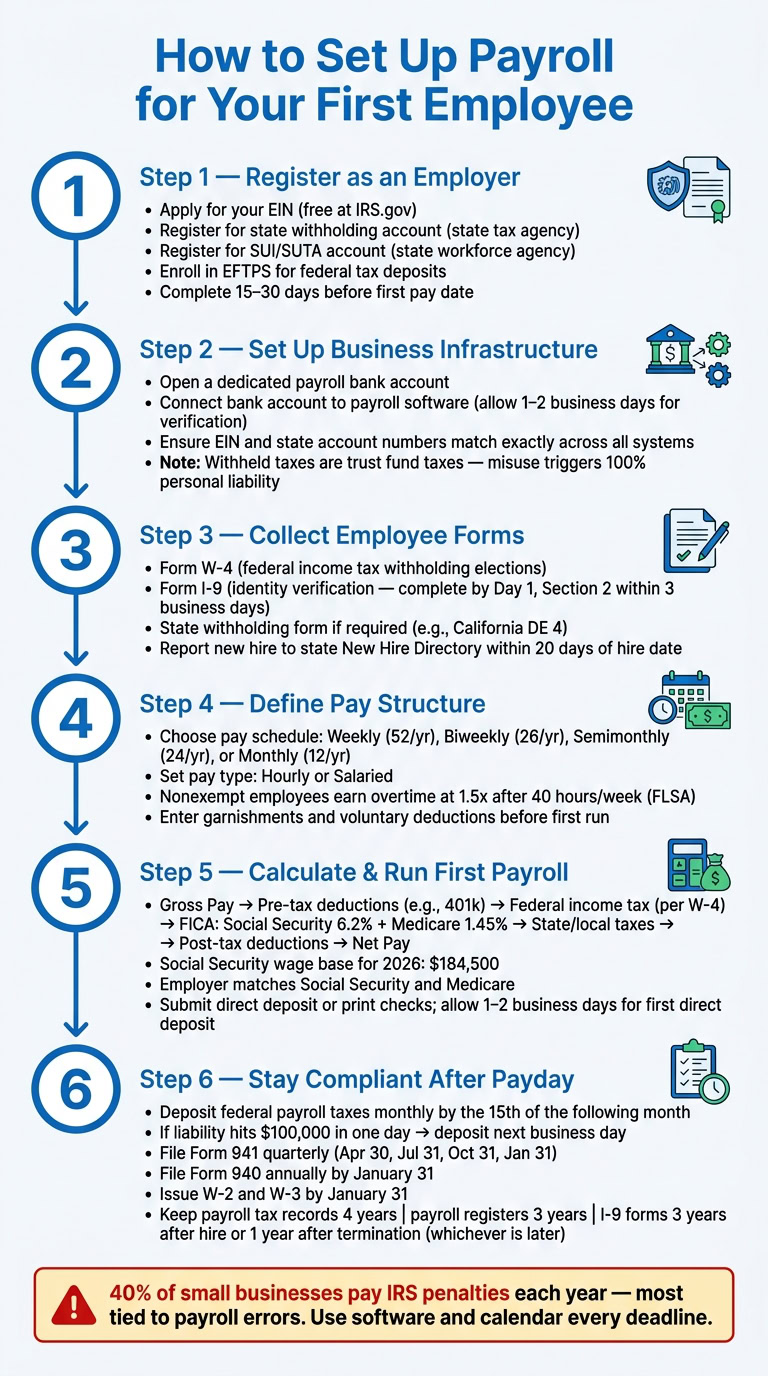
Register as an employer and get the IDs you need
Before you can legally pay anyone, you need the right tax IDs and accounts in place. This is the setup payroll runs on. Miss one piece, and your first paycheck can get delayed, or you can end up with penalties you never planned for.
Get your EIN and state payroll tax accounts
Your Employer Identification Number (EIN) is your business’s federal tax ID. You need it to file payroll tax forms, make federal tax deposits, and open state employer accounts. The application is free through IRS.gov.
The usual order is simple: form your business, get your EIN, then register for state payroll accounts. In most states, you can’t complete state registration without the EIN first.
After that, register with your state. Most states require two separate accounts:
- A state tax agency account for state income tax withholding
- A state workforce agency account for State Unemployment Insurance (SUI)
You should also check whether your city requires local payroll tax registration.
Try to finish all registrations 15 to 30 days before your first pay date so you don’t get caught in a timing crunch. Also check whether your state requires workers’ compensation coverage before the employee’s start date.
Set up the business infrastructure payroll depends on
Once your IDs are in place, gather the business details payroll systems and agencies will ask for: your legal business name, EIN, and state account numbers. These details need to match exactly everywhere. Even a small mismatch can cause problems. Payroll systems also need your tax accounts and banking details set up before the first run.
Enroll in the Electronic Federal Tax Payment System (EFTPS). This is the system used to deposit federal payroll taxes. The IRS no longer accepts paper coupons.
Open a dedicated payroll bank account. Keep wages and payroll tax reserves separate from your day-to-day operating cash. This isn’t just tidy bookkeeping. It helps protect money that doesn’t belong to the business.
Withheld employee taxes – income tax, Social Security, and Medicare – are trust fund taxes. If that money gets used for operations by mistake, the IRS can hold you personally liable for 100% of the unpaid amount under the Trust Fund Recovery Penalty, even if your business is an LLC or corporation.
When you connect the payroll account to your software, allow 1–2 business days for bank-account verification before your first live payroll run.
Use this checklist to make sure every required account is active before payday:
| ID or Account | Agency | Purpose |
|---|---|---|
| Employer Identification Number (EIN) | IRS | Federal tax ID for filings and deposits |
| State Withholding Account | State Tax Agency | Remit employee state income tax |
| SUI/SUTA Account | State Workforce Agency | Pay employer unemployment insurance tax |
| EFTPS Account | Dept. of Treasury | Electronic federal payroll tax deposits |
| New Hire Registry | State New Hire Directory | Required compliance filing within 20 days of hire date |
Federal law requires you to report new hires to your state’s New Hire Directory within 20 days of the hire date. Once these accounts are active, the next step is to collect employee forms and pay details before the first payroll run.
Collect employee forms and define the pay structure
Now that your employer accounts are active, it’s time to gather the forms and pay details that shape withholding, worker classification, and pay timing. These choices affect how your payroll system withholds taxes and when employees get paid.
Collect Form W-4, Form I-9, and state withholding forms
Form W-4 tells your payroll system how much federal income tax to withhold from each paycheck. The employee fills it out based on filing status and any adjustments. If an employee claims exempt withholding, they need to submit an updated W-4 by the annual deadline.
Have the employee complete Form I-9 by their first day of work, then complete Section 2 within three business days using original identity documents. Keep completed I-9 forms separate from general personnel files. That makes audits much easier to handle.
State rules matter here too. Some states require their own withholding form in addition to the federal W-4. For example, California uses the DE 4.
Record the employee details payroll will use
Once the forms are signed, enter the employee’s information into your payroll system with care. Small mistakes here can turn into tax issues, failed direct deposits, or pay delays.
You’ll need the employee’s full legal name, Social Security Number (SSN), current home address, date of birth, hire date, job title, work location, and FLSA status as exempt or non-exempt. On the pay side, collect the pay rate, direct deposit banking details – routing number and account number – plus a signed authorization, along with any voluntary deduction elections like 401(k) contributions or health insurance premiums.
If there’s a court order for wage garnishment, such as child support or a tax levy, add it as a mandatory deduction before the first payroll run.
If your payroll system includes a self-service portal, use it. Letting employees enter their own banking and tax details can cut down on data entry mistakes.
Choose a pay schedule and pay type
Your pay schedule sets how often employees get paid. State law sets the minimum standard, and some states – such as California and New York – require more frequent pay for certain types of workers. Check your state’s rules before you lock anything in.
Here’s a quick look at the most common options:
| Pay Schedule | Pay Periods/Year | Best For | Admin Workload |
|---|---|---|---|
| Weekly | 52 | Hourly, construction, or hospitality workers | Highest |
| Biweekly | 26 | Most common; balanced for hourly and salary | Moderate |
| Semimonthly | 24 | Salaried employees; consistent dates (e.g., 1st and 15th) | Moderate |
| Monthly | 12 | Executives or very small businesses | Low |
Biweekly is often the most practical option for hourly teams because it lines up cleanly with 40-hour workweeks. Semimonthly tends to work well for salaried teams with steady expenses.
Pay type matters too. Hourly employees are paid for the hours they actually work. Salaried employees receive a fixed amount each pay period no matter how many hours they work. Under the FLSA, nonexempt employees must receive overtime at 1.5 times their regular rate after 40 hours in a workweek. Exempt employees do not qualify for overtime, but they must meet both salary and duties tests.
Once the pay schedule and pay type are in place, you’re ready to calculate gross pay and run the first payroll.
sbb-itb-ba0a4be
Calculate pay, set up software, and run the first payroll
Calculate gross pay, taxes, deductions, and net pay
Once you’ve collected the forms and pay details, calculate payroll in a set order.
Start with gross pay. For hourly employees, multiply hours worked by the hourly rate. For salaried employees, divide the annual salary by the number of pay periods in the year.
After that, work through deductions in sequence before the employee gets take-home pay.
Pre-tax deductions, like 401(k) contributions, come out first. That lowers taxable income. Then withhold federal income tax based on the employee’s Form W-4 elections and current IRS tax tables.
Next are FICA taxes:
- Social Security: 6.2% of gross pay, up to the annual wage base
- Medicare: 1.45% of all gross pay
For 2026, the Social Security wage base is $184,500. As the employer, you also match both Social Security and Medicare as a separate tax liability.
Then withhold state and local taxes if your state or city requires them. Post-tax deductions, such as health insurance premiums and legally required garnishments, come out last. What’s left is net pay – the amount that lands in the employee’s bank account.
This is where payroll can get messy fast. A small math error doesn’t just stay on paper; it can affect paychecks, tax deposits, and filings. That’s why payroll software is often the safer route. It handles the calculations and filing tasks for you.
Choose a payroll method that fits your business
Next, pick the method that will handle payroll from here on out. This choice affects how you calculate pay, send deposits, and file taxes.
| Method | Automation Level | Tax Filing Support | Complexity | Ongoing Cost Range |
|---|---|---|---|---|
| Manual (Spreadsheets) | None | None (you handle filings) | High, error-prone | Low, but time-intensive |
| Payroll Software | High | Automated federal, state, and local filings and deposits | Moderate | $40–$70/month |
| Full-Service Provider | Full | Comprehensive, hands-off | Low | $60–$150+/month |
Manual payroll may look cheaper at first because there’s no upfront software cost. But it takes more time and leaves more room for mistakes. Available data shows that 40% of small businesses pay IRS penalties each year, and most of those problems trace back to manual processing errors.
Run your first payroll step by step
Once the numbers look right, process the payment and schedule the tax deposit. Here’s the sequence to follow:
- Confirm hours or salary: Approve employee hours worked, or verify the salary amount for that pay period.
- Check taxes and deductions: Review the figures in your payroll software and make sure they match the W-4 details and pay rate you entered.
- Send payment: Submit direct deposits or print checks. If this is your first direct deposit run, allow 1–2 business days for test deposit verification. That step confirms the routing and account numbers before live funds move.
- Save pay stubs: Generate and store pay stubs for your records.
- Schedule the tax deposit: Pay payroll taxes through EFTPS. Most new employers deposit payroll taxes monthly, which means taxes withheld in one month are due by the 15th of the following month.
If you’re using software, most of this will feel like moving through a checklist. That’s the point. Payroll has a lot of moving parts, and a clear process helps you keep each one in line.
Stay compliant after the first paycheck
Track tax deposits, payroll filings, and record retention
Once the first paycheck goes out, you need to master small business payroll basics. The work shifts to tax deposits, required filings, and keeping the right records on hand.
For most new employers, federal payroll tax deposits are due on a monthly schedule. That means taxes withheld in one month are due by the 15th of the following month. There’s one big exception: if your payroll tax liability hits $100,000 in a single day, you must deposit that amount by the next business day, no matter what your usual deposit schedule is.
You also need to stay current with state requirements, including:
- state income tax withholding
- State Unemployment Insurance (SUTA)
It’s smart to put every recurring payroll deadline on your calendar now, before something gets missed after the first run.
| Form | Purpose | Due Date |
|---|---|---|
| Form 941 | Quarterly Federal Tax Return | Apr 30, Jul 31, Oct 31, Jan 31 |
| Form 940 | Annual Federal Unemployment (FUTA) | January 31 |
| Form W-2 | Wage and Tax Statement to employee | January 31 |
| Form W-3 | Transmittal of Wage and Tax Statements | January 31 |
Missing a deposit deadline can lead to steep penalties, so every due date needs a place on the calendar.
On the recordkeeping side, hold onto payroll tax records for 4 years, payroll registers and time cards for 3 years, and Form I-9 for 3 years after hire or 1 year after termination, whichever is later. When deposits, filings, and record retention are set up the right way, payroll becomes a lot less stressful.
Conclusion: Key actions to complete before and after payroll starts
After payroll starts, keep deposits on time, file Forms 941 and 940 by their deadlines, issue W-2s and W-3s by January 31, and keep payroll records for the required time periods.
"Payroll is more than paying wages. It includes registrations, filings, deposits, recordkeeping, and deadlines that continue long after payday."
FAQs
Do I need payroll before the employee starts?
Yes. You should set up payroll and finish the required registrations before you run your first payroll.
If you pay an employee before that, you can run into compliance problems and tax penalties. It’s the kind of admin task that feels easy to put off – until it turns into a mess.
Before the employee starts, make sure you:
- get your EIN
- register for state tax and unemployment accounts
- choose a pay schedule
- pick a payroll system
- collect Form W-4 and Form I-9 by or before the first day
What if I miss a payroll tax deadline?
Missing a payroll tax deadline is a serious compliance issue. Federal and state agencies don’t cut small businesses any slack here.
If you miss a deposit or filing, you could face penalties of up to 15%, based on how late the payment is. That can add up fast.
The best way to avoid this is simple: use a reliable payroll system and stay on top of your deposit schedules and filing dates.
Can I run payroll myself for one employee?
Yes, but it’s not simple. Small businesses face the same legal and compliance duties as bigger companies.
That means you need to:
- handle registrations
- calculate withholdings
- make tax deposits on time
- keep records for at least three years
There’s also a practical issue: manual payroll is easy to mess up. A small mistake can turn into tax penalties, which is why payroll software is often recommended.