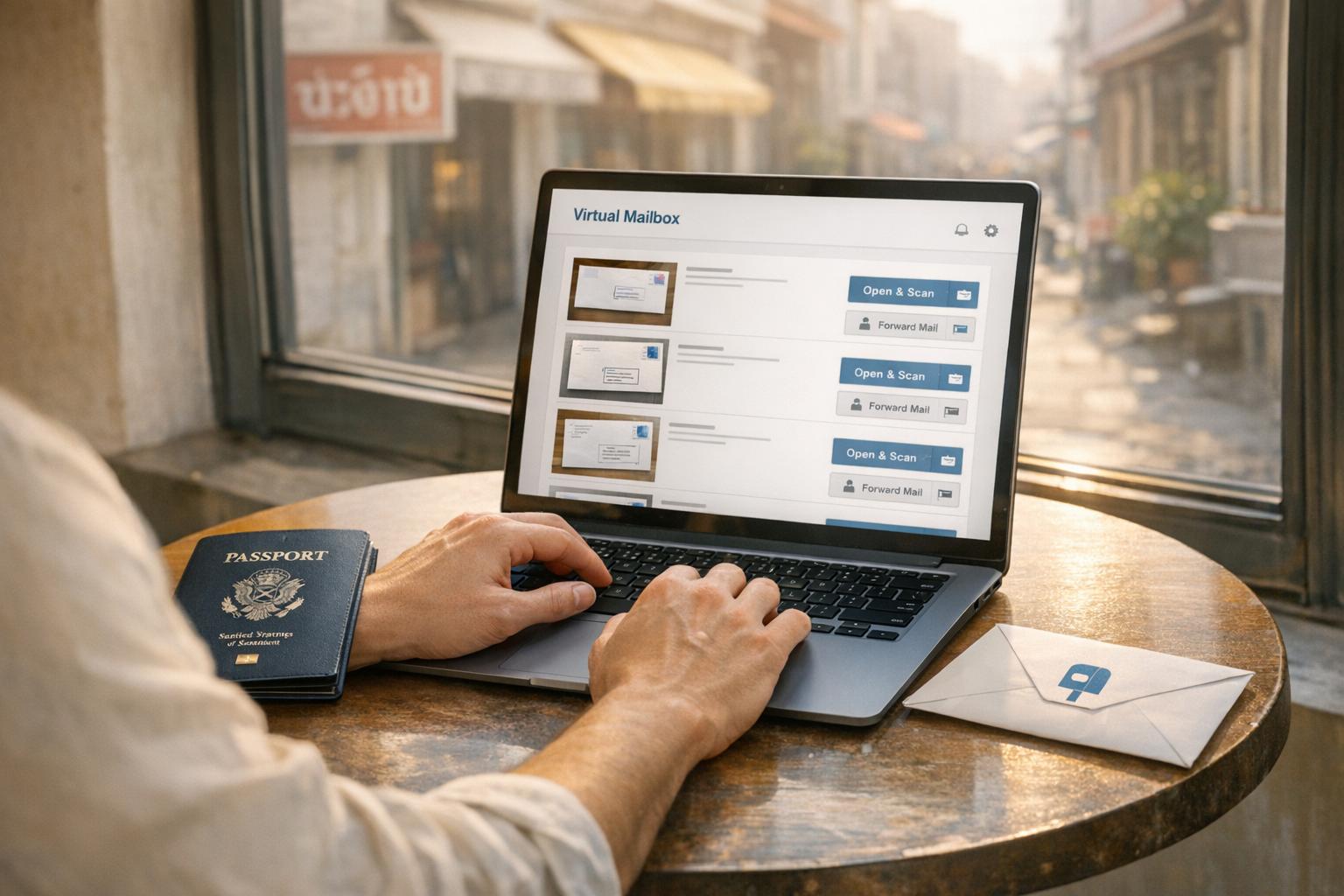
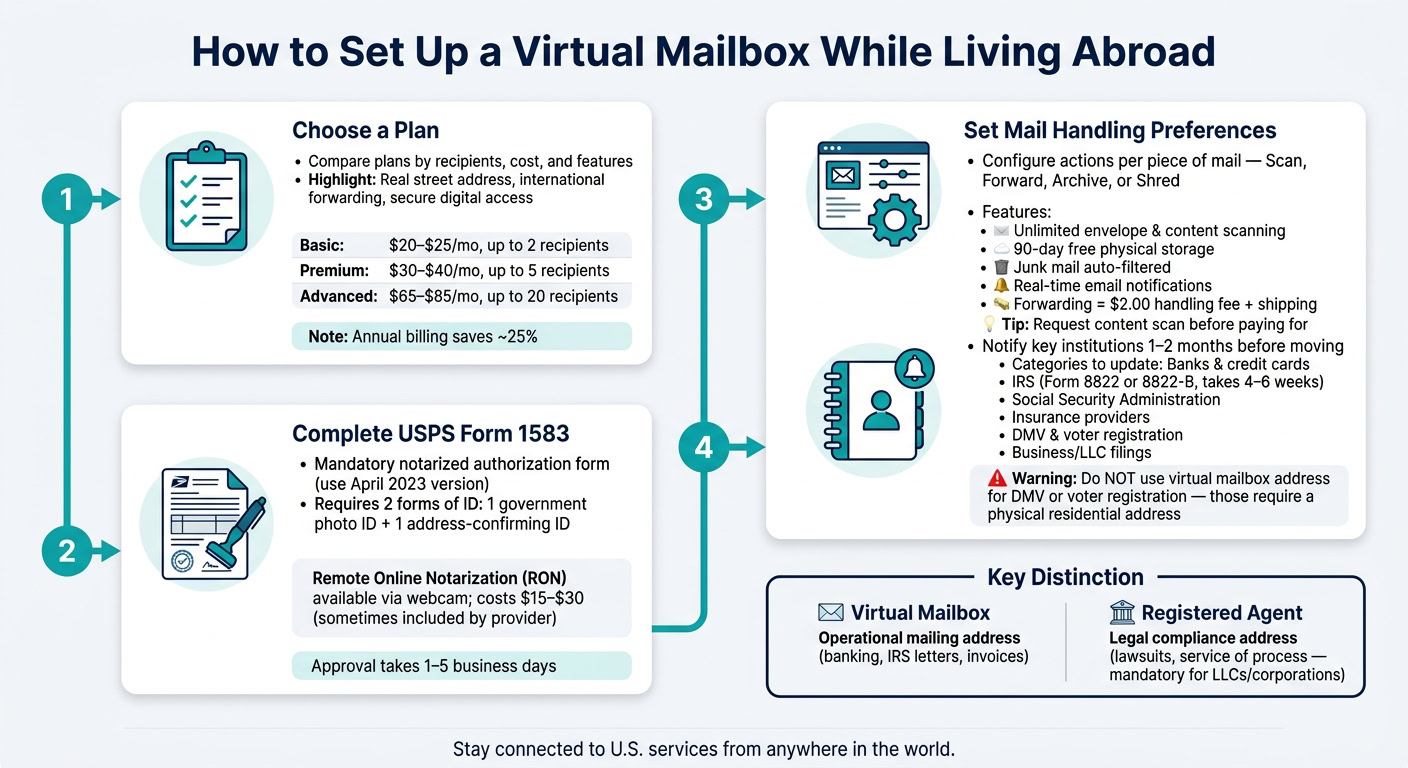
Managing mail while living abroad can be challenging, but a virtual mailbox offers a simple solution. It provides a virtual mailbox vs. a physical address where your mail is received, scanned, and uploaded online for you to access from anywhere. This service is essential for expats who need to maintain a U.S. address for banking, taxes, or legal purposes. Here’s how to get started:
- Choose a Plan: Look for features like a real street address, international forwarding, and secure digital access. Compare costs and recipient limits.
- Complete USPS Form 1583: This form authorizes the service to handle your mail. You’ll need two forms of ID and may need online notarization.
- Set Mail Preferences: Decide how to manage your mail – scan, forward, archive, or shred. Many providers offer junk mail filtering and package consolidation.
- Update Your Address: Notify banks, the IRS, and other organizations of your new address to avoid missing important documents.
A virtual mailbox ensures you stay connected to essential U.S. services, no matter where you are. It’s a reliable way to handle personal or business mail efficiently while living abroad.
Understanding Virtual Mailboxes
What Is a Virtual Mailbox?
A virtual mailbox gives you a real U.S. street address where your mail is received, scanned, and uploaded for you to manage online. When mail arrives, it’s scanned and securely uploaded to your online dashboard. From there, you can log in to decide what to do with it: have it scanned in full, forwarded internationally, archived, or shredded.
The key difference between this and a P.O. Box is important. Banks, insurance providers, and government agencies often reject P.O. Boxes for official use, such as account registration. A virtual mailbox solves this problem by providing a legitimate street address.
| Feature Virtual Mailbox P.O. Box | ||
|---|---|---|
| Address Type | Real street address | Box number at post office |
| Remote Access | Scanned mail online | Physical pickup required |
| Package Acceptance | Accepts UPS, FedEx, DHL, USPS | Usually limited to USPS |
| Banking Compliance | Accepted by banks | Often rejected for accounts |
| International Use | Ideal for expats/nomads | Requires local presence |
This setup makes virtual mailboxes a practical solution, especially for people living overseas.
Why You Need a Virtual Mailbox When Living Abroad
Having a U.S. address isn’t just about receiving mail; it’s a lifeline to critical services like banking, taxes, and legal notices – services you can’t afford to lose access to, no matter where you are.
"Your U.S. address serves as more than just a place to receive mail. It’s a critical piece of infrastructure that keeps you connected to essential U.S. systems and services." – Mike Wallace, CEO, Greenback Expat Tax Services
Missing something as vital as an IRS notice while abroad can lead to serious consequences, like frozen bank accounts. For example, the Foreign Earned Income Exclusion allows expats to exclude up to $130,000 from U.S. taxes for the 2025 tax year. But to file Form 1040 and claim this benefit, you still need a valid U.S. address.
A virtual mailbox also ensures you don’t miss replacement bank cards, state tax documents, or urgent legal communications. These are things you can’t always wait to handle until your next trip back home.
For business owners working remotely, having a virtual mailbox can also be strategic. Picking an address in a no-income-tax state like Florida, Texas, or Wyoming can fit into a broader state tax residency plan. However, keep in mind that just having an address in one of these states doesn’t automatically change your tax residency. It’s always wise to consult a tax professional to ensure your strategy holds up.
Choosing the Right Virtual Mailbox Plan
Key Features to Look For
When selecting a virtual mailbox plan, focus on features that offer convenience, security, and functionality. Start with a real street address – essential because many banks and government agencies won’t accept P.O. Boxes. An intuitive mail dashboard is another must-have, allowing you to manage incoming mail by requesting actions like opening and scanning, forwarding, archiving, shredding, or recycling.
For expats, services that offer international forwarding with package consolidation and automatic junk mail filtering can help reduce costs and hassle.
If you’re managing a business, look for plans that include check deposit services, registered agent options, and an address in a tax-friendly state such as Florida or Wyoming. As global entrepreneur Rick Mak explains:
"If you run a company and need an American address for it, then you’ll want to research business income tax rates, as they’ll vary from state to state."
Additionally, ensure the provider uses encrypted servers to protect digital files and maintains strong physical security at their mail centers.
Once you’ve identified these features, you can compare plans based on your specific mail volume and recipient needs.
How to Compare and Pick a Plan
After identifying the features you need, the next step is to evaluate plans for cost-effectiveness and capacity.
Take BusinessAnywhere as an example. They offer three tiers based on the number of recipients:
| Plan | Monthly Billing | Annual Billing | Recipients |
|---|---|---|---|
| Basic | $25/mo | $20/mo | Up to 2 |
| Premium | $40/mo | $30/mo | Up to 5 |
| Advanced | $85/mo | $65/mo | Up to 20 |
Note: Monthly plans include a $25 one-time sign-up fee, which is waived for annual plans [6].
For a couple managing personal mail, the Basic plan might suffice. On the other hand, a freelancer juggling multiple LLCs and sharing the account with a spouse may find the Premium plan a better fit.
Be cautious about hidden costs like per-scan or per-page fees. BusinessAnywhere keeps it simple with unlimited scans and storage across all plans. Choosing annual billing not only saves around 25% compared to monthly billing but also eliminates the $25 sign-up fee.
Finally, confirm that the plan includes integrated online notary services. This is crucial for completing the notarized USPS Form 1583 required for account setup.
Completing USPS Form 1583
What Is USPS Form 1583?
USPS Form 1583 gives a Commercial Mail Receiving Agency (CMRA) the legal authority to handle and process your mail. According to federal regulations (Domestic Mail Manual Section 508.1.8), a notarized Form 1583 is mandatory for any U.S. virtual mailbox provider to begin processing your mail.
"Without a completed, notarized Form 1583 on file, no provider in the United States can accept a single piece of your mail." – Tashi Nibber, CMO, US Global Mail
You can download the form for free from the USPS website or through your provider’s dashboard. It’s crucial to use the version dated "April 2023", as older versions are no longer accepted. Additionally, a recent update from April 2023 requires spouses to file separate forms – sharing one form is no longer allowed.
Once you have the form, the next step is gathering the necessary identification documents to complete the process.
Documents Needed for Identity Verification
To complete Form 1583, you’ll need two forms of identification. One must be a government-issued photo ID, and the other must confirm your current residential address. Keep in mind that a driver’s license can only fulfill one of these requirements, not both at the same time.
| ID Category | Acceptable Documents |
|---|---|
| Primary (Photo ID) | U.S. or Foreign Passport, Driver’s License, Uniformed Services ID, U.S. University ID, NEXUS Card |
| Secondary (Address ID) | Current Lease/Mortgage, Voter Registration, Vehicle Registration, Home or Vehicle Insurance Policy, Utility Bill |
For expats, a foreign passport can serve as your photo ID, but your address ID must still reflect your current physical residence abroad. When filling out Box 4 on the form, make sure to list your actual home address – do not use a P.O. Box or your virtual mailbox address. After submission, the approval process typically takes between 1 and 5 business days.
How to Get Form 1583 Notarized From Abroad
Once you’ve selected your virtual mailbox plan and gathered the required documents, the next step is notarizing Form 1583. The USPS allows Remote Online Notarization (RON), which lets you confirm your signature through a live audio and video session. The notary must be commissioned in a U.S. state, territory, or the District of Columbia.
"The addressee must sign or confirm his or her signature in the physical or virtual (in real-time audio and video) presence of the CMRA owner or manager or authorized employee, or acknowledge his or her signature in the physical or virtual (in real-time audio and video) presence of a notary public commissioned in a United States state, territory, possession, or the District of Columbia." – Colleen Hibbert-Kapler, Attorney, Ethics and Legal Compliance, Postal Service
Online notarization typically costs between $15 and $30. However, some virtual mailbox providers include this service as part of their onboarding process, so it’s worth checking before paying separately. Services like Notarize.com allow you to complete the notarization entirely via webcam, making it a convenient and often less expensive alternative to visiting a U.S. embassy abroad.
sbb-itb-ba0a4be
Setting Up Your Mail Handling Preferences
Configuring Your Mail Options
Once approved, it’s time to set your mail handling preferences. Every piece of mail you receive will be scanned and uploaded to your dashboard, where you can decide whether to open, forward, archive, or shred it.
For those who need physical copies of certain documents – like legal paperwork – you can enable auto-forwarding in your account settings. This feature ensures all mail is sent directly to your international address without requiring manual approval for each item.
"Typically we filter out junk mail so you only see the mail you want." – BusinessAnywhere
Here’s a quick overview of the standard features included in most plans:
| Feature | Standard Offering |
|---|---|
| Envelope Scanning | Unlimited (included in base price) |
| Content Scanning | Unlimited (included in base price) |
| Physical Storage | 90 days |
| Junk Mail | Automatically filtered and discarded |
| Forwarding Cost | $2.00 handling fee + actual shipping costs |
| Notifications | Real-time email alerts |
These settings help you stay on top of important U.S. mail while simplifying international management.
Managing Mail From Abroad
Your dashboard is accessible 24/7 from any device, making it easy to handle mail wherever you are. Real-time notifications keep you updated, and you can review scanned images to decide the next steps. When forwarding physical mail, you’ll see the cost upfront and can choose your preferred carrier.
Tip: Before paying for international shipping, request a content scan first. In most cases, the digital version will suffice, saving you the cost and hassle of forwarding. Physical mail is stored for free for up to 90 days, giving you plenty of time to decide whether to forward, consolidate, or shred it.
To save even more, try a consolidation strategy: allow multiple items to accumulate in storage and then forward them all in one shipment. This approach reduces shipping costs significantly – refer to the features table above for forwarding fee details.
Cutting Down on Unnecessary Mail
Reducing the amount of unnecessary mail you receive can simplify your life and lower costs. One of the easiest ways to achieve this is by switching to paperless delivery. Many U.S. banks, utility companies, and government agencies offer this option, and it usually takes just a few minutes to set up.
"Having a reliable way to receive physical mail is still crucial, even in our increasingly digital world." – Rick Mak, Global Entrepreneur and Business Strategist, BusinessAnywhere
Focus on only receiving physical mail for essential items, like IRS correspondence, legal notices, or official government documents. Marketing flyers, paper statements, and promotional materials can either be filtered out by your provider or shredded upon arrival. By minimizing unnecessary mail, you can keep storage and forwarding costs down month after month.
Updating Your Address Records
Who Needs Your New Address?
Once you’ve activated your virtual mailbox, it’s time to update any accounts that send you physical mail or rely on your address for identity verification. This step is crucial to avoid delays, returned mail, or compliance problems.
Start with the most important accounts, ideally 1–2 months before your move:
- Financial accounts: Banks, credit cards, investment accounts, retirement plans, and loans.
- Government agencies: IRS, Social Security Administration, Medicare, and your state tax agency.
- Insurance providers: Health, life, auto, and property insurance.
- Personal records: DMV, voter registration, healthcare providers, and pharmacies.
- Business accounts: Secretary of State filings, professional licensing boards, and Registered Agent services.
For IRS updates, submit Form 8822 (for individuals) or Form 8822-B (for businesses). Keep in mind that processing these forms typically takes 4–6 weeks.
"The IRS and state tax agencies still send important letters to your U.S. address, everything from refund checks to audit notices. If you miss them, you could face fines, penalties, or processing delays." – Sabrina Jeongco, Author, Anytime Mailbox
To stay organized, track your updates in a spreadsheet. Include details like the institution’s name, the date you made the change, and any confirmation numbers. This will save you time if you need to follow up later.
If your virtual mailbox is based in a state like California or New York, be cautious. Using that address could sometimes be interpreted as maintaining residency, potentially leading to state income tax obligations on your worldwide income. If you need to change your state residency while abroad, careful planning is required. If this might apply to you, consult with a tax professional before finalizing your mailbox location.
Now, let’s clarify the difference between a mailing address and a legal address.
Mailing Address vs. Legal Address: What Is the Difference?
Although these terms are often used interchangeably, they serve very different functions.
A mailing address is where you receive everyday correspondence like bank statements, IRS notices, invoices, and vendor communications. A virtual mailbox is perfect for this role.
A legal address (or registered address) is a physical street address required for compliance purposes. It’s used for official government notices, service of process (like lawsuits), and other legal matters. For LLCs and corporations, this is typically handled by a Registered Agent, which is a separate service from your virtual mailbox.
| Address Type | Primary Use | Required For |
|---|---|---|
| Mailing Address (Virtual Mailbox) | Day-to-day correspondence | Banking, IRS letters, invoices |
| Registered Agent Address | Legal compliance and service of process | LLCs, corporations (mandatory) |
| Residential Address | Identity verification and domicile | DMV, voter registration |
"Registered Agent equals legal service of process. Virtual Address equals operational mailing address." – Erynn Ortanez, Anytime Mailbox
It’s important to keep these roles distinct. Use your virtual mailbox for operational mail and your Registered Agent for legal notices. Confusing the two could mean missing critical deadlines or lawsuits.
One more thing to note: a virtual mailbox address cannot replace a residential address for DMV or voter registration purposes.
"A virtual mailbox typically won’t satisfy DMV or election-board residency requirements on its own." – Kelly Milligan, Author, Expat Retire Guide
For these situations, you’ll need a physical residential address. This could be a family member’s home or a location where you’ve established legal residency before moving abroad.
Conclusion
To set up your virtual mailbox, start by selecting a plan that fits your needs. Then, notarize USPS Form 1583, activate your account, and update your address with banks, the IRS, and any relevant agencies.
The advantages are clear. A virtual mailbox offers a stable, professional U.S. address that complies with the requirements of banks and government institutions, ensuring you stay connected to critical services no matter where you are in the world.
It’s important to keep your virtual mailbox and Registered Agent duties separate. Your virtual mailbox manages routine correspondence, while your Registered Agent handles legal notices and service of process. Combining these roles could lead to missed deadlines for legal filings, which is why it is vital to choose the best registered agent service for your needs. Keeping them distinct ensures your U.S. mail is managed efficiently and in compliance with legal requirements.
FAQs
Will my bank accept a virtual mailbox address?
Yes, many banks will accept virtual mailbox addresses, but it ultimately depends on their specific compliance policies. Banks are required to collect a physical street address to comply with Know Your Customer (KYC) and Patriot Act regulations. Since BusinessAnywhere offers a legitimate commercial street address (not a P.O. Box), it often satisfies these requirements. However, it’s always a good idea to confirm with your bank, as some may request extra documentation to verify the address.
Can I notarize USPS Form 1583 online from overseas?
Yes, you can get USPS Form 1583 notarized online even if you’re living abroad. U.S.-commissioned notaries can perform remote online notarization through a live audio-video session. Make sure you have two valid forms of ID ready for the identity verification process. Once the form is notarized, simply upload the completed document to your account dashboard to activate your virtual mailbox.
How do I lower international forwarding costs?
To cut down on international forwarding costs, consider using a virtual mailbox. This allows you to scan and review your mail online, so you only forward items that truly need physical delivery. Stick with budget-friendly postal services instead of pricier express couriers – just keep in mind that delivery might take a bit longer. Lastly, double-check your shipping preferences and destination details in your profile to ensure accurate cost estimates before making a request.