
If I had to cut this down to one answer, it’s this: BusinessAnywhere is the best fit for most people who want a Chicago virtual mailbox for an LLC or remote business, while iPostal1 and Anytime Mailbox are better if price and address choice matter more.
Here’s what I’d look at first:
- Best for LLC owners: BusinessAnywhere
- Best for low starting price: iPostal1 and Anytime Mailbox at $9.99/month
- Best for office-style address: Regus
- Best for light mail use: PostScan Mail
- Main setup rule: you need USPS Form 1583 and two IDs
- Main legal point: a virtual mailbox is not the same as an Illinois registered agent
The big tradeoff is simple. Some services keep the monthly price low, but charge more for scans, forwarding, storage, or extra recipients. Others cost more up front, but include more in the plan.
Quick Comparison
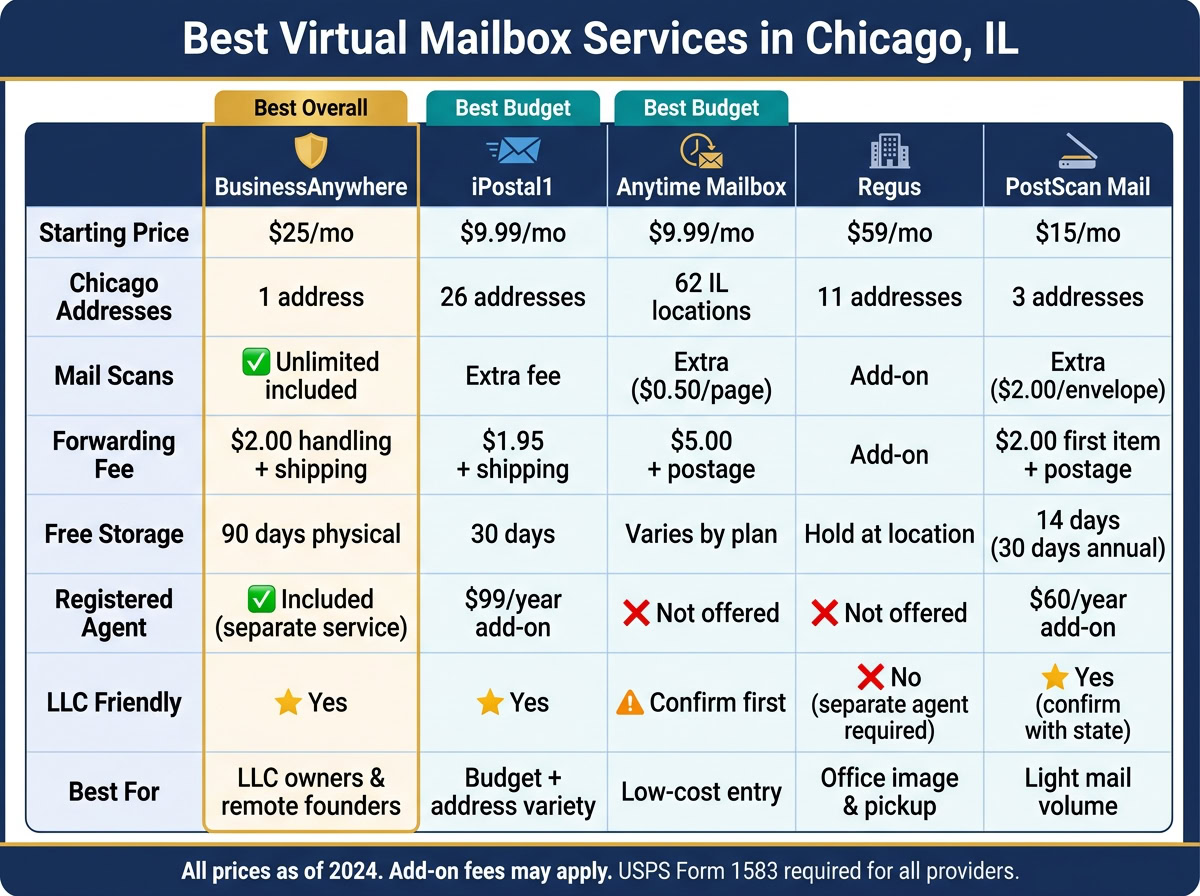
| Provider | Starting Price | Best Use | Main Watch-Out |
|---|---|---|---|
| BusinessAnywhere | $20/month | LLC owners, remote founders | Higher starting price |
| iPostal1 | $9.99/month | Budget users who want many Chicago addresses | Scan fees can add up |
| Anytime Mailbox | $9.99/month | Low-cost entry, many locations | Extra page and forwarding fees |
| Regus | $59/month | Office image and pickup access | Add-ons push cost up |
| PostScan Mail | $15/month | Light mail volume | Scans cost extra on lower plans |
In short, I’d choose based on mail volume, need for scans, LLC use, and whether you want just mail handling (see how a virtual mailbox works) or some office access too.
1. BusinessAnywhere
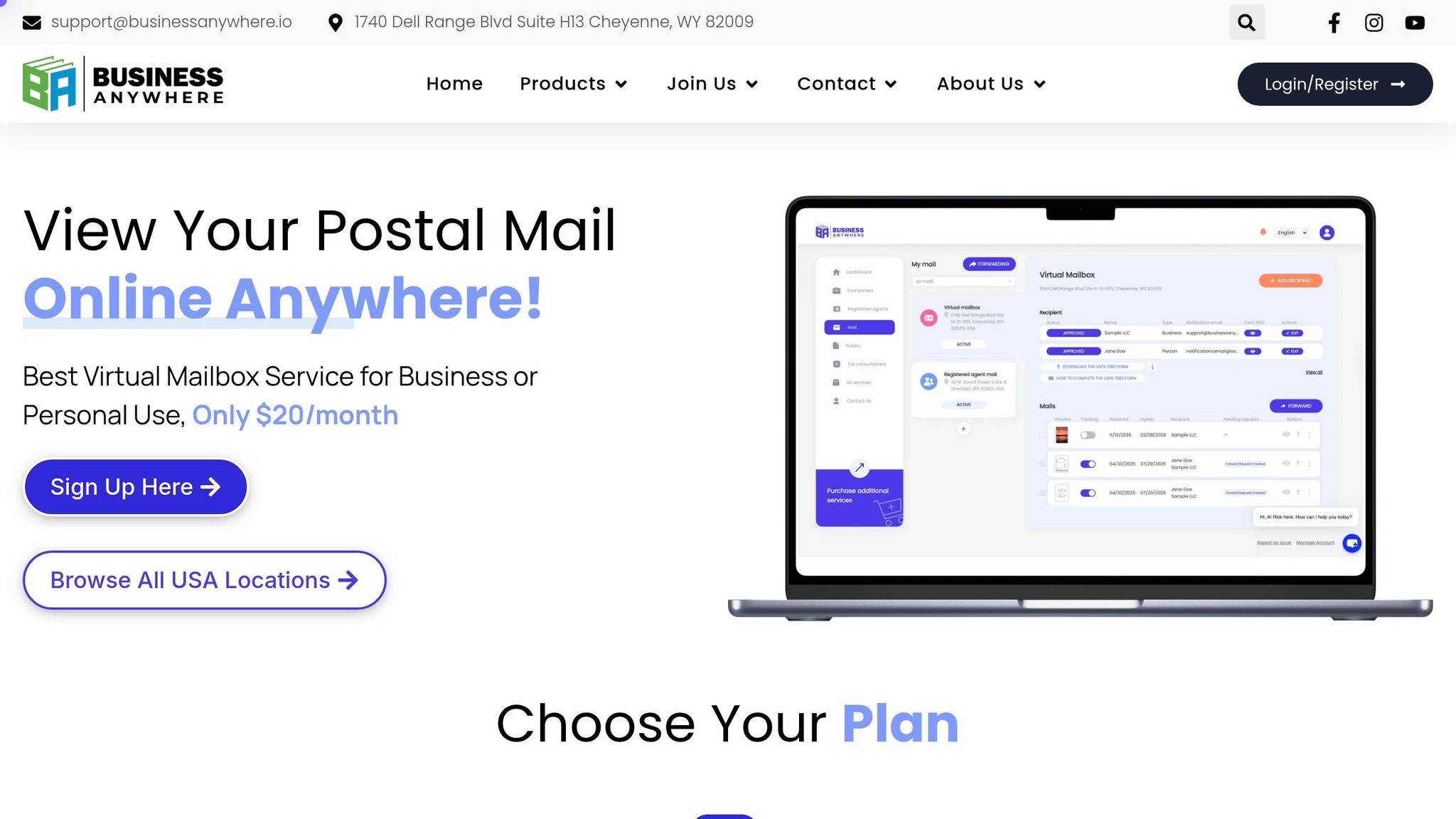
BusinessAnywhere gives you a Chicago street address you can use for business mail, banks, clients, and vendors. Its strong points are pretty clear: privacy, fast mail scans, and simple forwarding.
Chicago Address Suitability
The Chicago address helps keep your home address off public records, which is a big plus for remote owners and digital nomads.
After that, the next thing most people want to know is simple: how fast does your mail show up online?
Mail Scanning and Forwarding
Every plan comes with unlimited envelope and document scans. Mail is uploaded to your dashboard within two business days. The service also filters out marketing mail, which saves you from sorting through junk.
Physical mail is stored for 90 days, while digital scans stay in your dashboard with no time limit. If you need the original item sent to you, forwarding is available worldwide for a flat $2.00 handling fee per shipment, plus shipping costs. One thing to know: mail is handled through partner locations, so pickup isn’t part of the process.
Pricing and Fees
Pricing mostly comes down to how many recipients you need and whether you pay monthly or annually.
| Plan | Monthly Billing | Annual Billing | Recipients |
|---|---|---|---|
| Basic | $25/mo + $25 sign-up fee | $20/mo, no sign-up fee | Up to 2 |
| Premium | $40/mo + $25 sign-up fee | $30/mo, no sign-up fee | Up to 5 |
| Advanced | $85/mo + $25 sign-up fee | $65/mo, no sign-up fee | Up to 20 |
LLC and Remote-Business Fit
This setup makes the most sense for remote founders who want mail handling and compliance tools in one place. The dashboard combines virtual mailbox access with LLC formation, registered agent service, and an online notary, which can help you complete USPS Form 1583 from anywhere.
There is one limit worth calling out: the virtual mailbox address can’t be used as your registered agent address. That service is sold separately.
For remote LLC owners, the main draw is that mail handling, formation, and compliance sit inside one dashboard.
2. iPostal1
iPostal1 works through a network of independent mail centers across Chicago and gives you 26 distinct Chicago addresses to pick from, including spots on North Lake Shore Drive, Wacker Drive, and Michigan Avenue. These are real Chicago street addresses, and they are CMRA-approved, which means they can be used for Illinois LLC registration and regular business mail.
Chicago Address Suitability
One of iPostal1’s main selling points is choice. With 26 locations available, you can pick an address that matches the image you want your business to project. If location matters to you, this setup gives you more room to choose than many other mailbox services.
Mail Scanning and Forwarding
You manage your mail through the iPostal1 app or web portal, and you get alerts when new items arrive. That part is simple.
A few details matter, though:
- Mail scans cost extra.
- Free storage lasts 30 days for letters and small packages, while larger items have shorter storage windows.
- Mail forwarding is charged at real-time shipping rates, plus a $1.95 consolidation fee per package.
- Some locations also offer check deposit support.
So if you expect frequent scans or package forwarding, it’s worth looking past the base monthly rate and checking the add-on costs.
Pricing and Fees
Plans start at $9.99/month for the Virtual Mailing Address plan. The Virtual Business Address plan starts at $14.99/month and makes more sense if you want to receive mail under a company name or use the address for LLC registration.
Annual billing brings the cost down by giving you the equivalent of two months free. If you also want registered agent service, iPostal1 offers it as a $99/year add-on for business plan subscribers.
LLC and Remote-Business Fit
For remote owners, iPostal1 is a solid pick if you want to keep your home address off public records and use a professional Chicago street address instead. The $99/year registered agent add-on can also help you keep legal and tax documents in the same system and portal.
If your top priority is having a lot of Chicago address options, iPostal1 stands out here.
3. Anytime Mailbox
Anytime Mailbox stands out for its large Chicago address selection and low starting price. It has 62 Illinois locations, which gives Chicago users plenty of address options. You also get a real street address, and major carriers generally accept it.
Chicago Address Suitability
Many users choose these addresses for LLC registration and banking. That said, it’s smart to confirm acceptance with the Illinois Secretary of State and your bank before you sign up.
Mail Scanning and Forwarding
You handle everything through a web portal or mobile app on iOS and Android. When mail comes in, you can request an open and scan, then get a scanned PDF within 24 business hours. Forwarding is available worldwide. Some Chicago locations also support check deposits.
That flexibility is nice, but there’s a catch: extra fees can add up.
Pricing and Fees
Plans start at $9.99/month, while premium Chicago addresses can cost up to $50/month. The base plan includes 30 incoming items and 5 scan pages.
After that, costs stack up pretty fast:
- Extra open and scan pages cost $0.50 each
- Forwarding costs $5.00 per bundle, plus postage
- Adding a recipient costs $10.00 per person
LLC and Remote-Business Fit
For digital nomads and remote business owners who want a Chicago presence without paying for a physical office, Anytime Mailbox covers the core mail tools. It has a 4.8/5 average rating from more than 44,000 reviews.
Local Chicago freelancers may also like the scheduled pickup option available at most locations. Just note that some sites charge up to $2.00 per pickup.
If you need more of an office feel, not just mail handling, the next provider starts to lean that way.
4. Regus
Regus mixes virtual mailbox service with virtual office plans, so your business address is tied to an actual office building. That setup makes it a good fit for companies that want more than just a place to receive mail. You also get the feel of a physical office presence.
Chicago Address Suitability
Regus offers 11 Chicago business addresses in prime areas, including the Loop, Magnificent Mile, Fulton Market, and the Financial District. Some locations are in well-known buildings like the John Hancock Center and Two Prudential Plaza, which can make your business look more established in the city.
These are commercial business addresses, so they work for day-to-day business use. But there’s one catch: Illinois still requires a separate registered agent for legal documents.
Mail Scanning and Forwarding
Regus staff receive and hold your mail and packages at the location you choose. You can stop by and pick them up during reception hours, or have them forwarded weekly or monthly. There’s also a scan-to-email option if you want digital access to your mail.
The main thing to watch is cost. Mail forwarding and scan-to-email are add-ons, so your monthly bill can grow as you use more of those services.
Pricing and Fees
Pricing depends on the location. Starting monthly rates for the Chicago spots listed below range from $59 to $115.
| Location | District | Starting Monthly Price |
|---|---|---|
| Equitable Building (401 N Michigan Ave) | Magnificent Mile | $59 |
| 111 West Jackson | Chicago Loop | $79 |
| 19 N Green St | Fulton Market | $79 |
| South Loop Roosevelt | South Loop | $85 |
| South Riverside Plaza | Commercial District | $105 |
| Two Prudential Plaza | Downtown/Loop | $115 |
| John Hancock Center | Magnificent Mile | $115 |
| 203 North LaSalle | Financial/Legal | $115 |
Regus pricing lines up with its office-first approach. A lobby directory listing costs about $25 per month, and call answering is only available if you move up to a Virtual Office plan.
LLC and Remote-Business Fit
Regus makes sense for established businesses or frequent travelers who want a well-known Chicago address and occasional office access. The Virtual Office Plus plan includes five days of private office or coworking access each month across Regus’s global network of more than 4,000 locations. If you travel often, that can be a nice extra.
On the other hand, if your business is fully remote and you mostly want a mailing address with mail handling, Regus can get pricey fast. The base plan may look fine at first, but the add-ons are where the bill starts to creep up. If office access doesn’t matter much to you, a mailbox-first service may be a better match.
sbb-itb-ba0a4be
5. PostScan Mail
PostScan Mail gives you Chicago street addresses at a few price levels, along with digital mail management for businesses that need a fixed Illinois mailing address. Available addresses include 7234 W North Ave, 1 E Erie St, and 1655 S Blue Island Ave. That can work well for business mail and privacy, since it helps keep your home address off public records and vendor mail.
Before you use any virtual address for LLC formation or banking, check the rules with the Illinois Secretary of State and your bank. Some banks have their own limits on CMRA addresses. You’ll also need USPS Form 1583 and notarized ID verification before PostScan Mail can receive mail for you. If you want a Chicago address without a lot of hands-on mail handling, PostScan Mail is a solid option.
Mail Scanning and Forwarding
You manage mail through a dashboard and an iOS or Android app. When something arrives, you can ask PostScan Mail to open and scan it, forward it, shred it, or hold it for local pickup.
It also offers AI summaries for scanned documents up to 40 pages, which can help when you’re sorting through business or legal paperwork.
Scans are not part of the Starter plan. Extra open-and-scan requests cost $2.00 per envelope for up to 10 pages, plus $0.25 for each extra page. Forwarding costs $2.00 for the first item, $0.50 for each extra item, plus postage. Check deposit is not available.
Pricing and Fees
Pricing depends on the Chicago address you choose. The W North Ave address starts at $15/month, while 1 E Erie St and 1655 S Blue Island Ave start at $20/month. For the Erie Street plans, pricing looks like this:
| Plan | Monthly Cost (Erie St) | Included Mail Items | Included Scans |
|---|---|---|---|
| Starter | $25.00 | 30 | 0 |
| Standard | $35.00 | 60 | 5 (10 if annual) |
| Premium | $45.00 | 120 | 10 (20 if annual) |
Annual billing extends free mail storage from 14 to 30 days and free package storage from 3 to 7 days. The Starter plan makes sense for light mail volume if you don’t need scans often. If you want steadier digital access, the Standard plan is usually the better fit. Those extra fees matter most when you expect regular scanning or forwarding.
LLC and Remote-Business Fit
PostScan Mail supports LLC and corporate use. It also offers a Registered Agent add-on for $60 per year ($5/month). HIPAA support is available for $25/month billed annually, plus $0.50 per received mail item.
The multi-address mailbox feature lets you manage more than one location under one login. That’s handy if you run more than one business location. Next, weigh its fees and features against the other Chicago options in the pros-and-cons section.
Pros and Cons of Each Provider
Now that each provider is covered, here’s the clearest side-by-side summary.
| Provider | Key Pros | Key Cons | Best For |
|---|---|---|---|
| BusinessAnywhere | Unlimited scans, worldwide forwarding, and mail, formation, and registered agent in one dashboard. | Starts at $25/mo; monthly billing adds a $25 sign-up fee. | Entrepreneurs who want mail handling and business services in one place. |
| iPostal1 | 26 Chicago addresses; plans from $9.99/mo. | High mail volume can drive costs up fast. | Budget-conscious users who want address flexibility. |
| Anytime Mailbox | 2,500+ global locations and low entry pricing. | $5.00 forwarding fee per shipment; addresses may not be accepted by all states or banks for LLC registration. | Users who want flexible Chicago address options at a low entry price. |
| Regus | Prime Chicago office addresses and pickup access. | Higher starting prices, plus add-ons that can push the total up fast. | Businesses that want a real office address and occasional reception access. |
| PostScan Mail | Low entry pricing and solid digital mail tools. | Scans and forwarding come with extra fees. | Users who want a budget Chicago mailing address. |
The main tradeoff is pretty simple: lower starting prices often come with more add-on fees, while bundled services tend to cost more upfront.
The next section breaks those tradeoffs down by use case: LLC registration, privacy, travel, and office presence. If you are just starting out, you can also follow our guide on starting an LLC in Illinois.
Which Chicago Virtual Mailbox Fits Your Situation?
Once you’ve looked at features and pricing, the next step is simple: match the service to how you plan to use it. That makes the choice a lot easier.
Here’s the quick breakdown:
| User Type | Best Fit | Key Reason |
|---|---|---|
| Illinois or out-of-state LLC owner | BusinessAnywhere | Combines mail handling and registered agent service in one dashboard |
| Digital nomad | BusinessAnywhere | Unlimited scans and worldwide forwarding |
| Small business owner on a tight budget | iPostal1 / Anytime Mailbox | Compare each Chicago address and add-on fees before deciding |
| Business needing occasional meeting space | iPostal1 Prestige | Select Chicago locations, including 1021 W. Adams St., include conference room access |
If you run an LLC, BusinessAnywhere makes a lot of sense because it puts your mail and registered agent service in the same dashboard. That can save time and cut down on back-and-forth between different tools.
For digital nomads, the draw is pretty clear. Unlimited scans and worldwide forwarding mean you can manage your mail without being tied to one place.
If cost is your main concern, start with iPostal1 and Anytime Mailbox. The base price might look good at first, but the add-on fees and the exact Chicago address can change the deal quite a bit.
And if you need a place to meet clients once in a while, iPostal1 Prestige stands out. Some Chicago locations, including 1021 W. Adams St., come with conference room access.
Conclusion
After comparing address quality, pricing, and mail handling, the choice comes down to how you’ll use the address day to day.
The right Chicago virtual mailbox depends on what matters most for your setup. You may need LLC compliance support, more address options, heavy mail handling, or access to office space. For most readers, the best pick is the one that fits both compliance needs and daily mail volume.
BusinessAnywhere stands out for founders who want a mailbox, business formation, and compliance tools in one place. Pick the service that lines up with your mail volume, business structure, and need for office access.
Before you use any Chicago virtual mailbox for business mail or banking, complete USPS Form 1583 and confirm that the address is accepted by the bank or other institution involved.
FAQs
Can I use a virtual mailbox for my LLC in Illinois?
Yes. You can use a virtual mailbox for your LLC in Illinois.
In Chicago, many providers give you a real street address instead of a PO Box. That means you can often use the address for business registration, official mail, and marketing materials.
There’s another plus: it helps keep your home address off public records, which can give you more privacy.
That said, don’t assume one address works for everything. Banks, licensing boards, and government agencies may each have their own rules, so it’s smart to check those before you register.
What do I need to complete USPS Form 1583?
To complete USPS Form 1583, you’ll need your full name, your home street address, and two forms of ID:
- One valid photo ID
- One proof of address
Accepted photo IDs include a U.S. passport, driver’s license, or military ID. Proof of address can include a lease, mortgage, or vehicle registration.
The form must also be notarized. That step gives a commercial mail receiving agency permission to accept mail on your behalf.
How do I estimate my real monthly mailbox cost?
Look past the base subscription price and map out what you’ll actually use each month.
Start with the monthly plan cost. Then add the repeat charges that can stack up over time, such as extra scan fees, check deposit services, and mail forwarding costs, including postage and any per-shipment handling fee.
It also helps to check whether your mail volume could go past the included limit. If it does, overage fees for extra envelopes or scanned pages can push your total higher than expected.
Then layer in any one-time charges, like setup fees or required document notarization.
Related Blog Posts
- Virtual Mailbox in Gilbert, Arizona: Mail Scanning, Forwarding and a Real Street Address
- Virtual Mailbox in Dallas, Texas: Mail Scanning, Forwarding and a Real Street Address
- Virtual Mailbox in Inglewood, California: Mail Scanning, Forwarding and a Real Street Address
- Virtual Mailbox in Pearland, Texas: Mail Scanning, Forwarding and a Real Street Address